
Last Updated On : 12-Oct-2026
Total 68 Questions
Refer to the exhibit.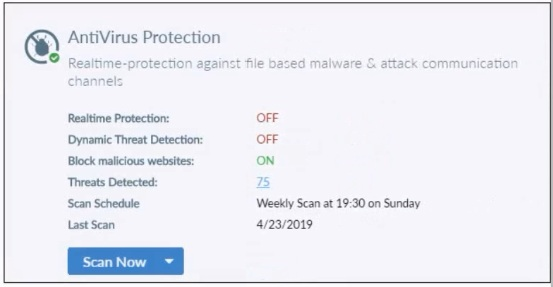
Based on the settings shown in the exhibit what action will FortiClient take when it detects
that a user is trying to download an infected file?
A. Blocks the infected files as it is downloading
B. Quarantines the infected files and logs all access attempts
C. Sends the infected file to FortiGuard for analysis
D. Allows the infected file to download without scan
Explanation:
The exhibit from FortiClient shows Antivirus Protection with Realtime Protection set to OFF.
This question checks your understanding that real-time (on-access) scanning is the only mechanism that can detect and respond to malware during file downloads. When it is disabled, FortiClient provides no protection at the moment of download.
✔️Correct Option:
D. Allows the infected file to download without scan
Realtime Protection being OFF means FortiClient does not perform any scanning when files are being downloaded or accessed.
As a result, the infected file is permitted to download completely without interruption, blocking, quarantine, logging, or any antivirus intervention.
❌Incorrect options:
A. Blocks the infected files as it is downloading
This action requires Realtime Protection to be enabled so FortiClient can scan the file during the download process and deny access if malware is detected.
With Realtime Protection turned OFF, no scanning takes place and therefore no blocking can occur at any point during the download.
B. Quarantines the infected files and logs all access attempts
Quarantine and detailed logging of access attempts are remedial actions that FortiClient only executes after successfully detecting a threat.
Detection itself depends on Realtime Protection being active to inspect files on access or download; since it is OFF, no threat is ever identified and no quarantine or logging happens.
C. Sends the infected file to FortiGuard for analysis
Submission of suspicious files to FortiGuard for cloud-based analysis typically occurs only after an initial detection is made by the local AV engine (via Realtime Protection or scheduled/on-demand scan).
Because Realtime Protection is disabled, the file is never scanned or flagged locally, so FortiClient has no reason or mechanism to forward it for further analysis.
Reference:
⇒ Malware Protection – FortiClient 7.4.5 Administration Guide
Explains that Realtime Protection must be enabled to provide on-access scanning and take protective actions (such as block or quarantine) when malware is detected during file download or execution.
⇒ Real-time protection – FortiClient XML Reference Guide 7.4
States that when realtime protection is disabled, FortiClient does not scan files being accessed or downloaded and performs no remedial actions on detected threats.
Which two statements about FortiClient EMS integration with Active Directory (AD) are true? (Choose two answers)
A. FortiClient EMS has full read-write access on the AD server.
B. FortiClient installations on domain endpoints can deployed from FortiClient EMS.
C. Endpoint profiles can be assigned to endpoints based on domain groups.
D. Imported AD endpoints cannot be directly deleted on FortiClient EMS
Explanation:
📘 Question Summary:
This question evaluates knowledge of FortiClient EMS integration with Microsoft Active Directory, focusing on how EMS leverages AD for endpoint management, deployment, and policy assignment. It assesses understanding of EMS’s AD connector behavior, including LDAP read-only access, dynamic group-based profile assignment, automated deployment capabilities for domain-joined devices, and restrictions on managing imported AD objects directly in the EMS console. Core concepts come from FortiClient EMS administration and AD synchronization features in version 7.4.
🟢 Correct Answer: B. FortiClient installations on domain endpoints can be deployed from FortiClient EMS.
FortiClient EMS supports automated deployment of FortiClient agents to Windows domain endpoints using Active Directory integration. Once EMS is connected to AD via LDAP, administrators can use the “Deploy” feature to push FortiClient installers silently to selected AD users, groups, or OUs. This method relies on domain credentials with sufficient rights to perform remote installations, making large-scale rollout efficient without manual intervention on each endpoint.
🟢 Correct Answer: C. Endpoint profiles can be assigned to endpoints based on domain groups.
After successful AD synchronization, FortiClient EMS imports AD users, groups, and organizational units. Administrators can then assign endpoint profiles dynamically based on AD group membership. Endpoints that belong to a specific AD security group automatically receive the corresponding profile, enabling centralized and scalable policy application without manually tagging individual devices.
🔴 Incorrect Answer: A. FortiClient EMS has full read-write access on the AD server.
FortiClient EMS connects to Active Directory using LDAP with read-only privileges. The integration is designed solely for querying and importing user, group, and computer objects. EMS never requires or uses write permissions on the AD server, as it does not modify AD attributes, create objects, or alter group memberships. Any write operations would violate security best practices and are not supported.
🔴 Incorrect Answer: D. Imported AD endpoints cannot be directly deleted on FortiClient EMS.
Imported AD endpoints can be deleted directly from the FortiClient EMS console. While AD synchronization periodically re-imports missing or changed objects, manual deletion of an AD-imported endpoint is allowed and removes it from the EMS database until the next sync cycle brings it back (if still present in AD). This differs from some other directory-integrated platforms that lock imported objects against deletion.
🧩 Conclusion:
Options B and C are correct because FortiClient EMS uses Active Directory integration to enable automated FortiClient deployment to domain-joined endpoints and to dynamically assign endpoint profiles according to AD group membership. Candidates should remember that these features allow efficient, group-based management of large endpoint fleets while relying on read-only LDAP access to AD, a key design principle in FortiClient EMS 7.4 architecture.
Reference:
Fortinet Document Library – FortiClient EMS 7.4.0 Administration Guide, “Active Directory Integration” and “Endpoint Deployment” sections; FortiClient EMS 7.4.0 Administration Guide, “Endpoint Profiles” chapter.
Refer to the exhibits.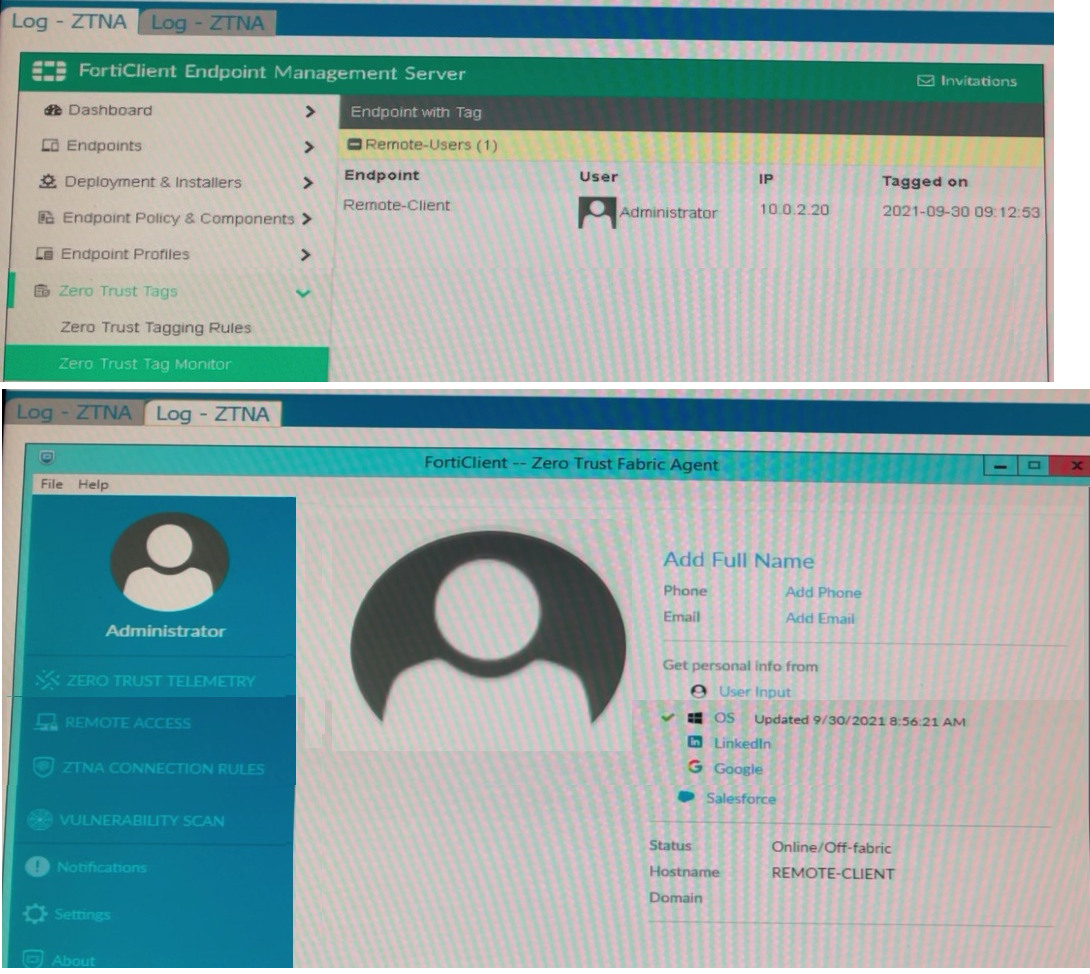
Which show the Zero Trust Tag Monitor and the FortiClient GUI status.
Remote-Client is tagged as Remote-Users on the FortiClient EMS Zero Trust Tag Monitor.
What must an administrator do to show the tag on the FortiClient GUI?
A. Update tagging rule logic to enable tag visibility
B. Change the FortiClient system settings to enable tag visibility
C. Change the endpoint control setting to enable tag visibility
D. Change the user identity settings to enable tag visibility
Explanation:
This question tests the understanding of how Zero Trust Tags assigned by FortiClient EMS are displayed on the FortiClient GUI. Even though EMS successfully tags the endpoint (visible in Zero Trust Tag Monitor), the tag won't automatically appear on the FortiClient GUI unless a specific system-level setting is enabled on the client side.
✔️ Correct Answer:
B. Change the FortiClient system settings to enable tag visibility
In FortiClient, the Zero Trust tag visibility on the GUI is controlled under System Settings. By default, assigned tags from EMS are not displayed to the endpoint user. An administrator must explicitly enable the "Show Zero Trust Tags" option within FortiClient's system settings to make the tag visible on the client interface.
❌ Incorrect Answers:
A. Update tagging rule logic to enable tag visibility
Tagging rule logic in EMS defines the conditions under which a tag is applied — not whether the tag is displayed on the FortiClient GUI. Since the tag is already applied (confirmed in EMS monitor), modifying tagging rules is unnecessary and irrelevant here.
C. Change the endpoint control setting to enable tag visibility
Endpoint control settings govern how EMS manages and communicates with endpoints (e.g., compliance enforcement, telemetry). They do not include options to control the display of Zero Trust tags on the FortiClient GUI.
D. Change the user identity settings to enable tag visibility
User identity settings relate to how users authenticate and are identified within FortiClient/EMS. These settings have no bearing on whether Zero Trust tags are visually displayed on the FortiClient GUI dashboard.
🔧 Reference:
⇒ FortiClient EMS 7.4 Administration Guide – Zero Trust Tagging
Confirms how Zero Trust Tags are assigned by EMS and how tag visibility is managed on the FortiClient GUI through system-level settings.
⇒ FortiClient 7.4 Administration Guide – System Settings
Confirms that tag display options are configured under FortiClient System Settings on the endpoint.
A FortiClient EMS administrator has enabled the compliance rule for the sales department. Which Fortinet device will enforce compliance with dynamic access control?
A. FortiClient
B. FortiClient EMS
C. FortiGate
D. FortiAnalyzer
Explanation:
📘 Question Summary:
This question assesses understanding of the roles within the Fortinet Security Fabric, specifically the interaction between FortiClient, FortiClient EMS, and FortiGate for endpoint compliance enforcement. It examines knowledge of dynamic access control flow and policy enforcement points.
🟢 Correct Answer:
C: FortiGate is the correct device. As the network enforcement point, FortiGate receives endpoint compliance status from FortiClient EMS via the Security Fabric. It then dynamically applies access control policies, such as network quarantine or VLAN assignment, based on that compliance information to regulate the endpoint's network access.
🔴 Incorrect Answer:
A: FortiClient is incorrect; while it runs on the endpoint and reports its status, it does not enforce network-wide access control.
B: FortiClient EMS is incorrect as it acts as the central management server to define rules and aggregate status but does not perform inline traffic enforcement.
D: FortiAnalyzer is incorrect as its primary role is logging and analysis, not real-time policy enforcement.
🧩 Conclusion:
The correct answer confirms that the FortiGate firewall functions as the central policy enforcement point within the Fabric. Candidates should remember that while EMS manages and distributes compliance policy, the FortiGate is responsible for applying dynamic network-level access control based on endpoint posture.
Reference:
Fortinet Documentation - FortiOS 7.4 Administration Guide: Endpoint Compliance and FortiClient EMS Administration Guide.
An administrator configures ZTNA configuration on the FortiGate. Which statement is true about the firewall policy?
A. It redirects the client request to the access proxy.
B. It uses the access proxy.
C. It defines ZTNA server.
D. It only uses ZTNA tags to control access for endpoints.
Explanation:
📘 Question Summary:
The question evaluates a candidate's understanding of how Zero Trust Network Access (ZTNA) policies are structured within the FortiOS environment. Specifically, it tests knowledge regarding the technical function of a ZTNA firewall policy compared to standard policies. To answer correctly, one must understand the interaction between the ZTNA access proxy, the incoming client traffic, and how the FortiGate handles redirection to ensure that authentication and security posture checks are enforced before granting access to internal applications.
✅ Correct Answer:
Option A is correct because the ZTNA firewall policy acts as the enforcement point that redirects client requests to the designated access proxy. In a ZTNA deployment, when a client attempts to connect to a protected resource, the firewall policy identifies the traffic based on the ZTNA tags and destination. It then transparently steers that traffic toward the internal access proxy component, which performs the necessary certificate validation and security posture assessment before allowing the session to proceed.
❌ Incorrect Answer:
Options B, C, and D are incorrect due to fundamental misinterpretations of the FortiOS configuration hierarchy. While a ZTNA policy "uses" a proxy in a general sense, its specific technical role in the configuration GUI and CLI is the redirection mechanism. The ZTNA server is a separate object defined under the ZTNA menu, not within the firewall policy itself. Furthermore, policies do not "only" use tags; they also incorporate standard firewall criteria like source interfaces and destination addresses to maintain granular control.
🧩 Conclusion:
The correct answers confirm that the primary role of a ZTNA firewall policy is the redirection of client requests to the integrated access proxy. This mechanism ensures that all traffic is strictly governed by identity and device health status before reaching the application layer. Candidates must remember that the firewall policy serves as the bridge between the incoming connection and the proxy logic, maintaining the core "verify-then-trust" principle essential for a successful Fortinet ZTNA implementation.
Reference:
Official Fortinet documentation on "ZTNA firewall policies" and "Access proxy configuration" within the FortiOS 7.4 Administration Guide and the ZTNA Deployment Guide.
Refer to the exhibit.
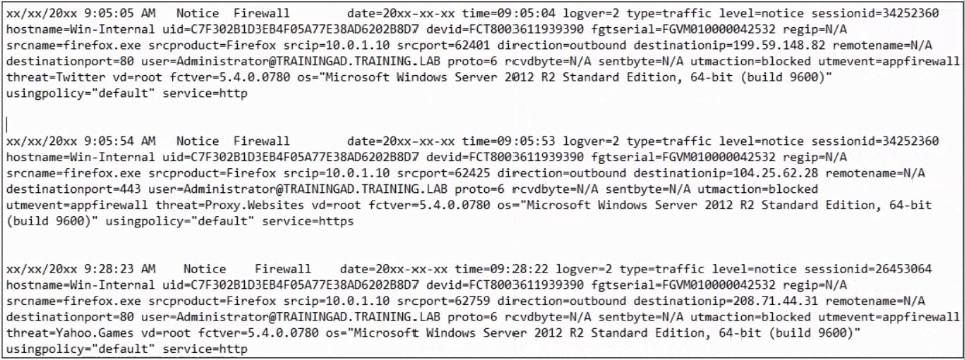
Based on the FortiClient logs shown in the exhibit which application is blocked by the
application firewall?
A. Twitter
B. Facebook
C. Internet Explorer
D. Firefox
Explanation:
📘 Question Summary:
This question assesses the ability to interpret FortiClient application firewall logs and identify blocked applications based on raw log data. Candidates must analyze log entries containing session details, process information, and threat events to determine which application triggered the blocking action. The evaluation tests practical skills in log analysis, understanding FortiClient endpoint security enforcement mechanisms, and correlating process names with application identifiers within the application firewall framework.
✔ Correct Answer:
Option D is correct because the log entries explicitly show "srcname=firefox.exe" and "srcproduct=Firefox" in multiple blocked events. The application firewall enforcement is clearly targeting the Firefox browser process across all three log samples. Each entry displays "utmevent=appFirewall" indicating application-level blocking, with Firefox consistently identified as the source application attempting connections to various destinations. The logs demonstrate that regardless of the destination being accessed, the Firefox application itself is subject to blocking rules configured within FortiClient's application control policies.
✖ Incorrect Answer:
Option A is incorrect because Twitter appears only as a threat classification descriptor ("threat=Twitter") in one log entry, not as the blocked application. The threat field identifies the category or signature of detected activity, whereas the actual blocked application is determined by the srcname and srcproduct fields showing Firefox. Twitter represents the content or service being accessed rather than the executable process subject to application firewall enforcement, demonstrating confusion between threat categorization and application identification.
Option B is invalid because Facebook does not appear anywhere within the provided log entries as either a source application or threat category. While the logs show various threats including proxy websites, Yahoo Games, and Twitter, Facebook is completely absent from all three samples. This option represents a distractor with no supporting evidence in the exhibit data, testing whether candidates actually examine log content rather than making assumptions about commonly blocked social media platforms.
Option C is inaccurate because Internet Explorer never appears in the logs as the source application. Although the operating system field shows "Microsoft Windows Server 2012 R2 Standard Edition" indicating a Windows environment where Internet Explorer might be installed, the actual blocked process is consistently identified as Firefox throughout all entries. The srcname field would display "iexplore.exe" if Internet Explorer were being blocked, but instead shows "firefox.exe" in every instance, clearly eliminating this option.
🧩 Conclusion:
The correct answer demonstrates that Firefox is the application blocked by FortiClient's application firewall, as evidenced by consistent "srcname=firefox.exe" and "srcproduct=Firefox" fields across all log entries. Candidates should recognize that application firewall blocking is determined by examining process-level identifiers in the srcname and srcproduct fields, not by threat categories or destination services mentioned elsewhere in logs. Understanding this distinction between the application initiating connections and the content or threats associated with those connections is fundamental for accurate FortiClient log interpretation and troubleshooting endpoint security policies.
📚 Reference:
FortiClient Administration Guide - Log Message Reference - Fortinet Documentation Library
FortiClient Endpoint Security Technical Documentation - Application Firewall Logging
Refer to the exhibits.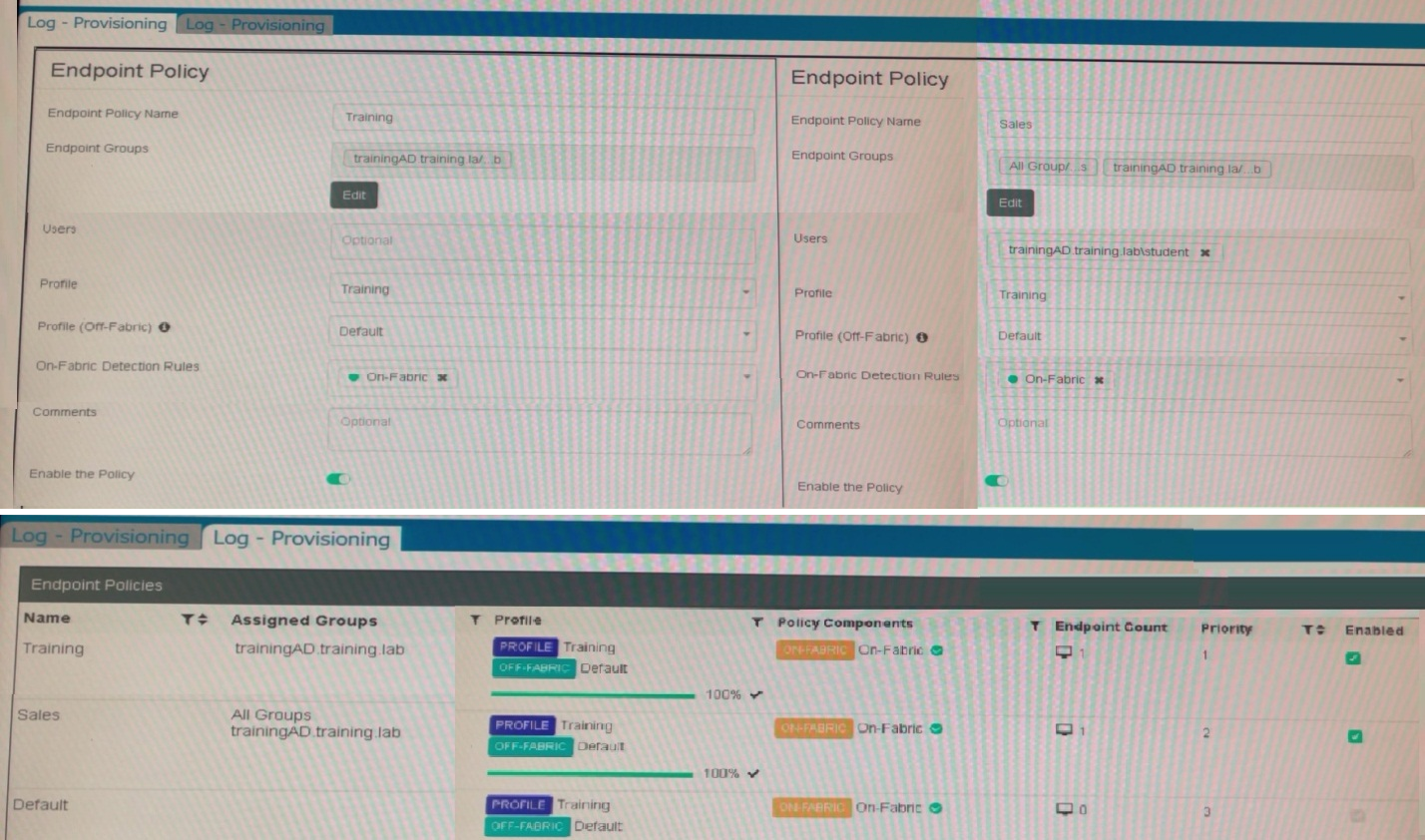
Which shows the configuration of endpoint policies.
Based on the configuration, what will happen when someone logs in with the user account
student on an endpoint in the trainingAD domain?
A. FortiClient EMS will assign the Sales policy
B. FortiClient EMS will assign the Training policy
C. FortiClient EMS will assign the Default policy
D. FortiClient EMS will assign the Training policy for on-fabric endpoints and the Sales policy for the off-fabric endpoint
Explanation:
📘 Question Summary:
This question evaluates comprehension of FortiClient EMS endpoint policy assignment logic, specifically how user and group membership intersect with policy priority and on-fabric detection rules. It tests the candidate’s ability to interpret configuration exhibits to determine which policy is applied under specified conditions, reflecting real-world deployment scenarios in domain-integrated environments.
🟢 Correct Answer:
B. FortiClient EMS will assign the Training policy
The Training policy explicitly includes the trainingAD domain group and has a higher priority (1) than the Sales policy (priority 2). Even though the Sales policy also references trainingAD\student, FortiClient EMS applies policies based on priority order when multiple policies match. Since the Training policy is prioritized and matches the user’s domain context, it takes precedence for both on- and off-fabric endpoints.
🔴 Incorrect Answer:
A. FortiClient EMS will assign the Sales policy
Although the Sales policy includes the specific user trainingAD\student, its lower priority (2) prevents it from overriding the Training policy (priority 1), which already covers the broader trainingAD group. Policy assignment follows strict priority ranking; specificity alone does not supersede configured precedence in FortiClient EMS.
C. FortiClient EMS will assign the Default policy
The Default policy, while present, has the lowest priority (3) and is only applied if no higher-priority policies match. In this scenario, both Training and Sales policies match the user context, rendering the Default policy irrelevant. It serves as a fallback, not a primary assignment mechanism.
D. FortiClient EMS will assign the Training policy for on-fabric endpoints and the Sales policy for the off-fabric endpoint
This misinterprets policy behavior. Both policies define an Off-Fabric profile (Default), but assignment is determined by policy priority, not fabric status. The Training policy applies universally to matching users regardless of fabric connectivity because it holds higher priority and encompasses the required group membership.
🔧 Conclusion:
The correct answer demonstrates that FortiClient EMS assigns endpoint policies based on priority order when multiple policies match user or group criteria. Candidates must remember that explicit user targeting does not override group-based policy priority, and fabric status affects profile selection—not policy assignment—within the same policy.
Reference:
Fortinet Documentation – “Endpoint Policy Assignment in FortiClient EMS,”
| Page 2 out of 10 Pages |
| 12345 |
| FCP_FCT_AD-7.4 Practice Test Home |
The Fortinet NSE 6 FortiClient EMS 7.4 Administrator exam is notoriously tough. It doesn't test memorization. It forces you to make complex decisions under time pressure. A weak prep strategy risks a costly failure and wasted effort. Our FCP_FCT_AD-7.4 practice tests are built to be your definitive bridge to a passing score.

Copyright © - All Rights Reserved