
Last Updated On : 12-Oct-2026
Total 68 Questions
The difference between a near pass and a confident pass isn't just knowing the material, it's mastering the Fortinet NSE 6 FortiClient EMS 7.4 Administrator exam experience. Our Fortinet FCP_FCT_AD-7.4 practice test is engineered to close the gap between your current knowledge and the 2026 exam's demands. With every question, you receive detailed, expert verified explanations that break down not just the correct answer, but also the reasoning behind every incorrect option.
Don't just study. Practice FCP_FCT_AD-7.4 with purpose. Start your journey to a first-time pass today.
By replicating the exact style, complexity, and format of the real Fortinet NSE 6 FortiClient EMS 7.4 Administrator exam questions, we ensure you walk into the exam with complete confidence.
Which two third-party tools can an administrator use to deploy FortiClient? (Choose two.)
A. Microsoft Windows Installer
B. Microsoft SCCM
C. Microsoft Active Directory GPO
D. QR code generator
Explanation:
📘 Question Summary
This question evaluates administrators' understanding of enterprise-scale FortiClient deployment strategies within Fortinet's endpoint management ecosystem. It specifically tests familiarity with FortiClient EMS 7.4 integration capabilities alongside Microsoft ecosystem tools for mass distribution. Key knowledge domains encompass software packaging, policy-based installation workflows, and leveraging Active Directory infrastructure to streamline endpoint onboarding across organizational units, ensuring consistent security agent rollout without manual intervention.
✔ Correct Answer
B. Microsoft SCCM
Microsoft System Center Configuration Manager (SCCM) facilitates centralized FortiClient deployment through MSI package distribution and software update management. Fortinet documentation outlines SCCM's compatibility for pushing FortiClient installers with predefined configurations, enabling administrators to target collections, enforce compliance, and monitor installation status across thousands of endpoints efficiently.
C. Microsoft Active Directory GPO
Group Policy Objects in Active Directory enable assigned or published deployment of FortiClient MSI packages to organizational units. Fortinet design principles support GPO for automated installation during startup or logon, incorporating transform files (.mst) generated via FortiClient tools to customize settings like VPN profiles, ensuring seamless integration with domain-joined Windows environments.
✖ Incorrect Answer
A. Microsoft Windows Installer
Microsoft Windows Installer (MSI) represents the packaging format, not a standalone third-party deployment tool. Fortinet specifies MSI for use within management platforms like SCCM or GPO, but lacks native capabilities for enterprise-wide distribution, targeting, or reporting required for administrative deployment at scale.
D. QR code generator
QR code generators produce scannable images for manual endpoint activation or configuration import, unsuitable for automated bulk deployment. Fortinet reserves QR codes for individual user onboarding or mobile scenarios, conflicting with EMS server-driven policies that prioritize scripted, policy-enforced agent installation across networks.
🧩 Conclusion
The correct answers confirm that Microsoft SCCM and Active Directory GPO serve as validated third-party mechanisms for FortiClient deployment. These tools integrate directly with Fortinet's MSI packaging and EMS-generated configurations, enabling scalable, policy-driven rollout aligned with Security Fabric automation. Candidates should memorize their roles in handling organizational unit targeting and compliance enforcement for exam success.
Reference:
Fortinet Documentation: FortiClient 7.4 EMS Administration Guide - Initially Deploying FortiClient Software to Endpoints
Refer to the exhibit.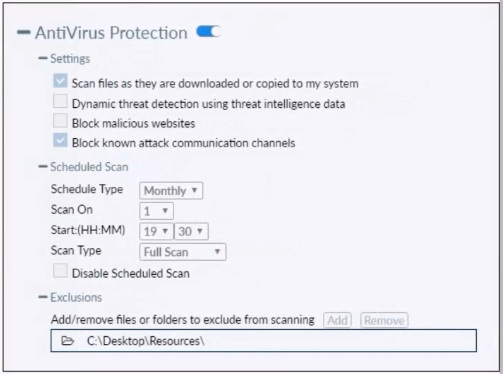
Based on the settings shown in the exhibit which statement about FortiClient behavior is
true?
A. FortiClient quarantines infected files and reviews later, after scanning them.
B. FortiClient blocks and deletes infected files after scanning them.
C. FortiClient scans infected files when the user copies files to the Resources folder
D. FortiClient copies infected files to the Resources folder without scanning them.
Explanation:
📘 Question Summary:
This question tests understanding of FortiClient Antivirus real-time protection behavior and how specific configuration options influence file handling during on-access scanning. It focuses on FortiClient Endpoint Protection's default action when malware is detected during real-time scans (files downloaded or copied), the role of exclusions, and the distinction between scanning, blocking, quarantining, and deletion. Candidates need to know FortiClient’s quarantine mechanism and real-time protection logic as described in FortiClient 7.4 administration documentation.
✔ Correct Answer:
A. FortiClient quarantines infected files and reviews later, after scanning them.
FortiClient’s real-time Antivirus Protection, when enabled with “Scan files as they are downloaded or copied to system,” performs on-access scanning. Upon detection of malware, the default action is to quarantine the file rather than delete it immediately. Quarantined files are moved to the FortiClient quarantine store, where they can be reviewed, restored, or deleted later by the user or administrator. This behavior aligns with Fortinet’s balanced approach to endpoint protection, allowing recovery of false positives while preventing immediate data loss.
✖ Incorrect Answer:
B. FortiClient blocks and deletes infected files after scanning them.
FortiClient does not delete infected files by default during real-time protection. Deletion is typically a configurable action in some policy profiles or EMS-managed settings, but the standard client-side Antivirus behavior quarantines rather than permanently deletes files. Immediate deletion without user/admin review would risk irrecoverable loss of legitimate files misidentified as malicious, which contradicts Fortinet’s documented default handling.
C. FortiClient scans infected files when the user copies files to the Resources folder
The exhibit shows “C:\Desktop\Resources” listed as an exclusion. Files copied to this folder (or its subfolders) are explicitly excluded from Antivirus scanning. Therefore, FortiClient does not scan any files—clean or infected—placed in this location during real-time protection. This option incorrectly assumes scanning still occurs despite a clear exclusion entry.
D. FortiClient copies infected files to the Resources folder without scanning them.
While files copied to the excluded “C:\Desktop\Resources” folder bypass scanning, FortiClient does not actively copy or move infected files into this folder. The exclusion only prevents scanning of files that the user (or another process) deliberately places there. This option misrepresents both the purpose of exclusions and FortiClient’s file-handling logic.
🧩 Conclusion:
The correct answer confirms that FortiClient’s default real-time Antivirus behavior is to quarantine detected malware rather than delete it outright. Candidates should remember that when “Scan files as they are downloaded or copied to system” is enabled, malicious files are isolated in quarantine for later review, supporting safe recovery of potential false positives while maintaining endpoint security. This is a key principle of FortiClient’s on-access protection in version 7.4.
Reference:
Fortinet Document Library – FortiClient 7.4.0 Administration Guide, “Antivirus” section; FortiClient EMS 7.4.0 Administration Guide, “Endpoint Profiles – Antivirus” chapter.
Exhibit.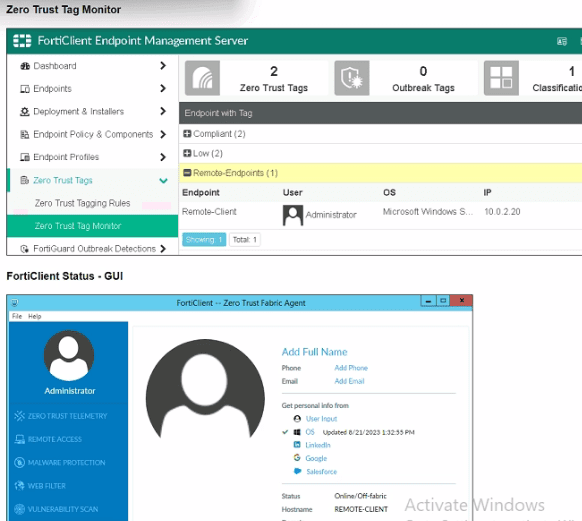
Refer to the exhibits, which show the Zero Trust Tag Monitor and the FortiClient GUI
status.
Remote-Client is tagged as Remote-User* on the FortiClient EMS Zero Trust Tag Monitor.
What must an administrator do to show the tag on the FortiClient GUI?
A. Change the FortiClient EMS shared settings to enable tag visibility.
B. Change the endpoint alerts configuration to enable tag visibility.
C. Update tagging rule logic to enable tag visibility.
D. Change the FortiClient system settings to enable lag visibility.
Explanation:
This question examines why a Zero Trust tag (e.g., Remote-User*) appears in the EMS Zero Trust Tag Monitor but not in the FortiClient GUI on the endpoint (Remote-Client). It tests knowledge of controlling tag display in the FortiClient user interface via profile settings in EMS 7.4, where tags are dynamically applied but visibility to the end user is optional.
✅ Correct Option:
D. Change the FortiClient system settings to enable tag visibility.
In EMS, navigate to Endpoint Profiles > System Settings (or the assigned profile), edit it, ensure Advanced settings is selected, and under the UI section enable the option "Show Security Posture Tag on FortiClient GUI" (formerly "Show Zero Trust Tag on FortiClient GUI" in earlier versions). This makes applied tags visible when the user clicks their avatar in the FortiClient GUI, without affecting tag application or EMS monitoring.
❌ Incorrect options:
A. Change the FortiClient EMS shared settings to enable tag visibility.
This is incorrect because there is no "shared settings" section in EMS that controls tag display in the FortiClient GUI. Tag visibility is configured per-profile in System Settings under UI, not in any global shared or EMS-wide setting.
B. Change the endpoint alerts configuration to enable tag visibility.
This option does not apply as endpoint alerts handle notifications (e.g., bubble pop-ups or severity events), not the display of security posture/Zero Trust tags in the FortiClient avatar/user info section. Alerts and tag visibility are separate features.
C. Update tagging rule logic to enable tag visibility.
This is wrong because tagging rules (in Zero Trust Tagging Rules / Security Posture Tagging Rules) define conditions for applying tags (e.g., based on IP, OS, or location), not their visibility in the FortiClient GUI. Visibility is a UI toggle in the System Settings profile, independent of rule logic.
Reference:
⇒ Prepare FortiClient and FortiClient EMS for ZTNA – FortiGate / FortiOS 7.2.5
Confirms: In Endpoint Profiles > System Settings, under UI, enable "Show Zero Trust Tag on FortiClient GUI" to display detected tags when clicking the user avatar in FortiClient.
⇒ Configuring EMS Security Posture tags – FortiGate / FortiOS 7.6.3
Describes enabling "Show Security Posture Tag on FortiClient GUI" in the System Settings profile (Advanced view) to make applied tags visible in the FortiClient GUI.
Which two statements about ZTNA destinations are true? (Choose two.)
A. FottiClient ZTNA destinations use an existing VPN tunnel to create a secure connection.
B. FortiClient ZTNA destinations provides access through TCP forwarding.
C. FortiClient ZTNA destinations do not support a wildcard FQDN.
D. FortiClient ZTNA destination encryption is disabled by default.
E. FortiCIient ZTNA destination authentication is enabled by default.
Explanation:
📘 Question Summary:
This question evaluates comprehension of FortiClient ZTNA destination configuration specifics. It tests knowledge of core attributes, including wildcard FQDN support, default security settings for encryption and authentication, and the fundamental access methodology distinct from traditional VPN tunnels.
✔ Correct Answer:
Option C is correct as ZTNA destinations require explicit, fully-qualified domain names and do not permit wildcard entries to ensure precise access control.
Option D is valid because, by default, encryption is initially disabled for a ZTNA destination and must be explicitly configured by the administrator to activate secure, encrypted communications for the protected resource.
✖ Incorrect Answer:
Option A is invalid because ZTNA destinations operate using TCP forwarding proxies over encrypted TLS tunnels, not by reusing an existing IPsec or SSL VPN tunnel.
Option B is incorrect as ZTNA destinations provide access via HTTPS forwarding, not generic TCP forwarding. Option E is false because authentication is disabled by default and must be manually enabled to enforce identity verification.
🧩 Conclusion:
The correct answers demonstrate that FortiClient ZTNA destinations are configured with explicit security postures, requiring precise FQDN definitions and having encryption disabled by default. Candidates should remember that ZTNA uses a proxy-based access model with configurable security settings, differing fundamentally from traditional VPN tunnel architectures.
Reference:
Fortinet Documentation - FortiOS 7.4 Administration Guide: ZTNA.
Refer to the exhibit, which shows the endpoint summary information on FortiClient EMS.
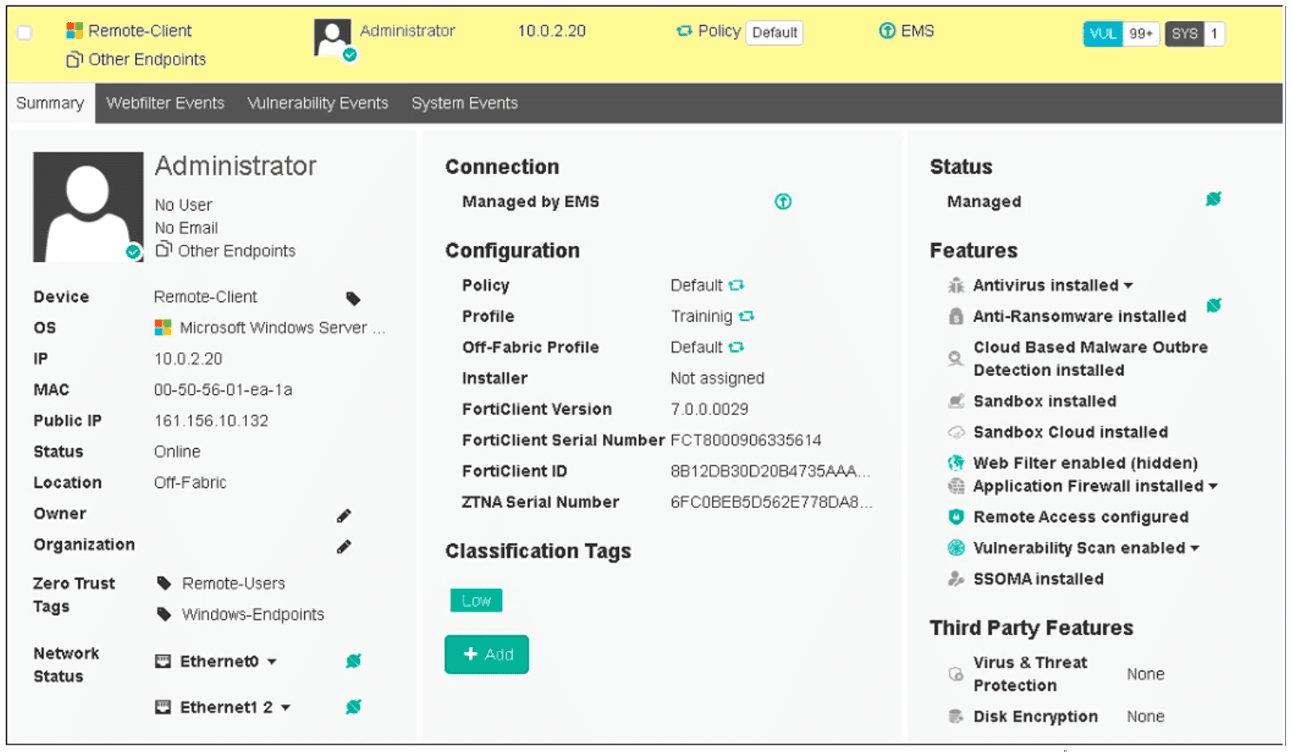
What two conclusions can you make based on the Remote-Client status shown above?
(Choose two.)
A. The endpoint is classified as at risk.
B. The endpoint has been assigned the Default endpoint policy.
C. The endpoint is configured to support FortiSandbox.
D. The endpoint is currently off-net.
Explanation:
This question requires an analysis of the provided FortiClient EMS endpoint summary to deduce key characteristics of the "Remote-Client" endpoint.
✅ Correct Option: D. The endpoint is currently off-net.
The exhibit clearly states "Location: Off-Fabric" under the "Summary" tab for the Remote-Client. In Fortinet terminology, "Off-Fabric" indicates that the endpoint is currently outside the trusted network, or "off-net."
✅ Correct Option: B. The endpoint has been assigned the Default endpoint policy.
Under the "Configuration" section, the "Policy" field for the Remote-Client is explicitly set to "Default." This directly indicates that the endpoint is currently assigned and operating under the Default endpoint policy configured in FortiClient EMS.
❌Incorrect options:
A. The endpoint is classified as at risk.
This is incorrect. While the image shows "VUL 99+" in the top right corner, which indicates many vulnerabilities, the overall "Status" for the endpoint itself is "Online," and there is no explicit "at risk" classification shown for the endpoint's compliance or health state in the visible summary.
C. The endpoint is configured to support FortiSandbox.
This is incorrect. Under "Features," "Sandbox installed" and "Sandbox Cloud installed" are listed. However, "configured to support" implies active integration or utilization for this specific endpoint's traffic, which cannot be concluded solely from the presence of the installed features. It only confirms the capability is present on the endpoint.
Reference:
⇒ FortiClient EMS Administration Guide - Endpoint Monitoring and Management [docs.fortinet.com] This documentation provides context on interpreting endpoint summary information within FortiClient EMS, including location status ("Off-Fabric") and policy assignments, enabling these conclusions.
In a ForliSandbox integration, what does the remediation option do?
A. Deny access to a tile when it sees no results
B. Alert and notify only
C. Exclude specified files
D. Wait for FortiSandbox results before allowing files
Explanation:
📘 Question Summary:
This question evaluates understanding of FortiSandbox integration capabilities within the Fortinet Security Fabric, specifically focusing on remediation action configurations. Candidates must distinguish between different response behaviors when FortiSandbox analyzes suspicious files. The assessment tests knowledge of how security appliances handle file inspection workflows, notification mechanisms, and the distinction between blocking actions versus passive monitoring approaches during sandbox analysis integration.
✔ Correct Answer:
Option B is accurate because the remediation option in FortiSandbox integration configures the system to generate alerts and send notifications when threats are identified without implementing blocking measures. This passive approach allows security teams to maintain visibility into suspicious file activity while permitting file transmission to continue uninterrupted. Organizations use this mode during initial deployment phases or when business requirements prioritize availability over immediate threat containment, ensuring analysts receive comprehensive threat intelligence for investigation and response planning.
✖ Incorrect Answer:
Option A is invalid because denying access based on absent results contradicts FortiSandbox operational logic. The system requires explicit threat verdicts to trigger blocking actions, not the absence of analysis outcomes. This approach would create operational disruptions by blocking legitimate files experiencing processing delays or connectivity issues, fundamentally misrepresenting how sandbox integrations handle incomplete or pending inspection results within the Security Fabric architecture.
Option C is incorrect because file exclusion represents a separate configuration mechanism unrelated to remediation actions. Exclusions are typically managed through allowlists, filter policies, or exception rules that prevent specific files from entering the sandbox inspection pipeline altogether. The remediation option governs response behaviors after analysis completion, whereas exclusion configurations determine which objects undergo examination, representing distinct functional categories within FortiSandbox deployment architecture.
Option D is inaccurate because waiting for results before permitting files describes an inline blocking or hold mode rather than a remediation configuration. This behavior characterizes flow-based inspection where files remain quarantined pending sandbox verdicts. The remediation option specifically addresses post-analysis response actions—what happens after FortiSandbox completes its evaluation. Confusing inspection timing controls with remediation responses demonstrates misunderstanding of the sequential stages in sandbox-integrated file security workflows.
🧩 Conclusion:
The correct answer confirms that remediation in FortiSandbox integration operates as an alerting and notification mechanism rather than an enforcement control. This configuration enables organizations to gather threat intelligence and maintain security visibility while allowing file operations to proceed without interruption. Candidates should recognize that remediation settings determine whether the system takes passive monitoring approaches or active blocking measures following sandbox analysis, with alert-only modes supporting gradual deployment strategies and comprehensive threat awareness without impacting business continuity.
📚 Reference:
FortiSandbox Administration Guide - Fortinet Documentation Library
FortiGate and FortiSandbox Integration Guide - Fortinet Technical Documentation
Which security fabric component sends a notification to quarantine an endpoint after IOC detection in the automation process?
A. FortiAnalyzer
B. FortiClient
C. ForbClient EMS
D. Forti Gate
Explanation:
📘 Question Summary:
This question evaluates the candidate’s understanding of Fortinet Security Fabric automation workflows, specifically the component responsible for enforcing endpoint quarantine following an Indicator of Compromise (IOC) detection. It assesses knowledge of how threat intelligence triggers automated responses across integrated Fortinet products, particularly within endpoint and network security layers.
✔ Correct Answer:
D. FortiGate
FortiGate serves as the enforcement point in the Security Fabric automation chain. Upon receiving IOC-based alerts—often relayed via FortiAnalyzer or FortiClient EMS—it executes predefined response actions such as quarantining compromised endpoints. This aligns with Fortinet’s design principle where FortiGate acts as the policy enforcement engine, applying dynamic firewall policies or interface-level restrictions to isolate threats in real time.
✖ Incorrect Answer:
A. FortiAnalyzer
FortiAnalyzer functions primarily as a logging, analytics, and reporting platform. While it can correlate IOC data and trigger automation stitches, it does not directly enforce endpoint quarantine actions. Its role is observational and orchestration-oriented, not enforcement-based, making it unsuitable as the component that applies network-level isolation.
B. FortiClient
FortiClient is an endpoint agent that provides host-based protection and telemetry. Although it can detect local threats and report them, it lacks the authority to unilaterally quarantine itself or other endpoints via network policy changes. Quarantine enforcement requires coordination with a central enforcement point like FortiGate.
C. FortiClient EMS
FortiClient EMS centrally manages endpoint policies and collects telemetry but does not directly enforce network-level quarantine. While it may initiate automation workflows upon IOC detection, actual isolation is carried out by FortiGate through integration with the Security Fabric.
🧩 Conclusion:
The correct answer confirms that FortiGate is the designated enforcement component within the Security Fabric automation framework. It executes quarantine actions by dynamically adjusting access policies based on threat intelligence, ensuring rapid containment of compromised endpoints in alignment with Fortinet’s integrated security architecture.
Reference:
Fortinet Documentation – “Security Fabric Automation Stitches,”
| Page 1 out of 10 Pages |
| 12345 |
The Fortinet NSE 6 FortiClient EMS 7.4 Administrator exam is notoriously tough. It doesn't test memorization. It forces you to make complex decisions under time pressure. A weak prep strategy risks a costly failure and wasted effort. Our FCP_FCT_AD-7.4 practice tests are built to be your definitive bridge to a passing score.

Copyright © - All Rights Reserved