
Last Updated On : 12-Oct-2026
Total 32 Questions
The difference between a near pass and a confident pass isn't just knowing the material, it's mastering the Fortinet FCP FortiSIEM 7.2 Analyst exam experience. Our Fortinet FCP_FSM_AN-7.2 practice test is engineered to close the gap between your current knowledge and the 2026 exam's demands. With every question, you receive detailed, expert verified explanations that break down not just the correct answer, but also the reasoning behind every incorrect option.
Don't just study. Practice FCP_FSM_AN-7.2 with purpose. Start your journey to a first-time pass today.
By replicating the exact style, complexity, and format of the real Fortinet FCP FortiSIEM 7.2 Analyst exam questions, we ensure you walk into the exam with complete confidence.
Refer to the exhibit.
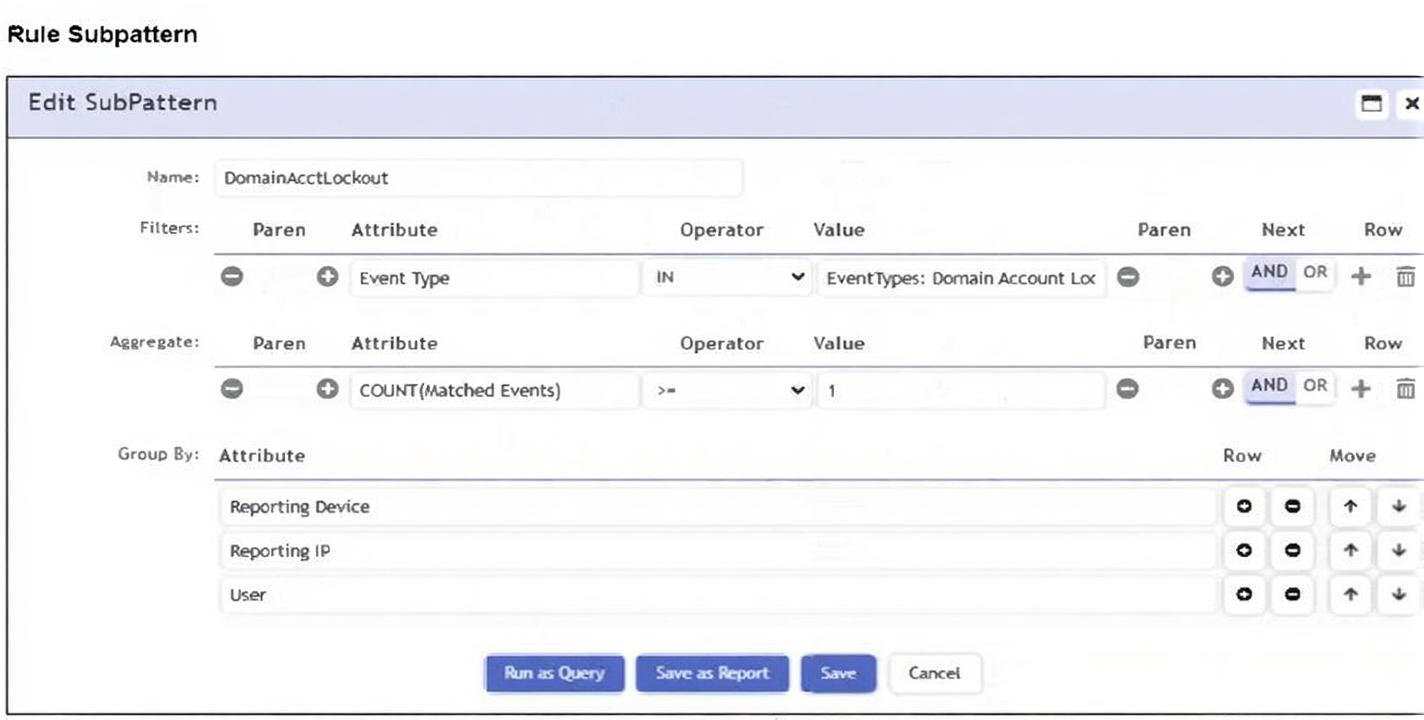
Which section contains the subpattern configuration that determines how many matching events are needed to
trigger the rule?
A. Aggregate
B. Group By
C. Actions
D. Filters
Explanation:
In a FortiSIEM correlation rule, the Aggregate section is the component that determines how many matching events must occur before the rule triggers. This section defines statistical thresholds such as COUNT, SUM, AVG, MIN, or MAX based on the events returned by the subpattern filters.
In the exhibit, the Aggregate line shows:
COUNT(Matched Events) ≥ 1
This clearly specifies the minimum number of events needed for the rule to generate an alert. FortiSIEM evaluates this aggregation after applying the filters and before grouping or performing final correlation. Because aggregation logic directly determines the event count threshold, the Aggregate section is always the place where the “how many events” condition is configured in a subpattern.
Why the other options are not correct
B. Group By
Group By defines how events should be grouped (e.g., by Reporting Device, Reporting IP, User). While grouping organizes events for analysis, it does not determine the number of events needed to trigger the rule. It simply structures the dataset before aggregation is applied.
C. Actions
The Actions section defines what happens when the rule is triggered—such as sending alerts, applying tags, initiating remediation, or creating incidents. It does not influence how many events must match before triggering.
D. Filters
Filters define the event criteria (such as Event Type or User), determining which events qualify for the subpattern. Although they determine what events must match, they do not specify how many events are required. That logic resides strictly in the Aggregate section.
References
FortiSIEM 7.2 Administration Guide – Correlation Rules → Subpattern Structure
FortiSIEM Rules Configuration Guide – Aggregation and Threshold Logic
FCP FortiSIEM 7.2 Analyst Training – Rule Subpattern Components
When configuring anomaly detection machine learning, in which step must you select the fields to analyze?
A. Design
B. Schedule
C. Prepare Data
D. Train
Explanation:
When configuring anomaly detection using machine learning (ML) in FortiSIEM (or most ML workflows), the Prepare Data step is where you select the specific fields (attributes) from your dataset to be analyzed by the ML model.
Prepare Data involves:
Selecting the source dataset (e.g., a specific analytics search, log type, or CMDB view).
Choosing the relevant fields that will be used as features for the ML model. For example, for anomaly detection on network traffic, you might select fields like Bytes Sent, Bytes Received, Destination Port, and Protocol.
Possibly applying filters, defining time ranges, and handling missing data.
Selecting the correct fields is critical because it directly determines what patterns the model will learn and what deviations it will flag as anomalies.
The other options refer to different stages of the ML configuration:
A. Design
– This is typically the initial stage where you define the objective of the ML task (e.g., "Detect anomalous login volumes") and select the ML method (e.g., clustering, regression, time-series forecasting), not the specific fields.
B. Schedule
– This is where you set the execution frequency (e.g., run hourly, daily) and retention policies for the ML job, after the model is configured.
D. Train
– This is the process where the ML model learns patterns from the data you've prepared. You initiate training after data preparation is complete; you do not select fields during this step.
Reference:
Machine Learning Workflow in FortiSIEM – The process generally follows:
Design (define goal & method) → Prepare Data (select dataset & features) → Train (build model) → Schedule/Deploy (operationalize).
Which statement about thresholds is true?
A. FortiSIEM uses fixed, hardcoded global and device thresholds for all performance metrics.
B. FortiSIEM uses only device thresholds for security metrics.
C. FortiSIEM uses global and per device thresholds for performance metrics.
D. FortiSIEM uses only global thresholds for performance metrics.
Explanation:
Thresholds in FortiSIEM are used to determine when a performance metric crosses a defined limit and should generate an alert.
FortiSIEM supports two levels of thresholds:
Global thresholds: These apply across all devices for a given metric (e.g., CPU utilization > 90%).
Per-device thresholds: These can be customized for specific devices, overriding the global threshold when necessary.
This dual approach allows analysts to maintain broad monitoring policies while fine-tuning thresholds for critical or unique devices.
Why the other options are incorrect
A. Fixed, hardcoded global and device thresholds
→ Incorrect. Thresholds are configurable, not hardcoded. Analysts can adjust them in the FortiSIEM UI.
B. Only device thresholds for security metrics
→ Incorrect. Security metrics are not limited to device thresholds; thresholds can be global as well.
D. Only global thresholds for performance metrics
→ Incorrect. Device-specific thresholds exist to provide flexibility.
Reference
From the FortiSIEM 7.2 Administration Guide:
“Thresholds can be defined globally for all devices or overridden at the device level for performance metrics.”
Refer to the exhibit.
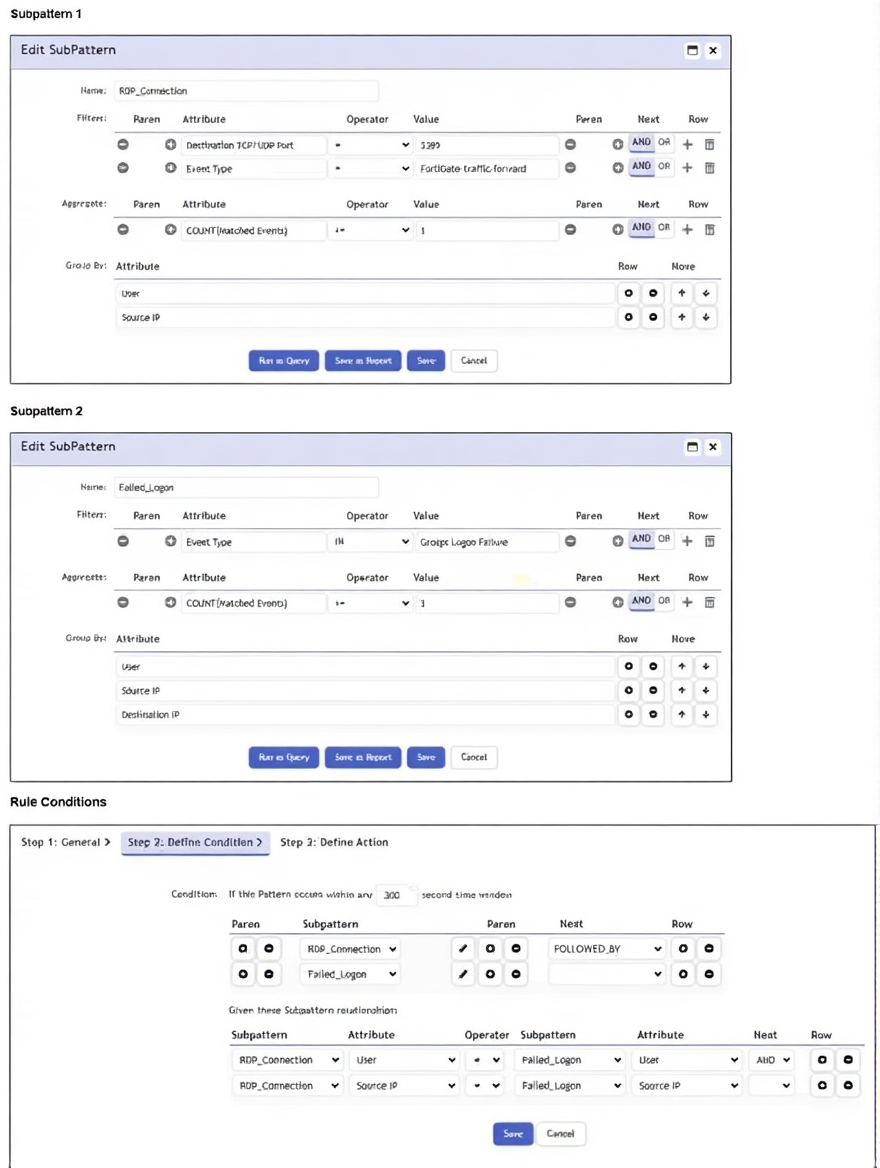
Which two conditions will match this rule and subpatterns? (Choose two.)
A. A user using RDP over SSL VPN fails to log in to an application five times.
B. A user runs a brute force password cracker against an RDP server.
C. A user fails twice to log in when connecting through RDP.
D. A user connects to the wrong IP address for an RDP session five times.
Explanation:
The correlation rule is structured with two subpatterns linked by a FOLLOWED_BY temporal relationship within a 300-second window, requiring matching User and Source IP. Subpattern 1 detects RDP connections (FortiGate traffic forward on port 3389). Subpattern 2 detects Windows Logon Failure events. For the rule to trigger, both patterns must occur in sequence from the same user and source IP
Options A and B correctly match this logic:
Both describe an initial RDP connection followed by multiple failed logon attempts, satisfying the sequence and attribute correlation.
Why C and D are incorrect:
C: Only describes failed logins without a preceding RDP connection event, failing to satisfy Subpattern 1.
D: Only describes an RDP connection to a wrong IP, but lacks the subsequent Windows Logon Failure events required by Subpattern 2.
Reference:
FortiSIEM Analyst Guide – Correlation Rules:
Rules using FOLLOWED_BY require both subpatterns to occur sequentially with matched attributes to detect multi-stage attack patterns like brute-forcing.
What can you use to send data to FortiSIEM for user and entity behavior analytics (UEBA)?
A. FortiSIEM agent
B. SSH
C. SNMP
D. FortiSIEM worker
Explanation:
For User and Entity Behavior Analytics (UEBA), FortiSIEM needs detailed event logs that include user identities and their associated actions (logons, file access, command execution, etc.). The FortiSIEM Agent (also known as the Windows Agent or Log Forwarder) is specifically designed to collect and forward such rich, identity-aware logs from endpoints and servers to FortiSIEM.
FortiSIEM Agent runs on Windows and Linux systems and can collect:
Windows Security Event Logs (critical for tracking user authentication and activity)
Syslog from applications
Custom script outputs
It enriches logs with user context, which is essential for building accurate UEBA baselines and detecting anomalous user behavior.
The agent ensures reliable, structured log delivery with the necessary fields (like UserName, TargetUserName, EventID) that UEBA models require to correlate actions to specific users and entities.
The other options are incorrect because:
B. SSH
– This is a protocol for secure remote access, not a standard log collection method for UEBA. While FortiSIEM can execute scripts over SSH to pull data, it is not the primary or specialized method for collecting the identity-focused logs required for UEBA.
C. SNMP
– Simple Network Management Protocol is used for collecting device performance metrics (CPU, memory, interface stats), not for user-behavior event logs. SNMP traps lack the detailed user-action context needed for UEBA.
D. FortiSIEM worker
– A Worker node is part of FortiSIEM's distributed architecture for processing events and analytics; it is not a data collection component. Collectors (and agents reporting to Collectors) are responsible for ingesting data.
Reference:
FortiSIEM Data Collection Architecture – Agents are the recommended method for collecting detailed logs from endpoints, especially Windows events, for security monitoring and UEBA.
UEBA Prerequisites – Successful UEBA deployment depends on ingesting logs that contain user identifiers and action details, which agents are optimized to provide.
Refer to the exhibit.
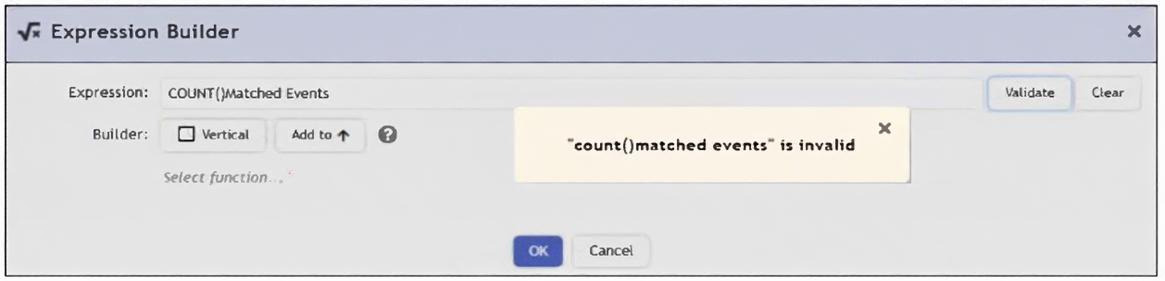
An analyst is trying to identify an issue using an expression based on the Expression Builder settings shown in
the exhibit; however, the error message shown in the exhibit indicates that the expression is invalid.
What is the correct syntax to create an expression that generates a total count of matched events?
A. COUNT(Matched Events)
B. (COUNT) Matched Events
C. Matched Events (COUNT)
D. Matched Events COUNT()
Explanation:
In FortiSIEM’s Expression Builder, when creating a calculated field or condition, functions like COUNT() require proper syntax: the function name followed by parentheses containing the field or expression to be counted.
The correct syntax is COUNT(Matched Events).
COUNT – The aggregation function.
( ) – Parentheses enclosing the target.
Matched Events – The field name (or event attribute) representing the events to be counted.
The error in the exhibit (COUNT()Matched Events) is missing parentheses around the argument. The parentheses are empty (), and Matched Events is placed outside, which is syntactically incorrect.
Why the other options are incorrect:
B. (COUNT) Matched Events – Incorrect placement of parentheses; functions are not wrapped in parentheses this way.
C. Matched Events (COUNT) – This reverses the order; the function must come before its argument.
D. Matched Events COUNT() – Also incorrect order and has empty parentheses.
Reference:
FortiSIEM Expression Syntax –
Functions in expressions follow the pattern FUNCTION_NAME(argument). Common functions include COUNT(), SUM(), AVG(), etc.
Which analytics search can be used to apply a user and entity behavior analytics (UEBA) tag to an event for a failed login by the user JSmith?
A. User = smith
B. Username NOT END WITH jsmith
C. User IS jsmith
D. Username CONTAIN smit
Explanation:
To apply a UEBA (User and Entity Behavior Analytics) tag to events for a specific user, you must create a precise match in an analytics search filter. The IS operator is used for exact string matching in FortiSIEM analytics.
User IS jsmith – This filter will match events where the User attribute exactly equals "jsmith". This is the correct method to target all failed login events for that specific user account so that a UEBA tag (like Failed_Logon) can be applied to build a behavioral baseline.
UEBA tagging typically requires a well-defined search filter to accurately label relevant events. Exact matching (IS) ensures no unintended events are tagged.
The other options are incorrect because:
A. User = smith –
While = can sometimes be used for equality, the standard exact match operator in FortiSIEM analytics is IS. More importantly, "smith" would not match the full username "jsmith".
B. Username NOT END WITH jsmith –
This would exclude events where the username ends with "jsmith", which is the opposite of the goal.
D. Username CONTAIN smit –
This is too broad. It would match any username containing the substring "smit" (e.g., "jsmith", "asmith", "smithee"), leading to over-tagging and inaccurate UEBA profiling.
Reference:
UEBA Configuration in FortiSIEM – UEBA relies on accurate event tagging to model normal behavior and detect anomalies.
Analytics Search Operators – Understanding operators like IS, CONTAIN, END WITH, and NOT is essential for building precise filters for rules and tagging.
| Page 1 out of 5 Pages |
| 123 |
The Fortinet FCP FortiSIEM 7.2 Analyst exam is notoriously tough. It doesn't test memorization. It forces you to make complex decisions under time pressure. A weak prep strategy risks a costly failure and wasted effort. Our FCP_FSM_AN-7.2 practice tests are built to be your definitive bridge to a passing score.

Copyright © - All Rights Reserved