
Last Updated On : 31-Aug-2026
Total 36 Questions
The smartest way to prepare for your Fortinet FCP_FWB_AD-7.4 2026 exam isn't just reading — it's practicing. Our Fortinet FCP FortiWeb 7.4 Administrator practice test bridge gap, transforming your knowledge into a passing score. Familiarize yourself with the exact style and difficulty of the real Fortinet FCP_FWB_AD-7.4 practice questions, so there are no surprises. Get detailed feedback to identify your strengths and target your weaknesses, making your study time more efficient.
Refer to the exhibit.
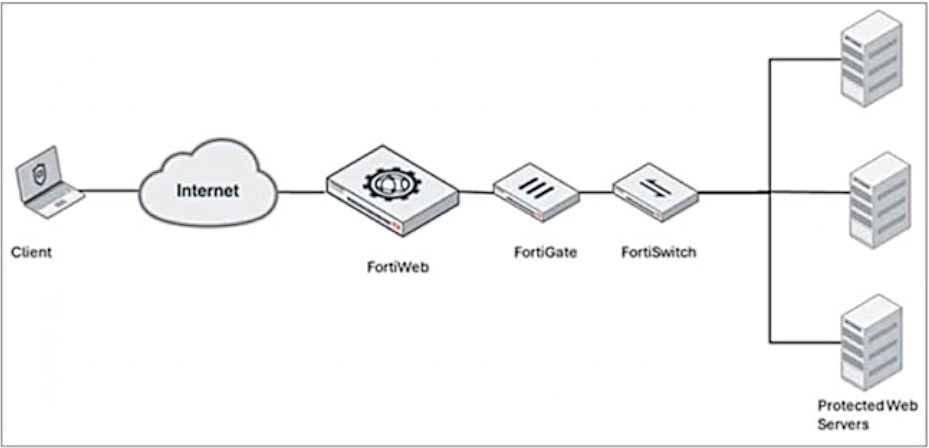
A FortiWeb device is deployed upstream of a device performing source network address
translation (SNAT) or load balancing.
What configuration must you perform on FortiWeb to preserve the original IP address of the
client?
A. Enable and configure the Preserve Client IP setting.
B. Use a transparent operatingmode on FortiWeb.
C. Enable and configure the Add X-Forwarded-For setting.
D. Turn off NAT on the FortiWeb.
Explanation:
This question addresses the challenge of maintaining visibility of the original client IP address when traffic passes through intermediary devices like load balancers or SNAT gateways. It tests the knowledge of HTTP header manipulation used to preserve source identity across a multi-tiered network infrastructure.
✅ Correct Option C:
When FortiWeb sits upstream of a device performing SNAT, the backend servers would normally only see the IP of that intermediate device. By enabling the Add X-Forwarded-For setting, FortiWeb inserts the original client's IP address into a specific HTTP header. The downstream devices or web servers can then be configured to extract the "X-Forwarded-For" (XFF) header value to identify the actual source of the request for logging and security purposes.
❌ Incorrect options:
A. Enable and configure the Preserve Client IP setting:
While this sounds like a logical choice, it usually refers to maintaining the source IP at the packet level (Layer 3), which is often technically impossible or breaks routing when passing through a SNAT-performing load balancer or a stateful firewall like FortiGate.
B. Use a transparent operating mode on FortiWeb:
Transparent modes (like Transparent Inspection or True Transparent) allow FortiWeb to bridge traffic without changing the IP header. However, if there is a downstream device already performing SNAT, changing FortiWeb’s mode won’t prevent that specific downstream device from masking the IP.
D. Turn off NAT on the FortiWeb:
Turning off NAT on FortiWeb does not solve the problem if the downstream device (the one closer to the servers) is the one performing the SNAT. The issue lies in how the subsequent hop handles the traffic, not necessarily FortiWeb's own NAT configuration.
🔧 Reference:
→ FortiWeb X-Forwarded-For Header Configuration
This official documentation confirms that X-Forwarded-For is the standard method used by FortiWeb to pass the original client IP to downstream devices in a load-balanced or SNAT environment.
Which is an example of a cross-site scripting (XSS) attack?
A. SELECT username FROM accounts WHERE username='admin';-- ' AND password='password';
B. < img src = " http://badfile/nothere " onerror = " alert(document.cookie) ; " >
C. SELECT username FROM accounts WHERE username='XSS' ' AND password='alert("http://badurl.com")';
D. < img src = " xss.png " >
Explanation:
A Cross-Site Scripting (XSS) attack occurs when an attacker injects malicious, client-side scripts into a trusted website. This script then executes in the victim's browser, allowing the attacker to steal cookies, session tokens, or other sensitive information. It exploits the trust a user has for a particular site.
Correct Option:
🟢 B. < img src = " http://badfile/nothere " onerror = " alert(document.cookie) ; " >
This is a correct and classic example of an XSS payload. It uses an HTML tag with a deliberately invalid source. When the image fails to load, it triggers the onerror event, which executes the malicious JavaScript (alert(document.cookie)). This demonstrates how an attacker can run scripts to access a user's browser data.
Incorrect Options:
🔴 A. SELECT username FROM accounts WHERE username='admin';-- ' AND password='password';
This is an example of a SQL Injection attack, not XSS. The -- sequence is an SQL comment that causes the database to ignore the subsequent password check, allowing unauthorized login. This attacks the database server, not the client's browser.
🔴 C. SELECT username FROM accounts WHERE username='XSS' ' AND password='alert("http://badurl.com")';
This is another SQL Injection example. It attempts to break the SQL query structure by closing the username field early. Although it contains the text "alert," it is embedded within a database query string and is not executable script in a browser context.
🔴 D. < img src = " xss.png " >
This is a normal, harmless HTML image tag. It contains no malicious attributes (like onerror, onload, etc.) and does not attempt to execute any script. Therefore, it does not represent an XSS attack vector.
Summary:
Option B is the correct example of XSS, using a malicious script in an HTML event handler. Options A and C are SQL injection attacks targeting a database. Option D is benign HTML with no malicious intent.
Reference:
For details on how FortiWeb identifies and mitigates such attacks using signatures and policies, please consult the official FortiWeb Administration Guide from the Fortinet Documentation Library.
A customer wants to be able to index your websites for search and advertisement
purposes.
What is the easiest way to allow this on a FortiWeb?
A. Add the indexer IP address to the trusted IP list on the FortiWeb.
B. Add the indexer IP address tothe FortiGuard "Known Search Engines" category.
C. Create a firewall rule to bypass the FortiWeb entirely for the indexer IP address.
D. Do not allow any external sites to index your websites.
Explanation:
This question tests the FortiWeb feature used to permit legitimate search crawlers for indexing and advertisement purposes. The intended solution is to recognize the crawler as a known search engine rather than simply trusting an arbitrary IP.
✔️ Correct Option:
B. Add the indexer IP address to the FortiGuard "Known Search Engines" category.
FortiWeb’s known search engine handling is the best fit when the goal is to allow legitimate crawler traffic for indexing. This approach is designed for search engines and similar bots, so it aligns more closely with the requirement than a generic allowlist. It helps FortiWeb distinguish legitimate indexing activity from unwanted automated access.
❌ Incorrect options:
A. Add the indexer IP address to the trusted IP list on the FortiWeb.
This is a broad allowlist action, but it is not the most specific or intended method for search-engine indexing. The question asks for the easiest way to allow indexing, and the known search engines feature is more appropriate.
C. Create a firewall rule to bypass the FortiWeb entirely for the indexer IP address.
This would remove FortiWeb protection for that traffic, which is unnecessary and not the intended solution for crawler access.
D. Do not allow any external sites to index your websites.
This directly conflicts with the requirement, since the customer explicitly wants indexing to be possible.
🔧 Reference:
→ Configuring known bots
Refer to the exhibit.
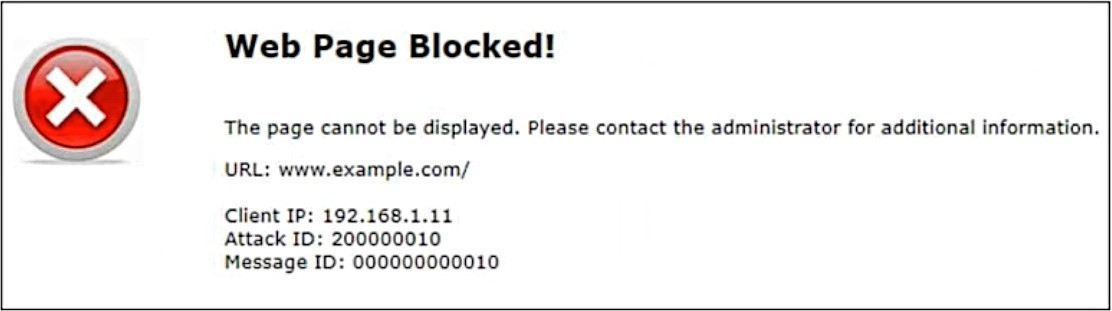
Attack ID20000010is brute force logins.
Which statement is accurate about the potential attack?
A. The attacker has successfully retrieved the credentials to www.example.com.
B. www.example.com is running attacks against the client 192.168.1.11.
C. The attack has happened 10 times.
D. 192.168.1.11 is sending suspicious traffic to FortiWeb.
Explanation
The accurate statement about the potential attack shown in the exhibit is D.
✅ Correct Option: D
192.168.1.11 is sending suspicious traffic to FortiWeb.
The "Web Page Blocked!" status, along with the Client IP of 192.168.1.11, confirms FortiWeb detected the traffic from this source as a threat. The Attack ID 20000010 identifies the action as a credential-breach attempt. FortiWeb's action of generating this block page proves that it is actively stopping the hostile traffic originating from the client to protect the backend web server.
❌ Incorrect Option: A
The attacker has successfully retrieved the credentials to www.example.com.
The display of a "Web Page Blocked!" status is a security notification confirming FortiWeb has successfully intercepted and stopped the malicious traffic before it reached the server. Since the brute force attempt was blocked by the WAF, the attacker was highly likely unsuccessful in obtaining credentials. A successful attack would typically result in a normal application response, bypassing the security alert.
❌ Incorrect Option: B
www.example.com is running attacks against the client 192.168.1.11.
This statement reverses the attack flow. FortiWeb, as a WAF, is specifically deployed to protect the server (www.example.com) from attacks launched by external clients. The Client IP 192.168.1.11 is clearly the origin of the blocked traffic, making it the source of the aggression. The WAF's intended purpose is entirely defensive, protecting the web application.
❌ Incorrect Option: C
The attack has happened 10 times.
The Attack ID, 20000010, is a permanent, static identifier. The trailing digits (0010) are part of the signature label referencing the security rule for "Brute Force Logins." The number 10 is an identification element, not a dynamic counter of attack occurrences. The actual frequency is tracked in the FortiWeb system logs, but the Attack ID itself is a fixed label for the threat category.
📄 Summary
This response confirms that the FortiWeb block page correctly identifies the client IP 192.168.1.11 as the source of suspicious brute force login traffic. FortiWeb successfully intercepted this traffic, protecting the targeted web application from the attack.
🔗 Reference
For official documentation on interpreting FortiWeb log messages and attack IDs, consult the FortiWeb Administration Guide available on the Fortinet official document library website.
In SAML deployments, which server contains user authentication credentials (username/password)?
A. Identity provider
B. Service provider
C. User database
D. Authentication client
Explanation
In SAML (Security Assertion Markup Language), authentication is strictly separated: the Identity Provider (IdP) is the only component that stores and verifies user credentials (username and password). The Service Provider (SP), such as FortiWeb in SP mode, never sees or stores passwords – it simply trusts assertions issued by the IdP after successful authentication.
Correct Option
✅ A. Identity provider
The Identity Provider (IdP), such as FortiAuthenticator, Azure AD, Okta, or ADFS, is the trusted entity that maintains the user directory and credential database. When a user logs in, the IdP directly receives and validates the username and password, then issues a signed SAML assertion to the Service Provider (FortiWeb) confirming successful authentication.
Incorrect Options
❌ B. Service provider
The Service Provider (FortiWeb when configured as SAML SP) never receives or stores user passwords in SAML flows. It only consumes the SAML assertion sent by the IdP and grants access based on attributes inside that assertion.
❌ C. User database
“User database” is not a standard SAML component or role. While the IdP relies on an underlying directory (LDAP, local DB, etc.), the SAML specification defines the role as “Identity Provider,” not a generic database.
❌ D. Authentication client
There is no role called “authentication client” in SAML architecture. The user’s browser acts as the User Agent that redirects between IdP and SP, but it never stores or validates credentials itself.
Summary
Only the Identity Provider (IdP) stores and verifies user credentials in a SAML deployment.
FortiWeb acting as Service Provider trusts the IdP and never handles passwords directly.
This separation is the core security principle of federated SAML authentication.
Reference
Fortinet FortiWeb 7.4.0 Administration Guide
→ User Authentication > SAML Authentication
→ FortiWeb as SAML Service Provider (SP) configuration
Refer to the exhibits.
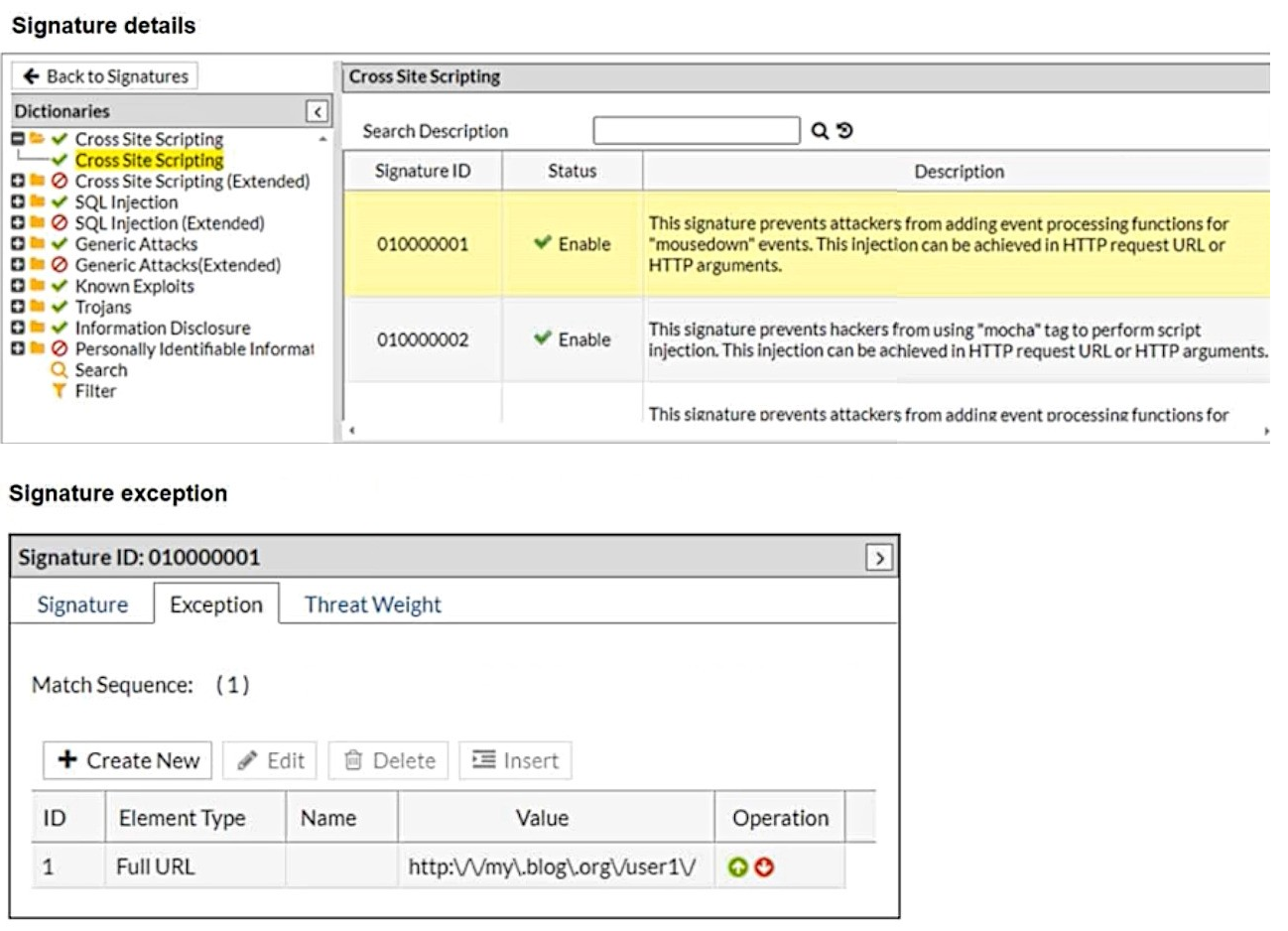
What will happen when a client attempts a mousedown cross-site scripting (XSS) attack
against the sitehttp://my.blog.org/userl1/blog.phpand FortiWeb is enforcing the highlighted
signature?
A. The connection will be stripped of the mousedown JavaScript code.
B. The connection will be blocked as an XSS attack.
C. FortiWeb will report the new mousedown attack to FortiGuard.
D. The connection will be allowed.
Explanation:
The exhibit shows that Signature ID 010000001, which detects mousedown-based XSS attempts, includes a signature exception for the exact URL http://my.blog.org/user1/blog.php. In FortiWeb, a signature exception tells the system to skip applying that signature whenever the request matches the configured URL. Because the attack is sent to a URL that is explicitly exempted, FortiWeb will not inspect or block it. The request therefore passes through normally.
Correct Option:
✅ D. The connection will be allowed.
Signature exceptions override signature enforcement. When the request URL matches an exception entry, FortiWeb does not evaluate the signature at all. No detection, no sanitization, and no blocking occur. Since the mousedown XSS attempt is aimed at a URL listed under the signature exception, the system allows the connection without inspection.
Incorrect Options:
❌ A. The connection will be stripped of the mousedown JavaScript code.
FortiWeb does not remove or sanitize malicious JavaScript when a signature exception exists. Instead, it bypasses inspection entirely for that signature. Because the signature is skipped, FortiWeb does not modify the request, meaning nothing is stripped or cleaned from the attack payload.
❌ B. The connection will be blocked as an XSS attack.
Blocking would only occur if the signature were applied. However, the exception prevents this signature from being evaluated for the specified URL. This means the XSS detection logic never triggers, so the system cannot block the request. The attack simply passes through untouched.
❌ C. FortiWeb will report the new mousedown attack to FortiGuard.
Reporting requires detection. Since the exception prevents the signature from running, FortiWeb never identifies the request as malicious. Without detection, nothing is logged or forwarded to FortiGuard. Exception rules stop both inspection and reporting for the matched request.
Summary:
Because the request targets a URL listed under a signature exception, FortiWeb bypasses the mousedown XSS signature. The system neither analyzes nor blocks the attack. As a result, the connection is fully allowed despite containing the XSS payload.
Reference:
Configuring action overrides or exceptions to data leak & attack detection signatures
What is the difference between an API gateway protection schema and a machine learning (ML) API protection schema?
A. An API gateway protection schema does not allow authentication.
B. An API gateway protection schema handles response bodies.
C. An API gateway protection schema supports data types other than string.
D. An API gateway protection schema cannot change without administrator intervention.
Explanation:
This question explores the distinction between static and dynamic API security methods in FortiWeb. It focuses on how schemas are maintained and updated, contrasting the manual configuration required for standard API Gateway protection with the automated, data-driven nature of Machine Learning (ML) schemas.
✅ Correct Option D:
An API gateway protection schema is a static security model where the administrator manually uploads or defines a schema file (such as OpenAPI/Swagger). Any changes to the API structure require the administrator to manually update the configuration. In contrast, an ML API protection schema is dynamic; it learns the API structure by observing traffic and can automatically adapt to changes without constant manual intervention.
❌ Incorrect options:
A. An API gateway protection schema does not allow authentication:
This is incorrect because API gateways are frequently used specifically to manage and enforce authentication and authorization. FortiWeb's API protection features support various authentication methods to secure access to backend services.
B. An API gateway protection schema handles response bodies:
While some advanced configurations can inspect responses, the primary distinction between these two schema types is not about response body handling, but rather how the rules and constraints are generated and maintained (manual vs. learned).
C. An API gateway protection schema supports data types other than string:
Both API Gateway and ML-based schemas are designed to understand and validate various data types (integers, booleans, etc.). This capability is not a differentiating factor between the two specific schema protection methods.
🔧 Reference:
→ FortiWeb API Protection Documentation
This documentation confirms that API Gateway schemas are user-defined/uploaded, while ML-based protection leverages automated discovery and behavioral learning to build the schema.
| Page 1 out of 6 Pages |
| 123 |
Choosing the right preparation material is critical for passing the Fortinet FCP FortiWeb 7.4 Administrator exam. Here’s how our FCP_FWB_AD-7.4 practice test is designed to bridge the gap between knowledge and a passing score.

Copyright © - All Rights Reserved