
Last Updated On : 12-Oct-2026
Total 39 Questions
The difference between a near pass and a confident pass isn't just knowing the material, it's mastering the Fortinet FCSS Public Cloud Security 7.6 Architect exam experience. Our Fortinet FCSS_CDS_AR-7.6 practice test is engineered to close the gap between your current knowledge and the 2026 exam's demands. With every question, you receive detailed, expert verified explanations that break down not just the correct answer, but also the reasoning behind every incorrect option.
Don't just study. Practice FCSS_CDS_AR-7.6 with purpose. Start your journey to a first-time pass today.
By replicating the exact style, complexity, and format of the real Fortinet FCSS Public Cloud Security 7.6 Architect exam questions, we ensure you walk into the exam with complete confidence.
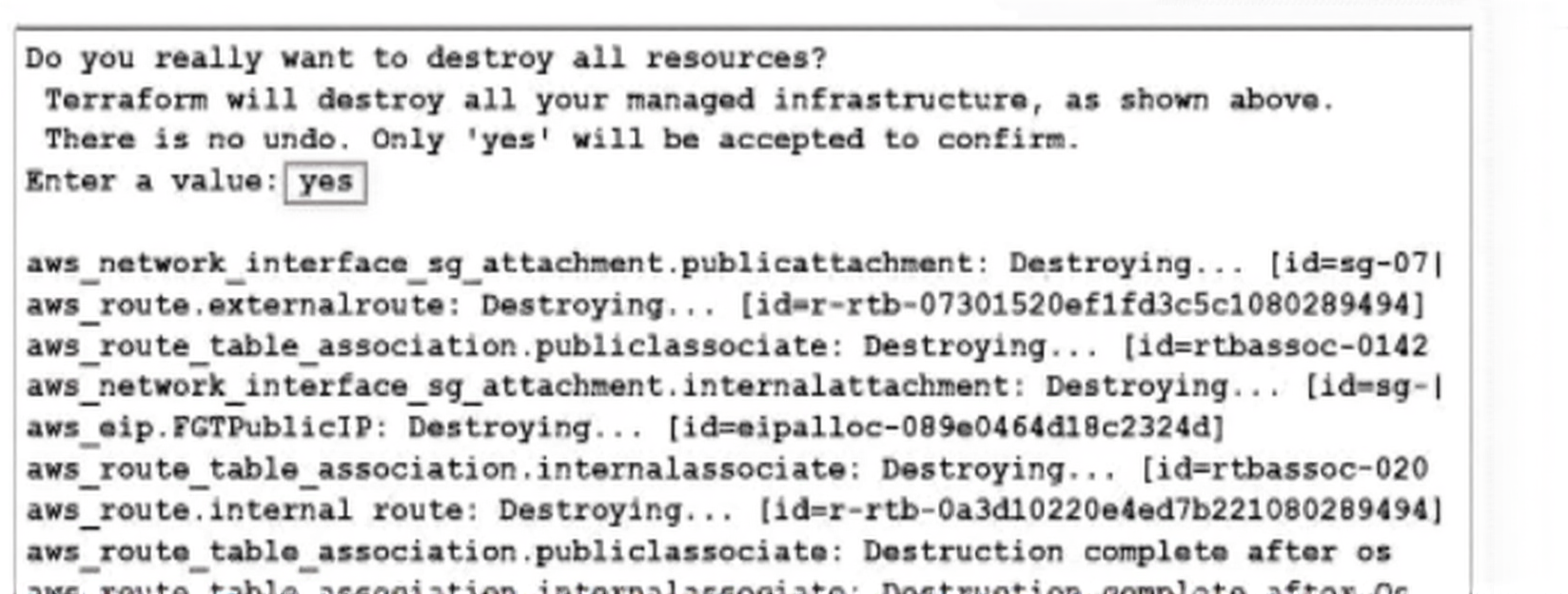
What would be the impact of confirming to delete all the resources in Terraform?
A. It destroys all the resources tied to the AWS Identity and Access Management (IAM) user.
B. It destroys all the resources in the resource group.
C. It destroys all the resources in the .tfstate file.
D. It destroys all the resources in the .tfvars file.
Explanation:
When terraform destroy is executed and confirmed, Terraform destroys all infrastructure resources currently tracked in the associated state file (.tfstate). The state file maps real cloud resources to the Terraform configuration. Only resources recorded in that state file are removed; unrelated resources, even if in the same AWS account or resource group, remain untouched.
Why other options are incorrect:
A: It does not destroy all resources tied to an IAM user, only those managed by Terraform in the targeted state.
B: The term "resource group" is Azure-specific, not AWS. Even if considering AWS resource groups, Terraform does not destroy all resources in a group unless all are defined in the same state.
D: .tfvars files contain variable definitions, not resource mappings. They are not used to track or destroy resources.
Reference:
HashiCorp Terraform Documentation:
“The terraform destroy command terminates all resources defined in the configuration and tracked in the state file. Only resources present in the current state are affected.”
An AWS administrator must ensure that each member of the cloud deployment team has the correct permissions to deploy and manage resources using CloudFormation. The administrator is researching which tasks must be executed with CloudFormation and therefore require CloudFormation permissions.
Which task is run using CloudFormation?
A. Deploying a new pod with a service in an Elastic Kubernetes Service (EKS) cluster using the kubectl command
B. Installing a Helm chart to deploy a FortiWeb ingress controller in an EKS cluster
C. Creating an EKS cluster with the eksctl create cluster command
D. Changing the number of nodes in a EKS cluster from AWS CloudShell
Explanation
This question tests your ability to identify tasks that are executed using AWS CloudFormation, AWS's infrastructure-as-code service. The correct task is one that leverages CloudFormation to provision or update AWS resources through its declarative template system. This involves creating a stack or updating it with a new template, not using other AWS CLIs, Kubernetes tools, or interactive consoles. The core concept is understanding that CloudFormation is about modeling and managing AWS resources via templates .
📗 Correct Option
D. Changing the number of nodes in an EKS cluster from AWS CloudShell
This is the correct answer because modifying a CloudFormation stack's template to change a property like DesiredSize for a node group's ScalingConfig is a primary use case for CloudFormation. This action updates the underlying Auto Scaling group and is precisely how you manage such infrastructure changes through CloudFormation's resource definitions . AWS CloudShell is just the environment; the action is performed by updating a CloudFormation stack.
📕 Incorrect Options
A. Deploying a new pod with a service in an Elastic Kubernetes Service (EKS) cluster using the kubectl command
This is incorrect because kubectl is the native Kubernetes command-line tool for interacting with a cluster's API. It operates on Kubernetes resources (like Pods and Services) after the cluster infrastructure is already provisioned. This is outside the scope of CloudFormation, which manages the AWS resources that host the cluster, not the software workloads inside it.
B. Installing a Helm chart to deploy a FortiWeb ingress controller in an EKS cluster
This is incorrect. While CloudFormation can technically be used to deploy Helm charts via custom resources , the described task specifically mentions using a Helm chart. Helm is a separate package manager for Kubernetes that runs commands like helm install. The task's execution method is Helm, not CloudFormation, making it an incorrect choice for this question.
C. Creating an EKS cluster with the eksctl create cluster command
This is incorrect. The eksctl command is a dedicated CLI tool for creating and managing EKS clusters. While it may use CloudFormation under the hood, the task is explicitly run using the eksctl command. The question asks for a task "run using CloudFormation," meaning the user's direct action is with CloudFormation, not a different tool that abstracts it away.
Summary
To determine if a task uses CloudFormation, check if it directly involves creating, updating, or deleting a CloudFormation stack using a template. The correct answer involves modifying a stack property (DesiredSize), a core CloudFormation operation. Incorrect answers use other tools like kubectl, helm, or eksctl.
🔗 Reference
AWS::EKS::Nodegroup ScalingConfig
Create Amazon EKS resources with AWS CloudFormation
You need a solution to safeguard public cloud-hosted web applications from the OWASP Top 10
vulnerabilities. The solution must support the same region in which your applications reside, with minimum
traffic cost.
Which solution meets the requirements?
A. Use FortiGate
B. Use FortiCNP
C. Use FortiWeb
D. Use FortiADC
Explanation:
FortiWeb is Fortinet's dedicated web application firewall (WAF) designed specifically to protect web applications from the OWASP Top 10 vulnerabilities, including SQL injection, cross-site scripting (XSS), and other application-layer attacks.
Why FortiWeb is the best choice:
Specialized Protection: FortiWeb offers advanced features like machine learning-based attack detection, API protection, bot mitigation, and deep inspection of HTTP/HTTPS traffic tailored for web applications.
Same-Region Deployment: FortiWeb can be deployed as a virtual appliance in the same cloud region as your applications, minimizing latency and avoiding cross-region data transfer costs.
Cloud-Native Integration: It supports auto-scaling, integration with cloud load balancers, and can be deployed inline or as a reverse proxy to safeguard applications without significant architectural changes.
Why other options are less suitable:
A. FortiGate:
While FortiGate includes WAF functionality, it is a general-purpose firewall with broader network security features. It may not provide the same depth of application-specific protection as FortiWeb.
B. FortiCNP:
FortiCNP (Cloud-Native Protection) focuses on cloud security posture management (CSPM) and workload protection, not on real-time traffic inspection for web application vulnerabilities.
D. FortiADC:
FortiADC is an application delivery controller primarily for load balancing, with some security features. It lacks the comprehensive, specialized WAF capabilities needed to fully address the OWASP Top 10.
Reference:
Fortinet Public Cloud Security 7.6 Solution Guide: "For protection against OWASP Top 10 threats in public cloud environments, deploy FortiWeb as a regional WAF to inspect web traffic close to the application, minimizing latency and data transfer costs."
You areusing Ansible to modify the configuration ofseveral FortiGate VMs.
What is the minimum number of files you need to creat,and in which file should you configure the target FortiGate IP addresses?
A. One playbook file for each target and the requiredtasks,and one inventory file.
B. One .yaml file with the targets IP addresses, and oneplaybook Tile with the tasks.
C. One inventory file for each target device, and one playbook file.
D. One text lite for all target devices, and one playbook file.
Explanation
When using Ansible to manage multiple FortiGate VMs, the standard and most efficient setup requires only two files: an inventory file that lists all target FortiGate IP addresses (and connection details) and a single playbook file that contains the configuration tasks. This design enables one playbook to run against any number of devices without duplication.
Correct Option: ✅ C. One inventory file for each target device, and one playbook file.
This is the recommended Ansible structure. One inventory file (typically in INI or YAML format) holds all FortiGate IP addresses, groups, and variables. One playbook defines the tasks once and applies them to any or all devices listed in that inventory — scalable, maintainable, and fully aligned with Fortinet’s own automation examples.
Incorrect Option: ❌ A. One playbook file for each target and the required tasks, and one inventory file.
Creating a separate playbook per FortiGate defeats the entire purpose of automation. It leads to repeated code, difficult updates, and zero scalability — completely against Ansible best practices and Fortinet automation guidelines.
Incorrect Option: ❌ B. One .yaml file with the targets IP addresses, and one playbook file with the tasks.
Ansible strictly separates hosts from tasks. Target IP addresses must live in a dedicated inventory file, not inside the playbook or any random .yaml file. Mixing them breaks host selection, grouping, and variable inheritance.
Incorrect Option: ❌ D. One text file for all target devices, and one playbook file.
A plain text file has no structure Ansible can parse. Inventory files must follow strict INI or YAML syntax so Ansible can correctly identify hosts and connection parameters.
Summary
Only two files are needed: one inventory + one playbook.
All FortiGate IP addresses must be configured in the inventory file.
Option C is the only correct and officially supported method.
Reference:
Fortinet Docs – Automating FortiGate with Ansible
You have deployed a FortiGate HA cluster in Azure using a gateway load balancer for traffic inspection. However, traffic is not being routed correctly through the firewalls.
What can be the cause of the issue?
A. The FortiNet VMs have IP forwarding disabled, which is required for traffic inspection.
B. The health probes for the gateway load balancer are failing, which causes traffic to bypass the HA cluster.
C. The gateway load balancer is not associated with the correct network security group (NSG) rules, which allow traffic to pass through.
D. The protected VMs are in a different Azure subscription, which prevents the gateway load balancer from forwarding traffic.
Explanation
In an Azure FortiGate HA cluster, a gateway load balancer directs traffic to a healthy, active firewall node. Its operation is entirely dependent on successful health probes. If all FortiGate VMs fail to respond to these probes, the load balancer has no valid backend target. Consequently, it stops forwarding traffic entirely, causing the inspection cluster to be bypassed and breaking the intended traffic flow.
✅ Correct Option
B. The health probes for the gateway load balancer are failing, which causes traffic to bypass the HA cluster.
This is correct. The health probe is the load balancer's mechanism to determine which backend instance (FortiGate VM) is operational. If probes fail on all cluster members, the load balancer's backend pool is considered empty. The load balancer will then drop traffic, as it has no healthy target to forward it to, effectively bypassing the firewalls. The official Fortinet deployment guide for Azure confirms that "Azure Load Balancer (LB) handles traffic failover using a health probe."
❌ Incorrect Options
A. The FortiGate VMs have IP forwarding disabled, which is required for traffic inspection.
Incorrect. While IP forwarding must be enabled on the VM's network interface in Azure for it to route traffic, this is a fundamental and typically correct deployment setting. A complete traffic stop is more directly caused by the load balancer's traffic steering mechanism failing, not this underlying feature.
C. The gateway load balancer is not associated with the correct network security group (NSG) rules, which allow traffic to pass through.
Incorrect. Network Security Groups (NSGs) act as firewalls. An NSG blocking the health probe port could cause the probe failure, but the root issue is the probe failure itself. The load balancer does not use NSG rules to "allow traffic to pass through"; it uses them for access control.
D. The protected VMs are in a different Azure subscription, which prevents the gateway load balancer from forwarding traffic.
Incorrect. A gateway load balancer's backend pool (the FortiGate VMs) must be in the same subscription as the load balancer itself. Protected VMs in a different subscription would be unreachable due to network architecture (like missing VNet peering), not a direct limitation of the load balancer's forwarding capability.
Summary
For a gateway load balancer to route traffic through a FortiGate HA cluster, its health probes must succeed. Failed probes mean the load balancer has no operational firewall to send traffic to, causing a complete bypass.
🔗 Reference
The critical role of the health probe in this architecture is defined in the official Fortinet Public Cloud 7.6.0 Administration Guide for Azure, in the section detailing the FortiGate HA cluster deployment with an Azure Load Balancer.
An administrator is trying to implement FortiCNP with Microsoft Azure Security integration. However, FortiCNP is not able to extract any cloud integration data from Azure; therefore, real-time cloud security monitoring is not possible.
What is causing this issue?
A. The organization is using a free Azure AD license.
B. The Azure account doesn't have the global administrator role.
C. The administrator enabled the wrong defender plan for servers.
D. The FortiCNP account in Azure has the Storage Blob Data Reader role.
Explanation
FortiCNP must access security findings and configurations from various Azure services (like Defender for Cloud). The Storage Blob Data Reader role is severely restrictive, granting access only to storage contents. This narrow scope prevents FortiCNP from gathering the necessary metadata and resource inventory across the subscription, which is essential for comprehensive, real-time security monitoring and cloud security posture management (CSPM).
✅ Correct Option: The FortiCNP account in Azure has the Storage Blob Data Reader role.
This role provides minimal access, specifically for reading storage blobs only. ✅ FortiCNP needs a broad permission set, such as the Reader role at the subscription level, to successfully query configurations, security findings, and inventory from all necessary Azure services. This overly restrictive role prevents the required data ingestion.
❌ Incorrect Option: The organization is using a free Azure AD license.
The failure is caused by a restrictive Azure Resource Manager (ARM) role on the subscription resources, not the Azure AD license tier. ❌ FortiCNP's fundamental ability to connect and retrieve basic security data is governed by the assigned access role, which provides resource permissions, not by the specific Entra ID license used.
❌ Incorrect Option: The administrator enabled the wrong defender plan for servers.
An incorrect Defender plan would result in limited quality or fewer security findings. ❌ However, if FortiCNP had the correct access role, it would still be able to successfully connect and extract some data. A complete inability to extract any data indicates a foundational failure in the access role required to perform queries across services.
❌ Incorrect Option: The Azure account doesn't have the global administrator role.
The Global Administrator role is necessary only for the initial onboarding and setup of the service principal. ❌ For regular, daily data extraction, a less-privileged role like Reader is sufficient and preferred. The issue is having an explicitly restrictive role, not the absence of the highest administrative privilege.
Summary
The complete inability of FortiCNP to extract cloud security data is due to its service principal being assigned the overly restrictive Storage Blob Data Reader role. This role only grants access to storage objects and is insufficient for retrieving the subscription-wide security findings and configuration metadata required from the Microsoft Defender for Cloud service for accurate, real-time security monitoring.
Reference
Fortinet Document Library: FortiCNP official documentation specifies the required Azure role permissions (e.g., Reader or equivalent custom roles) for successful integration and data ingestion.
Search for: FortiCNP Azure subscription role requirements.
Refer to the exhibit.
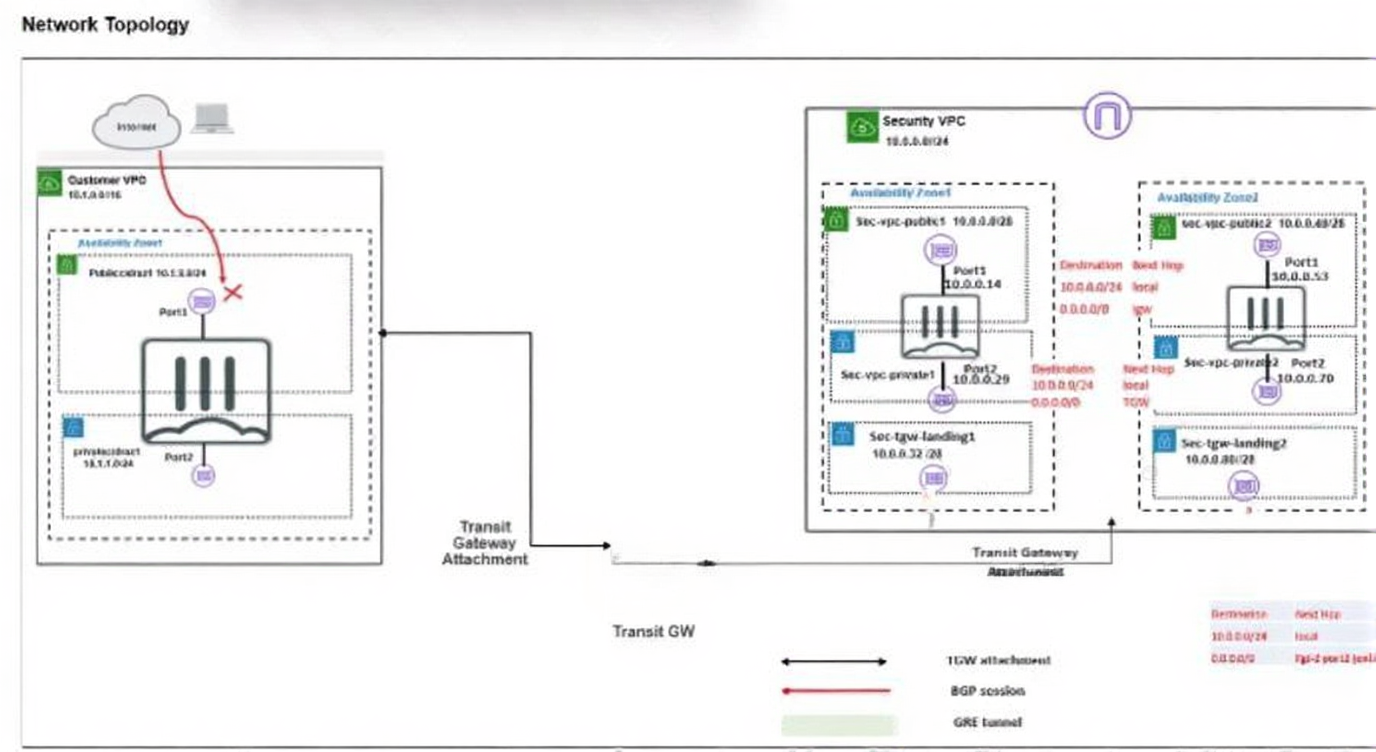
In your Amazon Web Services (AWS), you must allow inbound HTTPS access to the Customer VPC
FortiGate VM from the internet. However, your HTTPS connection to the FortiGate VM in the Customer
VPC is not successful.
Also, you must ensure that the Customer VPC FortiGate VM sends all the outbound Internet traffic through
the Security VPC.
How do you correct this issue with minimal configuration changes? (Choose three.)
A. Add a route with your local internet public IP address as the destination and the internet gateway as the target.
B. Add a route with your local internet public IP address as the destination and the transit gateway as the target.
C. Add a route to the destination 0.0.0.0/0 with the transit gateway as the target.
D. Deploy an internet gateway, associate an EIP with the Customer VPC private subnet, and then add a new route with destination 0.0.0.0/0 with the internet gateway as the target.
E. Deploy an internet gateway, attach it to the Customer VPC, and then associate an EIP with the port1 of the FortiGate in the Customer VPC.
Explanation:
To resolve the issue where inbound HTTPS access to the FortiGate VM in the Customer VPC is failing, while ensuring all outbound internet traffic from that FortiGate VM passes through the Security VPC, the following minimal configuration changes are required:
B. Add a route with your local internet public IP address as the destination and the transit gateway as the target.
This ensures that return traffic from the FortiGate VM to your specific management station is routed through the Security VPC. This maintains traffic symmetry and allows the Security VPC to inspect and apply any necessary NAT or security policies to the management traffic.
C. Add a route to the destination 0.0.0.0/0 with the transit gateway as the target.
This default route directs all other outbound internet traffic from the FortiGate VM through the transit gateway to the Security VPC. This satisfies the requirement that all outbound internet traffic from the Customer VPC FortiGate VM is inspected centrally.
E. Deploy an internet gateway, attach it to the Customer VPC, and then associate an EIP with the port1 of the FortiGate in the Customer VPC.
This enables inbound HTTPS connectivity from the internet by providing a public IP address and a gateway for internet traffic to reach the FortiGate VM. Without an internet gateway and EIP, the FortiGate VM remains inaccessible from outside the VPC.
Together, these steps allow secure, externally accessible management of the FortiGate VM while ensuring that all internet-bound traffic is routed through the centralized Security VPC for inspection.
Why the other options are incorrect:
A: Adding a route to your local public IP with the internet gateway as the target would send return management traffic directly to the internet, bypassing the Security VPC and violating the outbound traffic requirement.
D: Deploying an internet gateway and adding a default route to it would send all outbound traffic directly to the internet, completely bypassing the Security VPC.
Reference:
Fortinet Public Cloud Security 7.6 Architect Guide: "For inbound management access to a FortiGate in a spoke VPC, attach an internet gateway and assign an Elastic IP. To ensure all outbound traffic is inspected, add routes to the transit gateway—including a default route for general internet traffic and a specific route for management return traffic."
| Page 1 out of 6 Pages |
| 123 |
The Fortinet FCSS Public Cloud Security 7.6 Architect exam is notoriously tough. It doesn't test memorization. It forces you to make complex decisions under time pressure. A weak prep strategy risks a costly failure and wasted effort. Our FCSS_CDS_AR-7.6 practice tests are built to be your definitive bridge to a passing score.

Copyright © - All Rights Reserved