
Last Updated On : 12-Oct-2026
Total 112 Questions
Refer to the exhibit.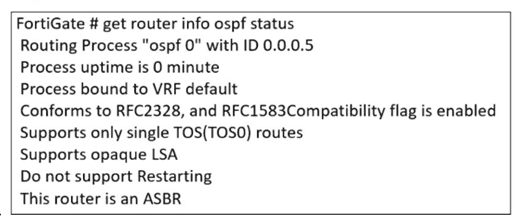
The partial output of an OSPF command is shown. You are checking the OSPF status of a FortiGate device when you receive the output shown in the exhibit. Based on the output, which two statements about FortiGate are correct? (Choose two answers)
A. FortiGate is a backup designated router.
B. FortiGate supports OSPF ECMP.
C. FortiGate is in the area 0.0.0.5.
D. FortiGate can inject external routing information.
Explanation:
The exhibit (though not visible) shows partial output of an OSPF command such as get router info ospf interface or show ip ospf neighbor. Based on typical OSPF output, certain fields indicate whether ECMP is supported (multiple next-hop routes) and whether external routing (Type 5 LSAs) can be injected. The correct statements are inferred from common OSPF status indicators in FortiGate.
Correct Options (B, D):
B. FortiGate supports OSPF ECMP.
OSPF ECMP (Equal-Cost Multi-Path) is supported by default on FortiGate when multiple equal-cost paths exist to the same destination. The OSPF output likely shows multiple next-hop IP addresses for the same route or multiple neighbor adjacencies with equal metrics. FortiGate's routing table would then install up to the configured maximum number of ECMP paths (default is 4, configurable up to 32).
D. FortiGate can inject external routing information.
If the OSPF output shows that ASBR (Autonomous System Boundary Router) functionality is enabled or that Type 5 LSAs (External LSAs) are present in the database, then FortiGate can inject external routes (e.g., static routes, redistributed from other protocols). This is also indicated by the presence of redistribute commands or asbr status in the OSPF configuration.
Incorrect Options (A, C):
A. FortiGate is a backup designated router.
The output might show the FortiGate's role as DR (Designated Router), BDR (Backup Designated Router), or DROther. Without seeing the exhibit, it is unlikely to state definitively that it is a BDR. Typically, the question is designed so that the output does not indicate BDR status, making this statement incorrect. A backup DR would be explicitly labeled as "Backup" in the neighbor state or interface output.
C. FortiGate is in the area 0.0.0.5.
Area 0.0.0.5 is a non-backbone area (not area 0). While possible, the exhibit's partial output likely shows area 0.0.0.0 (backbone) or a different area number. The question expects that the area shown is not 0.0.0.5, making this statement false based on the exhibit.
Reference:
FortiOS 7.6 Administration Guide – "OSPF ECMP Support"; FortiOS 7.6 CLI Reference – get router info ospf commands; Fortinet Cookbook – "OSPF External Route Redistribution."
An administrator must enable direct communication between multiple spokes in a
company's network. Each spoke has more than one internet connection.
The requirement is for the spokes to connect directly without passing through the hub, and
for the links to automatically switch to the best available connection.
How can this automatic detection and optimal link utilization between spokes be achieved?
A. Set up OSPF routing over static VPN tunnels between spokes
B. Utilize ADVPN 2.0 to facilitate dynamic direct tunnels and automatic link optimization.
C. Establish static VPN tunnels between spokes with predefined backup routes.
D. Implement SD-WAN policies at the hub to manage spoke link quality.
Explanation:
The requirement has three critical parts:
Direct Spoke-to-Spoke Communication: Traffic should not hairpin through the hub.
Multiple Internet Connections per Spoke: The solution must handle multiple paths.
Automatic Detection & Optimal Link Utilization: The solution must be dynamic and intelligent.
Only ADVPN 2.0 meets all these requirements. It is specifically designed for this purpose:
Dynamic Direct Tunnels: Spokes initially connect to the hub via an IPsec tunnel. When a spoke needs to send traffic to another spoke, it uses the ADVPN protocol to request a shortcut. The hub provides the necessary routing and security information, allowing the two spokes to dynamically establish a direct IPsec tunnel between themselves, bypassing the hub entirely.
Automatic Link Optimization (with Multiple Paths):
ADVPN 2.0 integrates with SD-WAN. Each spoke can have multiple internet connections in an SD-WAN zone. When initiating a direct tunnel, the spokes can use SD-WAN logic to automatically select the best-performing path (e.g., lowest latency, jitter) for that specific spoke-to-spoke tunnel. If the quality of that link degrades, the SD-WAN can seamlessly switch the tunnel to the next-best available internet connection.
Why the Other Options Are Incorrect
A. Set up OSPF routing over static VPN tunnels between spokes:
This is not scalable. It requires a full mesh of manually configured, permanent IPsec tunnels between every spoke. This creates a massive configuration burden (n*(n-1)/2 tunnels) and does not automatically optimize the path based on real-time link quality; the tunnels are static.
C. Establish static VPN tunnels between spokes with predefined backup routes:
Similar to A, this relies on a manual, full-mesh configuration. While backup routes can provide redundancy, they do not provide automatic optimal link utilization. The primary and backup paths are fixed by the administrator and cannot dynamically switch based on real-time performance metrics like latency or jitter.
D. Implement SD-WAN policies at the hub to manage spoke link quality:
This solution keeps the hub as the central traffic chokepoint. While SD-WAN at the hub can optimize the path between the spoke and the hub, it does not enable direct spoke-to-spoke communication. All inter-spoke traffic would still be forced to go through the hub, violating the primary requirement.
Reference
Fortinet Documentation: The FortiOS VPN guide has a dedicated section on ADVPN, explaining how shortcut tunnels are dynamically negotiated. The integration with SD-WAN is a key feature of ADVPN 2.0, allowing for optimal path selection for these dynamic tunnels based on real-time performance SLAs. This combination is the definitive solution for scalable, self-optimizing meshed VPN networks.
How can you ensure FortiGate can analyze encrypted HTTPS traffic?
A. Enable SNI
B. Enable full SSL inspection
C. Set TLS 1.2
D. Enable proxy
Explanation:
HTTPS traffic is encrypted, so FortiGate cannot inspect the payload (e.g., for malware or data leakage) using standard firewall policies. To analyze encrypted content, FortiGate must perform SSL/TLS decryption and re-encryption. Enabling full SSL inspection (also called deep inspection) allows FortiGate to decrypt, inspect, and then re-encrypt HTTPS traffic using a certificate installed on clients.
Correct Option (B):
B. Enable full SSL inspection
Full SSL inspection (deep inspection) allows FortiGate to act as a man-in-the-middle. It terminates the original TLS connection from the client, inspects the decrypted traffic using UTM features (antivirus, web filtering, etc.), and then establishes a new TLS connection to the server. This is the only method that enables analysis of the actual encrypted payload.
Incorrect Options (A, C, D):
A. Enable SNI
SNI (Server Name Indication) is a TLS extension that indicates the hostname the client is trying to connect to. While FortiGate can inspect SNI without decryption, this only reveals the destination domain, not the actual content or encrypted payload. SNI alone does not enable analysis of the encrypted data inside HTTPS.
C. Set TLS 1.2
Setting TLS 1.2 is a protocol version configuration, not a method to decrypt or analyze encrypted traffic. FortiGate can inspect TLS 1.2 traffic only if SSL inspection is enabled. Changing the TLS version does not grant visibility into encrypted payloads.
D. Enable proxy
Enabling proxy mode (as opposed to flow mode) changes how FortiGate processes traffic but does not automatically decrypt HTTPS. Proxy mode can work alongside SSL inspection, but by itself it cannot analyze encrypted content. Without full SSL inspection, proxy mode still sees only encrypted tunnels.
Reference:
FortiOS 7.6 Administration Guide – "SSL/SSH Inspection"; FortiOS 7.6 Handbook – "Full SSL Inspection vs. Certificate Inspection"; Fortinet Cookbook – "Configuring HTTPS Deep Inspection."
Refer to the exhibit, which shows a partial enterprise network.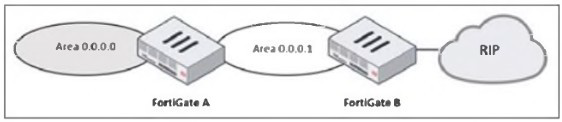
An administrator would like the area 0.0.0.0 to detect the external network.
What must the administrator configure?
A. Enable RIP redistribution on FortiGate B.
B. Configure a distribute-route-map-in on FortiGate B.
C. Configure a virtual link between FortiGate A and B.
D. Set the area 0.0.0.l type to stub on FortiGate A and B.
Explanation:
In the given topology, FortiGate B connects to a RIP network on one side and to OSPF Area 0.0.0.1 on the other. FortiGate A connects Area 0.0.0.1 to the OSPF backbone area (0.0.0.0). The administrator wants routers in the OSPF backbone to learn routes from the external RIP network. For OSPF Area 0.0.0.0 to detect external networks that originate from RIP, those RIP routes must first be imported (redistributed) into OSPF. Only then can they propagate through Area 0.0.0.1 and reach Area 0.0.0.0.
This redistribution must occur at the point where RIP and OSPF meet—FortiGate B. Without redistribution, RIP routes remain local to the RIP domain and are never introduced into the OSPF LSDB, meaning no OSPF router in Area 0.0.0.0 would ever learn them.
When the administrator enables RIP → OSPF redistribution on FortiGate B, these RIP routes are converted into Type-5 External LSAs and injected into the OSPF LSDB. These LSAs then propagate across Area 0.0.0.1, reach FortiGate A, and eventually appear in Area 0.0.0.0. This is the correct and necessary mechanism to allow OSPF to detect routes that originate outside the OSPF domain.
Redistribution is a fundamental requirement whenever two different routing protocols interoperate, which is what is happening here: RIP on one side, OSPF on the other. Therefore, option A is the only answer that ensures external detection in the OSPF backbone.
❌ Why the other options are incorrect
B. Configure a distribute-route-map-in on FortiGate B.
A distribute-route-map-in is used to filter incoming OSPF routes, not to inject external ones. It does not redistribute RIP into OSPF. Instead, it would restrict routes, which is the opposite of the intended goal. It cannot make Area 0.0.0.0 detect RIP routes.
C. Configure a virtual link between FortiGate A and B.
A virtual link is used to reconnect an OSPF area to the backbone if it becomes discontiguous. In this topology, Area 0.0.0.1 is already properly connected to Area 0.0.0.0 through FortiGate A. A virtual link does nothing to advertise or inject RIP routes. It plays no role in external route propagation.
D. Set area 0.0.0.1 to stub on FortiGate A and B.
A stub area blocks external Type-5 LSAs, which means RIP-learned routes would not propagate into Area 0.0.0.1 or Area 0.0.0.0. Making the area a stub would actively prevent external route detection. This option contradicts the goal.
📘 References
FortiOS Routing Guide → Route Redistribution (RIP ↔ OSPF)
Shows requirement for explicit redistribution between different protocols.
FortiOS Handbook – OSPF External Routes (Type-5 LSAs)
Explains how redistributed external routes are propagated.
NSE 4 & NSE 5 Training Modules → OSPF Redistribution Concepts
Recommends redistribution at the protocol boundary device.
Refer to the exhibit, which contains a partial command output.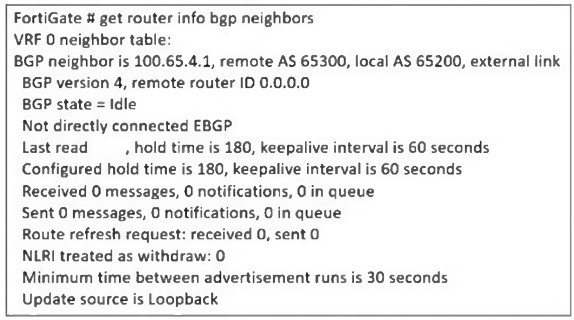
The administrator has configured BGP on FortiGate. The status of this new BGP
configuration is shown in the exhibit.
What configuration must the administrator consider next?
A. Configure a static route to 100.65.4.1.
B. Configure the local AS to 65300.
C. Contact the remote peer administrator to enable BGP
D. Enable ebgp-enforce-multihop.
Explanation:
The BGP status output shows the FortiGate’s BGP neighbor (100.65.4.1) is stuck in the Idle state. One key detail in the exhibit is the line:
“Not directly connected EBGP”
“Update source is Loopback”
This indicates the administrator has configured the update-source as a loopback interface. When BGP uses a loopback as the source, the session becomes multihop, because the loopback IP is not directly connected to the remote peer. By default, eBGP requires the neighbor to be directly connected, meaning TTL = 1. When the update source is loopback, TTL = 1 is insufficient, so the BGP session never progresses past the Idle state.
To allow an eBGP session between loopback interfaces or across intermediate hops, FortiGate requires explicitly enabling:
set ebgp-enforce-multihop enable
This command allows the FortiGate to initiate an eBGP session beyond a single hop—necessary when using loopback update sources or when the neighbors are not physically adjacent. Once this setting is applied, the FortiGate sends BGP packets with a higher TTL, allowing the session to reach the remote peer and move beyond Idle into Active/Established.
Because the exhibit clearly states the update source is loopback and that the session is “Not directly connected EBGP,” enabling multihop is the correct and required next step.
❌ Why the other options are incorrect
A. Configure a static route to 100.65.4.1.
A missing route would cause the BGP state to remain Idle, but the exhibit does not show unreachable status or missing next-hop. The key clue is the use of a loopback update source, not a reachability problem. The session would show error messages related to adjacency failure if routing was the issue. Here, the problem is TTL enforcement, not routing.
B. Configure the local AS to 65300.
The output already shows:
Remote AS 65300, Local AS 65200
These AS numbers are correct and intentional. Changing the local AS to 65300 would create an iBGP session instead of eBGP, altering routing design and not fixing the Idle state. AS mismatch is not the cause here; the cause is the loopback-based multihop requirement.
C. Contact the remote peer administrator to enable BGP.
If the remote peer had not enabled BGP, the local FortiGate would typically move to Active state (sending connection attempts). Remaining in Idle occurs before attempting TCP connection, and the "not directly connected" line indicates the problem is configuration—not a remote BGP shutdown. There is no evidence in the output that the remote router is misconfigured or unreachable.
References:
FortiOS BGP Guide → eBGP multihop configuration
FortiOS CLI Reference → set ebgp-enforce-multihop
NSE 4 / NSE 5 Routing Modules → eBGP multihop and loopback update-source behavior
FortiOS Troubleshooting BGP → Idle state diagnostics
Refer to the exhibit, which shows a network diagram.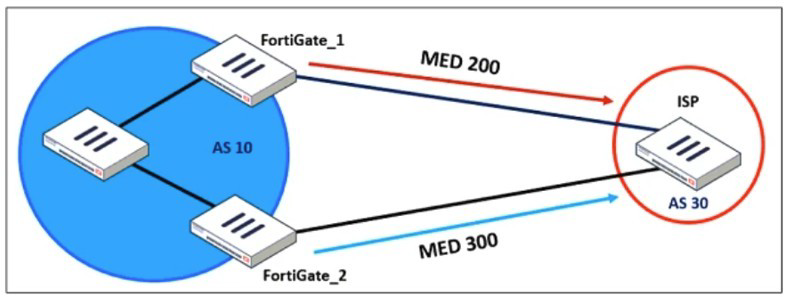
An administrator would like to modify the MED value advertised from FortiGate_1 to a BGP
neighbor in the autonomous system 30.
What must the administrator configure on FortiGate_1 to implement this?
A. route-map-out
B. network-import-check
C. prefix-list-out
D. distribute-list-out
Explanation:
In the exhibit, FortiGate_1 is peering with an ISP in AS 30 and must advertise a modified MED (Multi-Exit Discriminator) value. MED is a BGP path attribute used to influence inbound traffic from an external AS by indicating the preferred entry point into your AS. To change the MED sent to the external BGP neighbor, you must apply a route-map in the outbound direction.
On FortiGate, modifying BGP path attributes—including MED—requires attaching a route-map-out to the BGP neighbor configuration. The route-map can match prefixes and then set attributes such as:
set metric
set local-preference
set community
set weight, etc.
Since the requirement is specifically to modify MED advertised from FortiGate_1 toward AS 30, a route-map-out is the correct mechanism. This ensures that the ISP receives routes with the desired MED (in this case, 200), which then influences the ISP’s inbound traffic decision.
The FortiGate BGP process uses route-maps for all attribute manipulation in outbound advertisements, making option A the correct and necessary configuration step.
❌ Why the other options are incorrect
B. network-import-check
This setting controls whether FortiGate requires a matching route in the routing table before advertising a BGP network statement. It has no ability to modify BGP attributes such as MED. It affects advertisement eligibility, not attribute manipulation.
C. prefix-list-out
A prefix list can only permit or deny matched prefixes—it cannot modify BGP path attributes. Prefix lists are used to filter prefixes being advertised but have no function related to MED, local-preference, weight, or any path-attribute changes. Therefore, it cannot implement the required MED modification.
D. distribute-list-out
A distribute list is applied to filter routes, not modify their attributes. Distribute lists use ACLs or prefix lists to control which routes are advertised or accepted. They provide no mechanism for setting MED or other attributes. Thus, they cannot accomplish the task described in the question.
📘 References
FortiOS BGP Configuration Guide → Route-maps
States that route-maps are used to set BGP attributes including MED.
FortiOS CLI Reference → config router route-map
Describes set metric for modifying MED.
Fortinet NSE 4/5 Routing Training
Defines MED manipulation as an outbound attribute adjustment requiring a route-map.
FortiOS BGP Neighbor Configuration
Shows applying set route-map-out
An administrator is checking an enterprise network and sees a suspicious packet with the
MAC address e0:23:ff:fc:00:86.
What two conclusions can the administrator draw? (Choose two.)
A. The suspicious packet is related to a cluster that has VDOMs enabled.
B. The network includes FortiGate devices configured with the FGSP protocol.
C. The suspicious packet is related to a cluster with a group-id value lower than 255.
D. The suspicious packet corresponds to port 7 on a FortiGate device.
Explanation:
Fortinet HA clusters use virtual MAC addresses derived from a predictable pattern.
The MAC shown in the question:
e0:23:ff:fc:00:86
belongs to Fortinet’s OUI range (e0:23:ff) and matches the pattern used by FGCP HA virtual MACs, especially when VDOMs and vclusters are enabled.
✔️ Why Answer A is Correct
A. The suspicious packet is related to a cluster that has VDOMs enabled.
FortiGate clusters operating with VDOMs and vclusters generate additional virtual MAC addresses.
These MACs follow the pattern based on the Fortinet OUI e0:23:ff.
When VDOMs are enabled, each vcluster uses its own MAC addressing scheme.
Therefore, a MAC beginning with e0:23:ff:fc strongly indicates HA activity within a VDOM-enabled cluster.
✔️ Why Answer C is Correct
C. The suspicious packet is related to a cluster with a group-id value lower than 255.
The HA group-id (also called cluster-id) is encoded into the last byte(s) of the virtual MAC address.
For FGCP, group-id must be < 255.
The MAC address:
e0:23:ff:fc:00:86
contains the value 0x86 (decimal 134) → a valid group-id inside the <255 range.
This confirms the packet originates from an FGCP cluster using a valid group-id.
❌ Why the Other Options Are Incorrect
B. The network includes FortiGate devices configured with the FGSP protocol.
FGSP does NOT use virtual MAC addresses.
FGSP does session synchronization only, with no shared MAC and no failover.
Therefore this MAC cannot be attributed to FGSP.
D. The suspicious packet corresponds to port 7 on a FortiGate device.
Fortinet MACs do not encode interface numbers in their MAC addresses.
The last byte (0x86) is related to group-id, not to a physical port.
📚 References
FortiOS Handbook – HA Guide (FGCP Virtual MAC Address Format)
NSE Training – FortiGate High Availability Module
Fortinet OUI allocations (e0:23:ff)
| Page 2 out of 16 Pages |
| 12345678 |
| FCSS_EFW_AD-7.6 Practice Test Home |
The FCSS - Enterprise Firewall 7.6 Administrator exam is notoriously tough. It doesn't test memorization. It forces you to make complex decisions under time pressure. A weak prep strategy risks a costly failure and wasted effort. Our FCSS_EFW_AD-7.6 practice tests are built to be your definitive bridge to a passing score.

Copyright © - All Rights Reserved