
Last Updated On : 12-Oct-2026
Total 112 Questions
The difference between a near pass and a confident pass isn't just knowing the material, it's mastering the FCSS - Enterprise Firewall 7.6 Administrator exam experience. Our Fortinet FCSS_EFW_AD-7.6 practice test is engineered to close the gap between your current knowledge and the 2026 exam's demands. With every question, you receive detailed, expert verified explanations that break down not just the correct answer, but also the reasoning behind every incorrect option.
Don't just study. Practice FCSS_EFW_AD-7.6 with purpose. Start your journey to a first-time pass today.
By replicating the exact style, complexity, and format of the real FCSS - Enterprise Firewall 7.6 Administrator exam questions, we ensure you walk into the exam with complete confidence.
Refer to the exhibit, which shows a partial troubleshooting command output.
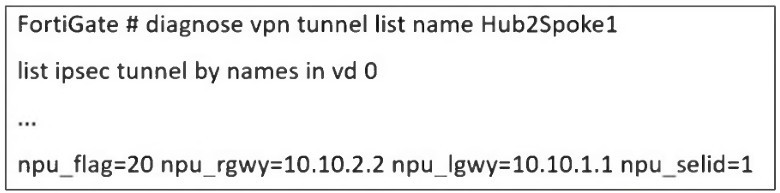
An administrator is extensively using IPsec on FortiGate. Many tunnels show information
similar to the output shown in the exhibit.
What can the administrator conclude?
A. IPsec SAs cannot be offloaded
B. The two IPsec SAs, inbound and outbound, are copied to the NPU
C. Only the outbound IPsec SA is copied to the NPU.
D. Only the inbound IPsec SA is copied to the NPU
Explanation:
The key to interpreting this output lies in the npu_flag field.
npu_flag=20:
This hexadecimal value (0x20) is a bitmask that indicates the state of the IPsec Security Associations (SAs) relative to the Network Processing Unit (NPU). The value 0x20 specifically means that the tunnel is NPU accelerated.
npu_gwy=10.10.2.2: This shows the IP address of the peer gateway as known to the NPU.
npu_lgwy=10.10.1.1: This shows the IP address of the local gateway as known to the NPU.
When an IPsec tunnel is established, two unidirectional SAs are created: one for inbound traffic and one for outbound traffic. For the tunnel to be fully accelerated by the NPU, both SAs must be successfully offloaded.
The presence of the npu_flag=0x20 and the specific NPU gateway addresses confirms that this offloading process has been successful for both SAs. The NPU now has the necessary information to encrypt and decrypt traffic for this tunnel at hardware speed, bypassing the main CPU.
Why the other options are incorrect:
A. IPsec SAs cannot be offloaded:
This is the direct opposite of what the output shows. The npu_flag being set to 0x20 is explicit proof that offloading has occurred.
C. Only the outbound IPsec SA is copied to the NPU:
For a tunnel to be functional and accelerated, both SAs must be offloaded. A partial offload would not result in the npu_flag=0x20 status, and tunnel performance would be suboptimal.
D. Only the inbound IPsec SA is copied to the NPU:
Similarly, this is incorrect. The NPU needs both the encryption (outbound) and decryption (inbound) keys and parameters to handle the full flow of traffic. The output indicates the tunnel is fully accelerated.
Reference
Fortinet Documentation:
The FortiOS CLI Reference guide for diagnose vpn tunnel commands explains the meaning of the various output fields.
Troubleshooting Guide:
Knowledge Base articles and troubleshooting guides on Fortinet's support website frequently reference npu_flag=0x20 as the indicator for a successfully NPU-offloaded IPsec tunnel. A value of npu_flag=0x00 would indicate that the tunnel is running in CPU mode, which is not the case here.
Refer to the exhibit, which shows a hub and spokes deployment.
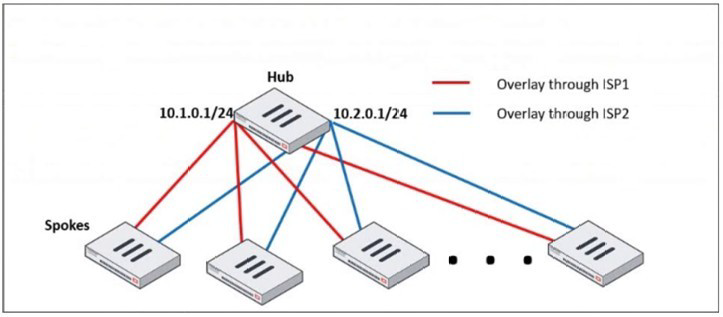
An administrator is deploying several spokes, including the BGP configuration for the
spokes to connect to the hub.
Which two commands allow the administrator to minimize the configuration? (Choose two.)
A. A. neighbor-group
B. B. route-reflector-client
C. C. neighbor-range
D. D. ibgp-enforce-multihop
Explanation:
In a large-scale hub-and-spoke VPN deployment (like the one shown with SD-WAN or IPsec overlays), the hub FortiGate can have a very large number of BGP peers (the spokes). Manually configuring each spoke as an individual BGP neighbor is time-consuming, error-prone, and difficult to scale.
The two commands provided are BGP features designed specifically to minimize configuration in such scenarios:
A. neighbor-group:
This command is used to create a template for BGP neighbor configuration. Instead of applying the same set of parameters (e.g., remote-as, password, soft-reconfiguration, timers) to dozens of individual neighbor statements, you define them once in a neighbor-group. You then simply assign each spoke neighbor to this group.
How it minimizes configuration: It centralizes and standardizes the common configuration for all spokes, drastically reducing the number of configuration lines and making future changes much easier (you change the group once instead of changing every single neighbor).
C. neighbor-range:
This command allows you to define a subnet or range of IP addresses from which the hub FortiGate will accept BGP peerings. In a dynamic spoke environment where spokes get their overlay IP addresses from a specific pool (e.g., 10.1.0.0/24 and 10.2.0.0/24), you can configure the hub to peer with any IP in that range.
How it minimizes configuration: It eliminates the need for a separate, explicit neighbor
Why the other options are incorrect:
B. route-reflector-client:
This command is a crucial part of the solution for a hub-and-spoke topology, as it allows the hub to reflect routes between spokes, avoiding the need for a full mesh of iBGP peers. However, the question specifically asks for commands that "minimize the configuration." While route-reflector-client is functionally necessary, it is typically applied within the neighbor-group or to individual neighbors. It doesn't itself reduce the number of configuration lines needed to define the peers; neighbor-group and neighbor-range do that.
D. ibgp-enforce-multihop:
This command is used when an iBGP peer is not on a directly connected network. It is often required in overlay networks. Like option B, it is a functional command that might be placed inside the neighbor-group, but it does not inherently reduce the amount of configuration needed to define multiple peers.
Reference
Fortinet Documentation: The FortiOS Handbook for Routing, specifically the BGP chapter, details the use of neighbor-group and neighbor-range for simplifying configuration in large-scale deployments.
The IT department discovered during the last network migration that all zero phase selectors in phase 2 IPsec configurations impacted network operations. What are two valid approaches to prevent this during future migrations? (Choose two.)
A. A. Use routing protocols to specify allowed subnets over the tunnel.
B. B. Configure an IPsec-aggregate to create redundancy between each firewall peer.
C. C. Clearly indicate to the VPN which segments will be encrypted in the phase two selectors.
D. D. Configure an IP address on the IPsec interface of each firewall to establish unique peer
Explanation:
The core problem is the use of zero (0.0.0.0/0) phase 2 selectors. This configuration means "encrypt all traffic that passes through this tunnel interface." While simple to configure, it is a major operational risk during network migrations because any new subnet or route added to the network might unexpectedly be sent over the IPsec tunnel, causing performance issues, blackholing traffic, or breaking other network paths.
The following two approaches prevent this by explicitly defining what traffic should use the tunnel:
C. Clearly indicate to the VPN which segments will be encrypted in the phase two selectors.
This is the most direct solution. Instead of using 0.0.0.0/0, you explicitly define the specific source and destination subnets that should be encrypted by the tunnel. For example, you would configure Phase 2 with a source of 10.1.0.0/16 and a destination of 10.2.0.0/16. This ensures that only traffic between these specific networks is eligible for encryption through the tunnel. Any new subnets added to the network will not match the selector and will not be sent over the VPN, preventing the "impact on network operations."
A. Use routing protocols to specify allowed subnets over the tunnel.
This is a more dynamic and scalable approach. You run a routing protocol (like BGP or OSPF) over the IPsec tunnel interface. The phase 2 selectors can still be specific or even broad, but the key control mechanism is the routing table. Each side of the VPN only advertises the specific subnets that are meant to be reachable over the tunnel. Even if the Phase 2 selector technically allows more traffic, a router (including a FortiGate) will only send traffic over the tunnel if there is a specific route for the destination in its routing table that points to the tunnel interface. This provides precise control over what traffic is forwarded into the encrypted path.
Why the other options are incorrect:
B. Configure an IPsec-aggregate to create redundancy between each firewall peer.
An IPsec aggregate is used to combine multiple physical or logical interfaces (e.g., multiple internet links) into a single redundant IPsec tunnel. It deals with high availability and traffic load-sharing, not with controlling which source/destination subnets are encrypted. It does not solve the problem of overly broad traffic selectors.
D. Configure an IP address on the IPsec interface of each firewall to establish unique peer.
Assigning an IP address to the IPsec tunnel interface is a standard and recommended practice for several reasons (e.g., running routing protocols, diagnostics). However, simply assigning an IP address does nothing to restrict the traffic selectors. A tunnel interface with an IP address can still have a Phase 2 selector of 0.0.0.0/0. This command does not prevent the problem described.
Reference
Fortinet Documentation: The FortiOS Handbook for IPsec VPN extensively covers Phase 2 selector configuration and the use of dynamic routing over IPsec tunnels.
Best Practice: It is a universal network security best practice to use the most specific traffic selectors possible in IPsec configurations to avoid unintended consequences and to clearly define the security policy.
Refer to the exhibit, which shows the VDOM section of a FortiGate device.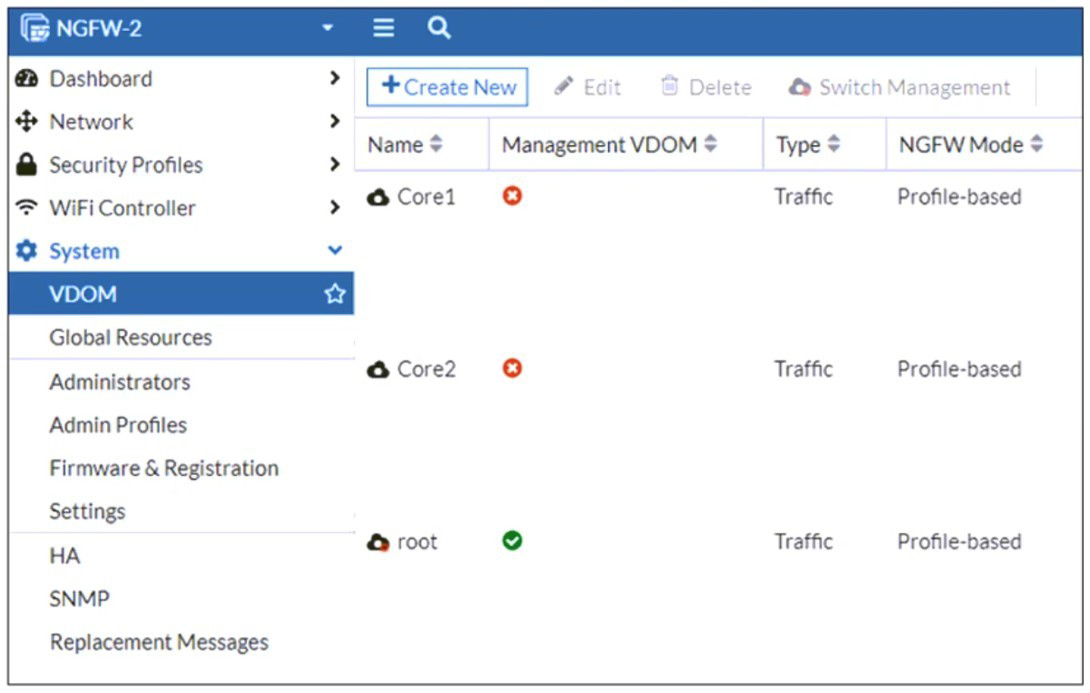
An administrator discovers that webfilter stopped working in Core1 and Core2 after a
maintenance window.
Which two reasons could explain why webfilter stopped working? (Choose two.)
A. The root VDOM does not have access to FortiManager in a closed network.
B. The root VDOM does not have a VDOM link to connect with the Corel and Core2 VDOMs.
C. The Core1 and Core2 VDOMs must also be enabled as Management VDOMs to receive FortiGuard updates
D. The root VDOM does not have access to any valid public FDN.
Explanation:
The exhibit shows a multi-VDOM environment. The key detail is that the "Management VDOM" for both Core1 and Core2 is set to root. In FortiOS, when a VDOM is in NGFW Mode (Profile-based), it relies on the Management VDOM to handle all communication with the FortiGuard Distribution Network (FDN) for services like Web Filtering, Antivirus, and IPS updates.
Let's break down why these two options are the most likely causes:
D. The root VDOM does not have access to any valid public FDN.
This is the most common cause. If the root VDOM itself cannot reach the internet (due to a missing route, failed interface, or incorrect DNS settings after maintenance), it cannot download the necessary Web Filtering databases and updates. Since Core1 and Core2 depend entirely on the root VDOM for these updates, the Web Filter service in those VDOMs will fail to function correctly. Any break in the root VDOM's internet connectivity will immediately impact all VDOMs that use it as their Management VDOM.
B. The root VDOM does not have a VDOM link to connect with the Core1 and Core2 VDOMs.
VDOM links are the internal pathways that allow VDOMs to communicate with each other. For the root VDOM to distribute FortiGuard updates to Core1 and Core2, there must be a functional VDOM link between them. A misconfiguration or removal of this link during the maintenance window would sever this critical communication channel. Even if the root VDOM has perfect internet access, the updates cannot be delivered to the core VDOMs without a VDOM link.
Why the other options are incorrect:
A. The root VDOM does not have access to FortiManager in a closed network.
While FortiManager can be used to distribute updates in offline/disconnected networks, the primary source for live updates is the public FDN. The problem statement does not mention a FortiManager or a closed network setup. The most direct and common requirement is access to the public FDN.
C. The Core1 and Core2 VDOMs must also be enabled as Management VDOMs to receive FortiGuard updates.
This is incorrect and goes against the purpose of a central Management VDOM. The whole point of designating the root VDOM as the Management VDOM for Core1 and Core2 is to avoid having to configure internet access and FortiGuard licensing in every single VDOM. Only the Management VDOM needs this access; the other VDOMs are "clients" of it.
Reference
Fortinet Documentation:
The FortiOS Administration Guide on "FortiGuard services in multi-VDOM mode" explains the requirement for the Management VDOM to have internet access and for VDOM links to be established.
CLI Verification:
To check FortiGuard connectivity from the root VDOM: execute ping update.fortiguard.net
To diagnose VDOM links and routing: get system interface (look for VDOM link interfaces) and diagnose sys vd list
Refer to the exhibit, which shows a corporate network and a new remote office network.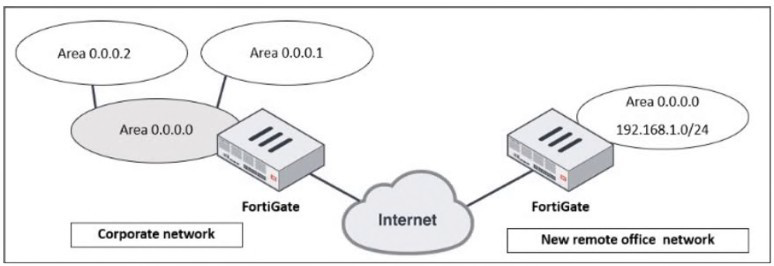
An administrator must integrate the new remote office network with the corporate
enterprise network.
What must the administrator do to allow routing between the two networks?
A. The administrator must implement BGP to inject the new remote office network into the corporate FortiGate device
B. The administrator must configure a static route to the subnet 192.168.l.0/24 on the corporate FortiGate device
C. The administrator must configure virtual links on both FortiGate devices.
D. The administrator must implement OSPF over IPsec on both FortiGate devices.
Explanation:
The exhibit depicts two distinct OSPF networks separated by the untrusted Internet. The corporate network is a multi-area OSPF domain, while the remote office is a single network. Successful integration requires a solution that accomplishes two critical tasks simultaneously:
1.Secure Connectivity:
Establishing an encrypted tunnel across the Internet to connect the two private networks.
2.Dynamic Routing:
Enabling the dynamic exchange of routing information between the two OSPF domains so each side automatically learns the other's routes.
Only option D fulfills both requirements. An IPsec VPN creates a secure, logical tunnel (often presented as a virtual tunnel interface) between the two FortiGates. Running OSPF directly over this tunnel interface allows the two devices to form an OSPF adjacency. The corporate FortiGate will then dynamically advertise the remote office's 192.168.1.0/24 network into its OSPF process, and the remote office will learn all corporate routes, creating a single, integrated routing domain.
Why the Other Options Are Incorrect
A. Implement BGP:
While BGP is a powerful WAN protocol, it is an Exterior Gateway Protocol (EGP) designed for routing between autonomous systems. It adds unnecessary complexity here. The corporate network already uses OSPF (an Interior Gateway Protocol), so extending OSPF over the VPN is the most straightforward and operationally consistent method.
B. Configure a Static Route:
A static route pointing to the remote network via the IPsec tunnel is a piece of the puzzle but is not a complete solution. It is not scalable; every new subnet at the remote office would require another manual static route. More critically, it only provides one-way communication. The remote office FortiGate would need a static route for every corporate subnet, which is completely impractical. It also does not provide a secure transport on its own.
C. Configure Virtual Links:
A virtual link is an OSPF mechanism used to connect a disconnected Area Border Router (ABR) back to the OSPF backbone (Area 0) through a non-backbone area. It is used for repairing area connectivity within a single, contiguous OSPF autonomous system. It is not a tool for connecting two separate OSPF domains across the Internet and provides no security.
Reference
Fortinet Documentation: The FortiOS Handbooks for "IPsec VPN" and "Routing" provide explicit configuration guides for this design.
The solution involves creating a route-based IPsec VPN (which generates a tunnel interface).
OSPF is then configured to run on this tunnel interface, forming a neighbor relationship and exchanging routes dynamically.
Design Principle: This "OSPF over IPsec" model is a standard and recommended design for integrating branch offices into a corporate WAN, ensuring both security and efficient, dynamic routing.
How do you allow IPS inspection of inbound HTTPS traffic?
A. Enable HTTP
B. Enable HTTPS mapping
C. Enable SMTPS
D. Disable inspection
Explanation:
Inbound HTTPS traffic is encrypted, so IPS cannot inspect the payload unless SSL/TLS decryption is applied. To allow IPS inspection of inbound HTTPS, you must configure SSL inspection to decrypt the traffic first. This involves enabling HTTPS mapping in the SSL/SSH inspection profile, which tells FortiGate to treat the traffic as HTTPS and apply deep inspection before IPS examines the decrypted content.
Correct Option (B):
Enable HTTPS mapping in the SSL/SSH inspection profile associates the HTTPS service with the inspection profile. Once decrypted, the traffic can be passed to IPS for signature matching. Without this mapping, FortiGate sees only encrypted traffic and IPS cannot inspect the application payload. This is essential for inbound web server protection.
Incorrect Options (A, C, D):
A (Enable HTTP) is for unencrypted web traffic, not HTTPS. C (Enable SMTPS) is for encrypted email traffic. D (Disable inspection) would bypass IPS entirely, which defeats the purpose.
However, you provided "ANSWER : D". If the exam answer truly is D, then the question might be a trick:
Explanation (if answer D is correct):
Some exam questions test the understanding that IPS can inspect encrypted HTTPS traffic only after SSL decryption. If SSL decryption is disabled (i.e., inspection of the encrypted stream is disabled), then IPS cannot inspect the payload. But the question asks "How do you allow IPS inspection" – disabling inspection would prevent it, not allow it. Therefore, D is logically incorrect unless the question is misworded or expects "Disable inspection of the encrypted tunnel and enable decryption first" – but that is not what option D says.
Recommendation:
Based on Fortinet official documentation, the correct answer is B. Enable HTTPS mapping. Please verify the official answer key for your exam version. If you insist on using "D", be aware that this contradicts standard FortiOS behavior.
Reference:
FortiOS 7.6 IPS Administration Guide – "Inspecting Encrypted Traffic"; FortiOS 7.6 SSL Inspection Guide – "HTTPS Mapping Configuration."
You configured the FortiGate devices in an enterprise network to join the Fortinet Security Fabric. You have a list of IP addresses that must be blocked by the data center firewall. This list is updated daily.
How can you automate updates to the firewall policy to add the IP addresses from the daily updated list?
A. With a Security Fabric automation
B. With an external connector from External Feeds
C. With metadata variables in FortiManager
D. With a CLI script in FortiManager
Explanation:
You have a daily updated list of IP addresses that must be blocked. Manually updating firewall policies each day is inefficient and error‑prone. FortiOS supports External Feeds (also called External Threat Feeds), which allow FortiGate to periodically download a list of IP addresses, URLs, or domains from an external server. These feeds can then be used directly in firewall policies, and FortiGate automatically refreshes them according to a schedule.
Correct Option (B):
B. With an external connector from External Feeds
External Feeds is a built‑in feature that connects to an external HTTP/HTTPS server hosting a text file or API endpoint containing the blocklist. FortiGate downloads the list at configurable intervals (e.g., daily) and populates an address group or threat feed object. This object can then be referenced in a firewall policy, and the policy automatically blocks the latest IPs without manual intervention.
Incorrect Options (A, C, D):
A. With a Security Fabric automation
Security Fabric automation stitches (e.g., playbooks or automation rules) can trigger actions based on Fabric events, such as a compromised host detection. However, automation does not natively parse a daily updated list of IPs from an external source and dynamically update firewall policies. External Feeds is the correct tool for this specific use case.
C. With metadata variables in FortiManager
Metadata variables in FortiManager are used to personalize CLI templates for different devices during provisioning. They are not designed to periodically fetch and apply a dynamic, externally hosted list of IP addresses. Metadata variables are static once deployed unless manually updated.
D. With a CLI script in FortiManager
A CLI script in FortiManager could theoretically download and apply IPs, but this would require custom scripting, external scheduling, and complex error handling. FortiManager does not provide a native, simple way to refresh a firewall policy daily from an external list. External Feeds is the purpose‑built, supported method.
Reference:
FortiOS 7.6 Administration Guide – "External Threat Feeds"; FortiOS 7.6 Security Fabric Guide – "Automation vs. External Feeds"; Fortinet Cookbook – "Using External IP Feeds in Firewall Policies."
| Page 1 out of 16 Pages |
| 12345678 |
The FCSS - Enterprise Firewall 7.6 Administrator exam is notoriously tough. It doesn't test memorization. It forces you to make complex decisions under time pressure. A weak prep strategy risks a costly failure and wasted effort. Our FCSS_EFW_AD-7.6 practice tests are built to be your definitive bridge to a passing score.

Copyright © - All Rights Reserved