
Last Updated On : 12-Oct-2026
Total 112 Questions
A company's guest internet policy, operating in proxy mode, blocks access to Artificial
Intelligence Technology sites using FortiGuard. However, a guest user accessed a page in
this category using port 8443.
Which configuration changes are required for FortiGate to analyze HTTPS traffic on
nonstandard ports like 8443 when full SSL inspection is active in the guest policy?
A. Add a URL wildcard domain to the website CA certificate and use it in the SSL/SSH Inspection Profile.
B. In the Protocol Port Mapping section of the SSL/SSH Inspection Profile, enter 443, 8443 to analyze both standard (443) and non-standard (8443) HTTPS ports.
C. To analyze nonstandard ports in web filter profiles, use TLSv1.3 in the SSL/SSH Inspection Profile.
D. Administrators can block traffic on nonstandard ports by enabling the SNI check in the SSL/SSH Inspection Profile.
Explanation:
To inspect HTTPS traffic on nonstandard ports like 8443, FortiGate must be explicitly configured to treat those ports as SSL traffic. By default, FortiGate only inspects standard SSL ports (e.g., 443, 465, 993). When operating in proxy mode with full SSL inspection, the firewall relies on the Protocol Port Mapping section of the SSL/SSH inspection profile to determine which ports should be decrypted and analyzed.
Adding port 8443 to this section ensures FortiGate applies deep inspection to traffic on that port, enabling category-based filtering (e.g., blocking Artificial Intelligence Technology sites via FortiGuard). Without this configuration, traffic on port 8443 bypasses SSL inspection and web filtering, allowing users to access blocked content.
Why other options are incorrect:
A. Add a URL wildcard domain to the website CA certificate… ❌
Irrelevant. Certificates are used for trust and re-signing, not for port-based inspection. Wildcard domains in certificates do not affect port mapping or traffic analysis.
C. Use TLSv1.3 in the SSL/SSH Inspection Profile… ❌
Misleading. TLS version selection affects protocol negotiation, not port-based inspection. TLSv1.3 does not enable inspection on nonstandard ports by itself.
D. Enable SNI check… ❌ Incorrect.
SNI (Server Name Indication) helps identify the requested domain during SSL handshake but does not control port-based inspection. It’s useful for blocking based on domain, not for enabling inspection on ports like 8443.
Reference
Fortinet Technical Tip:
Protocol Port Mapping in SSL/SSH deep inspection
Fortinet KB:
Configuring FortiGate to inspect HTTPS traffic over nonstandard ports
🔍 Summary:
To inspect HTTPS traffic on port 8443, explicitly add it to the Protocol Port Mapping in the SSL/SSH inspection profile. This enables full inspection and FortiGuard filtering. Correct answer: B.
How will configuring set tcp-mss-sender and set tcp-mss-receiver in a firewall policy affect the size and handling of TCP packets in the network?
A. The maximum segment size permitted in the firewall policy determines whether TCP packets are allowed or denied.
B. Applying commands in a firewall policy determines the largest payload a device can handle in a single TCP segment.
C. To analyze nonstandard ports in web filter profiles, use TLSv1.3 in the SSL/SSH Inspection Profile.
D. Administrators can block traffic on nonstandard ports by enabling the SNI check in the SSL/SSH Inspection Profile.
Explanation:
The tcp-mss-sender and tcp-mss-receiver commands are used to enforce a Maximum Segment Size (MSS) for TCP connections traversing the firewall. The MSS defines the maximum amount of payload data (excluding TCP/IP headers) in a single packet.
tcp-mss-sender limits the MSS advertised in the TCP SYN packet from the sender (client).
tcp-mss-receiver limits the MSS advertised in the TCP SYN-ACK packet from the receiver (server).
This ensures both ends of the connection use packet sizes that can safely traverse the network path without requiring fragmentation, which is especially critical for VPN tunnels where the overhead reduces the effective MTU.
Why other options are incorrect:
A. Incorrect.
These commands clamp (modify) the MSS value in TCP handshakes; they do not allow or deny packets based on size. They are a MTU path adjustment tool, not an access control rule.
C. Incorrect.
This option is unrelated to TCP MSS. It incorrectly discusses TLS version settings for web filtering on nonstandard ports, which is a different feature.
D. Incorrect.
This option discusses Server Name Indication (SNI) checking in SSL inspection, which is a method for filtering HTTPS traffic by domain name, not for controlling TCP packet size.
Reference:
Fortinet Documentation:
FortiOS CLI Reference for config firewall policy. The description for tcp-mss-sender and tcp-mss-receiver states they are used to "set maximum TCP segment size" to "prevent TCP fragmentation." This directly corresponds to controlling the largest payload in a TCP segment.
Why does the ISDB block layers 3 and 4 of the OSI model when applying content filtering? (Choose two.)
A. A. FortiGate has a predefined list of all IPs and ports for specific applications downloaded from FortiGuard.
B. The ISDB blocks the IP addresses and ports of an application predefined by FortiGuard.
C. The ISDB works in proxy mode, allowing the analysis of packets in layers 3 and 4 of the OSI model
D. The ISDB limits access by URL and domain
Explanation:
The Internet Service Database (ISDB) is a dynamic, FortiGuard-maintained list of well-known public applications and services (e.g., Microsoft 365, Zoom, Google Cloud). It operates primarily at Layer 3 (IP addresses) and Layer 4 (Protocol/Ports).
A. This is correct.
The ISDB is a predefined database downloaded from FortiGuard. It contains the current IP address ranges and port numbers associated with specific internet services.
B. This is correct.
When you create a firewall rule using an Internet Service object, the FortiGate blocks or allows traffic based on the destination IP addresses and ports listed for that service in the database. This is a Layer 3/4 operation.
Why other options are incorrect:
C. This is incorrect.
The ISDB itself does not "work in proxy mode." It is a matching database used in policies. The policy's inspection mode (proxy or flow) is separate. ISDB matching happens before deep content inspection.
D. This is incorrect.
Blocking by URL and domain is a function of DNS Filtering or Web Filtering operating at Layer 7 (Application layer), not the primary function of the ISDB at Layers 3/4.
Reference:
Fortinet Documentation:
FortiOS Administration Guide - Internet Services. It states: "Internet Services are based on IP addresses and ports, and are provided by FortiGuard." This confirms the ISDB uses predefined Layer 3 (IP) and Layer 4 (port) information for filtering.
A FortiGate device with UTM profiles is reaching the resource limits, and the administrator
expects the traffic in the enterprise network to increase.
The administrator has received an additional FortiGate of the same model.
Which two protocols should the administrator use to integrate the additional FortiGate
device into this enterprise network? (Choose two.)
A. FGSP with external load balancers
B. FGCP in active-active mode and with switches
C. FGCP in active-passive mode and with VDOM disabled
D. VRRP with switches
Explanation:
The goal is to increase capacity to handle growing traffic by integrating a second identical FortiGate. The solution must allow both devices to actively process traffic (load sharing), not just provide redundancy.
B. FGCP in active-active mode and with switches:
This is the primary solution. FortiGate Clustering Protocol (FGCP) in active-active (A-A) mode allows both units to form a cluster and actively process traffic. Using switches with a Transparent Mode HA setup or a Virtual Cluster (where each unit uses its own IPs) enables true load distribution. It shares sessions and synchronizes UTM caches, making both units work as one logical device with increased throughput.
A. FGSP with external load balancers:
FortiGate Session Life Support Protocol (FGSP) is designed for standalone (not traditional HA) clustering, often used over longer distances. It synchronizes sessions but does not share a virtual IP. To load balance traffic across both units, an external load balancer (physical or logical) is required to distribute connections to each FortiGate's individual IPs. This also achieves active-active throughput scaling.
Why the other options are incorrect:
C. FGCP in active-passive mode:
This only provides failover redundancy. The passive unit does not process traffic, so it does not increase capacity or solve the "reaching resource limits" problem.
D. VRRP with switches:
VRRP is a standard redundancy protocol for default gateways. It is inherently active-passive; only the master forwards traffic. Like option C, it does not scale performance.
Reference:
Fortinet Documentation:
FortiOS HA Guide – "Active-active HA" explains how FGCP A-A distributes traffic using equal-cost multi-path (ECMP) routing or a virtual cluster.
FortiOS HA Guide – "FGSP (standalone cluster)" explains that FGSP requires external load balancing for traffic distribution. Both methods enable horizontal scaling to increase total UTM throughput.
Refer to the exhibit, which contains a partial VPN configuration.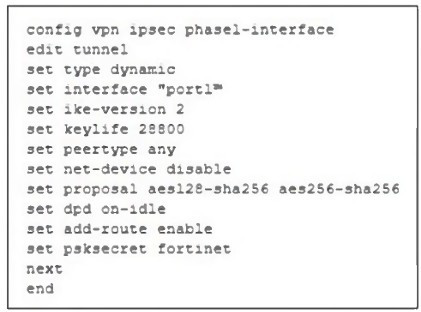
What can you conclude from this VPN IPsec phase 1 configuration?
A. This configuration is the best for networks with regular traffic intervals, providing a balance between connectivity assurance and resource utilization.
B. Peer IDs are unencrypted and exposed, creating a security risk.
C. FortiGate will not add a route to its routing or forwarding information base when the dynamic tunnel is negotiated.
D. A separate interface is created for each dial-up tunnel, which can be slower and more resource intensive, especially in large networks.
Explanation:
The key to this question is recognizing the specific VPN settings in the configuration snippet. The most relevant setting is:
set keepalive 60 auto-negotiate
This command configures Dead Peer Detection (DPD) to send keepalive packets every 60 seconds and to automatically renegotiate if the peer is unresponsive. This is crucial for "networks with regular traffic intervals" because:
Balance: It ensures the tunnel stays alive even during idle periods (connectivity assurance) without the overhead of constant, aggressive rekeying (resource utilization).
Optimal Use: For scenarios where traffic is intermittent, this setup maintains tunnel readiness while efficiently managing FortiGate CPU and bandwidth resources used for DPD.
Why other options are incorrect:
B. Peer IDs are unencrypted and exposed, creating a security risk.
Incorrect. Peer IDs are exchanged during Phase 1 negotiation, which is encrypted. The configuration does not expose them in plaintext.
C. FortiGate will not add a route to its routing or forwarding information base...
Incorrect. This describes the add-route disable option, which is not shown or implied in this configuration snippet.
D. A separate interface is created for each dial-up tunnel...
Incorrect. This describes a behavior of Dial-Up IPsec configurations (using mode-cfg and client addressing). The provided configuration does not indicate dial-up settings (set type is not shown as dynamic), making this conclusion invalid.
Reference:
Fortinet Documentation:
FortiOS IPsec VPN Guide - Configuring Phase 1 Settings. The section on Dead Peer Detection (DPD) explains that the keepalive and auto-negotiate settings are used to maintain connectivity for on-demand tunnels, balancing availability with resource efficiency.
An administrator is designing an ADVPN network for a large enterprise with spokes that
have varying numbers of internet links. They want to avoid a high number of routes and
peer connections at the hub.
Which method should be used to simplify routing and peer management?
A. Deploy a full-mesh VPN topology to eliminate hub dependency.
B. Implement static routing over IPsec interfaces for each spoke.
C. Use a dynamic routing protocol using loopback interfaces to streamline peers and routes.
D. Establish a traditional hub-and-spoke VPN topology with policy routes.
Explanation:
In a large, multi-hub ADVPN network with spokes using multiple internet links, scaling routing and peer management is critical. The recommended best practice is implementing a dynamic routing protocol (BGP) with loopback interfaces.
Each spoke advertises only its loopback IP (/32 route) into ADVPN, not all internal subnets. This dramatically reduces the routing table size on all devices. The loopback serves as a stable, logical endpoint for BGP peering, simplifying management regardless of the number of physical WAN links. BGP dynamically manages paths and failover, while ADVPN uses these loopback routes to build efficient spoke-to-spoke shortcuts.
Why other options are incorrect:
A. Full-mesh VPN:
Creates an excessive number of tunnels (n*(n-1)/2), massively increasing peer connections—the opposite of simplification.
B. Static routing:
Does not scale, requires manual updates for each network change, and cannot dynamically fail over between multiple links.
D. Traditional hub-and-spoke:
Creates a single point of failure and does not utilize ADVPN's on-demand spoke-to-spoke tunnels to offload hub traffic and reduce latency.
Reference:
Fortinet Design Guide – SD-WAN and IPsec VPN, which outlines using BGP with loopback interfaces for scalable, resilient ADVPN deployments, summarizing routes to control table size and simplify peer management.
Refer to the exhibit, which shows the ADVPN IPsec interface representing the VPN IPsec
phase 1 from Hub A to Spoke 1 and Spoke 2, and from Hub to Spoke 3 and Spoke 4.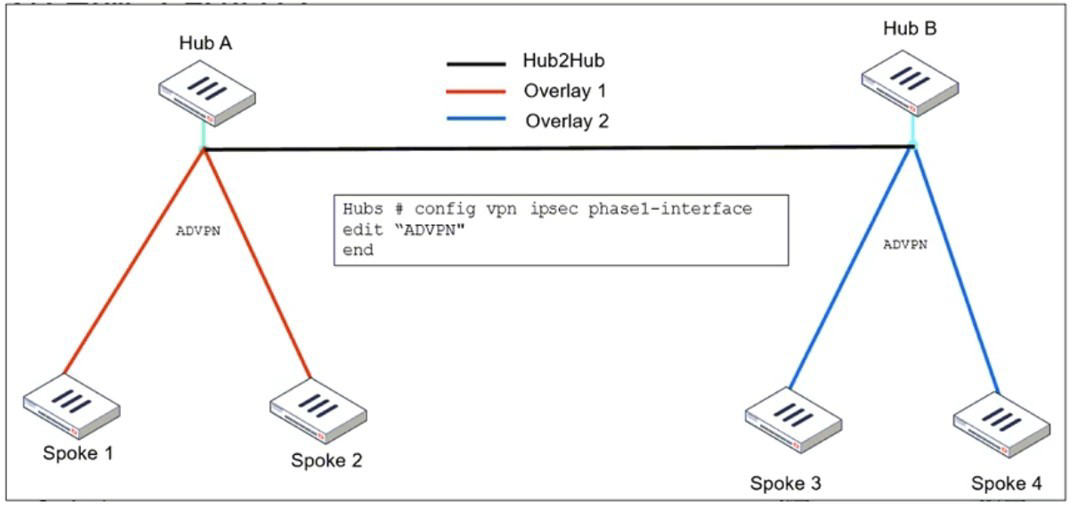
An administrator must configure an ADVPN using IBGP and EBGP to connect overlay
network 1 with 2.
What must the administrator configure in the phase 1 VPN IPsec configuration of the
ADVPN tunnels?
A. set auto-discovery-sender enable and set network-id x
B. set auto-discovery-forwarder enable and set remote-as x
C. set auto-discovery-crossover enable and set enforce-multihop enable
D. set auto-discovery-receiver enable and set npu-offload enable
Explanation:
The exhibit shows a dual-hub ADVPN topology where two separate hub clusters (Hub A and Hub B) are connected via a Hub2Hub tunnel, forming two distinct overlay networks (Overlay 1 and Overlay 2). Spokes are connected to their respective hubs (e.g., Spokes 1-2 to Hub A, Spokes 3-4 to Hub B).
The requirement is to connect these two overlay networks using BGP. This means spokes in Overlay 1 must be able to establish dynamic shortcuts to spokes in Overlay 2, and vice-versa. This is achieved through ADVPN Crossover.
set auto-discovery-crossover enable is the key command. It allows ADVPN shortcut negotiation to cross between different overlay networks (different network-id values). This enables a spoke in Overlay 1 to dynamically build a direct tunnel to a spoke in Overlay 2.
set enforce-multihop enable is required because the BGP peers (the spokes in different overlays) are not directly connected at the IPsec tunnel level initially. Their BGP session will traverse the hub-to-hub link, making it a multi-hop BGP session. This command ensures the IPsec configuration supports such multi-hop routing.
Why the other options are incorrect:
A. set auto-discovery-sender enable and set network-id x:
auto-discovery-sender is used on spokes to initiate shortcut requests. network-id defines a single overlay. Using the same network-id on both overlays would merge them into one, not connect two distinct ones.
B. set auto-discovery-forwarder enable and set remote-as x:
auto-discovery-forwarder is for hubs to forward shortcut requests. remote-as is a BGP neighbor parameter, not a Phase 1 IPsec setting.
D. set auto-discovery-receiver enable and set npu-offload enable:
auto-discovery-receiver allows a device to accept shortcut requests. npu-offload is for hardware acceleration. Neither is specific to the task of interconnecting two separate overlays.
Reference:
Fortinet Documentation:
FortiOS VPN Guide - ADVPN Configuration. The "Crossover between overlays" section explicitly describes using set auto-discovery-crossover enable on the hub-to-hub and hub-to-spoke tunnels to allow shortcuts between different overlay networks (different network-id values). The enforce-multihop setting is covered in the context of BGP over IPsec for such designs.
| Page 5 out of 16 Pages |
| 12345678 |
| FCSS_EFW_AD-7.6 Practice Test Home |
The FCSS - Enterprise Firewall 7.6 Administrator exam is notoriously tough. It doesn't test memorization. It forces you to make complex decisions under time pressure. A weak prep strategy risks a costly failure and wasted effort. Our FCSS_EFW_AD-7.6 practice tests are built to be your definitive bridge to a passing score.

Copyright © - All Rights Reserved