
Last Updated On : 12-Oct-2026
Total 62 Questions
The difference between a near pass and a confident pass isn't just knowing the material, it's mastering the Fortinet FCSS Security Operations 7.4 Analyst exam experience. Our Fortinet FCSS_SOC_AN-7.4 practice test is engineered to close the gap between your current knowledge and the 2026 exam's demands. With every question, you receive detailed, expert verified explanations that break down not just the correct answer, but also the reasoning behind every incorrect option.
Don't just study. Practice FCSS_SOC_AN-7.4 with purpose. Start your journey to a first-time pass today.
By replicating the exact style, complexity, and format of the real Fortinet FCSS Security Operations 7.4 Analyst exam questions, we ensure you walk into the exam with complete confidence.
Refer to the exhibits.
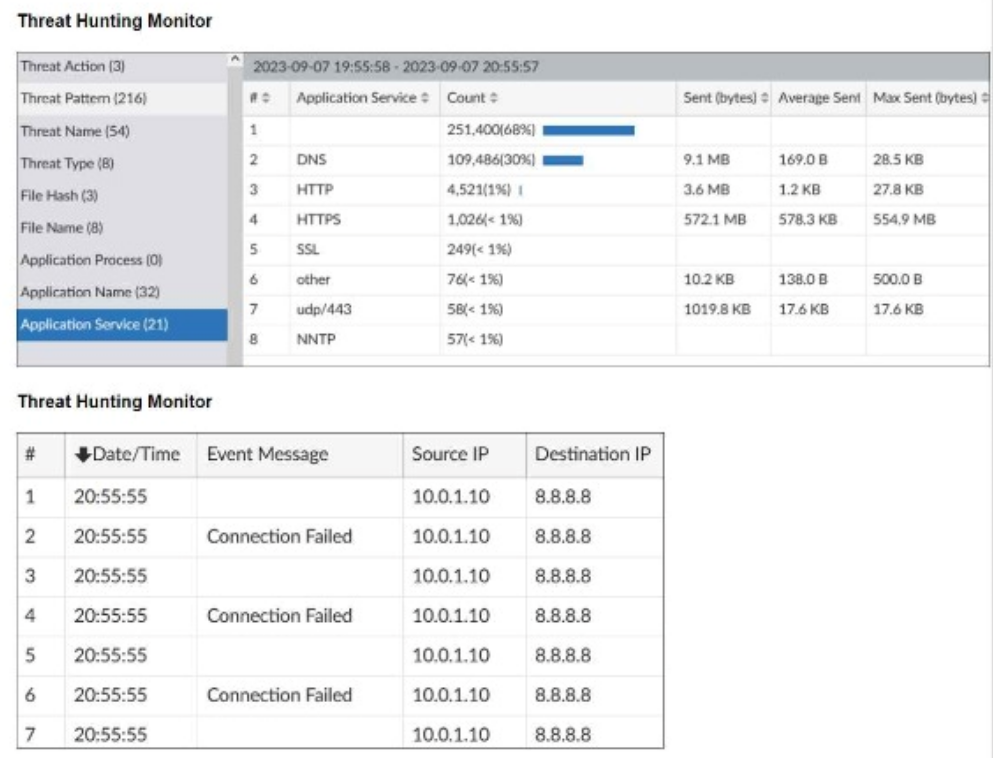
What can you conclude from analyzing the data using the threat hunting module?
A. Spearphishing is being used to elicit sensitive information.
B. DNS tunneling is being used to extract confidential data from the local network.
C. Reconnaissance is being used to gather victim identityinformation from the mail server.
D. FTP is being used as command-and-control (C&C) technique to mine for data.
Explanation:
The Threat Hunting Monitor data shows:
Top Application Service by Count:
DNS is the second highest (109,486 sessions, 30% of total), which is unusually high for normal network traffic.
The volume of DNS traffic (9.1 MB total) is also suspiciously large for typical DNS queries, which are normally small (<1 KB per query).
Event Details:
Repeated "Connection Failed" messages from the same source IP (10.0.1.10) to destination IP (8.8.8.8, a public DNS server).
High frequency of connections in a short time window (multiple failures at the same second) suggests automated, rapid DNS queries.
Indicators of DNS Tunneling:
High DNS session count with substantial data volume (megabytes) aligns with data exfiltration via DNS tunneling.
Connection failures may indicate malformed or oversized DNS packets being rejected by the DNS server, a common side‑effect of tunneling attempts.
This pattern matches the MITRE ATT&CK technique T1071.004 – DNS and T1048 – Exfiltration Over Alternative Protocol, where DNS is abused to covertly extract data.
Why the other options are incorrect:
A. Spearphishing
– There is no evidence of email activity (SMTP, phishing links, user interaction) in the logs. The traffic shown is DNS and HTTP/S, not email‑based.
C. Reconnaissance gathering victim identity from mail server
– No mail‑server protocols (SMTP, IMAP) appear in the top services. The traffic is DNS/HTTP/S, not mail‑server interaction.
D. FTP as C&C
– FTP does not appear in the top application services list. The main services are DNS, HTTP, HTTPS, SSL – not FTP.
Reference:
FortiAnalyzer’s Threat Hunting module helps identify anomalies like abnormally high DNS volume and frequency, which are classic signs of DNS tunneling for data exfiltration. The FCSS_SOC_AN‑7.4 curriculum includes analyzing such patterns for evidence of covert C&C or data theft.
Refer to the exhibits.
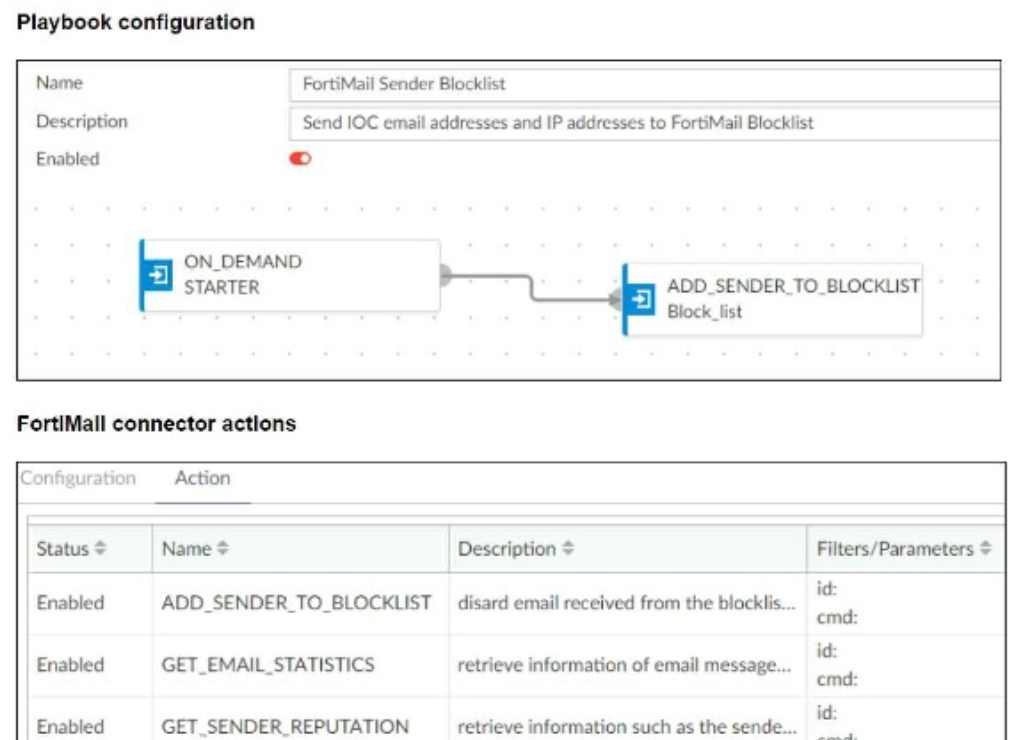
The FortiMail Sender Blocklist playbook is configured to take manual input and add those
entries to the FortiMail abc. com domain-level block list. The playbook is configured to use
a FortiMail connector and the ADD_SENDER_TO_BLOCKLIST action.
Why is the FortiMail Sender Blocklist playbook execution failing7
A. You must use the GET_EMAIL_STATISTICS action first to gather information about email messages.
B. FortiMail is expecting a fully qualified domain name (FQDN).
C. The client-side browser does not trust the FortiAnalzyer self-signed certificate.
D. The connector credentials are incorrect
Explanation:
The FortiMail Sender Blocklist playbook uses the ADD_SENDER_TO_BLOCKLIST action via a FortiMail connector. If the playbook fails to execute this action, the most common root cause is authentication failure — meaning the connector credentials (username/password or API token) are invalid, expired, or misconfigured.
This is especially true when:
The connector status is enabled, but the action fails silently or with an error.
Other actions (like GET_EMAIL_STATISTICS or GET_SENDER_REPUTATION) also fail or return empty.
The playbook is correctly structured and manually triggered, but no change occurs on FortiMail.
Why the other options are incorrect
A. GET_EMAIL_STATISTICS first:
Not required. The ADD_SENDER_TO_BLOCKLIST action can operate independently with manual input. This is a distractor.
B. FQDN expectation:
FortiMail accepts both email addresses and domains. While formatting matters, it would cause a validation error — not a complete playbook failure.
C. Browser trust issue:
This affects UI access, not playbook execution. Playbooks run server-side and use connector credentials, not browser trust chains.
Reference
Fortinet Community –
Troubleshooting Playbook Execution Failures
When configuring a FortiAnalyzer to act as a collector device, which two steps must you perform?(Choose two.)
A. Enable log compression.
B. Configure log forwarding to a FortiAnalyzer in analyzer mode.
C. Configure the data policy to focus on archiving.
D. Configure Fabric authorization on the connecting interface.
Explanation
Correct Options: ✅ B, D
B. Configure log forwarding to a FortiAnalyzer in analyzer mode. ✅
When FortiAnalyzer is set to Collector mode, you must explicitly configure log forwarding so that the Collector sends the logs to another FortiAnalyzer running in Analyzer mode. This involves setting the remote server type to “FortiAnalyzer,” specifying the Analyzer’s IP, and selecting the device whose logs will be forwarded. Without this, the Collector will only store logs locally and won’t forward them for analysis.
D. Configure Fabric authorization on the connecting interface. ✅
For secure and authenticated log forwarding (especially when using multiple FortiAnalyzer devices in a network), enabling collector authorization — often referred to as “fabric authorization” — ensures the Collector is authorized by the Analyzer before it sends logs. This step helps prevent unauthorized data forwarding and is required when collectors are expected to forward logs to the Analyzer.
Incorrect Options: ❌ A, C
A. Enable log compression. ❌
While log compression (or archiving settings) can be useful for storage management on a Collector, it is not a mandatory step when configuring FortiAnalyzer as a Collector. The official configuration guide does not list log compression as a required action for Collector mode.
C. Configure the data policy to focus on archiving. ❌
Although storage policy (i.e. how logs are stored) does need to be configured when in Collector mode, the requirement is to configure log storage policy — typically allocating most disk space to archive logs. But there is no requirement that you must “focus on archiving” specifically as a separate step beyond setting storage policy. The critical setup steps remain operation mode, storage policy, and log forwarding to an Analyzer.
Reference:
FortiAnalyzer Administration Guide — “Configuring the Collector” / “Log Forwarding” sections.
Which statement describes automation stitch integration between FortiGate and FortiAnalyzer?
A. An event handler on FortiAnalyzer executes an automation stitch when an event is created.
B. An automation stitch is configured on FortiAnalyzer and mapped to FortiGate using the FortiOS connector.
C. An event handler on FortiAnalyzer is configured to send a notification to FortiGate to trigger an automation stitch.
D. A security profile on FortiGate triggers a violation and FortiGate sends a webhook call to FortiAnalyzer.
Explanation:
Automation stitches in FortiAnalyzer are automated response workflows that can be triggered by event handlers. When a log matches a rule in an event handler, FortiAnalyzer generates an event. That event can then be configured to trigger an automation stitch, which performs a series of actions—such as executing a CLI script on a FortiGate—directly from FortiAnalyzer. This integration enables automated, real-time responses (like blocking an IP or quarantining a device) based on detected threats without manual intervention.
Why the other options are incorrect:
B. Automation stitches are configured and executed within FortiAnalyzer;
they are not "mapped to FortiGate using a FortiOS connector" as a configuration step. The stitch may target FortiGate via a connector action, but the stitch itself resides in FortiAnalyzer.
C. Event handlers do not send notifications to FortiGate to trigger stitches.
Instead, the event handler triggers the stitch directly within FortiAnalyzer, which then may contact FortiGate via a connector (e.g., the FortiOS CLI connector) to execute commands.
D. This describes a FortiGate-initiated webhook to FortiAnalyzer, which is a different form of automation (like FortiGate SOAR integration).
Automation stitches are FortiAnalyzer-driven workflows triggered by events processed within FortiAnalyzer, not by FortiGate security profile violations.
Reference:
FortiAnalyzer’s automation stitch feature is designed to link event handlers to response actions. The FCSS_SOC_AN-7.4 curriculum includes configuring stitches that run CLI commands on FortiGate when specific events (e.g., malware detection) are generated by FortiAnalyzer event handlers.
Which two types of variables can you use in playbook tasks? (Choose two.)
A. input
B. Output
C. Create
D. Trigger
Explanation
In FortiAnalyzer's automation framework, variables allow playbooks to handle dynamic data. Input variables carry external data into a playbook for tasks to use, while output variables store the results from a task so they can be used in later steps or trigger further actions. These are the two primary variable types that interact directly with task execution.
✅ Correct Option 1: A. Input
This statement is true. Input variables are the data passed into a playbook at the start of its execution. They provide the initial information or conditions that the playbook's tasks will work with. For example, an IP address or a log severity level could be defined as input variables.
✅ Correct Option 2: B. Output
This statement is true. Output variables are generated when a playbook task runs successfully. They hold the results or data produced by that task, which can then be referenced by subsequent tasks within the same playbook.
❌ Incorrect Option 1: C. Create
This statement is false. While you can create or define variables within a playbook, "Create" is not a standard, distinct type of variable in the FortiAnalyzer automation context. Variables are generally defined as either input to the playbook or output from its tasks.
❌ Incorrect Option 2: D. Trigger
This statement is false. A trigger is a condition or event that initiates the execution of a playbook, not a type of variable used within tasks. While triggers often pass data into the playbook (which become input variables), "Trigger" itself is not a variable category.
📚 Reference
This explanation is consistent with the fundamental automation concepts in FortiAnalyzer and general playbook design principles. For definitive details, please consult the FortiAnalyzer Administration Guide section on "Automation" and "Using Variables in Playbooks."
Refer to the exhibit.
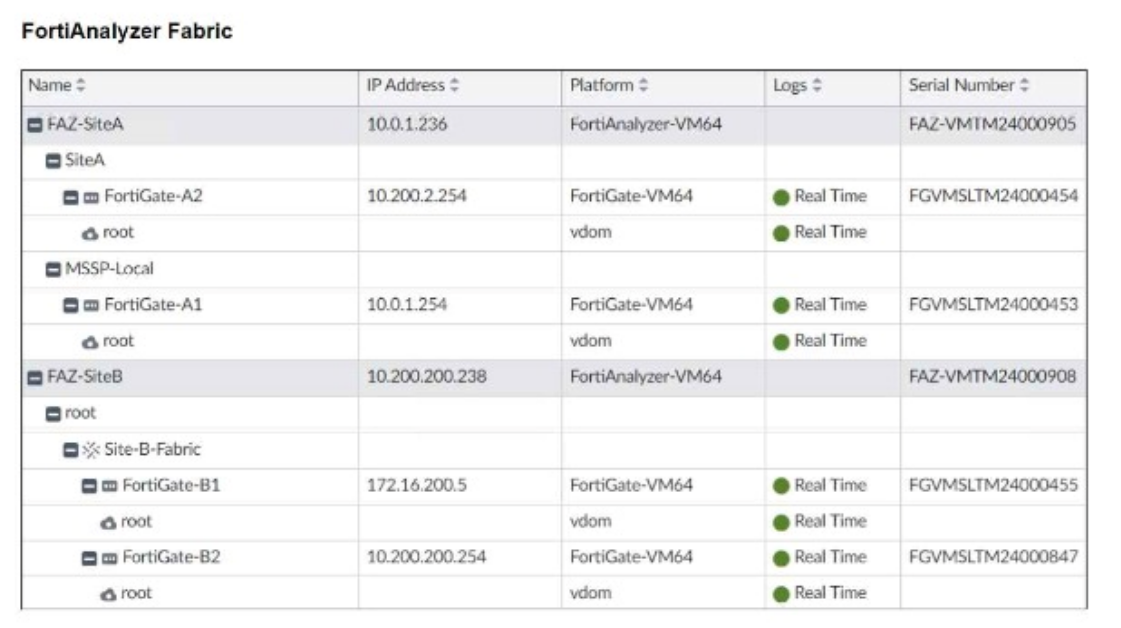
Assume that all devices in the FortiAnalyzer Fabric are shown in the image.
Which two statements about the FortiAnalyzer Fabric deployment are true? (Choose two.)
A. FortiGate-B1 and FortiGate-B2 are in a Security Fabric.
B. There is no collector in the topology.
C. All FortiGate devices are directly registered to the supervisor.
D. FAZ-SiteA has two ADOMs enabled.
Explanation:
A. FortiGate-B1 and FortiGate-B2 are in a Security Fabric.
Both devices are listed under the same parent group "Site-B-Fabric" in the FortiAnalyzer device tree, which indicates they are part of a Fortinet Security Fabric group managed collectively. This grouping is used for fabric-wide visibility and correlation.
D. FAZ-SiteA has two ADOMs enabled.
Under FAZ-SiteA, there are two distinct device groups: "SiteA" and "MSSP-Local". Each of these groups represents a separate ADOM (Administrative Domain). The presence of these two top-level containers under a single FortiAnalyzer indicates multi-ADOM mode is enabled and configured.
Why the other options are incorrect:
B. There is no collector in the topology.
Incorrect. Both FAZ-SiteA and FAZ-SiteB are FortiAnalyzer-VM64 devices shown in the tree. In a Fabric setup, one FortiAnalyzer typically acts as the Supervisor and others can be Collectors. The topology explicitly includes two FortiAnalyzer devices, meaning at least one is acting as a collector or peer.
C. All FortiGate devices are directly registered to the supervisor.
Incorrect. The tree shows FortiGate-A1 and FortiGate-A2 registered under FAZ-SiteA, while FortiGate-B1 and FortiGate-B2 are registered under FAZ-SiteB. This indicates a distributed FortiAnalyzer Fabric where devices are registered to their local FortiAnalyzer (collector), not necessarily directly to a single central supervisor.
Reference:
FortiAnalyzer Fabric architecture supports Supervisor-Collector hierarchies and multi-ADOM management. The FCSS_SOC_AN-7.4 curriculum covers Fabric topologies where devices register to local collectors, and ADOMs are used to segment management (e.g., for different departments or customers in an MSSP). The device tree structure in the exhibit clearly shows these relationships.
What is the primary purpose of a Security Information and Event Management (SIEM) system in a SOC?
A. To protect physical hardware from cyber threats
B. To provide visibility into security events through centralized log collection
C. To automate incident response workflows
D. To configure network firewalls and VPNs
Explanation
A Security Information and Event Management (SIEM) system is the central nervous system of a modern Security Operations Center (SOC). Its foundational job is to aggregate, normalize, and analyze log data from virtually every system and device across an organization's network—such as firewalls, servers, and endpoints—into a single, searchable platform. This centralized view is essential for detecting anomalies, investigating incidents, and maintaining security compliance.
✅ Correct Option: B. To provide visibility into security events through centralized log collection.
This is the primary purpose of a SIEM. All other advanced functions of a SIEM, like correlation, alerting, and reporting, depend entirely on this first step of collecting and centralizing log data from disparate sources. Without this centralized visibility, security teams would be blind to threats spread across different systems.
❌ Incorrect Options
A. To protect physical hardware from cyber threats:
SIEMs are software platforms focused on logical data analysis, not physical security. Protecting physical hardware is the role of other controls like physical access security, environmental monitoring, and endpoint protection software.
C. To automate incident response workflows:
While many modern SIEMs (including FortiAnalyzer) include or integrate with Security Orchestration, Automation, and Response (SOAR) tools for automation, this is an advanced capability built on top of the SIEM's core function. The primary purpose is first to collect and present the data that informs those automated responses.
D. To configure network firewalls and VPNs:
SIEMs are monitoring and analysis tools, not configuration management platforms. Their role is to collect logs from firewalls and VPNs to see what is happening. The actual configuration of those devices is done through their dedicated management interfaces (like FortiManager for FortiGate devices).
📚 Reference
This definition aligns with the fundamental principles of SIEM technology as described in general cybersecurity frameworks and the product descriptions for systems like FortiAnalyzer, Fortinet's SIEM solution. Fortinet's documentation consistently highlights "centralized log management" and "visibility" as the starting point for its SOC capabilities.
| Page 1 out of 9 Pages |
| 12345 |
The Fortinet FCSS Security Operations 7.4 Analyst exam is notoriously tough. It doesn't test memorization. It forces you to make complex decisions under time pressure. A weak prep strategy risks a costly failure and wasted effort. Our FCSS_SOC_AN-7.4 practice tests are built to be your definitive bridge to a passing score.

Copyright © - All Rights Reserved