
Last Updated On : 20-Sep-2026
Total 95 Questions
The difference between a near pass and a confident pass isn't just knowing the material, it's mastering the Fortinet NSE 6 - SD-WAN 7.6 Enterprise Administrator exam experience. Our Fortinet NSE6_SDW_AD-7.6 practice test is engineered to close the gap between your current knowledge and the 2026 exam's demands. With every question, you receive detailed, expert verified explanations that break down not just the correct answer, but also the reasoning behind every incorrect option.
Don't just study. Practice NSE6_SDW_AD-7.6 with purpose. Start your journey to a first-time pass today.
By replicating the exact style, complexity, and format of the real Fortinet NSE 6 - SD-WAN 7.6 Enterprise Administrator exam questions, we ensure you walk into the exam with complete confidence.
You configured an SD-WAN rule with the best quality strategy and selected the predefined health check, Default_FortiGuard, to check the link performances against FortiGuard servers. For the quality criteria, you selected Custom-profile-1. Which factors does FortiGate use, and in which order. to determine the link that it should use to steer the traffic?
A. Latency – Member configuration order – Link cost threshold
B. Link quality index – Member configuration order – Link cost threshold
C. Links that meet the SLA targets – Member configuration order – Member local cost
D. Latency – Jitter - Packet loss – Bibandwidth – Member configuration order
Explanation
You configured:
Strategy: Best quality
Health check: Default_FortiGuard
Quality criteria: Custom-profile-1
With the Best Quality strategy, FortiGate does not load balance. Instead, it selects one single best SD-WAN member based on calculated link quality.
How FortiGate selects the link (decision order)
1️⃣ Link Quality Index (LQI)
FortiGate first calculates a Link Quality Index using the SLA profile.
The LQI is derived from the SLA metrics defined in the custom profile:
latency
jitter
packet loss
These values are combined into a single score representing overall link quality.
👉 The link with the best LQI is preferred.
2️⃣ Member configuration order
If multiple links have equal quality scores, FortiGate uses the member order (sequence in SD-WAN configuration) as a tie-breaker.
3️⃣ Link cost threshold
If still equal, FortiGate evaluates the configured link cost to finalize selection.
Why the other options are incorrect
A. Latency first — Incorrect
Best Quality does not evaluate latency alone; it evaluates the combined LQI.
C. Links meeting SLA targets — Incorrect
That logic applies to Lowest Cost (SLA) strategy, not Best Quality.
D. Latency → Jitter → Packet loss → Bandwidth — Incorrect
Metrics are not evaluated sequentially; they are merged into the LQI score.
NSE6 SD-WAN Key Concept
Strategy-----Decision Basis
Best Quality----- Link Quality Index (single best link)
Lowest Cost (SLA)----- SLA compliance + load balancing
Manual/Priority -----Static preference
(Refer to the exhibit.
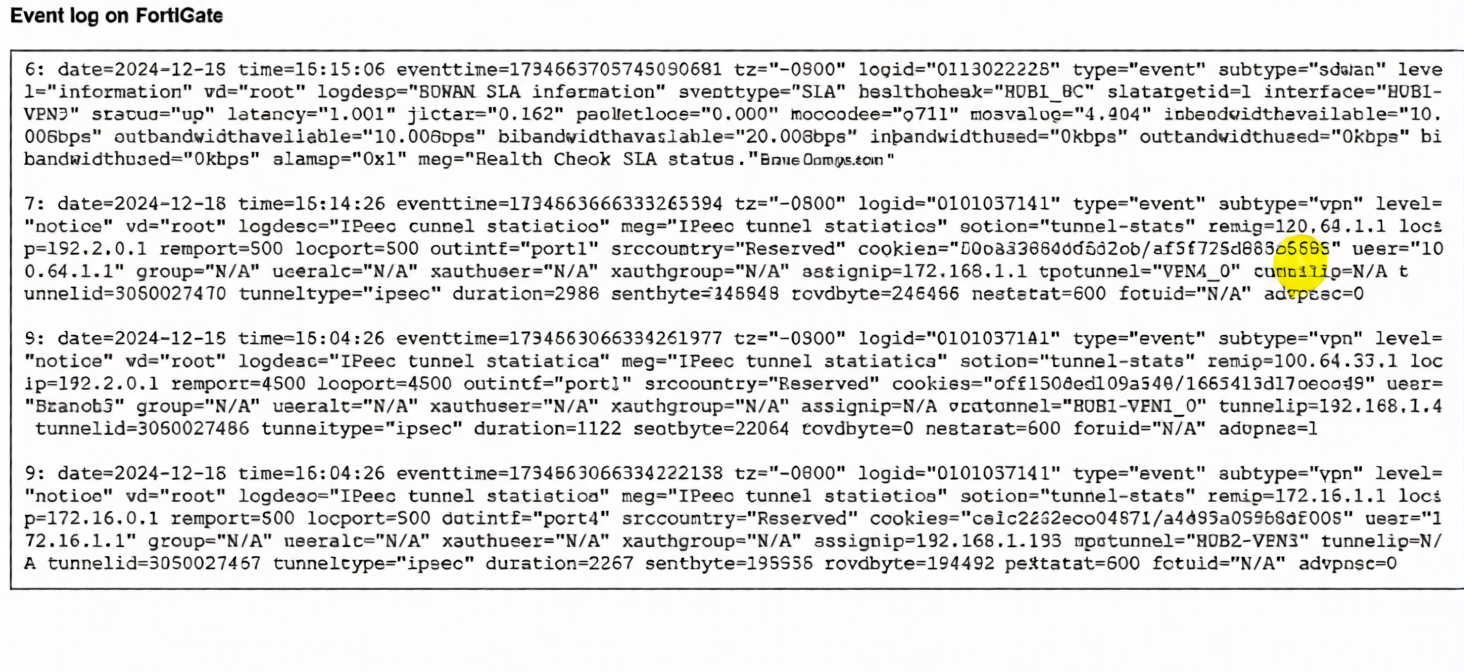
The event log on a FortiGate device is shown.
Based on the output shown in the exhibit, what can you conclude about the tunnels on this device? (Choose one answer))
A. There is one shortcut tunnel built from the master tunnel VPN4.
B. The voice traffic is steered through the VPN tunnel HUB1-VPN3.
C. The VPN tunnel HUB1-VPN1_0 is a shortcut tunnel.
D. The master tunnel HUB2-VPN3 cannot accept Auto-Discovery VPN (ADVPN) shortcuts.
Explanation:
The log entries are key for identifying Auto-Discovery VPN (ADVPN) shortcut tunnels. In ADVPN, a shortcut tunnel is a direct IPsec tunnel built dynamically between two spokes (or a hub and spoke for optimization), bypassing the hub for specific traffic. The critical indicator is the advpn=1 field.
Log Entry 9 (for HUB1-VPN1_0 tunnel) explicitly shows advpn=1. This confirms it is an ADVPN shortcut tunnel. The cvptunnel="HUB1-VPN1_0" is the name, and the presence of advpn=1 is the definitive flag.
Log Entry 6 (for HUB1-VPN3 tunnel) shows an SLA health check with slatargetid=1. While this indicates it's part of an SD-WAN performance SLA monitor, there is no advpn field in this SLA log entry to classify it as a shortcut or master tunnel for voice traffic.
Log Entry 8 (for HUB2-VPN3 tunnel) shows advpn=0. This means it is not a shortcut tunnel; it is a regular or master tunnel, which can accept ADVPN shortcuts (contradicting option D).
Why the other options are incorrect:
A: Incorrect. The logs do not show a tunnel named "VPN4," nor do they show a master/shortcut relationship between tunnels labeled "VPN4" and another.
B: Incorrect. Log Entry 6 for HUB1-VPN3 only shows SLA metrics (latency, jitter). While these metrics are relevant for voice, the log does not show any actual traffic being steered. It is a health check log, not a traffic flow log.
D: Incorrect. Log Entry 9 for HUB2-VPN3 shows advpn=0, meaning it is not itself a shortcut. However, a master tunnel (advpn=0) is the prerequisite for accepting shortcut requests. The statement that it "cannot accept" shortcuts is false.
Reference
Fortinet NSE 6 SD-WAN 7.6 Study Guide / Administration Guide: The advpn flag in IPsec tunnel logs (type="event" subtype="vpn") is the definitive field to identify ADVPN shortcut tunnels (advpn=1) versus regular/master tunnels (advpn=0).
Refer to the exhibit, which shows the SD-WAN rule status and configuration.
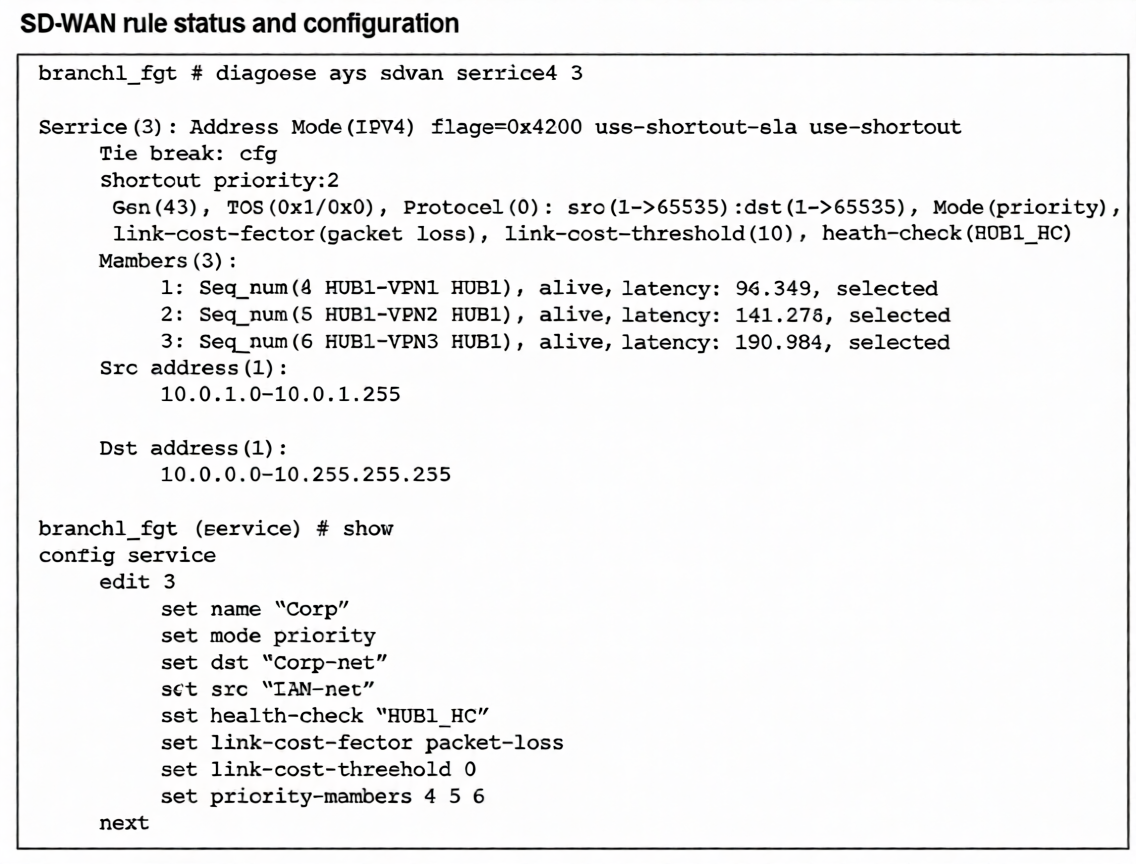
Based on the exhibit, which change in the measured latency will first make HUB1-VPN3 the new preferred
member?
A. When HUB1-VPN3 has a lower latency than HUB1-VPN1 and HUB1-VPN2
B. When HUB1-VPN3 has a latency of 80 ms
C. When HUB1-VPN3 has a latency of 90 ms
D. When HUB1-VPN1 has a latency of 200 ms
Explanation:
The SD-WAN service rule is configured in priority mode but includes the critical flag use-shortest-sla, as shown in the diagnose sys sdwan service output. This flag modifies standard priority behavior: instead of strictly following sequence number order, it selects the member with the best SLA performance (lowest latency, jitter, or loss) from among the configured priority members, provided all meet the link-cost-threshold.
Key parameters:
link-cost-factor: packet-loss
link-cost-threshold: 10 (members with packet loss >10% are excluded)
Current latencies: HUB1-VPN1=96.349 ms, HUB1-VPN2=141.278 ms, HUB1-VPN3=190.984 ms
Since all members are "alive" and presumably meeting the packet-loss threshold, the use-shortest-sla flag causes the member with the lowest latency to be preferred. Currently, HUB1-VPN1 is selected (lowest at 96.349 ms). For HUB1-VPN3 to become preferred, its latency must drop below HUB1-VPN1's current 96.349 ms.
Option C (90 ms) is the only choice where HUB1-VPN3's latency falls below this threshold while still being the highest possible value under 96 ms, making it the precise point where preference would switch.
Why other options are incorrect:
A: Incorrect because it's incomplete. HUB1-VPN3 must have lower latency specifically than HUB1-VPN1's current 96 ms, not just lower than both.
B: While 80 ms would also make HUB1-VPN3 preferred, the question asks for the first change. With use-shortest-sla, preference switches as soon as latency drops below 96 ms. 90 ms represents that threshold value—the highest latency still triggering the change.
D: If HUB1-VPN1's latency rises to 200 ms, HUB1-VPN3 (190 ms) still wouldn't be preferred because HUB1-VPN2 (141 ms) has better latency and would be selected first under use-shortest-sla.
Reference
Fortinet SD-WAN 7.6 Administration Guide: The use-shortest-sla flag in priority mode enables performance-based selection where the member with the best SLA metrics (latency/jitter/loss) is chosen from the priority list, overriding strict sequence order when latency differences exceed measurement variations.
(When you deploy SD-WAN, you can choose from several common designs. Each design best applies to specific contexts. Which two statements correctly associate a common SD-WAN design with its main indication or constraint? Choose two answers.)
A. Use a cloud on-ramp topology to improve the performance of cloud applications.
B. Use a standalone design for sites with only one WAN link to the cloud.
C. Use remote breakout to centralize traffic inspection and limit local management requirements.
D. Use a direct internet access (DIA) design to increase the traffic security and allow local devices with limited capabilities.
Explanation:
✅ A. Use a cloud on-ramp topology to improve the performance of cloud applications. — Correct
A cloud on-ramp SD-WAN design is specifically intended for:
- Optimizing access to SaaS and public cloud providers (AWS, Azure, Google Cloud)
- Reducing latency by steering traffic toward the nearest cloud edge or gateway
- Improving user experience for cloud applications
👉 This topology is chosen when cloud application performance is a primary objective.
✅ C. Use remote breakout to centralize traffic inspection and limit local management requirements. — Correct
Remote breakout means:
- Branch traffic is backhauled to a central hub or data center
- Security inspection happens centrally
- Branch sites require less local security configuration
This design is common when organizations want:
✔ centralized security policies
✔ simplified branch management
✔ MSSP-operated environments
❌ Why the other options are incorrect
B. Standalone design for one WAN link — Incorrect
SD-WAN provides benefits primarily when multiple WAN links exist. A single-link site gains little from SD-WAN steering.
D. DIA increases security for limited devices — Incorrect
Direct Internet Access (DIA) improves performance and reduces backhaul, but it does not inherently increase security unless additional security services are deployed locally or via SASE.
🧠 NSE6 SD-WAN Design Mapping
Design Main Purpose
Cloud on-ramp Optimize SaaS/cloud performance
Remote breakout Centralized inspection
DIA Local internet performance
Standalone Minimal SD-WAN benefit
✅ Final Answer: A and C
Which statement describes FortiGate behavior when you reference a zone in a static route?
A. FoftiGate installs ECMP static routes for the first two members of the zone.
B. FortiGate ignores the static routes defined through members referenced in the zone.
C. FortiGate routes the traffic through the best performing member of the zone.
D. FortiGate installs a static route for each member in the zone.
Explanation:
When you create an interface zone and add multiple physical or logical interfaces to it, then reference that zone in a static route, the FortiGate's behavior is to install an equal-cost multipath (ECMP) static route for every member interface within that zone.
This means:
The FortiGate creates a separate routing table entry for each interface in the zone, all pointing to the same destination network.
Traffic can be load-balanced across all zone members (if ECMP is enabled and properly configured).
This is a fundamental routing construct that treats the zone as a logical group of egress paths.
Why the other options are incorrect:
A: Incorrect. The FortiGate installs ECMP routes for all zone members, not just the first two. The number of routes equals the number of zone members.
B: Incorrect. The opposite is true; static routes are explicitly installed for each member. Ignoring them would break routing.
C: Incorrect. Static routes using a zone do not incorporate performance-based routing or SLA monitoring. The "best performing member" selection is a feature of SD-WAN rules, not basic static routing. A zone-based static route uses ECMP or routing priority settings, not real-time performance metrics.
Reference
FortiOS 7.6 Administration Guide > Network > Static Routes: Explicitly states, "When you add a zone to a static route, the route is added to the routing table for each zone member interface, creating equal-cost multipath (ECMP) routes."
An SD-WAN member is no longer used to steer SD-WAN traffic. The administrator updated the SD-WAN configuration and deleted the unused member. After the configuration update, users report that some destinations are unreachable. You confirm that the affected flow does not match an SD-WAN rule. What could be a possible cause of the traffic interruption?
A. FortiGate, with SD-WAN enabled, cannot route traffic through interfaces that are not SD-WAN members.
B. FortiGate can remove some static routes associated with an interface when the member is removed from SD-WAN.
C. FortiGate removes the layer 3 settings for interfaces that are removed from the SD-WAN configuration.
D. FortiGate administratively brings down interfaces when they are removed from the SD-WAN configuration.
Explanation:
In FortiOS (including 7.6, as covered in NSE6_SDW_AD-7.6), when an interface is configured as an SD-WAN member and you point static routes to the SD-WAN zone (for example, virtual-wan-link) instead of a physical interface, removing that member from the SD-WAN configuration can cause FortiGate to automatically remove or invalidate associated static routes that referenced the zone or were tied to the member's behavior.
This happens because static routes using the SD-WAN zone rely on the zone's members for gateway resolution and validity. Deleting a member can trigger a cleanup or re-evaluation of routes dependent on that member (especially if the route was implicitly or explicitly linked via zone usage).
For traffic not matching any explicit SD-WAN rule (as stated in the question), FortiGate falls back to standard FIB lookup. If the removal of the member causes a previously valid static route (for example, default route or subnet route via the SD-WAN zone) to be removed or become inactive, destinations reachable only via that route become unreachable → B is correct.
This is a common troubleshooting issue in SD-WAN changes. Administrators often forget to verify or recreate static routes after modifying members, which can lead to traffic blackholing for non-SD-WAN-steered flows.
Why not the others?
A. FortiGate, with SD-WAN enabled, cannot route traffic through interfaces that are not SD-WAN members.
Incorrect. SD-WAN is optional for steering. Non-SD-WAN traffic (flows not matching SD-WAN rules) can route normally via regular interfaces (physical ports, aggregates, etc.) using the FIB. Enabling SD-WAN does not block non-member interfaces.
C. FortiGate removes the layer 3 settings for interfaces that are removed from the SD-WAN configuration.
Incorrect. Removing an interface from SD-WAN (deleting the member entry) does not remove IP addresses, mode (static/DHCP), or other Layer 3 settings from the underlying interface. The interface remains fully configured and operational.
D. FortiGate administratively brings down interfaces when they are removed from the SD-WAN configuration.
Incorrect. The interface state (up or down) is independent of SD-WAN membership. Removal from SD-WAN does not administratively shut down the physical or logical interface.
Reference
FortiOS 7.6 Administration Guide — “SD-WAN members and zones” and “Static routes with SD-WAN” sections. Static routes often use SD-WAN zones as the outgoing interface; changes to members can affect route validity and resolution.
Fortinet Community Technical Tips on SD-WAN static route behavior and member removal confirm that deleting SD-WAN members can lead to static route removal or invalidation if routes depend on the zone or its members.
Refer to the exhibits.
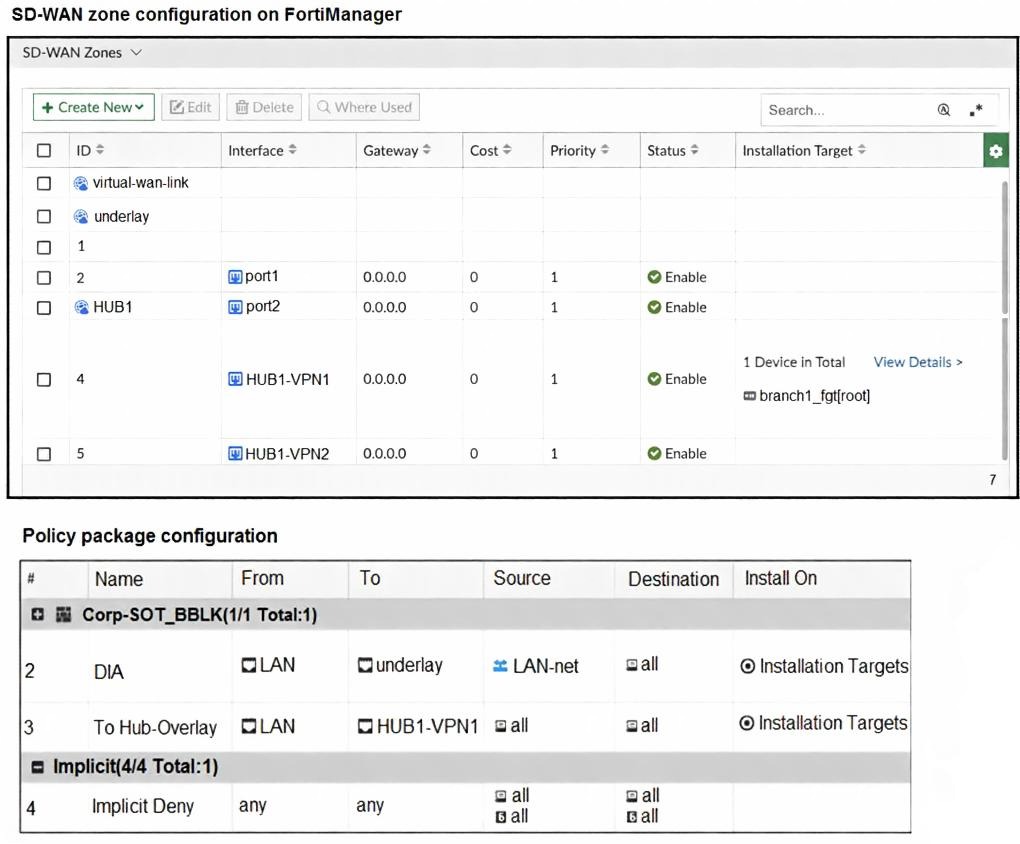
The exhibits show the SD-WAN zone configuration of an SD-WAN template prepared on FortiManager and
the policy package configuration.
When the administrator tries to install the configuration changes, FortiManager fails to commit.
What should the administrator do to fix the issue?
A. Configure branch1_fgt as the installation target for policy 3.
B. Configure HUB1 as the destination of policy 3.
C. Configure a normalized interface for the IPsec tunnel HUB1-VPN1.
D. Configure both HUB1-VPN1 and HUB1-VPN2 as the destination of policy 3
Explanation:
The installation fails because FortiManager cannot properly resolve or push the firewall policy that references HUB1-VPN1 as the outgoing interface (ToHub-Overlay policy: From LAN → To HUB1-VPN1).
Key Observations from the Exhibits:
* SD-WAN zone configuration (template level):
HUB1 zone exists and contains HUB1-VPN1 and HUB1-VPN2 as members.
These are IPsec tunnel interfaces (phase1-interface names).
Installation target for HUB1 zone members: only branch1_fgt is shown.
* Policy Package:
Policy #3: To Hub-Overlay → Destination interface = HUB1-VPN1 (single interface selected).
Installation targets: Installation Targets (generic, likely applies to the device group or ADOM devices).
Common FortiManager Failure Reason in This Scenario:
When a policy references a specific IPsec tunnel interface (e.g., HUB1-VPN1) created dynamically via an SD-WAN overlay template/IPsec template, FortiManager requires that interface to be defined as a normalized interface in the policy package.
Normalized interfaces are placeholders that FortiManager uses to consistently refer to dynamically named or template-generated interfaces across multiple devices.
Without normalization, FortiManager sees HUB1-VPN1 as a device-specific object that may not exist or match during validation/commit on the target FortiGate.
This causes commit failure with errors like:
* "interface not found"
* "invalid outgoing interface"
* "object dependency failure"
* Generic "commit failed" during install preview/log
Correct Fix (Option C):
In the policy package → Edit policy #3 → Outgoing Interface → change from selecting the literal HUB1-VPN1 to a normalized interface (e.g., create/use a normalized interface named $$HUB1_VPN_OVERLAY$$ or HUB1-VPN that maps to the tunnel interface created by the template).
FortiManager will then substitute the correct per-device interface name during installation (HUB1-VPN1 on branch1_fgt).
Why Not the Others?
A. Configure branch1_fgt as the installation target for policy 3
Unlikely to fix it. The zone members already target branch1_fgt. The issue is interface resolution, not target device.
B. Configure HUB1 as the destination of policy 3
Incorrect. HUB1 is an SD-WAN zone, not an interface. Firewall policies require interface (or zone in some cases, but FortiManager SD-WAN policies prefer explicit interfaces or normalized ones). Using the zone name would fail.
D. Configure both HUB1-VPN1 and HUB1-VPN2 as the destination of policy 3
Makes the policy more redundant but does not solve the root cause (lack of normalized interface). Commit would still fail.
Reference:
FortiManager Administration Guide (7.4/7.6): "Normalized Interfaces" section — Required when using SD-WAN overlay templates or IPsec templates that create dynamic tunnel names (e.g., HUB*-VPN*).
Fortinet NSE7/FCSS SD-WAN exam topics: Common troubleshooting scenario — "FortiManager install fails when policy references template-created IPsec interface" → solution is always normalized interface.
| Page 1 out of 14 Pages |
| 1234567 |
The Fortinet NSE 6 - SD-WAN 7.6 Enterprise Administrator exam is notoriously tough. It doesn't test memorization. It forces you to make complex decisions under time pressure. A weak prep strategy risks a costly failure and wasted effort. Our NSE6_SDW_AD-7.6 practice tests are built to be your definitive bridge to a passing score.

Copyright © - All Rights Reserved