
Last Updated On : 20-Sep-2026
Total 95 Questions
Refer to the exhibits.
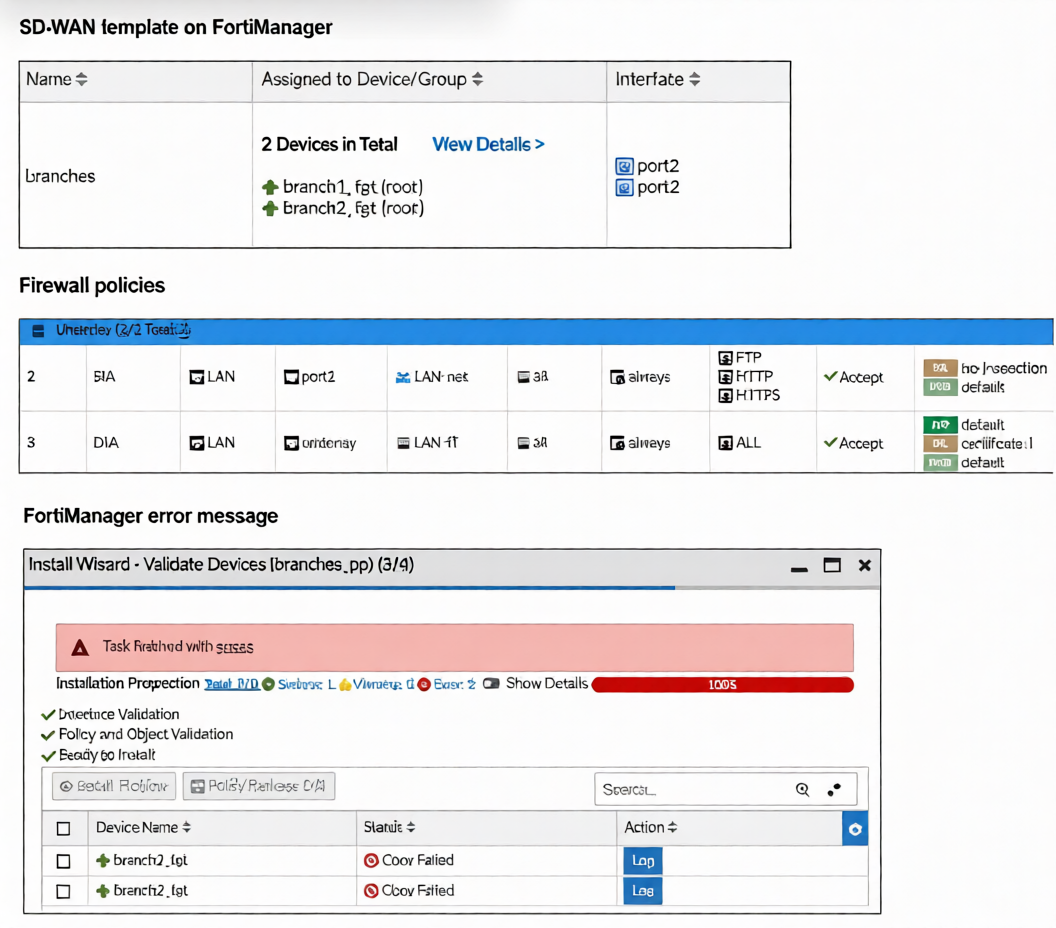 You use FortiManager to manage the branch devices and configure the SD-WAN template. You have
configured direct internet access (DIA) for the IT department users. Now. you must configure secure internet
access (SIA) for all local LAN users and have set the firewall policies as shown in the second exhibit.
Then, when you use the install wizard to install the configuration and the policy package on the branch
devices, FortiManager reports an error as shown in the third exhibit.
Which statement describes why FortiManager could not install the configuration on the branches?
You use FortiManager to manage the branch devices and configure the SD-WAN template. You have
configured direct internet access (DIA) for the IT department users. Now. you must configure secure internet
access (SIA) for all local LAN users and have set the firewall policies as shown in the second exhibit.
Then, when you use the install wizard to install the configuration and the policy package on the branch
devices, FortiManager reports an error as shown in the third exhibit.
Which statement describes why FortiManager could not install the configuration on the branches?
A. You must direct SIA traffic to a VPN tunnel.
B. You cannot install firewall policies that reference an SD-WAN zone.
C. You cannot install firewall policies that reference an SD-WAN member.
D. You cannot install SIA and DIA rules on the same device.
Explanation :
FortiManager fails to install the configuration because the firewall policies reference SIA and DIA as outgoing interfaces. These are SD-WAN zones defined within an SD-WAN template. In FortiManager's architecture, SD-WAN template zones are not exposed as selectable interfaces in the firewall policy object database. During pre-install validation, FortiManager cannot resolve these zone references, resulting in a "Conf Failed" error. The policies must use concrete interfaces (e.g., port2, wan1) or a regular interface zone defined at the device level, not an SD-WAN template zone.
Correct Option
B is correct. Firewall policies in a policy package cannot use an SD-WAN zone from a template as an egress interface. These zones are part of the SD-WAN configuration namespace and are unavailable to the firewall policy engine, causing a validation failure upon installation.
Incorrect Options
A: Incorrect. The error is not about routing SIA traffic to a VPN tunnel; it is a configuration validation failure. A policy can successfully use a VPN tunnel interface (e.g., to_HUB) as its egress interface.
C: Incorrect.You can install policies that reference an individual SD-WAN member interface (e.g., port1). These are standard, concrete interfaces that exist in the global object database and are valid for policy configuration.
D: Incorrect. A FortiGate device can host both SIA and DIA rules simultaneously. The error is specific to the invalid interface reference in the policy configuration, not a conflict between SIA and DIA functionalities.
Reference:
FortiManager Administration Guide (v7.6): SD-WAN zones configured within an SD-WAN template are not available as outgoing interfaces in firewall policies. Policies must reference interfaces or zones defined at the device/global level. This separation prevents policy binding to dynamic SD-WAN objects, ensuring clean template management. The validation failure occurs when a policy package references an unresolved interface object from an SD-WAN template.
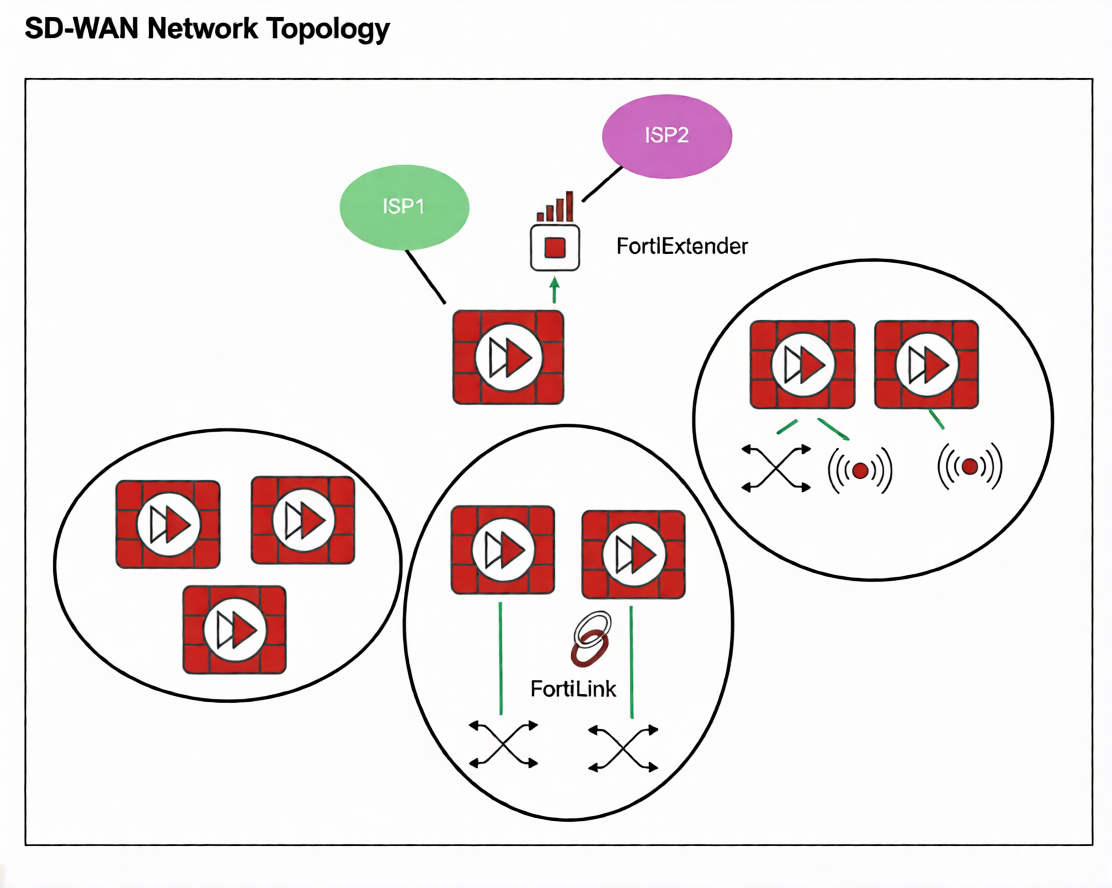
Refer to the exhibit.
You want to configure SD-WAN on a network as shown in the exhibit.
The network contains many FortiGate devices. Some are used as NGFW, and some are installed with
extensions such as FortiSwitch. FortiAP. or Forti Ex tender.
What should you consider when planning your deployment?
A. You can build an SD-WAN topology that includes all devices. The hubs can be FortiGate devices with Forti Extender.
B. You can build an SD-WAN topology that includes all devices. The hubs must be devices without extensions.
C. You must use FortiManager to manage your SD-WAN topology.
D. You must build multiple SD-WAN topologies. Each topology must contain only one type of extension.
Explanation:
The exhibit shows a network with various Fortinet devices (FortiGate, FortiExtender, FortiSwitch, FortiAP). In a Fortinet SD-WAN fabric, hub devices are critical for establishing the overlay VPN mesh and managing control-plane traffic.
The key consideration is that hub FortiGates must be dedicated to the SD-WAN routing function. If a FortiGate acts as a hub and also manages local extensions (like a FortiSwitch, FortiAP, or FortiExtender) via FortiLink, it can lead to complex dependencies and potential traffic loops. Specifically, if the SD-WAN overlay relies on an underlay interface that is also part of a FortiLink aggregate (e.g., for switch or AP management), a failure in the local extension could destabilize the entire SD-WAN overlay.
Therefore, hubs should be devices without local FortiLink-managed extensions to ensure stability and simplified troubleshooting.
Why other options are incorrect:
A: Incorrect. Hubs should not have FortiExtender (or other extensions like FortiSwitch/FortiAP) managed via FortiLink, as this creates underlay dependency on the extension, risking SD-WAN stability.
C: Incorrect. While FortiManager is recommended for centralized management, it is not mandatory to build an SD-WAN topology. SD-WAN can be configured directly on FortiGates.
D: Incorrect. You do not need separate topologies per extension type. You can have a single SD-WAN topology, but spoke devices can have extensions (e.g., a branch FortiGate with FortiSwitch). The restriction primarily applies to hub devices.
Reference
Fortinet SD-WAN 7.6 Deployment Guide - Design Considerations: Recommends that SD-WAN hub FortiGates should not be used as FortiLink aggregation devices for switches, APs, or extenders to avoid underlay dependency and ensure overlay stability.
Refer to the exhibit.
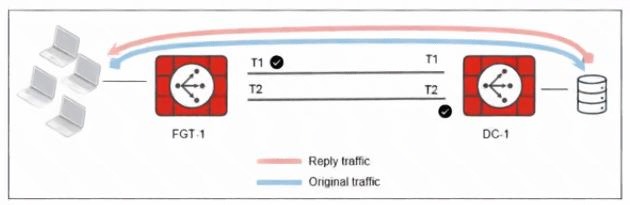
The administrator analyzed the traffic between a branch FortiGate and the server located in the data center,
and noticed the behavior shown in the diagram.
When the LAN clients located behind FGT1 establish a session to a server behind DC-1, the administrator
observes that, on DC-1, the reply traffic is routed overT2. even though T1 is the preferred member in
the matching SD-WAN rule.
What can the administrator do to instruct DC-1 to route the reply traffic through the member with the best
performance?
A. Enable snat-route-change under config system global.
B. Enable reply-session under config system sdwan.
C. Enable auxiliary-session under config system settings.
D. FortiGate route lookup for reply traffic only considers routes over the original ingress interface.
Explanation:
Why this happens
In SD-WAN, by default:
The reply traffic is routed based on the original session information.
FortiGate tries to maintain session symmetry.
That means reply traffic follows the same interface path used by the original traffic, even if another member now has better SLA performance.
In your diagram:
Original traffic goes via T1 (preferred).
On DC-1, the return traffic is going via T2, because the session was built that way (likely due to routing lookup or ingress-interface behavior at session creation).
✅ What set reply-session enable does
When you enable:
config system sdwan
set reply-session enable
end
FortiGate performs a fresh SD-WAN rule lookup for reply traffic, instead of forcing it to follow the original session’s ingress interface.
This allows reply traffic to:
Follow the SD-WAN rule logic
Use the member with the best performance
Improve path symmetry and performance optimization
❌ Why the other options are incorrect
A. snat-route-change
This only affects SNAT session behavior when routing changes — unrelated to reply traffic path selection.
C. auxiliary-session
Used for asymmetric routing handling, not for SD-WAN reply path optimization.
D. Route lookup only considers original ingress interface
That describes default behavior, not the solution.
Which three factors about SLA targets and SD-WAN rules should you consider when configuring SD-WAN rules? (Choose three.)
A. Member metrics are measured only if a rule uses the SLA target.
B. SLA targets are used only by SD-WAN rules that are configured with a Lowest Cost (SLA) strategy.
C. SD-WAN rules can use SLA targets to check whether the preferred members meet the SLA requirements.
D. When configuring an SD-WAN rule, you can select multiple SLA targets if they are from the same performance SLA.
E. When configuring an SD-WAN rule, you can select multiple SLA targets from different performance SLAs.
Explanation:
C is correct: The primary purpose of referencing an SLA target in an SD-WAN rule is to validate that selected members meet the defined performance thresholds (latency, jitter, loss) before being used for traffic steering.
E is correct: An SD-WAN rule can reference multiple SLA targets from different performance SLA configurations. This allows a rule to enforce composite performance requirements (e.g., one target for latency, another for jitter).
A is correct: SLA target measurement (active probing or passive monitoring) is only performed for members in rules that reference that SLA target. If no rule uses a particular SLA target, its probes are not sent, conserving bandwidth.
Why other options are incorrect:
B: Incorrect. SLA targets are not exclusive to Lowest Cost (SLA) strategy. They can also be used in Priority, Weighted, and Manual strategies to validate member performance before selection.
D: Incorrect. While you can select multiple SLA targets, they can be from different performance SLAs, not necessarily the same one. The requirement "from the same performance SLA" is false; you can mix targets across different SLA configurations.
Reference
FortiOS 7.6 SD-WAN Administration Guide > Configuring SD-WAN > Performance SLA:
SLA targets define thresholds; rules reference them to validate members.
Rules can use multiple targets from different SLA configurations for comprehensive checks.
Health-check probes run only for SLA targets referenced by active rules.
This ensures efficient resource usage and flexible performance validation across various traffic types.
You are tasked with configuring ADVPN 2.0 on an SD-WAN topology already configured for ADVPN. What should you do to implement ADVPN 2.0 in this scenario?
A. Update the IPsec tunnel configurations on the hub.
B. Update the SD-WAN configuration on the branches.
C. Update the IPsec tunnel configuration on the branches.
D. Delete the existing ADVPN configuration and configure ADVPN 2.0.
Explanation:
In an existing ADVPN-enabled SD-WAN topology, upgrading to ADVPN 2.0 does not require redesigning SD-WAN or hub configurations. The primary enhancement in ADVPN 2.0 is the ability for branches to dynamically establish shortcut tunnels directly with other branches. This behavior is controlled at the IPsec layer, not by SD-WAN policies. Because the hub already serves as a registration and routing point, it continues to function without modification. Therefore, updating the branch IPsec tunnel configuration is sufficient to enable ADVPN 2.0 functionality.
Why the incorrect options are wrong
A. Update the IPsec tunnel configurations on the hub
This is incorrect because ADVPN 2.0 eliminates the need for hub-assisted shortcut creation. The hub configuration remains unchanged in an existing ADVPN setup.
B. Update the SD-WAN configuration on the branches
SD-WAN is responsible for traffic steering, not for establishing ADVPN shortcut tunnels. Shortcut negotiation occurs at the IPsec level.
D. Delete the existing ADVPN configuration and configure ADVPN 2.0
ADVPN 2.0 is backward-compatible and implemented by modifying existing IPsec settings, not by rebuilding the configuration.
References
Fortinet FortiOS 7.6 IPsec VPN Administration Guide – Details ADVPN configuration and branch-initiated shortcuts.
Refer to the exhibits.
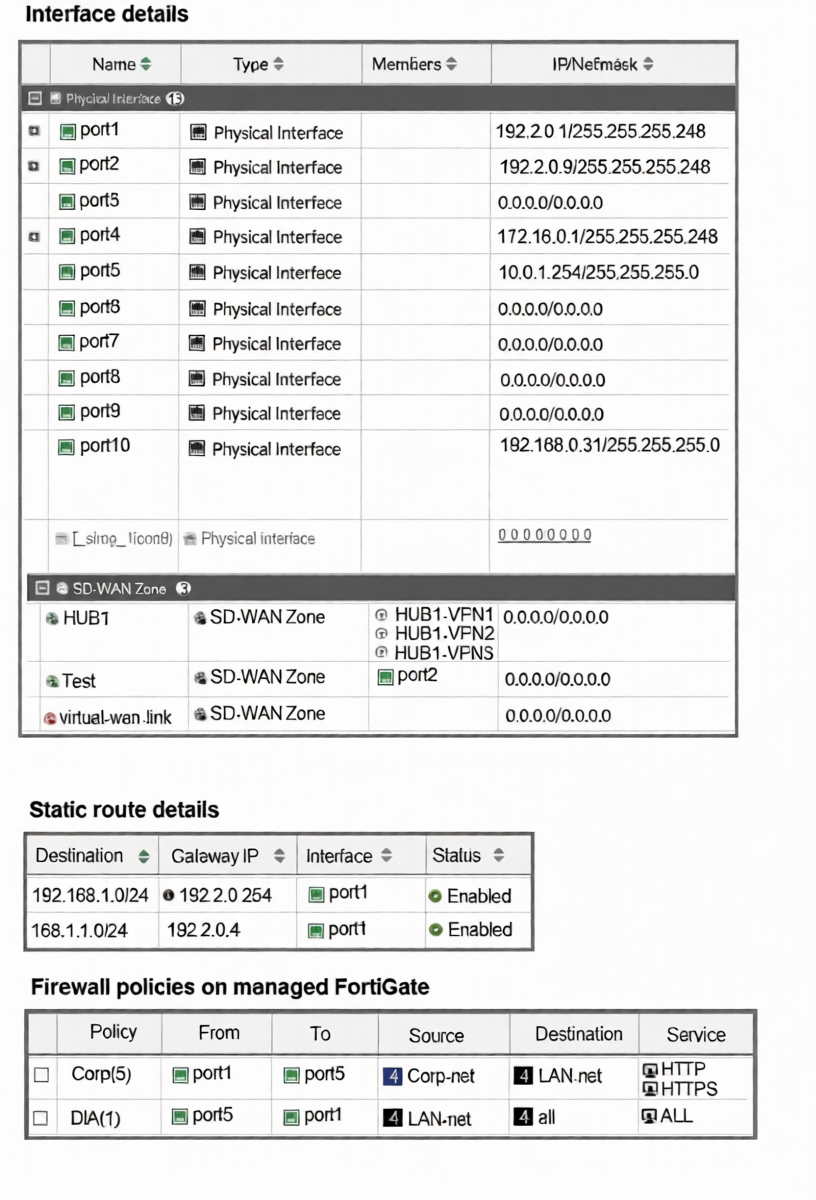
The interface details, static route configuration, and firewall policies on the managed FortiGate device are
shown.
You want to configure a new SD-WAN zone, named Underlay, that contains the interfaces port1 and port2.
What must be your first action?
A. Define port1 as an SD-WAN member.
B. Delete the static routes.
C. Delete the SD-WAN Zone Test.
D. Delete the firewall policies.
Explanation:
To add an interface to an SD-WAN zone, that interface must not be referenced by any other configuration object that would conflict with SD-WAN's dynamic path control. The exhibit shows that port1 is currently used by two static routes.
SD-WAN zones manage egress path selection dynamically, while static routes define fixed egress paths. If port1 is simultaneously a member of an SD-WAN zone and referenced in static routes, this creates a configuration conflict. The FortiGate will not allow the same interface to be used in both static routing and SD-WAN zone membership unless the static routes are removed first.
Therefore, the first action is to delete the static routes that use port1 as the egress interface.
Why other options are incorrect:
A: Defining port1 as an SD-WAN member is part of the process, but it cannot be done while port1 is still bound to static routes. The static routes must be removed first.
C: Deleting the "Test" SD-WAN zone is unnecessary. It contains only port2 and does not conflict with adding port1 to a new zone.
D: Deleting firewall policies is not required. The policies shown use port1 as a source/destination interface in rules, which is permissible. Firewall policies can coexist with SD-WAN zones.
Reference
FortiOS 7.6 SD-WAN Administration Guide > Configuring SD-WAN Members: An interface cannot be added to an SD-WAN zone if it is already referenced in a static route. The static route must be removed or modified to use a different interface or an SD-WAN zone itself before the interface can become an SD-WAN member.
Refer to the exhibit.
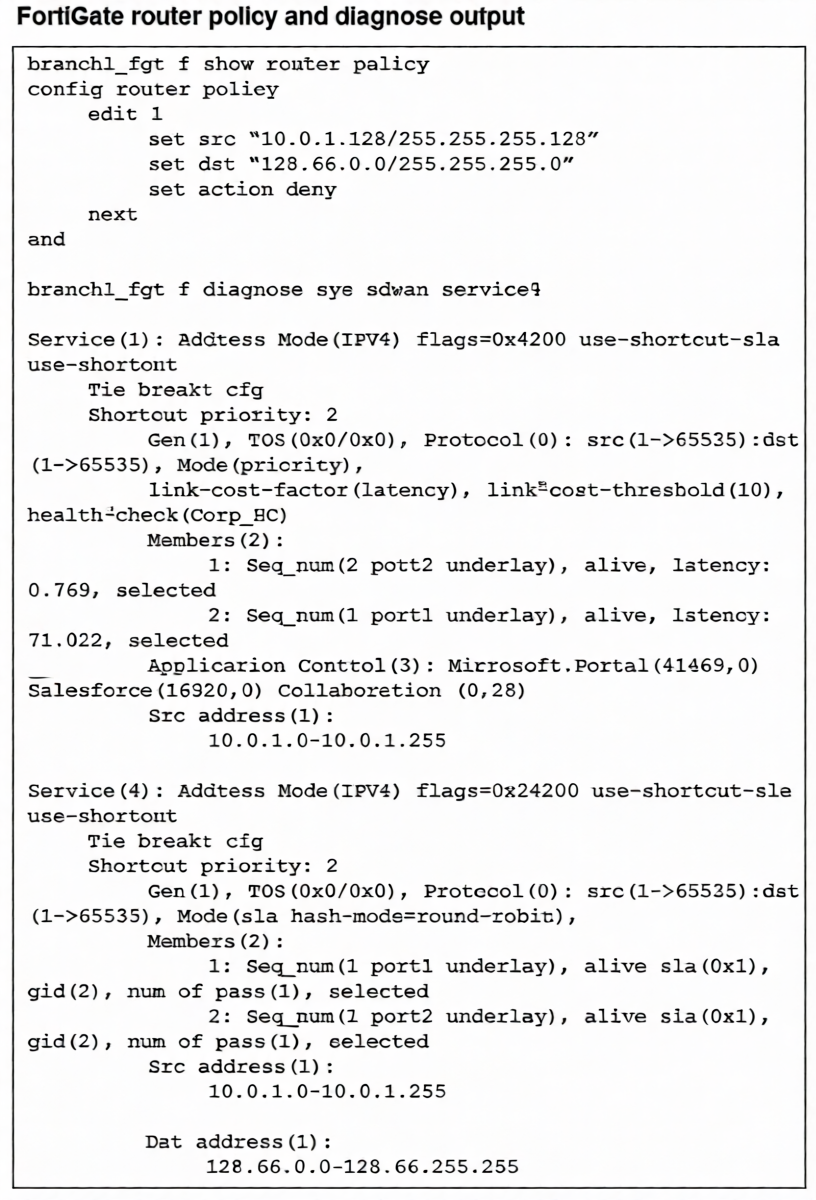
How does FortiGate handle the traffic with the source IP 10.0.1.130 and the destination IP 128.66.0 125?
A. FortiGate drops the traffic flow.
B. FortiGate routes the traffic flow according to the forwarding information base (FIB).
C. FortiGate load balances the traffic flow through port7 and port8.
D. FortiGate steers the traffic flow through port7.
Explanation:
Traffic from 10.0.1.130 to 128.66.0.125 matches Router Policy 1, which has an action of deny. Router policies (policy-based routing) are evaluated before SD-WAN rules in the packet processing flow. Since a matching router policy with a deny action is found, the packet is discarded immediately. The SD-WAN rule (Service 4) that also matches this destination is never reached or evaluated. Therefore, despite SD-WAN being configured for load balancing, the traffic is blocked at the routing stage and never forwarded.
Correct Option
A is correct because a router policy with a deny action takes precedence over SD-WAN rules.
The matching policy (src 10.0.1.128/25, dst 128.66.0.0/24, action deny) causes the FortiGate to drop the packet before any SD-WAN path selection occurs.
Incorrect Options:
B: Incorrect. The forwarding information base (FIB) is not used because the router policy denies the traffic first, halting the routing process.
C: Incorrect. The traffic is not load-balanced; it is dropped. Additionally, the SD-WAN members are port1 and port2, not port7 and port8.
D: Incorrect. The traffic is not steered through any interface; it is denied. The referenced interface (port7) is also not a member of the relevant SD-WAN service, which uses port1 and port2.
Reference:
FortiOS 7.6 Router Policy Guide: Router policies are processed in the routing stage before SD-WAN evaluation. If a router policy matches and has action deny, the packet is discarded. The SD-WAN rule logic is only applied if the router policy action is permit or no router policy matches. This order ensures routing policies can override SD-WAN path selection, including blocking traffic entirely.
| Page 2 out of 14 Pages |
| 1234567 |
| NSE6_SDW_AD-7.6 Practice Test Home |
The Fortinet NSE 6 - SD-WAN 7.6 Enterprise Administrator exam is notoriously tough. It doesn't test memorization. It forces you to make complex decisions under time pressure. A weak prep strategy risks a costly failure and wasted effort. Our NSE6_SDW_AD-7.6 practice tests are built to be your definitive bridge to a passing score.

Copyright © - All Rights Reserved