
Last Updated On : 12-Oct-2026
Total 53 Questions
The difference between a near pass and a confident pass isn't just knowing the material, it's mastering the FCSS - FortiSASE 25 Administrator exam experience. Our Fortinet FCSS_SASE_AD-25 practice test is engineered to close the gap between your current knowledge and the 2026 exam's demands. With every question, you receive detailed, expert verified explanations that break down not just the correct answer, but also the reasoning behind every incorrect option.
Don't just study. Practice FCSS_SASE_AD-25 with purpose. Start your journey to a first-time pass today.
By replicating the exact style, complexity, and format of the real FCSS - FortiSASE 25 Administrator exam questions, we ensure you walk into the exam with complete confidence.
When accessing the FortiSASE portal for the first time, an administrator must select data center locations for which three FortiSASE components? (Choose three.)
A. Identity & access management (IAM)
B. Points of presence
C. Endpoint management
D. Logging
E. Sandbox
Explanation
This question checks knowledge of the initial provisioning process of a FortiSASE instance. During the first access to the FortiSASE portal, administrators must choose data center regions for services responsible for traffic inspection, security analysis, and log storage. These selections define where security processing and data handling occur.
🟢 Correct Options
B. Points of presence
FortiSASE security services run through globally distributed Points of Presence (PoPs). During provisioning, administrators select PoP regions from available global data centers so user traffic can be routed through nearby inspection points, ensuring better latency, optimized routing, and consistent security enforcement.
D. Logging
FortiSASE logging stores network activity, traffic logs, and security events generated within the environment. Administrators select the region where log data will be stored during the initial setup. This determines the physical location of log retention and supports monitoring, auditing, and security investigations.
E. Sandbox
FortiSASE integrates sandbox analysis for detecting unknown or zero-day malware. Suspicious files can be submitted to the sandbox environment where they are executed and analyzed. Administrators configure the sandbox region where the analysis occurs, defining where advanced threat inspection takes place.
🔴 Incorrect Options
A. Identity & access management (IAM)
IAM manages authentication and access control policies. It operates as a centralized identity service within the platform and does not require administrators to select a specific data center location during the first FortiSASE portal setup.
C. Endpoint management
Endpoint management focuses on device posture, endpoint configuration, and integration with FortiClient. These settings are configured after deployment and do not require selecting a data center region during initial tenant provisioning.
Reference
🔧 PoPs – FortiSASE Administration Guide
Explains FortiSASE security Points of Presence and how regional PoPs are provisioned for traffic inspection.
🔧 Logging – FortiSASE Administration Guide
Describes how FortiSASE logs network activity and security events for monitoring and investigation.
🔧 Sandbox – FortiSASE Administration Guide
Details sandbox configuration and how suspicious files are analyzed for advanced threat detection.
In which two ways does FortiSASE help organizations ensure secure access for remote workers? (Choose two.)
A. It secures traffic from endpoints to cloud applications.
B. It uses the FortiCloud organizational units to assign endpoint profiles to remote workers.
C. It uses the identity and access management (IAM) portal to validate the identities of remote workers.
D. It offers zero trust network access (ZTNA) capabilities.
Explanation:
This question explores the core security capabilities of FortiSASE designed to protect remote users. It focuses on the platform's ability to provide consistent security for both general internet/cloud traffic and specific private applications.
✔️Correct Option: A
FortiSASE ensures secure access by routing traffic from remote endpoints through a cloud-based Secure Web Gateway (SWG) or a VPN tunnel (SIA). This allows the platform to apply security policies, such as web filtering and application control, to all traffic destined for cloud-based SaaS applications and the internet.
✔️Correct Option: D
FortiSASE integrates Zero Trust Network Access (ZTNA) capabilities, allowing organizations to provide secure, granular access to private applications. By verifying user identity and device posture for every session, it ensures that remote workers can only access the specific internal resources they are authorized to use.
❌Incorrect options: B
While FortiCloud organizational units (OUs) are used for administrative organization and multi-tenancy, they are not the primary mechanism for assigning endpoint profiles. Endpoint profiles and security policies are managed directly within the FortiSASE configuration portal.
❌Incorrect options: C
The Identity and Access Management (IAM) portal is primarily used for managing administrative access to the Fortinet cloud portals. While FortiSASE does validate user identities, it typically uses an Authentication Provider (like Entra ID or LDAP) integrated within the FortiSASE settings rather than the IAM portal itself.
Reference:
⇒ FortiSASE Secure Internet Access (SIA)
This documentation confirms how FortiSASE secures endpoint traffic to the internet and cloud applications through its cloud-delivered security services.
Refer to the exhibit.
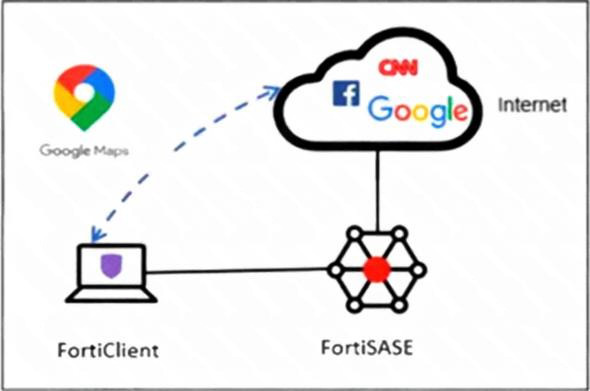
An organization must inspect all the endpoint internet traffic on FortiSASE, and exclude Google Maps traffic
from the FortiSASE VPN tunnel and redirect it to the endpoint physical interface.
Which configuration must you apply to achieve this requirement?
A. Configure a steering bypass tunnel firewall policy using Google Maps FQDN to exclude and redirect the traffic.
B. Add the Google Maps URL in the zero trust network access (ZTNA) TCP access proxy forwarding rule.
C. Add the Google Maps URL as a steering bypass destination in the endpoint profile.
D. Exempt Google Maps in URL filtering in the web filter profile.
Explanation:
This question tests the configuration of Split Tunneling (Steering Bypass) within FortiSASE. The goal is to identify how to offload specific, trusted internet traffic from the secure tunnel to the endpoint's local physical interface to optimize bandwidth and performance.
✔️Correct Option:
C. Add the Google Maps URL as a steering bypass destination in the endpoint profile:
By adding the Google Maps destination to the steering bypass list in the endpoint profile, the FortiClient is instructed to route this specific traffic through the local gateway. This effectively excludes it from the FortiSASE VPN tunnel as required.
❌Incorrect options:
A. Configure a steering bypass tunnel firewall policy:
Firewall policies manage traffic that is already inside the FortiSASE infrastructure. They cannot "redirect" traffic back to a local interface once it has already been encapsulated in the VPN tunnel.
B. Add the Google Maps URL in the ZTNA TCP access proxy:
ZTNA is designed for secure, granular access to private internal applications behind a FortiGate. It is not the correct mechanism for managing split-tunneling for general public SaaS or web applications.
D. Exempt Google Maps in URL filtering in the web filter profile:
This action would stop the FortiSASE firewall from blocking the site, but the traffic would still travel through the VPN tunnel to the FortiSASE gateway instead of being redirected locally.
Reference:
⇒ FortiSASE Split Tunneling
This documentation confirms how to define steering bypass destinations to allow specific traffic to exit via the endpoint's local physical interface.
An administrator must restrict endpoints from certain countries from connecting to FortiSASE. Which configuration can achieve this?
A. Configure a network lockdown policy on the endpoint profiles.
B. Configure a geography address object as the source for a deny policy.
C. Configure geofencing to restrict access from the required countries.
D. Configure source IP anchoring to restrict access from the specified countries.
Explanation:
This question focuses on restricting endpoint connections to FortiSASE based on geographic location (country-level blocking). FortiSASE provides a dedicated geofencing feature to control regional access for remote users and endpoints connecting to its cloud security PoPs.
✔️Correct Option:
C. Configure geofencing to restrict access from the required countries.
FortiSASE includes a specific Geofencing configuration under Configuration > Geofencing, allowing administrators to set Country/regions restrictions (e.g., block specific countries while allowing others). By default set to Allow All, changing it enforces regional access controls for all incoming remote user connections, including agent-based endpoints.
❌Incorrect options
A. Configure a network lockdown policy on the endpoint profiles.
Network lockdown restricts off-net endpoints by forcing tunnel reconnection or limiting access based on on-net detection and posture, not on geographic country origin of the connecting IP.
B. Configure a geography address object as the source for a deny policy.
Geography address objects (GeoIP-based) are used in FortiGate firewall policies for traffic control. FortiSASE does not expose direct policy-level geography objects for connection restriction; geofencing handles this at the ingress level for endpoint connectivity.
D. Configure source IP anchoring to restrict access from the specified countries.
Source IP anchoring assigns static or dedicated egress IPs for outbound traffic (e.g., for geolocation-dependent SaaS apps), not for restricting inbound endpoint connections based on source country.
Reference:
⇒ Geofencing – FortiSASE Mature Administration Guide
– Describes configuring Regional access to FortiSASE via Country/regions settings to enforce or restrict access based on endpoint geographic location.
⇒ Configuration workflow – FortiSASE Mature Administration Guide – Notes geofencing for access control based on remote user geolocation, applying to all incoming remote user and edge device connectivity.
⇒ Configuring a geography-based policy – FortiSASE Feature Administration Guide – Covers geography-based configurations in policies, supporting the broader use of geo-restrictions in FortiSASE.
What can be configured on FortiSASE as an additional layer of security for FortiClient registration?
A. security posture tags
B. application inventory
C. user verification
D. device identification
Explanation:
This question tests knowledge of FortiSASE security features during FortiClient endpoint registration. It focuses on identifying the configuration that adds identity-based authentication as an extra protection layer against unauthorized device onboarding.
✔️ Correct Option:
✔️ C. user verification
User verification via SAML SSO requires end users to enter credentials during FortiClient registration with FortiSASE. This authenticates users against an identity provider, ensuring only authorized individuals can onboard endpoints and preventing unauthorized access even with valid invitation codes.
❌ Incorrect options:
❌ A. security posture tags
Security posture tags assess endpoint compliance post-registration using rules for vulnerabilities, OS versions, or certificates. They enforce zero-trust access but do not secure the initial registration process.
❌ B. application inventory
Application inventory provides visibility into installed software on endpoints after registration. It supports monitoring but adds no authentication or verification during the FortiClient registration phase.
❌ D. device identification
Device identification profiles endpoints by attributes like OS or hardware post-registration. It enables tagging and policy application but lacks user credential checks for securing registration.
Reference:
🔧 FortiClient EMS Administration Guide
Official docs confirm user verification enforces authentication during FortiClient registration and onboarding.
🔧 FortiClient ZTNA Deployment Guide
Details SAML and user verification configuration for secure endpoint registration.
Refer to the exhibits.
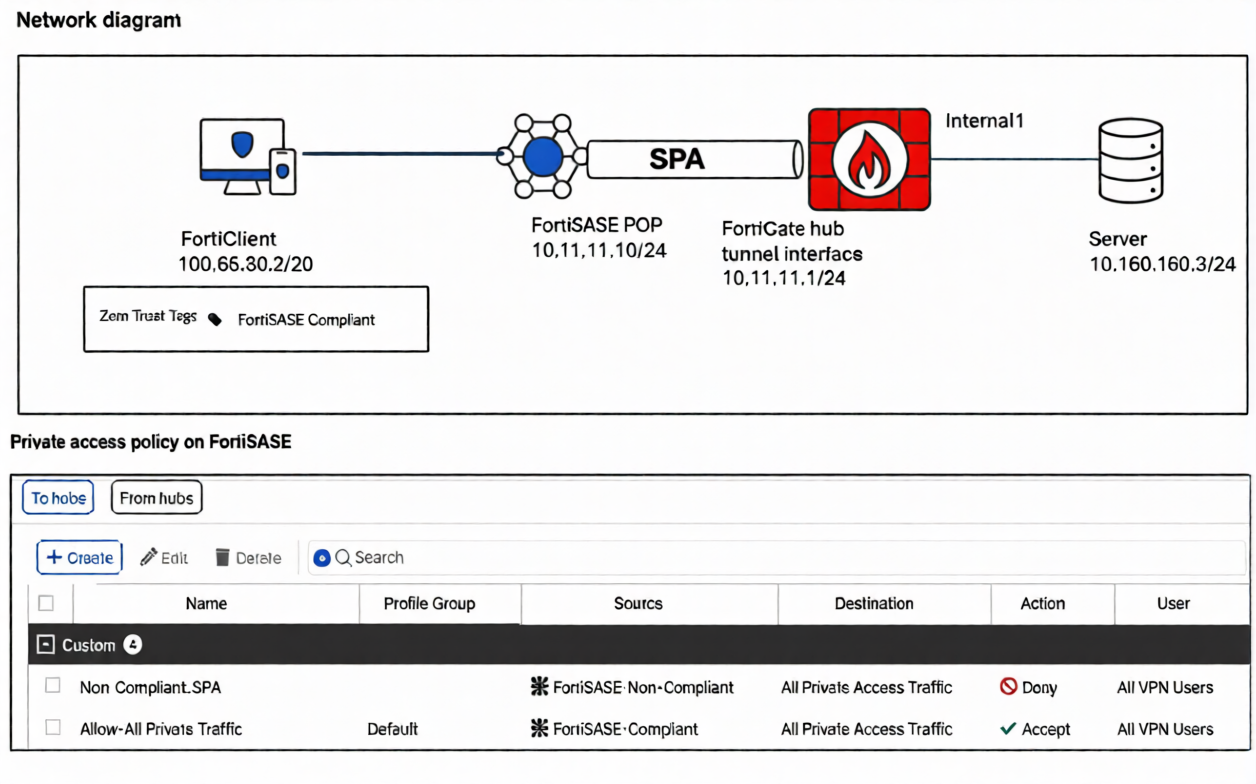
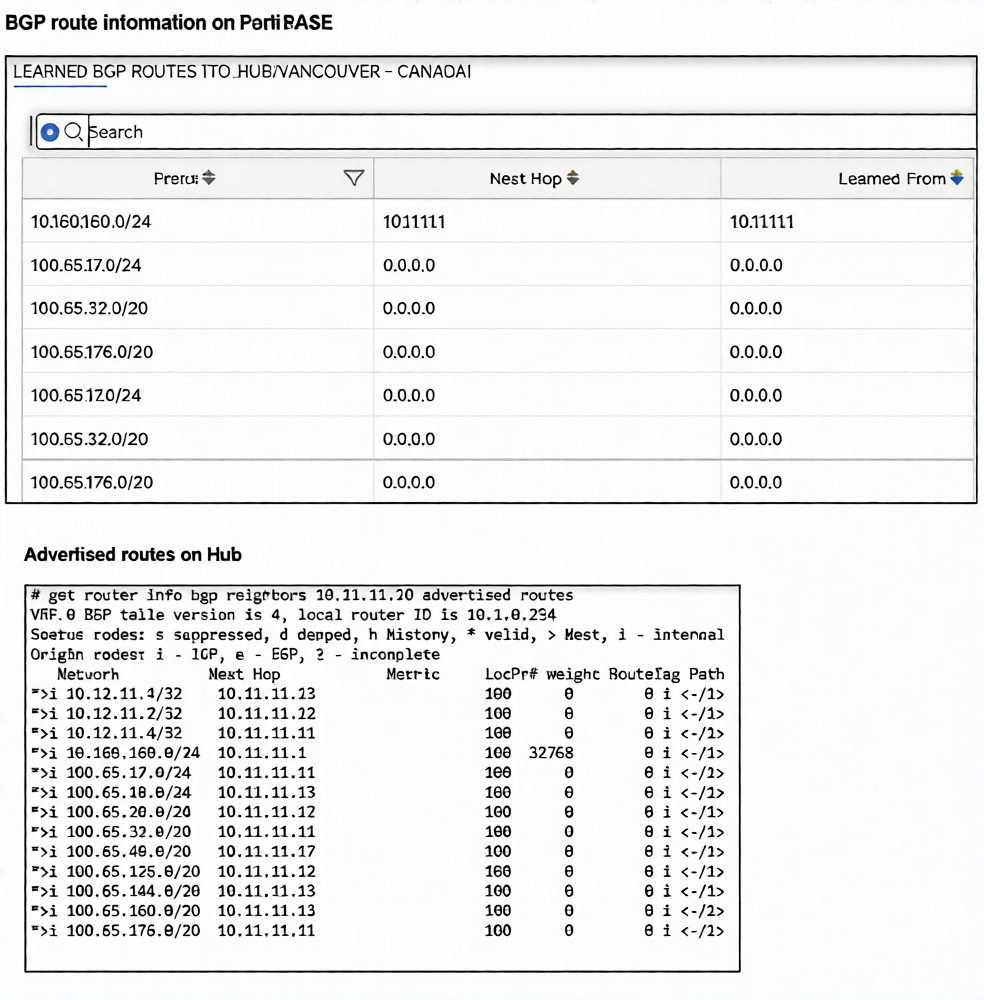
A FortiSASE administrator has configured FortiSASE as a spoke to a FortiGate hub. The tunnel is up to the
FortiGate hub. However, the remote FortiClient is not able to access the web server hosted behind the
FortiGate hub.
Based on the exhibits, what is the reason for the access failure?
A. A private access policy has denied the traffic because of failed compliance
B. The hub is not advertising the required routes.
C. The hub firewall policy does not include the FortiClient address range.
D. The server subnet BGP route was not received on FortiSASE.
Explanation:
This question tests your ability to interpret BGP routing tables in a FortiSASE spoke-to-FortiGate hub topology. The exhibits show what the hub is advertising versus what FortiSASE has actually learned — identifying the routing gap causing the access failure.
✔️ Correct Option — D. Server Subnet BGP Route Not Received on FortiSASE:
In the FortiSASE learned BGP routes table, the 100.65.x.x subnet entries show 0.0.0.0 as both Next Hop and Learned From, indicating those routes are not properly installed. The server's subnet behind the hub is not reflected as a valid, routable entry on the FortiSASE side — meaning FortiClient traffic has no valid path to reach it.
❌ Why the Other Options Are Wrong:
❌ A. Private Access Policy Denied Due to Failed Compliance
Compliance-based denials are enforced through security posture policies and would be visible in traffic or security logs, not in BGP routing tables. The exhibits only show routing information, with no indication of a policy block or posture evaluation failure. This option cannot be concluded from the data presented in the exhibits.
❌ B. The Hub Is Not Advertising the Required Routes
The hub's advertised routes output clearly shows it IS actively advertising routes, including 10.160.160.0/24 and multiple 100.65.x.x subnets with valid next-hop addresses. The advertisement from the hub side is functioning correctly. The issue lies in FortiSASE not properly receiving and installing those routes, not in the hub failing to send them.
❌ C. Hub Firewall Policy Does Not Include the FortiClient Address Range
A missing firewall policy on the hub is a valid general troubleshooting scenario, but the exhibits provided contain only BGP routing table data. There is no firewall policy output or traffic log shown to support this conclusion. Diagnosing a firewall policy issue would require separate policy or traffic log exhibits, which are not present here.
Reference:
⇒ Fortinet FortiSASE Admin Guide – Private Access / BGP Configuration
Confirms that FortiSASE as a BGP spoke must properly receive and install hub-advertised routes for FortiClient remote access to function correctly.
⇒ Fortinet SD-WAN & BGP Spoke-Hub Troubleshooting
Validates that 0.0.0.0 next-hop entries in BGP tables indicate routes that are not usable for forwarding.
What are two advantages of using zero-trust tags? (Choose two.)
A. Zero-trust tags can determine the security posture of an endpoint.
B. Zero-trust tags can be assigned to endpoint profiles based on user groups.
C. Zero-trust tags can be used to allow or deny access to network resources.
D. Zero-trust tags can help monitor endpoint system resource usage.
Explanation:
This question tests your understanding of the core functions and advantages of zero-trust tags (also known as security posture tags) within the FortiSASE framework. These tags are dynamically assigned to endpoints based on compliance rules and are fundamental for implementing adaptive, identity-aware security policies.
✅ A. Zero-trust tags can determine the security posture of an endpoint.
This is correct because zero-trust tags are created based on an endpoint's compliance with specific rules, such as having a minimum OS version or antivirus software installed and running . FortiClient checks the endpoint against these rules, and FortiSASE applies the corresponding tag, which reflects the device's current security posture .
✅ C. Zero-trust tags can be used to allow or deny access to network resources.
This is a primary advantage of using these tags. Policies can be configured to use tags as a condition, dynamically granting access to resources only to tagged compliant endpoints, while denying access to non-compliant ones . This allows for adaptive, dynamic policies that do not require manual reconfiguration when an endpoint's status changes .
❌ B. Zero-trust tags can be assigned to endpoint profiles based on user groups.
Zero-trust tags are assigned dynamically to endpoints based on the results of posture checks, not statically assigned to profiles based on user groups . Tags reflect the device's health, while user groups reflect the user's identity.
❌ D. Zero-trust tags can help monitor endpoint system resource usage.
Tags are used to represent security and compliance states, such as "SASE-Compliant" or "SASE-Non-Compliant" . They do not provide information about or help monitor system resource usage like CPU, memory, or disk space.
Reference:
⇒ Fortinet Documentation: Security posture tags
This official guide confirms that tagging rules are based on criteria like OS versions and running processes, and that these tags can be used to build dynamic policies .
⇒ Fortinet Documentation: Using security posture tags to configure dynamic policies
This documentation provides a concrete example of using tags like "SASE-Compliant" to allow access and "SASE-Non-Compliant" to deny access to private applications, demonstrating how tags are used for access control .
| Page 1 out of 8 Pages |
| 1234 |
The FCSS - FortiSASE 25 Administrator exam is notoriously tough. It doesn't test memorization. It forces you to make complex decisions under time pressure. A weak prep strategy risks a costly failure and wasted effort. Our FCSS_SASE_AD-25 practice tests are built to be your definitive bridge to a passing score.

Copyright © - All Rights Reserved