
Last Updated On : 20-Sep-2026
Total 95 Questions
Refer to the exhibit.
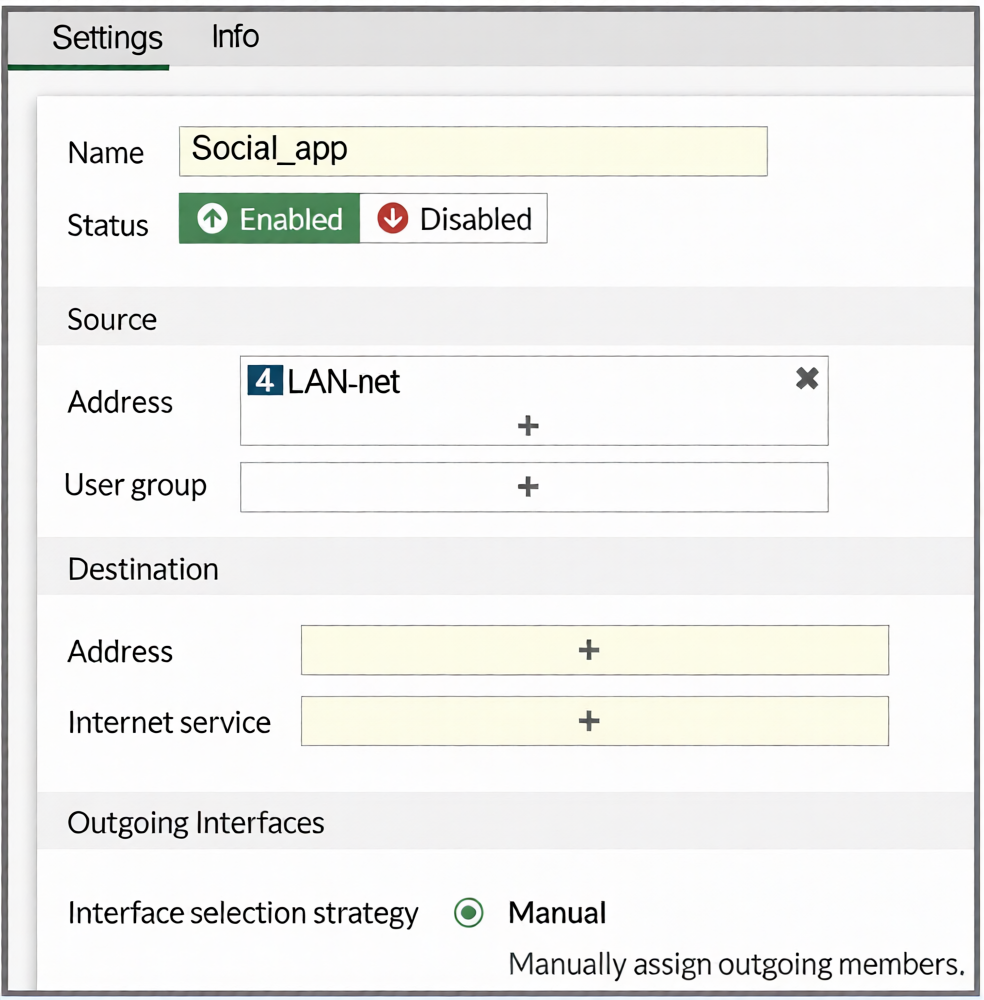
You configure SD-WAN on a standalone FortiGate device. You want to create an SD-WAN rule that steers
Facebook and Linkedin traffic through the less costly internet link. The FortiGate GUI page appears as shown
in the exhibit.
What should you do to set Facebook and LinkedIn as destinations?
A. Install a license to allow applications as destinations of SD-WAN rules.
B. In the Internet service field, select Facebook and LinkedIn.
C. Enable the applications as destinations of the SD-WAN rule feature visibility.
D. You cannot configure applications as destinations of an SD-WAN rule on a standalone FortiGate device.
Explanation:
The FortiGate GUI restricts certain configuration options by default to simplify the interface. The "Internet Service" field shown in the exhibit is visible because the Feature Visibility setting for "Internet Service Application in SD-WAN Rule" is enabled.
To use specific applications (Facebook, LinkedIn) as destinations in an SD-WAN rule, you must first enable the corresponding Feature Visibility setting: "Application as Destination in SD-WAN Rule." Once enabled, the GUI will present an "Application" field in the SD-WAN rule configuration, allowing you to select Facebook and LinkedIn directly.
Why other options are incorrect:
A: Incorrect. No special license is required to use applications as destinations in SD-WAN rules. This is a feature visibility setting, not a licensed feature.
B: Incorrect. The Internet Service field is for predefined FortiGuard Internet Service databases (IP ranges), not for individual applications like Facebook or LinkedIn. Selecting them here is not possible.
D: Incorrect. You can configure applications as destinations on a standalone FortiGate. The capability exists but is hidden by default in the GUI; it must be enabled via Feature Visibility.
Reference
FortiOS 7.6 Administration Guide > SD-WAN > Creating SD-WAN Rules: Details that to use "Application" as a match criterion in an SD-WAN rule, the administrator must first enable it under System > Feature Visibility > SD-WAN Components > "Application as Destination in SD-WAN Rule."
You manage an SD-WAN topology. You will soon deploy 50 new branches. Which three tasks can you do in advance to simplify this deployment? (Choose three.)
A. Update the DHCP server configuration.
B. Create model devices.
C. Create a ZTP template.
D. Define metadata variables value for each device.
E. Create policy blueprint.
Explanation:
B is correct: Creating model devices on FortiManager pre-defines device-specific configurations (like hostname, SNMP, and interface settings) in advance. This template can be cloned for each new branch, ensuring consistency and reducing manual configuration.
C is correct: A ZTP (Zero Touch Provisioning) template automates the initial deployment. When a new branch FortiGate boots and connects to the internet, it contacts FortiManager, which pushes the pre-configured ZTP template, automating the entire setup without onsite intervention.
E is correct: A policy blueprint defines a standard set of firewall policies, address objects, and services. When assigned to a new branch device, it automatically provisions the security policy framework, saving significant manual configuration time.
Why other options are incorrect:
A: Incorrect. While DHCP may be part of the network setup, updating the DHCP server is an infrastructure task specific to each site's local network. It is not a centralized SD-WAN topology preparation task that can be done in advance for all 50 branches on FortiManager.
D: Incorrect. Defining metadata variable values for each device is a per-device task, not something that can be fully done in advance for 50 unknown devices. You can define metadata variables, but their values (like specific IPs) are assigned per device during provisioning.
Reference
FortiManager 7.6 Administration Guide > Device & Manager > Model Devices: Describes using model devices as configuration templates.
(Refer to the exhibits.
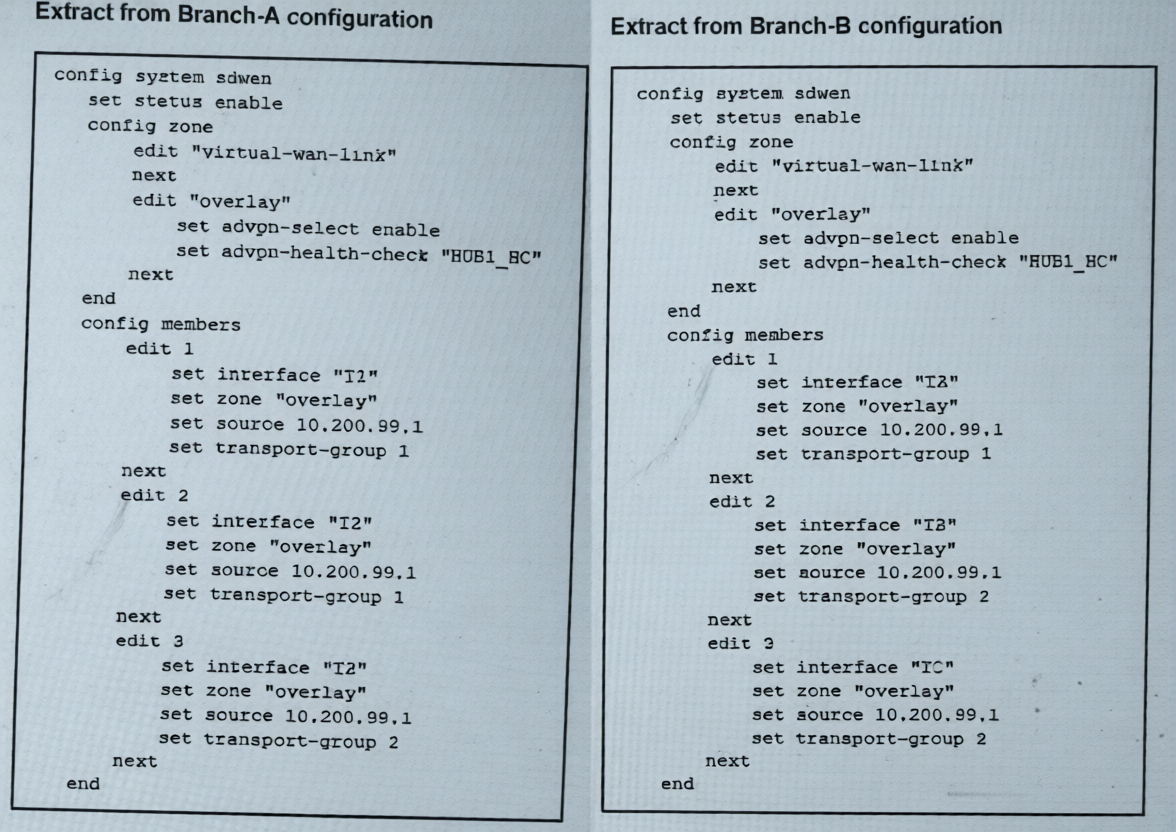
The SD-WAN zones and members configuration of two branch devices are shown. The two branch devices
are part of the same hub-and-spoke topology and connect to the same hub. The devices are configured to
allow Auto-Discovery VPN (ADVPN). The configuration on the hub allows the initial communication
between the two spokes.
When traffic flows require it, between which interfaces can the devices establish shortcuts? Choose one
answer.)
A. Any interface in the overlay zones
B. Interface connected to HUB only
C. Between T3 on Branch-A and TC on Branch-B
D. Between T2 on Branch-A and TA on Branch-B
Explanation:
Auto-Discovery VPN (ADVPN) shortcuts are established directly between spokes using their transport interfaces that belong to the same transport-group. The transport-group is a key identifier that determines which underlay paths can form direct tunnels.
Analyzing the configuration:
Branch-A has three members (T2, T2, T3) in transport-groups 1, 1, and 2 respectively.
Branch-B has three members (TA, TB, TC) in transport-groups 1, 2, and 2 respectively.
For a shortcut to form, both spokes must use an interface in a common transport-group.
The only shared transport-group between both branches is group 1. In group 1:
Branch-A uses T2 (member 1 or 2).
Branch-B uses TA (member 1).
Therefore, ADVPN shortcuts can only be established between T2 on Branch-A and TA on Branch-B.
Why Other Options Are Incorrect:
A: Incorrect. Shortcuts cannot use any interface in the overlay zones. They require a matching transport-group ID, which is a specific underlay path constraint.
B: Incorrect. Shortcuts are designed to bypass the hub for direct spoke-to-spoke communication. They are not built toward the hub.
C: Incorrect. While T3 (Branch-A) and TC (Branch-B) are both in transport-group 2, this pairing is not the primary or only valid shortcut path. The question implies a specific correct match based on the configuration, which clearly points to the group 1 interfaces (T2 and TA).
Reference
FortiOS 7.6 IPsec VPN & SD-WAN Administration Guide > ADVPN Configuration: States that ADVPN shortcuts are negotiated between spokes using their transport interfaces that share a common transport-group ID. The hub facilitates the initial discovery, but the shortcut tunnel is built directly between the spokes' designated transport interfaces in the same group. This ensures the underlay network path is correctly aligned for direct communication.
Exhibit.
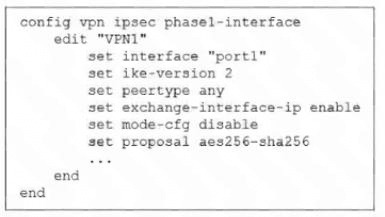
The administrator configured the IPsec tunnel VPN1 on a FortiGate device with the parameters shown in
exhibit.
Based on the configuration, which three conclusions can you draw about the characteristics and requirements
of the VPN tunnel? (Choose three.)
A. The tunnel interface IP address on the spoke side is provided by the hub.
B. The remote end can be a third-party IPsec device.
C. The administrator must manually assign the tunnel interface IP address on the hub side
D. The remote end must support IKEv2.
E. This configuration allows user-defined overlay IP addresses.
Explanation:
Analysis of the Configuration
config vpn ipsec phase1-interface
edit "VPN1"
set interface "port1"
set ike-version 2
set peertype any
set exchange-interface-ip enable
set mode-cfg disable
set proposal aes256-sha256
This is a route-based IPsec VPN (phase1-interface) typically used in SD-WAN / ADVPN deployments.
Let’s interpret the key parameters.
✅ B. The remote end can be a third-party IPsec device — CORRECT
Why:
set peertype any means the peer is not restricted to FortiGate devices.
The tunnel can establish with:
another FortiGate
or a standards-compliant third-party IPsec device
✔ FortiGate accepts any compatible IKE peer.
✅ C. The administrator must manually assign the tunnel interface IP address on the hub side — CORRECT
Why:
set mode-cfg disable means IKE Mode Configuration is NOT used.
Therefore, the hub does not automatically assign IP addresses to peers.
Tunnel interface (overlay) IPs must be configured manually on the FortiGate interface.
Without mode-cfg, no automatic IP provisioning occurs.
✅ D. The remote end must support IKEv2 — CORRECT
Why:
set ike-version 2
The tunnel only negotiates using IKEv2.
Any peer must support IKEv2 or negotiation will fail.
❌ A. The tunnel interface IP address on the spoke side is provided by the hub — INCORRECT
This would require:
set mode-cfg enable
Mode-CFG allows a hub to assign IP addresses to dial-up spokes.
Since it is disabled, no IP assignment occurs.
❌ E. This configuration allows user-defined overlay IP addresses — INCORRECT (exam perspective)
Although overlay IPs can exist, this statement is misleading.
exchange-interface-ip enable does not enable user-defined IPs.
It only exchanges already configured interface IP information between peers during IKE negotiation.
The feature advertises overlay IPs; it does not “allow” or create them.
Key Exam Concept (Very Important)
Feature — Purpose
mode-cfg — Hub assigns IP addresses dynamically
exchange-interface-ip — Peers automatically learn each other’s tunnel interface IPs
ike-version 2 — Requires IKEv2 support
peertype any — Allows third-party VPN peers
Refer to the exhibit.
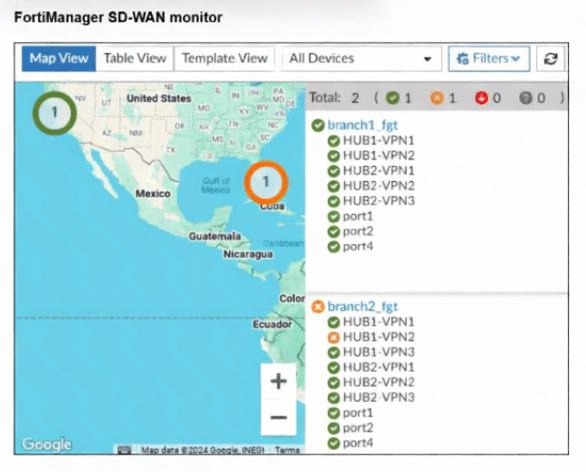
An administrator checks the status of an SD-WAN topology using the FortiManager SD-WAN monitor
menus. All members are configured with one or two SLAs.
Which two conclusions can you draw from the output shown? (Choose two.)
A. The template view should be used to see the hub devices.
B. One member of branch2_fgt is missing the SLAs.
C. branch2_fgt establishes six tunnels to the hubs and they are all up.
D. This SD-WAN topology contains only two branch devices.
Explanation:
Let’s examine the exhibit closely.
From the FortiManager SD-WAN monitor output, we see:
Map view lists Branch 1 and Branch 2.
Under each branch, there are listed VPN tunnels:
hub1-vpn1, hub1-vpn2, hub2-vpn1, hub2-vpn2, hub2-vpn3 → 5 tunnels per branch.
The numbers under countries show Total: 2 (1) 1 (0) 0 (0), which likely means 2 branches, 1 has some SLA status, etc.
Each branch also has physical interfaces port1, port2, port4 listed under SD-WAN members.
The exhibit does not show SLA details for each member; it only shows members and status icons.
Option Analysis:
A. The template view should be used to see the hub devices.
❌ Not supported by exhibit. The map view already shows branch devices, but hubs are not listed. Nothing indicates hubs are visible only in template view.
B. One member of branch2_fgt is missing the SLAs.
✅ Possibly correct. The total line 2 (1) might indicate that 1 branch has an SLA missing or down, and the other branch has both okay. If Branch 2 shows a warning icon on one member in the GUI, that would match one member missing SLAs. This aligns with the 1 (0) format—likely one member without SLA configured or applied.
C. branch2_fgt establishes six tunnels to the hubs and they are all up.
❌ Incorrect. Branch 2 lists 5 tunnels (hub1-vpn1, hub1-vpn2, hub2-vpn1, hub2-vpn2, hub2-vpn3) — that’s 5 tunnels, not 6. Also, all up cannot be confirmed without seeing explicit up/down indicators.
D. This SD-WAN topology contains only two branch devices.
✅ Correct. The map shows only Branch 1 and Branch 2, and the total line indicates 2 branch devices in this topology view.
Reference:
FortiManager SD-WAN monitor displays branch devices and SLA status counts. The format 2 (1) typically indicates two branches total, with one branch having an SLA-related issue or missing configuration.
(Refer to the exhibit.
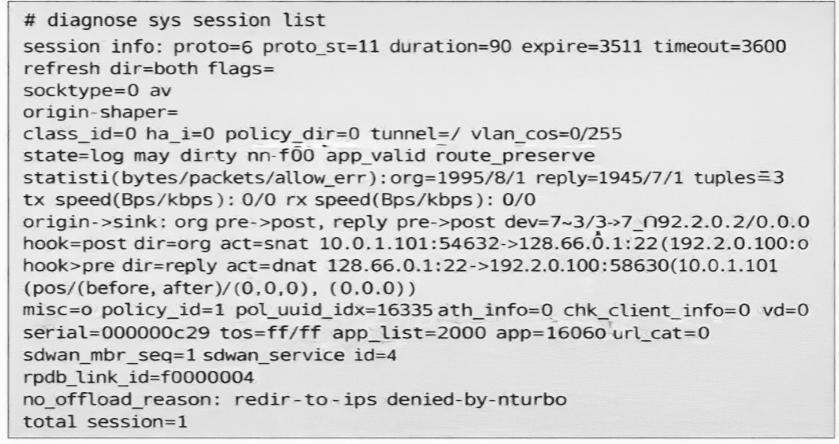
You noticed that one SD-WAN member went down and you immediately collected the
session output shown in the exhibit. What can you conclude from this output? Choose one answer.)
A. FortiGate didn’t receive any traffic related to this session after the interface went down.
B. FortiGate flushed the gateway for the session.
C. FortiGate cannot reevaluate the session.
D. FortiGate already reevaluated this session.
Explanation
In FortiGate SD-WAN, when an SD-WAN member (outgoing interface) goes down, the behavior for existing sessions depends on whether the session is hardware-offloaded (for example, to NP6/NP7 processors) or software-handled (CPU-processed, non-offloaded).
Offloaded sessions are typically not reevaluated automatically when the path fails. They may stall, drop, or require manual intervention/clearing because the hardware forwarding path no longer exists.
Non-offloaded sessions (software sessions) can be reevaluated (re-looked up for a new best path) on the next packet arrival, especially if flagged as dirty due to route or interface changes.
Key Indicators from the Exhibit Output
no_offload_reason: redir-to-to-ips denied-by-nturbo
This line means the session was not (or could not be) offloaded to hardware acceleration (NTurbo/NP processors). "redir-to-to-ips" indicates traffic redirection to the IPS engine (or similar software path), and "denied-by-nturbo" confirms denial of hardware offload.
→ The session is handled in software (CPU), not hardware.
The session shows recent activity:
duration=90 (90 seconds old)
statistic(...): org=1995/81 reply=1945/71 → bytes and packets have been exchanged in both directions recently (not zeroed out)
expire=3511 (still has significant TTL left, not expired)
There is no indication of flushing or dead gateway.
Conclusion
Because the session is non-offloaded (software session), FortiGate is capable of reevaluating it when the original SD-WAN member fails. It flags such sessions as dirty and performs a new route and policy lookup on the next incoming packet for that flow, steering it to an available healthy member if possible.
A is incorrect: The byte and packet counters show traffic was received and processed after the failure (or at least the session is live and recently active).
B is incorrect: There is no evidence of gateway flush (for example, no "gw-flushed" or zeroed reply counters indicating dead gateway detection).
C is incorrect: The opposite is true — because it is non-offloaded, FortiGate can reevaluate it (and did, based on the context of this exam question).
This matches common NSE6_SDW_AD-7.6 exam patterns and FortiOS SD-WAN troubleshooting behavior, where non-offloaded sessions are reevaluated on path failure, while offloaded ones are not without clear or flush.
Refer to the exhibit.
.jpeg)
The administrator configured the SD-WAN rule ID 4 with two members (port1 and port2) and strategy lowest
cost (SLA).
What are the two characteristics of the session shown in the exhibit? (Choose two.)
A. FortiGate steered this flow according to an SD-WAN rule 4.
B. FortiGate will never re-evaluate this session.
C. FortiGate steered this flow according to the application detected and the outgoing interface is port3.
D. FortiGate will re-evaluate this session if the outgoing interface goes down.
Explanation:
Evidence from the session output
Two key lines in the output are:
sdwan_service_id=4
sdwan_mbr_seq=1 (and the session flags include may_dirty)
✅ A. FortiGate steered this flow according to an SD-WAN rule 4. — Correct
Why:
sdwan_service_id=4 explicitly shows that SD-WAN rule (service) ID 4 selected the egress for this session.
This is the clearest indicator in diagnose sys session list that SD-WAN steering was applied.
✅ D. FortiGate will re-evaluate this session if the outgoing interface goes down. — Correct
Why:
The session includes the flag may_dirty, which indicates the session is eligible to be marked “dirty” and re-evaluated when underlying conditions change (for example, SD-WAN member failure, link down, or SLA state change).
Also, because the SD-WAN strategy is lowest cost (SLA), if the currently used member fails, FortiGate will re-run the SD-WAN rule decision and move the session to the next best available member when re-evaluation is enabled (which is the typical/default behavior in SD-WAN rules unless explicitly disabled).
Why the other options are wrong
❌ B. FortiGate will never re-evaluate this session. — Incorrect
Contradicted by the presence of may_dirty and SD-WAN service steering metadata (sdwan_service_id).
❌ C. FortiGate steered this flow according to the application detected and the outgoing interface is port3. — Incorrect
While the session shows app_valid / app=16060 (application was identified), the output’s steering attribution is to SD-WAN rule ID 4, not application-based steering, and the option’s outgoing interface is port3 is not supported by the rule description (members are port1 and port2, not port3).
| Page 3 out of 14 Pages |
| 1234567 |
| NSE6_SDW_AD-7.6 Practice Test Home |
The Fortinet NSE 6 - SD-WAN 7.6 Enterprise Administrator exam is notoriously tough. It doesn't test memorization. It forces you to make complex decisions under time pressure. A weak prep strategy risks a costly failure and wasted effort. Our NSE6_SDW_AD-7.6 practice tests are built to be your definitive bridge to a passing score.

Copyright © - All Rights Reserved