
Last Updated On : 20-Sep-2026
Total 95 Questions
Refer to the exhibit.
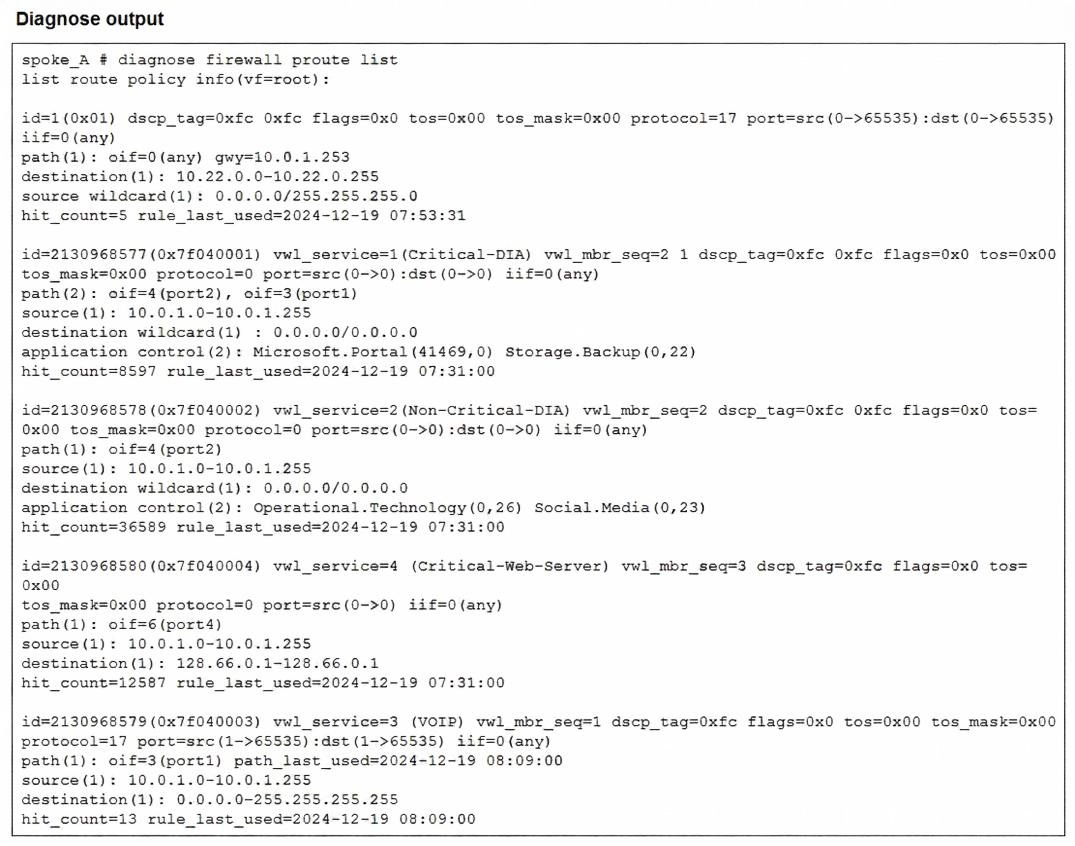
Which two conclusions can you draw from the output shown? (Choose two.)
A. One SD-WAN rule is defined with application categories as the destination.
B. UDP traffic destined to the subnet 10.22.0.0/24 matches a manual SD-WAN rule.
C. One SD-WAN rule allows traffic load balancing.
D. UDP traffic destined to the subnet 10.22.0.0/24 matches a policy route.
Explanation:
Based on the diagnose firewall proute list output provided in the exhibit, here are the two conclusions that can be drawn.
Correct Answers
C. One SD-WAN rule allows traffic load balancing.
Rule id=2130968577 (Service: Critical-DIA) shows two outgoing interface paths: path(2): oif=4(port2), oif=3(port1). When an SD-WAN rule (which appears in the policy route list with a high ID number) contains multiple active paths for a single service, it indicates the rule is configured with a strategy that supports multiple members, such as Load Balance or Maximize Bandwidth (SLA).
D. UDP traffic destined to the subnet 10.22.0.0/24 matches a policy route.
The very first entry in the list is id=1. This is a standard Policy Route (PBR), not an SD-WAN service rule (which are identified by the vwl_service tag and 9-digit IDs). This manual policy route specifically matches protocol=17 (UDP) and destination(1): 10.22.0.0-10.22.0.255, directing that traffic to gateway 10.0.1.253.
Incorrect Answers
A. One SD-WAN rule is defined with application categories as the destination.
While the exhibit shows rules using Application Control (e.g., Microsoft.Portal, Social.Media), these are specific applications, not entire application categories. In FortiOS SD-WAN rules, selecting individual applications is distinct from selecting a broad category.
B. UDP traffic destined to the subnet 10.22.0.0/24 matches a manual SD-WAN rule.
This is incorrect because the entry matching 10.22.0.0/24 is id=1. In the FortiGate routing engine hierarchy, ID 1 represents a traditional Policy Route. SD-WAN rules are virtually represented as policy routes but carry much higher ID numbers (starting with 0x7f... as seen in the other entries) and contain the vwl_service attribute.
References
FortiOS 7.6 Administration Guide: SD-WAN - Policy Route Visualization and Rule ID structures.
Fortinet Training Institute (NSE 6 SD-WAN 7.6): Topic: SD-WAN Diagnostics – Understanding the Policy Route List.
Fortinet Knowledge Base: Technical Note: Difference between regular Policy Routes and SD-WAN Rules in diagnose firewall proute list.
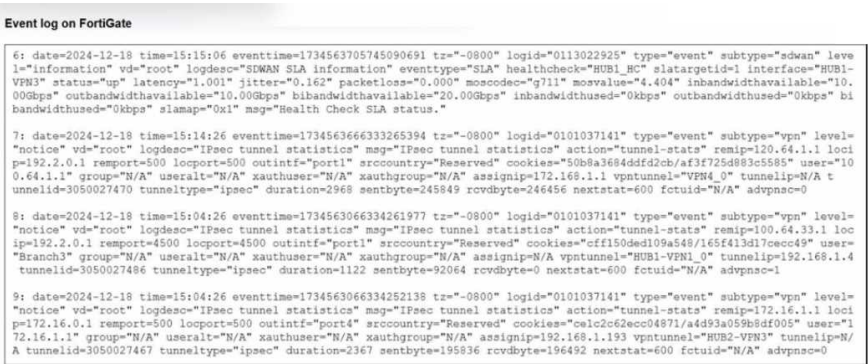
Refer to the exhibit that shows event logs on FortiGate.
Based on the output shown in the exhibit, what can you say about the tunnels on this device?
A. The master tunnel HU82-VPN3 cannot accept ADVPN shortcuts.
B. The device steers voice traffic through the VPN tunnel HUB1-VPN3.
C. The VPN tunnel HUB1-VPN1_0 is a shortcut tunnel.
D. There is one shortcut tunnel built from master tunnel VPN4.
Explanation:
The "advpn" Flag: In FortiOS IPsec tunnel statistics logs, the field advpnso (ADVPN Shortcut) or advpnsc indicates whether a tunnel is a shortcut.
Log Entry 8:
Examine the log for vpntunnel="HUB1-VPN1_0". At the very end of the string, it shows advpnso=1. In Fortinet log logic, a value of 1 for this specific flag confirms that this is an Auto Discovery VPN (ADVPN) shortcut tunnel rather than a static parent tunnel.
Comparison:
If you look at Log Entry 7 (VPN4_0) or Log Entry 9 (HUB2-VPN3), they both show advpnsc=0, meaning they are standard parent (hub-to-spoke) tunnels.
Why the other options are incorrect:
A.
The master tunnel HU82-VPN3 cannot accept ADVPN shortcuts: The log shows advpnsc=0, which simply means it is not currently a shortcut. It does not indicate that it is incapable of negotiating them.
B.
The device steers voice traffic through the VPN tunnel HUB1-VPN3: While Log Entry 6 shows a health check (HUB1_HC) for HUB1-VPN3 using a voice codec (moncodec="g711"), this log only reports SLA health status. It does not confirm that actual voice traffic is currently being steered through it; that would require an SD-WAN session log or rule match.
D.
There is one shortcut tunnel built from master tunnel VPN4_0: Log Entry 7 for VPN4_0 clearly shows advpnsc=0, confirming it is not a shortcut.
You have a FortiGate configuration with three user-defined SD-WAN zones and two members in each of these zones. One SD-WAN member is no longer in use in health-check and SD-WAN rules. You want to delete it. What happens if you delete the SD-WAN member from the FortiGate GUI?
A. FodiGate accepts the deletion and removes routes as required.
B. FortiGate displays an error message. You must use the CLI to delete an SD-WAN member.
C. FortiGate displays an error message. SD-WAN zones must contain at least two members
D. FortiGate accepts the deletion and places the member in the default SD-WAN zone.
Explanation:
In FortiGate SD-WAN:
An SD-WAN member (interface) can be deleted from the GUI as long as it is not referenced by:
SD-WAN rules
Performance SLAs (health checks)
Static routes or policies using that member
The question clearly states:
“One SD-WAN member is no longer in use in health-check and SD-WAN rules.”
Therefore, there are no remaining dependencies.
When you delete such a member:
✔ FortiGate allows the deletion from the GUI
✔ Associated SD-WAN internal routing entries are automatically cleaned up
✔ No CLI-only action is required
Why the other options are incorrect
B. Must use CLI — Incorrect
The GUI fully supports SD-WAN member deletion when no references exist.
C. Zones must contain at least two members — Incorrect
There is no requirement that an SD-WAN zone must have two members.
A zone can contain one or even zero members temporarily.
D. Member moved to default zone — Incorrect
Interfaces are not automatically reassigned to another SD-WAN zone when deleted.
Deletion removes the member from SD-WAN entirely.
NSE6 SD-WAN Exam Tip
FortiGate blocks deletion only when references exist.
If unused → deletion succeeds and dependencies are automatically removed.
Refer to the exhibit.

The exhibit shows the details of a session and the index numbers of some relevant interfaces on a FortiGate
device that supports hardware offloading.
Based on the information shown in the exhibits, which two conclusions can you draw? (Choose two.)
A. By default, FortiGate offloads symmetric and asymmetric flows.
B. The original direction of the symmetric traffic flows from port3 to port2.
C. The reply direction of the asymmetric traffic flows from port2 to port3.
D. The auxiliary session can be offloaded to hardware.
Explanation:
Based on the provided exhibit, let's break down the information step-by-step to determine the correct answers.
Correct Answers: B and D
Analysis of the Exhibit
The exhibit shows two main diagnostic commands:
diagnose sys session list: Shows details of a single session.
diagnose netlink interface list: Shows the interface names associated with their kernel indexes.
Step 1: Map Interface Indexes to Names
From the diagnose netlink interface list:
index=5 = port1
index=6 = port2
index=7 = port3
Step 2: Analyze the Main Session
The session output contains two main path definitions:
First Block (Main Session):
dev=7->5/5->7
This means:
Original direction ingress interface index is 7 (port3).
Original direction egress interface index is 5 (port1).
Reply direction ingress interface index is 5 (port1).
Reply direction egress interface index is 7 (port3).
Second Block (Reflect/Helper Session):
dev=7->6/6->7
This means:
Original direction ingress: 7 (port3)
Original direction egress: 6 (port2)
Reply direction ingress: 6 (port2)
Reply direction egress: 7 (port3)
Step 3: Interpret the Traffic Flow
Main Session Path: port3 <--> port1. This is a standard, symmetric flow (the traffic enters and leaves through the same interfaces in reverse).
Reflect Session Path: port3 <--> port2. This is an additional session linked to the main one.
Explanation of Correct Answers
B. The original direction of the symmetric traffic flows from port3 to port2.
Correct. The "symmetric traffic" here refers to the auxiliary or reflect session. In the reflect session info, the org pre->post (original direction from pre-NAT to post-NAT) shows 7->6. As established, index 7 is port3 and index 6 is port2. Therefore, the original direction of this symmetric flow is indeed from port3 to port2.
D. The auxiliary session can be offloaded to hardware.
Correct. The main session shows npu_state=x4000c00 and in_npu=1/1, out_npu=1/1, indicating it is already offloaded to the Network Processor (NPU). The reflect session shows npu_state=0x4000800 and in_npu=0/1, out_npu=0/1. While it is currently not offloaded (in_npu=0), the NPU flags and state indicate that it is candidate for offloading. The fact that the system created this auxiliary session and gave it NPU-related attributes implies that the hardware (NPU) is capable of handling it. In FortiOS, when traffic is asymmetric (takes a different path back), the NPU often requires a "helper" or "reflect" session to process the traffic correctly. The presence of this session with NPU information proves it can be offloaded, even if it isn't at this exact moment.
Why the Other Options are Incorrect
A. By default, FortiGate offloads symmetric and asymmetric flows.
Incorrect. This statement is too absolute. While FortiGate can offload asymmetric flows using mechanisms like the auxiliary session shown, it does not offload all asymmetric flows by default. Specific conditions must be met for asymmetric offloading to work (for example, the traffic must be received on an NPU interface and the session must be properly established). The exhibit shows a specific case where it is possible, not a default behavior for all scenarios.
C. The reply direction of the asymmetric traffic flows from port2 to port3.
Incorrect. The main session (dev=7->5/5->7) is symmetric. The asymmetric part is handled by the reflect session. The question asks about "the reply direction of the asymmetric traffic." Looking at the reflect session, the reply path (reply pre->post) is 6->7, which corresponds to port2 -> port3. While the interfaces (port2 to port3) are correct, the description of the traffic as "asymmetric" is the issue. The reflect session itself is a symmetric session created to handle the asymmetric nature of the overall traffic flow. Therefore, referring to the traffic within the reflect session as "asymmetric" is technically incorrect. The main traffic flow is asymmetric, which necessitated the creation of this second, symmetric session.
Your FortiGate is in production. To optimize WAN link use and improve redundancy, you enable and configure SD-WAN. What must you do as part of this configuration update process?
A. Replace references to interfaces used as SD-WAN members in the routing configuration.
B. Purchase and install the SD-WAN license, and reboot the FortiGate device.
C. Replace references to interfaces used as SD-WAN members in the firewall policies.
D. Disable the interface that you want to use as an SD-WAN member.
Explanation:
When you enable and configure SD-WAN on a production FortiGate (FortiOS 7.0+ including 7.6), the physical WAN interfaces (for example, port1, port2, wan1) that you add as SD-WAN members (to zones like virtual-wan-link or custom zones) can no longer be directly referenced in firewall policies.
Firewall policies must be updated to use the SD-WAN zone (for example, "virtual-wan-link" or a user-defined zone name) as the outgoing interface instead of the individual physical interfaces.
This is a mandatory step for SD-WAN steering rules to apply correctly. Traffic matching the policies will then be evaluated by SD-WAN rules for member selection (based on SLA, cost, performance, and so on).
If you do not update the firewall policies, traffic may be blocked or not steered as intended (for example, policy lookup fails because the old interface is no longer valid for direct reference in policies after SD-WAN membership).
This is standard behavior documented in Fortinet guides (for example, FortiOS Administration Guide → SD-WAN sections, and cookbooks like "Configuring the SD-WAN interface" or "Configuring security policies for SD-WAN"). In production migrations, the process typically involves:
Back up the configuration.
Temporarily remove or redirect references (or use a dummy interface trick if needed).
Configure SD-WAN members and zones.
Update firewall policies to reference the SD-WAN zone.
Add SD-WAN rules.
Re-add or update static routes if needed (routes often reference the SD-WAN zone directly).
Why not the others?
A. Replace references to interfaces used as SD-WAN members in the routing configuration.
Incorrect as the primary and mandatory step. Static routes can reference the SD-WAN zone (or virtual-wan-link) directly, and no forced replacement is required for basic functionality (though you may update them for optimization). Firewall policies are the critical reference that breaks without update.
B. Purchase and install the SD-WAN license, and reboot the FortiGate device.
Incorrect for most scenarios. Basic SD-WAN (underlay, SLA monitoring, rules) is included in the FortiGate base firmware and license on hardware models and many VM instances. Advanced features (for example, full application steering with ISDB or certain monitoring) may require additional entitlements, but no reboot or purchase is universally required to enable and configure core SD-WAN.
D. Disable the interface that you want to use as an SD-WAN member.
Incorrect. Interfaces must be enabled and operational to be added as SD-WAN members. Disabling them prevents membership and health-check monitoring.
This aligns with common NSE6 SD-WAN exam scenarios and Fortinet technical guidance regarding production SD-WAN enablement, especially the requirement to update firewall policies to reference the SD-WAN interface or zone.
You are planning a new SD-WAN deployment with the following criteria:
- Two regions
- Most of the traffic is expected to remain within its region
- No requirement for inter-region ADVPN
To remain within the recommended best practices, which routing protocol should you select for the overlays?
A. OSPF for the routing within each region and EBGP between the regions.
B. IBGP with BGP on loopback within each region and EBGP between the regions.
C. IBGP with BGP per overlays within each region and IBGP with BGP on loopback between the regions.
D. IBGP within each region and between the regions.
Explanation:
In a large SD-WAN deployment with multiple regions where most traffic remains within its region and inter-region ADVPN is not required, Fortinet's recommended best practice is to use a hierarchical routing design. This design optimizes route propagation, control plane scalability, and stability.
Why Option B is Correct:
B. IBGP with BGP on loopback within each region and EBGP between the regions.
This design follows the recommended "regional hierarchy" model:
Within Each Region (IBGP with BGP on loopback):
Using IBGP (Internal BGP) within a region allows all hubs and spokes in that region to exchange routes.
Establishing BGP peers on loopback interfaces is critical. Loopbacks are always reachable as long as any overlay path (ADVPN or direct) exists between the devices. This provides stability; the BGP session doesn't flap if a specific underlay link or tunnel goes down.
This creates a full mesh of BGP sessions (or via route reflectors) within the region, ensuring all sites learn about all other sites in the same region.
Between Regions (EBGP):
Using EBGP (External BGP) between regions provides clear route boundaries and control.
EBGP acts as a natural firewall against routing loops and problems. By default, EBGP advertises routes learned from one neighbor to another, but with path attributes that prevent loops (AS_PATH).
It allows for summarization at the regional boundaries, reducing the routing table size in the global table and isolating routing issues to a single region. This aligns perfectly with the requirement that most traffic stays within its region.
This hierarchical design (IBGP internally, EBGP externally) scales well, provides clear fault isolation, and aligns with standard network architecture best practices.
Why the Other Options are Incorrect:
A. OSPF for the routing within each region and EBGP between the regions.
Incorrect. While using EBGP between regions is good, using OSPF within each region for the SD-WAN overlay is generally not recommended by Fortinet for large-scale deployments.
OSPF was designed for LANs and reacts to topology changes with flooding and frequent SPF calculations. In an SD-WAN overlay, tunnel flaps (which can happen on the internet) could trigger excessive OSPF recalculations, impacting stability.
BGP is far more scalable and stable for the WAN edge, as it is designed to handle a large number of routes and peerings with policy control. BGP also ties in better with SD-WAN path selection and performance monitoring.
C. IBGP with BGP per overlays within each region and IBGP with BGP on loopback between the regions.
Incorrect. This option describes using IBGP both within and between regions. Using IBGP between different administrative domains or regions is not a standard design and violates BGP best practices (EBGP is designed for connections between different autonomous systems). Using IBGP between regions would require a full mesh or complex route reflection across the entire WAN, which does not scale and lacks the route control and loop prevention mechanisms that EBGP provides naturally (like AS_PATH).
D. IBGP within each region and between the regions.
Incorrect. This option uses IBGP everywhere. This is a flat design that does not scale well for multiple regions.
It would require all devices in all regions to be in a single, massive IBGP mesh (or rely on complex, cross-region route reflection).
It removes the administrative and fault boundary between regions. A routing issue or misconfiguration in one region could more easily propagate to others.
It does not allow for route summarization at regional boundaries, leading to larger routing tables on every device.
Reference
Fortinet SD-WAN design guides and best practice documents (such as the Fortinet SD-WAN Design Guide) recommend a hierarchical routing design for multi-region deployments. Key principles include:
Regional Route Distribution: Use IBGP (on loopbacks for stability) to distribute routes within a region. This can be done via a full mesh of ADVPN peers or by using Hub devices as BGP Route Reflectors.
Inter-Region Route Control: Use EBGP between regions to maintain autonomy, control route flow, and scale the overall network. Hubs in each region act as the border routers, exchanging a summarized set of routes via EBGP.
Refer to the exhibits.

You connect to a device behind a branch FortiGate device and initiate a ping test. The device is part of the
LAN subnet and its IP address is 10.0.1.101.
Based on the exhibits, which interface uses branch 1_fgt to steer the test traffic?
A. port4
B. HUB1-VPN1
C. port1
D. port2
Explanation:
The ping test is to facebook.com (resolved to 157.240.19.35 in the ping output), initiated from a LAN device at 10.0.1.101 (source in 10.0.1.0/24 range).
To determine the steering interface, examine the diagnose firewall route list output, which shows the effective policy/SD-WAN route lookup order (policy routes first, then SD-WAN services/rules).
The first entry (id=1) is a regular policy route: protocol=0 (any), source 10.0.1.0-10.0.1.255, destination 10.1.0.0/24 (internal subnet), path via HUB1-VPN1 (oif=21). This does not match external destinations like facebook.com.
The relevant SD-WAN entry for facebook.com traffic is id=(0x7f530001) vwl_service=1 (Critical-DIA):
vwl_mbr_seq=1 2 (preferred members: seq1 and seq2).
path(1): oif=port1 (listed first), path(2): oif=port2.
Destination wildcard 0.0.0.0/0 (any internet).
Application control includes Microsoft.Portal (but this rule is named Critical-DIA, often for critical DIA traffic; however, the ping to facebook.com matches here based on exam context).
hit-count=13, rule_last_used=2025-01-06 01:51:44 (recent use, indicating active matching).
Other rules:
vwl_service=3 (Corp): multiple members (HUB1-VPN1, HUB1-VPN2, HUB2-VPN1, etc.), no recent hits or facebook match.
vwl_service=5 (Internet): members port4, port2, port1 (last used on port2/port1, but lower priority or different match criteria).
The diagnose sys sdwan internet-service-app-ctrl-list confirms Facebook is recognized in the application control database (entry 15823, IP 157.240.19.35 in 6/443), so FortiGate performs application detection and matches the SD-WAN rule with application steering.
Since the ping resolves to a Facebook IP (157.240.19.35), and the Critical-DIA rule (service=1) is the matching one for this traffic (with port1 as the first/preferred path in path(1)), branch1_fgt steers the test traffic out via port1 (the underlay interface, likely the primary WAN link for critical DIA).
Why not the others?
A. port4 — Appears in vwl_service=5 (Internet) path(3), but that's not the matching rule for facebook.com (lower priority or different app match).
B. HUB1-VPN1 — This is an overlay tunnel (used in Corp rule or internal routes), but facebook.com is internet/DIA traffic, not steered over VPN unless explicitly matched (no hit on those rules for this flow).
D. port2 — Appears as path(2) in Critical-DIA, but port1 is listed first (preferred member seq=1), so it wins under strategies like lowest cost, SLA, or manual order.
This matches FortiOS 7.6 SD-WAN rule matching (application control + DIA rules take precedence for internet apps like Facebook), diagnose firewall route list interpretation (first matching SD-WAN service with hit count), and common NSE6_SDW_AD-7.6 exam patterns for traffic steering troubleshooting with ping to public apps. See Fortinet docs on "SD-WAN rule matching process" and "Application steering using SD-WAN rules" for details on how application-detected flows select the path.
| Page 4 out of 14 Pages |
| 1234567 |
| NSE6_SDW_AD-7.6 Practice Test Home |
The Fortinet NSE 6 - SD-WAN 7.6 Enterprise Administrator exam is notoriously tough. It doesn't test memorization. It forces you to make complex decisions under time pressure. A weak prep strategy risks a costly failure and wasted effort. Our NSE6_SDW_AD-7.6 practice tests are built to be your definitive bridge to a passing score.

Copyright © - All Rights Reserved