
Last Updated On : 12-Oct-2026
Total 112 Questions
An administrator is setting up an ADVPN configuration and wants to ensure that peer IDs
are not exposed during VPN establishment.
Which protocol can the administrator use to enhance security?
A. Use IKEv2, which encrypts peer IDs and prevents exposure.
B. Opt for SSL VPN web mode because it does not use peer IDs at all.
C. Choose IKEv1 aggressive mode because it simplifies peer identification.
D. Stick with IKEv1 main mode because it offers better performance.
Explanation:
IKEv2 encrypts identity payloads during Phase 1, so peer IDs (FQDN, user ID) are not exposed to passive observers. It also aligns with ADVPN requirements for scalable shortcut tunnels, network-id support, and efficient rekeying, making it the right choice when the goal is both security and operational robustness. In FortiGate deployments, ADVPN is designed around IKEv2 to enable automatic spoke-to-spoke shortcuts without leaking identity information in transit.
Why B is incorrect:
SSL VPN web mode is unrelated to ADVPN (IPsec). It doesn’t use IPsec’s IKE identity exchange at all, and cannot provide ADVPN shortcut behavior or route-based VPN semantics required for dynamic peer discovery and on-demand tunnels. Choosing SSL VPN here does not solve peer ID exposure in an ADVPN context.
Why C is incorrect:
IKEv1 aggressive mode explicitly sends the initiator’s identity in cleartext for speed, which is the opposite of the security goal. It’s known to expose peer IDs and is generally discouraged for enterprise deployments, especially where privacy and reconnaissance resistance matter.
Why D is incorrect:
IKEv1 main mode does protect identity better than aggressive mode, but it lacks the ADVPN feature set and scalability of IKEv2 (e.g., network-id–based shortcut formation, improved NAT traversal behavior, and more efficient rekeying). Performance alone is not the deciding factor; capability and security are. Fortinet’s ADVPN feature set is centered on IKEv2.
References:
FortiOS Administration Guide (IPsec VPN, ADVPN, IKEv2): Configuring ADVPN with IKEv2 and identity protection; route-based VPN and shortcut tunnels.
Fortinet Technical Tips: ADVPN with network-id and IKEv2 requirements; identity handling in IKE exchanges.
What does the command set forward-domain
A. It configures the interface to prioritize traffic based on the domain ID, enhancing quality of service for specified VLANs.
B. It isolates traffic within a specific VLAN by assigning a broadcast domain to an interface based on the VLAN ID.
C. It restricts the interface to managing traffic only from the specified VLAN, effectively segregating network traffic.
D. It assigns a unique domain ID to the interface, allowing it to operate across multiple VLANs within the same VDOM.
Explanation:
In a transparent VDOM, the set forward-domain command creates isolated Layer 2 segments by assigning a domain ID (1-4094) to an interface or VLAN subinterface. Interfaces with the same forward-domain ID can communicate directly at Layer 2. Interfaces with different IDs are completely isolated—no traffic passes between them unless explicitly permitted by a firewall policy, enabling multiple separate logical networks on a single physical device.
Why other options are incorrect:
A. Incorrect. The command controls traffic isolation, not QoS prioritization.
C. Incorrect.
This describes basic VLAN tagging (set vlanid), not forward-domain’s role in defining inter-VLAN communication.
D. Incorrect. Assigning a unique ID isolates an interface. To allow an interface to operate across multiple VLANs, those VLANs must share the same forward-domain ID.
Reference:
Fortinet Documentation:
FortiOS Handbook – Transparent Mode > Configuring multiple transparent mode networks (forward domains). It states forward-domains "divide a transparent mode VDOM into multiple Layer 2 networks that are isolated from each other."
Refer to the exhibits. The exhibits show a network topology, a firewall policy, and an
SSL/SSH inspection profile configuration.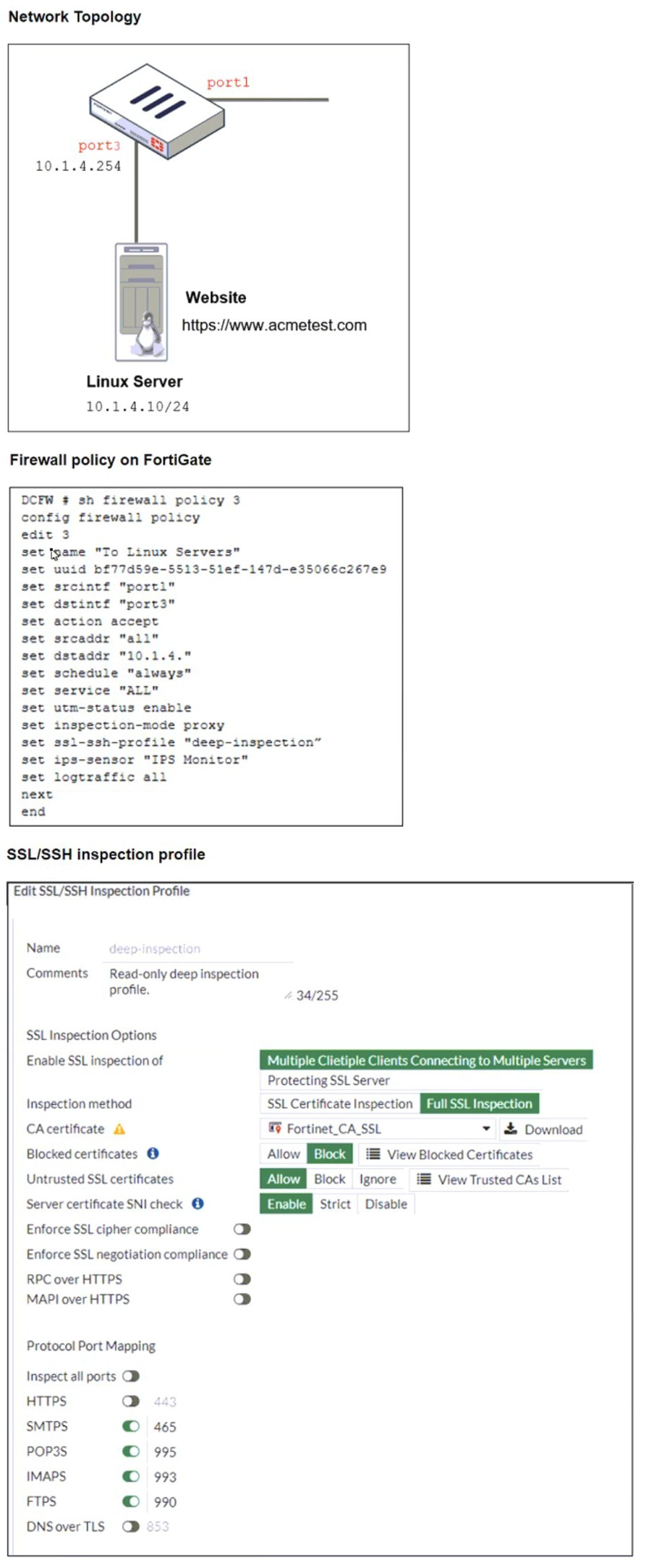
Why is FortiGate unable to detect HTTPS attacks on firewall policy ID 3 targeting the Linux
server?
A. The administrator must set the policy to inspection mode to analyze the HTTPS packets as expected.
B. The administrator must enable HTTPS in the protocol port mapping of the deepinspection SSL/SSH inspection profile.
C. The administrator must enable SSL inspection of the SSL server and upload the certificate of the Linux server website to the SSL/SSH inspection profile.
D. The administrator must enable SSL inspection of the SSL server and upload the certificate of the Linux server website to the SSL/SSH inspection profile.
Explanation:
FortiGate cannot detect HTTPS-based attacks unless it can decrypt and inspect the encrypted traffic. In this scenario, the Linux server hosts a site at https://www.acmetest.com, and the firewall policy uses deep inspection with proxy mode. However, for FortiGate to inspect inbound HTTPS traffic targeting the server, it must be able to re-sign the server’s certificate using a trusted certificate authority (CA) or have access to the original server certificate and private key.
Option C is correct because it addresses the core requirement:
uploading the server certificate to the SSL/SSH inspection profile allows FortiGate to decrypt inbound HTTPS traffic destined for the Linux server. Without this, FortiGate cannot perform full inspection and will bypass encrypted payloads, missing potential threats.
Why other options are incorrect:
A. Set the policy to inspection mode ❌
Already configured as proxy mode in the exhibit, which supports full SSL inspection. Changing inspection mode is not the issue.
B. Enable HTTPS in protocol port mapping ❌
HTTPS (port 443) is already mapped in the profile. This setting controls which ports are inspected, not certificate handling.
D. Duplicate of C ❌
This is a distractor. It repeats option C verbatim and is not a valid separate choice.
References
FortiOS 7.6 Administration Guide – SSL/SSH Inspection: Inbound HTTPS inspection requires uploading the server certificate and enabling inspection of SSL server traffic.
Refer to the exhibit, which shows an enterprise network connected to an internet service
provider.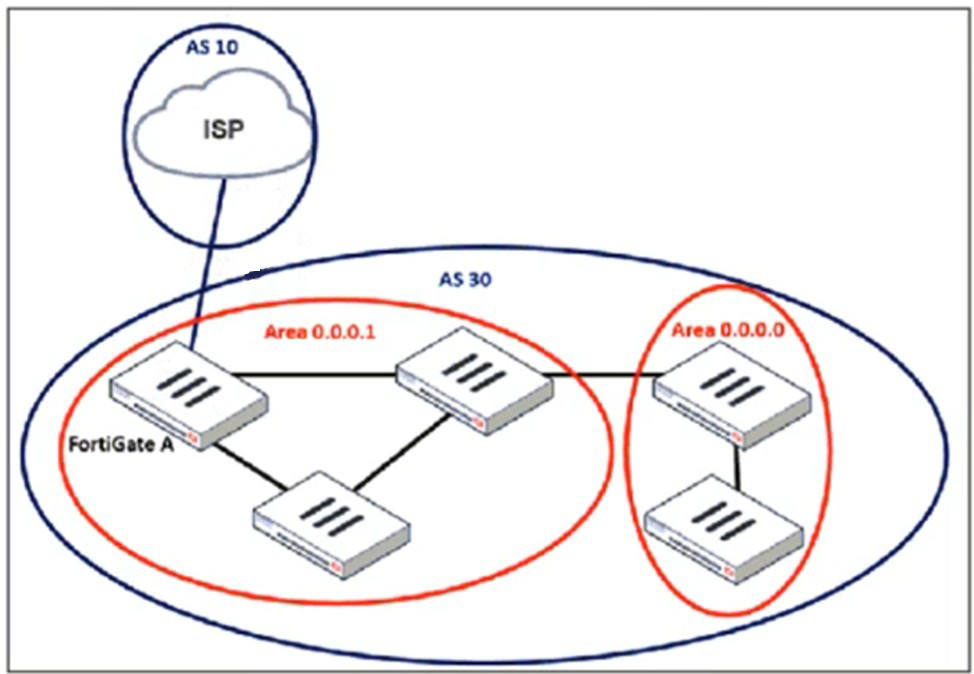
An administrator must configure a loopback as a BGP source to connect to the ISP.
Which two commands are required to establish the connection? (Choose two.)
A. ebgp-enforce-multihop
B. update-source
C. ibgp-enforce-multihop
D. recursive-next-hop
Explanation:
When using a loopback interface as the source for a BGP session (instead of a directly connected physical interface), two specific issues must be addressed in the BGP neighbor configuration:
B.update-source:
This command specifies the local interface/IP that the FortiGate uses to originate the BGP TCP connection. To use the loopback interface (loopback1, for example) as the stable source, you must configure set update-source
A. ebgp-enforce-multihop:
By default, eBGP sessions (between different Autonomous Systems, like AS 10 and AS 30 in the exhibit) expect the peer to be directly connected (TTL=1). Since a loopback interface is not a directly connected network from a routing perspective, this default behavior will cause the session to fail. The ebgp-enforce-multihop command increases the TTL, allowing the BGP packets to traverse multiple hops to reach the peer's loopback address, which is essential when the loopback is reachable via an IGP (like OSPF, shown in Area 0.0.0.0).
Why the other options are incorrect:
C. ibgp-enforce-multihop:
This command is used for iBGP sessions (within the same AS). The exhibit clearly shows an eBGP connection between different AS numbers (AS 10 and AS 30), making this command irrelevant.
D. recursive-next-hop:
This command relates to how BGP resolves the next-hop for installed routes (recursively via the RIB). It is a global BGP setting, not a required command for establishing the basic TCP neighbor connection using a loopback source.
Reference:
Fortinet Documentation:
FortiOS Handbook - BGP, specifically the sections on "Configuring BGP neighbors" and "eBGP multihop." The documentation states that update-source defines the source IP for BGP packets, and ebgp-enforce-multihop is required when an eBGP peer is not directly connected.
Refer to the exhibit.
A pre-run CLI template that is used in zero-touch provisioning (ZTP) and low-touch
provisioning (LTP) with FortiManager is shown.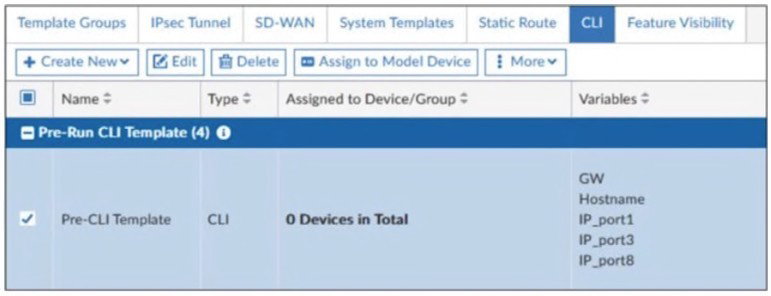
The template is not assigned even though the configuration has already been installed on
FortiGate.
What is true about this scenario?
A. The administrator did not assign the template correctly when adding the model device because pre-CLI templates remain permanently assigned to the firewall
B. Pre-run CLI templates are automatically unassigned after their initial installation
C. Pre-run CLI templates for ZTP and LTP must be unassigned manually after the first installation to avoid conflicting error objects when importing a policy package
D. The administrator must use post-run CLI templates that are designed for ZTP and LTP
Explanation:
In FortiManager’s Zero-Touch Provisioning (ZTP) and Low-Touch Provisioning (LTP) workflows, pre-run CLI templates are used to push initial configuration to FortiGate devices before they are fully onboarded. These templates typically include interface IPs, hostnames, default routes, and other bootstrap settings.
Once the FortiGate device receives and applies the pre-run CLI template during provisioning, FortiManager automatically unassigns the template. This behavior is by design — it ensures that the template does not persist and interfere with future policy package installations or device-level configuration updates.
This automatic unassignment avoids:
Redundant configuration pushes
Conflicting object errors during policy import
Misalignment between template logic and policy package logic
Why other options are incorrect:
A. Pre-CLI templates remain permanently assigned ❌ Incorrect.
They are not permanently assigned. FortiManager automatically detaches them post-installation to prevent conflicts.
C. Must be unassigned manually ❌ Incorrect.
Manual unassignment is not required. FortiManager handles this automatically after the initial provisioning.
D. Use post-run CLI templates instead ❌
Misleading. Post-run templates are used after device onboarding, not for ZTP/LTP. They serve different purposes and do not replace pre-run templates in provisioning workflows.
References
FortiManager Administration Guide – ZTP and CLI Template Behavior:
Confirms automatic unassignment of pre-run templates after initial install.
Fortinet KB Article: Understanding CLI template lifecycle in ZTP/LTP workflows
NSE 5 FortiManager Training – Device Provisioning and Template Assignment
An administrator wants to scale the IBGP sessions and optimize the routing table in an
IBGP network.
Which parameter should the administrator configure?
A. network-import-check
B. ibgp-enforce-multihop
C. neighbor-group
D. route-reflector-client
Explanation:
The core scaling challenge in an iBGP network is the full mesh requirement, where every router must peer with every other router (n*(n-1)/2 sessions). This does not scale. The primary solution is Route Reflection.
Configuring route-reflector-client on an iBGP neighbor achieves both stated goals:
1.Scales iBGP Sessions:
A Route Reflector (RR) can re-advertise iBGP-learned routes to its clients, eliminating the need for a full mesh. Clients only need to peer with the RR.
2.Optimizes the Routing Table:
It prevents unnecessary route propagation and path hiding, ensuring clients receive the best paths efficiently from a single, authoritative source (the RR).
Why other options are incorrect:
A. network-import-check:
This verifies if a BGP network route exists in the RIB before advertising it. It prevents invalid advertisements but does not scale or optimize iBGP session topology.
B. ibgp-enforce-multihop:
This allows iBGP sessions with non-directly connected peers, which is sometimes necessary but does not reduce the number of required sessions or optimize the routing table structure.
C. neighbor-group:
This is a configuration template for applying common settings to multiple BGP peers. It simplifies configuration but does not change the fundamental iBGP full-mesh scaling problem.
Reference:
Fortinet Documentation:
FortiOS Handbook - BGP, section "Configuring route reflectors." It explicitly describes route reflectors as the method to "simplify iBGP configuration and improve scalability" by allowing a router to reflect routes to clients, breaking the full-mesh requirement.
Refer to the exhibit, which contains the partial output of an OSPF command.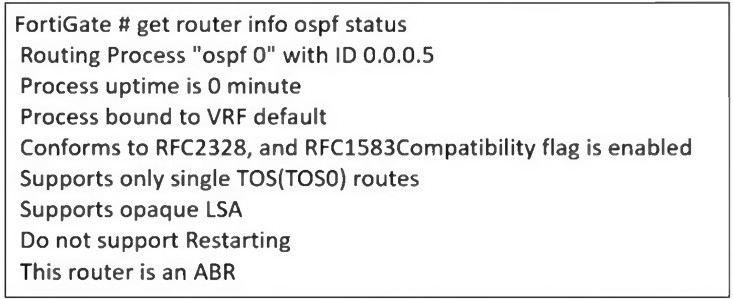
An administrator is checking the OSPF status of a FortiGate device and receives the output
shown in the exhibit.
What two conclusions can the administrator draw? (Choose two.)
A. The FortiGate device is a backup designated router
B. The FortiGate device is connected to multiple areas
C. The FortiGate device injects external routing information
D. The FortiGate device has OSPF ECMP enabled
Explanation:
The key to answering this question is interpreting the status line: "This router is an ABR".
An ABR (Area Border Router) is an OSPF router with interfaces in more than one OSPF area. It connects one or more non-backbone areas (Area 0.0.0.1, etc.) to the backbone area (Area 0).
Let's evaluate each option:
B. The FortiGate device is connected to multiple areas.
This is correct. By definition, an ABR (Area Border Router) must have interfaces in at least two OSPF areas, including the backbone area (Area 0). The status explicitly identifies the router as an ABR.
C. The FortiGate device injects external routing information.
This is correct. An ABR has the additional role of being an ASBR (Autonomous System Boundary Router) if it is also configured to redistribute routes from other sources (static, BGP, connected, etc.) into OSPF. The command output does not explicitly say "ASBR," but the ABR functionality inherently involves summarizing and injecting inter-area routes. More importantly, in practical FortiOS OSPF scenarios, an ABR is typically the device where route redistribution is configured to inject external routes into the OSPF domain.
A. The FortiGate device is a backup designated router (BDR).
Incorrect.The output shows "This router is an ABR", which is a role related to areas. The DR/BDR role is per multi-access network segment (like a LAN) and is indicated by the state of individual OSPF interfaces (e.g., get router info ospf interface would show "BDR"). The provided status does not contain this information.
D. The FortiGate device has OSPF ECMP enabled.
Incorrect. The output does not provide any information about Equal-Cost Multi-Path (ECMP) routing. ECMP is a global routing table feature, not an OSPF process status detail shown here.
Reference:
Fortinet Documentation: FortiOS Handbook - OSPF, section "OSPF router types." The documentation defines an Area Border Router (ABR) as a router that has interfaces in multiple areas and summarizes routes between them. It also explains that an ABR can function as an ASBR if it redistributes external routes, which is a common administrative task on such a device.
| Page 4 out of 16 Pages |
| 12345678 |
| FCSS_EFW_AD-7.6 Practice Test Home |
The FCSS - Enterprise Firewall 7.6 Administrator exam is notoriously tough. It doesn't test memorization. It forces you to make complex decisions under time pressure. A weak prep strategy risks a costly failure and wasted effort. Our FCSS_EFW_AD-7.6 practice tests are built to be your definitive bridge to a passing score.

Copyright © - All Rights Reserved