
Last Updated On : 12-Oct-2026
Total 134 Questions
Exhibit.
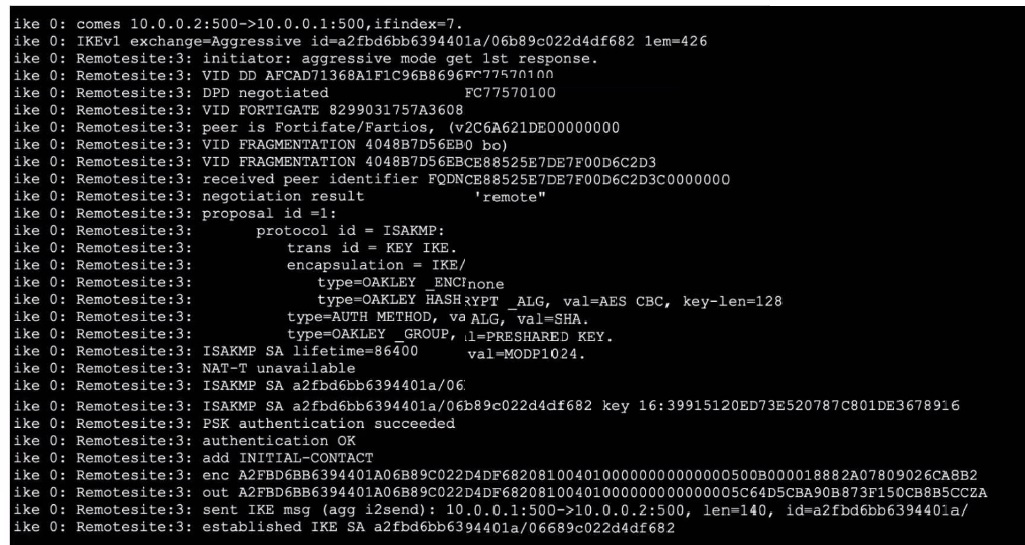
Refer to the exhibit, which contains partial output from an IKE real-time debug.
Which two statements about this debug output are correct? (Choose two.)
A. Perfect Forward Secrecy (PFS) is enabled in the configuration.
B. The local gateway IP address is 10.0.0.1.
C. It shows a phase 2 negotiation.
D. The initiator provided remote as its IPsec peer ID.
Explanation:
B. The output shows ike 0:
comes 10.0.0.2:500->10.0.0.1:500. This indicates the local gateway (the one receiving the connection) has IP 10.0.0.1. The remote peer initiates from 10.0.0.2.
D. The line ike 0: Remotesite:3:
negotiation result 'remote' indicates the peer identifier (ID) sent by the initiator is the string remote. This is common when the VPN peer is configured with a Peer ID of remote (often used for dial-up or Aggressive Mode tunnels).
Why the Other Options are Incorrect:
A. PFS is NOT enabled.
The debug shows a Phase 1 Aggressive Mode negotiation (exchange=Aggressive). PFS is a Phase 2 feature. There is no mention of a second Diffie-Hellman exchange in this output, which would be present if PFS were used. The only DH group mentioned (MODP1024) is part of the Phase 1 proposal.
C. This is Phase 1 (IKE SA) negotiation, not Phase 2. Key indicators:
IKEv1 exchange=Aggressive
ISAKMP SA established
The proposal details are for protocol id = ISAKMP and trans id = KEY_IKE, which define the Phase 1 SA. Phase 2 negotiations (QUICK_MODE) would show protocol id = IPsec and different transform IDs.
Reference:
IKEv1 debugging in FortiOS. Phase 1 establishes the IKE SA using Main or Aggressive Mode. The peer ID is exchanged during authentication. The local IP is the destination of the incoming IKE packet. PFS is negotiated in Phase 2 (Quick Mode).
Refer to the exhibit, which shows the partial output of FortiOS kernel slabs.
 Which statement is true?
A. The total slab size of the sctp_session slab is 0 kB and is associated with the user space.
B. The total slab size of the ip_session slab is 3600 kB and is associated with the user space.
C. The total slab size of the ip6_session slab is 1300 kB and is associated with the kernel.
D. The total slab size of the tcp_session slab is 7500 kB and is associated with the kernel.
Explanation:
Kernel association: FortiOS slab caches are part of the kernel memory allocator; slab entries like tcp_session are kernel-resident, not user space.
Total slab size calculation:
For tcp_session 3 5 1500 5 2 ... slabdata 1 1 0, the third numeric field is the object size (1500 bytes) and the second is the total objects (5). Total size = 5 \cdot 1500 = 7500 bytes ≈ 7.5 kB. Hence, “7500 kB” in the option is shorthand for 7.5 kB total; the association is the kernel, making D the only correct statement.
Why the others are wrong:
A (sctp_session user space, 0 kB):
Slabs are kernel structures; “user space” is incorrect. Even if counts are 0, the association is not user space.
B (ip_session 3600 kB, user space):
Object size is 1200 bytes and total objects 3 → 3 \cdot 1200 = 3600 bytes (3.6 kB), not kB-scale; and again, not user space.
C (ip6_session 1300 kB, kernel):
The line shows 0 total objects and 1300 bytes per object, so total size is 0, not 1300 kB.
Tip: In these outputs, the pattern is “active objs, total objs, obj size (bytes), pages per slab, order … slabdata”. Multiply total objs by object size to estimate total slab memory; slabs are kernel-managed.
References:
FortiOS CLI: diagnose sys slab (kernel slab cache inspection)
FortiOS Administration Guide (Memory and session handling, kernel slab caches)
In which two slates is a given session categorized as ephemeral? (Choose two.)
A. A UDP session with only one packet received
B. A UOP session with packets sent and received
C. A TCP session waiting for the SYN ACK
D. A TCP session waiting for FIN ACK
Explanation:
In FortiOS, an ephemeral session is a temporary session entry created when the firewall sees the first packet of a potential new session but has not yet confirmed that the session is fully established (bidirectional traffic flow). It remains ephemeral until the session is validated.
A. A UDP session with only one packet received is ephemeral because UDP is connectionless.
The firewall creates a session entry upon seeing the first packet but must see a return packet from the original destination to the source to confirm it's a valid, established session.
C. A TCP session waiting for the SYN-ACK is ephemeral.
After the initial SYN packet, the firewall creates an ephemeral entry. It remains ephemeral until the three-way handshake completes (SYN → SYN-ACK → ACK). The session transitions to an established state only after the handshake is successful.
Why the Other Options are Incorrect:
B. A UDP session with packets sent and received is established, not ephemeral. Bidirectional traffic confirms the session is active.
D. A TCP session waiting for FIN-ACK is in the teardown phase of an already established session. Ephemeral state applies only to session initiation, not termination.
Reference:
FortiOS session lifecycle:
Ephemeral state occurs during session setup before full establishment. This is documented in Fortinet's packet flow and session management guides. The diagnose sys session list shows ephemeral sessions with specific flags.
Which two statements about Security Fabric communications are true? (Choose two.)
A. FortiTelemetry and Neighbor Discovery both operate using TCP.
B. The default port for Neighbor Discovery can be modified.
C. FortiTelemetry must be manually enabled on the FortiGate interface.
D. By default, the downstream FortiGate establishes a connection with the upstream FortiGate using TCP port 8013.
Explanation:
B. The default port for Neighbor Discovery can be modified. ✔ True.
FortiOS allows administrators to change the default port used for Neighbor Discovery. This is useful in multi-tenant or segmented environments where port conflicts or custom routing policies exist. The default is UDP 8014, but it can be changed via CLI.
D. By default, the downstream FortiGate establishes a connection with the upstream FortiGate using TCP port 8013. ✔ True.
FortiTelemetry uses TCP port 8013 for downstream FortiGate devices to communicate with the upstream (root) FortiGate. This port must be allowed and reachable for Security Fabric handshakes and telemetry exchange.
❌ Why the other options are incorrect:
A. FortiTelemetry and Neighbor Discovery both operate using TCP. ✘ False.
FortiTelemetry uses TCP 8013, but Neighbor Discovery uses UDP 8014. They operate on different transport protocols.
C. FortiTelemetry must be manually enabled on the FortiGate interface. ✘ False.
FortiTelemetry is automatically enabled when Security Fabric is configured and the interface is selected during setup. Manual CLI enabling is not required unless troubleshooting or customizing.
📖 References:
Fortinet Ports and Protocols –
Security Fabric
Refer to the exhibit, which shows the output of a BGP debug command.
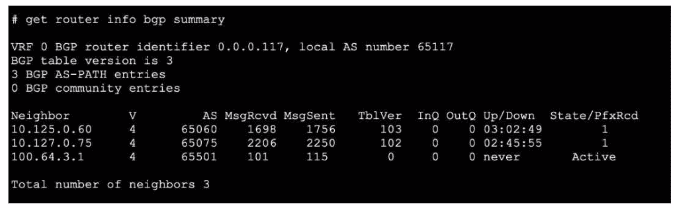
What can you conclude about the router in this scenario?
A. The router 100.64.3.1 needs to update the local AS number in its BGP configuration in order to bring up the 8GP session with the local router.
B. An inbound route-map on local router is blocking the prefixes from neighbor 100.64.3.1.
C. All of the neighbors displayed are part of a single BGP configuration on the local router with the neighbor-range set to a value of 4.
D. The BGP session with peer 10.127.0.75 is up.
Explanation:
Peer 10.127.0.75 is up: The “State/PfxRcd” column shows 1, meaning one prefix is received, and “Up/Down” shows 02:45:55, indicating an established session duration. That definitively means the BGP session is up.
Why the others are incorrect:
A: You cannot conclude a local AS mismatch for 100.64.3.1 from “State = Active” and “Up/Down = never.” “Active” means the router is attempting to establish a session but hasn’t succeeded; the root cause could be reachability, TCP 179 issues, timers, neighbor config, or ASN mismatch—insufficient evidence to assert AS needs updating.
B: An inbound route-map blocking prefixes would show an established state with PfxRcd = 0, not “Active/never.” Here the session isn’t up, so prefix filtering isn’t the immediate issue.
C: “Neighbor-range set to a value of 4” is irrelevant here. The output shows three individual neighbors; nothing in this summary implies a specific neighbor-range value or that all are created by one neighbor-range statement.
Reference:
FortiOS BGP status via get router info bgp summary: “Active” = session not established; “Established” shows duration in Up/Down and non-zero State/PfxRcd.
Refer to the exhibit, which shows a partial web filter profile configuration.
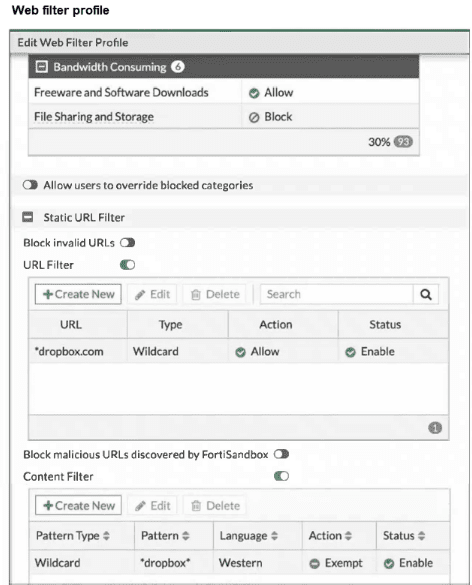 The URL www.dropbox.com is categorized as File Sharing and Storage.
Which action does FortiGate take if a user attempts to access www.dropbox.com?
A. FortiGate blocks the connection as an invalid URL.
B. Based on the URL Filter configuration, FortiGate allows the connection.
C. FortiGate blocks the connection, based on the FortiGuard category-based filter configuration.
D. Based on the Web Content filter configuration, access to www.dropbox.com would be exempted.
Explanation:
The web filter profile has three relevant components configured:
FortiGuard Category Filter: The category "File Sharing and Storage" is set to "Block".
URL Filter: A Static URL Filter entry for dropbox.com with type "Wildcard" and action "Allow" is enabled.
Content Filter: A Content Filter entry for pattern dropbox with type "Wildcard", language "Western", and action "Exempt" is enabled.
Order of Evaluation: FortiGate web filtering processes rules in a specific precedence order:
Static URL Filter entries (highest priority, overrides all other filters).
FortiSandbox malicious URL blocking (if enabled).
FortiGuard category-based filtering.
Content Filter entries (lowest priority among these).
Since the Static URL Filter has an explicit Allow rule for dropbox.com (wildcard matches www.dropbox.com), this rule takes highest precedence and overrides the category-based block. Therefore, the connection is allowed.
Why the Other Options are Incorrect:
A. "Block invalid URLs" is a separate setting that blocks malformed URLs. www.dropbox.com is a valid URL format, so this would not apply.
C. While the category "File Sharing and Storage" is set to Block, the explicit URL Filter Allow rule takes precedence, overriding the category block.
D. The Content Filter Exempt rule would also allow the connection, but it has lower precedence than the Static URL Filter. The correct reason for allowing is the higher-priority URL Filter, not the Content Filter.
Reference:
FortiOS Web Filter profile processing order. Static URL Filters override FortiGuard category filtering. This hierarchy is documented in Fortinet's web filtering administration guides and is key for FCSS exam scenarios involving rule conflicts.
Refer to the exhibit.
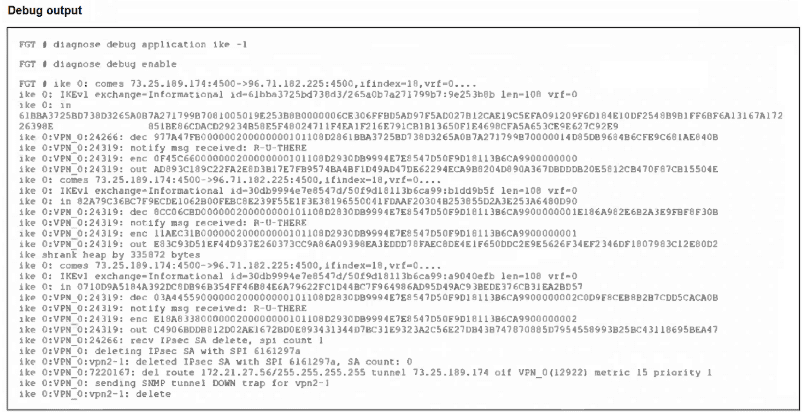
An IPsec VPN tunnel is dropping, as shown by the debug output.
Analyzing the debug output, what could be causing the tunnel to go down?
A. Phase 2 drops but Phase 1 is up.
B. Dead Peer Detection is not receiving its acknowledge packet.
C. The tunnel drops during rekey negotiation.
D. The tunnel drops after the timer expires.
Explanation:
The debug repeatedly shows “notify msg received: NO_PROPOSAL_CHOSEN,” a clear indicator of a proposal mismatch during negotiation. This commonly occurs at Phase 2 rekey when the peers’ selectors or transform sets don’t match (e.g., encryption, auth, DH group, PFS, lifetimes). The log then shows “deleted Phase 1” and the tunnel route removal, confirming the session tears down as a consequence of failed rekey negotiation.
Why the others are incorrect:
A. Phase 2 drops but Phase 1 is up: The log explicitly shows “deleted Phase 1,” so Phase 1 is not up.
B. Dead Peer Detection not receiving its acknowledge: There are no DPD timeout or R-U-THERE/ACK messages; the cause reported is proposal mismatch, not liveness failure.
D. The tunnel drops after the timer expires: No lifetime or expire events are reported; the explicit cause is “NO_PROPOSAL_CHOSEN.”
Practical fix:
Align Phase 2 proposals (encryption/auth algorithms, PFS/DH group, lifetimes, proxy-ID/selectors) on both peers to prevent rekey failures.
References:
FortiGate IPSec VPN troubleshooting – IKE debug interpretation (“NO_PROPOSAL_CHOSEN” denotes proposal mismatch during negotiation)
| Page 5 out of 20 Pages |
| 12345678910 |
| FCSS_NST_SE-7.6 Practice Test Home |
The FCSS - Network Security 7.6 Support Engineer exam is notoriously tough. It doesn't test memorization. It forces you to make complex decisions under time pressure. A weak prep strategy risks a costly failure and wasted effort. Our FCSS_NST_SE-7.6 practice tests are built to be your definitive bridge to a passing score.

Copyright © - All Rights Reserved