
Last Updated On : 12-Oct-2026
Total 134 Questions
An administrator wants to capture encrypted phase 2 traffic between two FotiGate devices
using the built-in sniffer.
If the administrator knows that there Is no NAT device located between both FortiGate
devices, which command should the administrator run?
A. diagnose sniffer packet any 'udp port 500'
B. diagnose sniffer packet any 'lp proto 50'
C. diagnose sniffer packet any 'udp port 4500'
D. diagnose sniffer packet any 'ah'
Explanation:
IPSec Phase 2 encrypts the actual data traffic using either:
ESP (Encapsulating Security Payload) – Protocol IP 50
AH (Authentication Header) – Protocol IP 51 (less common)
Since there is no NAT device between the FortiGates, the traffic will use ESP in tunnel mode (most common for site-to-site VPNs). ESP is identified by IP protocol number 50. The sniffer filter 'ip proto 50' will capture these encrypted ESP packets.
Why the Other Options are Incorrect:
A. 'udp port 500'
– Captures IKE Phase 1 negotiation traffic (unencrypted management traffic), not the encrypted Phase 2 data traffic.
C. 'udp port 4500'
– Captures IKE traffic when NAT-T (NAT Traversal) is used, which encapsulates IKE in UDP 4500. Since there is no NAT, NAT-T is not used, and this will not capture Phase 2 ESP data.
D. 'ah'
– Captures AH traffic (IP protocol 51), which is rarely used compared to ESP. Most FortiGate IPSec VPNs use ESP for encryption; AH provides only authentication and no encryption, so it wouldn't show "encrypted" traffic.
Reference:
IPSec protocol numbers:
ESP = IP 50, AH = IP 51. Without NAT, ESP packets are sent directly with IP protocol 50. The diagnose sniffer command uses tcpdump-style filters; ip proto 50 correctly matches the ESP header.
Exhibit.
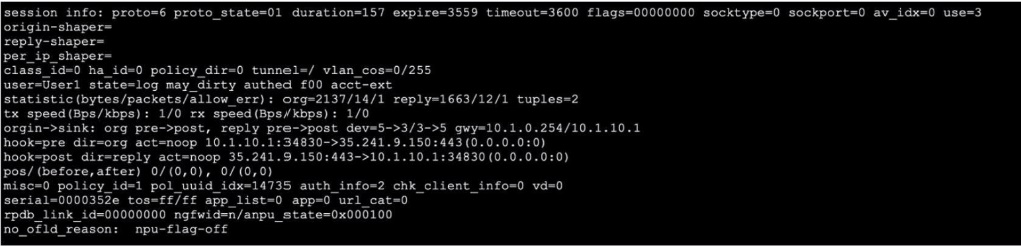
Refer to the exhibit, which shows the output of a session. Which two statements are true?
(Choose Iwo.)
A. The TCP session has been successfully established.
B. The session was initiated from an authenticated user.
C. The session is being inspected using flow inspection.
D. The session is being offloaded.
Explanation:
A. proto_state=01
indicates the TCP session state is "established". In FortiOS session diagnostics, proto_state=01 means the TCP three-way handshake is complete and the connection is active.
B. The field user=User1
shows the session is associated with an authenticated user. The flag authed also appears in the state= field, confirming the session was authenticated (likely via FSSO, firewall authentication, or captive portal).
Why the Other Options are Incorrect:
C. The session is not using flow inspection. Key indicators:
hook=pre dir=org act=noop and hook=post dir=reply act=noop show the session is processed in the kernel with "noop" (no operation), meaning no proxy-based inspection.
There are no security profile references (av_idx=0, app_list=0, url_cat=0), confirming no UTM inspection is applied.
Flow-based inspection is the default, but these fields confirm no proxy-mode (deep inspection) is active.
D. The session is NOT offloaded.
The field npu_state=0x000100 and the explicit comment no_ofid_reason: npu-flag-off indicate NPU offloading is disabled for this session. This is likely because the traffic requires CPU processing (e.g., user authentication, certain policy features) that prevent hardware acceleration.
Reference:
FortiOS session table analysis:
proto_state=01 = TCP established.
user= and authed flag = authenticated session.
hook=... act=noop = flow-based, not proxy-based inspection.
npu_state and no_ofid_reason indicate offloading status.
Which statement about IKEv2 is true?
A. Both IKEv1 and IKEv2 share the feature of asymmetric authentication.
B. IKEv1 and IKEv2 have enough of the header format in common that both versions can run over the same UDP port.
C. IKEv1 and IKEv2 use same TCP port but run on different UDP ports.
D. IKEv1 and IKEv2 share the concept of phase1 and phase2.
Explanation:
Both IKEv1 and IKEv2 fundamentally operate with a two-phase approach:
Phase 1 establishes a secure, authenticated channel (IKE SA) for management traffic.
Phase 2 negotiates the IPsec SAs (CHILD_SAs in IKEv2) used to encrypt actual user data.
While IKEv2 simplifies and consolidates the exchanges (IKE_SA_INIT and IKE_AUTH for Phase 1+initial CHILD_SA), the conceptual separation of control channel setup (Phase 1) and data channel setup (Phase 2) remains.
Why the Other Options are Incorrect:
A. Asymmetric authentication (different authentication methods for each peer) is not a standard feature of IKEv1.
IKEv1 typically requires the same authentication method (e.g., PSK or certificates) on both ends. IKEv2 explicitly supports asymmetric authentication via the AUTH payload, allowing each peer to use a different method (e.g., certificates on one side, PSK on the other).
B. IKEv1 and IKEv2 cannot interoperate, but they do both run over UDP port 500 by default.
However, the statement says they have "enough of the header format in common," which is false. The packet formats are entirely different; they are separate protocols. The fact they share the same port is for convenience and convention, not due to header compatibility.
C. Both IKEv1 and IKEv2 use UDP port 500 (and UDP 4500 for NAT-T).
Neither uses TCP for standard operation. The claim that they use TCP is incorrect.
Reference:
RFC 7296 (IKEv2) and IKEv1 standards. IKEv2 merges some exchanges but retains the two-phase logical model. Asymmetric authentication is an IKEv2-specific feature. Both versions default to UDP/500.
Refer to the exhibit, which contains the output of diagnose vpn tunnel list.
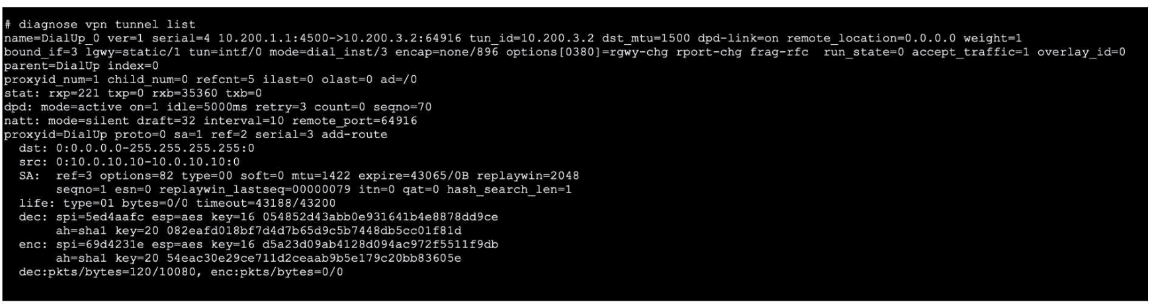
Which command will capture ESP traffic for the VPN named DialUp_0?
A. diagnose sniffer packet any 'ip proto 50'
B. diagnose sniffer packet any 'host 10.0.10.10'
C. diagnose sniffer packet any 'esp and host 10.200.3.2'
D. diagnose sniffer packet any 'port 4500'
Explanation:
The VPN tunnel named DialUp_0 is using ESP encryption for data traffic, as shown by the esp=aes and SPI values in the output. The remote endpoint is 10.200.3.2. The filter 'esp and host 10.200.3.2' will capture the actual encrypted ESP packets (IP protocol 50) exchanged with that peer, which is the administrator's goal.
Why the Other Options are Incorrect:
A. 'ip proto 50'
would capture all ESP traffic, not just for this VPN, creating unnecessary noise.
B. 'host 10.0.10.10'
filters by the tunnel’s internal source IP, which is not visible in the outer ESP packet headers, so it will not match.
D. 'port 4500'
would capture IKE/NAT-T control traffic (UDP 4500), not the encrypted ESP data traffic (IP protocol 50). The output shows NAT-T is enabled (remote_port=64916), but ESP data remains IP protocol 50 unless UDP-encapsulated for NAT traversal; the sniffer filter must target ESP specifically.
Reference:
IPSec uses ESP (IP protocol 50) for encrypted data. FortiGate’s diagnose sniffer uses tcpdump syntax; esp matches IP protocol 50. The diagnose vpn tunnel list output shows ESP SPIs and remote endpoint 10.200.3.2.
What are two reasons you might see iprope_in_check() check failed, drop when using the debug flow? (Choose two.)
A. Packet was dropped because of policy route misconfiguration.
B. Packet was dropped because of traffic shaping.
C. Trusted host list misconfiguration.
D. VIP or IP pool misconfiguration.
Explanation:
The debug flow error iprope_in_check() check failed, drop indicates a failure in the IP routing policy engine during the initial routing lookup stage. This occurs when the FortiGate cannot determine the correct egress interface or routing path for a packet before policy checking. The two most common causes are:
A. Policy route misconfiguration:
An incorrectly configured policy route (static policy route or ISDB route) can create an ambiguous or invalid routing decision, causing the iprope check to fail.
D. VIP or IP pool misconfiguration:
A misconfigured Virtual IP (VIP) or IP pool (especially in NAT/port forwarding scenarios) can conflict with routing, as the engine cannot resolve the translation mapping or egress interface, leading to the drop.
Why the Other Options are Incorrect:
B. Traffic shaping:
Traffic shaping occurs after the routing decision and policy check in the packet flow. Shaping may drop or delay packets but does not cause an iprope_in_check() failure, which is specific to routing/policy resolution.
C. Trusted host list misconfiguration:
Trusted host settings are applied after the routing/policy check, during authentication or management access processing. This would not trigger iprope_in_check().
Reference:
FortiOS debug flow (diagnose debug flow) shows packet processing stages. iprope_in_check() is an early routing/policy validation step documented in Fortinet's packet flow diagrams. Misconfigured policy routes or VIPs disrupt this initial lookup, causing drops.
Refer to the exhibit, which shows the output of the command get router info bgp neighbors
100.64.2.254 advertised-routes.
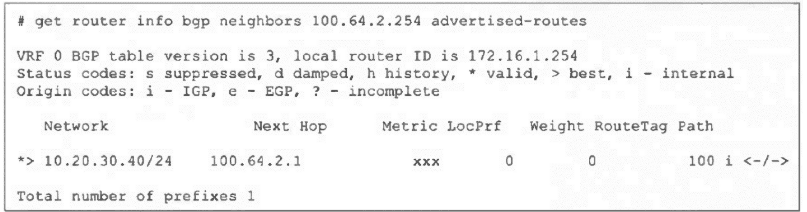
What can you conclude from the output?
A. The BGP state of the two BGP participants is OpenConfirm.
B. The router ID of the neighbor is 100.64.2.254.
C. The BGP neighbor is advertising the 10.20.30.40/24 network to the local router.
D. The local router is advertising the 10.20.30.40/24 network to its BGP neighbor.
Explanation:
The command get router info bgp neighbors
Why the Other Options are Incorrect:
A. The output shows nothing about the BGP session state.
The advertised-routes command only works when the BGP session is already established. The state would be shown in get router info bgp summary, not here.
B. The neighbor's router ID is not shown in this output.
The Router ID displayed (172.16.1.254) is the local router's ID, not the neighbor's.
C. This is the inverse of the correct answer.
The command shows routes advertised to the neighbor, not received from the neighbor. To see routes received from a neighbor, you would use get router info bgp neighbors
Reference:
FortiOS BGP commands:
advertised-routes lists prefixes sent to a peer; routes lists prefixes received from a peer. The local router ID and advertised prefix are clearly indicated in the output.
Exhibit.
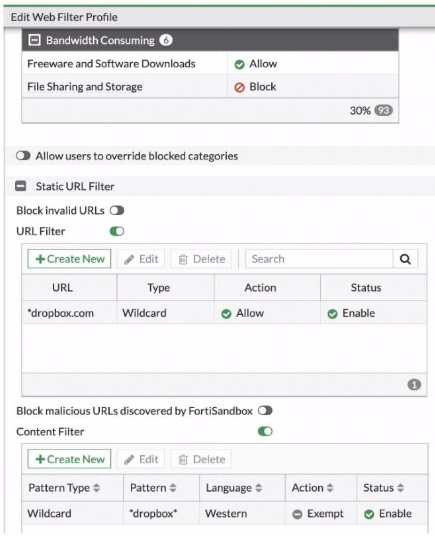
Refer to the exhibit, which shows a partial web fillet profile configuration.
Which action does FortiGate lake if a user attempts to access www. dropbox. com, which is
categorized as File Sharing and Storage?
A. FortiGate allows the connection, based on the URL Filter configuration.
B. FortiGate blocks the connection as an invalid URL.
C. FortiGate exempts the connection, based on the Web Content Filter configuration.
D. FortiGate blocks the connection, based on the FortiGuard category based filter configuration.
Explanation:
The web filter profile has three relevant configurations:
FortiGuard Category Filter: The category "File Sharing and Storage" (which includes www.dropbox.com) is set to Block.
Static URL Filter: There is an explicit Allow rule for *dropbox.com (wildcard) that is Enabled.
Content Filter: An E
xempt rule for the pattern *dropbox* is Enabled.
Processing Order: FortiOS web filtering applies rules in this priority:
Static URL Filter (highest priority)
FortiSandbox malicious URL blocking
FortiGuard category-based filtering
Content Filter (lowest priority)
Since the Static URL Filter has an explicit Allow rule for *dropbox.com (which matches www.dropbox.com) and it is Enabled, this rule takes precedence over the category-based Block rule. Therefore, the connection is allowed.
Why the Other Options are Incorrect:
B. "Block invalid URLs" is a separate setting for malformed URLs; www.dropbox.com is valid.
C. The Content Filter Exempt rule would also allow the connection, but it has lower priority than the Static URL Filter. The correct reason is the URL Filter, not the Content Filter.
D. While the category is set to Block, the explicit higher-priority URL Filter Allow rule overrides it.
Reference:
FortiOS Web Filter profile processing hierarchy. Static URL Filters override category-based filtering. This is documented in Fortinet's web filtering administration guides and is a key exam objective.
| Page 6 out of 20 Pages |
| 12345678910 |
| FCSS_NST_SE-7.6 Practice Test Home |
The FCSS - Network Security 7.6 Support Engineer exam is notoriously tough. It doesn't test memorization. It forces you to make complex decisions under time pressure. A weak prep strategy risks a costly failure and wasted effort. Our FCSS_NST_SE-7.6 practice tests are built to be your definitive bridge to a passing score.

Copyright © - All Rights Reserved