
Last Updated On : 12-Oct-2026
Total 134 Questions
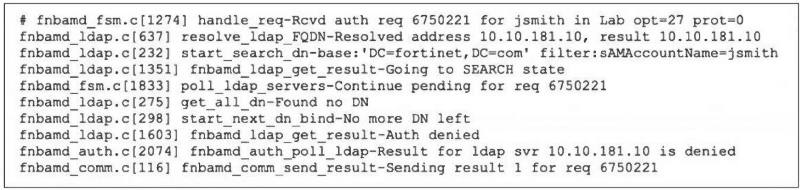
Refer to the exhibit, which shows a partial output of the real-time LDAP debug.
What two actions can the administrator take to resolve this issue? (Choose two.)
A. Ensure the user logs in using 'John Smith' not 'jsmith'.
B. Ensure the user is providing the correct user credentials.
C. Ensure the user is a member of at least one AD group to ensure step 4 of the LDAP authentication process is successful.
D. Ensure the account is active.
Explanation:
The debug output shows the LDAP authentication process failing at the bind stage:
search succeeds: filter:sAMAccountName=jsmith finds the user.
bind fails: No more DN left and Auth denied indicate the bind (authentication) step failed.
The two most common reasons for a bind failure are:
Incorrect credentials (wrong password).
Inactive/locked/expired account in Active Directory.
Thus, verifying the user's credentials and account status are the immediate corrective actions.
Why the Other Options are Incorrect:
A. The user logs in with the sAMAccountName (jsmith), not the full name.
The debug shows the LDAP search successfully found the user using sAMAccountName=jsmith, so the login name is correct.
C. The failure occurs before group membership retrieval (step 4 of LDAP auth).
The process is: 1) Connect, 2) Bind (authenticate), 3) Search for user, 4) Retrieve groups. The debug shows failure at step 2 (bind), so group membership is irrelevant at this stage.
Reference:
LDAP authentication flow in FortiOS:
Bind failure after a successful search points to invalid credentials or inactive account. The debug lines No more DN left and Auth denied confirm this. Troubleshooting steps involve verifying password and account status in AD.
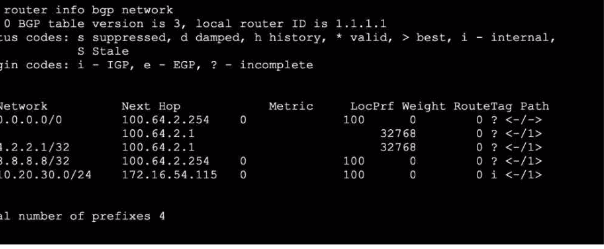
Refer to the exhibit, which shows the output o! the BGP database.
Which two statements are correct? (Choose two.)
A. The advertised prefix of 10.20.30.0/24 was configured using the network command.
B. The first four prefixes are being advertised using a legacy route advertisement.
C. The advertised prefix of 10.20.30.0/24 is being advertised through the redistribution of another routing protocol.
D. The output shows all prefixes advertised by all neighbors as well as the local router.
Explanation:
A. The prefix 10.20.30.0/24
shows a Next Hop of 172.16.54.115 (which is a local interface IP) and an Origin Code of i (IGP). In BGP, an origin of i indicates the route was injected into BGP via the network command (or via redistribution from an IGP, but the local next hop suggests network command).
D. The get router info bgp network
command displays the BGP routing table (Loc-RIB), which includes all prefixes learned from neighbors (e.g., 1.0.0.0/8, 1.8.8.8/32 from neighbor 100.64.2.254) and prefixes advertised by the local router (e.g., 10.20.30.0/24 with next hop 172.16.54.115). It is a comprehensive view of all BGP routes in the RIB.
Why the Other Options are Incorrect:
B. The first four prefixes are not "legacy route advertisement."
They are standard BGP routes learned from a neighbor (100.64.2.254) with an Origin Code ? (incomplete), meaning they were likely redistributed from a static route or another source into BGP on the peer. "Legacy route advertisement" is not a standard BGP term.
C. The prefix 10.20.30.0/24
has an Origin Code i (IGP), which typically indicates injection via the network command, not redistribution. Redistribution from another routing protocol would still show origin i, but the key is the local next hop (172.16.54.115) suggests it's a locally originated network, not redistributed from another protocol.
Reference:
FortiOS BGP commands: get router info bgp network shows the BGP table. Origin codes: i (IGP) from network command or IGP redistribution; e (EGP) from EGP; ? (incomplete) from static routes or other sources. The local next hop indicates locally originated routes.
Refer to the exhibit showing a debug output.

An administrator deployed FSSO in DC Agent Mode but FSSO is failing on FortiGate.
Pinging FortiGate from where the collector agent is deployed is successful.
The administrator then produces the debug output shown in the exhibit.
What could be causing this error message?
A. The TCP port 445 is blocked between FortiGate and collector agent.
B. The collector agent preshared password is mismatched.
C. The FortiGate cannot resolve the active directory server name.
D. The FortiGate and the collector agent are using different TCP ports.
Explanation:
The debug output shows:
127.0.0.1:8000 disconnect_server_only – The FortiGate is trying to connect to the collector agent on port 8000.
Connection refused – The connection attempt is being rejected.
In DC Agent Mode, the FortiGate communicates with the Collector Agent (not directly with domain controllers). The standard port for this communication is TCP 8000 by default. A "Connection refused" error typically indicates that the collector agent is not listening on the port the FortiGate is trying to reach (8000). This happens if the agent is configured to use a different port, or if the service is not running.
Since ping is successful, network reachability is fine. The mismatch in TCP ports is the direct cause of the connection refusal.
Why the Other Options are Incorrect:
A. TCP port 445 is used for Windows domain controller communication (for the collector agent to poll AD), not for communication between the FortiGate and the collector agent. Blocking port 445 would affect the agent’s ability to query AD, not the FortiGate-to-agent connection.
B. A mismatched pre-shared password would cause an authentication failure after the TCP connection is established, not a "Connection refused" error. The error occurs before authentication.
C. The FortiGate does not resolve the AD server name directly in DC Agent Mode; the collector agent handles AD communication. The FortiGate only needs to reach the collector agent’s IP.
Reference:
FSSO DC Agent Mode architecture:
FortiGate connects to the collector agent on TCP port 8000 (default). The diagnose debug application authd output shows connection attempts and errors. "Connection refused" means the port is not open/listening on the agent.
Consider the scenario where the server name indication (SNI) does not match either the common name (CN) or any of the subject alternative names (SAN) in the server certificate. Which action will FortiGate take when using the default settings for SSL certificate inspection?
A. FortiGate uses the SNI from the user's web browser.
B. FortiGate closes the connection because this represents an invalid SSL/TLS configuration.
C. FortiGate uses the first entry listed in the SAN field in the server certificate.
D. FortiGate uses the CN information from the Subject field in the server certificate.
Explanation:
This question tests understanding of FortiGate's SSL Inspection behavior when encountering a certificate validation discrepancy during the TLS handshake. Specifically, it focuses on the scenario where the SNI extension (indicating the intended hostname) does not match any name in the server's certificate. The FortiGate, acting as an SSL proxy, must decide how to proceed when constructing its own certificate to present to the client.
Correct Option:
D. FortiGate uses the CN information from the Subject field in the server certificate.
Under default SSL certificate inspection settings, if the SNI from the client does not match the CN or any SAN in the server's certificate, the FortiGate will still generate a deep inspection certificate for the client. It does this by defaulting to and copying the Common Name (CN) from the original server certificate's Subject field into the CN of the forged certificate it presents to the client. The connection proceeds, but the client may see a certificate mismatch warning.
Incorrect Options:
A. FortiGate uses the SNI from the user's web browser.
This is incorrect because the SNI is the mismatched value causing the problem. If the FortiGate used the SNI for the forged certificate's CN, it would be presenting a certificate for a hostname that the backend server's certificate does not authorize, which is the core issue. The default fallback is to the server's provided CN, not the client's requested SNI.
B. FortiGate closes the connection because this represents an invalid SSL/TLS configuration.
While this would be a valid SSL/TLS error (name mismatch), the default behavior of FortiGate's SSL/SSH Inspection profile in proxy-based (flow) inspection is not to block purely based on certificate name mismatch. It proceeds with inspection using the server's CN. Blocking can be enabled by configuring "Block invalid certificates" in the SSL/SSH Inspection profile.
C. FortiGate uses the first entry listed in the SAN field in the server certificate.
The SAN field is only checked for a match against the SNI. Since the premise states the SNI matches neither the CN nor any SAN, the SAN field is irrelevant for the fallback decision. The system's deterministic fallback is to the CN, not an arbitrary selection from the SAN list.
Reference:
Fortinet Documentation Library, FortiOS Handbook - SSL/SSH Inspection. The behavior for handling certificate name mismatches is defined in the SSL inspection profile settings. The default "certificate name mismatch" action is "Allow," and the procedure for generating the inspection certificate in such cases is documented.
Exhibit.
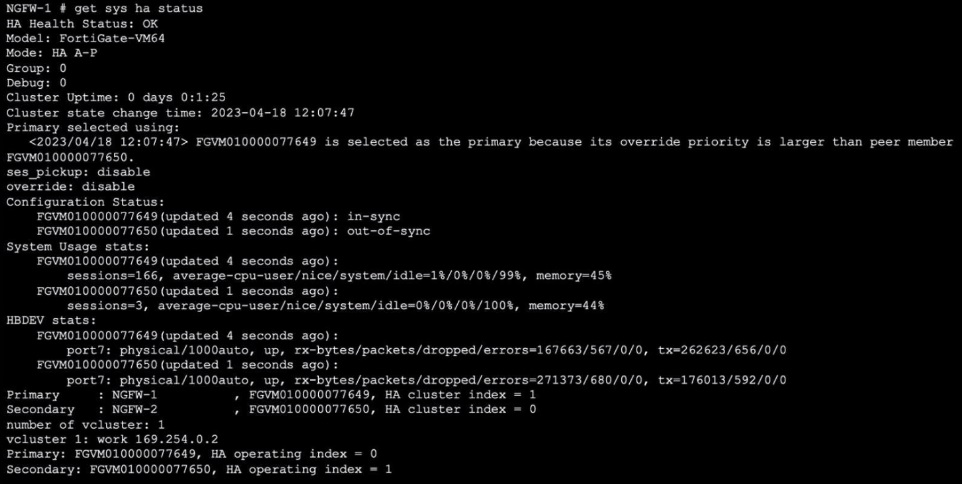
Refer to the exhibit, which shows the output of get system ha status.
NGFW-1 and NGFW-2 have been up for a week.
Which two statements about the output are true? (Choose two.)
A. If a configuration change is made to the primary FortiGate at this time, the secondary will initiate a synchronization reset.
B. If port 7 becomes disconnected on the secondary, both FortiGate devices will elect itself as primary.
C. If FGVM...649 is rebooted. FGVM...650 will become the primary and retain that role, even after FGVM...649 rejoins the cluster.
D. If no action is taken, the primary FortiGate will leave the cluster because of the current sync status.
Explanation:
A. The output shows the secondary (FGVM010000077650) has a Configuration Status of out-of-sync. By default, when a secondary is out-of-sync and a configuration change is made on the primary, the secondary will initiate a synchronization reset to fetch the updated configuration and resynchronize.
C. The primary (FGVM010000077649) was elected because it has a higher override priority (as stated in Primary selected using:). If the primary is rebooted, the secondary (FGVM...650) will take over as primary. Because override is disabled, the original primary will not preempt (reclaim the primary role) when it rejoins; it will remain as secondary. The new primary retains the role.
Why the Other Options are Incorrect:
B. If port 7 (the HA heartbeat interface) becomes disconnected on the secondary, only the secondary would lose HA communication. The primary would remain primary. The secondary might consider itself isolated and, depending on ha-mgmt-status settings, may remain secondary or become standalone—but it would not cause both devices to elect themselves as primary. Split-brain is prevented by heartbeat and configuration.
D. The primary will not leave the cluster due to an out-of-sync secondary. The cluster remains operational; the primary continues functioning. The out-of-sync status is a warning but does not trigger an automatic primary departure.
Reference:
FortiOS HA behavior: An out-of-sync secondary triggers a configuration reset upon primary config change. With override disabled, the primary role is sticky (no preemption). Heartbeat loss affects secondary role but does not cause dual-primary election under normal settings.
Which two statements about an auxiliary session ate true? (Choose two.)
A. With the auxiliary session selling disabled, only auxiliary sessions are offloaded.
B. With the auxiliary session setting enabled. ECMP traffic is accelerated to the NP6 processor.
C. With the auxiliary session setting enabled. Iwo sessions are created in case of routing change.
D. With the auxiliary session setting disabled, for each traffic path. FortiGate uses the same auxiliary session.
Explanation:
B. Auxiliary sessions are a feature that allows NP6 processors to handle ECMP (Equal-Cost Multi-Path) traffic more efficiently by pre-creating additional session entries for possible alternative paths, enabling hardware acceleration (offloading) even if the route changes.
C. When enabled, the system creates two session entries for the same traffic flow: one for the primary path and an auxiliary session for a potential alternate path (e.g., if an ECMP member link fails or a route changes). This allows fast failover without disrupting the session.
Why the Other Options are Incorrect:
A. With the auxiliary session setting disabled,
only the primary session is offloaded; auxiliary sessions are not created. The statement incorrectly says "only auxiliary sessions are offloaded," which is false.
D. With the auxiliary session setting disabled,
no auxiliary session is created. The FortiGate uses only a single session entry per traffic path, not the same auxiliary session for multiple paths.
Reference:
FortiOS NP6 acceleration and ECMP handling. Auxiliary sessions (config system session-helper) improve ECMP failover performance by pre-creating backup sessions in hardware. This is documented in Fortinet's NP6 and traffic offloading guides.
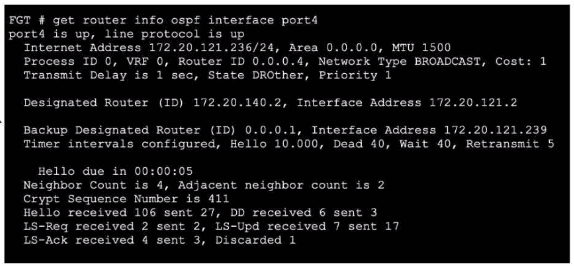
Refer to the exhibit, which shows the output of a debug command.
Which two statements about the output are true? (Choose two.)
A. The interlace is part of the OSPF backbone area.
B. There are a total of five OSPF routers attached to the vorz4 network segment
C. One of the neighbors has a router ID of 0.0.0.4.
D. In the network connected to port4, two OSPF routers are down.
Explanation:
The output from get router info ospf interface port4 shows the interface is in Area 0.0.0.0, which is the OSPF backbone area. This confirms statement A. Additionally, the “Neighbor Count is 4” indicates four OSPF neighbors are detected on the same broadcast segment. Since the local router itself is also part of the segment, the total number of OSPF routers attached to port4 is 5 (4 neighbors + 1 local), making statement B true.
Why the Other Options are Incorrect:
C: The router ID 0.0.0.4 belongs to the local router, as shown in the “Router ID” field. The neighbor router IDs are listed as the Designated Router (172.20.140.2) and Backup Designated Router (0.0.0.1). There is no indication that any neighbor has the ID 0.0.0.4.
D: The output shows “Adjacent neighbor count is 2,” meaning only two of the four neighbors have formed full adjacencies. The other two neighbors are still in a lesser OSPF state (e.g., 2-way), but this does not mean they are “down.” OSPF neighbors can be operational without being fully adjacent, especially in a broadcast network where not all routers become adjacent with every other router.
Reference:
FortiOS OSPF interface details:
The area is displayed as “Area 0.0.0.0” for the backbone. Neighbor count reflects only directly connected OSPF speakers, not the local device. Adjacency count indicates the number of neighbors with which the local router has exchanged full LSAs.
| Page 7 out of 20 Pages |
| 234567891011 |
| FCSS_NST_SE-7.6 Practice Test Home |
The FCSS - Network Security 7.6 Support Engineer exam is notoriously tough. It doesn't test memorization. It forces you to make complex decisions under time pressure. A weak prep strategy risks a costly failure and wasted effort. Our FCSS_NST_SE-7.6 practice tests are built to be your definitive bridge to a passing score.

Copyright © - All Rights Reserved