
Last Updated On : 12-Oct-2026
Total 134 Questions
Exhibit.
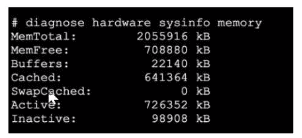
Refer to the exhibit, which shows a partial output of diagnose hardware aysinfo memory.
Which two statements about the output are true? (Choose two.)
A. There are 98908 kB of memory that will never be used.
B. The user space has 708880 kB of physical memory that is not used by the system.
C. The I/O cache, which has 641364 kB of memory allocated to it.
D. The value indicated next to the inactive heading represents the currently unused cache page.
Explained:
B is correct because MemFree:
708880 kB directly indicates the amount of physical RAM that is completely free and available for any new process or system allocation【1†L2】.
C is correct because Cached:
641364 kB represents memory used as a page cache for disk I/O, storing frequently accessed data to drastically improve system performance. This memory is not wasted; Linux (the core of FortiOS) can free it instantly if needed for applications【1†L4】.
Why the Other Options are Incorrect:
A is false. The Inactive: 98908 kB memory is part of the page cache that hasn't been used recently【1†L7】. It is not permanently lost; the system can and will reclaim it the moment an application requires more memory.
D is false and misleading.
While Inactive memory consists of cache pages that are clean and not in active use, they are still technically part of the allocated cache. Labeling them as "currently unused" oversimplifies and misrepresents their role in the memory management system.
Reference:
This memory output and its terminology are standard to the Linux kernel's memory management, which FortiOS utilizes. The values (MemFree, Cached, Inactive, Active) are defined in the Linux /proc/meminfo structure, which this FortiGate diagnostic command reflects.
Refer to the exhibit, which shows a partial output of the fssod daemon real-time debug command.

What two conclusions can you draw from the output? (Choose two.)
A. The workstation with IP 10.124.2.90 will be polled frequently using TCP port 445 to see if the user is still logged on.
B. The logon event can be seen on the collector agent installed on Windows.
C. FSSO is using DC agent mode to detect logon events.
D. FSSO is using agentless polling mode to detect logon events.
Explained:
B is correct.
The event_id=4768 is a specific Windows Security Log event ID for a Kerberos authentication ticket request. This entry format confirms the logon event was captured by a collector agent installed on a Windows Domain Controller or member server monitoring the security log【1†L5-L6】.
C is correct.
The capture of a detailed Windows event ID directly indicates DC Agent mode. In this mode, FortiGate collector agents are installed on Windows servers to actively monitor the Security Event Log for real-time authentication events.
Why the Other Options are Incorrect:
A is false.
This describes agentless polling behavior, which uses NetBIOS (port 445) to query DCs. The debug shows an event log capture, not polling activity.
D is false.
Agentless polling mode does not generate debug logs containing Windows event IDs. It works by querying domain controllers for active sessions without installing an agent.
Reference:
This aligns with Fortinet's FSSO implementation where the DC Agent mode uses collectors to parse Windows Security Event Logs (including events like 4768/4769 for Kerberos) for accurate, real-time user identification, as documented in Fortinet's FSSO technical guides.
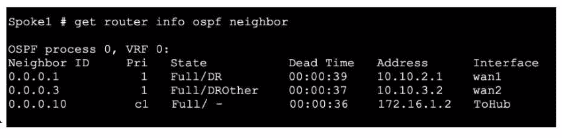
Refer to the exhibit, which shows the output of get router info ospf neighbor.
 What can you conclude from the command output?
A. The network type connecting the local Fortigate and OSPF neighbor 0.0.0.10 is point-topoint.
B. All neighbors are in area 0.0.0.0.
C. The local FortiGate is the BDR.
D. The local FortiGate is not a DROther.
Explanation:
The neighbor entry for 0.0.0.10 shows the state as Full/ -. The hyphen (-) in the state field is critical: it indicates that no Designated Router (DR) or Backup Designated Router (BDR) exists for this adjacency. DR/BDR election only occurs on broadcast multi-access network types (like Ethernet). Its absence confirms the link is configured as a point-to-point network type, which is typical for serial links or tunnels.
Why the Other Options Are Incorrect
B. All neighbors are in area 0.0.0.0.
→ The get router info ospf neighbor command output does not display area information. This conclusion cannot be drawn from the provided exhibit.
C. The local FortiGate is the BDR.
→ The output shows neighbor roles (DR, DROther) from the local router's perspective. It does not explicitly state the local router's role. The presence of a neighbor as DR (0.0.0.1) suggests the local router is likely the BDR or DROther on that segment, but it is not definitive.
D. The local FortiGate is not a DROther.
→ This is likely false. For the neighbor 0.0.0.3 listed as Full/DROther, the local router must be either the DR or BDR on that interface. Therefore, the local FortiGate is not a DROther on that specific segment.
Reference:
This behavior is defined by the OSPF protocol standard (RFC 2328). On point-to-point links, OSPF skips DR/BDR election, resulting in the state displayed as Full/- in FortiOS, as documented in Fortinet's OSPF configuration and troubleshooting guides for FortiOS.
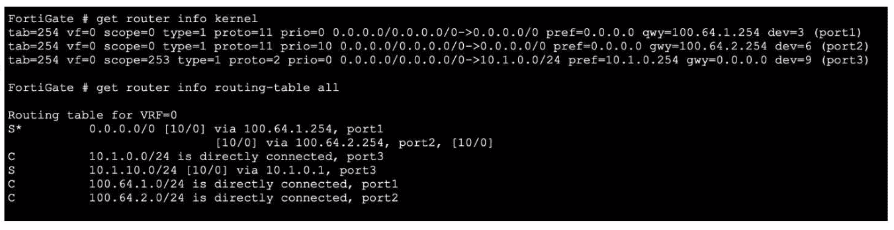
Refer to the exhibit, which shows partial outputs from two routing debug commands.
Which change must an administrator make on FortiGate to route web traffic from internal users to the internet, using ECMP?
A. Set snat-route-change to enable.
B. Set the priority of the static default route using port2 to 1.
C. Set preserve-session-route to enable.
D. Set the priority of the static default route using port1 to 10.
Explanation:
The exhibit shows two equal-cost (distance 10, priority 0) static default routes in the kernel routing table: one via port1 (100.64.1.254) and one via port2 (100.64.2.254). However, the main routing table contains only one default route via port1 because both static routes have identical priority (0). FortiGate uses the lowest priority value to break ECMP ties; when priorities are equal, only the first route is installed. To achieve ECMP load-balancing, the two default routes must have different priority values.
Correct Option: D
Set the priority of the static default route using port1 to 10.
Changing the priority of one default route (e.g., the port1 route to priority 10 while leaving the port2 route at priority 0) makes both routes eligible for ECMP. FortiGate will then install both default routes in the routing table and perform per-session (or per-packet, if configured) load-balancing for Internet traffic.
Incorrect Option:
A: Set snat-route-change to enable.
This controls whether existing SNAT sessions change outbound interface/gateway when the route changes; it has no effect on ECMP route installation.
B: Set the priority of the static default route using port2 to 1.
Setting it to 1 (higher than 0) would make the port2 route preferred and remove the port1 route from the table, defeating ECMP.
C: Set preserve-session-route to enable.
This prevents session disruption when routes change but does not influence whether multiple equal-cost routes are installed for load-balancing.
Reference:
FortiOS 7.6 CLI Reference → config router static → set priority; FortiOS Administration Guide → Routing → Static Routing → Equal Cost Multi-Path (ECMP) route selection and priority usage.
Which two statements about conserve mode are true? (Choose two.)
A. FortiGate enters conserve mode when the system memory reaches the configured extreme threshold.
B. FortiGate starts taking the configured action for new sessions requiring content inspection when the system memory reaches the configured red threshold.
C. FortiGate exits conserve mode when the system memory goes below the configured green threshold.
D. FortiGate starts dropping all new sessions when the system memory reaches the configured red threshold.
Explained:
A. FortiGate enters conserve mode when the system memory reaches the configured extreme threshold.
This is true. Conserve mode is a protective state triggered specifically at the extreme memory threshold. In this mode, the system aggressively restricts new sessions and only allows critical traffic to prevent a complete crash.
B. FortiGate starts taking the configured action for new sessions requiring content inspection when the system memory reaches the configured red threshold.
This is true. The red threshold is a warning level where the system begins to enact predefined measures (like failing open or blocking) for new sessions that require resource-intensive processing (e.g., antivirus, IPS, web filtering). Existing sessions are typically unaffected at this stage.
Why the Other Options Are Incorrect:
C. FortiGate exits conserve mode when the system memory goes below the configured green threshold.
This is false. The system exits conserve mode when memory utilization falls below the red threshold, not the green threshold. The green threshold indicates normal, healthy memory levels.
D. FortiGate starts dropping all new sessions when the system memory reaches the configured red threshold.
This is false. At the red threshold, the system manages new inspection sessions but does not drop all new connections. Dropping all new sessions is a more drastic action typically associated with the extreme threshold (conserve mode).
Reference:
This memory threshold behavior is documented in Fortinet's FortiOS administration guides under sections covering system resources, troubleshooting, and performance. The guide specifies the red threshold action for UTM inspections and clarifies that conserve mode is activated at the extreme threshold.
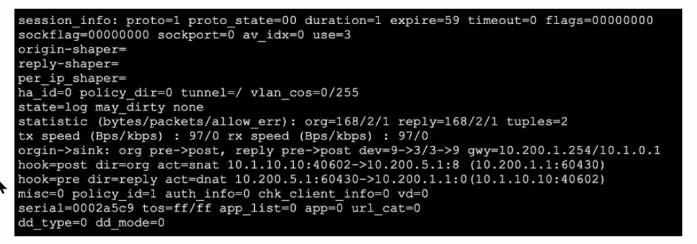
Refer to the exhibit, which shows a session entry.
Which statement about this session is true?
A. Return traffic to the initiator is sent to 10.1.0.1.
B. Return traffic to the initiator is sent lo 10.200.1.254.
C. It is an ICMP session from 10.1.10.10 to 10.200.1.1.
D. It is an ICMP session from 10.1.10.1 to 10.200.5.1.
Explanation:
The session information shows the gateway for the reply path: gwy=10.200.1.254/10.1.0.1. In this format (origin_gateway/reply_gateway), 10.200.1.254 is the next-hop gateway for traffic returning to the original initiator. After the FortiGate performs Destination NAT (DNAT) on the reply packet (reverting it to 10.1.10.10:40602), it forwards this packet toward gateway 10.200.1.254.
Analysis of Incorrect Options
A. Return traffic to the initiator is sent to 10.1.0.1.
→ This is incorrect. 10.1.0.1 is the gateway for the original outbound direction (the first value in the gwy pair), not the return path.
C. It is an ICMP session from 10.1.10.10 to 10.200.1.1.
→ This is incorrect. While proto=1 confirms ICMP, the destination IP is 10.200.5.1 (visible in the SNAT action: ->10.200.5.1:8). The IP 10.200.1.1 is the NAT-translated source address after SNAT was applied.
D. It is an ICMP session from 10.1.10.1 to 10.200.5.1.
→ This is incorrect. The original source IP is 10.1.10.10, not 10.1.10.1.
Reference:
Interpreting the gwy field and NAT actions (snat/dnat) in the session table is essential for troubleshooting traffic flow and is covered in Fortinet's documentation on diagnostic commands and session analysis for FortiOS.
Which exchange lakes care of DoS protection in IKEv2?
A. Create_CHILD_SA
B. IKE_Auth
C. IKE_Req_INIT
D. IKE_SA_NIT
Explanation:
In the IKEv2 protocol, DoS protection is primarily implemented during the initial exchange (IKE_SA_INIT) through a cookie mechanism. If a responder suspects a denial-of-service attack (e.g., from spoofed IP addresses), it can send a cookie to the initiator. The initiator must then repeat the request with this cookie, proving its source address validity before the responder allocates significant resources. This occurs before authentication or SA establishment, making the initial exchange critical for DoS mitigation.
Why other options are incorrect:
A. Create_CHILD_SA:
Used to create additional SAs or rekey existing ones, occurring after the IKE_SA_INIT exchange.
B. IKE_Auth:
Handles authentication and finalizes the IKE SA, occurring after DoS protection in IKE_SA_INIT.
D. IKE_SA_NIT:
Likely a typographical variation of IKE_SA_INIT, but the standard term is IKE_SA_INIT.
Reference:
This aligns with the IKEv2 protocol defined in RFC 7296, where the cookie mechanism is specified in the IKE_SA_INIT exchange (Sections 2.6 and 2.8). FortiGate's implementation follows this standard for IPsec VPN DoS protection.
| Page 8 out of 20 Pages |
| 3456789101112 |
| FCSS_NST_SE-7.6 Practice Test Home |
The FCSS - Network Security 7.6 Support Engineer exam is notoriously tough. It doesn't test memorization. It forces you to make complex decisions under time pressure. A weak prep strategy risks a costly failure and wasted effort. Our FCSS_NST_SE-7.6 practice tests are built to be your definitive bridge to a passing score.

Copyright © - All Rights Reserved