
Last Updated On : 12-Oct-2026
Total 94 Questions
You are planning a large SD-WAN deployment with approximately 1000 spokes and want to allow ADVPN between the spokes. Some remote sites use FortiSASE to connect to the company's SD-WAN hub. Which overlay routing configuration should you use?
A. BGP on loopback with dynamic BGP for ADVPN shortcut routing.
B. BGP on loopback with IPsec phase2 selectors for ADVPN shortcut routing.
C. BGP per overlay with dynamic BGP for ADVPN shortcut routing.
D. BGP per overlay with BGP next-hop convergence for ADVPN shortcut routing.
Explanation:
This question tests knowledge of scalable SD-WAN overlay design with ADVPN (Auto Discovery VPN) for hub-and-spoke and spoke-to-spoke shortcuts. In large deployments, using loopback interfaces with dynamic BGP provides stability, scalability, and automatic route propagation, which is required when integrating ADVPN and FortiSASE connections.
🟢 Correct Option:
A. BGP on loopback with dynamic BGP for ADVPN shortcut routing
Using loopback interfaces for BGP ensures persistent routing even if physical interfaces flap. Dynamic BGP supports ADVPN, automatically creating spoke-to-spoke tunnels when needed. This configuration scales efficiently to hundreds or thousands of spokes and works with remote FortiSASE connections without requiring manual tunnel definitions.
🔴 Incorrect options:
B. BGP on loopback with IPsec phase2 selectors for ADVPN shortcut routing
Incorrect because IPsec phase2 selectors require static tunnel definitions. They do not support automatic spoke-to-spoke ADVPN shortcuts and do not scale well for large deployments.
C. BGP per overlay with dynamic BGP for ADVPN shortcut routing
Incorrect because configuring BGP per overlay increases complexity and does not leverage the loopback interface’s stability. Loopback BGP is the recommended method for large-scale ADVPN topologies.
D. BGP per overlay with BGP next-hop convergence for ADVPN shortcut routing
Incorrect because next-hop convergence is an advanced optimization, not a replacement for loopback-based dynamic BGP. It complicates configuration for large-scale deployments and is unnecessary for standard ADVPN shortcut routing.
🔧 Reference:
→ ADVPN Deployment Guide
– Explains that loopback interfaces with dynamic BGP are recommended for scalable ADVPN shortcut routing.
→ FortiSASE Integration with SD-WAN
– Confirms dynamic BGP over loopback works with FortiSASE connections in large deployments.
When a customer delegate the installation and management of its SD-WAN infrastructure to an MSSP, the MSSP usually keeps the hub within its infrastructure for ease of management and to share costly resources. In which two situations will the MSSP install the hub in customer premises? (Choose two.)
A. The customer requires SIA with centralized breakout.
B. The administrator expects a large volume of traffic between the branches.
C. The customer expects a large amount of VoIP traffic.
D. The majority of the branch traffic is directed to a corporate data center.
Explanation:
This question tests understanding of when an MSSP would deviate from the standard practice of keeping hubs in their own infrastructure and instead deploy hubs on customer premises. The decision is driven by traffic patterns—specifically, when significant traffic must terminate at customer-owned resources rather than traverse the MSSP backbone. The key principle is that hubs should be placed where traffic naturally aggregates.
✔️ Correct Option A:
Secure Internet Access (SIA) with centralized breakout means all branch internet traffic is tunneled to a central point for inspection before exiting. Placing the hub at the customer premises (typically a data center) allows the customer to apply their own security policies and maintain control over internet breakout points, rather than sending traffic through MSSP infrastructure.
✔️ Correct Option D:
When the majority of branch traffic is destined for a corporate data center, placing the hub at the data center premises is the most efficient design. This allows traffic to terminate locally at the data center without hair-pinning through MSSP infrastructure, reducing latency, bandwidth costs, and complexity. The hub location should align with the primary traffic destination.
❌ Incorrect Option B:
A large volume of traffic between branches (branch-to-branch) is actually a reason to keep hubs within MSSP infrastructure or leverage ADVPN shortcuts. MSSP-hosted hubs can efficiently route inter-branch traffic, and ADVPN enables direct spoke-to-spoke tunnels for optimal performance. This does not require customer-premises hubs.
❌ Incorrect Option C:
VoIP traffic volume alone does not dictate hub placement. VoIP requires low latency and jitter, but this can be achieved with ADVPN shortcuts between spokes or QoS policies regardless of hub location. The decision is based on traffic destinations, not traffic types.
🔧 Reference:
→ Fortinet Docs: SD-WAN Designs Principles - Overlay Topology: Explains that VPN overlays interconnect branches, datacenters, and the cloud in hub-and-spoke topologies; hub placement should align with traffic aggregation points.
→ Fortinet Docs: Blueprint 2 - MSSP Premises, No Multitenancy: Confirms that dedicated hubs for a specific customer can be deployed on MSSP premises when multitenancy is handled by Telco Cloud infrastructure, implying customer-premises hubs are used when traffic must terminate locally.
As an MSSP administrator, you are asked to configure ADVPN on an existing SD-WAN topology. FortiManager manages the customer devices in a dedicated ADOM. The previous administrator used the SD-WAN overlay topology. Which two statements apply to this scenario? (Choose two.)
A. You can activate auto-discovery VPN in the SD-WAN overlay template only if it is a single hub topology.
B. When auto-discovery VPN is enabled, FortiManager updates the IPsec and BGP templates in the hub.
C. After you enable auto-discovery VPN in the overlay template, you must select between ADVPN 2.0 and ADVPN 1.0.
D. You can activate auto-discovery VPN in the SD-WAN overlay template for any type of topology, including a primary-primary dual-hub topology.
Explanation:
This question tests knowledge of how FortiManager's SD-WAN overlay template handles ADVPN configuration across different hub-and-spoke topologies. The SD-WAN overlay template wizard provides a unified interface for enabling ADVPN that automatically applies the necessary configuration to both hub and spoke devices without topology restrictions .
✔️ Correct Option B:
When Auto-Discovery VPN is enabled in an SD-WAN overlay template, FortiManager automatically adds the required settings to both the IPsec templates and the BGP templates on the hub devices . This automation is a core feature of the overlay template, which updates all relevant provisioning templates—including IPsec phase1 configurations with auto-discovery-sender and BGP neighbor settings—without manual intervention .
✔️ Correct Option D:
The SD-WAN overlay template supports ADVPN activation for all available topology types, including Single Hub, Dual Hub (Primary/Secondary), Dual Hub (Primary/Primary), and Multi Hub . When creating or editing a template, the Auto-Discovery VPN setting is available regardless of the chosen topology, and the wizard adjusts the configuration appropriately for each design.
❌ Incorrect Option A:
ADVPN can be activated in any supported topology type, not just single hub . The SD-WAN overlay template explicitly lists Dual Hub (Primary/Primary) and Multi Hub as topology options where ADVPN can be enabled, contradicting the claim that ADVPN requires a single hub.
❌ Incorrect Option C:
FortiManager does not require manual selection between ADVPN 2.0 and ADVPN 1.0 after enabling ADVPN in the overlay template. The selection is made at configuration time within the Auto-Discovery VPN dropdown (Disabled, Legacy, or ADVPN 2.0) . Once saved, the choice is finalized and the template does not prompt for reselection.
🔧 Reference:
→ Fortinet Docs: Configuring an SD-WAN overlay template: Confirms Auto-Discovery VPN is configurable for Single Hub, Dual Hub (Primary/Primary), Dual Hub (Primary/Secondary), and Multi Hub topologies.
→ Fortinet Docs: Enabling ADVPN: Explains that enabling ADVPN in the overlay template automatically adds required settings to IPsec and BGP templates.
→ Fortinet Docs: ADVPN 2.0 and dynamic BGP support: Details the Auto-Discovery VPN dropdown options for ADVPN 2.0 or Legacy mode.
Within the context of SD-WAN, what does SIA correspond to?
A. Remote Breakout
B. Local Breakout
C. Software Internet Access
D. Secure Internet Authorization
Explanation:
SIA (Software Internet Access) is the Fortinet-specific term for the feature that allows branch offices to directly and securely access the internet through a local internet breakout, instead of backhauling all traffic through a central hub. It integrates Secure Web Gateway (SWG), DNS filtering, application control, and anti-malware services locally on the branch FortiGate to ensure secure direct internet access.
Why the other options are incorrect:
A. Remote Breakout & B. Local Breakout: These are general networking concepts describing where internet traffic exits the network (at a remote hub vs. the local branch). SIA is the Fortinet solution that enables secure local breakout.
D. Secure Internet Authorization: This is a distractor; the correct term is "Access," not "Authorization."
Reference
In Fortinet documentation and training (NSE 6 - Secure SD-WAN), SIA is consistently defined as Software Internet Access, emphasizing its role in providing secure, local internet egress with integrated security services.
Refer to the exhibit.
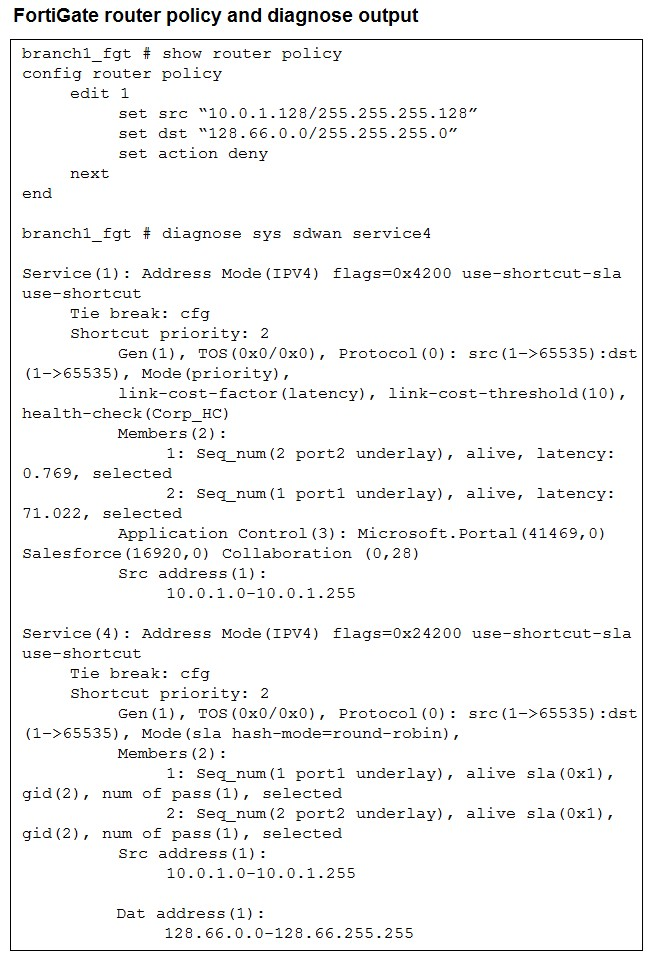 How does FortiGate handle the traffic with the source IP 10.0.1.130 and the destination IP
128.66.0 125?
How does FortiGate handle the traffic with the source IP 10.0.1.130 and the destination IP
128.66.0 125?A. FortiGate drops the traffic flow.
B. FortiGate routes the traffic flow according to the forwarding information base (FIB).
C. FortiGate load balances the traffic flow through port7 and port8.
D. FortiGate steers the traffic flow through port7.
Explanation:
Let's trace through what happens:
1. Router Policy Check (First):
The router policy is evaluated first:
set src "10.0.1.128/255.255.255.128"
set dst "128.66.0.0/255.255.255.0"
set action deny
Source IP: 10.0.1.130
Subnet: 10.0.1.128/25 (covers 10.0.1.128 - 10.0.1.255)
Does 10.0.1.130 match? YES
Destination IP: 128.66.0.125
Subnet: 128.66.0.0/24 (covers 128.66.0.0 - 128.66.0.255)
Does 128.66.0.125 match? YES
Action: DENY
Since both source and destination match the router policy rule, and the action is "deny", FortiGate drops this traffic immediately. The packet never reaches the SD-WAN processing stage.
2. SD-WAN Services are Never Evaluated:
The diagnose output shows two SD-WAN services (Service 1 and Service 4), but they're irrelevant here because:
Router policies are processed before SD-WAN route selection
Once denied by router policy, the packet is dropped - no further processing occurs
Why other answers are wrong:
B is wrong: The traffic doesn't get to FIB lookup. Router policy denies it first.
C is wrong: No load balancing happens. The traffic is denied before reaching SD-WAN member selection. (Also, the exhibit shows port1 and port2, not port7 and port8.)
D is wrong: Same reason - traffic is dropped before any steering decision. Also, there's no port7 in the SD-WAN member configuration shown (Members show port1 and port2).
Reference: FortiOS SD-WAN documentation - Router policies are evaluated before SD-WAN service rules. When action is "deny", traffic is dropped immediately.
Refer to the exhibits.
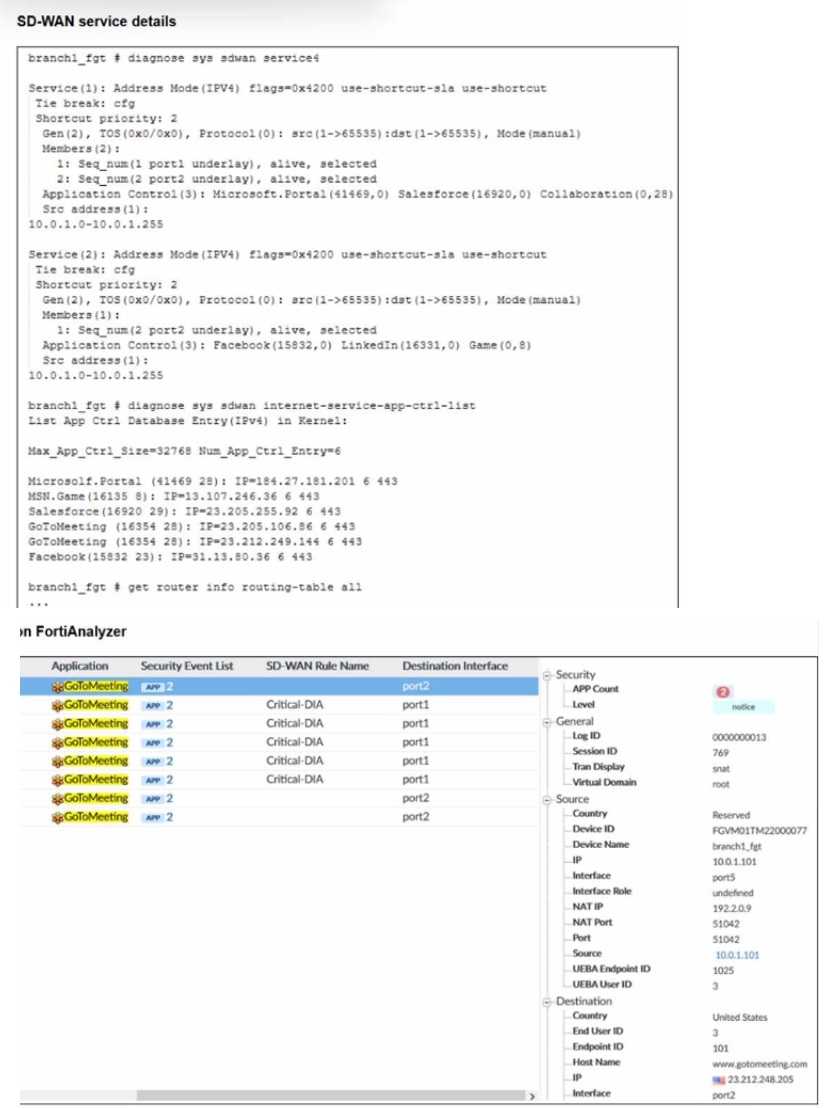
An administrator is testing application steering in SD-WAN. Before generating test traffic,
the administrator collected the information shown in the first exhibit. After generating
GoToMeeting test traffic, the administrator examined the corresponding traffic log on FortiAnalyzer, which is shown in the second exhibit.
The administrator noticed that the traffic matched the implicit SD-WAN rule, but they
expected the traffic to match rule ID 1.
Which two reasons explain why some log messages show that the traffic matched the
implicit SD-WAN rule? (Choose two.)
A. Full SSL inspection is not enabled on the matching firewall policy.
B. The session 3-tuple did not match any of the existing entries in the ISDB application cache.
C. FortiGate could not refresh the routing information on the session after the application was detected.
D. No configured SD-WAN rule matches the traffic related to the collaboration application GoToMeeting
Explanation:
✅ B. The session 3-tuple did not match any of the existing entries in the ISDB application cache.
Before test traffic, GoToMeeting’s IP/port/protocol wasn’t cached in ISDB. FortiGate couldn’t instantly identify it as the target app, so initial packets didn’t match rule ID 1 and hit the implicit rule instead. Later packets populate the cache, allowing better matches on new sessions. This explains why some logs show implicit hits.
✅ D. No configured SD-WAN rule matches the traffic related to the collaboration application GoToMeeting.
Service(1) lists Microsoft.Portal, Salesforce, and broad “Collaboration,” but GoToMeeting (ID 16354) isn’t explicitly included or perfectly covered. Even after detection, if the rule doesn’t recognize it precisely, traffic falls to the implicit rule. The exhibit shows no exact match, so some sessions never qualify for rule ID 1.
❌ A. Full SSL inspection is not enabled on the matching firewall policy.
SSL inspection helps with encrypted payloads, but SD-WAN app steering often uses ISDB (IP/port-based) or basic signatures first—GoToMeeting can be identified without full decryption. The logs already show the app detected, so missing inspection isn’t blocking the rule match here. Common misconception: assuming all app-ID needs deep inspection.
❌ C. FortiGate could not refresh the routing information on the session after the application was detected.
FortiGate can re-evaluate sessions mid-flow once the app is identified, but the issue is upstream: initial packets didn’t match any rule because of cache absence or config mismatch. The logs show detection happened, yet steering stayed implicit for some flows—pointing to no initial match, not a refresh failure.
You are configuring SD-WAN to load balance network traffic and you want to take into account the link quality. Which two facts should you consider? (Choose two answers.)
A. When applicable, FortiGate load balances the traffic through all members that meet the SLA target.
B. You can select the best quality strategy and allow SD-WAN load balancing.
C. You can select the lowest cost service level agreement (SLA) strategy and allow SDWAN load balancing.
D. The best quality strategy supports only the round-robin hash mode.
Explanation:
Correct Answer: A, C
When configuring SD-WAN load balancing with link quality consideration in Fortinet FortiGate (version 7.6), FortiGate evaluates performance SLAs to monitor metrics like latency, jitter, and packet loss across SD-WAN members.
✅ Option A
FortiGate load balances traffic across all eligible SD-WAN members that pass the configured SLA targets, ensuring optimal path selection based on real-time link health. This applies when load balancing is enabled in SD-WAN rules alongside SLA verification.
✅ Option C
The "lowest cost (SLA)" strategy prioritizes the cheapest member meeting SLA requirements while permitting load balancing among qualifying members, factoring in costs assigned to interfaces. This balances performance and expense in multi-link setups.
❌ Why Not B or D
Option B is inaccurate because "best quality" prioritizes the single highest-quality link (lowest latency/jitter/loss) without distributing load. Option D is false as best quality supports multiple load balancing modes like source-IP or session, not just round-robin.
| Page 2 out of 14 Pages |
| 1234567 |
| FCSS_SDW_AR-7.6 Practice Test Home |
The Fortinet FCSS SD-WAN 7.6 Architect exam is notoriously tough. It doesn't test memorization. It forces you to make complex decisions under time pressure. A weak prep strategy risks a costly failure and wasted effort. Our FCSS_SDW_AR-7.6 practice tests are built to be your definitive bridge to a passing score.

Copyright © - All Rights Reserved