
Last Updated On : 12-Oct-2026
Total 94 Questions
Refer to the exhibit.
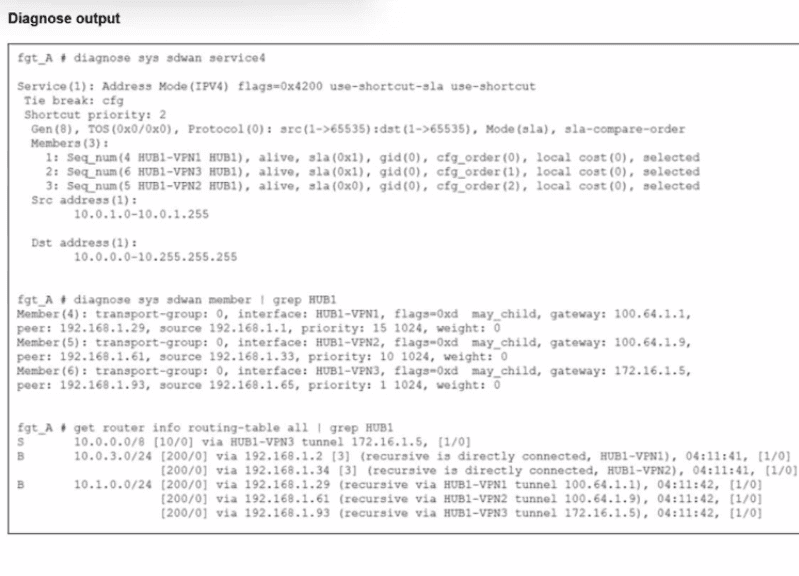
An administrator is troubleshooting SD-WAN on FortiGate. A device behind branch1_fgt
generates traffic to the 10.0.0.0/8 network.
The administrator expects the traffic to match SD-WAN rule ID 1 and be routed over HUB1-
VPN1. However, the traffic is routed over HUB1-VPN3.
Based on the output shown in the exhibit, which two reasons, individually or together, could
explain the observed behavior? (Choose two.)
A. HUB1-VPN3 has a higher member configuration priority than HUB1-VPN1.
B. The traffic matches a regular policy route configured with HUB1-VPN3 as the outgoing device
C. HUB1-VPN1 does not have a valid route to the destination
D. HUB1-VPN3 has a lower route priority value (higher priority) than HUB1-VPN1.
Explanation:
To understand why the traffic is taking HUB1-VPN3 instead of the expected HUB1-VPN1, we must look at the FortiGate steering hierarchy: Policy Routes > SD-WAN Rules > Routing Table.
1. Analysis of Policy Routes (Option B)
The Logic: In the FortiGate packet flow, Regular Policy Routes (manually configured under config router policy) are evaluated before SD-WAN rules.
If an administrator has configured a specific policy route that matches source 10.0.1.0/24 and destination 10.0.0.0/8 with the outgoing interface set to HUB1-VPN3, the FortiGate will forward the traffic immediately and never evaluate the SD-WAN rules list. This is a common reason why traffic "ignores" SD-WAN steering.
2. Analysis of the Routing Table (Option D)
Looking at the get router info routing-table all output in the exhibit:
There is a Static Route (S) for 10.0.0.0/8 specifically via HUB1-VPN3.
The diagnose sys sdwan member output shows the Route Priority (distinct from SD-WAN member priority) for each interface:
➡️ HUB1-VPN1 (Member 4): Priority 15
➡️ HUB1-VPN2 (Member 5): Priority 10
➡️ HUB1-VPN3 (Member 6): Priority 1
The Logic: In FortiOS, a lower priority value in the routing table means a higher preference. Since HUB1-VPN3 has a priority of 1 (the lowest value shown), it is the most preferred route in the RIB. SD-WAN rules generally require matching routes to exist; if multiple routes exist, the underlying routing table priority can influence selection if the SD-WAN rule criteria are tied or if the "Preserve-order" is influenced by the RIB.
Why the other options are incorrect:
Option A (HUB1-VPN3 has a higher member configuration priority): The diagnose sys sdwan service output shows that for Service ID 4, the cfg_order for HUB1-VPN1 is 0 (which is the highest priority in config order), while HUB1-VPN3 is 1. If the SD-WAN rule was being followed correctly, it would prefer VPN1. Therefore, configuration priority isn't the reason for the failure; it's the reason why the behavior is unexpected.
Option C (HUB1-VPN1 does not have a valid route): The routing table output clearly shows BGP (B) routes for 10.1.0.0/24 and other subnets reachable via HUB1-VPN1. It has a valid path to the destination network.
Reference:
FortiOS 7.6 Study Guide: Refer to the "SD-WAN Traffic Steering" section, specifically the Policy Route vs. SD-WAN Rule evaluation order.
FortiGate Troubleshooting: Check diagnose firewall proute list to confirm if a regular policy route is intercepting the traffic before it hits the SD-WAN engine.
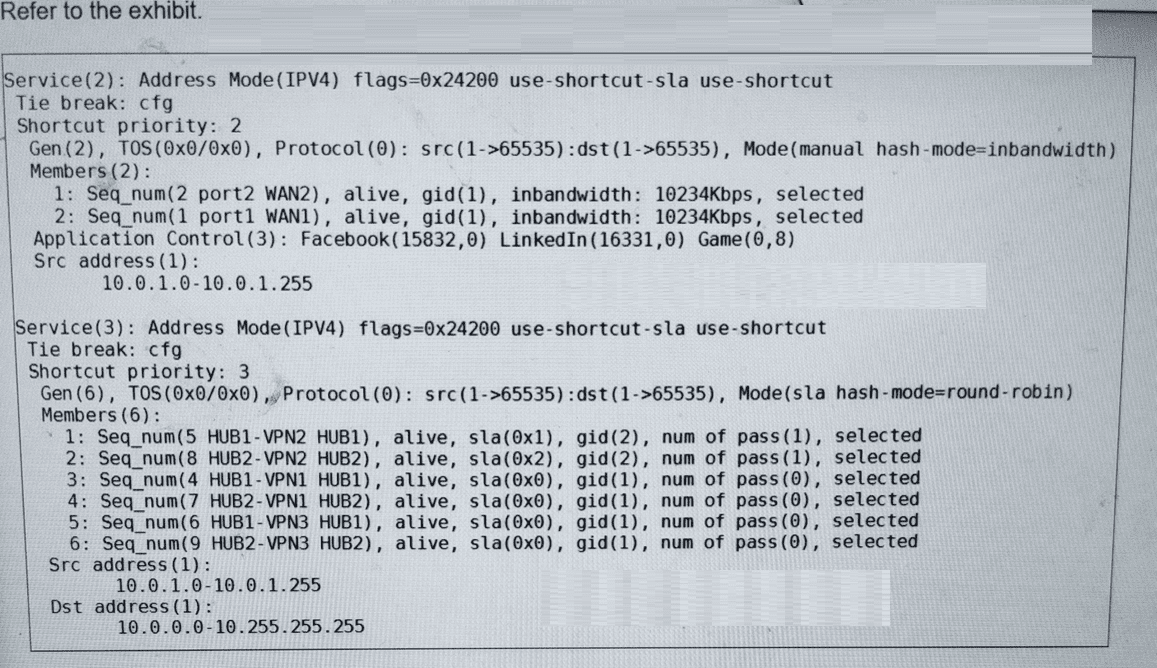
Refer to the exhibit. The administrator configured two SD-WAN rules to load balance the
traffic.
Which interfaces does FortiGate use to steer the traffic from 10.0.1.124 to 10.0.0.254?
(Choose one answer.)
A. HUB2-VPN2
B. HUB1-VPN2 or HUB2-VPN2
C. port1 or port2
D. Any interface in the HUB1 or HUB2 zones
Explanation:
Let's analyze the provided CLI output and the question step by step.
1. Understanding the Traffic Flow:
The question asks about traffic from 10.0.1.124 to 10.0.0.254. We must determine which SD-WAN rule this traffic matches and, therefore, which interfaces are used to steer it.
2. Analyzing the SD-WAN Rules:
We have two SD-WAN services configured: Service(2) and Service(3).
Service(2):
🔹 Members: port2 (WAN2) and port1 (WAN1). These are physical WAN interfaces.
🔹 Source: 10.0.1.0-10.0.1.255
🔹 Destination: Not specified in the rule. This means it matches any destination.
🔹 Application Control: This rule is specifically for Facebook, LinkedIn, and Game traffic.
Service(3):
🔹 Members: Six VPN tunnels to two hubs (HUB1-VPN1/2/3, HUB2-VPN1/2/3).
🔹 Source: 10.0.1.0-10.0.1.255
🔹 Destination: 10.0.0.0-10.255.255.255
🔹 Application Control: Not specified. This means it matches all applications.
3. Matching the Traffic to a Rule:
The traffic is from 10.0.1.124 (which falls within 10.0.1.0/24) to 10.0.0.254 (which falls within 10.0.0.0/8).
Does it match Service(2)?
🔹 Source: YES (10.0.1.124 is in 10.0.1.0/24).
🔹 Destination: YES (Service(2) has no destination constraint).
🔹 Application: NO. The traffic destination is an IP address (10.0.0.254). The FortiGate has no context about what application this is (it's not Facebook, LinkedIn, or a tagged Game). Therefore, it does not match the Application Control filter of Service(2). Service(2) is not selected.
Does it match Service(3)?
🔹 Source: YES (10.0.1.124 is in 10.0.1.0/24).
🔹 Destination: YES (10.0.0.254 is in 10.0.0.0/8).
🔹 Application: YES (Service(3) has no Application filter).
🔹 Conclusion: Service(3) is the matching rule.
4. Determining the Interface Selection within Service(3):
Now we must see how Service(3) selects an interface. The key is in its configuration line:
Mode(sla hash-mode=round-robin)
🔹 sla: This means member selection is SLA-driven. Only members meeting the SLA targets are candidates for selection.
🔹 hash-mode=round-robin: This is the tie-breaking method used when multiple members meet the SLA.
Looking at the members' status:
HUB1-VPN2: sla(0x1), num of pass(1) → Passes SLA.
HUB2-VPN2: sla(0x2), num of pass(1) → Passes SLA.
All other members (HUB1-VPN1, HUB1-VPN3, HUB2-VPN1, HUB2-VPN3) have sla(0x0) and num of pass(0) → Fail SLA.
Therefore, only HUB1-VPN2 and HUB2-VPN2 are eligible for traffic steering. The round-robin hash mode will distribute sessions between these two healthy members.
Why the Other Options Are Incorrect:
A. HUB2-VPN2: This is partially correct but incomplete. It ignores the fact that HUB1-VPN2 also passes SLA and will be used in a round-robin fashion.
C. port1 or port2: These are members of Service(2), which does not match our traffic due to the Application Control mismatch.
D. Any interface in the HUB1 or HUB2 zones: This is too broad and incorrect. The rule uses SLA-driven selection. Only the interfaces that pass the SLA (HUB1-VPN2 and HUB2-VPN2) are selected. The other four VPN tunnels in those zones are alive but fail SLA and are therefore not used.
Reference / Key Concept:
This question tests your understanding of the SD-WAN rule matching order and logic.
Rule Order: FortiGate evaluates SD-WAN rules from top to bottom (in this case, Service ID 2, then 3). The first rule that matches all criteria (source, destination, application, etc.) is used.
Member Selection Logic: Once a rule is matched, you must apply its configured selection logic (manual, sla, priority, etc.) to the rule's members to determine the egress interface.
The exhibit clearly shows the result of this logic: Service(3) is matched, and within it, only the two SLA-passing members are selected.
SD-WAN interacts with many other FortiGate features. Some of them are required to allow SD-WAN to steer the traffic. Which three configuration elements that you must configure before FortiGate can steer traffic according to SD-WAN rules? (Choose three.)
A. Firewall policies
B. Interfaces
C. Security profiles
D. Traffic shaping
E. Routing
Explanation:
A) Firewall policies
SD-WAN steers traffic by controlling how packets flow through the FortiGate. To enforce SD-WAN rules, firewall policies must be in place to define which traffic is allowed and how it should be handled. Without firewall policies, traffic cannot be directed or matched properly for SD-WAN steering.
B) Interfaces
SD-WAN operates over multiple WAN interfaces. These interfaces must be configured and linked to the SD-WAN virtual interface. The FortiGate uses these interfaces to send traffic across different paths based on SD-WAN rules.
E) Routing
Proper routing setup is essential for SD-WAN to steer traffic. SD-WAN modifies routing decisions by steering traffic through the best path based on the rules and performance SLA metrics configured. Without routing, the device won’t know how to direct traffic to the chosen interface.
Why Not the Others?
C) Security profiles
Security profiles apply inspection and filtering but don’t influence traffic steering. They are not required for SD-WAN path selection.
D) Traffic shaping
Traffic shaping manages bandwidth but is not a prerequisite for SD-WAN steering. It can be used optionally to manage traffic flow, but steering depends on firewall policies, interfaces, and routing.
Reference:
Fortinet Document: FortiOS Handbook - SD-WAN
You want FortiGate to use SD-WAN rules to steer local-out traffic. Which two constraints should you consider? (Choose two.)
A. By default, FortiGate uses SD-WAN rules only for local-out traffic that corresponds to ping and traceroute.
B. By default, local-out traffic does not use SD-WAN.
C. You can steer local-out traffic only with SD-WAN rules that use the manual strategy.
D. You must configure each local-out feature individually to use SD-WAN.
Explanation:
B. By default, local-out traffic does not use SD-WAN.
This is correct. Local-out traffic (traffic originating from FortiGate itself, like updates, DNS queries, or management traffic) doesn't automatically follow SD-WAN rules. It uses the routing table by default. You need to explicitly enable SD-WAN for local-out traffic.
D. You must configure each local-out feature individually to use SD-WAN.
This is correct. You can't enable SD-WAN for all local-out traffic with a single global setting. Each service that generates local-out traffic needs to be configured separately. For example:
🔹 FortiGuard updates
🔹 DNS queries
🔹 NTP traffic
🔹 RADIUS/LDAP authentication
🔹 Logging to remote servers
Each one requires specific configuration to use SD-WAN instead of the default routing table.
Why the other options are wrong
A. By default, FortiGate uses SD-WAN rules only for local-out traffic that corresponds to ping and traceroute.
Wrong. By default, FortiGate doesn't use SD-WAN rules for ANY local-out traffic, including ping and traceroute. Option B already tells us local-out traffic doesn't use SD-WAN by default.
C. You can steer local-out traffic only with SD-WAN rules that use the manual strategy.
Wrong. You can use various load balancing strategies (volume-based, session-based, spillover, etc.) for local-out traffic, not just manual strategy. The strategy choice depends on your needs.
Reference
FortiOS SD-WAN documentation covers local-out traffic behavior under SD-WAN configuration sections. The key point is that local-out traffic requires explicit per-feature configuration to leverage SD-WAN rules instead of standard routing.
As an IT manager for a healthcare company, you want to delegate the installation and management of your SD-WAN deployment to a managed security service provider (MSSP). Each site must maintain direct internet access and ensure that it is secure. You expected significant traffic flow between the sites and want to delegate as much of the network administration and management as possible to the MSSP. Which two MSSP deployment blueprints best address the customer’s requirements? (Choose two.)
A. Use a shared hub at the MSSP premises with a dedicated VDOM for the new customer, and install the spokes at the customer premises.
B. Use a shared hub at the MSSP premises and a dedicated hub at the customer premises and install the spokes at the customer premises.
C. Install a dedicated hub at the MSSP premises for the new customer, and install the spokes at the customer premises.
D. Install the hub and spokes at the customer premises and enable the MSSP to manage the SD-WAN deployment using FortiManager with a dedicated ADOM.
Explanation:
In Fortinet Secure SD-WAN for managed service providers (MSSPs), the big decision is where to place the hub(s) versus the spokes. Spokes (at branch/customer sites) usually handle local decisions like secure direct internet breakout (DIA). Hubs act as the central glue for control plane (BGP, ADVPN shortcut negotiation, routing policies) and sometimes data-plane transit.
When you want to delegate installation + ongoing management as much as possible to the MSSP (especially in regulated healthcare), while keeping secure local DIA at every site and efficiently handling lots of branch-to-branch traffic (via ADVPN shortcuts whenever possible), the winning strategy is to let the MSSP own and operate the hub(s) at their premises. This removes hardware installation, patching, scaling, and deep overlay admin from your team. Spokes stay local so internet exits directly and securely at each site.
Now let’s evaluate each option with the icons you wanted:
✅ A. Use a shared hub at the MSSP premises with a dedicated VDOM for the new customer, and install the spokes at the customer premises.
This is a classic MSSP blueprint (often called “MSSP premises, multitenant”). The MSSP installs and runs one physical/VM FortiGate (or cluster) as the hub, carving out a dedicated VDOM just for your organization—strong logical isolation without needing separate hardware. They own all hub-related installation, maintenance, FortiManager ADOM config, overlay policies, and ADVPN facilitation. Your spokes go on your sites → direct secure DIA stays local. For heavy inter-site traffic, ADVPN creates dynamic spoke-to-spoke tunnels most of the time (minimal hub transit), which is efficient and low-latency. Maximum delegation achieved. Many MSSPs prefer this for cost-efficiency and scale.
❌ B. Use a shared hub at the MSSP premises and a dedicated hub at the customer premises and install the spokes at the customer premises.
This hybrid adds unnecessary complexity and reduces delegation. You now have to install, power, rack (or VM), and physically maintain a dedicated hub device/VM on your premises—exactly what you wanted to hand off. Even if the MSSP manages it remotely, they don’t own the hardware lifecycle. It also forces more potential hair-pinning through your local hub instead of optimizing via the MSSP-hosted control plane. Common misconception: “more hubs = better redundancy”—but in this scenario it actually increases your operational burden without clear benefit over pure MSSP-hosted models.
✅ C. Install a dedicated hub at the MSSP premises for the new customer, and install the spokes at the customer premises.
This matches the “MSSP premises, no multitenancy / dedicated per customer” blueprint. Instead of sharing hardware + VDOM, the MSSP gives you your own isolated FortiGate/VM instance as the hub—often chosen in healthcare or other regulated industries for maximum separation and compliance comfort. Delegation is still very high: MSSP handles all hub installation, upgrades, monitoring, and overlay control. Spokes remain at your sites for local secure DIA. Inter-site traffic behaves the same—ADVPN shortcuts for direct spoke-to-spoke flows, hub only as fallback. It’s slightly more expensive for the MSSP (hence higher price to you), but still far better delegation than keeping anything hub-like on your premises.
❌ D. Install the hub and spokes at the customer premises and enable the MSSP to manage the SD-WAN deployment using FortiManager with a dedicated ADOM.
Everything (hub + spokes) stays physically at your sites → you (or your staff/vendor) handle installation, cabling, power, cooling, hardware refreshes, and on-site troubleshooting. The MSSP only does remote config/monitoring via FortiManager (nice ADOM separation, yes), but that’s only partial delegation. You didn’t offload the “installation” part at all, which was a core requirement. Common trap: people think “remote management = full delegation”—but in MSSP speak, true high-delegation blueprints put the heavy hub infrastructure at the provider’s data center.
So the two blueprints that best satisfy “delegate as much as possible” + local secure DIA + efficient inter-site handling are A and C—both keep the control-plane-heavy hub(s) fully with the MSSP while spokes stay local.
Refer to the exhibit.
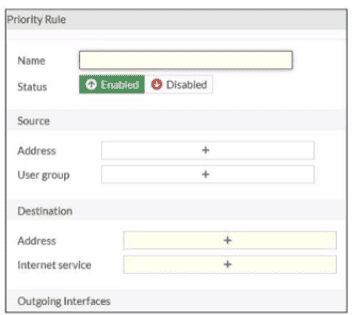
An administrator configures SD-WAN rules for a DIA setup using the FortiGate GUI. The
page to configure the source and destination part of the rule looks as shown in the exhibit.
The GUI page shows no option to configure an application as the destination of the SDWAN
rule Why?
A. You cannot use applications as the destination when FortiGate is used for a DIA setup.
B. FortiGate allows the configuration of applications as the destination of SD-WAN rules only on the CLI.
C. You must enable the feature on the CLI.
D. You must enable the feature first using the GUI menu System > Feature Visibility.
Explanation:
By default, FortiGate hides certain advanced or specific configuration options in the GUI to prevent the interface from becoming cluttered. This is known as Feature Visibility. If you are looking for a specific field—such as "Application" in an SD-WAN rule—and it simply isn't there, it usually means the toggle for that feature is turned off globally. Enabling it allows you to use Deep Packet Inspection (DPI) and Application Control signatures to steer traffic, which is a cornerstone of a sophisticated Direct Internet Access (DIA) setup.
Analysis of Options
✅ D. You must enable the feature first using the GUI menu System > Feature Visibility. This is the correct answer. In FortiOS, many granular controls for SD-WAN, including the ability to select specific Applications as a destination rather than just "Internet Services" or "IP Addresses," are controlled by the Feature Visibility settings. Once you toggle the "Application Control" or relevant SD-WAN features on in that menu, the "Application" field will appear in the SD-WAN rule creation screen.
❌ A. You cannot use applications as the destination when FortiGate is used for a DIA setup. This is incorrect. Steering traffic by application is one of the primary benefits of using SD-WAN for DIA (Direct Internet Access). For example, you might want to send Office 365 traffic over your cleanest fiber link while sending generic web browsing over a cheaper broadband link. FortiGate fully supports this.
❌ B. FortiGate allows the configuration of applications as the destination of SD-WAN rules only on the CLI. While almost everything can be done via CLI, this is not a CLI-only feature. Fortinet prioritizes making SD-WAN management accessible via the GUI because of the complexity involved in managing many business rules. If it's missing from the GUI, it's a visibility setting, not a platform limitation.
❌ C. You must enable the feature on the CLI. While you could technically use the CLI to enable a feature, the standard administrative workflow and the specific answer the exam looks for is the GUI-based "Feature Visibility" menu. In the context of the FortiGate GUI missing a field, the solution is almost always located within the GUI's own settings.
Reference
For more details on interface customization and SD-WAN rule requirements, you can refer to the official documentation: https://docs.fortinet.com
You are tasked with configuring ADVPN 2.0 on an SD-WAN topology already configured for ADVPN. What should you do to implement ADVPN 2.0 in this scenario?
A. Update the IPsec tunnel configurations on the hub.
B. Update the SD-WAN configuration on the branches.
C. Update the IPsec tunnel configuration on the branches.
D. Delete the existing ADVPN configuration and configure ADVPN 2.0.
Explanation:
✅ A. Update the IPsec tunnel configurations on the hub.
Updating the IPsec tunnels on the hub is the right move because the hub acts as the central coordinator in ADVPN topologies. In ADVPN 2.0, enhanced features like improved shortcut handling and better scalability require the hub's tunnels to support new negotiation parameters (like updated Phase 1/2 settings for dynamic discovery). Branches can continue using their existing dial-up configurations, as the hub pushes the necessary updates during tunnel establishment—this minimizes disruption across your spokes.
❌ B. Update the SD-WAN configuration on the branches.
SD-WAN rules on branches handle traffic steering and SLAs, but they don't control the core ADVPN discovery mechanism. A common mix-up here is thinking spoke-side SD-WAN changes are needed first, but that's not the case—branches rely on hub-driven signaling, so tweaking their SD-WAN won't trigger the 2.0 upgrade.
❌ C. Update the IPsec tunnel configuration on the branches.
While branches do form IPsec tunnels, forcing updates there creates unnecessary work and potential outages across all spokes. Many folks mistakenly prioritize spokes since they're the "demand" side, but ADVPN 2.0 upgrades propagate from the hub outward, keeping branch configs simpler and dial-up compatible.
❌ D. Delete the existing ADVPN configuration and configure ADVPN 2.0.
Starting from scratch sounds thorough but risks downtime and misconfiguration in a live SD-WAN setup. Fortinet's design allows in-place evolution to 2.0 without deletion—the hub update alone enables new features while preserving existing tunnels.
Reference
https://docs.fortinet.com
| Page 3 out of 14 Pages |
| 1234567 |
| FCSS_SDW_AR-7.6 Practice Test Home |
The Fortinet FCSS SD-WAN 7.6 Architect exam is notoriously tough. It doesn't test memorization. It forces you to make complex decisions under time pressure. A weak prep strategy risks a costly failure and wasted effort. Our FCSS_SDW_AR-7.6 practice tests are built to be your definitive bridge to a passing score.

Copyright © - All Rights Reserved