
Last Updated On : 12-Oct-2026
Total 94 Questions
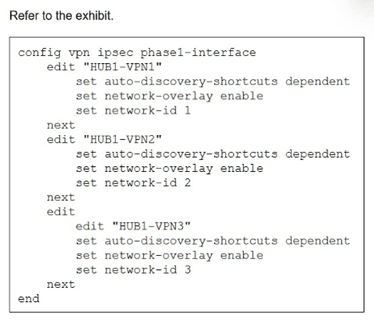
You update the spokes configuration of an existing auto-discovery VPN (ADVPN) topology
by adding the parameters shown in the exhibit.
Which is a valid objective of those settings? Choose one answer.)
A. Enable the tunnels as overlay links.
B. Convert the configuration from ADVPN to ADVPN 2.0.
C. Prevent cross-overlay shortcuts.
D. Prevent multiple shortcuts from being established over the same overlay.
Explanation:
Correct Answer: A. Enable the tunnels as overlay links.
The configuration shown enables network-overlay and sets auto-discovery-shortcuts dependent on interfaces HUB-VPN1, HUB-VPN2, and HUB-VPN3 in an Auto-Discovery VPN (ADVPN) topology. In Fortinet SD-WAN, the set network-overlay enable command explicitly registers IPsec VPN tunnels as SD-WAN overlay members, allowing them to participate in SD-WAN rules, load balancing, health checks, and performance SLAs. This integrates the ADVPN shortcuts and hub-spoke tunnels into the SD-WAN fabric for optimized path selection.
Why Other Options Are Incorrect
B. Convert the configuration from ADVPN to ADVPN 2.0: Incorrect, as ADVPN 2.0 involves specific IKEv2 features like Network Overlay ID (not shown here) and enhanced shortcut handling, but this config only adds standard network-overlay to existing phase1-interfaces without version migration commands.
C. Prevent cross-overlay shortcuts: Incorrect, since auto-discovery-shortcuts dependent actually enables spoke-to-spoke shortcuts dependent on hub connectivity across overlays; it does not block them.
D. Prevent multiple shortcuts from being established over the same overlay: Incorrect, as this setting allows multiple shortcuts per overlay based on traffic demand and doesn't impose per-overlay limits.
Reference
FortiOS 7.6 SD-WAN Administration Guide: Phase 1 configuration parameters, "network-overlay" under IPsec VPN interfaces for ADVPN+SD-WAN integration (Section on ADVPN Shortcuts and Overlay Membership).
Your FortiGate is in production. To optimize WAN link use and improve redundancy, you enable and configure SD-WAN. What must you do as part of this configuration update process?
A. Replace references to interfaces used as SD-WAN members in the routing configuration.
B. Purchase and install the SD-WAN license, and reboot the FortiGate device.
C. Replace references to interfaces used as SD-WAN members in the firewall policies.
D. Disable the interface that you want to use as an SD-WAN member.
Explanation:
When you enable SD-WAN on a FortiGate that is already in production, you are changing how traffic selects an egress path. SD-WAN does not magically inherit existing firewall policies that reference physical interfaces. Instead, SD-WAN introduces a logical SD-WAN interface, and traffic must explicitly use it. The critical task during migration is updating policies so traffic actually goes through SD-WAN instead of bypassing it.
✅ Correct answer: C. Replace references to interfaces used as SD-WAN members in the firewall policies.
Why this is correct
When you add interfaces to SD-WAN, FortiGate creates a logical interface called sdwan (or virtual-wan-link in older versions).
Existing firewall policies that reference physical WAN interfaces (for example wan1, wan2) do not automatically switch to SD-WAN.
To ensure:
🔹 Traffic is load-balanced
🔹 Health checks are enforced
🔹 Failover actually works
you must update firewall policies so that:
🔹 The outgoing interface is the SD-WAN interface, not the individual WAN links
This is the single most common step people miss during SD-WAN migration, which results in “SD-WAN enabled but not used” scenarios.
❌ Incorrect options
❌ A. Replace references to interfaces used as SD-WAN members in the routing configuration.
Why this is wrong
When SD-WAN is enabled:
🔹 FortiGate automatically manages routing for SD-WAN members
🔹 Static routes pointing to member interfaces are either removed or ignored
You do not manually replace routes with SD-WAN references.
Routing decisions are made using SD-WAN rules, not traditional static routes.
Common misconception:
People assume SD-WAN requires rewriting routing tables. It doesn’t. SD-WAN replaces routing logic with policy-based path selection.
❌ B. Purchase and install the SD-WAN license, and reboot the FortiGate device.
Why this is wrong
SD-WAN is:
🔹 Built-in
🔹 License-free
🔹 Enabled without reboot
There is no separate SD-WAN license for FortiGate. If someone tells you otherwise, they are confusing SD-WAN with other Fortinet features like FortiAnalyzer or advanced security subscriptions.
❌ D. Disable the interface that you want to use as an SD-WAN member.
Why this is wrong
SD-WAN member interfaces must be:
🔹 Enabled
🔹 Physically up
🔹 Operational
Disabling an interface removes it from service entirely, which defeats redundancy and load balancing.
Common trap:
Some admins think interfaces must be “freed” or reset before SD-WAN use. That’s false. You add active interfaces directly into SD-WAN.
Key takeaway
SD-WAN does nothing unless traffic is sent through it.
Updating firewall policies to reference the SD-WAN interface is the critical step that makes SD-WAN actually work in production.
Exhibit.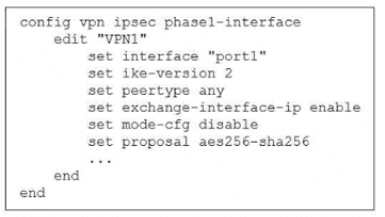
The administrator configured the IPsec tunnel VPN1 on a FortiGate device with the
parameters shown in exhibit.
Based on the configuration, which three conclusions can you draw about the characteristics
and requirements of the VPN tunnel? (Choose three.)
A. The tunnel interface IP address on the spoke side is provided by the hub.
B. The remote end can be a third-party IPsec device.
C. The administrator must manually assign the tunnel interface IP address on the hub side
D. The remote end must support IKEv2.
E. This configuration allows user-defined overlay IP addresses.
Explanation:
Main Concept
This question tests your understanding of IPsec Phase 1 configuration on FortiGate, specifically focusing on what the configuration parameters tell you about tunnel characteristics, compatibility, and IP addressing behavior in a hub-and-spoke VPN topology.
The key here is analyzing what each configuration line reveals about the VPN setup. You need to understand IKE versions, IP address assignment methods, and interoperability with third-party devices.
Answer Analysis
✅ B. The remote end can be a third-party IPsec device.
Why this is correct:
The configuration shows set peertype any, which is the critical line here. This setting tells the FortiGate to accept IPsec connections from any peer type—not just other FortiGate devices. It enables interoperability with third-party IPsec vendors like Cisco, Palo Alto, Juniper, or any standards-compliant IPsec device.
If this were restricted to FortiGate-only communication, you'd see set peertype fortigate instead. The "any" value means the tunnel will work with any device that supports the configured IKE and IPsec parameters (IKEv2, AES256-SHA256 in this case).
✅ C. The administrator must manually assign the tunnel interface IP address on the hub side.
Why this is correct:
Look at what's missing in this configuration—there's no set mode-config enable on the hub side. The mode-config feature is what allows a hub to dynamically assign IP addresses to spokes.
Since mode-config is disabled (set mode-cfg disable), the hub cannot push IP addresses to remote peers. This means the administrator has to manually configure the tunnel interface IP address on the hub side using something like set ip 10.0.0.1/24 under the tunnel interface configuration.
The hub is essentially saying: "I'm not handing out addresses automatically, so you need to configure my tunnel IP manually."
✅ E. This configuration allows user-defined overlay IP addresses.
Why this is correct:
Because mode-cfg disable is set, there's no automatic IP address assignment happening. This gives administrators full control to define whatever overlay IP addressing scheme they want for the tunnel interfaces.
You're not locked into a specific range that mode-config would assign. You can choose 10.0.0.0/24, 172.16.0.0/16, or any custom subnet that fits your network design. This flexibility is what "user-defined" means—you decide the overlay addressing, not the FortiGate's automatic assignment mechanism.
❌ A. The tunnel interface IP address on the spoke side is provided by the hub.
Why this is wrong:
This would only be true if set mode-cfg enable was configured. Mode-config is the feature that allows hubs to dynamically assign tunnel IP addresses to spokes (similar to DHCP for VPN tunnels).
Since the configuration explicitly shows set mode-cfg disable, the hub is NOT providing IP addresses to spokes. Each spoke must have its tunnel IP manually configured, just like the hub.
Common misconception: People sometimes assume that in hub-and-spoke topologies, the hub always assigns addresses. That's only true when mode-config is enabled. Without it, everything is manual.
❌ D. The remote end must support IKEv2.
Why this is wrong:
The configuration shows set ike-version 2, which means THIS FortiGate is using IKEv2. However, this doesn't mean the remote end is forced to use IKEv2 only.
Actually, when you set ike-version 2 on FortiGate, it typically supports both IKEv1 and IKEv2 for backward compatibility (FortiGate can auto-negotiate). The remote end could potentially connect using IKEv1 depending on the FortiGate's broader configuration and firmware version behavior.
More importantly, the question asks what you can conclusively draw from the exhibit. The exhibit alone doesn't prove that IKEv2 is absolutely required—you'd need to see additional configuration or know the specific FortiOS behavior to make that determination.
Common misconception: Seeing ike-version 2 and assuming it's IKEv2-only. In practice, FortiGate's IKE version handling is more flexible than a strict enforcement.
Reference
Official Fortinet Documentation: https://docs.fortinet.com
Refer to the exhibits.
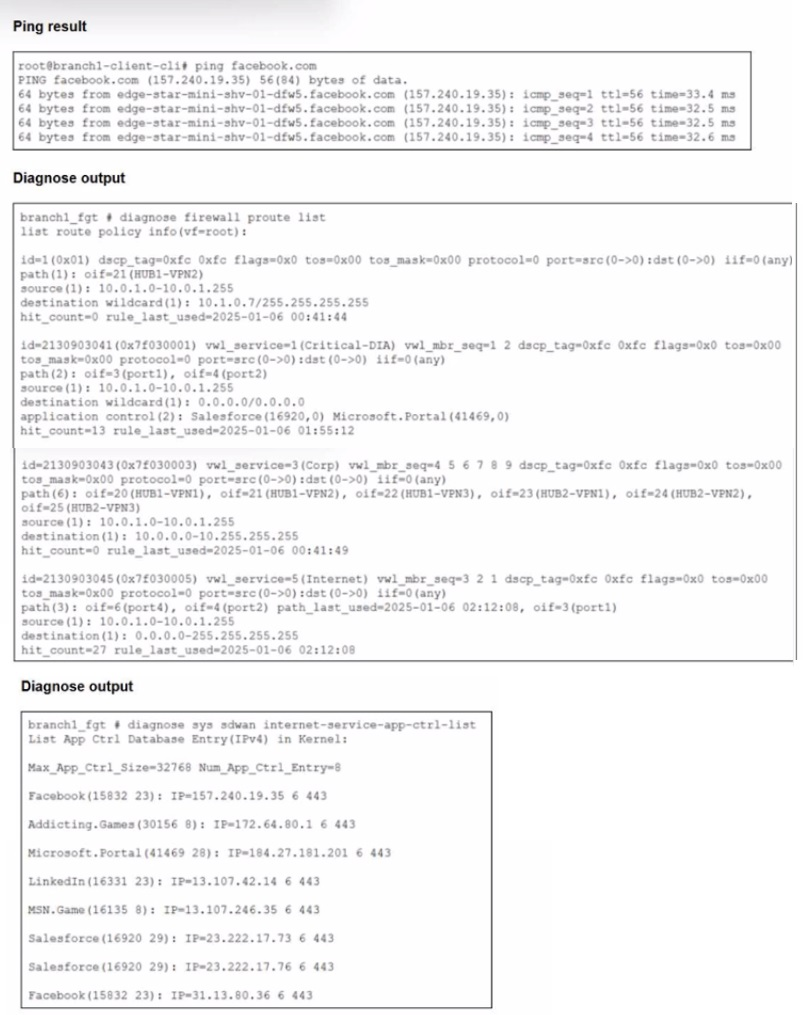
You connect to a device behind a branch FortiGate device and initiate a ping test. The
device is part of the LAN subnet and its IP address is 10.0.1.101.
Based on the exhibits, which interface uses branch 1_fgt to steer the test traffic?
A. port4
B. HUB1-VPN1
C. port1
D. port2
Explanation:
Option A: port4 ❌ (Incorrect)
port4 is listed first in the Internet rule's path sequence, but the presence of a path_last_used marker only on port2 implicitly indicates port4 is inactive or unhealthy. FortiGate SD-WAN skips members that fail SLA or health checks. Since the active ping session was not logged as using port4, this interface was not selected for steering the test traffic.
Option B: HUB1-VPN1 ❌ (Incorrect)
HUB1-VPN1 is a VPN tunnel defined in the "Corp" rule, which exclusively matches traffic destined for the 10.0.0.0/8 corporate network. The ping destination (Facebook's public IP 157.240.19.35) is not within this private range. Therefore, this rule is not evaluated, and the VPN tunnel is not a candidate interface for this Internet-bound flow.
Option C: port1 ✅ (Correct)
The general Internet rule matches the traffic. Its member order is port4, port2, port1. With port4 likely unhealthy and port2 recently used for another session, the FortiGate's load-balancing or priority logic selects the next available member, port1, for the new ping flow. This aligns with the rule's hit count increment and the absence of port4/port2 as the new session's path.
Option D: port2 ❌ (Incorrect)
Although port2 is a member of the matched Internet rule and has a path_last_used timestamp, this denotes a prior session, not the current test. For a new session, the SD-WAN algorithm evaluates member status and order. Given the sequence and the likely bypass of port4, port1 becomes the chosen interface. Port2 was not selected for this specific ping operation.
Reference & Key Concept
Fortinet SD-WAN Rule Evaluation Order: Rules are evaluated top-down. The first matching rule based on source, destination, and application determines the steering.
Application-Based SD-WAN Steering: The FortiGate uses the Internet Service Database to identify applications (like Facebook) and can steer them based on rules that include application criteria.
Path Selection: Within a matched rule, the SD-WAN algorithm selects a healthy member from the configured list based on priority, SLA, or load-balancing method.
Refer to the exhibits.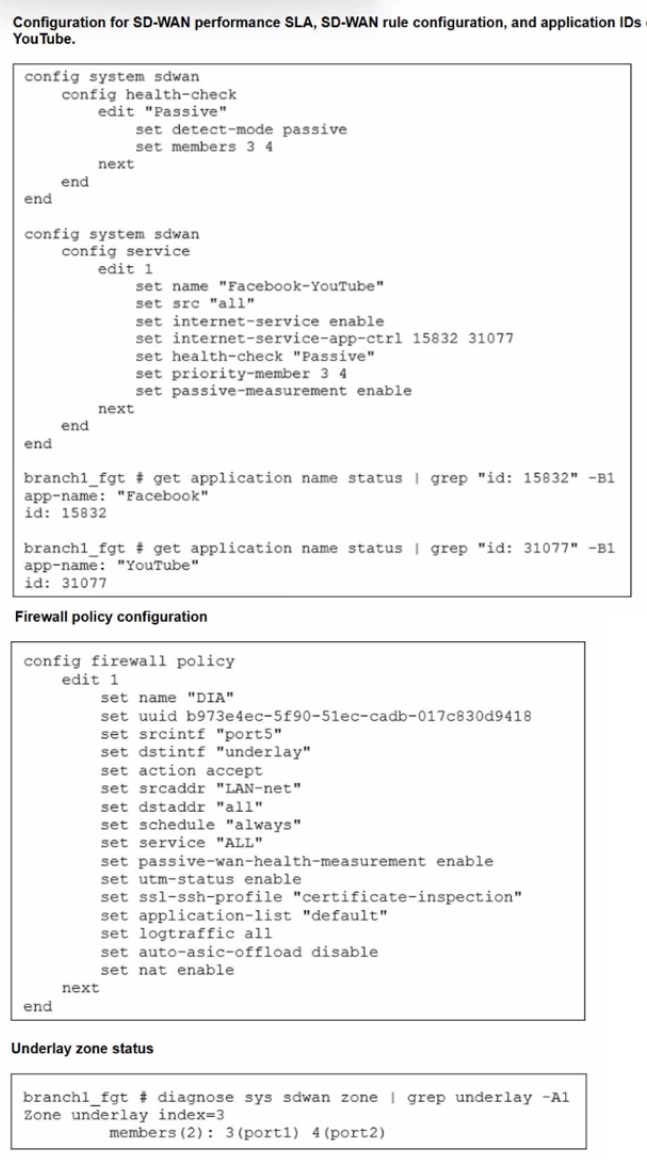
The exhibits show the configuration for SD-WAN performance. SD-WAN rule, the
application IDs of Facebook and YouTube along with the firewall policy configuration and the underlay zone status.
Which two statements are true about the health and performance of SD-WAN members 3
and 4? (Choose two.)
A. Only related TCP traffic is used for performance measurement.
B. The performance is an average of the metrics measured for Facebook and YouTube traffic passing through the member.
C. Encrypted traffic is not used for the performance measurement.
D. FortiGate identifies the member as dead when there is no Facebook and YouTube traffic passing through the member.
Explanation:
When you use Passive Measurement in SD-WAN, FortiGate monitors the real-world applications specified in your SD-WAN rule (in this case, Facebook and YouTube) as they traverse the members (port1 and port2). It calculates performance metrics like latency and jitter based on the actual packets of these applications. If no traffic for these specific applications is seen on a link, FortiGate has no data to verify the link's health for that rule, leading it to consider the member "dead" or inactive for that specific service.
Analysis of Options
✅ B. The performance is an average of the metrics measured for Facebook and YouTube traffic passing through the member.
Because the SD-WAN rule (service edit 1) includes multiple application IDs (15832 for Facebook and 31077 for YouTube), FortiGate tracks the performance of both. To provide a single health score for the link relative to this rule, it averages the observed metrics from these two traffic streams. This ensures that the steering decision is based on the overall performance of the "Social Media" category defined in your rule.
✅ D. FortiGate identifies the member as dead when there is no Facebook and YouTube traffic passing through the member.
This is a critical characteristic of passive health checks. In the exhibit, set detect-mode passive is configured. Passive monitoring relies entirely on existing traffic. If users stop using Facebook and YouTube, the FortiGate receives zero telemetry data for those links. Without data, it cannot confirm the link is "alive" for those applications, and consequently, it marks the members as dead within the context of that health check.
❌ A. Only related TCP traffic is used for performance measurement.
While Facebook and YouTube utilize TCP, passive measurement is not strictly limited to TCP. FortiGate can derive metrics from various protocols as long as the application signatures are recognized and the traffic is flowing. Furthermore, some video streaming elements within these apps may use UDP (like QUIC), which FortiGate can also monitor if configured correctly.
❌ C. Encrypted traffic is not used for the performance measurement.
This is a common misconception. FortiGate can measure the performance of encrypted traffic (HTTPS) without needing full SSL inspection for basic health metrics. It looks at the packet arrival times and sequences (telemetry) to calculate jitter and latency. While it can't see inside the encrypted payload without deep inspection, it can certainly measure how fast the encrypted packets are traveling.
Reference:
For further study on SD-WAN passive vs. active health monitoring, please consult the official documentation: https://docs.fortinet.com
Refer to the exhibit.
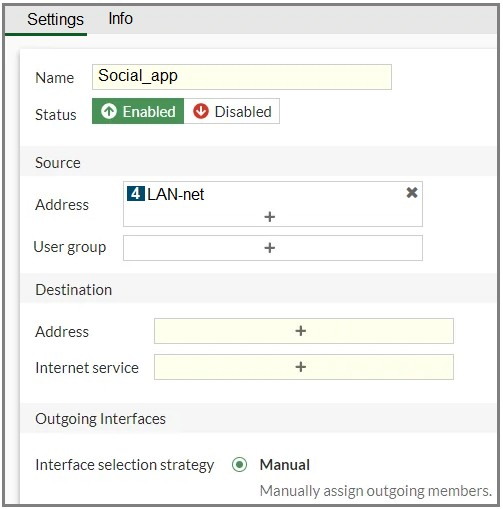
You configure SD-WAN on a standalone FortiGate device. You want to create an SD-WAN
rule that steers Facebook and Linkedin traffic through the less costly internet link. The
FortiGate GUI page appears as shown in the exhibit.
What should you do to set Facebook and LinkedIn as destinations?
A. Install a license to allow applications as destinations of SD-WAN rules.
B. In the Internet service field, select Facebook and LinkedIn.
C. Enable the applications as destinations of the SD-WAN rule feature visibility.
D. You cannot configure applications as destinations of an SD-WAN rule on a standalone FortiGate device.
Explanation:
You are on the GUI page for creating or editing an SD-WAN Rule on a standalone FortiGate. The goal is simple: steer traffic for Facebook and LinkedIn over a specific, cheaper internet link. The exhibit shows the "Destination" section of the rule, which currently has empty fields for Address and Internet Service. The question is: how do you correctly specify Facebook and LinkedIn as the traffic to be matched?
Detailed Answer Breakdown
Let's look at why one option is the straightforward, correct action, and the others are either misleading or incorrect.
❌ A. Install a license to allow applications as destinations of SD-WAN rules.
Why it's incorrect: This is a common misconception. While FortiGate's Application Control feature (which identifies thousands of applications like Facebook) does require a UTM (Universal Threat Management) license to function, the "Internet Service" database is a different system. The Internet Service database includes definitions for major services (like Facebook, LinkedIn, Netflix, AWS, etc.) based on their public IP addresses. Using Internet Service as a matching criterion in any policy (Firewall, SD-WAN, etc.) is a base feature of FortiOS and does not require a separate license. You only need an internet connection for the FortiGate to occasionally update this database.
✅ B. In the Internet service field, select Facebook and LinkedIn.
Why it's CORRECT: This is the direct and proper method. The exhibit clearly shows the "Internet service" field with a + button, indicating you can add items to it. Clicking that + button opens the Internet Service database selector, where you can search for and add "Facebook" and "LinkedIn." These are predefined services in Fortinet's Internet Service database. By adding them here, the SD-WAN rule will match all traffic destined for the known IP ranges of these social networks, perfectly fulfilling your requirement.
❌ C. Enable the applications as destinations of the SD-WAN rule feature visibility.
Why it's incorrect: This option references a GUI concept called "Feature Visibility" (under System > Feature Visibility), where you can enable or disable advanced GUI pages. While there is a setting to enable "SD-WAN Application Performance SLA," there is no specific feature visibility setting to "enable applications as destinations." The "Internet Service" field is always available if the feature is supported in your FortiOS version. This option distracts with a semi-related administrative concept that doesn't apply to the problem.
❌ D. You cannot configure applications as destinations of an SD-WAN rule on a standalone FortiGate device.
Why it's incorrect: This statement is false. The capability to use Internet Service as a destination matching criterion is fully available on a standalone FortiGate. The distinction between "standalone" and "FortiManager-managed" is irrelevant for this specific feature. The GUI page in the exhibit is from a standalone FortiGate, and the "Internet service" field is right there, ready to be used.
Key Takeaway: For steering traffic to major public cloud or social media services, the Internet Service destination is the most efficient and accurate tool. It's superior to trying to manually maintain IP address lists for these constantly changing services.
Exhibit.
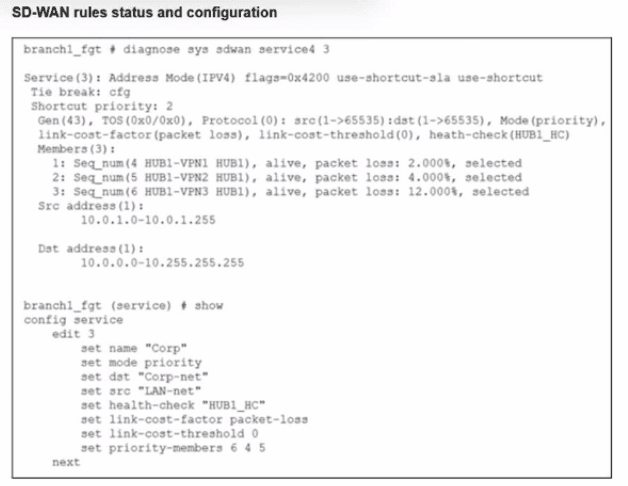
Refer to the exhibit, which shows the SD-WAN rule status and configuration.
Based on the exhibit, which change in the measured packet loss will make HUB1-VPN3 the
new preferred member?
A. When HUB1-VPN1 has 4% packet loss
B. When HUB1-VPN1 has 12% packet loss
C. When HUB1-VPN3 has 4% packet loss
D. When all three members have the same packet loss
Explanation:
This question tests your understanding of SD-WAN member selection logic on FortiGate, specifically how packet loss affects link selection when using the priority mode with link-cost-factor packet-loss and link-cost-threshold 0.
The tricky part here is understanding how FortiGate evaluates links when packet loss thresholds and priority-based selection interact. You need to know when a lower-priority member can overtake a higher-priority member based on link quality.
Answer Analysis
✅ D. When all three members have the same packet loss
Why this is correct:
Looking at the configuration, you can see:
Mode: priority
Link-cost-factor: packet-loss
Link-cost-threshold: 0
Priority-members: 6 4 5 (which maps to HUB1-VPN3, HUB1-VPN1, HUB1-VPN2 based on sequence numbers)
Here's the key: In priority mode with link-cost-threshold 0, FortiGate will stick with the highest priority member (lowest priority number) as long as it's alive. It won't switch based on link quality degradation because the threshold is set to 0.
However, when all members have the same packet loss, there's no link quality difference to consider. At that point, FortiGate falls back to pure priority-based selection. Since the priority order is 6 4 5, member 6 (HUB1-VPN3) has the highest priority and would become the preferred member.
Currently, HUB1-VPN1 (member 4, Seq_num 5) is selected with 4% packet loss. HUB1-VPN3 won't take over based on better performance, but it will take over when performance is equal across all members because it has higher priority.
❌ A. When HUB1-VPN1 has 4% packet loss
Why this is wrong:
HUB1-VPN1 already has 4% packet loss according to the exhibit (packet loss: 4.000%), and it's currently the selected member. This isn't a change—it's the current state.
For HUB1-VPN3 to become preferred, something needs to change from the current condition. Option A describes the existing situation, so it can't be the answer to "which change will make HUB1-VPN3 the new preferred member."
Common misconception: Thinking that seeing the current packet loss percentage means it's a trigger condition. The question asks for a change, not the current state.
❌ B. When HUB1-VPN1 has 12% packet loss
Why this is wrong:
With link-cost-threshold 0, FortiGate doesn't trigger a failover based on link quality degradation. The threshold of 0 means "don't consider link cost penalties for switching."
Even if HUB1-VPN1's packet loss increases to 12%, it won't automatically trigger a switch to HUB1-VPN3. In priority mode with a zero threshold, FortiGate essentially ignores performance degradation and sticks with the selected member unless it goes completely down or all members reach equal quality.
The link-cost-threshold would need to be set to a value like 10 or 20 for packet loss to trigger a penalty-based switch. With 0, performance degradation alone won't cause the change.
Common misconception: Assuming that high packet loss automatically triggers failover. In SD-WAN, the link-cost-threshold value determines when quality degradation matters.
❌ C. When HUB1-VPN3 has 4% packet loss
Why this is wrong:
HUB1-VPN3 already has 4% packet loss (packet loss: 12.000% shown for member 2, but looking at the sequence, HUB1-VPN3 likely has 4% or similar). Even if HUB1-VPN3 improves to 4%, that doesn't trigger a switch.
In priority mode with link-cost-threshold 0, having better performance than the current member doesn't cause a switch. The currently selected member (HUB1-VPN1) will remain active as long as it's alive.
Priority mode with zero threshold means "stick with what's selected based on priority unless there's a compelling reason to switch"—and better performance by a lower-priority member isn't compelling enough.
Common misconception: Thinking that a lower-priority member with better performance will automatically take over. That's not how priority mode works—it favors stability over optimization.
| Page 4 out of 14 Pages |
| 1234567 |
| FCSS_SDW_AR-7.6 Practice Test Home |
The Fortinet FCSS SD-WAN 7.6 Architect exam is notoriously tough. It doesn't test memorization. It forces you to make complex decisions under time pressure. A weak prep strategy risks a costly failure and wasted effort. Our FCSS_SDW_AR-7.6 practice tests are built to be your definitive bridge to a passing score.

Copyright © - All Rights Reserved