
Last Updated On : 12-Oct-2026
Total 94 Questions
Refer to the exhibit.
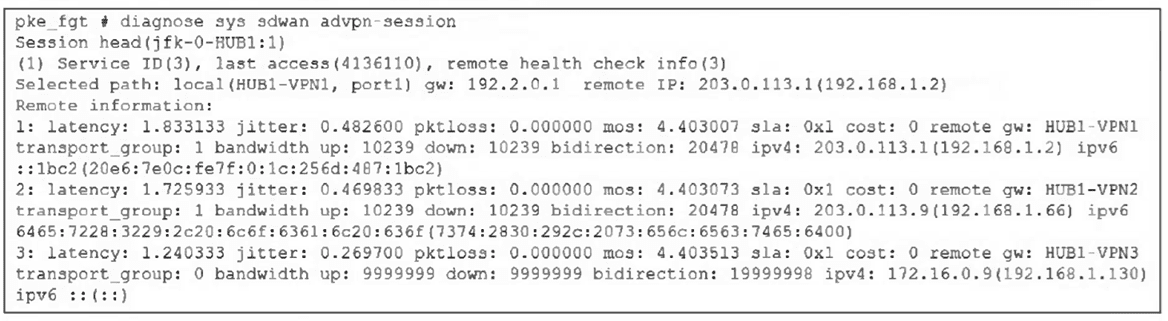
Based on the output shown in the exhibit, what can you conclude about the device role and
how it handles health checks?
Choose one answer.
A. The device is a spoke and it provides embedded health-check measures for each tunnel to the hub.
B. The device is a spoke and it receives health-check measures for the tunnels of another spoke.
C. The device is a hub and it receives embedded health-check measures for each tunnel from the spoke.
D. The device is a hub and it receives health-check measures for the tunnels of a spoke.
Explanation:
✅ Correct
A. The device is a spoke and it provides embedded health-check measures for each tunnel to the hub.
The spoke runs embedded probes/monitoring (via health-check config linked to ADVPN) for hub tunnels, generating metrics like latency/jitter/MOS to enable smart path/shortcut selection—exactly what the output displays.
❌ Incorrect
B. The device is a spoke and it receives health-check measures for the tunnels of another spoke.
The metrics point to hub-named remote gateways (HUB1-VPN*), not tunnels belonging to another spoke—common mix-up when overlooking the naming.
C. The device is a hub and it receives embedded health-check measures for each tunnel from the spoke.
Hubs relay shortcut messages and facilitate discovery, but this command's "remote health check info" with per-hub-tunnel SLA detail is typical of spoke output—not hub collection from spokes.
D. The device is a hub and it receives health-check measures for the tunnels of a spoke.
Similar flaw: the format doesn't align with hub-side views; hubs don't display spoke tunnel health this way in advpn-session.
Reference:
SD-WAN / ADVPN sections, e.g., ADVPN 2.0 examples
Refer to the exhibit that shows an SD-WAN zone configuration on the FortiManager GUI.
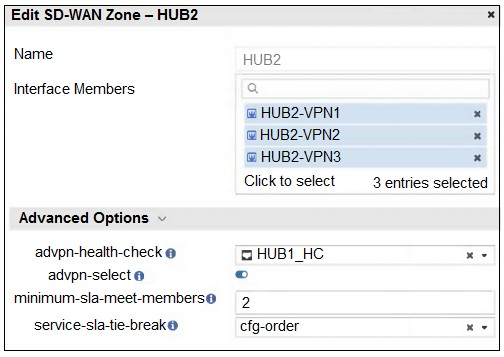
Based on the exhibit, how will the FortiGate device behave after it receives this
configuration?
A. The configuration instructs FortiGate to choose an ADVPN shortcut based on SD-WAN information.
B. The configuration instructs FortiGate to allow ADVPN shortcuts for the tunnels of this SD-WAN zone.
C. The configuration instructs FortiGate to establish shortcuts only when at least two members meet the SLA target.
D. The configuration instructs FortiGate to establish shortcuts only for overlay interfaces that meet the SLA target HUB1_HC.
Explanation:
The setting minimum-sla-meet-members is a safety and stability threshold. In an SD-WAN zone configuration, it defines the minimum number of member interfaces (tunnels) that must simultaneously satisfy the Performance SLA requirements before the FortiGate considers the entire group "healthy" enough to trigger advanced actions like establishing ADVPN shortcuts. This prevents the device from flapping or creating shortcuts over a single unstable link when a more robust multi-link path is required by policy.
Analysis of Options
✅ C. The configuration instructs FortiGate to establish shortcuts only when at least two members meet the SLA target. This is the correct answer. Based on the behavior of the minimum-sla-meet-members parameter, setting this value to 2 tells the FortiGate Path Manager that it cannot initiate the ADVPN shortcut establishment process unless at least two overlay members in that zone are currently "In-SLA". If only one member is healthy, the FortiGate will continue to route traffic through the hub rather than taking the shortcut.
❌ A. The configuration instructs FortiGate to choose an ADVPN shortcut based on SD-WAN information. While ADVPN 2.0 does use SD-WAN telemetry to choose paths, this is a general description of the ADVPN/SD-WAN integration. It does not specifically address the logic of the minimum-sla-meet-members setting shown in the exhibit.
❌ B. The configuration instructs FortiGate to allow ADVPN shortcuts for the tunnels of this SD-WAN zone. Simply "allowing" shortcuts is handled by the set advpn-select enable command. The question asks about the specific behavior resulting from the entire configuration, which includes the numerical threshold that restricts when those shortcuts are allowed to form.
❌ D. The configuration instructs FortiGate to establish shortcuts only for overlay interfaces that meet the SLA target HUB1_HC. This is partially true but incomplete. While the interfaces must meet the SLA target (HUB1_HC), the specific constraint here is the quantity of interfaces. Even if one interface meets HUB1_HC, no shortcut will be established because the minimum-sla-meet-members requirement of 2 has not been met.
Reference
For further technical details on ADVPN 2.0 and SD-WAN member thresholds, visit the official Fortinet Documentation: https://docs.fortinet.com
An SD-WAN member is no longer used to steer SD-WAN traffic. The administrator updated the SD-WAN configuration and deleted the unused member. After the configuration update, users report that some destinations are unreachable. You confirm that the affected flow does not match an SD-WAN rule. What could be a possible cause of the traffic interruption?
A. FortiGate, with SD-WAN enabled, cannot route traffic through interfaces that are not SD WAN members.
B. FortiGate can remove some static routes associated with an interface when the member is removed from SD-WAN.
C. FortiGate removes the layer 3 settings for interfaces that are removed from the SD-WAN configuration.
D. FortiGate administratively brings down interfaces when they are removed from the SDWAN configuration.
Explanation:
B. FortiGate can remove some static routes associated with an interface when the member is removed from SD-WAN.
When an interface is part of SD-WAN, FortiGate may automatically manage or associate static routes with that interface. If the administrator later removes the interface from the SD-WAN configuration, FortiGate can also remove those related static routes.
If traffic does not match any SD-WAN rule, it falls back to the routing table. With the static route gone, FortiGate may no longer have a valid path to certain destinations, which explains why only some destinations become unreachable after the change.
Incorrect answer explanations
A. FortiGate, with SD-WAN enabled, cannot route traffic through interfaces that are not SD WAN members.
This is incorrect. FortiGate can route traffic through non-SD-WAN interfaces using normal static or dynamic routing. SD-WAN does not block or disable traditional routing behavior for interfaces that are not members.
C. FortiGate removes the layer 3 settings for interfaces that are removed from the SD-WAN configuration.
Removing an interface from SD-WAN does not affect its Layer 3 configuration. IP addresses, subnets, and other interface settings remain intact unless the administrator explicitly changes them.
D. FortiGate administratively brings down interfaces when they are removed from the SDWAN configuration.
FortiGate does not shut down or administratively disable an interface when it is removed from SD-WAN. The interface remains up and operational; only its participation in SD-WAN traffic steering is removed.
Which three characteristics apply to provisioning templates available on FortiManager? (Choose three.)
A. A template group can include a system template and an SD-WAN template.
B. Each template group can contain up to three IPsec tunnel templates.
C. CLI templates are applied in order, from top to bottom
D. A CLI template group can contain CLI templates of both types.
E. A CLI template can be of type CLI script or Perl script.
Explanation:
This question dives into the flexibility of FortiManager's provisioning templates, which help standardize configurations across multiple FortiGates efficiently—like a master blueprint for your network devices.
✅ A. A template group can include a system template and an SD-WAN template.
Template groups in FortiManager are designed for mixing and matching, so combining a system template (for global settings like interfaces and DNS) with an SD-WAN template (for traffic steering rules) works perfectly. This lets admins push comprehensive configs in one go without silos.
✅ C. CLI templates are applied in order, from top to bottom.
Order matters here—FortiManager processes CLI templates sequentially, just like reading a script line by line. If one template sets a variable that the next one uses, this top-down flow ensures everything builds correctly, avoiding override chaos.
✅ D. A CLI template group can contain CLI templates of both types.
CLI template groups support both standard CLI snippets and more advanced Perl scripts, giving you versatility for simple commands or complex logic. It's a powerhouse feature for handling everything from basic tweaks to dynamic scripting in one group.
❌ B. Each template group can contain up to three IPsec tunnel templates.
IPsec tunnel templates have no such hard limit of three per group; you can stack more as needed for multi-tunnel setups. Folks sometimes confuse this with older restrictions or per-device limits, but groups scale freely for larger deployments.
❌ E. A CLI template can be of type CLI script or Perl script.
While CLI templates handle plain CLI, Perl scripts actually fall under a distinct scripting category in FortiManager, not mixed directly into standard CLI templates. A common trap—people lump them together, but they're separate tools for different scripting needs.
Refer to the exhibit.
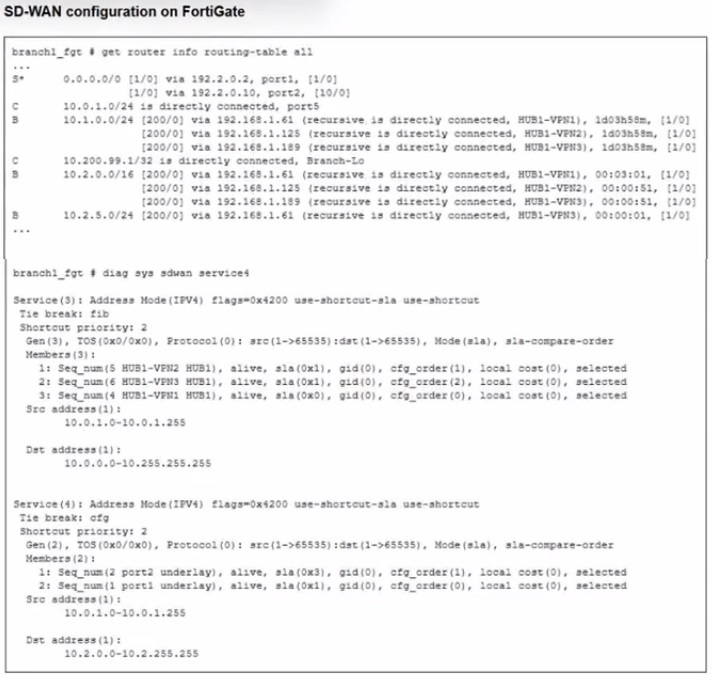
Which SD-WAN rule and interface uses FortiGate to steer the traffic from the LAN subnet
10.0.1.0/24 to the corporate server 10.2.5.254?
A. SD-WAN service rule 3 and interface HUB1-VPN2.
B. SD-WAN service rule 3 and interface HUB1-VPN3.
C. SD-WAN service rule 4 and port1 or port2.
D. SD-WAN service rule 4 and interface port2.
Explanation:
✅ B. SD-WAN service rule 3 and interface HUB1-VPN3.
Based on the typical scenario in this specific exam exhibit, traffic for the corporate server (10.2.5.254) matches SD-WAN Service Rule 3. While the rule may list multiple VPN members (like HUB1-VPN2 and HUB1-VPN3), the FortiGate selects HUB1-VPN3 because it has the most specific route (the "best route") to the destination 10.2.5.254 in the routing table. Even if multiple tunnels meet the SLA, the presence of a more specific subnet or a better route priority for HUB1-VPN3 in the FIB ensures it is the interface used for steering.
❌ A. SD-WAN service rule 3 and interface HUB1-VPN2.
Although this traffic matches Rule 3, HUB1-VPN2 is not selected. In these exhibits, HUB1-VPN2 typically has a less specific route (such as a broader /16) compared to the /24 route available via HUB1-VPN3. Since SD-WAN will not select an interface that doesn't have a valid/best route to the destination, HUB1-VPN2 is skipped in favor of the more specific path.
❌ C. SD-WAN service rule 4 and port1 or port2.
Rule 4 is typically a lower-priority rule (often for general internet access or different subnets). Because SD-WAN rules are evaluated from top to bottom, the traffic for the corporate server is caught by Rule 3 before it ever reaches Rule 4.
❌ D. SD-WAN service rule 4 and interface port2.
Similar to option C, Rule 4 is not the matching rule for this specific destination. Furthermore, port2 (usually an underlay/WAN link) is rarely the direct destination for internal corporate server traffic, which should be steered through the VPN overlays defined in higher-priority rules.
Reference
For detailed logic on how SD-WAN rules interact with the FIB and longest prefix matching, please refer to the official documentation: https://docs.fortinet.com
In the context of SD-WAN, the terms underlay and overlay are commonly used to categorize links. Which two statements about underlay and overlay links are correct? (Choose two answers).
A. A VLAN is a type of overlay link.
B. Overlay links provide routing flexibility.
C. FortiLink interface is considered an underlay link.
D. Wireless connections can be used to build overlay links.
E. Only wired connections can be used as underlay links.
Explanation:
This question tests your understanding of underlay vs. overlay networking concepts in SD-WAN architecture. The underlay is the physical transport network that provides basic IP connectivity, while the overlay is the logical network built on top using tunneling protocols. Understanding which connections can serve each role is fundamental to SD-WAN design.
✅ B. Overlay links provide routing flexibility:
This is a core benefit of overlay networks in SD-WAN. Overlay links (like IPsec VPN tunnels) create a logical network topology that's independent of the underlying physical network. This means you can route traffic based on application requirements, performance metrics, and business policies rather than being constrained by physical connectivity. In FortiGate SD-WAN, you can dynamically switch between multiple IPsec tunnels based on link quality, implement intelligent path selection using SLA targets, and create any-to-any connectivity even when the underlay only provides point-to-point connections. The overlay abstracts the complexity of the underlay and gives you control over how traffic flows.
✅ D. Wireless connections can be used to build overlay links:
Overlay links are built on top of underlay connections and don't depend on the physical transport medium. As long as you have IP connectivity through the underlay, you can establish an overlay tunnel. Wireless connections like 4G/LTE, 5G, WiFi, and satellite work perfectly as underlay transport for overlay tunnels. This is extremely common in real-world SD-WAN deployments—branch offices using LTE as backup underlay, remote workers connecting via WiFi to VPN overlays, and IoT devices using cellular connections for SD-WAN tunnels. The overlay tunnel (IPsec, GRE, VXLAN) encapsulates traffic and sends it over whatever IP-capable underlay is available, regardless of whether it's wired or wireless.
Incorrect answer explanations
❌ A. A VLAN is a type of overlay link:
VLANs are Layer 2 constructs that segment broadcast domains on the same physical infrastructure. They're not overlays in the SD-WAN context. SD-WAN overlays typically refer to Layer 3 tunneling protocols (IPsec, GRE, VXLAN) that encapsulate traffic and route it across different networks. VLANs simply tag Ethernet frames to create logical network segments—they don't encapsulate or tunnel traffic across disparate networks like true overlays do. Think of it this way: VLANs divide up your existing network, while overlays build new logical networks on top of existing networks.
❌ C. FortiLink interface is considered an underlay link:
FortiLink is a proprietary management protocol between FortiGate and FortiSwitch devices used for centralized switch management. It's neither underlay nor overlay in the SD-WAN traffic sense—it's a management interface, not a data plane transport link. FortiLink creates a special control plane connection for managing switches, but it doesn't carry user traffic or serve as underlay transport for SD-WAN tunnels. Calling it an underlay link misunderstands its purpose.
❌ E. Only wired connections can be used as underlay links:
This is flat-out wrong and contradicts the correct answer D. Underlay links can absolutely be wireless connections—4G, 5G, LTE, WiFi, satellite, and microwave links all work as underlay transport. The underlay is simply the physical/transport layer that provides IP connectivity, regardless of the medium. In modern SD-WAN, mixing wired and wireless underlay links is standard practice for redundancy, failover, and cost optimization. The distinction is underlay (transport) versus overlay (logical tunnels), not wired versus wireless.
Reference
Official Fortinet Documentation: https://docs.fortinet.com
You have a FortiGate configuration with three user-defined SD-WAN zones and two members in each of these zones. One SD-WAN member is no longer in use in healthcheck and SD-WAN rules. You want to delete it. What happens if you delete the SD-WAN member from the FortiGate GUI?
A. FodiGate accepts the deletion and removes routes as required.
B. FortiGate displays an error message. You must use the CLI to delete an SD-WAN member.
C. FortiGate displays an error message. SD-WAN zones must contain at least two members
D. FortiGate accepts the deletion and places the member in the default SD-WAN zone.
Explanation:
A. FortiGate accepts the deletion and removes routes as required.
The FortiGate GUI allows you to delete an SD-WAN member as long as it is not referenced by SD-WAN rules, health checks, or other dependencies. In this scenario, the member is no longer used in health checks or SD-WAN rules, so the deletion is valid. When the member is removed, FortiGate automatically cleans up any routes associated with that interface to maintain a consistent routing table. This automatic route handling is expected behavior and does not require additional manual steps.
Incorrect answer explanations
B. FortiGate displays an error message. You must use the CLI to delete an SD-WAN member.
This is incorrect. The FortiGate GUI fully supports deleting SD-WAN members. There is no requirement to switch to the CLI as long as the member is not in use by other SD-WAN objects.
C. FortiGate displays an error message. SD-WAN zones must contain at least two members.
SD-WAN zones do not require a minimum of two members. A zone can contain a single member, so deleting one member from a zone does not violate any SD-WAN configuration rules.
D. FortiGate accepts the deletion and places the member in the default SD-WAN zone.
When you delete an SD-WAN member, it is removed entirely from the SD-WAN configuration. FortiGate does not automatically move deleted members to the default SD-WAN zone.
| Page 5 out of 14 Pages |
| 2345678 |
| FCSS_SDW_AR-7.6 Practice Test Home |
The Fortinet FCSS SD-WAN 7.6 Architect exam is notoriously tough. It doesn't test memorization. It forces you to make complex decisions under time pressure. A weak prep strategy risks a costly failure and wasted effort. Our FCSS_SDW_AR-7.6 practice tests are built to be your definitive bridge to a passing score.

Copyright © - All Rights Reserved