
Last Updated On : 12-Oct-2026
Total 92 Questions
What are three key routing principles in SD-WAN? (Choose three answers)
A. By default, SD-WAN rules are skipped if the included SD-WAN members do not have a valid route to the destination.
B. SD-WAN rules have precedence over any other type of routes.
C. Regular policy routes have precedence over SD-WAN rules.
D. By default, SD-WAN rules are skipped if only one route to the destination is available.
E. By default, SD-WAN rules are skipped if the best route to the destination is not an SDWAN member.
Explanation:
FortiGate SD-WAN has specific routing principles. SD-WAN rules take precedence over regular routes but not over policy routes (unless configured otherwise). SD-WAN rules are skipped when no SD-WAN member has a valid route or when the best route (longest prefix match) is not an SD-WAN member.
Correct Option:
A. By default, SD-WAN rules are skipped if the included SD-WAN members do not have a valid route to the destination.
SD-WAN rules only apply to traffic when at least one member interface in the rule has a route (connected, static, or dynamic) to the destination. If none have a valid route, the rule is skipped and normal routing table lookup occurs.
*Reference: FortiOS 7.6 SD-WAN Guide, Rule Matching Behavior*
B. SD-WAN rules have precedence over any other type of routes.
SD-WAN rules are evaluated before regular static routes and dynamic routes (OSPF, BGP). If an SD-WAN rule matches the traffic, it is applied immediately without checking the main routing table for other non-SD-WAN routes.
*Reference: FortiOS 7.6 SD-WAN Guide, Routing Precedence*
E. By default, SD-WAN rules are skipped if the best route to the destination is not an SD-WAN member.
When the routing table contains multiple routes, the "best" (lowest distance/longest prefix) route is considered. If that best route does not use an SD-WAN member interface, the SD-WAN rule is skipped and the best non-SD-WAN route is used instead. This prevents SD-WAN from overriding a more specific or lower-distance route.
*Reference: FortiOS 7.6 SD-WAN Guide, Route Lookup Behavior*
Incorrect Option:
C. Regular policy routes have precedence over SD-WAN rules.
This is false. By default, SD-WAN rules have precedence over regular policy routes. Policy routes are evaluated after SD-WAN rules unless set sdwan-policy-route-disable is enabled. The correct order is: SD-WAN rules → Policy routes → Static/Dynamic routes.
Reference: FortiOS 7.6 Routing Hierarchy
D. By default, SD-WAN rules are skipped if only one route to the destination is available.
Having only one route does not cause SD-WAN rules to be skipped. SD-WAN rules work with single or multiple routes. Skipping occurs only when no member has a valid route (A) or the best route is not an SD-WAN member (E).
*Reference: FortiOS 7.6 SD-WAN Rule Processing*
Reference:
Fortinet NSE4_FGT_AD-7.6 Study Guide, Chapter: SD-WAN (Routing Principles & Rule Evaluation Order)
You are onboarding an agentless, secure web gateway (SWG) endpoint for secure internet access (SIA). What will happen to the user's nonweb traffic? (Choose one answer)
A. All the nonweb traffic will bypass FortiSASE.
B. The endpoint will use split tunneling to redirect nonweb traffic to FortiSASE.
C. FortiSASE will use Firewall-as-a-Service (FWaaS) to redirect nonweb traffic.
D. FortiSASE will use SWG to redirect nonweb traffic to FortiExtender.
Explanation:
FortiSASE Secure Internet Access (SIA) using an agentless SWG endpoint relies on proxy-based methods (e.g., PAC files, explicit proxy, or GRE/IPsec tunnels) that typically handle only web traffic (HTTP/HTTPS). Non-web traffic (e.g., email on non-standard ports, VoIP, gaming) is not captured by the SWG proxy and therefore bypasses FortiSASE.
Correct Option:
A. All the nonweb traffic will bypass FortiSASE.
Agentless SWG deployment for SIA uses web proxy mechanisms (explicit or transparent) that only intercept HTTP/HTTPS traffic on ports 80 and 443 (and optionally other configured web ports). Non-web traffic such as SMTP (port 25), SSH (port 22), or custom UDP applications does not traverse the SWG proxy and directly egresses via the local internet connection, bypassing FortiSASE inspection.
Incorrect Option:
B. The endpoint will use split tunneling to redirect nonweb traffic to FortiSASE.
Split tunneling is a VPN concept (IPsec/SSL VPN) that selectively routes traffic. Agentless SWG does not use split tunneling; it relies on proxy configuration. Non-web traffic cannot be redirected via split tunneling in an agentless SWG deployment.
C. FortiSASE will use Firewall-as-a-Service (FWaaS) to redirect nonweb traffic.
FWaaS inspects traffic forwarded to FortiSASE via IPsec tunnels, but agentless SWG endpoints do not establish a full IPsec tunnel. FWaaS requires a different deployment method (e.g., FortiClient with ZTNA or IPsec). Agentless SWG does not trigger FWaaS for non-web traffic.
D. FortiSASE will use SWG to redirect nonweb traffic to FortiExtender.
SWG is designed for web traffic only and does not redirect any traffic to FortiExtender. FortiExtender is a cellular/LTE connectivity device for FortiGate, unrelated to FortiSASE traffic redirection.
Reference:
Fortinet NSE4_FGT_AD-7.6 Study Guide, Chapter: FortiSASE (Secure Internet Access & Deployment Methods)
Refer to the exhibit to view the firewall policy.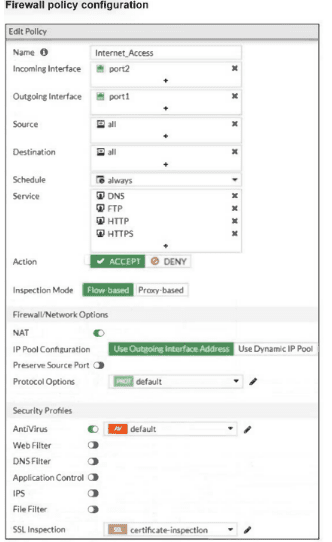
Why would the firewall policy not block a well-known virus, for example EICAR? (Choose one answer)
A. The action on the firewall policy is not set to DENY.
B. Web filter is not enabled, so the firewall policy does not complement the antivirus profile.
C. The firewall policy is not configured in proxy-based inspection mode.
D. The firewall policy does not apply deep content inspection.
Explanation:
The exhibit shows the firewall policy has Antivirus profile set to "Default" but SSL Inspection is set to "certificate inspection" (also known as common-inspection). Certificate inspection only validates the certificate but does not decrypt the HTTPS payload. A well-known virus like EICAR delivered over HTTPS will remain encrypted, so the antivirus scanner cannot see it.
Correct Option:
D. The firewall policy does not apply deep content inspection.
The SSL Inspection field is set to "certificate inspection" (common-inspection), which only checks certificate validity without decrypting HTTPS traffic. Without deep inspection (full SSL decryption), the antivirus profile cannot scan encrypted HTTPS payloads for viruses like EICAR. The virus passes through encrypted, never reaching the AV engine.
Incorrect Option:
A. The action on the firewall policy is not set to DENY.
The policy action is explicitly set to ACCEPT (as shown in the exhibit). However, ACCEPT with security profiles (including antivirus) should still block viruses. The issue is not the ACCEPT action but the lack of decryption for HTTPS traffic.
B. Web filter is not enabled, so the firewall policy does not complement the antivirus profile.
Web filter is not required for antivirus functionality. Antivirus profiles scan files regardless of web filter status. Web filter blocks categories/URLs, while AV blocks malware signatures. Missing web filter does not prevent AV from detecting EICAR when traffic is decrypted.
C. The firewall policy is not configured in proxy-based inspection mode.
Flow-based inspection (the default in many FortiOS versions) can still scan for viruses, including EICAR, as long as the traffic is decrypted. Proxy-based mode is not required for antivirus detection. The issue remains SSL decryption, not inspection mode.
Reference:
Fortinet NSE4_FGT_AD-7.6 Study Guide, Chapter: Security Profiles (SSL Inspection & Antivirus Scanning of Encrypted Traffic)
Refer to the exhibit.
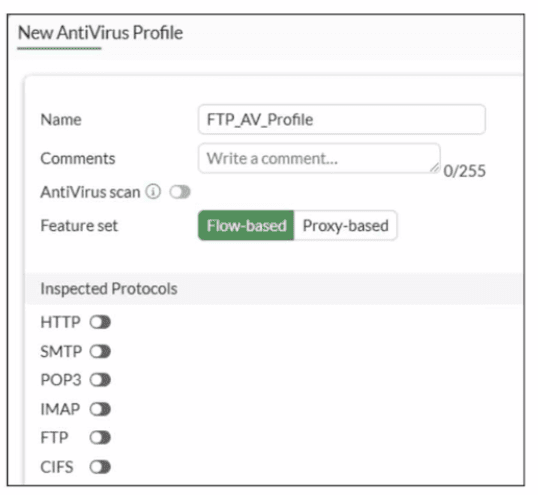
Why is the Antivirus scan switch grayed out when you are creating a new antivirus profile
for FTP?
A. Antivirus scan is disabled under System -> Feature visibility
B. None of the inspected protocols are active in this profile.
C. The Feature Set for the profile is Flow-based but it must be Proxy-based
D. FortiGate. with less than 2 GB RAM. does not support the Antivirus scan feature.
Explanation:
✅ Correct Answer: B
The Antivirus scan switch is grayed out because no inspected protocols are selected in the FTP Antivirus profile. In FortiGate, the Antivirus scan option becomes available only after enabling at least one protocol (such as FTP) under Inspected Protocols, as antivirus scanning requires a protocol context to operate.
The exhibit shows FTP unchecked along with all other protocols (HTTP, SMTP, IMAP, POP3, CIFS), leaving no scanning scope defined, which disables the feature toggle.
❌ Why others are wrong:
A: Feature visibility affects global UI options but doesn't gray out per-profile settings like this.
C: Flow-based supports FTP AV scanning; Proxy-based isn't required for basic antivirus on FTP traffic.
D: RAM size doesn't disable AV scan availability; it's a configuration prerequisite issue.
Reference:
FortiOS 7.6 Administration Guide - Antivirus Profile configuration (Content Inspection section, NSE4_FGT_AD-7.6 exam topics).
A network administrator is reviewing firewall policies in both Interface Pair View and By Sequence View. The policies appear in a different order in each view. Why is the policy order different in these two views?
A. By Sequence View groups policies based on rule priority, while Interface Pair View always follows the order of traffic logs.
B. The firewall dynamically reorders policies in Interface Pair View based on recent traffic patterns, but By Sequence View remains static.
C. Interface Pair View sorts policies based on matching interfaces, while By Sequence View shows the actual processing order of rules.
D. Policies in Interface Pair View are prioritized by security levels, while By Sequence View strictly follows the administrator's manual ordering.
Explanation:
The correct answer is C. Interface Pair View sorts policies based on matching interfaces, while By Sequence View shows the actual processing order of rules.
Here's why the orders look different:
FortiGate evaluates firewall policies top-down in a single, fixed sequence—the order you see in By Sequence View. That's the real processing order: the first matching policy wins, full stop. This view lists every policy exactly as it's checked, without any grouping.
Interface Pair View organizes the same policies into collapsible sections/groups based on the incoming and outgoing interface pairs (e.g., all policies from port1 → port2 in one section, port2 → wan1 in another). Within each section, the relative order matches the global sequence, but because it's grouped by interface pairs, the overall list appears reordered compared to the flat By Sequence View. It's just a different way to display the same set of rules for easier management when you have many policies—especially useful when troubleshooting traffic between specific interfaces.
The key point: both views reflect the same evaluation logic and order; only the presentation changes. Interface Pair View doesn't change priorities or reorder anything—it groups by src/dst interfaces to make scanning faster.
Why the others don't hold up:
A — No, neither view bases order on traffic logs, and rule priority isn't a separate thing here (it's the sequence).
B — FortiGate doesn't dynamically reorder policies based on traffic patterns in any view. The order is static unless you manually move rules.
D — There's no prioritization by "security levels" in Interface Pair View (that's not a FortiGate concept for policy ordering). By Sequence does follow the admin's manual ordering, but that's true for both—the difference is grouping, not priority method.
This is straight from Fortinet's docs (FortiOS 7.6 Administration Guide, Firewall Policy section, and the Policy views/policy lookup topic): Interface Pair View groups by incoming/outgoing pairs while showing check order within groups; By Sequence is the ungrouped, full top-down list.
Refer to the exhibits.
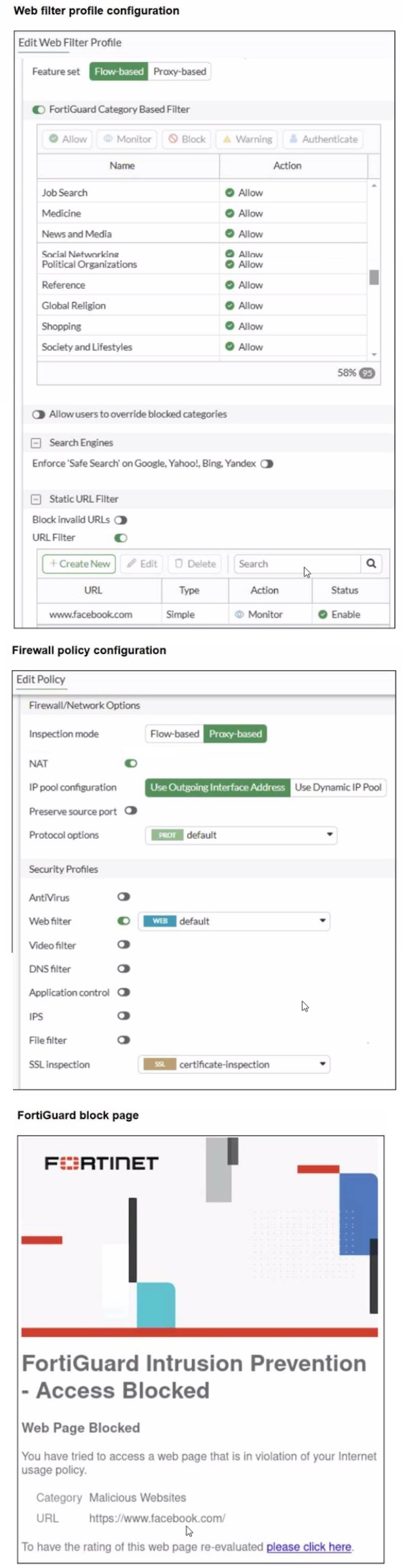
A web filter profile configuration and firewall policy configuration are shown.
You are trying to access www. facebook.com, but you are redirected to a FortiGuard web
filtering block page.
Based on the exhibits, what is the possible cause of the issue?
A. The web rating override configuration is incorrect.
B. The web filter profile feature set is configured incorrectly.
C. The firewall policy inspection mode is incorrect.
D. For www. facebook. com. the URL filter action is incorrect.
Explanation:
Correct answer: B
What is happening (read the exhibits carefully)
🔹 The web filter profile is configured as Flow-based.
🔹 The firewall policy inspection mode is Proxy-based.
🔹 Accessing www.facebook.com results in a FortiGuard web filtering block page, categorized as Malicious Websites.
🔹 The URL filter entry for www.facebook.com is set to Monitor, not Block.
This mismatch is the key.
Why B is correct
B. The web filter profile feature set is configured incorrectly.
You are mixing flow-based security profiles with a proxy-based firewall policy.
In FortiOS:
🔹 Proxy-based inspection mode requires proxy-based security profiles
🔹 Flow-based profiles are not fully compatible with proxy mode
When this mismatch exists, FortiGate behavior becomes inconsistent. Web filtering decisions can fall back to FortiGuard category enforcement without correctly honoring URL filter actions like Monitor.
That explains why:
🔹 Facebook is being blocked
🔹 Even though its URL filter action is Monitor
🔹 And category list shows Social Networking allowed
This is a classic NSE4 exam scenario: profile type mismatch causes unexpected blocking.
Why the other options are wrong
A. The web rating override configuration is incorrect.
Incorrect.
There is no exhibit showing any web rating override configuration. Also, rating overrides are explicit entries and would be visible in the profile. This is a distraction option.
C. The firewall policy inspection mode is incorrect.
Incorrect.
Proxy-based inspection mode is valid and required for:
🔹 Web filtering
🔹 Certificate inspection
🔹 Advanced HTTP inspection features
The issue is not proxy mode itself, but that it is paired with a flow-based profile.
D. For www.facebook.com, the URL filter action is incorrect.
Incorrect.
The URL filter entry for www.facebook.com is:
🔹 Action: Monitor
🔹 Status: Enabled
Monitor does not block traffic. If this were the cause, the site would load and only be logged. The block page proves the decision is happening elsewhere.
Core rule you must remember for NSE4
Flow-based profiles must be used with flow-based inspection.
Proxy-based inspection requires proxy-based profiles.
Mixing them leads to:
🔹 Unexpected blocks
🔹 Category overrides not behaving correctly
🔹 URL filter actions ignored
Fortinet reference (official)
FortiOS 7.6 Administration Guide
🔹 Web Filter Profiles
🔹 Proxy-based vs Flow-based Inspection
Fortinet explicitly states that security profile feature sets must match the policy inspection mode
Which statement correctly describes NetAPI polling mode for the FSSO collector agent?
A. The collector agent uses a Windows API to query DCs for user logins.
B. The NetSessionEnum function is used to track user logouts.
C. NetAPI polling can increase bandwidth usage in large networks.
D. The collector agent must search Windows application event logs.
Explanation:
The correct statement describing the NetAPI polling mode for the FSSO collector agent is:
✅ B. The NetSessionEnum function is used to track user logouts.
Technical Explanation
The NetAPI polling mode is one of three collector-agent-based polling methods (the others being WinSecLog and WMI). Here is how it operates:
Mechanism: The Collector Agent periodically connects to the Domain Controllers (typically every 9 seconds) and calls the Windows NetSessionEnum function.
Tracking Logons/Logouts: This function retrieves a list of all active sessions currently established on the DC. By comparing the results of the current poll to the previous one, the collector agent can identify:
Logons: New sessions that appear in the list.
Logouts: Sessions that were present in the previous poll but are now missing from the list.
Pros and Cons: It is the fastest polling method because it queries RAM rather than parsing large log files. However, it can miss logon events if a user logs in and then logs out quickly between two 9-second polling intervals.
Why the Other Options are Incorrect
❌ A: The collector agent uses a Windows API to query DCs for user logins. While technically true that it uses an API, this statement is considered too "generic" for the exam. The exam specifically looks for the function name (NetSessionEnum) or the specific behavior of how it manages sessions (both login and logout).
❌ C: NetAPI polling can increase bandwidth usage in large networks. This is a characteristic of WinSecLog polling, not NetAPI. WinSecLog requires the collector agent to pull and parse large security event logs from the DCs, which consumes significantly more bandwidth than the lightweight NetAPI session query.
❌ D: The collector agent must search Windows application event logs. This is incorrect. NetAPI queries the active session table in RAM. Searching logs is the method used by WinSecLog (Security Event Logs) or WMI.
Reference
FortiOS 7.6 Study Guide - FSSO: "NetAPI: Polls temporary sessions created on the DC when a user logs in or logs out and calls the NetSessionEnum function on Windows. It is faster than WinSec and WMI methods but can miss logon events under heavy load."
| Page 2 out of 14 Pages |
| 1234567 |
| NSE4_FGT_AD-7.6 Practice Test Home |
The Fortinet NSE 4 - FortiOS 7.6 Administrator exam is notoriously tough. It doesn't test memorization. It forces you to make complex decisions under time pressure. A weak prep strategy risks a costly failure and wasted effort. Our NSE4_FGT_AD-7.6 practice tests are built to be your definitive bridge to a passing score.

Copyright © - All Rights Reserved