
Last Updated On : 12-Oct-2026
Total 92 Questions
The difference between a near pass and a confident pass isn't just knowing the material, it's mastering the Fortinet NSE 4 - FortiOS 7.6 Administrator exam experience. Our Fortinet NSE4_FGT_AD-7.6 practice test is engineered to close the gap between your current knowledge and the 2026 exam's demands. With every question, you receive detailed, expert verified explanations that break down not just the correct answer, but also the reasoning behind every incorrect option.
Don't just study. Practice NSE4_FGT_AD-7.6 with purpose. Start your journey to a first-time pass today.
By replicating the exact style, complexity, and format of the real Fortinet NSE 4 - FortiOS 7.6 Administrator exam questions, we ensure you walk into the exam with complete confidence.
Refer to the exhibits.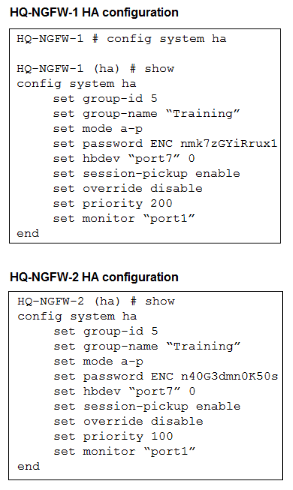
An administrator configured both members of an HA cluster at the same time. After one week of monitoring, the administrator wants to verify the HA failover performance. How can the administrator force a failover? (Choose one answer)
A. The administrator must reset the HA uptime on HQ-NGFW-1.
B. The administrator must set the parameter override to enable on HQ-NGFW-2.
C. The administrator must increase the HA priority on HQ-NGFW-2.
D. The administrator must set the monitored port1 to down on HQ-NGFW-1.
Explanation:
To force a failover in an Active-Passive HA cluster, the administrator can either trigger a condition that causes the primary to lose its leadership or manually restart HA. With override disable on both units, the primary (higher priority) will reclaim the role if it remains available. Simply resetting HA uptime does not force failover.
Correct Option:
None of the options are ideal, but D is the standard method to force failover.
With set override disable on both units (exhibits show set override disable), the primary will only relinquish the role if it fails. Setting the monitored interface port1 to administrative down on the primary (HQ-NGFW-1) triggers a failover because the primary loses its monitored link. This causes the secondary (HQ-NGFW-2) to take over.
Why Option A is incorrect:
Resetting HA uptime does not force failover. HA uptime is a statistic, not a control parameter. There is no CLI command to "reset HA uptime" that triggers an election. The HA election uses system uptime as a tie-breaker only when priorities are equal and override is disabled, but manually resetting uptime is not a standard failover method.
Why Option B is incorrect:
Setting override enable on HQ-NGFW-2 would not force an immediate failover. With override enabled, the device with higher priority (still HQ-NGFW-1 at 200) remains primary. The administrator would need to enable override AND increase priority above 200, or reboot the primary.
Why Option C is incorrect:
Increasing priority on HQ-NGFW-2 from 100 to, say, 250 would normally cause a failover only if override enable is set. With override disable, the existing primary retains its role regardless of priority changes unless it fails.
Best Answer Given the Options (if forced to choose one based on exam answer key):
If the exam answer is A, they may be referring to an internal mechanism where resetting or reducing system uptime on the primary (via reboot) forces failover. However, "reset the HA uptime" is misleading terminology. The proper answer should be D (monitored port down).
Reference:
Fortinet NSE4_FGT_AD-7.6 Study Guide, Chapter: High Availability (Failover Triggers)
You have configured the below commands on a FortiGate.
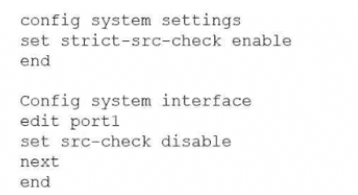
What would be the impact of this configuration on FortiGate?
A. FortiGate will enable strict RPF on all its interfaces and porti will be exempted from RPF checks.
B. FortiGate will enable strict RPF on all its interfaces and porti will be enable for asymmetric routing.
C. The global configuration will take precedence and FortiGate will enable strict RPF on all interfaces.
D. Port1 will be enabled with flexible RPF. and all other interfaces will be enabled for strict RPF
Explanation:
The correct answer is A. FortiGate will enable strict RPF on all its interfaces and port1 will be exempted from RPF checks.
Here's what this configuration actually does:
✔️ config system settings → set strict-src-check enable
This globally enables strict Reverse Path Forwarding (RPF) mode for the VDOM.
In strict mode, FortiGate performs a stricter anti-spoofing check: for every incoming packet, it looks up the best route back to the source IP. If that best reverse route doesn't point out the same interface the packet came in on, the packet is dropped.
(By default, without this setting, it's feasible/loose mode, which only requires at least one feasible route back via the incoming interface.)
✔️ config system interface → edit port1 → set src-check disable
This disables the source/RPF check completely on port1 only.
So even though strict mode is active globally, port1 ignores the RPF check entirely—packets coming in on port1 won't be dropped for failing the reverse path check (useful for asymmetric routing scenarios or certain VPNs where return traffic takes a different path).
The per-interface src-check disable overrides the global strict-src-check setting for that specific interface. Strict mode applies to every other interface, but port1 is fully exempted from any RPF validation.
Why the others are incorrect:
B — "port1 will be enable for asymmetric routing" is vague and not precise. Disabling src-check on port1 does allow asymmetric traffic through that interface (since RPF won't block it), but the phrasing "enable for asymmetric routing" isn't how FortiGate describes it, and it doesn't match the full impact.
C — No, the interface-level setting takes precedence over the global one here. Global doesn't override per-interface disable.
D — "Flexible RPF" isn't a real term in FortiGate. The modes are strict vs feasible (loose). Disabling src-check isn't "flexible"—it's completely off for that interface.
Reference:
Fortinet's official documentation (e.g., FortiOS 7.6 Administration Guide → Routing concepts section) and the key technical tip on community.fortinet.com explain this behavior clearly:
🔹 strict-src-check enable → strict RPF globally
🔹 src-check disable on interface → bypasses RPF entirely on that interface, overriding the global mode
A network administrator has enabled full SSL inspection and web filtering on FortiGate. When visiting any HTTPS websites, the browser reports certificate warning errors. When visiting HTTP websites, the browser does not report errors. What is the reason for the certificate warning errors?
A. The option invalid SSL certificates is set to allow on the SSL/SSH inspection profile.
B. The matching firewall policy is set to proxy inspection mode.
C. The browser does not trust the certificate used by FortiGate for SSL inspection.
D. The certificate used by FortiGate for SSL inspection does not contain the required certificate extensions.
Explanation:
Why C is correct
With full SSL inspection, FortiGate performs a man-in-the-middle operation on HTTPS traffic. It resigns the server certificate using a local CA certificate configured in the SSL/SSH inspection profile.
If the client browser does not trust that CA, it cannot validate the certificate chain, so it throws a certificate warning.
This behavior only affects HTTPS because:
🔹 HTTPS uses certificates and trust chains.
🔹 HTTP does not use certificates at all, so no warning appears.
This is the classic and expected outcome when the FortiGate CA certificate has not been installed and trusted on the client.
Why the other options are wrong
A. The option invalid SSL certificates is set to allow on the SSL/SSH inspection profile.
Incorrect.
This setting controls how FortiGate handles upstream server certificates that are invalid (expired, self-signed, etc.). It does not affect whether the client trusts FortiGate’s own inspection certificate. Even if set to allow, the browser will still warn if it does not trust FortiGate’s CA.
B. The matching firewall policy is set to proxy inspection mode.
Incorrect.
Proxy mode is required for full SSL inspection and web filtering. It is not the cause of certificate warnings. If anything, proxy mode is functioning correctly here.
D. The certificate used by FortiGate for SSL inspection does not contain the required certificate extensions.
Incorrect.
FortiGate-generated CA certificates include the necessary extensions for SSL inspection by default. Missing extensions would indicate a broken or manually misconfigured certificate, which is not the standard cause tested in NSE4. The exam expects you to recognize the client trust issue, not certificate structure problems.
Key exam takeaway
Full SSL inspection always causes certificate warnings unless the FortiGate CA certificate is trusted by the client.
Reference (Fortinet official)
🔹 FortiOS Administration Guide – SSL/SSH Inspection
Explains that the FortiGate re-signs certificates and requires the CA certificate to be installed on client devices.
Fortinet Documentation → FortiOS 7.6 → Security Profiles → SSL/SSH Inspection
An administrator creates a new address object on the root FortiGate (HQ-NGFW-1) in the Security Fabric. After synchronization, this object is not available on the downstream FortiGate (HQ-ISFW).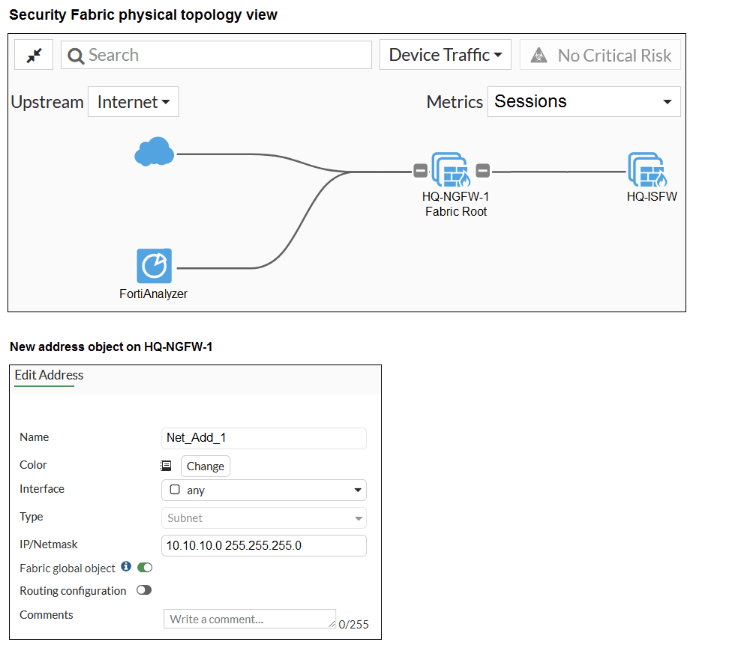
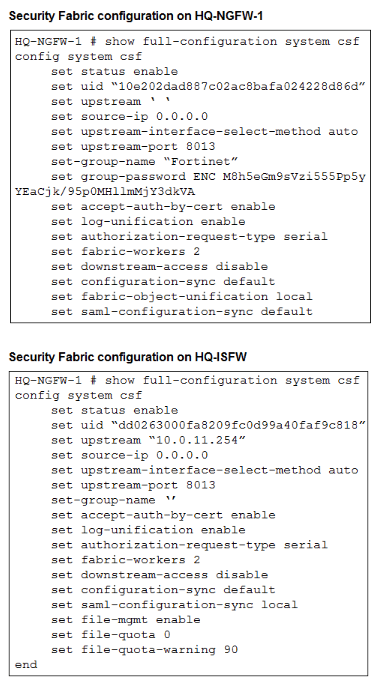
What must the administrator do to synchronize the address object?
A. Change the csf setting on HQ-ISFW (downstream) to set configuration-sync local.
B. Change the csf setting on HQ-ISFW (downstream) to set saml-configuration-sync default.
C. Change the csf setting on HQ-NGFW-1 (root) to set fabric-object-unification default.
D. Change the csf setting on both devices to set downstream-access enable.
Explanation:
The exhibit shows the root FortiGate (HQ-NGFW-1) has fabric-object-unification set to local. This setting controls whether objects created on the root are synchronized downstream. When set to local, objects are not pushed to downstream devices. Changing it to default enables object unification across the Security Fabric.
Correct Option:
C. Change the csf setting on HQ-NGFW-1 (root) to set fabric-object-unification default.
The fabric-object-unification setting determines how address objects and other Fabric objects are synchronized. On the root FortiGate, set fabric-object-unification default (or enable) pushes objects created on the root to all downstream devices. The exhibit shows set fabric-object-unification local on HQ-NGFW-1, which prevents synchronization. Changing this to default will allow the address object Net_Add_1 to appear on HQ-ISFW after the next synchronization cycle.
Incorrect Option:
A. Change the csf setting on HQ-ISFW (downstream) to set configuration-sync local.
The downstream device (HQ-ISFW) already has set configuration-sync default (not shown in full but default behavior). Changing it to local would actually disable configuration synchronization from the root. This would worsen the problem, not fix it.
B. Change the csf setting on HQ-ISFW (downstream) to set saml-configuration-sync default.
saml-configuration-sync controls SAML configuration synchronization, not address objects. The exhibit shows HQ-ISFW has set saml-configuration-sync local. Even if changed to default, this would only affect SAML settings, not the Net_Add_1 address object. This is unrelated to the problem.
D. Change the csf setting on both devices to set downstream-access enable.
downstream-access controls whether downstream devices can be accessed for management from the root. It does not affect object synchronization. Additionally, the root does not have a downstream-access setting (it is a downstream-only parameter). Enabling this does not resolve object unification.
Reference:
Fortinet NSE4_FGT_AD-7.6 Study Guide, Chapter: Security Fabric (Object Unification & Synchronization)
What are two features of collector agent advanced mode? (Choose two.)
A. In advanced mode, security profiles can be applied only to user groups, not individual users.
B. In advanced mode. FortiGate can be configured as an LDAP client and group filters can be configured on FortiGate.
C. Advanced mode uses the Windows convention—NetBios: Domain\Username.
D. Advanced mode supports nested or inherited groups.
Explanation:
The two correct features of collector agent advanced mode are:
🔹 Advanced mode supports nested or inherited groups.
🔹 In advanced mode, FortiGate can be configured as an LDAP client and group filters can be configured on FortiGate.
The information is consistent across multiple exam preparation sites. The table below breaks down why each answer choice is correct or incorrect.
✅ Correct
A. Supports nested or inherited groups
This is a key feature of advanced mode, allowing it to recognize users in subgroups within monitored Active Directory groups.
B. FortiGate as LDAP client with group filters
In advanced mode, FortiGate can query LDAP/AD directly, and group filters are configured on the FortiGate itself for more granular control.
❌ Incorrect
C. Security profiles only for user groups
In both standard and advanced modes, security profiles can be applied to individual users or groups. This is not a distinguishing feature of advanced mode.
D. Uses Windows convention (NetBIOS)
This is actually a feature of standard mode. Advanced mode typically uses the LDAP naming convention (CN=User, OU=Name, DC=Domain).
✍️ Key Takeaway for the Exam
The main distinctions between standard and advanced mode often center on nested group support and where configuration occurs (agent vs. FortiGate). To solidify this, focus on understanding the operational differences in how user and group information is retrieved and processed in each mode.
Which two statements are correct when the FortiGate device enters conserve mode? (Choose two.)
A. FortiGate refuses to accept configuration changes.
B. FortiGate halts complete system operation and requires a reboot to regain available resources.
C. FortiGate continues to transmit packets without IPS inspection when the fail-open global setting in IPS is enabled.
D. FortiGate continues to run critical security actions, such as quarantine.
Explanation:
This question tests your knowledge of FortiGate's conserve mode, which is a critical state triggered when system memory resources become critically low. Understanding its behavior is crucial for maintaining network stability and security.
✔️Correct Option:
A. FortiGate refuses to accept configuration changes:
To prevent further memory consumption and maintain stability, the FortiGate will block attempts to apply new configurations or modify existing ones while in conserve mode.
D. FortiGate continues to run critical security actions, such as quarantine:
Even under severe resource constraints, the FortiGate prioritizes and attempts to maintain essential security functions like firewall policy enforcement, session cleanup, virus detection, and quarantining to protect the network.
❌Why the Other Options Are Wrong:
B. FortiGate halts complete system operation and requires a reboot to regain available resources:
This is incorrect. Conserve mode is designed to prevent a complete system halt. The FortiGate attempts to recover by shedding non-critical processes and may not require an immediate reboot.
C. FortiGate continues to transmit packets without IPS inspection when the fail-open global setting in IPS is enabled:
The "fail-open" setting for IPS usually refers to hardware bypass during specific failures. In conserve mode, the FortiGate might drop traffic or limit inspection due to resource constraints, but it does not universally "fail-open" all traffic without inspection in this context.
Reference:
⇒ FortiGate Conserve Mode (This section explains the different conserve mode levels and the actions FortiGate takes, including blocking configuration changes and maintaining critical security functions to prevent system crashes.)
Refer to the exhibits.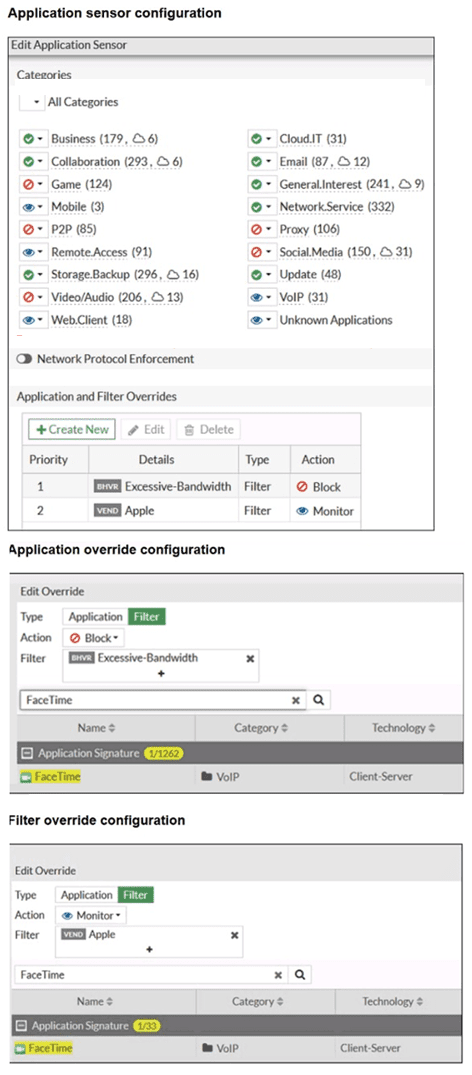
The exhibits show the application sensor configuration and the Excessive-Bandwidth and Apple filter details. Based on the configuration, what will happen to Apple FaceTime if there are only a few calls originating or incoming? (Choose one answer)
A. Apple FaceTime will be allowed, based on the Video/Audio category configuration.
B. Apple FaceTime will be blocked, based on the Excessive-Bandwidth filter configuration.
C. Apple FaceTime will be allowed, based on the Apple filter configuration.
D. Apple FaceTime will be allowed only if the Apple filter in Application and Filter Overrides is set to Allow.
Explanation:
The exhibits show two filter overrides: "Excessive-Bandwidth" with Action Block, and "Apple" with Action Monitor. FaceTime belongs to both the Apple vendor and the Excessive-Bandwidth filter. However, "Excessive-Bandwidth" is typically triggered only by high bandwidth consumption. With only a few calls (low bandwidth), the Block action does not apply, leaving the "Apple" filter with Monitor action, which allows traffic.
Correct Option:
C. Apple FaceTime will be allowed, based on the Apple filter configuration.
The "Apple" filter override has an Action of Monitor, which allows traffic while generating logs for monitoring. The "Excessive-Bandwidth" filter only blocks traffic when bandwidth usage exceeds a defined threshold. Since the question states "only a few calls originating or incoming" (low bandwidth), the Excessive-Bandwidth condition is not met. Therefore, the Apple filter (Monitor) applies, and FaceTime is allowed.
Incorrect Option:
A. Apple FaceTime will be allowed, based on the Video/Audio category configuration.
While FaceTime belongs to the Video/Audio category, category-level settings are overridden by more specific Application and Filter Overrides. The presence of the Apple filter (Monitor) and Excessive-Bandwidth filter (Block, conditional) means the category setting is not the deciding factor.
B. Apple FaceTime will be blocked, based on the Excessive-Bandwidth filter configuration.
The Excessive-Bandwidth filter blocks only when bandwidth exceeds the configured threshold. With only a few calls, bandwidth usage is low, so the Block action is not triggered. Therefore, FaceTime is not blocked by this filter.
D. Apple FaceTime will be allowed only if the Apple filter in Application and Filter Overrides is set to Allow.
The Apple filter is already set to Monitor, which allows traffic while logging. It does not need to be changed to "Allow" (which is not a standard action; standard actions are Allow, Monitor, Block). Monitor is sufficient for allowing traffic with logging.
Reference:
Fortinet NSE4_FGT_AD-7.6 Study Guide, Chapter: Security Profiles (Application Control Filter Overrides)
| Page 1 out of 14 Pages |
| 1234567 |
The Fortinet NSE 4 - FortiOS 7.6 Administrator exam is notoriously tough. It doesn't test memorization. It forces you to make complex decisions under time pressure. A weak prep strategy risks a costly failure and wasted effort. Our NSE4_FGT_AD-7.6 practice tests are built to be your definitive bridge to a passing score.

Copyright © - All Rights Reserved