
Last Updated On : 12-Oct-2026
Total 92 Questions
Refer to the exhibits.
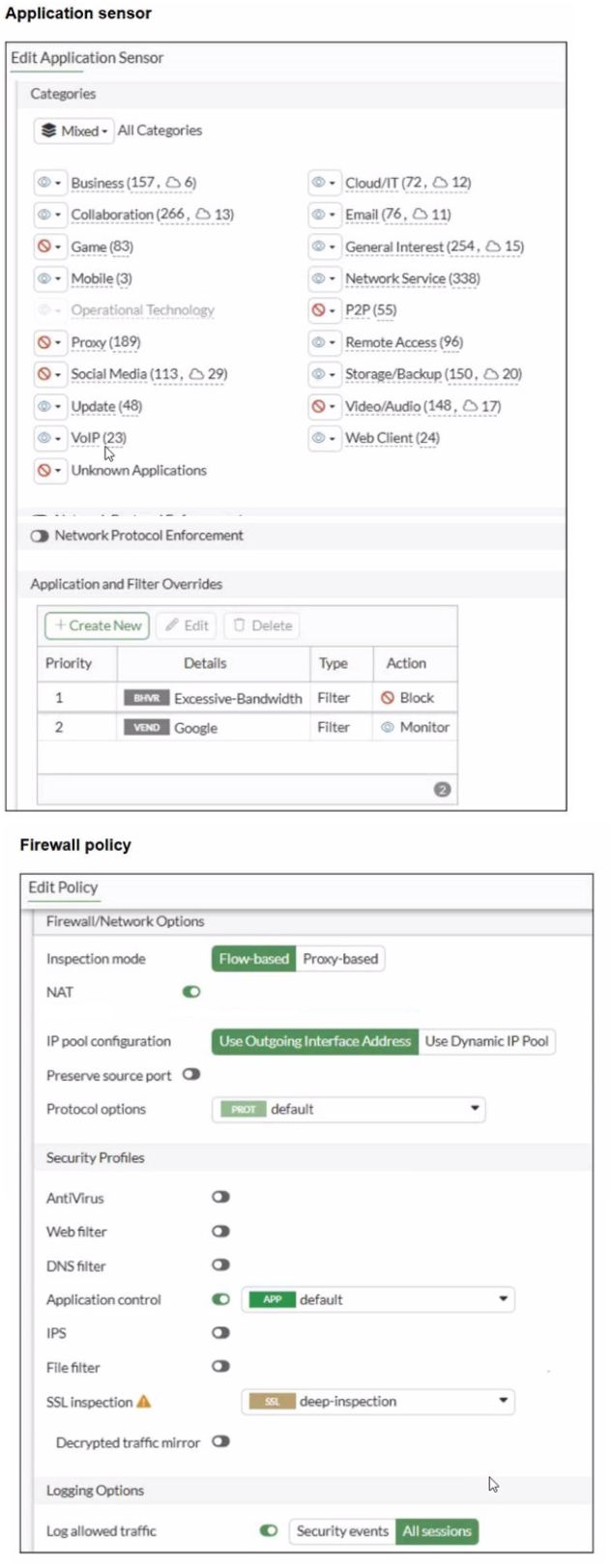
You have implemented the application sensor and the corresponding firewall policy as
shown in the exhibits.
Which two factors can you observe from these configurations? (Choose two.)
A. YouTube access is blocked based on Excessive-Bandwidth Application and Filter override settings.
B. Facebook access is blocked based on the category filter settings.
C. Facebook access is allowed but you cannot play Facebook videos based on Video/Audio category filter settings.
D. YouTube search is allowed based on the Google Application and Filter override settings.
Explanation:
The question tests understanding of Application Control processing order in FortiOS 7.6, including category actions versus priority-based Application and Filter Overrides. The sensor shows category-level blocks (e.g., Social Media) and two overrides evaluated top-down. The firewall policy applies the sensor (APP default) with deep SSL inspection.
🟢 Key point: Overrides take precedence over category actions when matched, and are processed by priority (highest first).
Why This Is Correct:
➡️ In the sensor, Social Media category is marked for Block (red icon / crossed). Facebook belongs to Social Media → blocked at category level.
➡️ Overrides table:
Priority 1: BHRVR (likely behavior filter) Excessive-Bandwidth → Block.
Priority 2: VEND Google → Monitor.
➡️ Overrides evaluate top-down; first match wins.
➡️ YouTube (Google-owned) streaming/video traffic often matches Excessive-Bandwidth behavior → hits priority 1 → blocked.
➡️ Google vendor override (priority 2, Monitor) is not reached for bandwidth-heavy YouTube traffic.
✔️ Thus, full YouTube access (including videos) is blocked by the higher-priority override, and Facebook is blocked by category.
Why the Other Options Are Wrong:
❌ A. YouTube search is allowed based on the Google Application and Filter override settings.
🔴 Trap: Assumes Google Monitor always allows YouTube; ignores that Excessive-Bandwidth (priority 1) blocks streaming first. Search might pass in some cases, but overall access is not reliably allowed.
❌ C. Facebook access is allowed but you cannot play Facebook videos based on Video/Audio category filter settings.
🔴 Trap: Video/Audio is blocked (red), but Social Media block applies first to Facebook as a whole → entire access blocked, not just videos.
Reference:
⇒ https://docs.fortinet.com/document/fortigate/7.6.6/administration-guide/19814/basic-category-filters-and-overrides
Confirms overrides are evaluated by priority and override category settings when matched.
⇒ FortiOS 7.6 Application Control documentation (behavior filters like Excessive-Bandwidth and processing logic).
Refer to the exhibit.
As an administrator you have created an IPS profile, but it is not performing as expected.
While testing you got the output as shown in the exhibit What could be the possible reason
of the diagnose output shown in the exhibit?
A. There is a no firewall policy configured with an IPS security profile.
B. Administrator entered the command diagnose test application ipsmonitor 5.
C. FortiGate entered into IPS fail open state.
D. Administrator entered the command diagnose test application ipsmonitor 99.
Explanation:
This question tests your ability to interpret diagnostic output related to the IPS engine on a FortiGate firewall. You must analyze the diagnose test application ipsmonitor 1 command output to determine why an IPS profile is not performing as expected.
🟢 The key concept is understanding IPS fail-open states and how they appear in diagnostic commands.
Why Option B Is Correct:
✅ B: FortiGate entered into IPS fail open state.
This is correct because the exhibit shows engine count = 0 (+1), which indicates that no IPS engine worker processes are currently running. The (+1) notation shows the system intends to start one engine. In a normal operational state, IPS engines run when traffic is being inspected. When the engine count drops to zero, it typically indicates that the FortiGate has stopped IPS inspection, which is characteristic of an IPS fail-open state . When IPS fails open, the firewall continues to pass traffic but without IPS inspection, matching the scenario where an IPS profile exists but is not performing as expected.
Why the Other Options Are Wrong:
❌ Option A: There is no firewall policy configured with an IPS security profile.
This is incorrect because if no firewall policy used an IPS profile, the IPS engine would not be initialized at all. The output shows engine count = 0 (+1), which indicates the system is attempting to start an engine, suggesting IPS is configured but not running properly .
❌ Option C: Administrator entered the command diagnose test application ipsmonitor 5.
This is incorrect. The command in the exhibit is ipsmonitor 1, which is valid. The output shown is consistent with this command, so an incorrect command parameter is not the issue.
❌ Option D: Administrator entered the command diagnose test application ipsmonitor 99.
This is incorrect for the same reason as option C. The exhibit clearly shows the correct command was used, and the output format matches what would be expected from ipsmonitor 1.
🔴 A common trap is assuming that a missing policy (Option A) would produce the same output. However, with no IPS policy configured, the system would not show engine count = 0 (+1) with an intent to start engines—it would simply show no engine activity at all .
Reference:
⇒ For more details, refer to the official Fortinet documentation:
Fortinet Community: Troubleshooting Tip - IPS engine new debug commands
Refer to the exhibit.
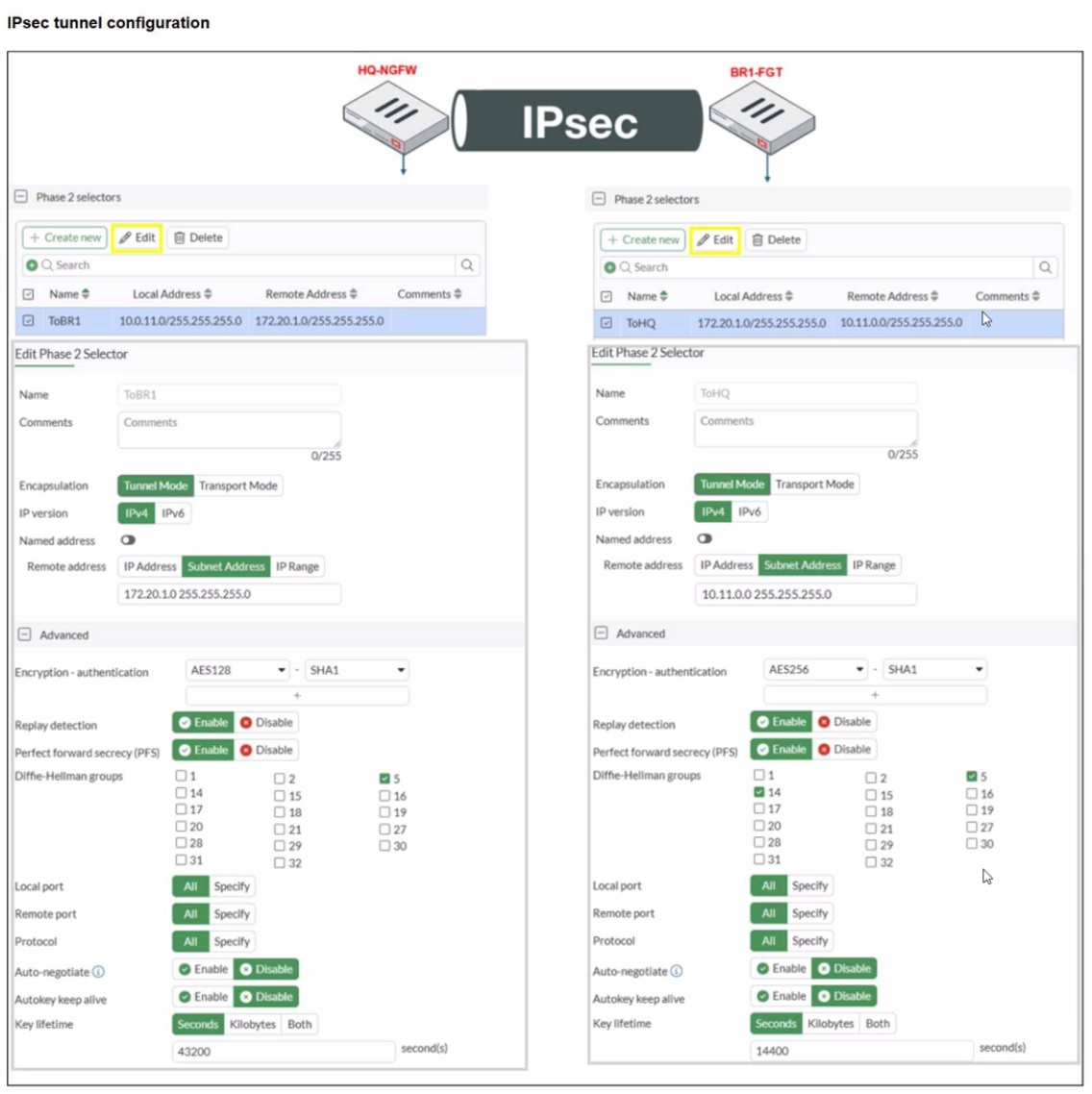
A network administrator is troubleshooting an IPsec tunnel between two FortiGate devices.
The administrator has determined that phase 1 status is up, but phase 2 fails to come up.
Based on the phase 2 configuration shown in the exhibit, which two configuration changes
will bring phase 2 up? (Choose two.)
A. On BR1-FGT, set Remote Address to 10.0.11.0/255.255.255.0.
B. On HQ-NGFW. enable Diffie-Hellman Group 2.
C. On BR1-FGT. set Seconds to 43200
D. On HQ-NGFW. set Encryption to AES256.
Explanation:
The question tests troubleshooting of IPsec phase 2 mismatches. The phase 1 tunnel is up, so the issue is in phase 2 configuration alignment.
🟢 Key concepts include matching IPsec selectors (local/remote subnets) and encryption/authentication settings on both FortiGate devices.
Why This Is Correct:
➡ Phase 2 requires that both ends have matching local and remote subnets. Currently, BR1-FGT’s remote address is set to 10.11.0.0/24, but HQ-NGFW expects 10.0.11.0/24. Changing BR1-FGT’s remote address to 10.0.11.0/24 ensures the selectors match.
➡ The encryption algorithms must match exactly. HQ-NGFW uses AES128, while BR1-FGT uses AES256. Changing HQ-NGFW to AES256 aligns both sides and allows phase 2 negotiation.
Why the Other Options Are Wrong:
❌ B. Enabling Diffie-Hellman Group 2 is irrelevant because DH group only affects phase 1, which is already up.
🔴 Common mistake: confusing phase 1 and phase 2 parameters.
❌ C. Changing the key lifetime on BR1-FGT does not resolve the mismatch in subnets or encryption.
🔴 Trap: key lifetime mismatch alone does not prevent phase 2 from coming up if selectors/encryption differ.
Reference:
⇒ Fortinet IPsec VPN Troubleshooting Guide
– Confirms that phase 2 fails if selectors or encryption/authentication settings are not identical on both ends.
Refer to the exhibits.
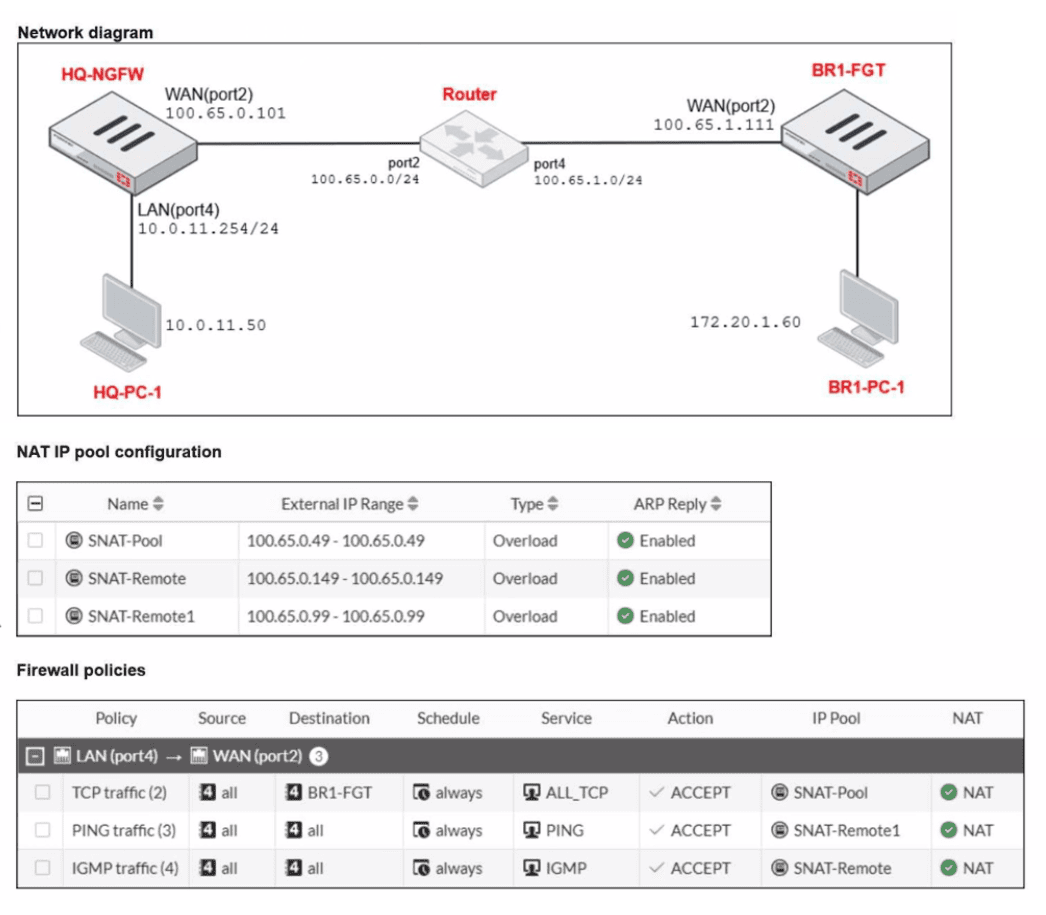
The exhibits show a diagram of a FortiGate device connected to the network, as well as the
IP pool configuration and firewall policy objects.
The WAN (port2) interface has the IP address
100.65.0.101/24.
The LAN (port4) interface has the IP address
10.0.11.254/24.
Which IP address will be used to source NAT (SNAT) the traffic, if the user on HQ-PC-1
(10.0.11.50) pings the IP address of BR-FGT (100.65.1.111)?
A. 100.65.0.101
B. 100.65.0.49
C. 100.65.0.149
D. 100.65.0.99
Explanation:
This question tests the understanding of Source NAT (SNAT) behavior when an IP Pool is applied to a firewall policy. It requires analyzing how FortiOS selects a specific address from a defined range when multiple NAT options are available.
✔️Why This Is Correct:
The firewall policy for traffic from LAN (port4) to WAN (port2) has NAT enabled and is configured to use the IP Pool named Sales_Pool.
The Sales_Pool is defined as an Overload type with a range of 100.65.0.49 to 100.65.0.99.
When using an IP Pool, FortiGate prioritizes the addresses within that pool over the outgoing interface's primary IP.
By default, FortiGate starts allocating from the first available address in the range, which is 100.65.0.49.
❌Why the Other Options Are Wrong:
A. 100.65.0.101:
This is the primary IP of the WAN interface. While this would be used if "Use Outgoing Interface Address" was selected, the policy is explicitly set to use the Sales_Pool.
C. 100.65.0.149:
This address is outside the range defined in the Sales_Pool (49–99) and is not associated with any configuration shown in the exhibits.
D. 100.65.0.99:
While this is the last address in the Sales_Pool range, FortiOS typically begins translation using the first address in the pool unless that address's port capacity is exhausted.
Reference:
⇒ FortOS 7.6 IP Pools Documentation
Confirms that when a dynamic SNAT IP pool is used, the FortiGate uses an address from the defined range for translation rather than the interface IP.
What are two characteristics of HA cluster heartbeat IP addresses in a FortiGate device? (Choose two.)
A. Heartbeat IP addresses are used to distinguish between cluster members.
B. The heartbeat interface of the primary device in the cluster is always assigned IP address 169.254.0.1.
C. A change in the heartbeat IP address happens when a FortiGate device joins or leaves the cluster.
D. Heartbeat interfaces have virtual IP addresses that are manually assigned.
Explanation:
This question tests FortiGate HA heartbeat interface behavior in FortiOS 7.6. Heartbeat IPs enable cluster communication via link-local addresses in the vsys_ha VDOM, assigned automatically based on serial number priority when devices join. They support synchronization of configs, sessions, and routing while distinguishing members.
✔️Why A Is Correct:
Heartbeat IPs (169.254.0.1 to 169.254.0.63/26) uniquely identify cluster members by serial number priority. Higher priority (lower serialno_prio) gets lower IPs like 169.254.0.1, allowing the cluster to track primary/subordinate roles and sync status.
✔️Why C Is Correct:
IPs reassign dynamically on membership changes (join/leave). New members receive available IPs from the pool; departing units free theirs, ensuring the cluster maintains unique addressing for heartbeat and sync traffic.
❌Option B:
Primary does not always get 169.254.0.1; assignment depends on serial number priority across all members. The highest priority unit receives the lowest IP, regardless of primary role post-election.
Lowest available IP goes to highest serial priority, not fixed to primary.
❌Option D:
Heartbeat interfaces use auto-assigned link-local IPs, not manually configured virtual IPs. Physical heartbeat ports may have traffic IPs, but HA virtual interfaces (port_ha) are automatic per RFC 3927.
No manual assignment; dedicated for Layer 3 sync over Layer 2 heartbeat.
Reference:
⇒ https://docs.fortinet.com/document/fortigate/7.6.6/administration-guide/849059/ha-heartbeat-interface
– Details link-local IP assignment and changes on cluster membership.
⇒ https://docs.fortinet.com/document/fortigate/7.6.6/administration-guide/849059/ha-heartbeat-interface
– Confirms serial priority-based unique addressing.
Refer to the exhibit.
A RADIUS server configuration is shown.
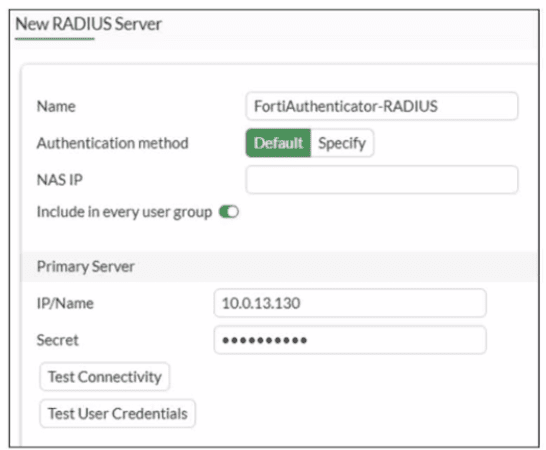
An administrator added a configuration for a new RADIUS server While configuring, the
administrator enabled Include in every user group What is the impact of enabling Include in
every user group in a RADIUS configuration?
A. This option places the RADIUS server, and all users who can authenticate against that server, into every FortiGate user group.
B. This option places all FortiGate users and groups required to authenticate into the RADIUS server, which, in this case, is FortiAuthenticator.
C. This option places the RADIUS server, and all users who can authenticate against that server, into every RADIUS group.
D. This option places all users into every RADIUS user group, including groups that are used for the LDAP server on FortiGate.
Explanation:
This question tests your understanding of how RADIUS server configurations integrate with FortiGate user groups, specifically the function of the "Include in every user group" setting. This option simplifies user management by automatically making all users authenticated by the RADIUS server part of every local FortiGate user group.
✅Correct option: A
When "Include in every user group" is enabled, FortiGate automatically includes all users who successfully authenticate against the configured RADIUS server within every user group defined on the FortiGate itself. This means you don't have to manually add these RADIUS users to each FortiGate user group. It streamlines policy application, as any user authenticating via this RADIUS server will inherit the permissions and policies assigned to all FortiGate user groups.
❌Why the Other Options Are Wrong:
❌ B. This option places all FortiGate users and groups required to authenticate into the RADIUS server, which, in this case, is FortiAuthenticator.
This statement reverses the direction of integration. FortiGate is consuming user information from the RADIUS server (FortiAuthenticator), not pushing its local users or groups to it.
❌ C. This option places the RADIUS server, and all users who can authenticate against that server, into every RADIUS group.
The setting impacts FortiGate's local user groups, not groups defined on the RADIUS server itself. RADIUS groups are managed on the RADIUS server (e.g., FortiAuthenticator), while FortiGate manages its own user groups.
❌ D. This option places all users into every RADIUS user group, including groups that are used for the LDAP server on FortiGate.
This option incorrectly mixes RADIUS and LDAP concepts. The setting is specific to RADIUS authentication and its integration with FortiGate's local user groups, not RADIUS groups, nor does it involve LDAP server groups on FortiGate.
Reference:
⇒ FortiGate Administration Guide - External User Authentication (Confirms the functionality of RADIUS server integration and user group mapping on FortiGate.)
Refer to the exhibit.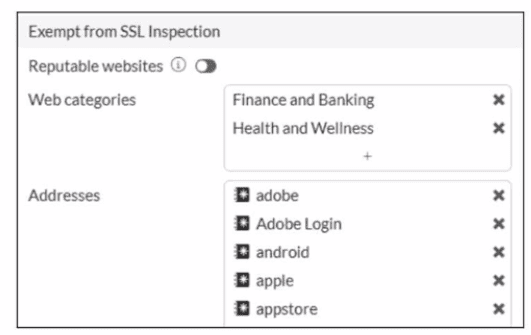
The predefined deep-inspection and custom-deep-inspection profiles exclude some web
categories from SSL inspection, as shown in the exhibit For which two reasons are these
web categories exempted? (Choose two.)
A. The resources utilization is optimized because these websites are in the trusted domain list on FortiGate.
B. The legal regulation aims to prioritize user privacy and protect sensitive information for these websites.
C. These websites are in an allowlist of reputable domain names maintained by FortiGuard.
D. The FortiGate temporary certificate denies the browser's access to websites that use HTTP Strict Transport Security.
Explanation:
This question tests why FortiGate's default deep-inspection (and custom-deep-inspection) profiles exempt specific FortiGuard web categories like Finance and Banking and Health and Wellness from full SSL inspection. Exemptions prevent interference with sensitive sites while allowing inspection of other traffic. The two main reasons are privacy/legal concerns and FortiGuard's reputable classification.
✔️ B. The legal regulation aims to prioritize user privacy and protect sensitive information for these websites.
Categories like Finance and Banking (financial data, banking) and Health and Wellness (personal health info, medical advice) contain highly sensitive user data. Performing deep SSL inspection (MITM with FortiGate's proxy certificate) could violate privacy regulations (e.g., GDPR, HIPAA-like rules) or user trust. FortiOS exempts them by default to avoid legal/compliance issues and protect sensitive information.
✔️ C. These websites are in an allowlist of reputable domain names maintained by FortiGuard.
FortiGuard maintains a reputation-based allowlist of trusted/reputable sites. The exempt categories (Finance and Banking, Health and Wellness) include many high-reputation domains. Exempting them aligns with trusting FortiGuard-rated reputable sites, reducing unnecessary inspection on low-risk, high-trust traffic. (Note: There's a separate "Reputable Websites" toggle for broader exemptions, but these categories are pre-added defaults for similar trust reasons.)
❌ A. The resources utilization is optimized because these websites are in the trusted domain list on FortiGate.
While exemptions reduce CPU/resource use (no decryption/re-encryption for those categories), this is a side effect, not the primary reason. The defaults focus on privacy/compliance and reputation, not optimization as the main driver.
❌ D. The FortiGate temporary certificate denies the browser's access to websites that use HTTP Strict Transport Security.
HSTS sites (and certificate-pinned ones) can reject FortiGate's proxy certificate, causing access issues. However, exemptions are not primarily for HSTS; they apply broadly to categories regardless of HSTS. HSTS breakage is a known deep-inspection side effect, but not the stated reason for these specific category exemptions in FortiOS defaults.
Reference:
⇒ https://docs.fortinet.com/document/fortigate/7.6.6/administration-guide/709167/configuring-an-ssl-ssh-inspection-profile — Confirms Finance and Banking, Health and Wellness (and Personal Privacy) are added by default to exemptions in full SSL inspection; mentions reputable websites option separately.
⇒ https://docs.fortinet.com/document/fortigate/7.6.0/best-practices/598577/ssl-tls-deep-inspection — States these categories are exempt by default when using full SSL inspection, noting undesirability for banking/personal health sites (implying privacy reasons).
⇒ https://community.fortinet.com/t5/FortiGate/Technical-Tip-Exempting-certain-categories-from-SSL-inspection/ta-p/198046 — Notes default exemptions for Finance and Banking and Health and Wellness in deep-inspection profile.
| Page 3 out of 14 Pages |
| 1234567 |
| NSE4_FGT_AD-7.6 Practice Test Home |
The Fortinet NSE 4 - FortiOS 7.6 Administrator exam is notoriously tough. It doesn't test memorization. It forces you to make complex decisions under time pressure. A weak prep strategy risks a costly failure and wasted effort. Our NSE4_FGT_AD-7.6 practice tests are built to be your definitive bridge to a passing score.

Copyright © - All Rights Reserved