
Last Updated On : 12-Oct-2026
Total 92 Questions
Which three statements about SD-WAN performance SLAs are true? (Choose three.)
A. They rely on session loss and jitter.
B. They monitor the state of the FortiGate device.
C. All the SLA targets can be configured.
D. They are applied in a SD-WAN rule lowest cost strategy.
E. They can be measured actively or passively.
Explanation:
This question tests SD-WAN performance SLA functionality in FortiOS 7.6, which monitors link health for intelligent path selection. SLAs probe interfaces using configurable metrics and measurement methods to mark links up/down, influencing routing in SD-WAN rules.
✔️Why A Is Correct:
Performance SLAs measure link quality using latency, jitter, and packet loss (session loss). These thresholds determine if a link passes/fails, triggering route removal or failover in SD-WAN load balancing.
✔️Why C Is Correct:
All SLA targets—latency threshold (default 5ms), jitter threshold (default 5ms), and packet loss threshold (default 0%)—are fully configurable per SLA. This allows customization based on application needs like VoIP or general traffic.
✔️Why E Is Correct:
SLAs support active measurement (probing servers via ping/HTTP/TWAMP) and passive measurement (analyzing real firewall session data). Active uses probes; passive leverages existing traffic for realistic health checks without extra overhead.
❌Option B:
SLAs monitor SD-WAN member interface/link health, not FortiGate device state (CPU/memory). Device health uses separate monitors like hardware health checks, not performance SLAs.
No direct tie to FortiGate system status; focused solely on WAN link metrics.
❌Option D:
SLAs integrate with multiple strategies (lowest cost, best quality, maximum bandwidth, etc.), not exclusively lowest cost. Rules specify strategy; SLA provides pass/fail input for path selection.
Flexible across all SD-WAN strategies, not strategy-specific.
Reference:
⇒ https://docs.fortinet.com/document/fortigate/7.6.6/administration-guide/584396/sd-wan-performance-sla
– Defines active/passive SLAs, jitter/loss metrics.
⇒ https://docs.fortinet.com/document/fortigate/7.6.4/administration-guide/867342/performance-sla-overview
– Confirms configurable targets (latency/jitter/loss).
What are two features of FortiGate FSSO agentless polling mode? (Choose two.)
A. FortiGate uses the AD server as the collector agent.
B. FortiGate uses the SMB protocol to read the event viewer logs from the DCs.
C. FortiGate does not support workstation check.
D. FortiGate directs the collector agent to use a remote LDAP server.
Explanation:
Correct Answers: B and C
🟢 FortiGate FSSO agentless polling mode enables user authentication monitoring without deploying external DC or collector agents. FortiGate directly polls domain controllers using the SMB protocol over TCP port 445 to read Windows Security event logs (specifically event IDs 4768 and 4769 for logon/logoff), confirming option B.
🟢 Workstation check (verification of user IP-to-hostname binding) is not supported in agentless mode, as FortiGate lacks the additional capabilities of a dedicated collector agent, making option C correct.
🔴 Option A is incorrect because FortiGate itself acts as the collector, not the AD server.
🔴 Option D is wrong, as agentless polling does not involve directing a collector agent or remote LDAP for event collection; LDAP serves group filtering separately.
Reference: FortiGate 7.4 Administration Guide (FSSO Polling Connector) and NSE4 study materials covering FortiOS 7.6 FSSO topics.
Refer to the exhibits.
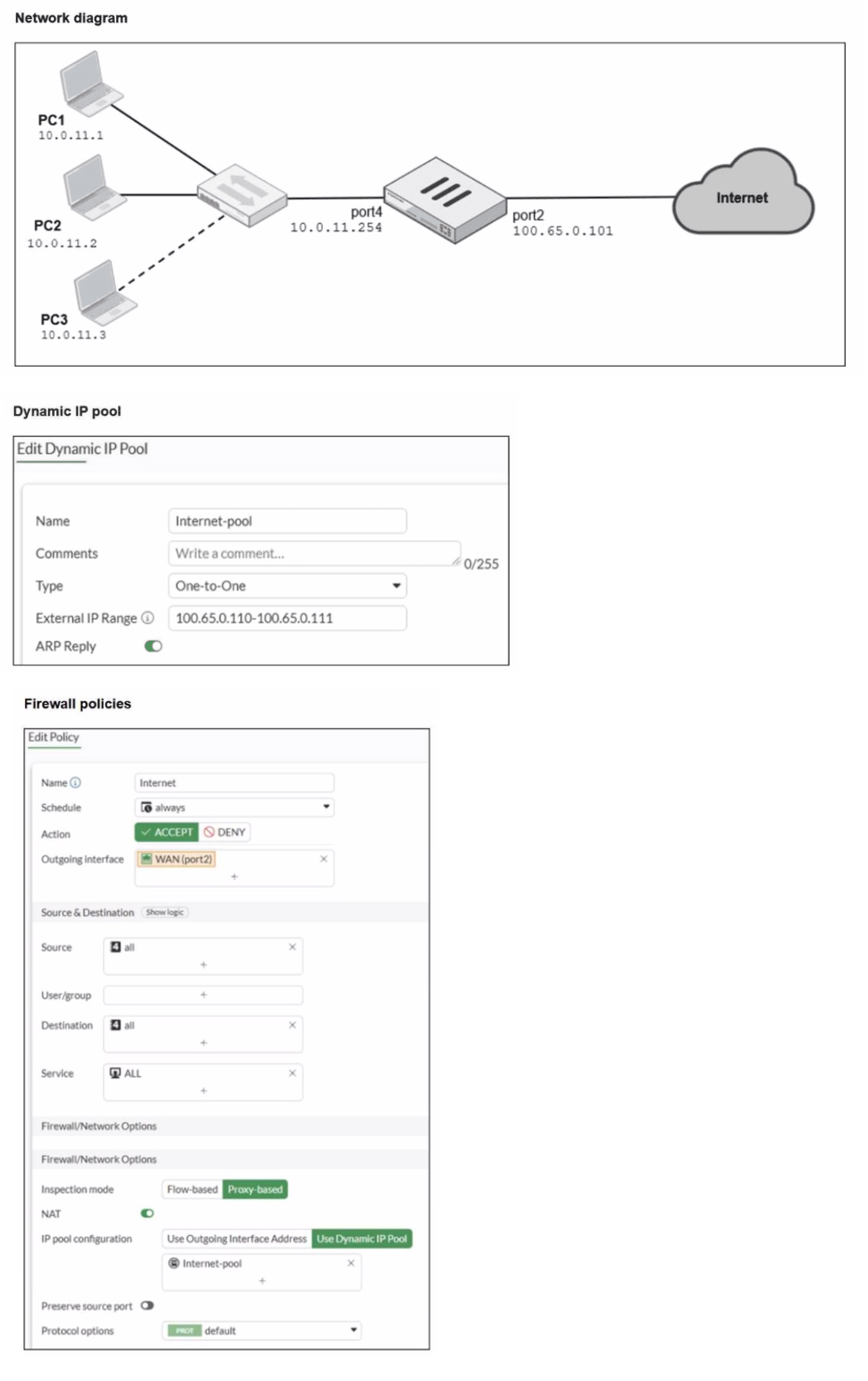
A diagram of a FortiGate device connected to the network, as well as the firewall policy and
IP pool configuration on the FortiGate device are shown.
Two PCs. PC1 and PC2, are connected behind FortiGate and can access the internet
successfully. However, when the administrator adds a third PC to the network (PC3), the
PC cannot connect to the internet.
Based on the information shown in the exhibit, which two configuration options can the
administrator use to fix the connectivity issue for PC3? (Choose two.)
A. In the system settings, set Multiple Interface Policies to enable.
B. In the IP pool configuration, set end ipto 100.65.0.112.
C. In the firewall policy, set match-vip to enable using CLI.
D. In the IP pool configuration, set type to overload.
Explanation:
This question tests your understanding of how Dynamic IP Pools and NAT work in FortiOS, specifically regarding the limitations of One-to-One IP pools and how address exhaustion can prevent connectivity for new hosts.
✔️Why B Is Correct:
The current One-to-One IP pool "Internet-pool" is configured with the range "100.65.0.110-100.65.0.111," which provides only two public IP addresses. Since PC1 and PC2 are already successfully accessing the internet, they are likely consuming both addresses in this pool. When PC3 attempts to connect, no public IP addresses remain available for allocation. Extending the range to include 100.65.0.112 would add a third address, accommodating PC3 and resolving the exhaustion issue while keeping the One-to-One NAT type.
✔️Why D Is Correct:
Changing the IP pool type from "One-to-One" to "Overload" (also known as Port Address Translation or PAT) would resolve the issue without requiring additional public IP addresses. With Overload NAT, all three private IP addresses (10.0.11.1, 10.0.11.2, and 10.0.11.3) can share the same public IP address(es) by using unique source ports to differentiate sessions. This maximizes the use of the existing public IP range and would immediately allow PC3 to connect.
❌Why the Other Options Are Wrong:
A. In the system settings, set Multiple Interface Policies to enable:
This setting relates to how FortiGate handles traffic when multiple policies match the same interface. It is not related to IP pool exhaustion or NAT capacity and would not resolve the connectivity issue for PC3.
C. In the firewall policy, set match-vip to enable using CLI:
The match-vip setting is used for Destination NAT (Virtual IPs) configurations, specifically to control how traffic matches VIPs before policy lookup. This issue involves Source NAT (IP pools), and enabling match-vip would not affect the availability of source IP addresses for outbound connections.
Reference:
⇒ Fortinet Document Library: One-to-One IP pools
This official guide explains that One-to-One NAT maps one private IP to one public IP, requiring enough public addresses for each concurrent private host.
⇒ Fortinet Document Library: Overload IP pools
This resource confirms that Overload NAT (Port Address Translation) allows multiple private IP addresses to share a single public IP by mapping unique source ports, conserving public address space.
An administrator wants to configure dead peer detection (DPD) on IPsec VPN for detecting dead tunnels. The requirement is that FortiGate sends DPD probes only when there is no inbound traffic. Which DPD mode on FortiGate meets this requirement?
A. On Demand
B. Enabled
C. On Idle
D. Usabled
Explanation:
This question assesses understanding of Dead Peer Detection (DPD) modes in FortiGate IPsec VPNs. DPD is used to monitor the health of VPN tunnels and detect if the peer device is unreachable. The specific requirement here is that DPD probes should be sent only when there is no inbound traffic, ensuring the tunnel is checked for inactivity without generating unnecessary traffic.
✔️ Correct option:
On Idle mode is designed for this exact scenario. FortiGate will send DPD probes only when the tunnel is idle, meaning no inbound traffic is detected. If the tunnel is actively carrying traffic, probes are suppressed, avoiding redundant messages. This ensures the tunnel is monitored efficiently and the VPN can detect dead peers without impacting normal traffic flow.
❌ Incorrect Options:
A. On Demand
This mode sends DPD probes only when traffic is being sent and a response is required. It does not check idle tunnels and therefore does not meet the requirement of probing only when there is no inbound traffic.
B. Enabled
Enabled mode triggers DPD probes continuously at set intervals, regardless of tunnel activity. While it keeps the tunnel constantly monitored, it generates unnecessary traffic and does not fulfill the “only when idle” condition.
D. Usabled
This is not a valid DPD mode in FortiGate; selecting it would be incorrect as it does not exist in the configuration options.
Reference:
⇒ Fortinet Documentation – Configuring Dead Peer Detection
Confirms that On Idle mode sends DPD probes only when the tunnel is inactive, ensuring efficient monitoring without generating unnecessary traffic.
Refer to the exhibits.
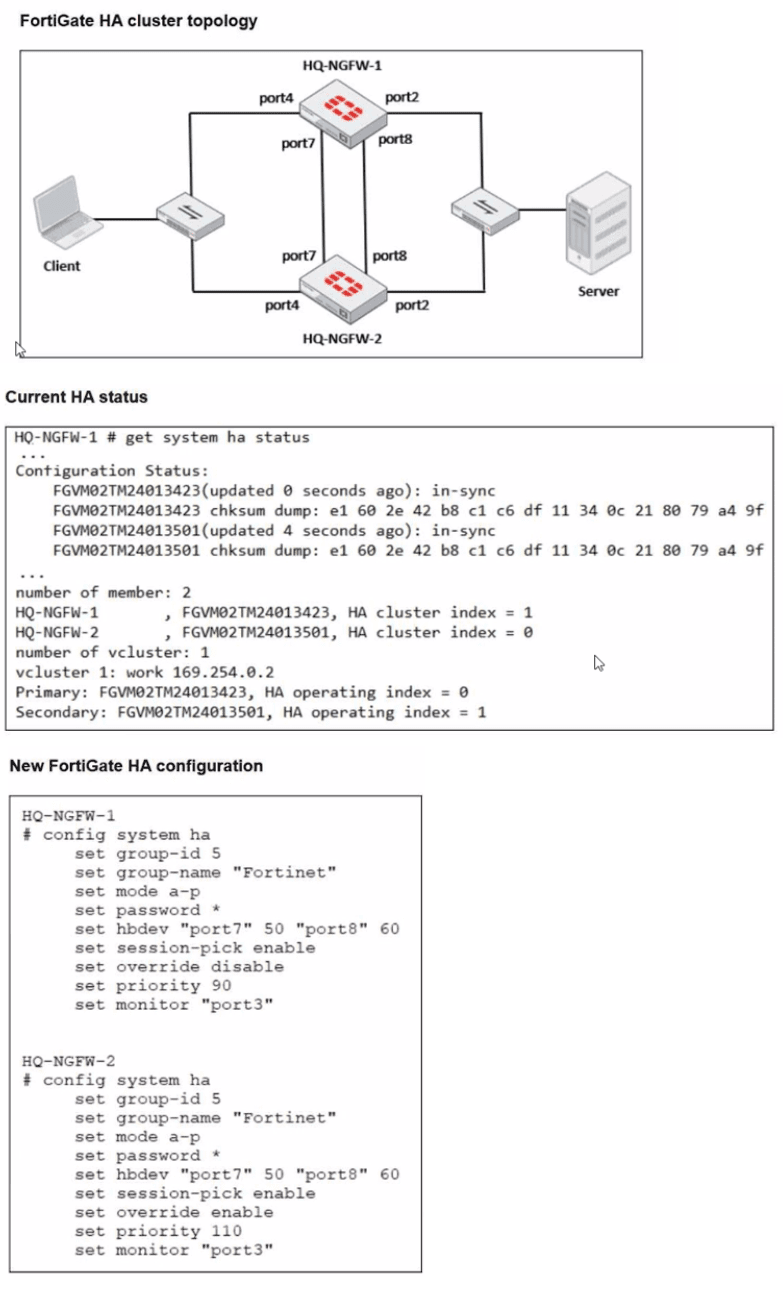
Based on the current HA status, an administrator updates the override and priority parameters on HQ-NGFW-1 and HQ-NGFW-2 as shown in the exhibits. What would be the expected outcome in the HA cluster?
A. HQ-NGFW-2 will take over as the primary because it has the override enable setting and higher priority than HQ-NGFW-1.
B. HQ-NGFW-1 will remain the primary because HQ-NGFW-2 has lower priority
C. The HA cluster will become out of sync because the override setting must match on all HA members.
D. HQ-NGFW-1 will synchronize the override disable setting with HQ-NGFW-2.
Explanation:
This question tests the understanding of the High Availability (HA) Master Selection Process in FortiOS. It specifically focuses on how the override setting alters the default selection criteria, prioritizing device priority over system uptime.
✔️Why This Is Correct:
By default, FortiGate HA selection follows the APPU order (Override disabled): Alive members > Priority > Previous primary (Uptime) > Unit SN.
When set override enable is configured on a cluster member, the selection order changes to Priority > Alive members > Previous primary > Unit SN.
In the exhibit, HQ-NGFW-2 is configured with set override enable and a higher priority (110) compared to HQ-NGFW-1 (priority 90). Because override is enabled on the member with the higher priority, the cluster will trigger a re-election and select HQ-NGFW-2 as the new primary.
❌Why the Other Options Are Wrong:
B. HQ-NGFW-1 will remain the primary:
This is incorrect because HQ-NGFW-2 has a higher priority (110 vs 90) and override is enabled, forcing a transition.
C. The HA cluster will become out of sync:
The override and priority settings are device-specific (not synchronized). Having different values for these settings does not cause a synchronization error.
D. HQ-NGFW-1 will synchronize the override disable setting:
As mentioned, these specific parameters are excluded from synchronization to allow for cluster management.
Reference:
⇒ FortiGate HA Primary Election
Confirms that the override setting moves the Priority criteria to the top of the selection list, allowing a higher-priority unit to preempt the current primary.
Refer to the exhibits.
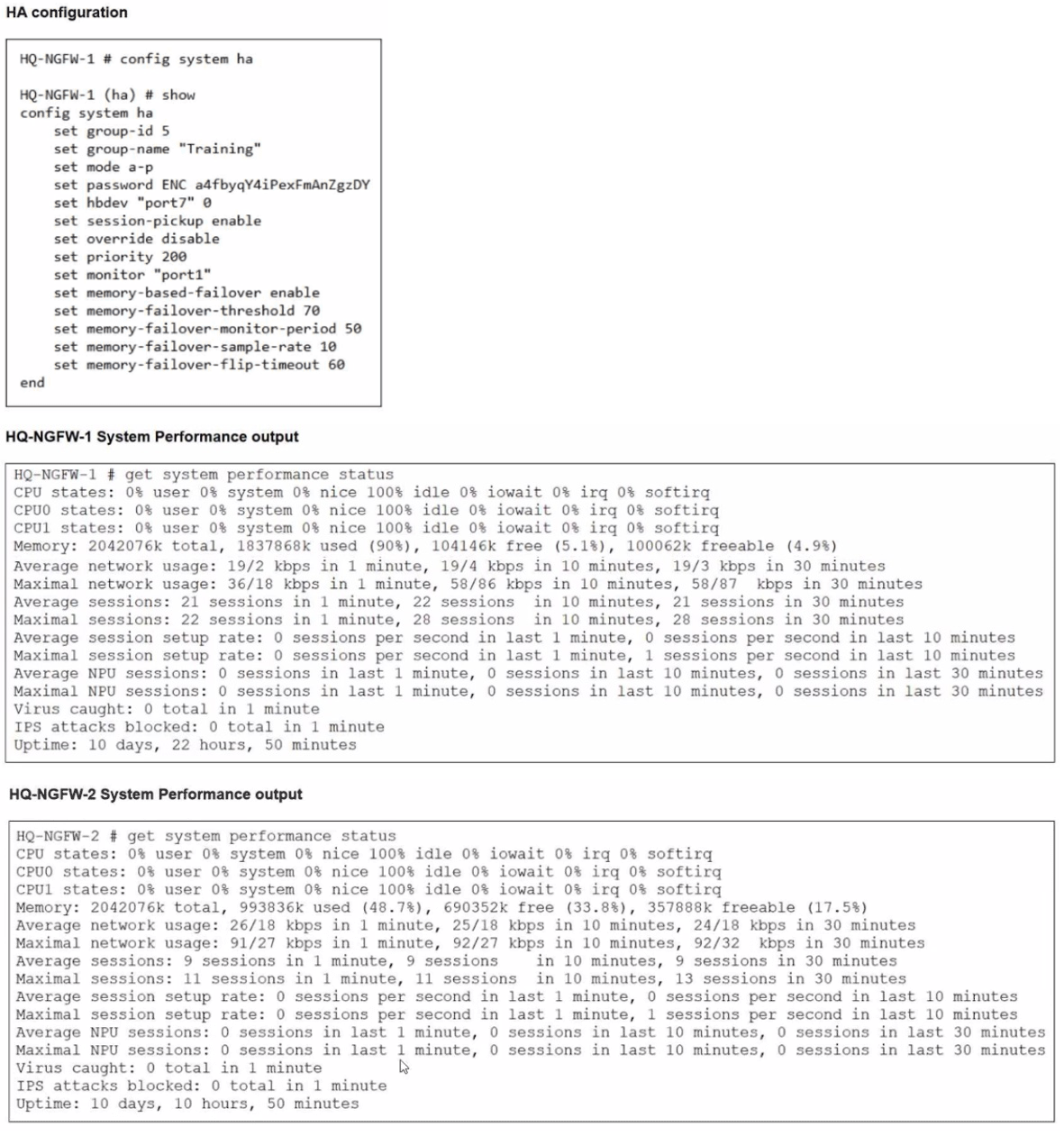
An administrator has observed the performance status outputs on an HA cluster for 55
seconds.
Which FortiGate is the primary?
A. HQ-NGFW-1 with the parameter memory-failover-flip-timeout setting
B. HQ-NGFW-2 with the parameter priority setting
C. HQ-NGFW-1 with the parameter override setting
D. HQ-NGFW-2 with the parameter memory-failover-threshold setting
Explanation:
The correct answer is D.
Technical Analysis
In this scenario, we must evaluate the HA election criteria specifically for memory-based failover, which is a feature enabled in this cluster's configuration.
➡️ Memory Threshold Breach: The configuration for HQ-NGFW-1 sets a memory-failover-threshold of 70%. Performance status shows HQ-NGFW-1 is currently at 90% memory usage, while HQ-NGFW-2 is at approximately 48.7%.
➡️ Monitoring Period: The memory-failover-monitor-period is set to 50 seconds. This is the duration the memory must stay above the threshold to trigger a failover.
➡️ Observation Window: The administrator has observed these statuses for 55 seconds. Because 55 seconds is greater than the 50-second monitor period, the threshold violation has been sustained long enough to trigger a failover.
➡️ Resulting Primary: Once the primary (HQ-NGFW-1) triggers a failover due to memory pressure, the secondary unit with memory usage below the threshold (HQ-NGFW-2) becomes the new primary.
Why Other Options are Incorrect
A: The memory-failover-flip-timeout (set to 60 minutes in this case) is a timer that prevents the cluster from failing back to the original unit too quickly to avoid "flapping". It does not determine which unit is currently primary during the initial 55-second window.
B: While HQ-NGFW-2 has a priority setting, the memory-based failover event overrides standard priority-based election when one unit exceeds its healthy resource threshold for the defined period.
C: Even though HQ-NGFW-1 has a higher priority (200) and override might be disabled, the specific memory-failover trigger has already transitioned the role to HQ-NGFW-2.
Reference
FortiOS 7.6 Administration Guide: "When memory-based failover is enabled, a failover occurs if the primary unit's memory usage exceeds the memory-failover-threshold for a duration longer than the memory-failover-monitor-period."
Refer to the exhibit.
A. The Underlay zone contains no member.
B. The virtual-wan-link and overlay zones can be deleted
C. The Underlay zone is the zone by default.
D. port2 and port3 are not assigned to a zone.
Explanation:
This question evaluates your understanding of FortiGate SD-WAN zone configuration, specifically how interfaces are assigned to zones. The exhibit shows a list of configured zones and a donut chart indicating SD-WAN members.
✅Correct option: D
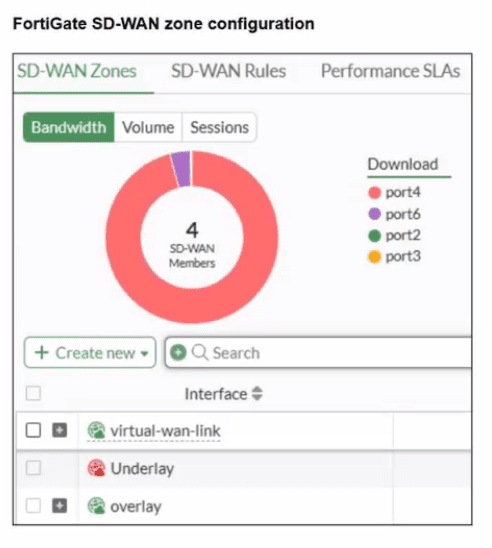
The donut chart clearly shows port2 and port3 as SD-WAN members. However, the listed SD-WAN Zones (virtual-wan-link, Underlay, overlay) do not explicitly show port2 or port3 assigned as members under them. In FortiGate SD-WAN, interfaces must be assigned to an SD-WAN zone to participate. The exhibit indicates that port2 and port3 are part of the overall SD-WAN setup (as members of the virtual-wan-link interface), but they are not assigned to any of the specific, explicitly listed zones like Underlay or overlay in this partial view.
Why the Other Options Are Wrong:
❌ A. The Underlay zone contains no member.
The Underlay zone is shown with a plus sign next to it, indicating it is expandable and likely contains members, even if they are not explicitly displayed in this truncated view. If it truly had no members, it would either not be expandable or display a count of zero members.
❌ B. The virtual-wan-link and overlay zones can be deleted.
The virtual-wan-link is the primary SD-WAN interface and cannot be deleted as long as SD-WAN is enabled and has members. The overlay zone might be deletable if it's a custom zone and has no members or policies tied to it, but the virtual-wan-link cannot.
❌ C. The Underlay zone is the zone by default.
There is no "Underlay zone" by default in FortiGate SD-WAN. The main SD-WAN interface is called virtual-wan-link. Custom zones like "Underlay" or "overlay" are created by administrators to group interfaces.
Reference:
⇒ FortiGate SD-WAN Configuration Guide - Zones (This documentation explains how SD-WAN interfaces are grouped into zones and how the virtual-wan-link interface functions as the primary SD-WAN interface.)
| Page 4 out of 14 Pages |
| 1234567 |
| NSE4_FGT_AD-7.6 Practice Test Home |
The Fortinet NSE 4 - FortiOS 7.6 Administrator exam is notoriously tough. It doesn't test memorization. It forces you to make complex decisions under time pressure. A weak prep strategy risks a costly failure and wasted effort. Our NSE4_FGT_AD-7.6 practice tests are built to be your definitive bridge to a passing score.

Copyright © - All Rights Reserved