
Last Updated On : 12-Oct-2026
Total 54 Questions
Refer to the exhibit.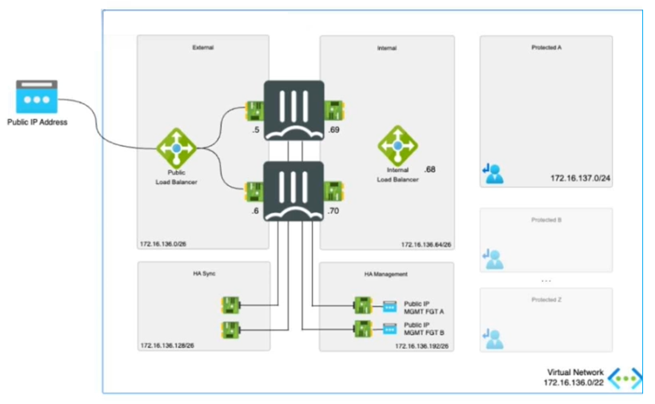
The exhibit shows an active-passive high availability FortiGate pair with external and internal Azure load
balancers There is no SDN connector used in this solution.
Which configuration must the administrator implement on each FortiGate?
A. Single BGP route to Azure probe IP address.
B. One static route to Azure Lambda IP address.
C. Two static routes to Azure probe IP address.
D. Two BGP routes lo Azure probe IP address.
Explanation:
✅ Correct Answer: C - Two static routes to Azure probe IP address.
In an active-passive HA FortiGate deployment on Azure without SDN connector, external and internal Azure load balancers require health probes to monitor FortiGate instances. Each FortiGate must configure two static routes—one for the external load balancer's probe IP and one for the internal—to ensure probes reach the active unit via backend pool mappings. This setup directs probe traffic correctly, avoiding asymmetry, as dynamic routing like BGP is not utilized here. Static routes provide reliable, low-cost probe handling matching the diagram's dual LB architecture.
❌ Incorrect answer: A - Single BGP route to Azure probe IP address.
BGP routing is unsuitable without SDN connector or explicit dynamic routing setup, as this solution relies on static configurations for simplicity in Azure HA. A single BGP route cannot address dual probes from external/internal LBs, risking failover detection failures. Probes demand precise static directing to active FortiGate IPs, preventing blackholing or misdirection in passive-active monitoring flows shown in the exhibit.
❌ Incorrect answer: B - One static route to Azure Lambda IP address.
Azure Lambda is a serverless compute service unrelated to load balancer probes, which use dedicated health check IPs, not Lambda endpoints. One route fails to cover both external/internal probes, causing incomplete monitoring and potential HA disruptions. The diagram depicts standard LB probes, requiring dual static routes to specific probe IPs for proper active-passive traffic steering.
❌ Incorrect answer: D - Two BGP routes to Azure probe IP address.
BGP introduces unnecessary complexity without SDN connector, lacking Azure integration for automatic probe handling. Dual BGP routes risk route flapping during HA failover, unlike stable static routes tailored for probe traffic. This static-focused design ensures probes hit correct interfaces/ports as per exhibit LBs, maintaining seamless health checks.
🔧 Conclusion:
Configuring two static routes to Azure probe IPs on each FortiGate ensures reliable health monitoring for external/internal LBs in active-passive HA without SDN. This matches the diagram's topology, directing probes to active unit precisely while avoiding dynamic routing pitfalls. Alternatives fail on routing method, count, or relevance, risking HA instability; static approach offers simplicity, cost-efficiency, and Azure best-practice compliance.
Reference:
About FortiGate-VM for Azure
Refer to the exhibit.
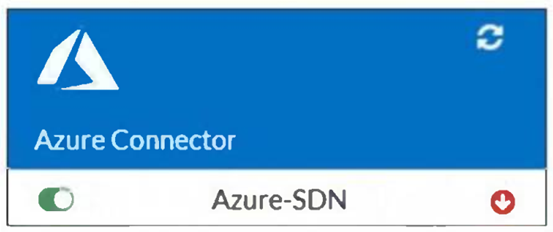
You are troubleshooting a Microsoft Azure SDN connector issue on your FortiGate VM in Azure.
Which command can you use to examine details about API calls sent by the connector?
A. diag debug application cloud-connector -1
B. diag test application azd 1
C. diag debug application azd -1
D. get system sdn-connector
Explanation:
This question tests knowledge of FortiGate diagnostic CLI commands used to troubleshoot Azure SDN Connector issues. The exhibit shows the Azure-SDN connector with a red error indicator (⬇), suggesting a connectivity or authentication failure. To investigate the API calls being sent by the SDN connector to Azure, the correct FortiGate debug command must target the Azure daemon (azd) process responsible for all Azure API communications.
✅ C. diag debug application azd -1
The azd process is the Azure-specific daemon that handles all API interactions between FortiGate and Microsoft Azure (including SDN connector calls). The -1 flag enables verbose/full debug output, allowing administrators to inspect real-time API request and response details. This is the correct and purpose-built command for diagnosing Azure SDN connector API communication failures.
❌ A. diag debug application cloud-connector -1
There is no FortiGate process named cloud-connector. This is not a valid daemon name in FortiGate's debug application framework. Running this command would return an error or no output, making it useless for diagnosing Azure SDN connector API call behavior.
❌ B. diag test application azd 1
The diag test application command is used to run specific internal tests on a process, not to capture or display API call details in real time. While azd is the correct process, this syntax tests the daemon rather than providing verbose debug output of actual API calls being made to Azure.
❌ D. get system sdn-connector
This command displays the current SDN connector configuration — such as connector name, type, and status — stored on the FortiGate. It does not provide any debug output, API call details, or real-time diagnostic information about what the connector is sending to or receiving from Azure.
🔧 Reference:
🔗 FortiGate SDN Connector Troubleshooting – Fortinet Documentation
⇒ Confirms that diag debug application azd -1 is the correct command to examine Azure SDN connector API call details and debug communication issues.
🔗 FortiGate CLI Reference – Fortinet Docs
⇒ Explains the diag debug application command syntax and how the -1 flag enables full verbose debugging for the specified FortiGate daemon process.
Refer to the exhibit.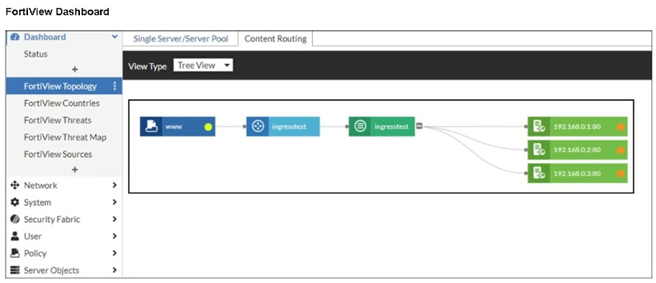
An administrator installed a FortiWeb ingress controller to protect a containerized web application. What is
the reason for the status shown in FortiView? (Choose one answer)
A. The SDN connector is not authenticated correctly.
B. The FortiWeb VM is missing a route to the node subnet.
C. The manifest file deployed is configured with the wrong node IP addresses.
D. The load balancing type is not set to round-robin.
Explanation:
The FortiView status indicates that FortiWeb can see the ingress and backend structure but cannot forward traffic successfully. This points to a missing or incorrect route between the FortiWeb VM and the Kubernetes node subnet. Without proper routing, backend services remain unreachable regardless of SDN configuration, manifest accuracy, or load-balancing settings.
✅ Correct Answer: B
The FortiView topology shows the ingress service and backend nodes, but traffic health indicators suggest communication failure. This typically happens when the FortiWeb VM cannot reach Kubernetes worker nodes. If the FortiWeb VM lacks a route to the node subnet, it cannot forward traffic to backend pods, causing the observed degraded or inactive status. Proper routing between the FortiWeb network and node subnet is mandatory for ingress traffic flow.
❌ Incorrect Answer: A
An unauthenticated SDN connector affects dynamic object synchronization and cloud resource discovery, not direct traffic forwarding between FortiWeb and Kubernetes nodes. The ingress controller can still deploy and show topology even if SDN authentication fails. Therefore, SDN connector authentication issues would not directly cause the backend node connectivity problem shown in FortiView.
❌ Incorrect Answer: C
If the manifest file contained incorrect node IP addresses, the ingress controller would fail to register or map backend services correctly. In such cases, the topology would either not populate or show missing backend nodes. The exhibit shows nodes present but unreachable, indicating a network routing issue rather than a configuration error in the manifest.
❌ Incorrect Answer: D
Load-balancing method selection, such as round-robin, affects traffic distribution among healthy backends but does not impact basic reachability. Even with an incorrect or default load-balancing algorithm, FortiWeb must still be able to route traffic to node IPs. The issue shown relates to connectivity failure, not traffic distribution behavior.
Reference:
Fortinet Documentation – FortiWeb Kubernetes Ingress Controller Guide
Fortinet Documentation – FortiWeb Administration Guide
Refer to the exhibit.
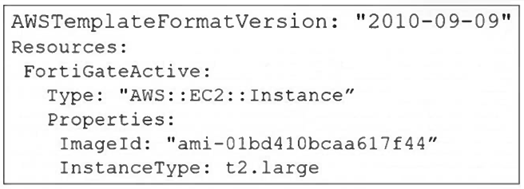
A senior administrator in a multinational organization needs to include a comment in the template shown in
the exhibit to ensure that administrators from other regions change the EC2 instance size value to one that
meets the requirements in their local deployments. How can the administrator add the comment in that section
of the file? (Choose one answer)
A. The administrator can run the aws cloudformation update-stack and include the comment.
B. The administrator must update the AWSTemplateFormatVersion to a more current version.
C. The administrator must convert the template to JSON format before adding the comment.
D. The administrator can add the comment with the # character next to the InstanceType section.
Explanation:
✅ Correct Answer:
D. The administrator can add the comment with the # character next to the InstanceType section.
The exhibit shows a CloudFormation template in YAML format. YAML natively supports single-line comments using the # character. The administrator can add a comment on the same line as the InstanceType key or on a separate line above it to document that the value should be changed to meet local deployment requirements. For example: InstanceType: t2.large # CHANGE TO LOCAL REQUIREMENT. This is a standard and effective method for inline documentation within YAML-based templates.
❌ Incorrect Answers:
A. The administrator can run the aws cloudformation update-stack and include the comment.
The update-stack command is used to deploy changes to a stack, not to embed human-readable comments within the template file itself. Comments are for template authors and readers, not a parameter for the deployment command.
B. The administrator must update the AWSTemplateFormatVersion to a more current version.
The version specified ("2010-09-09") is the fundamental template format version and is still current. Changing it does not enable or relate to the ability to add comments; comments are a feature of the YAML/JSON syntax, not the template format version.
C. The administrator must convert the template to JSON format before adding the comment.
This is incorrect and counterproductive. JSON does not support comments as part of its official specification. Converting to JSON would actually remove the ability to add compliant comments. YAML is the preferred format for readable CloudFormation templates precisely because it supports features like comments.
🔧 Key Insight:
For AWS CloudFormation templates written in YAML, inline documentation for other administrators is best achieved using the native comment syntax. Adding a comment prefixed with # next to the InstanceType parameter is the correct, simple, and standards-compliant approach to indicate that the value is region-specific and should be reviewed.
Reference:
AWS CloudFormation User Guide: AWS CloudFormation Template Formats.
What is the main advantage of using SD-WAN Transit Gateway Connect over traditional SD-WAN?
A. You can use BGP over IPsec for maximum throughput.
B. You can combine it with IPsec to achieve higher bandwidth.
C. It eliminates the use of ECMP.
D. You can use GRE-based tunnel attachments.
Explanation:
The transition from traditional SD-WAN attachments to Transit Gateway Connect focuses on performance and simplified orchestration. By utilizing GRE-based tunnels instead of standard IPsec VPNs, organizations can achieve up to four times the bandwidth per tunnel (5 Gbps vs 1.25 Gbps) and simplify dynamic routing via BGP. This makes GRE the defining technical advantage for high-performance FortiGate SD-WAN integrations within AWS environments.
✅ D. You can use GRE-based tunnel attachments.
The primary technical advantage of using AWS Transit Gateway (TGW) Connect over traditional SD-WAN attachments (like standard VPN or VPC attachments) is its native support for GRE-based tunnel attachments. Traditional SD-WAN integrations often rely on IPsec VPNs, which are capped at 1.25 Gbps per tunnel. By using GRE (Generic Routing Encapsulation), TGW Connect allows for much higher throughput—up to 5 Gbps per tunnel—and supports an increased MTU of 8500 bytes, significantly reducing encapsulation overhead and improving performance for cloud-native SD-WAN architectures.
❌ A. You can use BGP over IPsec for maximum throughput.
While BGP over IPsec is a standard method for traditional SD-WAN connectivity to AWS, it is not the main advantage of TGW Connect; in fact, it is the limitation that TGW Connect seeks to overcome. IPsec tunnels have significant performance bottlenecks due to encryption overhead and a strict throughput limit of 1.25 Gbps. TGW Connect moves away from IPsec as the primary transport, favoring GRE to achieve "maximum throughput" that IPsec cannot provide natively.
❌ B. You can combine it with IPsec to achieve higher bandwidth.
This is technically incorrect because TGW Connect is designed to replace or bypass the need for multiple managed IPsec VPN tunnels to achieve high bandwidth. While GRE can technically be wrapped in IPsec, the "Connect" attachment itself uses a VPC attachment as an underlay, allowing GRE to run over a high-bandwidth private backbone (up to 20 Gbps total per attachment) without the specific CPU-intensive overhead associated with scaling traditional IPsec tunnels.
❌ C. It eliminates the use of ECMP.
TGW Connect does not eliminate Equal-Cost Multi-Path (ECMP); rather, it leverages it. ECMP is a critical component of the TGW Connect architecture, allowing traffic to be load-balanced across multiple GRE tunnels (Connect peers) to reach the aggregated 20 Gbps bandwidth limit. Eliminating ECMP would actually hinder the scalability and high-availability benefits that TGW Connect provides to SD-WAN deployments.
Reference:
FortiGate Public Cloud 7.6.0 - SD-WAN Transit Gateway Connect FortiOS 6.4.3 New Features - Support AWS transit gateway connect attachment
Refer to the exhibit.
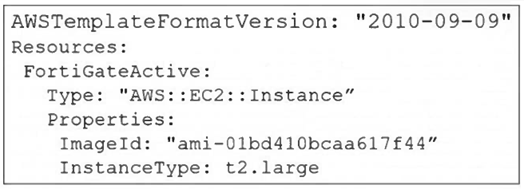
A senior administrator in a multinational organization needs to include a comment in the template shown in
the exhibit to ensure that administrators from other regions change the Amazon Machine Image (AMI) ID to
one that is valid in their location.
How can the administrator add the required comment in that section of the file?
A. The administrator can include the comment with the aws cloudformation update-stack command.
B. The administrator must convert the template file to YAML format to add a comment.
C. The administrator can add the comment starting with the # character next to the "Resources" section.
D. The administrator must update the AWSTemplateFormatVersion to the latest version.
Explanation:
The core issue is JSON's lack of comment support, which is a fundamental limitation of the format specification. When building CloudFormation templates for teams that need inline documentation, especially in multi-region or multinational environments, YAML is the better choice. Converting from JSON to YAML is straightforward, and both formats are fully supported by CloudFormation with identical functionality. The ability to add comments directly improves template maintainability and helps prevent configuration errors across distributed teams.
✅ Correct Answer: B
JSON format, which is currently used in this CloudFormation template, does not support comments. JSON is a strict data interchange format that has no specification for comment syntax. To add comments directly within a CloudFormation template file, the administrator must convert it to YAML format. YAML natively supports comments using the # character, allowing administrators to add inline documentation like "# Change this AMI ID to match your region" next to the ImageId property. This makes YAML the preferred format when template documentation and readability are priorities for multi-region teams.
❌ Incorrect Answer: A
The aws cloudformation update-stack command is used to apply changes to an existing stack, not to add comments within the template file itself. While you can include a --description parameter with the command to describe what the update does, this description is stored as stack metadata, not as a comment inside the template file. Other administrators downloading or viewing the template file wouldn't see this command-line description. The requirement is to add a comment within the template file itself so it's visible to anyone reviewing or modifying the template.
❌ Incorrect Answer: C
This answer incorrectly assumes JSON supports comments with the # character. If you add # comment text anywhere in a JSON file, the JSON parser will throw a syntax error because # is not valid JSON syntax. CloudFormation would reject the template as malformed. While the # character is the correct comment syntax in YAML, it cannot be used in JSON format. Any attempt to add comments using # in the current JSON template will cause validation failures when you try to create or update the stack.
❌ Incorrect Answer: D
Updating the AWSTemplateFormatVersion doesn't enable comment support in JSON. The template format version (like "2010-09-09") indicates which CloudFormation capabilities are available, not which file format features are supported. The version number relates to CloudFormation service features, not JSON or YAML syntax capabilities. Changing this version string won't magically allow JSON to support comments. The fundamental limitation is the JSON format itself, which requires conversion to YAML regardless of the template format version specified.
Reference:
CloudFormation template format
About FortiGate-VM for AWS
Refer to the exhibit.
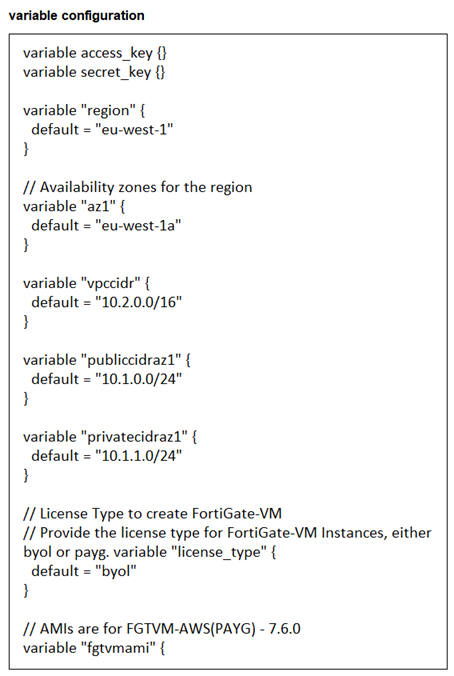
You are tasked to deploy a FortiGate VM with private and public subnets in Amazon Web Services (AWS).
You examined the variables.tf file. Assume that all the other terraform files are in place. What will be the
final result after running the terraform init and terraform apply commands? (Choose one answer)
A. Terraform will not deploy a FortiGate VM.
B. Terraform will deploy a FortiGate VM in the eu-West-1a availability zone without any subnets.
C. Terraform will deploy a FortiGate VM in the eu-West-1 region with private and public subnets.
D. Terraform will deploy a FortiGate VM in the eu-West-1a availability zone with two subnets and BYOL license.
Explanation:
The absence of required variable values—particularly AWS access keys and the FortiGate AMI ID—renders the Terraform configuration incomplete. Even though regional and subnet variables have defaults, they cannot compensate for missing authentication or image specifications. Thus, no resources will be created, and the deployment will fail before provisioning begins.
✅ Correct Answer:
A. Terraform will not deploy a FortiGate VM.
The variables.tf file defines required variables such as access_key, secret_key, and fgvmami (FortiGate AMI), but none are assigned values—only defaults for region, AZ, and CIDR blocks are set. Without valid AWS credentials or a specified AMI ID, Terraform cannot proceed with resource creation. The absence of actual values for critical variables results in deployment failure during apply.
❌ Incorrect answer
B. Terraform will deploy a FortiGate VM in the eu-West-1a availability zone without any subnets.
This is incorrect because even if the region and AZ were usable, missing credentials and AMI would prevent deployment entirely. Subnet definitions alone don’t enable deployment without core authentication and image references.
C & D are invalid for the same reason—the configuration lacks mandatory inputs, making any successful deployment impossible regardless of subnet or license type settings.
| Page 2 out of 8 Pages |
| 1234 |
| NSE7_CDS_AR-7.6 Practice Test Home |
The Fortinet NSE 7 Public Cloud Security 7.6.4 Architect exam is notoriously tough. It doesn't test memorization. It forces you to make complex decisions under time pressure. A weak prep strategy risks a costly failure and wasted effort. Our NSE7_CDS_AR-7.6 practice tests are built to be your definitive bridge to a passing score.

Copyright © - All Rights Reserved