
Last Updated On : 12-Oct-2026
Total 54 Questions
The difference between a near pass and a confident pass isn't just knowing the material, it's mastering the Fortinet NSE 7 Public Cloud Security 7.6.4 Architect exam experience. Our Fortinet NSE7_CDS_AR-7.6 practice test is engineered to close the gap between your current knowledge and the 2026 exam's demands. With every question, you receive detailed, expert verified explanations that break down not just the correct answer, but also the reasoning behind every incorrect option.
Don't just study. Practice NSE7_CDS_AR-7.6 with purpose. Start your journey to a first-time pass today.
By replicating the exact style, complexity, and format of the real Fortinet NSE 7 Public Cloud Security 7.6.4 Architect exam questions, we ensure you walk into the exam with complete confidence.
Refer to the exhibit.
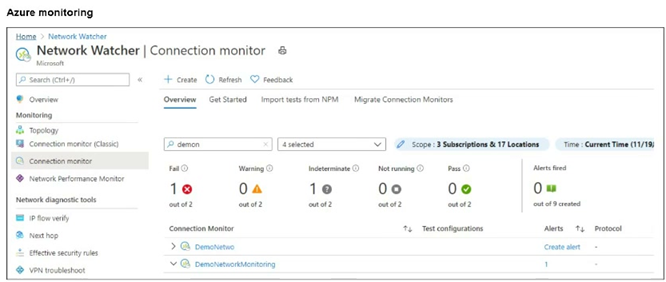
After analyzing the native monitoring tools available in Azure, an administrator decides to use the tool
displayed in the exhibit.
Why would an administrator choose this tool?
A. To view details about Azure resources and their relationships across multiple regions.
B. To obtain, and later examine, traffic flow data with a visualization tool.
C. To help debug issues affecting virtual network gateways.
D. To compare the latency of an on-premises site with the latency of an Azure application.
Explanation:
The exhibit specifically shows the Connection Monitor feature within Azure Network Watcher. This tool is designed to provide unified, end-to-end connectivity monitoring between Azure endpoints and hybrid configurations to ensure network performance.
✅Correct Option:
Option D:
Connection Monitor allows an architect to measure and compare network latency between Azure resources and on-premises sites. It helps verify if the network performance meets the required service-level agreements for applications spanning across a hybrid cloud environment.
❌Incorrect options:
Option A:
This functionality is provided by the Topology tool within Network Watcher. While Connection Monitor tracks the health of connections, it does not primarily serve to map the visual relationships and structures of resources across multiple regions.
Option B:
Obtaining and examining traffic flow data is the specific role of NSG Flow Logs and Traffic Analytics. These tools focus on logging actual data packets and visualizing traffic patterns rather than active connection testing for latency.
Option C:
To help debug issues specifically affecting virtual network gateways, an administrator would typically use the VPN Troubleshoot tool. Connection Monitor identifies if a connection is down but does not provide deep diagnostic logs for gateway hardware.
Reference:
⇒ Microsoft Documentation: Connection Monitor Overview
This official resource confirms that Connection Monitor provides a unified way to monitor connectivity and latency across Azure, hybrid, and on-premises endpoints.
Refer to the exhibit.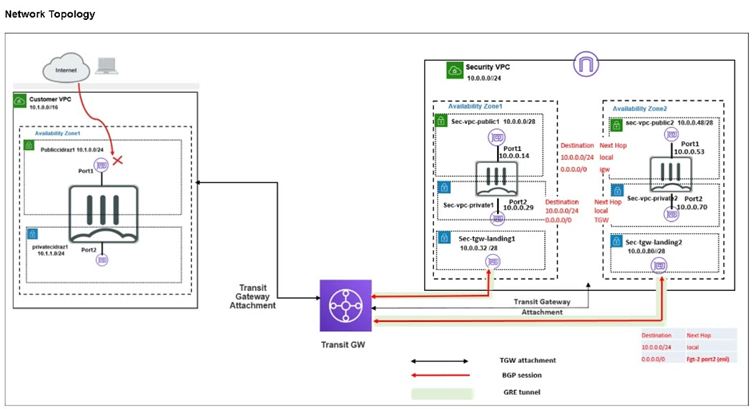
In your Amazon Web Services (AWS), you must allow inbound HTTPS access to the Customer VPC
FortiGate VM from the internet. However, your HTTPS connection to the FortiGate VM in the Customer
VPC is not successful.
Also, you must ensure that the Customer VPC FortiGate VM sends all the outbound Internet traffic through
the Security VPC.
How do you correct this issue with minimal configuration changes? (Choose three.)
A. Add a route with your local internet public IP address as the destination and the internet gateway as the target.
B. Add a route with your local internet public IP address as the destination and the transit gateway as the target.
C. Add a route to the destination 0.0.0.0/0 with the transit gateway as the target.
D. Deploy an internet gateway, associate an EIP with the Customer VPC private subnet, and then add a new route with destination 0.0.0.0/0 with the internet gateway as the target.
E. Deploy an internet gateway, attach it to the Customer VPC, and then associate an EIP with the port1 of the FortiGate in the Customer VPC.
Explanation:
✅ Correct Answer:
A. Add a route with your local internet public IP address as the destination and the internet gateway as the target.
This route ensures symmetric routing for your HTTPS management session. Inbound traffic from your public IP reaches the FortiGate via the new IGW and EIP. Without this, the default route sends responses via the TGW to the Security VPC, causing asymmetry and connection failure. Adding a specific /32 route for your IP to the IGW lets responses return directly, fixing the issue with minimal change while preserving overall outbound policy.
C. Add a route to the destination 0.0.0.0/0 with the transit gateway as the target.
This default route in the Customer VPC route table directs all outbound internet traffic from the FortiGate VM through the TGW to the Security VPC for centralized inspection and egress. It meets the requirement without altering existing setups, ensuring non-management outbound flows are secured. This is essential as the current topology likely lacks this route, allowing direct or no outbound.
E. Deploy an internet gateway, attach it to the Customer VPC, and then associate an EIP with the port1 of the FortiGate in the Customer VPC.
Attaching an IGW makes the Customer VPC internet-facing, and assigning an EIP to port1 (the public interface) provides a static public IP for inbound HTTPS access. The exhibit shows no IGW in Customer VPC, explaining the failed connection. This minimal addition enables direct internet reachability to the FortiGate without redesigning subnets or adding unnecessary routes.
❌ Incorrect answer
B. Add a route with your local internet public IP address as the destination and the transit gateway as the target.
Routing your public IP via TGW forces management response traffic through the Security VPC, exacerbating asymmetric routing since inbound arrives directly via IGW. This doesn't fix the connection failure and could introduce inspection or NAT issues in Security VPC not intended for management. It's too specific and misdirected, not addressing symmetry needed for successful HTTPS.
D. Deploy an internet gateway, associate an EIP with the Customer VPC private subnet, and then add a new route with destination 0.0.0.0/0 with the internet gateway as the target.
EIPs associate with interfaces, not subnets, making this invalid. Adding 0.0.0.0/0 to IGW bypasses the Security VPC for all outbound, violating the requirement to route through it. The FortiGate's port2 is in private subnet, but inbound targets port1; this misconfigures egress and doesn't enable proper public access.
🔧 Conclusion:
The core problems are no public exposure for inbound HTTPS (no IGW/EIP) and missing centralized outbound routing, plus potential asymmetry for management. A, C, and E resolve this minimally: E enables inbound, C enforces outbound via Security, and A ensures symmetric paths for your session responses. B and D are distractors—B worsens routing, D breaks rules and mechanics. This aligns with hub-spoke designs in AWS Transit Gateway setups.
Reference:
FortiGate / FortiOS 7.6.0 AWS Administration Guide (sections on deploying FortiGate-VM with EIP, IGW integration, and Transit Gateway routing for centralized security).
An administrator decides to use the Use managed identity option on the FortiGate SDN connector with Microsoft Azure. However, the SDN connector is failing on the connection. What must the administrator do to correct this issue?
A. Make sure to add the Client secret on FortiGate side of the configuration.
B. Make sure to add the Tenant ID on FortiGate side of the configuration.
C. Make sure to enable the system assigned managed identity on Azure.
D. Make sure to set the type to system managed identity on FortiGate SDN connector settings.
Explanation:
The failure occurs because managed identity authentication depends entirely on Azure-side configuration. FortiGate does not store secrets, tenant IDs, or identity types when managed identity is used. The administrator must enable the system-assigned managed identity on the Azure resource so Azure can issue tokens to FortiGate. Without this step, the SDN connector cannot authenticate, regardless of FortiGate configuration changes.
✅ Correct Answer: C
When using managed identity with the FortiGate Azure SDN connector, authentication relies entirely on Azure’s managed identity service. If the system-assigned managed identity is not enabled on the Azure resource (for example, the FortiGate VM), Azure cannot issue an access token. As a result, the SDN connector fails to authenticate. Enabling the system-assigned managed identity in Azure is mandatory for FortiGate to securely access Azure APIs without credentials.
❌ Incorrect Answer: A
A client secret is used only with service principal–based authentication, not with managed identities. Managed identity explicitly removes the need for secrets or certificates. Adding a client secret on the FortiGate side contradicts the managed identity design and has no effect on authentication. FortiGate will still fail to connect because Azure does not expect or validate client secrets when managed identity is selected.
❌ Incorrect Answer: B
The tenant ID is required when authenticating with a service principal. However, when using a system-assigned managed identity, Azure automatically determines the tenant context. FortiGate does not require a manually configured tenant ID for managed identity authentication. Adding or modifying the tenant ID on FortiGate does not resolve the issue because the failure occurs due to missing identity enablement in Azure.
❌ Incorrect Answer: D
FortiGate automatically understands the identity type when Use managed identity is selected in the SDN connector. There is no separate or manual configuration required to set the identity type to system-managed. If the Azure-side managed identity is disabled, changing FortiGate connector settings alone will not fix the connection failure.
Reference:
Fortinet Documentation – FortiGate SDN Connector for Microsoft Azure (Managed Identity)
Fortinet Documentation – FortiGate 7.6 Administration Guide
An administrator implements FortiWeb ingress controller to protect containerized web applications in an
AWS Elastic Kubernetes Service (EKS) cluster.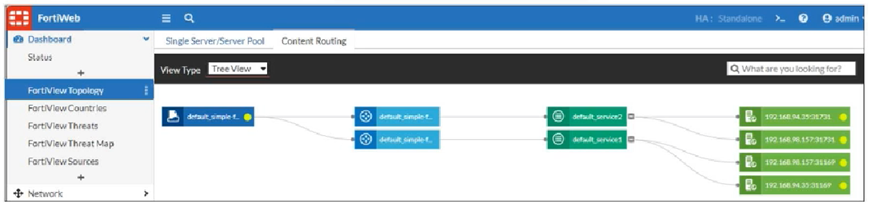
What can you conclude about the topology shown in FortiView?
A. The FortiWeb VM gets the latest cluster information through an SDN connector.
B. This topology has two services and two ingress controllers deployed.
C. Both services will be load balanced among the two nodes and the four pods.
D. Adding a new service will update the FortiWeb configuration automatically.
Explanation:
This question focuses on understanding the integration and dynamic capabilities of a FortiWeb ingress controller within an AWS Elastic Kubernetes Service (EKS) cluster. The topology view in FortiView illustrates how the FortiWeb appliance discovers and interacts with the services in the Kubernetes environment.
✅ Correct Option:
D. Adding a new service will update the FortiWeb configuration automatically.
FortiWeb, when deployed as an ingress controller, uses an SDN connector (Software-Defined Network) to dynamically discover services within the Kubernetes cluster. This means that when new services are added or existing ones are modified, FortiWeb automatically updates its configuration to reflect these changes, providing continuous protection without manual intervention.
❌ Incorrect options:
A. The FortiWeb VM gets the latest cluster information through an SDN connector.
While FortiWeb uses an SDN connector, the question specifies it's deployed as an ingress controller in EKS. In this setup, the ingress controller itself is the component that interacts with the Kubernetes API to get cluster information, rather than a separate FortiWeb VM getting it via an SDN connector in the same way a FortiGate would in a more traditional cloud VM deployment.
B. This topology has two services and two ingress controllers deployed.
Looking at the image, we clearly see two distinct services (default_service1 and default_service2). However, the leftmost icon (default_simple_f...) represents a single FortiWeb instance acting as the ingress point, not two separate ingress controllers. The two blue boxes next to it are likely virtual servers or policies configured on the single FortiWeb.
C. Both services will be load balanced among the two nodes and the four pods.
The image shows default_service1 and default_service2 each distributing traffic to multiple pods (four in total, with their IPs listed). While services abstract load balancing to pods, the concept of load balancing among nodes is managed by Kubernetes and the underlying AWS infrastructure, not directly by FortiWeb for the services themselves. FortiWeb routes traffic to the services, and the services handle distribution to their respective pods.
Reference:
→ Fortinet: FortiWeb for Kubernetes documentation: This documentation highlights the dynamic discovery capabilities of FortiWeb as an ingress controller, confirming its ability to automatically update configurations when services are added or changed in the Kubernetes environment.
Refer to the exhibit.
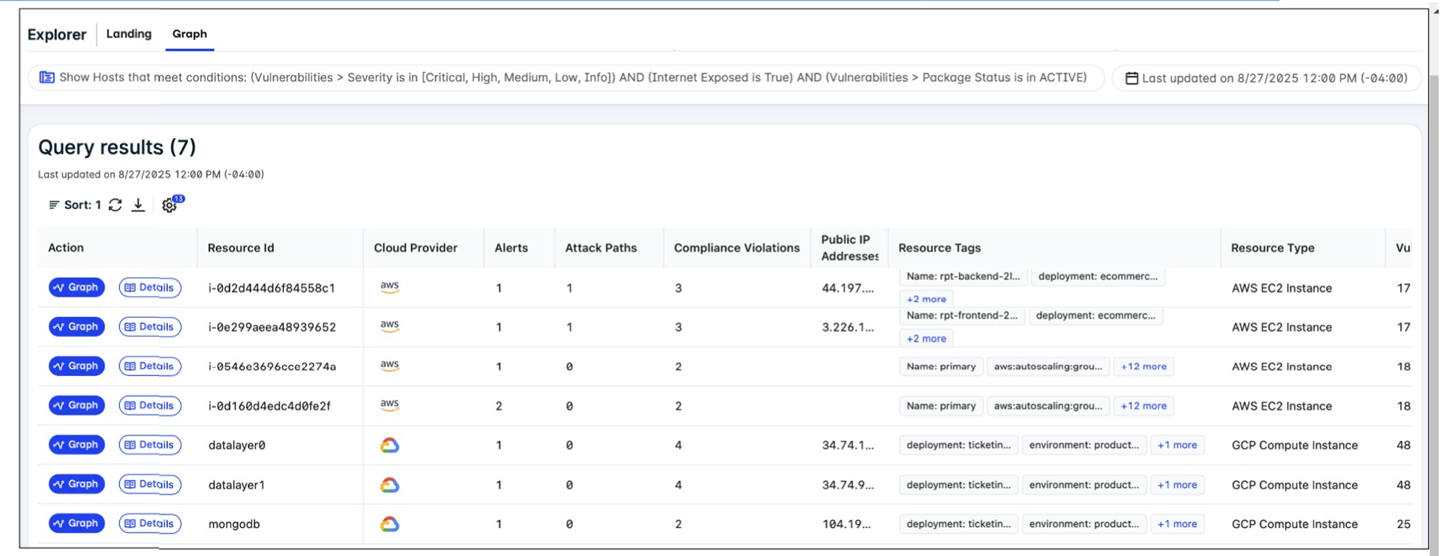
A FortiCNAPP administrator used the FortiCNAPP Explorer to reveal all hosts exposed to the internet that
are running active packages with vulnerabilities of all severity levels. Why do only the first two results have
an attack path? (Choose one answer)
A. Attack paths are available only for AWS resources with public IP addresses.
B. Attack paths are available only for AWS resources with high impact scores.
C. Attack paths are available only for resources with potential multi-hop exposure.
D. Attack paths are available only for resources that have critical vulnerabilities.
Explanation:
The presence of an Attack Path in the FortiCNAPP Explorer is fundamentally tied to external exposure. Because the administrator filtered for internet-exposed hosts, the system specifically generates paths for those resources that have a Public IP address, as these represent the direct entry points for external attackers. Resources lacking a public IP are not directly reachable from the internet, leading to an attack path count of zero in this context.
🟢 A. Attack paths are available only for AWS resources with public IP addresses.
In FortiCNAPP, an Attack Path represents a visualized sequence of potential exploit steps that an external attacker could take to reach a sensitive resource. For the platform to generate and display such a path in the Explorer, the target resource must be externally reachable. Resources without a public IP address are considered shielded from direct internet-based attacks, so the Explorer does not calculate a direct external attack path for them in this specific view.
🔴 B. Attack paths are available only for AWS resources with high impact scores.
While impact scores help prioritize which vulnerabilities to address first, they do not dictate the availability of an attack path. An attack path is a structural map of reachability, whereas an impact score is a measure of potential damage. A resource with a low impact score can still have an attack path if it is exposed to the internet via a public IP address.
🔴 C. Attack paths are available only for resources with potential multi-hop exposure.
Attack paths are not limited to complex, multi-hop scenarios; even a single-step exposure (e.g., a direct exploit of a service on a public IP) is visualized as an attack path in FortiCNAPP. The primary requirement for the "Attack Path" column to populate in the Explorer is the presence of an external entry point, regardless of how many "hops" follow the initial breach.
🔴 D. Attack paths are available only for resources that have critical vulnerabilities.
FortiCNAPP calculates attack paths based on network reachability and configuration, not just the severity of active packages. Even if a resource only has medium or low-severity vulnerabilities, the system will still generate an attack path if that resource is exposed to the internet. Vulnerability severity influences the risk score within the path, but not the existence of the path itself.
Reference:
FortiCNAPP Administration Guide - Attack Path
The cloud administration team is reviewing an AWS deployment that was done using CloudFormation. The deployment includes six FortiGate instances that required custom configuration changes after being deployed. The team notices that unwanted traffic is reaching some of the FortiGate instances because the template is missing a security group. To resolve this issue, the team decides to update the JSON template with the missing security group and then apply the updated template directly, without using a change set. What is the result of following this approach?
A. If new FortiGate instances are deployed later they will include the updated changes.
B. Some of the FortiGate instances may be deleted and replaced with new copies.
C. The update is applied, and the security group is added to all instances without interruption.
D. CloudFormation rejects the update and warns that a new full stack is required.
Explanation:
✅ Correct Answer: B
When you update a CloudFormation stack directly without using a change set, CloudFormation evaluates which resources need modification. Adding a security group to existing FortiGate EC2 instances often requires replacement because security groups are typically defined at instance launch time. CloudFormation will terminate the existing instances and create new ones with the updated security group configuration. This is problematic because the team made custom configuration changes to the six FortiGate instances after deployment, and those customizations will be lost when instances are replaced.
❌ Incorrect Answer: A
While it's true that future FortiGate instances deployed from the updated template will include the new security group, this answer misses the immediate impact on existing instances. The question asks about the result of applying the updated template to the current deployment, not future deployments. The existing six FortiGate instances with custom configurations are at risk of being replaced, which is the critical issue here. This option ignores the replacement behavior that CloudFormation triggers when certain resource properties are modified.
❌ Incorrect Answer: C
CloudFormation cannot simply add a security group to running EC2 instances without interruption. Security groups are immutable properties that require instance replacement in most scenarios. When you modify properties that require replacement, CloudFormation follows a replacement strategy (either delete-then-create or create-then-delete depending on configuration). The instances won't continue running unchanged while the security group is applied. This answer incorrectly assumes CloudFormation can perform in-place updates for all resource modifications, which isn't how the service handles immutable properties.
❌ Incorrect Answer: D
CloudFormation doesn't reject stack updates or require a completely new stack when you add resources like security groups. Stack updates are a standard CloudFormation operation, and the service is designed to handle incremental changes. CloudFormation will process the update and determine the appropriate actions (update in-place, update with interruption, or replacement) for each affected resource. Rejecting the update entirely would contradict CloudFormation's core functionality of managing infrastructure changes over time through stack updates.
🔧 Conclusion:
The key lesson is understanding CloudFormation's replacement behavior and the importance of using change sets before applying updates. Change sets provide a preview of what CloudFormation will do, showing which resources will be replaced, updated, or deleted. Since the FortiGate instances have custom configurations applied post-deployment, replacing them means losing those customizations. Always use change sets to preview infrastructure changes, especially when dealing with stateful resources or resources with manual configurations that aren't captured in the template.
Reference:
About FortiGate-VM for AWS
You must add an Amazon Web Services (AWS) network access list (NACL) rule to allow SSH traffic to a subnet for temporary testing purposes. When you review the current inbound and outbound NACL rules, you notice that the rules with number 5 deny SSH and telnet traffic to the subnet. What can you do to allow SSH traffic?
A. You do not have to create any NACL rules because the default security group rule automatically allows SSH traffic to the subnet.
B. You must create a new allow SSH rule anywhere in the network ACL rule base to allow SSH traffic.
C. You must create two new allow SSH rules, each with a number bigger than 5.
D. You must create two new allow SSH rules, each with a number smaller than 5.
Explanation:
This question tests AWS NACL rule evaluation order and stateless behavior. NACLs require explicit allow rules for both inbound and outbound traffic directions. Rules process from lowest to highest number, stopping at first match.
✔️ Correct Answer: D
NACLs are stateless, requiring separate inbound SSH allow (port 22) and outbound related return traffic rules. Rule 5 denies SSH first. New allow rules with numbers 1-4 process before the deny, permitting SSH both directions.
❌ Incorrect Answer: A
Security Groups and NACLs are independent controls. Default SG allows SSH but NACL rule 5 explicitly denies it at subnet level, blocking traffic regardless of SG configuration.
❌ Incorrect Answer: B
Single rule insufficient for stateless NACLs. SSH requires inbound TCP/22 allow AND outbound ephemeral return traffic allow. Both must precede rule 5's deny.
❌ Incorrect Answer: C
Rules bigger than 5 (like 10, 20) evaluate AFTER rule 5 deny. SSH matches deny rule 5 first, blocking traffic before higher-numbered allow rules process.
Reference:
🔧
Network ACL rules
Confirms rules evaluate lowest to highest number, first match applied regardless of later rules.
🔧
Control subnet traffic with network access control lists
Details stateless operation requiring inbound/outbound rules for bidirectional SSH.
| Page 1 out of 8 Pages |
| 1234 |
The Fortinet NSE 7 Public Cloud Security 7.6.4 Architect exam is notoriously tough. It doesn't test memorization. It forces you to make complex decisions under time pressure. A weak prep strategy risks a costly failure and wasted effort. Our NSE7_CDS_AR-7.6 practice tests are built to be your definitive bridge to a passing score.

Copyright © - All Rights Reserved