
Last Updated On : 12-Oct-2026
Total 91 Questions
SOC Features, Incidents, and Automation
Refer to the exhibits.
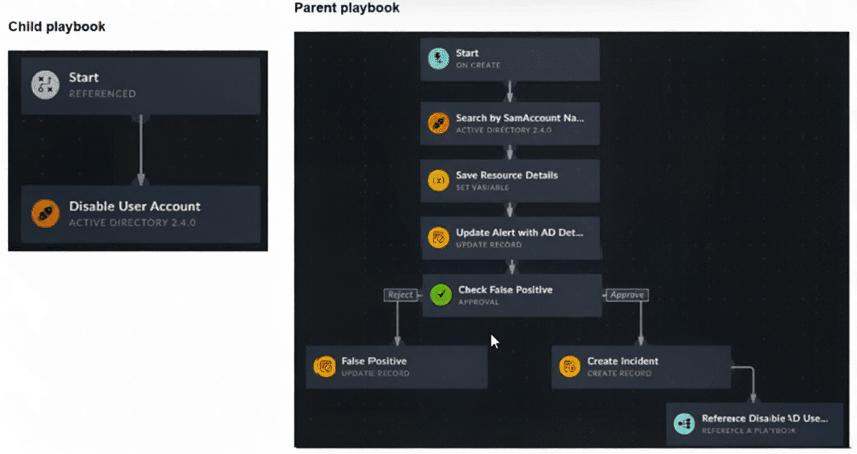
You have a playbook that, depending on whether an analyst deems the alert to be a true positive, could
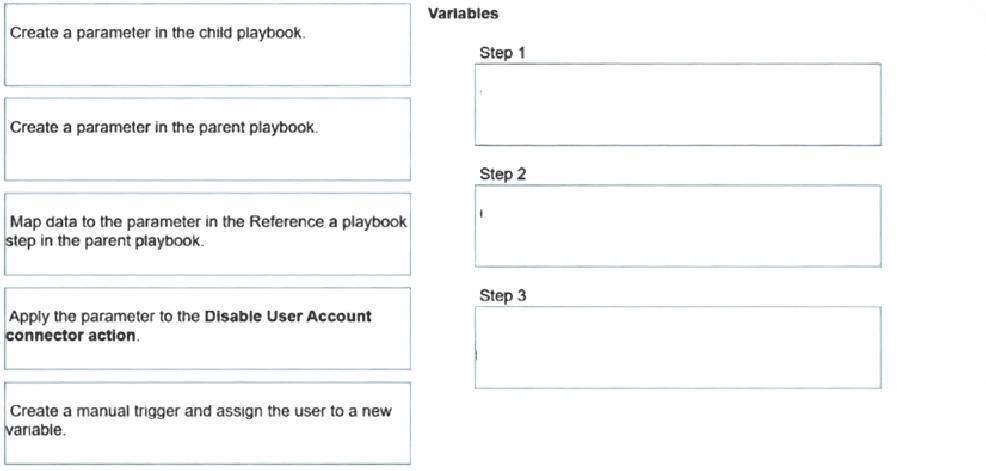
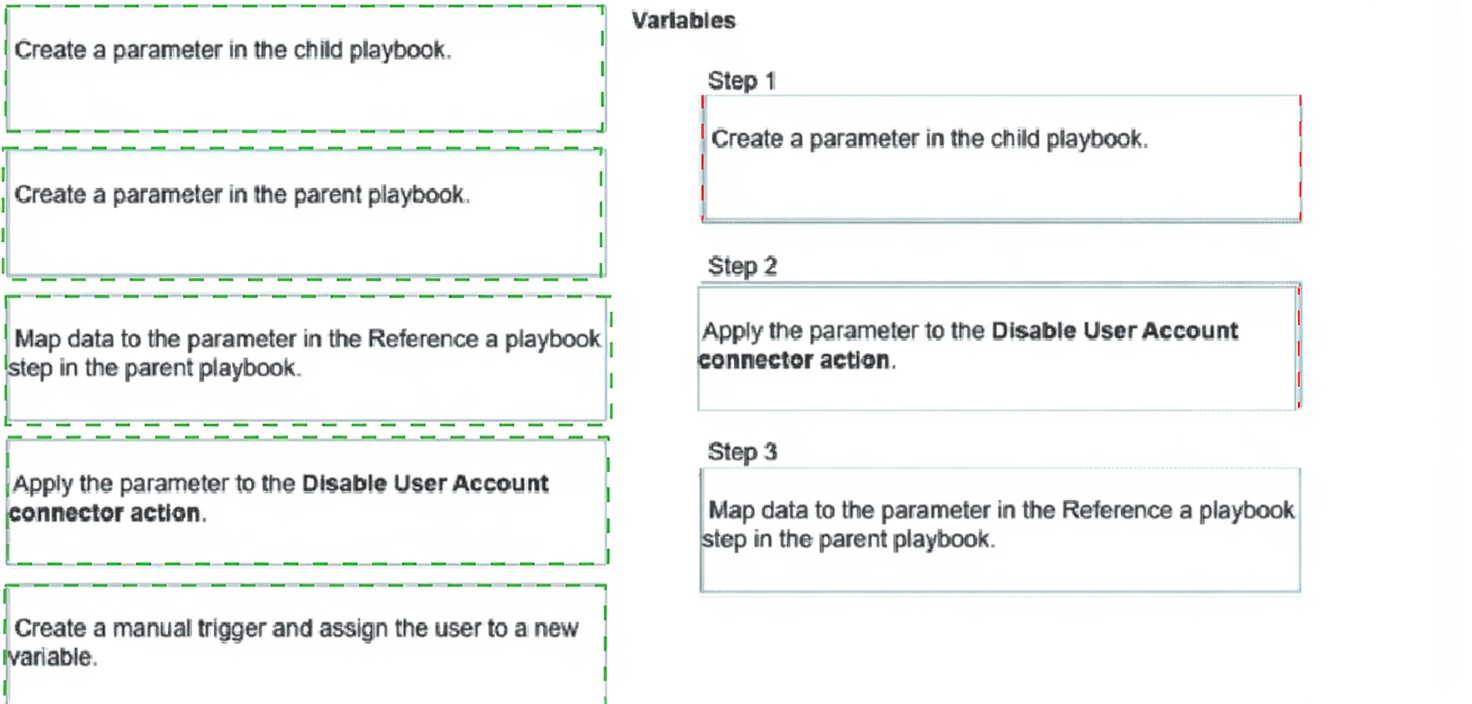
reference a child playbook. You need to pass variables from the parent playbook to the child playbook.
Place the steps needed to accomplish this in the correct order.
Review the following incident report:
Attackers leveraged a phishing email campaign targeting your employees.
The email likely impersonated a trusted source, such as the IT department, and requested login credentials.
An unsuspecting employee clicked a malicious link in the email, leading to the download and execution of a
Remote Access Trojan (RAT).
The RAT provided the attackers with remote access and a foothold in the compromised system.
Which two MITRE ATT&CK tactics does this incident report capture? (Choose two.)
A. Initial Access
B. Defense Evasion
C. Lateral Movement
D. Persistence
Explanation:
This incident describes two clear attack stages. The phishing email and malicious link show how the attacker first entered the environment, and the RAT establishing remote access shows how the attacker kept a foothold on the system.
✅ Correct Option A: Initial Access
The phishing email campaign and malicious link represent the entry point into the target environment. Fortinet’s MITRE ATT&CK content explains that tactics describe the attacker’s goal, and phishing is a common method used to gain initial access. In this scenario, the attacker used social engineering to get a user to execute the payload.
✅ Correct Option D: Persistence
The RAT providing remote access and a foothold indicates the attacker can remain on the host after the first compromise. Fortinet’s incident response material refers to reporting attack vectors, compromised systems, and the tactics, techniques, and procedures used by attackers, which supports treating ongoing malware-based access as persistence.
❌ Option B: Defense Evasion
Defense Evasion is about avoiding detection, hiding malicious activity, or bypassing security controls. The report does not describe stealth, concealment, or anti-detection behavior, so this tactic is not directly captured here.
❌ Option C: Lateral Movement
Lateral Movement means moving from the first compromised system to other systems in the network. This report only describes the initial phishing compromise and the RAT foothold on one system, not movement across additional hosts.
🔧 Reference:
→
What Is Mitre Att&CK? Framework, Techniques, and Benefits
— Confirms that tactics represent attacker goals and techniques describe how they are carried out.
→
FortiGuard Incident Response Service
— Confirms Fortinet incident reporting covers attack vectors, compromised systems, and TTPs used by attackers.
When does FortiAnalyzer generate an event?
A. When a log matches a filter in a data selector
B. When a log matches an action in a connector
C. When a log matches a rule in an event handler
D. When a log matches a task in a playbook
Explanation:
This question tests your understanding of the FortiAnalyzer event generation process. A key function of FortiAnalyzer is to analyze incoming logs and elevate them to noteworthy security Events when they meet specific, predefined conditions. This mechanism is the foundation of FortiAnalyzer's Security Operations Center (SOC) capabilities.
The correct answer focuses on the central, configurable component responsible for this detection logic.
✅ C. When a log matches a rule in an event handler.
This is the fundamental and correct mechanism for event generation in FortiAnalyzer. An Event Handler is a user-defined object that contains one or more detection rules. Its primary job is to continuously inspect incoming logs and generate an event whenever a log entry meets the criteria specified in its rules.
Here’s how it works:
✔️ Configuration: You create an event handler and define rules within it. These rules specify which log types to monitor (e.g., Traffic, IPS, Virus) and set the conditions for an event, such as matching specific source IPs, threat severity levels, or the number of occurrences within a timeframe.
✔️ Evaluation: As logs flow into FortiAnalyzer, the system runs them against all enabled event handlers.
✔️ Generation: A log that successfully matches all the conditions of a rule triggers that rule, causing FortiAnalyzer to generate a new Event. This event is then displayed in the Event Monitor and can optionally trigger notifications or automatically create an Incident.
❌ A. When a log matches a filter in a data selector.
This is a common point of confusion, but it's incorrect. A Data Selector is a tool used to scope and filter the logs that are fed into an event handler. Its purpose is administrative—to define which devices or subnetworks the event handler will process logs from. While it does contain filters, matching a data selector's filter alone does not generate an event. It simply determines whether a log is eligible to be evaluated by the event handler's rules in the first place.
❌ B. When a log matches an action in a connector.
This is incorrect and confuses different Fortinet product functions. Connectors (like Fabric Connectors) are typically used for outbound actions or integrations, such as sending an alert notification to another system (like FortiGate via Automation Stitch) after an event has already been generated. They are a response to an event, not the cause of it.
❌ D. When a log matches a task in a playbook.
This is also incorrect. Playbooks are associated with FortiSOAR (Security Orchestration, Automation, and Response), which is a separate product designed for post-event workflow automation. A playbook executes a series of tasks (like blocking an IP) in response to an incident that was created from a FortiAnalyzer event. The event generation happens in FortiAnalyzer first, before any playbook task is triggered.
Key Takeaway for Your Exam
Always remember this core sequence: Logs → Event Handler (with Rules) → Event → (Optional) Incident/Notification/Automation. The event handler and its rules are the essential, non-negotiable trigger for creating an event from a log in FortiAnalyzer.
Review the incident report:
Packet captures show a host maintaining periodic TLS sessions that imitate normal HTTPS traffic but run on
TCP 8443 to a single external host. An analyst flags the traffic as potential command-and-control. During the
same period, the host issues frequent DNS queries with oversized TXT payloads to an attacker-controlled
domain, transferring staged files.
Which two MITRE ATT&CK techniques best describe this activity? (Choose two answers)
A. Non-Standard Port
B. Exploitation of Remote Services
C. Exfiltration Over Alternative Protocol
D. Hide Artifacts
Explanation:
Summary
The activity described involves two distinct phases. First, the attacker is using an encrypted "tunnel" (TLS) on a port it doesn't belong to (TCP 8443) to talk to their home server; this is a trick to bypass simple firewalls that only check for standard traffic on standard ports. Second, they are moving stolen files out of the network by hiding pieces of data inside DNS TXT records. Since DNS is required for the internet to work, many organizations leave it relatively unmonitored, making it a perfect "alternative protocol" for stealing data without triggering high-traffic alerts.
The Correct Answers
✅ A. Non-Standard Port
The report mentions the host is running TLS sessions (normally TCP 443) over TCP 8443. In the MITRE ATT&CK framework, the technique Non-Standard Port (T1571) specifically refers to adversaries communicating using a protocol and port pairing that are typically not associated. Even though 8443 is often used for "alternative" HTTPS, it is officially considered a non-standard port for standard web traffic, and attackers use it to evade security filters that only inspect port 443.
✅ C. Exfiltration Over Alternative Protocol
The second part of the scenario describes transferring staged files using DNS queries with oversized TXT payloads. This is a textbook example of Exfiltration Over Alternative Protocol (T1048). Instead of using a dedicated file-transfer protocol like FTP or a web upload (HTTP/S), the attacker is abusing DNS—a protocol meant for address resolution—to "tunnel" the file data out of the network bit by bit.
Why the Other Options are Incorrect?
❌ B. Exploitation of Remote Services
This technique (T1210) refers to an attacker taking advantage of a programming error or "vulnerability" in a network service (like an unpatched VPN or web server) to gain access. In the scenario provided, the attacker already has a foothold and is communicating/exfiltrating data. There is no mention of a software vulnerability being exploited to gain entry.
❌ D. Hide Artifacts
This technique (T1564) involves an attacker trying to hide their presence on the host itself (e.g., hiding files in obscure directories, using hidden NTFS streams, or renaming malicious tools to look like system files). While the attacker is trying to hide their traffic (which is "Data Obfuscation" or "Protocol Impersonation"), "Hide Artifacts" specifically refers to the persistence and defense evasion steps taken on the local file system or operating system, not the network traffic patterns.
Official Reference:
https://docs.fortinet.com
Which two playbook triggers enable the use of trigger events in later tasks as trigger variables? (Choose two.)
A. EVENT
B. INCIDENT
C. ON SCHEDULE
D. ON DEMAND
Explanation:
FortiAnalyzer playbooks start with a trigger that decides when they run. Some triggers bring in real "event" or "incident" data from the system—like details from a newly created event (alert) or incident—and make that data available as variables (often called trigger variables, formatted like ${trigger.something}) for use in later playbook tasks. This lets you reference things like the source IP, user name, or event severity dynamically in actions such as searches, updates, or notifications. Not all triggers provide this incoming context: scheduled or manual ones usually don't carry the same live trigger payload.
Correct answers
✅ A. EVENT
This is correct. The EVENT_TRIGGER (or EVENT) starts the playbook when a matching event is created in FortiAnalyzer. The event details—like fields from the log or event record—are passed in and accessible as trigger variables throughout the playbook. You can pull things like ${trigger.epip} (endpoint IP), ${trigger.user}, or other event attributes directly into tasks. This is one of the main ways playbooks react to security detections automatically.
✅ B. INCIDENT
This is also correct. The INCIDENT_TRIGGER runs when a new incident matches your filters. Just like with events, the incident's data (fields, linked events, status, etc.) becomes available as trigger variables. You reference them the same way (e.g., ${trigger.incident_id} or ${trigger.severity}) to make decisions or enrich actions. It's designed for incident-response flows where you want to act based on the incident itself.
Incorrect options
❌ C. ON SCHEDULE
This doesn't work for trigger variables from an event/incident. ON_SCHEDULE runs the playbook at set times (like every hour or daily), but there's no incoming "trigger event" or record to provide context—it's just time-based execution. No dynamic data from a specific alert or incident gets passed in automatically. People sometimes think schedules could loop over recent events, but the trigger itself doesn't supply variables like the others do.
❌ D. ON DEMAND
This is manual—someone clicks to run it from the Playbooks list or an incident page. While you can select a record to pass in when starting it (especially if configured to require input), the standard trigger doesn't inherently provide automatic "trigger event" variables from a system-generated event or incident the way EVENT and INCIDENT do. It's more for ad-hoc runs, so the exam distinguishes it here.
Reference
Fortinet Documentation: https://docs.fortinet.com/product/fortianalyzer/7.6
Refer to the exhibit.
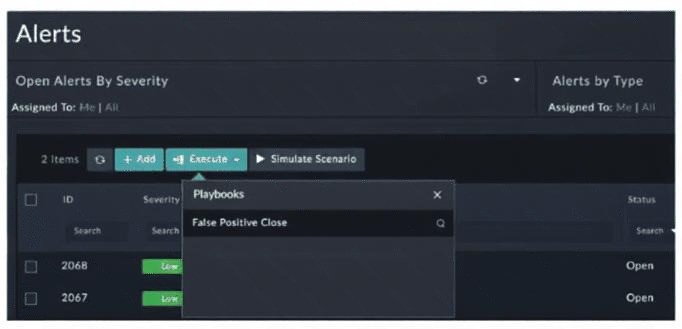
You configured a playbook namedFalse Positive Close, and want to run it to verify if it works. However,
when you clickExecuteand search for the playbook, you do not see it listed. Which two reasons could be the
cause of the problem? (Choose two answers)
A. The playbook must first be published using the Application Editor.
B. Another instance of the playbook is currently executing.
C. The Alerts module is not among the list of modules the playbook can execute on.
D. The manual trigger is configured to require record input to run.
Explanation:
🔍 Concept summary
This question is about why a FortiSOAR playbook does not appear in the Execute list, even though it exists. When a playbook is missing from the Execute menu, the problem is almost never a runtime issue. It is a visibility and eligibility problem.
For a playbook to appear under Execute in a specific module like Alerts, three things must be true:
🔹 The playbook must be published.
🔹 The playbook must be allowed to run on that module.
🔹 The trigger type must be compatible with how you are trying to run it.
If any of these conditions fail, the playbook is simply hidden from the list.
✅ Correct answers: A and C
✅ A. The playbook must first be published using the Application Editor.
Unpublished playbooks do not appear anywhere outside the editor.
If the playbook is still in Draft state:
🔹 It will not show up in the Execute menu.
🔹 It cannot be triggered manually.
🔹 It cannot be associated with alerts or incidents.
This is a very common oversight when testing new playbooks. Saving is not enough. Publishing is mandatory.
✅ C. The Alerts module is not among the list of modules the playbook can execute on.
Playbooks are module-scoped.
If the playbook is not configured to run on the Alerts module:
🔹 It will not appear when you click Execute from Alerts.
🔹 Even if the playbook is published, it remains invisible in that context.
This typically happens when:
🔹 The playbook was created for Incidents, not Alerts.
🔹 The module selection was skipped or misconfigured.
FortiSOAR does not warn you. It simply hides the playbook.
❌ Incorrect options
❌ B. Another instance of the playbook is currently executing.
This does not prevent the playbook from appearing in the Execute list.
Even if another instance is running:
🔹 The playbook remains visible.
🔹 Execution may fail or queue depending on configuration, but visibility is unaffected.
This option confuses execution control with playbook eligibility.
❌ D. The manual trigger is configured to require record input to run.
This is not the issue here.
When executing from the Alerts module, record input is automatically provided by the selected alert(s). A manual trigger that requires record input is actually expected behavior for alert-based playbooks.
This would only be a problem if you tried to run the playbook outside of any module context, which is not the case in the exhibit.
Reference
Fortinet Documentation: https://docs.fortinet.com
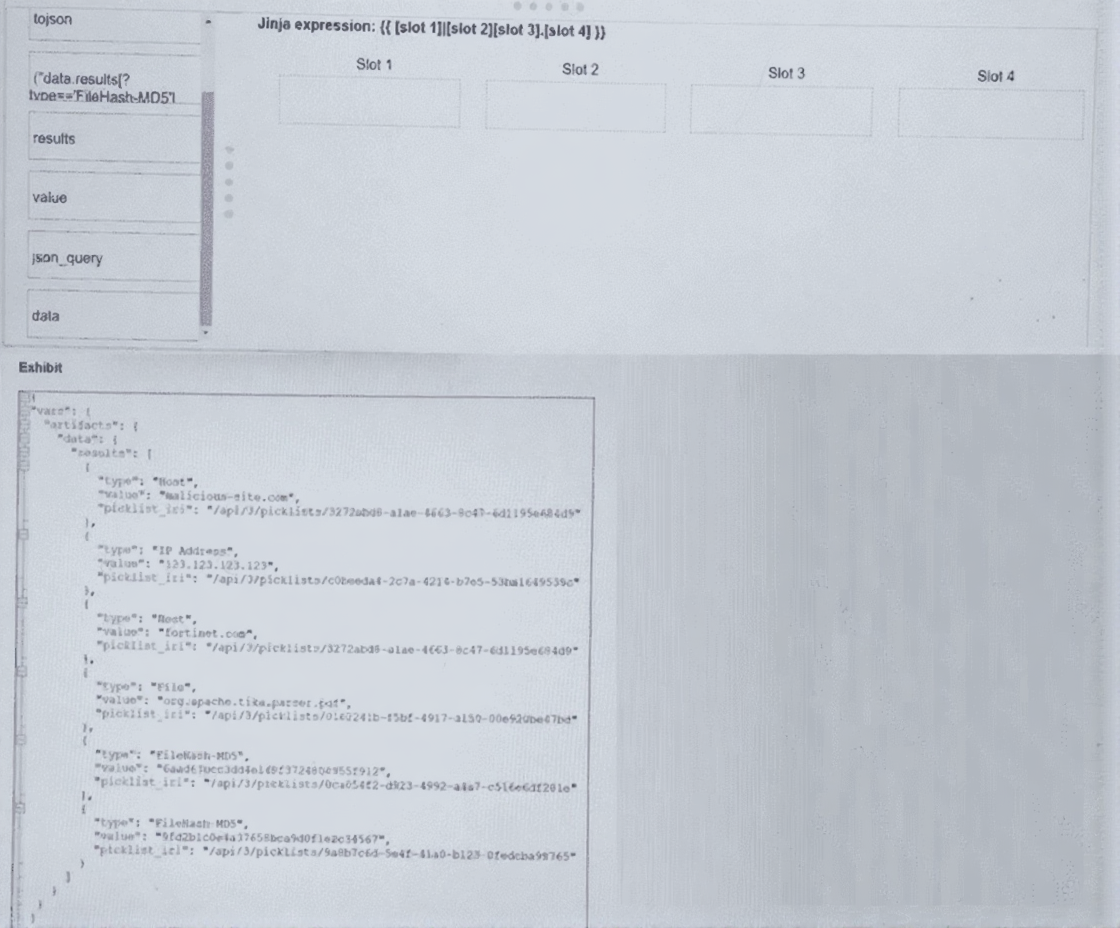
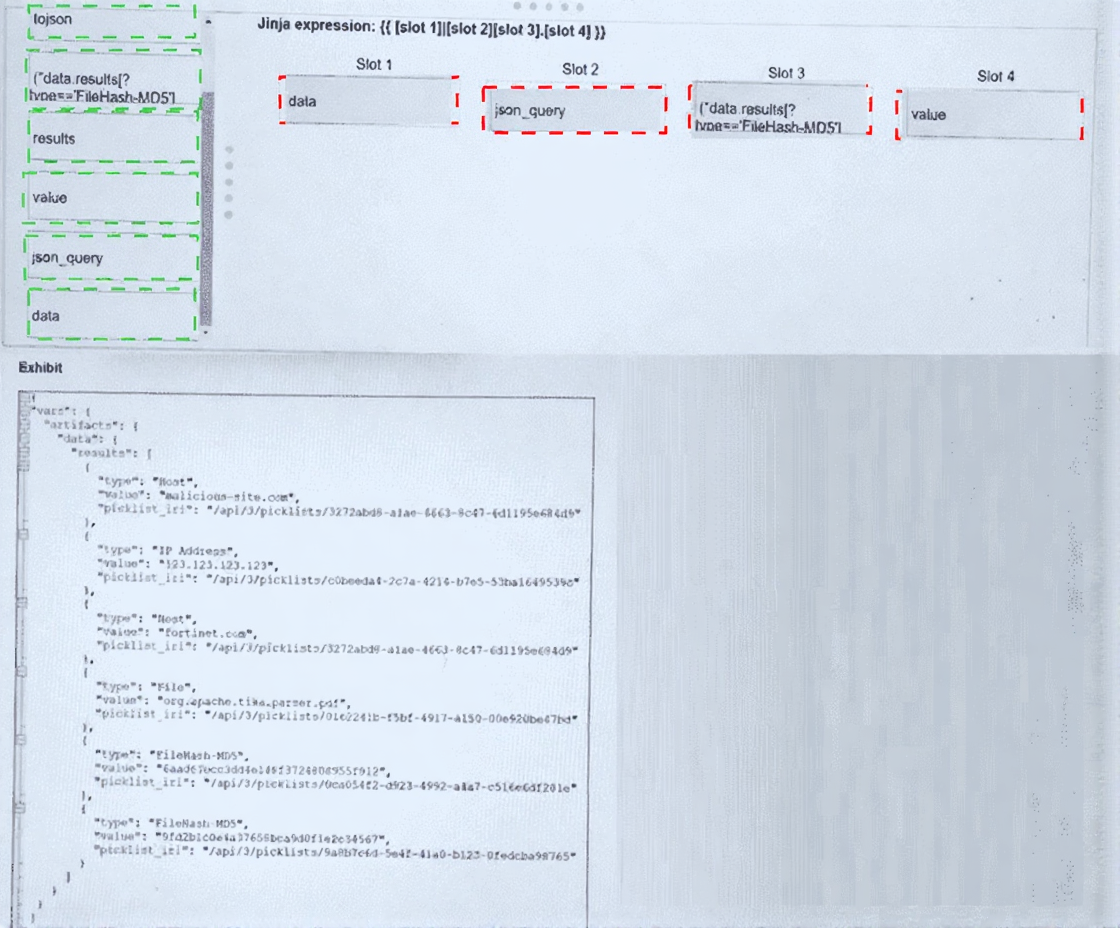
Refer to the exhibit. What is the correct Jinja expression to filter the results to show only the MD5 hash
values?
{{ [slot 1] | [slot 2] [slot 3].[slot 4] }}
Select the Jinja expression in the left column, hold and drag it to a blank position on the right. Place the four
correct steps in order, placing the first step in the first slot.
Explanation:
This question tests your ability to filter a JSON object in a Jinja template using the json_query filter. The goal is to extract only the value fields where type equals FileHash-MD5. The expression navigates from the root variable, filters the array, and selects the specific key.
✔️ Correct Options:
Slot 1 (data):
The variable vars.artifacts.data contains the results array. Starting with data accesses that nested dictionary correctly .
Slot 2 (json_query):
This is the Jinja2 filter that parses a JMESPath expression. It extracts elements from the JSON structure without writing explicit loops .
Slot 3 ("results[?type=='FileHash-MD5']"):
The JMESPath query filters the results array, keeping only objects where type equals FileHash-MD5. Note the exact string match including hyphen .
Slot 4 (value):
After filtering, selecting value returns only the MD5 hash strings (e.g., 6aadf0ccddde1d4f3724800955912) rather than full objects .
❌ Incorrect options (common mistakes):
data.results as a single slot:
The expression must use json_query after the base variable, not combine them as a dotted string .
json_query in Slot 3:
json_query is a filter, not a key. Placing it inside brackets will cause a syntax error .
['data_results']:
This misreads the JSON key. The exhibit uses data.results (dotted), not data_results (underscored) .
index = 'FileHash-MDS1':
This is not valid Jinja or JMESPath syntax. Filtering uses [?condition], not index assignment .
value in Slot 3:
value is the target key, not the filter condition. It must come after the filtered array .
| Page 2 out of 13 Pages |
| 1234567 |
| NSE7_SOC_AR-7.6 Practice Test Home |
The Fortinet NSE 7 - Security Operations 7.6 Architect exam is notoriously tough. It doesn't test memorization. It forces you to make complex decisions under time pressure. A weak prep strategy risks a costly failure and wasted effort. Our NSE7_SOC_AR-7.6 practice tests are built to be your definitive bridge to a passing score.

Copyright © - All Rights Reserved