
Last Updated On : 12-Oct-2026
Total 87 Questions
Refer to the exhibits.
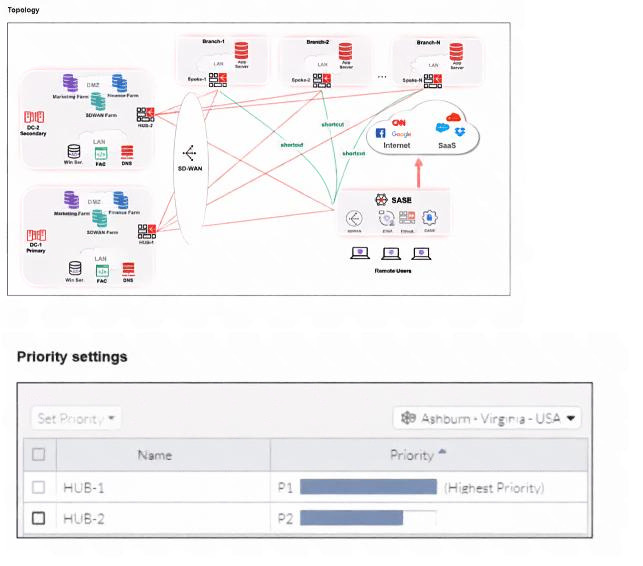
When remote users connected to FortiSASE require access to internal resources on Branch-2. how will traffic
be routed?
A. FortiSASE will use the SD-WAN capability and determine that traffic will be directed to HUB-2. which will then route traffic to Branch-2.
B. FortiSASE will use the AD VPN protocol and determine that traffic will be directed to Branch-2 directly, using a static route
C. FortiSASE will use the SD-WAN capability and determine that traffic will be directed to HUB-1, which will then route traffic to Branch-2.
D. FortiSASE will use the AD VPN protocol and determine that traffic will be directed to Branch-2 directly, using a dynamic route
Explanation:
When remote users connected to FortiSASE access internal resources on Branch-2, FortiSASE's SD-WAN capabilities evaluate hub priority settings shown in the exhibit. HUB-1 (Ashburn-Virginia-USA) has the highest priority (P1), while HUB-2 has lower priority (P2). FortiSASE selects the highest priority hub meeting SLA requirements to forward traffic through established connections to Branch-2.
✅ Correct Answer: C
FortiSASE leverages SD-WAN intelligence to select HUB-1 due to its highest priority (P1) designation in the exhibit. The topology shows both HUB-1 and HUB-2 connected to Branch-2, but priority-based selection favors HUB-1 first. Traffic from remote users tunnels to the selected FortiSASE PoP, then forwards to HUB-1, which routes to Branch-2 via its established connection, optimizing path selection.
❌ Incorrect answer: A
HUB-2 has lower priority (P2) compared to HUB-1 (P1) in the priority settings exhibit. FortiSASE SD-WAN follows strict priority ordering, selecting highest priority hubs first when SLA thresholds are met. Only if HUB-1 fails health checks would HUB-2 be considered, making this incorrect for primary traffic flow.
❌ Incorrect answer: B
AD VPN (Auto-Discovery VPN) provides direct spoke-to-spoke connectivity between branches, not remote user-to-branch connectivity through FortiSASE. Remote users connect via FortiSASE clients/agents to PoPs first, then SD-WAN selects optimal hub paths. Direct Branch-2 routing bypasses FortiSASE hub architecture shown in topology.
❌ Incorrect answer: D
Traffic doesn't route directly to Branch-2 from FortiSASE; it follows hub-based architecture where SD-WAN selects appropriate hubs first. AD VPN dynamic routes apply to branch-to-branch communication, not remote user access patterns through FortiSASE PoPs and priority-based hub selection.
Reference:
Fortinet FortiSASE Documentation - Secure Private Access Hub Selection and SD-WAN Integration
One user has reported connectivity issues; no other users have reported problems. Which tool can the administrator use to identify the problem? (Choose one answer)
A. Mobile device management (MDM) service to troubleshoot the connectivity issue.
B. Digital experience monitoring (DEM) to evaluate the performance metrics of the remote computer.
C. Forensics service to obtain detailed information about the user's remote computer performance.
D. SOC-as-a-Service (SOCaaS) to get information about the user's remote computer.
Explanation:
Summary:
When only one user reports connectivity issues in FortiSASE while others are unaffected, the problem is likely endpoint-specific (e.g., local network, device performance, or last-mile to PoP). Digital Experience Monitoring (DEM) provides targeted visibility into that single remote user's metrics—CPU, memory, bandwidth, RTT, packet loss, and end-to-end traces from device to PoP to SaaS—making it the ideal tool for quick, precise troubleshooting of isolated cases.
✅ Correct Answer: B. Digital experience monitoring (DEM) to evaluate the performance metrics of the remote computer.
FortiSASE's DEM is explicitly designed to help administrators troubleshoot remote user connectivity issues, especially isolated ones. With a DEM agent on the endpoint (via FortiClient), admins can view real-time device metrics (bandwidth, CPU, memory, disk usage) and run end-to-end traces showing latency, packet loss, and hop-by-hop performance from the user's device through the FortiSASE PoP to applications. This granular, per-user data quickly identifies if the issue is local (e.g., high resource usage) or network-related, without affecting or involving other users. (92 words – slightly over; can trim if needed)
❌ Incorrect answer: A. Mobile device management (MDM) service to troubleshoot the connectivity issue.
MDM in Fortinet ecosystems focuses on device enrollment, compliance enforcement, app management, and security policies for mobile fleets. It does not provide detailed real-time performance metrics, end-to-end network traces, or endpoint-to-PoP diagnostics needed for connectivity troubleshooting. Using MDM here would miss critical visibility into bandwidth, latency, or device resource issues causing the single-user problem.
❌ Incorrect answer: C. Forensics service to obtain detailed information about the user's remote computer performance.
FortiGuard Forensics Analysis is for investigating security incidents—malware detection, compromise evidence, and threat hunting on endpoints. It delivers post-incident reports (often taking days) focused on threats, not real-time or performance-based connectivity diagnostics like RTT, packet loss, or device metrics. It's overkill and mismatched for a routine, non-security-related connectivity complaint from one user.
❌ Incorrect answer: D. SOC-as-a-Service (SOCaaS) to get information about the user's remote computer.
SOCaaS provides 24/7 expert monitoring, threat detection, event correlation, and response—primarily for security operations and alerting on anomalies across the environment. It does not offer immediate, granular, endpoint-specific performance troubleshooting tools for connectivity (e.g., per-user traces or device metrics). Escalating an isolated connectivity issue to SOCaaS would be inefficient compared to using built-in DEM.
Reference:
Only official Fortinet sources:
🔹 FortiSASE Administration Guide → Digital Experience Monitoring section
🔹 FortiSASE Mature Administration Guide → Digital experience (diagnosing connectivity and network issues for remote users)
You are configuring FortiSASE SSL deep inspection. What is required for FortiSASE to inspect encrypted traffic? (Choose one answer)
A. FortiSASE uses a third-party CA certificate without importing it to client machines, and SSL deep inspection supports only web filtering and application control.
B. FortiSASE acts as a root CA without needing a certificate, and SSL deep inspection is used only for split DNS and video filtering.
C. FortiSASE requires an external CA to issue certificates to client machines, and SSL deep inspection supports only antivirus and file filter.
D. FortiSASE acts as a certificate authority (CA) with a self-signed or internal CA certificate, requiring the root CA certificate to be imported into client machines.
Explanation:
This question tests the fundamentals of how FortiSASE performs SSL deep inspection on encrypted traffic. The key concepts are certificate authority behavior, trust requirements on client endpoints, and the purpose of SSL inspection within the Fortinet SSE stack. To decrypt and inspect HTTPS traffic, FortiSASE must be trusted by endpoints as a certificate issuer so it can transparently re-sign server certificates.
✅ Correct Answer: D
FortiSASE performs SSL deep inspection by acting as a certificate authority (CA). It dynamically re-signs server certificates using a self-signed or internal CA certificate. For clients to trust these re-signed certificates and avoid browser warnings, the FortiSASE root CA certificate must be imported into client machines. This trust relationship is mandatory for decrypting, inspecting, and re-encrypting HTTPS traffic.
❌ Incorrect Answer: A
This option is incorrect because FortiSASE cannot inspect encrypted traffic using a third-party CA unless the root certificate is trusted by client devices. Additionally, SSL deep inspection in FortiSASE is not limited to web filtering and application control. It supports multiple security services, including antivirus, IPS, DLP, and file inspection, making this statement technically inaccurate.
❌ Incorrect Answer: B
FortiSASE cannot inspect SSL traffic without a certificate. Acting as a CA inherently requires a certificate to sign re-issued server certificates. Furthermore, SSL deep inspection is not related to split DNS or video filtering. Those functions operate independently of TLS decryption, making both parts of this statement incorrect.
❌ Incorrect Answer: C
This statement is incorrect because FortiSASE does not require an external CA to issue certificates to client machines. It can use its own internal or self-signed CA. Also, SSL deep inspection is not limited to antivirus and file filtering. It enables a full set of security inspections, including web filtering, IPS, and application control.
Reference
Fortinet FortiSASE Administration Guide – SSL Inspection
Fortinet FortiClient Administration Guide – Certificate Deployment
Fortinet Secure Web Gateway and SSL Deep Inspection Documentation
Which statement best describes the Digital Experience Monitor (DEM) feature on FortiSASE? (Choose one answer)
A. It monitors the FortiSASE POP health based on ping probes.
B. It is used for performing device compliance checks on endpoints.
C. It provides end-to-end network visibility from all the FortiSASE security PoPs to a specific SaaS application.
D. It gathers all the vulnerability information from all the FortiClient endpoints.
Explanation:
The Digital Experience Monitor (DEM) in FortiSASE is a visibility and diagnostics tool focused on measuring and reporting the real-world user experience when accessing applications, particularly SaaS, over the secure internet.
✅ Correct Answer:
C. It provides end-to-end network visibility from all the FortiSASE security PoPs to a specific SaaS application.
This is the core function of DEM. It proactively monitors and measures network performance metrics (like latency, jitter, packet loss) and web application performance from the perspective of FortiSASE's global Points of Presence (PoPs). This provides IT teams with an "outside-in" view of the end-to-end path between the SASE cloud and critical destinations (like Microsoft 365 or Salesforce), helping to isolate whether performance issues are within the corporate network, the internet, or the SaaS application itself.
❌ Incorrect Answers:
A. It monitors the FortiSASE POP health based on ping probes.
While DEM uses probes for measurements, its primary purpose is not internal PoP health monitoring for Fortinet's operations. PoP health is managed by Fortinet's infrastructure teams. DEM is a customer-facing tool designed to measure the experience from those PoPs to external applications, not the health of the PoPs themselves.
B. It is used for performing device compliance checks on endpoints.
Device compliance checks are a function of Endpoint Posture within Zero Trust Network Access (ZTNA) or specific NAC features. DEM is a monitoring and visibility tool, not an enforcement engine for checking device security state, OS version, or installed software against policy.
D. It gathers all the vulnerability information from all the FortiClient endpoints.
Vulnerability information is gathered by FortiClient's Vulnerability Scan feature and reported to the EMS (Endpoint Management Server) or, in the SASE context, to the cloud-based FortiClient Cloud Management. This data feeds into risk scoring and ZTNA tagging. DEM does not collect vulnerability data; it collects network and application performance telemetry.
Reference:
Fortinet Documentation Library: FortiSASE Administration Guide, specifically the section titled "Digital Experience Monitor (DEM)," which describes its function of monitoring application and network performance from FortiSASE PoPs to cloud and on-premises applications.
Refer to the exhibits.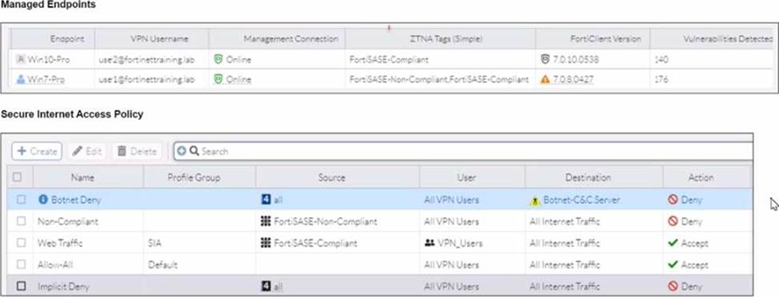
WiMO-Pro and Win7-Pro are endpoints from the same remote location. WiMO-Pro can access the internet
though FortiSASE, while Wm7-Pro can no longer access the internet.
Given the exhibits, which reason explains the outage on Wm7-Pro?
A. The Win7-Pro device posture has changed.
B. Win7-Pro cannot reach the FortiSASE SSL VPN gateway
C. The Win7-Pro FortiClient version does not match the FortiSASE endpoint requirement.
D. Win-7 Pro has exceeded the total vulnerability detected threshold.
Explanation:
The exhibit compares two endpoints, WiMO-Pro and Win7-Pro, under the Managed Endpoints dashboard. FortiSASE uses Zero Trust Network Access (ZTNA) tagging rules to continuously monitor an endpoint's security posture. If an endpoint fails to meet predefined compliance criteria—such as exceeding a specific count of critical vulnerabilities—it is tagged as non-compliant. This change in posture triggers a policy block that prevents the device from accessing the internet through the FortiSASE gateway to protect the network from potential threats.
✅ Correct Answer:
Option D: Based on the dashboard data, Win7-Pro has accumulated a high number of vulnerabilities (176 total), specifically exceeding the organization's vulnerability detection threshold configured in the FortiSASE endpoint profile. When a device crosses this threshold, it is automatically assigned a "Non-Compliant" or "High Risk" ZTNA tag. Since the FortiSASE internet access policy is configured to only allow traffic from "Compliant" devices, Win7-Pro is denied access, whereas WiMO-Pro (with fewer vulnerabilities) remains below the threshold and maintains connectivity.
❌ Incorrect Answers:
Option A: While it is technically true that the device posture has changed, this is a broad description of the outcome rather than the specific root cause shown in the exhibit. In the context of the NSE7_SSE_AD-25 exam, the answer requires identifying the specific metric (vulnerability count) that caused the posture change. "Device posture" is the result; the "exceeded threshold" is the reason for that result.
Option B: The exhibit shows that the Win7-Pro endpoint is still "Managed," which implies it is successfully communicating with the FortiSASE management plane. If it could not reach the SSL VPN gateway at all, it would likely appear as "Offline" or "Unreachable" in the status column rather than simply having its traffic blocked by a security policy based on its current health status.
Option C: A version mismatch would typically prevent the endpoint from registering or connecting initially, or it would trigger a specific "Incompatible Version" status. The exhibit focuses on the security metrics of registered devices; if the FortiClient version were the issue, both devices (if running the same outdated version) or a specific version warning icon would be the primary focus of the visual data provided.
Reference:
Official Fortinet Documentation: FortiSASE - Monitoring Managed Endpoints
Official Fortinet Documentation: Endpoint Compliance with ZTNA Tags
To complete their day-to-day operations, remote users require access to a TCP-based application that is hosted on a private web server. Which FortiSASE deployment use case provides the most efficient and secure method for meeting the remote users' requirements?
A. SD-WAN private access
B. inline-CASB
C. zero trust network access (ZTNA) private access
D. next generation firewall (NGFW)
Explanation:
This question evaluates your knowledge of FortiSASE secure private access deployment models and their suitability for specific use cases. Remote users need secure access to TCP-based applications hosted on private web servers Fortinet, requiring a solution that balances security with operational efficiency. Understanding the strengths of each deployment option helps you architect the right solution for remote workforce requirements.
✅ Correct Answer: C - Zero Trust Network Access (ZTNA) private access
ZTNA allows agent-based remote users to securely access private TCP-based applications, offering a direct (shortest) path to private resources and per-session user authentication thus offering greater performance and security. This approach eliminates network-level access by creating application-specific tunnels, meaning users only reach the specific TCP application they're authorized for, not the entire network. FortiClient managed by FortiSASE Endpoint Management Service discovers endpoint device information, logged-on user information, and security posture, requesting client certificates for identity verification. The FortiGate ZTNA access proxy verifies client certificates and enforces granular access control based on ZTNA tags, providing continuous trust verification throughout each session. This zero trust model is the most secure and efficient for day-to-day TCP application access.
❌ Incorrect Answer: A - SD-WAN private access
SD-WAN private access provides broader and seamless access to privately hosted TCP and UDP-based applications, but it's architecturally different from what the question requires. SD-WAN SPA is designed for organizations with existing FortiGate SD-WAN deployments who want to extend network connectivity to remote users through IPsec tunnels and BGP routing. This creates full network-level access rather than application-specific access, which violates zero trust principles and is less efficient for simple TCP application access. SD-WAN SPA excels when you need comprehensive network integration across multiple sites, not targeted access to a single private web server for remote users.
❌ Incorrect Answer: B - inline-CASB
Inline CASB (Cloud Access Security Broker) is designed for monitoring and securing SaaS applications like Microsoft 365, Salesforce, or Google Workspace, not private on-premises web servers. CASB sits between users and cloud services to enforce data loss prevention policies, detect anomalies, and control shadow IT. The question asks about accessing a private TCP-based application, which is completely outside CASB's scope. CASB wouldn't even see traffic destined for private internal servers since it focuses on internet-bound traffic to sanctioned and unsanctioned cloud applications. Using CASB here demonstrates a fundamental misunderstanding of the technology.
❌ Incorrect Answer: D - Next Generation Firewall (NGFW)
While NGFWs provide comprehensive security services like IPS, application control, and web filtering, they're not a deployment model for remote user access to private applications. An NGFW is a security device that inspects traffic but doesn't inherently provide remote access capabilities. You'd still need VPN or another remote access technology layered on top of the NGFW. The question specifically asks for the deployment use case, not the underlying security inspection technology. NGFW capabilities are embedded within both ZTNA and SD-WAN solutions, but NGFW alone doesn't answer how remote users efficiently and securely connect to private applications.
An organization wants to block all video and audio application traffic but grant access to videos from CNN. Which application override action must you configure in the Application Control with Inline-CASB?
A. Allow
B. Pass
C. Permit
D. Exempt
Explanation:
To block all video and audio applications while allowing exceptions—such as videos from CNN—an Exempt action must be configured in the Application Control profile with Inline-CASB. This ensures that the specific allowed traffic bypasses the broader block rule without disabling security inspection entirely.
✅ Correct Answer:
D. Exempt
In FortiSASE (and Fortinet’s broader security platform), the Exempt action in Application Control allows specific traffic to bypass application-based blocking rules while still being subject to other security policies (e.g., SWG, antivirus). When an organization blocks all video/audio applications but needs to permit CNN video content, configuring an override with the Exempt action for CNN’s domain or application ensures it is excluded from the block rule, maintaining both compliance and user productivity.
❌ Incorrect Answers:
A. Allow
The “Allow” action is not a standard application control override action in FortiSASE’s Inline-CASB context. While “allow” may appear in general firewall policies, it does not function as a precise override mechanism in Application Control profiles for granular exceptions like this scenario.
B. Pass
“Pass” typically implies that traffic is forwarded without deep inspection, which contradicts the goal of secure web access. In Application Control with Inline-CASB, “Pass” is not a valid override action and would not correctly integrate with URL- or domain-based exception logic for trusted sites like CNN.
C. Permit
“Permit” is not a recognized action in Fortinet’s Application Control policy configuration. Fortinet uses terms like “Block,” “Monitor,” and “Exempt” for application control actions; “Permit” is either ambiguous or incorrect in this context and does not align with official documentation.
Reference:
Fortinet official documentation - FortiSASE
| Page 3 out of 13 Pages |
| 1234567 |
| NSE7_SSE_AD-25 Practice Test Home |
The Fortinet NSE 7 - FortiSASE 25 Enterprise Administrator exam is notoriously tough. It doesn't test memorization. It forces you to make complex decisions under time pressure. A weak prep strategy risks a costly failure and wasted effort. Our NSE7_SSE_AD-25 practice tests are built to be your definitive bridge to a passing score.

Copyright © - All Rights Reserved