
Last Updated On : 12-Oct-2026
Total 87 Questions
The difference between a near pass and a confident pass isn't just knowing the material, it's mastering the Fortinet NSE 7 - FortiSASE 25 Enterprise Administrator exam experience. Our Fortinet NSE7_SSE_AD-25 practice test is engineered to close the gap between your current knowledge and the 2026 exam's demands. With every question, you receive detailed, expert verified explanations that break down not just the correct answer, but also the reasoning behind every incorrect option.
Don't just study. Practice NSE7_SSE_AD-25 with purpose. Start your journey to a first-time pass today.
By replicating the exact style, complexity, and format of the real Fortinet NSE 7 - FortiSASE 25 Enterprise Administrator exam questions, we ensure you walk into the exam with complete confidence.
What action must a FortiSASE customer take to restrict organization SaaS access to only FortiSASEconnected users? (Choose one answer)
A. Implement a CNAPP solution to allowlist the users under the FortiSASE egress IP
B. Implement ZTNA for their private apps and allow list them under SaaS portals or grant them conditional access.
C. Connect FortiSASE to an SPA hub for private access to an allowlisted connecting IP.
D. Retrieve the PoPs of the users' public IP addresses from the FortiSASE region IP list and whitelist the IP under SaaS portals, or grant them conditional access.
Explanation:
FortiSASE customers need to restrict SaaS access to only users connected through FortiSASE PoPs to ensure secure egress traffic. This prevents unauthorized access from non-corporate IPs while maintaining granular control over SaaS applications. The correct method leverages FortiSASE's regional IP lists containing PoP public IPs, which SaaS providers can whitelist for conditional access.
✅ Correct Answer: D
Retrieving FortiSASE PoPs' public IP addresses from the region IP list allows customers to whitelist these specific egress IPs in SaaS portals like Microsoft 365 or Google Workspace. This ensures only traffic originating from FortiSASE-connected users gains access, enforcing zero-trust principles. SaaS providers support conditional access policies based on trusted IP ranges, making this the standard implementation for FortiSASE SaaS security.
❌ Incorrect answer: A
CNAPP solutions focus on cloud-native application protection and workload security, not user IP allowlisting for SaaS access. They lack integration with FortiSASE PoP egress IPs and cannot dynamically manage regional IP lists for SaaS conditional access policies. This approach adds unnecessary complexity without addressing the core requirement of IP-based egress control.
❌ Incorrect answer: B
ZTNA secures private application access, not public SaaS services, and allowlisting private apps under SaaS portals is not feasible since SaaS operates via public endpoints. Conditional access in SaaS targets user identity or IP, not ZTNA tunnels, making this mismatched for FortiSASE SaaS restrictions.
❌ Incorrect answer: C
SPA (Secure Private Access) hubs manage private app connectivity via tunnels, not public SaaS access which uses direct internet egress. Allowlisting SPA hub IPs won't restrict SaaS traffic since users connect to SaaS via FortiSASE PoPs, not SPA infrastructure.
Reference:
Fortinet official documentation - FortiSASE Secure SaaS Access guides
What are two benefits of deploying secure private access (SPA) with SD-WAN? (Choose two answers)
A. ZTNA posture check performed by the hub FortiGate
B. Support of both TCP and UDP applications
C. A direct access proxy tunnel from FortiClient to the on-premises FortiGate
D. Inline security inspection by FortiSASE
Explanation:
Deploying Secure Private Access (SPA) with SD-WAN in FortiSASE gives remote users secure, high-performance access to on-premises applications. The two key benefits are full support for both TCP and UDP protocols (critical for legacy and real-time apps) and consistent inline security inspection applied by FortiSASE cloud PoPs before traffic reaches private resources. These advantages come directly from using SD-WAN overlays with FortiSASE PoPs acting as dynamic spokes.
✅ Correct Answer: B. Support of both TCP and UDP applications
Fortinet explicitly states in the FortiSASE Architecture Guide that the SPA with SD-WAN deployment model provides “broader and seamless access to privately hosted TCP- and UDP-based applications.” Because it uses IPsec tunnels and ADVPN dynamic shortcuts, it avoids the TCP-only limitation of some proxy-based tunnels. This is essential for organizations that still use UDP-based applications such as VoIP, video conferencing, legacy systems, or custom protocols. This is one of the main reasons Fortinet recommends this model.
✅ Correct Answer: D. Inline security inspection by FortiSASE
In the SPA with SD-WAN topology, all remote user traffic first enters a FortiSASE Point of Presence (PoP). FortiSASE applies its full cloud-delivered security stack — including NGFW, IPS, web filtering, anti-malware — inline before forwarding the traffic through SD-WAN tunnels to on-premises resources. This gives consistent SSE protection for private app access without relying only on on-premises inspection. This is clearly listed as a major benefit in official documentation.
❌ Incorrect answer: A. ZTNA posture check performed by the hub FortiGate
While the hub FortiGate does apply access policies, Fortinet documentation explains that ZTNA posture checks (device compliance, certificate validation, etc.) are primarily enforced by FortiClient and the FortiSASE PoP before the tunnel is established. The hub FortiGate focuses on routing, BGP, and policy enforcement after the connection is already allowed. Therefore, saying the posture check is “performed by the hub FortiGate” is not accurate for this deployment model.
❌ Incorrect answer: C. A direct access proxy tunnel from FortiClient to the on-premises FortiGate
This is not correct. In SPA with SD-WAN, FortiClient never connects directly to the on-premises FortiGate. Traffic always goes first to the nearest FortiSASE PoP (which acts as a spoke), and only then does the PoP create IPsec tunnels (with possible ADVPN shortcuts) to the organization’s SD-WAN hubs. The word “direct” is misleading — the PoP is always in the middle. This description fits other SPA modes, not the SD-WAN integrated model.
Reference:
Only official Fortinet sources:
🔹 FortiSASE Architecture Guide → “SPA using SD-WAN” section
🔹 Fortinet Document Library → Secure Private Access (SPA) deployment with SD-WAN
Refer to the exhibit.
In the user connection monitor, the FortiSASE administrator notices the user name is showing random
characters. Which configuration change must the administrator make to get proper user information?
A. Turn off log anonymization on FortiSASE.
B. Add more endpoint licenses on FortiSASE.
C. Configure the username using FortiSASE naming convention.
D. Change the deployment type from SWG to VPN.
Explanation:
This question checks understanding of FortiSASE logging and identity visibility. The exhibit shows a user name displayed as a random hash-like value instead of a readable username. This behavior is tied to privacy controls in FortiSASE logging. To troubleshoot user activity, administrators must know when and why FortiSASE anonymizes user identities and how to disable that behavior when clear attribution is required.
✅ Correct Answer: A. Turn off log anonymization on FortiSASE
FortiSASE anonymizes user identities in logs when log anonymization is enabled, replacing usernames with hashed or random-looking values. This is done for privacy and compliance reasons. To display proper usernames in the User Connection Monitor, the administrator must disable log anonymization. Once disabled, FortiSASE logs and monitoring views will show actual authenticated user identities instead of obfuscated strings.
❌ Incorrect Answer: B. Add more endpoint licenses on FortiSASE
Endpoint licensing has no impact on how usernames are displayed in logs or monitoring dashboards. Even with insufficient licenses, FortiSASE would not replace usernames with random characters. Licensing affects connectivity and feature availability, not identity visibility. This option misunderstands the root cause, which is privacy configuration rather than capacity or entitlement.
❌ Incorrect Answer: C. Configure the username using FortiSASE naming convention
FortiSASE does not require a special naming convention to display usernames correctly. Usernames are learned directly from the authentication source such as SAML, LDAP, or VPN authentication. Random-looking usernames indicate anonymization, not misnaming. Changing naming conventions would not reverse hashing or obfuscation applied by FortiSASE logging policies.
❌ Incorrect Answer: D. Change the deployment type from SWG to VPN
Deployment type (SWG vs VPN) does not control whether usernames are anonymized in logs. Both deployment models use the same logging and privacy controls. The exhibit already shows a VPN authentication method, proving that VPN mode alone does not guarantee readable usernames. This option confuses access method with logging behavior.
Reference
Fortinet FortiSASE Administration Guide – Logging and Monitoring
Fortinet FortiSASE Privacy and Log Anonymization Documentation
What are the key differences between the FortiSASE BGP per overlay and BGP on loopback routing design methods? (Choose one answer)
A. BGP per overlay can use separate iBGP sessions for each spoke-to-hub tunnel with mode-cfg enabled for IP address assignment, while BGP on loopback uses a single iBGP session per hub terminating on a loopback interface to simplify configuration and reduce advertised routes.
B. BGP per overlay establishes a single iBGP session per hub on a loopback interface, while BGP on loopback requires mode-cfg for IP address assignment and uses multiple iBGP sessions per tunnel.
C. BGP per overlay is used for loopback interfaces to reduce routes, while BGP on loopback is the default method requiring separate iBGP sessions for each spoke.
D. BGP per overlay simplifies hub configuration without mode-cfg, while BGP on loopback establishes multiple iBGP sessions for each tunnel to increase advertised routes.
Explanation:
This question focuses on two BGP routing design methods available in FortiSASE SD-WAN architecture. The key distinction lies in how iBGP sessions are established between hubs and spokes, affecting configuration complexity, IP assignment mechanisms, and route advertisement scale.
✅ Correct Answer:
A. BGP per overlay can use separate iBGP sessions for each spoke-to-hub tunnel with mode-cfg enabled for IP address assignment, while BGP on loopback uses a single iBGP session per hub terminating on a loopback interface to simplify configuration and reduce advertised routes.
This answer correctly identifies the core operational difference. In the BGP per overlay design, each individual IPSec or GRE tunnel between a spoke and a hub requires its own iBGP session. The mode-cfg (mode config) is often used in this scenario to dynamically assign the tunnel IP address to the spoke from the hub. In contrast, the BGP on loopback method consolidates routing. The spoke establishes a single iBGP session to a loopback interface IP on the hub, which is reachable via all the overlay tunnels (using recursive routing). This simplifies the hub BGP configuration significantly and reduces the number of routes the hub advertises, as it advertises a summary loopback route instead of individual tunnel networks.
❌ Incorrect Answers:
B. BGP per overlay establishes a single iBGP session per hub on a loopback interface, while BGP on loopback requires mode-cfg for IP address assignment and uses multiple iBGP sessions per tunnel.
This option completely reverses the definitions. It incorrectly assigns the "single iBGP session on a loopback" characteristic to BGP per overlay and the "multiple sessions" characteristic to BGP on loopback, which is the opposite of their true functionality.
C. BGP per overlay is used for loopback interfaces to reduce routes, while BGP on loopback is the default method requiring separate iBGP sessions for each spoke.
This option incorrectly swaps the primary purposes. The method specifically associated with using a loopback interface to reduce routes is BGP on loopback, not BGP per overlay. It also incorrectly labels BGP on loopback as the default requiring multiple sessions.
D. BGP per overlay simplifies hub configuration without mode-cfg, while BGP on loopback establishes multiple iBGP sessions for each tunnel to increase advertised routes.
This option is incorrect on multiple points. BGP per overlay generally complicates hub configuration due to multiple sessions and often uses mode-cfg. BGP on loopback is the design that simplifies configuration and aims to reduce advertised routes, not increase them.
Reference:
Fortinet Documentation Library: FortiSASE Administration Guide, specifically the SD-WAN Overlay Routing sections comparing "BGP per overlay" and "BGP on loopback interface" design methodologies.
Refer to the exhibit.
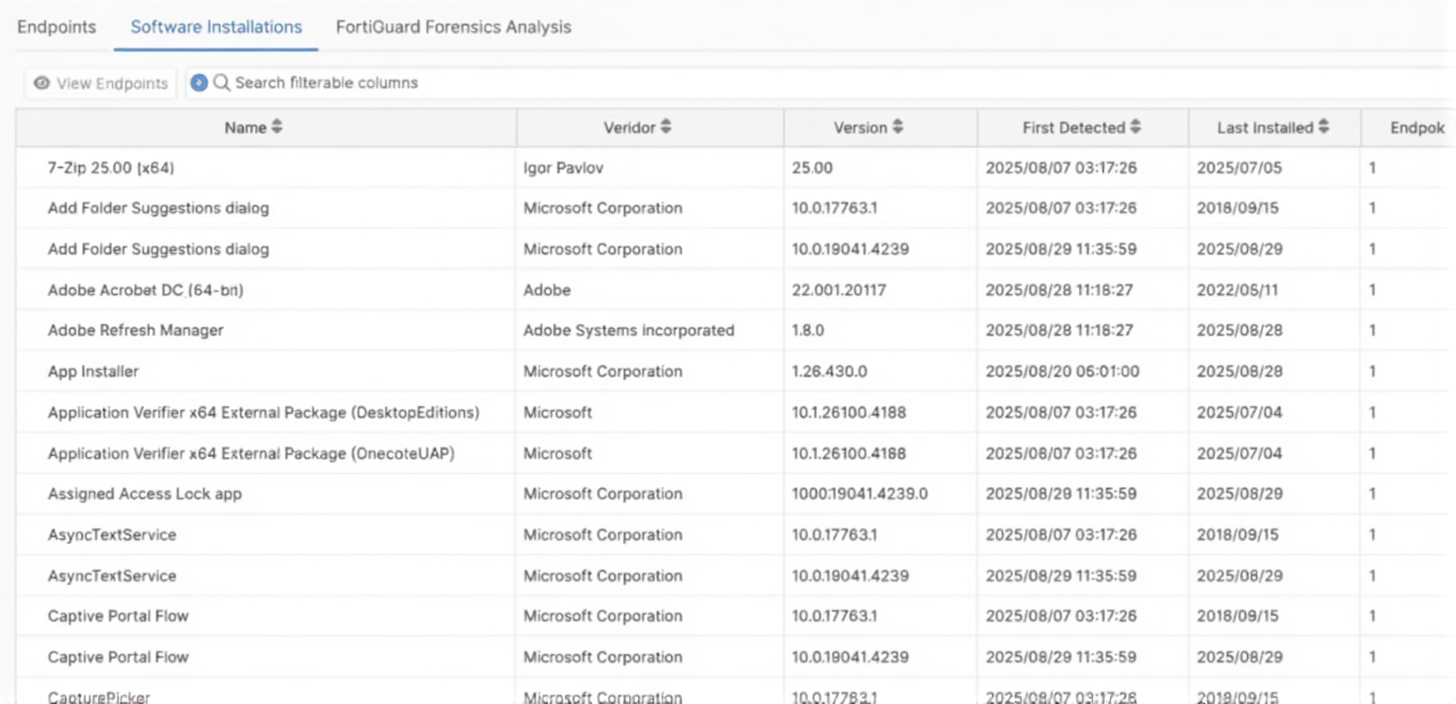
Which type of information or actions are available to a FortiSASE administrator from the following output?
(Choose one answer)
A. Administrators can view and configure endpoint profiles and ZTNA tags.
B. Administrators can view and configure automatic patching of endpoints, and first detected date for applications.
C. Administrators can view latest application version available and push updates to managed endpoints.
D. Administrators can view application details, such as vendor, version, and installation dates to identify unwanted or outdated software.
Explanation:
The exhibit displays the Software Installations tab under the Endpoints menu in the FortiSASE dashboard. This view provides a centralized inventory of all software detected on managed endpoints, including details like the vendor, version, and the date it was first detected or installed. This visibility is crucial for administrators to maintain compliance, perform security audits, and identify potentially unauthorized or vulnerable software within the organization's environment.
✅ Correct Answer:
Option D: In the FortiSASE Software Installations pane, administrators can monitor a comprehensive list of all applications installed on devices registered with FortiClient. By reviewing columns like Vendor, Version, and Last Installed, administrators gain the necessary visibility to detect outdated software versions that might pose security risks or identify unwanted applications that violate corporate policy. This granular data helps in maintaining a secure and standardized endpoint environment across the remote workforce.
❌ Incorrect Answers:
Option A: While FortiSASE does allow the configuration of endpoint profiles and ZTNA tags, these actions are performed under the Configuration > Endpoint Management or ZTNA Tagging menus. The exhibit specifically shows the "Software Installations" view, which is a reporting and monitoring tool rather than a configuration interface for policy-based ZTNA tags or profile assignments.
Option B: Although the output correctly displays the "First Detected" date for applications, FortiSASE does not directly handle the automatic patching of third-party software from this specific dashboard view. Patch management is typically a function of a dedicated UEM or the FortiClient EMS Vulnerability Scan module. This view is primarily for visibility and inventory purposes rather than active remediation or patching orchestration.
Option C: The exhibit shows the version of the software currently installed on the endpoint, but it does not display the "latest application version available" in the global market. Furthermore, FortiSASE's Software Installations tab is a passive inventory tool; it does not provide a mechanism to "push updates" or deploy software packages directly to managed endpoints from this specific list.
Reference:
Official Fortinet Documentation: FortiSASE - Endpoints - Software Installations
A customer needs to implement device posture checks for their remote endpoints while accessing the
protected server. They also want the TCP traffic between the remote endpoints and the protected servers to be
processed by FortiGate.
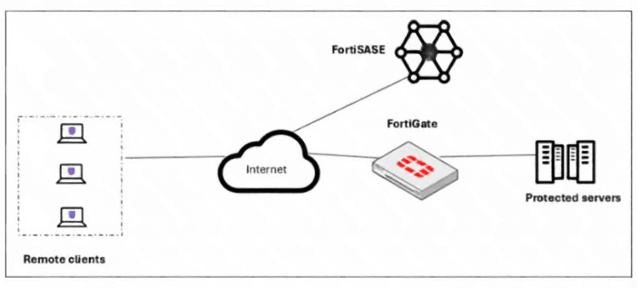
In this scenario, which two setups will achieve these requirements? (Choose two answers)
A. Configure ZTNA tags on FortiGate.
B. Configure FortiGate as a zero trust network access (ZTNA) access proxy.
C. Configure ZTNA servers and ZTNA policies on FortiGate.
D. Configure private access policies on FortiSASE with ZTNA.
Explanation:
The scenario requires two things: (1) evaluate endpoint posture (device health) and (2) have the FortiGate process the TCP traffic to the protected servers. This is the classic FortiGate ZTNA access-proxy model—FortiGate acts as the proxy (processing traffic) and you must define the ZTNA server objects and ZTNA policies that reference the posture tags.
✔️ Correct Option:
B. Configure FortiGate as a zero trust network access (ZTNA) access proxy.
FortiGate’s ZTNA application gateway acts as an SSL-encrypted access proxy, terminating client TCP sessions and forwarding them to protected servers. This design ensures all remote-client traffic is inspected and processed directly on the FortiGate.
C. Configure ZTNA servers and ZTNA policies on FortiGate.
A basic ZTNA deployment requires ZTNA server objects and ZTNA policies that reference security posture tags. Tags come from FortiClient EMS via the EMS connector and are used in the policy for posture-based access control.
❌ Incorrect options:
A. Configure ZTNA tags on FortiGate.
ZTNA tags are created on FortiClient EMS and synced to FortiGate; FortiGate doesn’t generate them. Thus this alone can’t satisfy posture checks or traffic processing.
D. Configure private access policies on FortiSASE with ZTNA.
FortiSASE private-access/ZTNA routes traffic through SASE PoPs, not the corporate FortiGate. Hence the FortiGate wouldn’t process the TCP traffic as required.
Reference:
→ Zero Trust Network Access introduction — FortiGate / FortiOS 7.6.6 Administration Guide Confirms FortiGate acts as an SSL-encrypted access proxy that forwards TCP traffic and that basic ZTNA uses ZTNA server, ZTNA policies, EMS connector and posture tags.
What is the purpose of the grace period for off-net endpoints in the FortiSASE Network Lockdown feature? (Choose one answer)
A. To allow users to attempt VPN reconnection before restrictions are applied1
B. To bypass security policies for specific applications
C. To permanently block network access for non-compliant endpoints
D. To automatically reset the FortiClient configuration
Explanation:
The grace period in FortiSASE Network Lockdown provides a brief window during which off-net endpoints can attempt to re-establish a secure connection—typically via VPN—before full network restrictions are enforced. This prevents abrupt service disruption and allows compliant devices time to reconnect securely.
✅ Correct Answer:
A. To allow users to attempt VPN reconnection before restrictions are applied
When an endpoint is detected as off-net (i.e., not connected through the approved secure tunnel), FortiSASE initiates a grace period. During this interval, the endpoint retains limited network access to facilitate reconnection to the corporate network via FortiClient VPN. This ensures legitimate users aren’t immediately locked out due to transient connectivity issues, supporting a seamless and secure user experience.
❌ Incorrect Answers:
B. To bypass security policies for specific applications
This is incorrect because the grace period does not exempt any application from security policies. All traffic remains subject to enforcement; the grace period only delays full lockdown to allow reconnection, not policy bypass.
C. To permanently block network access for non-compliant endpoints
This misrepresents the feature’s intent. The grace period is temporary and designed to avoid immediate blocking. Permanent blocking may occur only after the grace period expires and the endpoint remains non-compliant.
D. To automatically reset the FortiClient configuration
FortiSASE does not use the grace period to modify or reset FortiClient settings. Configuration management is handled separately through endpoint compliance policies, not the Network Lockdown grace mechanism.
Reference:
Fortinet official documentation - FortiSASE
| Page 1 out of 13 Pages |
| 1234567 |
The Fortinet NSE 7 - FortiSASE 25 Enterprise Administrator exam is notoriously tough. It doesn't test memorization. It forces you to make complex decisions under time pressure. A weak prep strategy risks a costly failure and wasted effort. Our NSE7_SSE_AD-25 practice tests are built to be your definitive bridge to a passing score.

Copyright © - All Rights Reserved