
Last Updated On : 12-Oct-2026
Total 87 Questions
Which service is included in a secure access service edge (SASE) solution, but not in a security service edge (SSE) solution? (Choose one answer)
A. SWG
B. SD-WAN1
C. CASB
D. ZTNA
Explanation:
This question tests your understanding of the architectural difference between SASE (Secure Access Service Edge) and SSE (Security Service Edge). While SSE focuses exclusively on cloud-delivered security services, SASE converges both networking and security capabilities into a unified solution.
✅Correct Option (B. SD-WAN):
SD-WAN represents the networking foundation that makes SASE a complete solution. SASE integrates SD-WAN capabilities to optimize connectivity, traffic routing, and WAN edge functions alongside security services. SSE, by contrast, is purely focused on security functions without any networking or SD-WAN components. The presence of SD-WAN is what transforms a security stack into a complete SASE architecture.
❌Incorrect options:
❌ A. SWG (Secure Web Gateway):
SWG protects users from web-based threats by filtering malicious internet traffic and enforcing company policies. This security service is fundamental to both SASE and SSE solutions, as web security remains essential regardless of whether networking is included.
❌ C. CASB (Cloud Access Security Broker):
CASB provides visibility, compliance, data security, and threat protection for cloud applications. As organizations increasingly adopt cloud services, CASB functionality is a standard component in both SASE and SSE architectures to secure cloud access.
❌ D. ZTNA (Zero Trust Network Access):
ZTNA enables secure, identity-based access to applications without exposing the entire network. This zero trust principle is core to modern security frameworks and is therefore included in both SASE and SSE solutions to ensure secure application access.
Reference:
→ Fortinet SASE vs SSE
Confirms that SASE combines networking (SD-WAN) and security, while SSE includes only security services
You are designing a new network, and the cybersecurity policy mandates that all remote users working from home must always be connected and protected. Which FortiSASE component facilitates this always-on security measure? (Choose one answer)
A. Unified FortiClient
B. SDWAN on-ramp2
C. Secure web gateway
D. Thin-branch SASE extension
Explanation:
This question evaluates the selection of the correct endpoint agent required to maintain persistent security posture for remote workers. It focuses on the specific FortiSASE component that ensures end-to-end encryption and continuous policy enforcement regardless of the user's location.
✅Correct Option:
The Unified FortiClient is the essential endpoint agent that enables an always-on VPN or ZTNA connection to the FortiSASE cloud. It automatically establishes a secure tunnel as soon as the user logs in, ensuring that all traffic is inspected and protected by central security policies.
❌Incorrect options:
B. SDWAN on-ramp:
This component is primarily used to connect physical office locations or data centers to the SASE cloud rather than individual remote users working from home.
C. Secure web gateway:
While this provides web filtering, it is a service delivered by the cloud and requires an agent like FortiClient or a proxy configuration to function for remote users.
D. Thin-branch SASE extension:
This refers to small office hardware deployments that extend SASE to a physical site, which is not the standard method for individual home-based employees.
Reference:
→ FortiClient for FortiSASE
This guide confirms that FortiClient provides the persistent connectivity and security fabric integration needed for remote users to stay protected.
Which role does FortiSASE play in supporting zero trust network access (ZTNA) principles9
A. It offers hardware-based firewalls for network segmentation.
B. It integrates with software-defined network (SDN) solutions.
C. It can identify attributes on the endpoint for security posture check.
D. It enables VPN connections for remote employees.
Explanation:
This question tests how FortiSASE enforces Zero Trust Network Access (ZTNA). ZTNA requires verification of user identity and device posture before granting application access. FortiSASE achieves this by collecting endpoint attributes from FortiClient and applying policies based on the device’s compliance status.
🟢 Correct Option: C. It can identify attributes on the endpoint for security posture check.
FortiSASE supports ZTNA by evaluating endpoint attributes collected through FortiClient, such as OS version, antivirus status, and device compliance. These attributes are used to create ZTNA tags and posture checks, ensuring that only trusted and compliant devices can access protected applications.
🔴 Incorrect Options:
🔴 A. It offers hardware-based firewalls for network segmentation.
Hardware firewalls provide traditional network segmentation at the perimeter or internal network. FortiSASE ZTNA is cloud-delivered and identity-driven, focusing on verifying users and device posture rather than relying on physical firewall segmentation.
🔴 B. It integrates with software-defined network (SDN) solutions.
While SDN helps automate network infrastructure and routing, it does not directly enforce zero-trust access decisions. ZTNA policies rely on identity verification, device certificates, and posture validation rather than SDN orchestration.
🔴 D. It enables VPN connections for remote employees.
VPN technology provides broad network-level access once a connection is established. ZTNA replaces this approach by granting application-specific access only after verifying user identity and device posture, reducing exposure compared to traditional VPNs.
Reference:
🔧 FortiSASE ZTNA Deployment Guide – Posture Check
Confirms that FortiSASE uses ZTNA tags and endpoint attributes from FortiClient to perform device posture checks before allowing access.
🔧 Fortinet – Zero Trust Network Access (ZTNA)
Explains that Fortinet ZTNA verifies user identity and device posture before granting application access.
Refer to the exhibits.
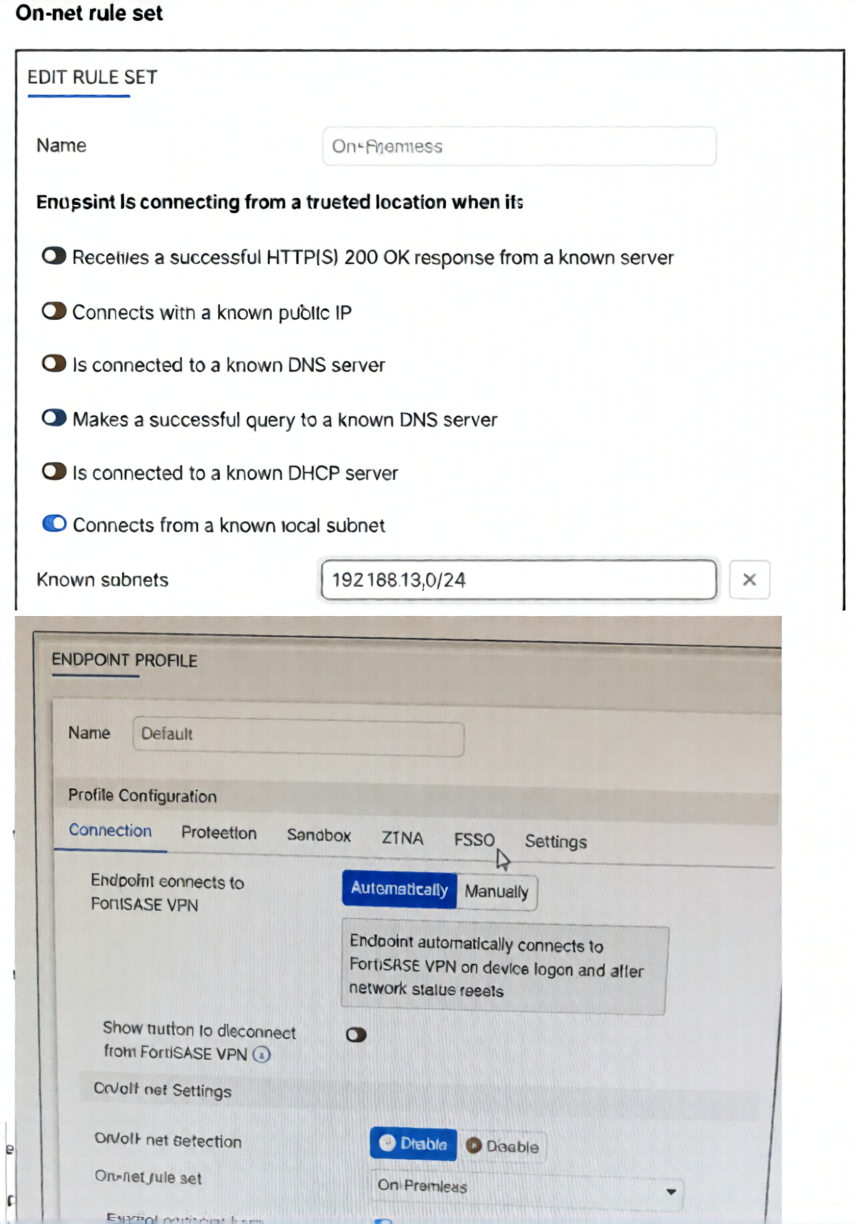
An endpoint is assigned an IP address of 192.168.13.101/24. Which action will be run on the endpoint?
(Choose one answer)
A. The endpoint will be able to bypass the on-net rule because it is connecting from a known subnet.
B. The endpoint will be detected as off-net.
C. The endpoint will be exempted from auto-connect to the FortiSASE tunnel.
D. The endpoint will automatically connect to the FortiSASE tunnel.
Explanation:
This question tests understanding of FortiSASE on/off-net detection and how endpoint profiles use on-net rule sets to determine VPN tunnel behavior. The exhibits show an on-net rule matching a known subnet and an endpoint profile with auto-connect and on-net detection both enabled.
✅ Correct Answer:
C. The endpoint will be exempted from auto-connect to the FortiSASE tunnel.
The endpoint IP 192.168.13.101/24 falls within the known subnet 192.168.13.0/24 defined in the "On-Premises" on-net rule set. Since on/off-net detection is enabled in the endpoint profile, FortiClient detects this endpoint as on-net and skips the automatic FortiSASE VPN tunnel connection.
❌ Incorrect Answers:
A. The endpoint will be able to bypass the on-net rule because it is connecting from a known subnet.
This statement misinterprets how on-net rules function. Matching a known subnet does not mean the endpoint bypasses the rule — it means the rule is successfully triggered and applied. The on-net rule set exists precisely to identify endpoints on trusted networks. When the subnet matches, the endpoint is classified as on-net, and the defined behavior is enforced, not skipped. There is no bypass mechanism for matching conditions.
B. The endpoint will be detected as off-net.
This is incorrect because off-net detection only occurs when none of the configured on-net conditions are satisfied. In this case, the endpoint's IP address 192.168.13.101 clearly falls within the known subnet 192.168.13.0/24 defined in the on-net rule set. Since the subnet condition is enabled and matched, the FortiClient agent correctly classifies the endpoint as on-net, making this option factually wrong.
D. The endpoint will automatically connect to the FortiSASE tunnel.
While the endpoint profile does have the "Endpoint connects to FortiSASE VPN" option set to Automatically, this setting applies specifically to off-net scenarios. When the endpoint is detected as on-net through the on-net rule set, the auto-connect behavior is intentionally suppressed. The purpose of on-net detection is to prevent unnecessary VPN tunneling when the user is already operating within a trusted corporate network environment.
🔧 Reference:
→ FortiSASE 25.2 Administration Guide – On/Off-Net Detection
Confirms that when an endpoint matches an on-net rule set condition (such as known subnet), it is treated as on-net and exempted from automatic FortiSASE VPN tunnel connection.
→ FortiClient EMS – Endpoint Profile & On-Net Rules
Explains how on/off-net detection integrates with endpoint profiles to control VPN auto-connect behavior based on network location.
In the Secure Private Access (SPA) use case, which two FortiSASE features facilitate access to corporate applications? (Choose two answers)
A. SD-WAN
B. zero trust network access (ZTNA)
C. thin edge
D. cloud access security broker (CASB)
Explanation:
This question identifies the specific technologies within the FortiSASE framework that enable Secure Private Access (SPA). SPA is designed to connect remote users to internal resources by combining robust network routing with granular, identity-based security policies.
✅Correct Option:
SD-WAN provides the essential networking infrastructure for SPA by establishing secure tunnels between FortiSASE and the corporate headquarters or data center. This "on-ramp" ensures that traffic is efficiently routed and that the SASE environment can communicate directly with the organization's private network fabric.
✅Correct Option:
Zero Trust Network Access (ZTNA) serves as the security enforcement layer for SPA, ensuring that access to private applications is granted on a per-session basis. It validates both the user’s identity and the device's security posture before allowing a connection, which prevents unauthorized access to internal data.
❌Incorrect options:
C. Thin edge:
This refers to the hardware-centric deployment model using FortiExtender or FortiAP to connect small branch locations to the SASE cloud; it is a connectivity method for sites rather than a core feature for application-level access.
D. Cloud Access Security Broker (CASB):
This service is dedicated to securing and monitoring interactions with third-party SaaS platforms like Dropbox or Salesforce; it does not facilitate the internal routing or verification required for private corporate applications.
Reference:
→ Secure Private Access
This documentation confirms that the SPA use case is built upon the integration of ZTNA for secure access and SD-WAN for private network connectivity.
When deploying FortiSASE agent-based clients, which three features are available compared to an agentless solution? (Choose three.)
A. Vulnerability scan
B. SSL inspection
C. Anti-ransomware protection
D. Web filter
E. ZTNA tags
Explanation:
This question tests FortiSASE agent-based deployment advantages over agentless solutions. Agent-based clients enable deeper endpoint visibility, local threat protection, and device posture assessment unavailable through browser-only agentless access.
✔️ Correct Option:
A. Vulnerability scan:
Agent-based FortiSASE clients perform comprehensive local vulnerability scanning on endpoints, identifying software flaws and misconfigurations. This deep system visibility is impossible with agentless browser-based access that lacks OS-level access.
✔️ Correct Option:
C. Anti-ransomware protection:
FortiSASE agents provide real-time file monitoring and behavioral analysis to detect ransomware encryption patterns. Local deployment enables immediate blocking before data loss occurs, unlike agentless solutions limited to network-level inspection.
✔️ Correct Option:
E. ZTNA tags:
Agents collect detailed device posture information including patch levels, AV status, and security compliance to generate dynamic ZTNA tags. These enable granular zero-trust access policies based on comprehensive endpoint assessment data.
❌Incorrect options:
B. SSL inspection:
Available equally to both deployment types through FortiSASE cloud gateways performing decryption and inspection.
Not exclusive to agent-based clients.
D. Web filter:
FortiGuard cloud web filtering applies identical category-based policies regardless of agent or agentless deployment.
Functions the same for both client types.
Reference:
🔧 FortiSASE Datasheet → Confirms agent-based endpoint protection features.
🔧 FortiSASE Admin Guide → Details agent vs agentless capability differences.
A FortiSASE administrator is receiving reports that some users have travelled overseas and cannot establish their agent-based VPN tunnels, although they can authenticate with their SSO credentials to access O365 and SFDC directly. The administrator reviewed the firewall policies and ZTNA tags of some users and could not find anything unusual. Which action can the administrator take to resolve this problem? (Choose one answer)
A. Create a dedicated firewall policy for the users.
B. Instruct the users to restart their laptops and log in again.
C. Ensure that the countries the users are visiting are not listed under the Deny list in the Geofencing settings.
D. Instruct the users to install the updated version of the agent-based client.
Explanation:
This question tests understanding of FortiSASE Geofencing and its impact on agent-based VPN tunnel establishment for remote users. The key clue is that users can still authenticate via SSO to cloud apps (O365/SFDC) but cannot establish VPN tunnels, and no issues were found in firewall policies or ZTNA tags — pointing directly to a location-based access restriction.
✅ Correct Answer:
C. Ensure that the countries the users are visiting are not listed under the Deny list in the Geofencing settings.
FortiSASE's Geofencing feature allows administrators to restrict or deny VPN tunnel connections based on the user's geographic location. If the overseas countries are listed in the Deny list, FortiSASE will block the agent-based VPN tunnel even when credentials are valid. Since SSO-based app access works independently of the VPN tunnel, users can still reach O365 and SFDC — confirming the issue is location-based blocking, not authentication or policy failure.
❌ Incorrect Answers:
A. Create a dedicated firewall policy for the users.
This option does not address the root cause. The administrator already reviewed firewall policies and found nothing unusual. Firewall policies govern traffic flow after a tunnel is established — they do not control whether the VPN tunnel itself can be initiated. Creating an additional policy would have no effect on a connection that is being blocked at the geofencing level before any tunnel is even formed.
B. Instruct the users to restart their laptops and log in again.
A laptop restart is a basic troubleshooting step that does not address a systematic, geography-specific issue affecting multiple overseas users simultaneously. Since the problem is consistently tied to users being in foreign countries and disappears when they return, it is clearly a configuration-level restriction rather than a device or session-level glitch that a restart would fix.
D. Instruct the users to install the updated version of the agent-based client.
There is no indication in the scenario that the issue is related to a software version incompatibility or bug. The users are specifically affected only when traveling overseas, while users in other locations are unaffected. A client version issue would typically impact all users regardless of location. This option does not logically align with the geography-specific nature of the reported problem.
🔧 Reference:
→ FortiSASE 25.2 Administration Guide – Geofencing
Directly covers the Regional access to FortiSASE tab where Allow/Deny lists for countries are configured under Configuration > Geofencing, confirming that denied countries block VPN tunnel establishment.
→ FortiSASE Latest Feature Administration Guide – Geofencing
Explains the full workflow — how FortiSASE identifies a user's country via public IP, checks the Regional access to FortiSASE deny list, and blocks or permits tunnel connections accordingly.
| Page 5 out of 13 Pages |
| 2345678 |
| NSE7_SSE_AD-25 Practice Test Home |
The Fortinet NSE 7 - FortiSASE 25 Enterprise Administrator exam is notoriously tough. It doesn't test memorization. It forces you to make complex decisions under time pressure. A weak prep strategy risks a costly failure and wasted effort. Our NSE7_SSE_AD-25 practice tests are built to be your definitive bridge to a passing score.

Copyright © - All Rights Reserved