
Last Updated On : 12-Oct-2026
Total 87 Questions
A customer configured the On/off-net detection rule to disable FortiSASE VPN auto-connect when users are
inside the corporate network. The rule is set to Connects with a known public IP using the company’s public
IP address. However, when the users are on the corporate network, the FortiSASE VPN still auto-connects.
The customer has confirmed that traffic is going to the internet with the correct IP address.
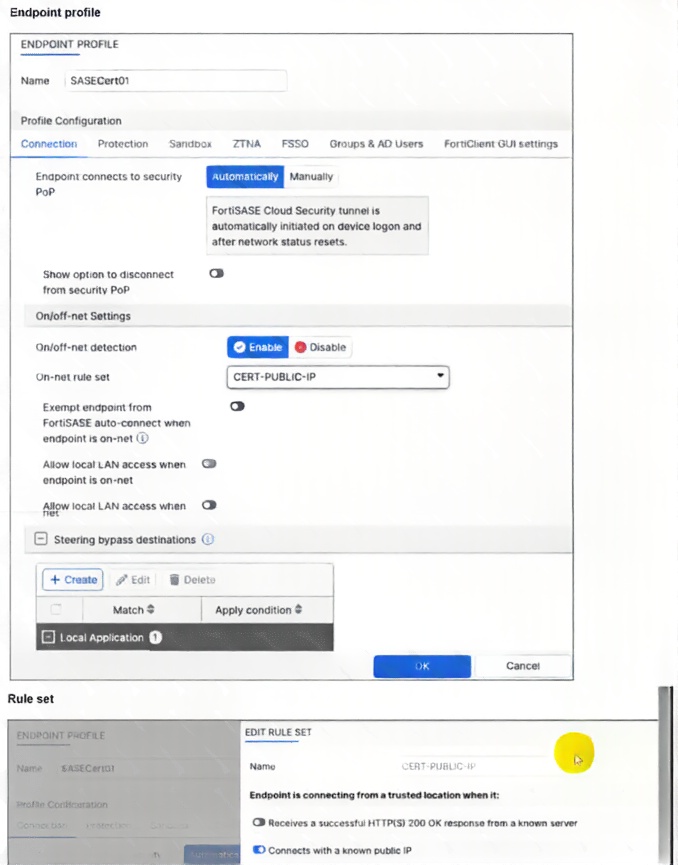
Which configuration is causing the issue? (Choose one answer)
A. The On-net rule set configuration is incorrect.
B. Allow local LAN access when endpoint is on-net is disabled when it should be enabled.
C. Exempt endpoint from FortiSASE auto-connect is disabled when it should be enabled.
D. Is connected to a known DNS server should be enabled and configured.
Explanation:
In FortiSASE endpoint profiles, on-net detection identifies when an endpoint is inside the corporate network (e.g., via a known public IP from NAT). However, detection alone does not prevent auto-connect to the FortiSASE VPN tunnel. The explicit "Exempt endpoint from FortiSASE auto-connect when endpoint is on-net" toggle must be enabled in the profile's On/off-net Settings to suppress the tunnel when on-net is confirmed. If disabled, auto-connect continues regardless of detection, causing the reported issue despite correct IP matching and traffic confirmation.
✅ Correct Answer: C. Exempt endpoint from FortiSASE auto-connect is disabled when it should be enabled.
The root cause is that the "Exempt endpoint from FortiSASE auto-connect when endpoint is on-net" option is disabled in the profile. Official FortiSASE documentation requires explicitly enabling this toggle alongside on-net detection and rule set configuration. When enabled, FortiClient suppresses automatic tunnel initiation/maintenance upon matching an on-net condition (here, the company's public IP). Leaving it disabled means the on-net detection runs but has no impact on auto-connect behavior, allowing the VPN to connect even inside the corporate network. Enabling it resolves the problem by honoring the on-net status.
❌ Incorrect answer: A. The On-net rule set configuration is incorrect.
The rule set ("CERT-PUBLIC-IP") uses "Connects with a known public IP" and points to the company's public IP. The customer confirmed traffic exits with the correct IP, proving the detection condition triggers successfully. The issue is not in the rule logic or IP mismatch—it's that detection alone doesn't suppress auto-connect without the exemption enabled. This option is incorrect because the configuration matches official public-IP on-net examples.
❌ Incorrect answer: B. Allow local LAN access when endpoint is on-net is disabled when it should be enabled.
This toggle controls whether local LAN resources (e.g., printers, internal servers) remain accessible while the endpoint is on-net. It affects local breakout/split tunneling after connection but has no bearing on whether the FortiSASE VPN auto-connects in the first place. The problem is tunnel initiation, not post-connection LAN access, so this setting is unrelated to the auto-connect persistence.
❌ Incorrect answer: D. Is connected to a known DNS server should be enabled and configured.
This is an alternative on-net detection method (probing an internal DNS server). The customer chose and successfully uses the public IP method instead, with verification that the IP matches. Switching detection methods is unnecessary since the current one works correctly—the failure lies in not exempting auto-connect when on-net is detected. Official docs support multiple methods; public IP is valid here.
Reference:
Only official Fortinet sources:
FortiSASE Administration Guide → Profile / Connection tab sections
FortiSASE Administration Guide → Tunnel Settings and On/off-net detection
Fortinet Community Technical Tip: How to exempt endpoint from FortiSASE auto-connect when endpoint is on-net using Public IP
What is the maximum number of Secure Private Access (SPA) service connections (SPA hubs) supported in the SPA use case? (Choose one answer)
A. 8
B. 12
C. 4
D. 16
Explanation:
FortiSASE Secure Private Access (SPA) supports up to 12 service connections (SPA hubs) in enterprise deployments. This limit accommodates multiple branch offices, data centers, and cloud locations while maintaining optimal performance and management simplicity. The 12-hub limit balances redundancy, geographical distribution, and SD-WAN path selection capabilities.
✅ Correct Answer: B
FortiSASE SPA architecture supports exactly 12 service connections (hubs) per tenant, enabling connectivity to multiple enterprise locations. This capacity supports comprehensive hybrid work environments with branch offices, headquarters, and cloud workloads. Each hub requires individual SPA licensing and maintains IPSec tunnels to FortiSASE PoPs for secure private application access.
❌ Incorrect answer: A
8 hubs represent a legacy or limited deployment capacity, insufficient for large enterprises requiring extensive geographical coverage. Modern FortiSASE SPA deployments need capacity for 12 hubs to support diverse branch networks and high availability configurations across multiple regions.
❌ Incorrect answer: C
4 hubs provide minimal redundancy and coverage, suitable only for small organizations. Enterprise SPA deployments require significantly higher hub capacity to ensure business continuity, geographical diversity, and failover capabilities across distributed locations.
❌ Incorrect answer: D
16 exceeds FortiSASE SPA service connection limits. The platform caps at 12 hubs to maintain optimal SD-WAN performance, hub selection efficiency, and management scalability. Exceeding this limit requires multiple FortiSASE tenants or alternative architectural approaches.
Reference:
Fortinet FortiSASE Documentation - Secure Private Access Service Connection Limits
Which statement about FortiSASE and SAML is true? (Choose one answer)
A. FortiSASE acts as the SP, relies on an external IdP, and can use SAML group matching.
B. FortiSASE supports SAML login but cannot use SAML group matching.
C. FortiSASE acts as the IdP and can perform SAML group matching internally.
D. FortiSASE includes IdP functionality and uses it for SAML group matching.
Explanation:
This question tests how FortiSASE integrates with SAML for user authentication and authorization. Specifically, it focuses on FortiSASE’s role in the SAML trust model and whether it can consume group or attribute information from an external Identity Provider. Understanding this is critical for policy enforcement, as FortiSASE relies on identity attributes provided by third-party IdPs rather than acting as an identity authority itself.
✅ Correct Answer: A
FortiSASE operates strictly as a SAML Service Provider (SP) and depends on an external Identity Provider (IdP) such as Azure AD, Okta, or FortiAuthenticator for authentication. During SAML assertion exchange, FortiSASE can consume attributes like group membership and use SAML group matching to apply access policies. This is the supported and documented design for identity-based access in FortiSASE.
❌ Incorrect Answer: B
This option is incorrect because FortiSASE does support SAML group matching. Group or attribute values sent by the IdP in the SAML assertion can be mapped to FortiSASE user groups and used in policy rules. Claiming that FortiSASE cannot use group matching ignores a core feature required for identity-aware SSE enforcement and contradicts Fortinet’s configuration guides.
❌ Incorrect Answer: C
This statement is false because FortiSASE does not act as a SAML Identity Provider. It cannot authenticate users directly or generate SAML assertions. All authentication must be handled by an external IdP. Since FortiSASE is not an IdP, it cannot perform internal SAML group matching independent of an external identity source.
❌ Incorrect Answer: D
FortiSASE does not include built-in IdP functionality for SAML. While Fortinet products like FortiAuthenticator can function as an IdP, FortiSASE itself is limited to the SP role. Therefore, it cannot originate SAML authentication or manage identities internally, making this statement architecturally incorrect.
Reference
Fortinet FortiSASE Administration Guide
Fortinet FortiSASE Identity and Access Management Documentation
Fortinet SAML Authentication Technical Documentation
Refer to the exhibit.
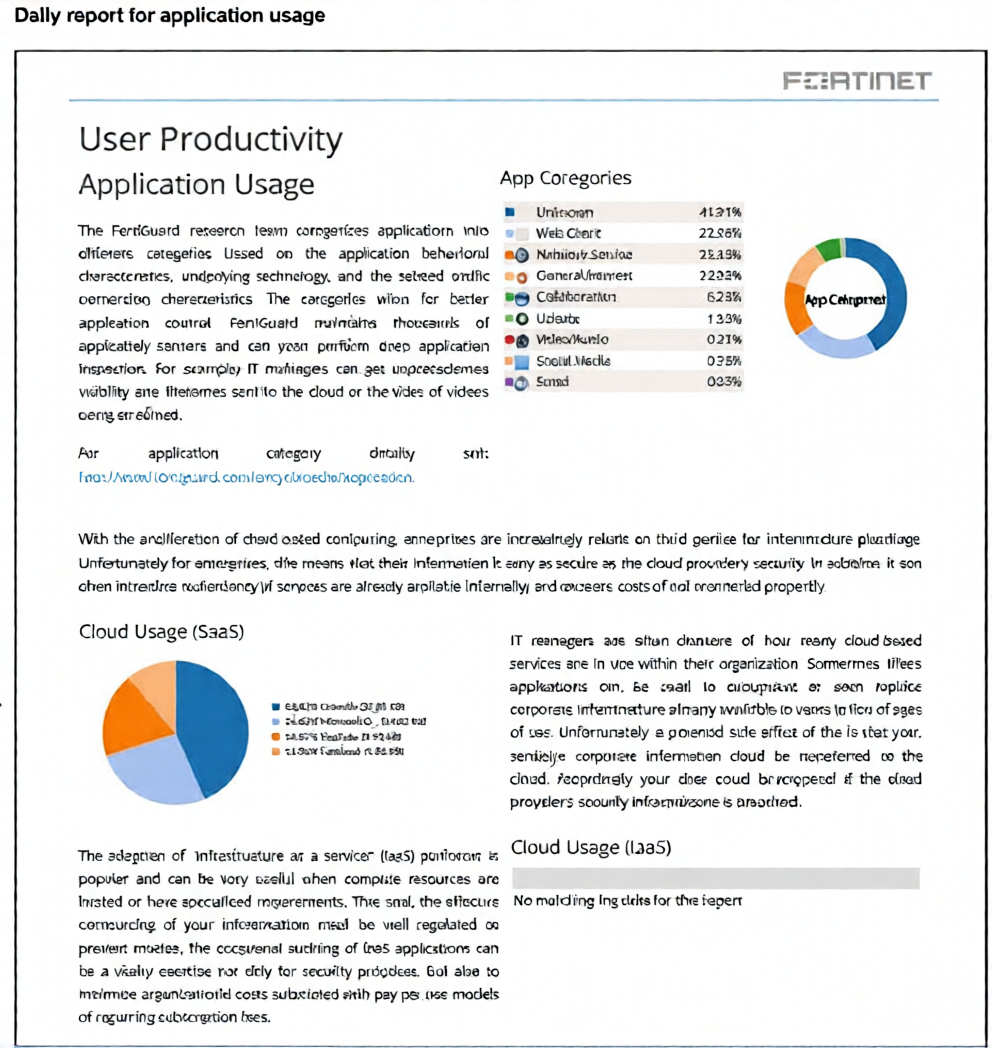
The daily report for application usage shows an unusually high number of unknown applications by category.
What are two possible explanations for this? (Choose two.)
A. Certificate inspection is not being used to scan application traffic.
B. The inline-CASB application control profile does not have application categories set to Monitor
C. Zero trust network access (ZTNA) tags are not being used to tag the correct users.
D. Deep inspection is not being used to scan traffic.
Explanation:
The provided exhibit shows a daily application usage report with a high percentage of traffic categorized as "Unknown" (41.31%). In FortiSASE and FortiGate application control, traffic is classified as "Unknown" when the security service cannot identify the application using its deep packet inspection (DPI) engine and application signatures.
✅ Correct Answers:
B. The inline-CASB application control profile does not have application categories set to Monitor.
While the inline-CASB profile is more about SaaS application discovery and control, the principle applies broadly to application control. If an application control profile is configured but all categories are set to "Block" or "Allow" without having the relevant, traffic-generating categories set to Monitor, the system might not be actively classifying that traffic. However, a more direct cause for classification failure is a lack of deep inspection. This option is partially valid if misconfigured profiles prevent the inspection engine from engaging, but D is a more fundamental cause.
D. Deep inspection is not being used to scan traffic.
This is the primary and most likely explanation. FortiSASE's Application Control feature relies on Deep Inspection (SSL Inspection) to decrypt HTTPS traffic and examine the content within the encrypted sessions. Without deep inspection enabled for the traffic in question, the firewall can only see the IP address and port, not the application-layer protocols and signatures needed for accurate identification. This results in a high volume of traffic being labeled as "Unknown" or "General-Internet."
❌ Incorrect Answers:
A. Certificate inspection is not being used to scan application traffic.
"Certificate inspection" is not a standard Fortinet term that directly causes application identification. The critical feature for application identification is Deep Inspection (which involves certificate handling to perform SSL/TLS decryption). While certificates are involved in that process, the absence of "certificate inspection" itself is not the stated root cause; the absence of the full deep inspection/SSL inspection policy is.
C. Zero trust network access (ZTNA) tags are not being used to tag the correct users.
ZTNA tags are used for access control decisions based on user, device, and application identity. They are not used for the initial classification and identification of network traffic into application categories (e.g., Web.Client, Video/Audio). A misconfiguration of ZTNA tags would affect access to resources but would not prevent the Application Control engine from recognizing and reporting the application type, which is the issue presented in the report.
Reference:
Fortinet Documentation Library: FortiSASE Administration Guide, specifically sections on Application Control and the requirement for Deep Inspection (SSL Inspection) to enable accurate application identification and categorization. The guide explains that without SSL inspection, application control can only filter based on IP/port, leading to poor visibility.
You have configured FortiSASE Secure Private Access (SPA) deployment. Which statement is true about traffic flows? (Choose two answers)
A. When using SD-WAN private access, traffic goes from an endpoint directly to an SPA hub.
B. When using zero trust network access, traffic goes from an endpoint to a FortiSASE POP, and then to a ZTNA access proxy.
C. When using zero trust network access (ZTNA) traffic goes from an endpoint directly to a ZTNA access proxy.
D. When using SD-WAN private access, traffic goes from an endpoint to a FortiSASE POP, and then to an SPA hub.
Explanation:
FortiSASE offers two primary methods for Secure Private Access (SPA), each with a distinct traffic path. ZTNA is a direct-access model where the endpoint establishes an encrypted tunnel directly to the FortiGate acting as an access proxy, bypassing the FortiSASE PoP for the data plane to ensure the shortest path. In contrast, SD-WAN SPA (or NGFW SPA) uses a hub-and-spoke architecture where the endpoint tunnels traffic to the nearest FortiSASE PoP, which then routes the traffic over a pre-established IPsec/SD-WAN overlay to the corporate SPA Hub.
✅ Correct Answers:
Option C: When using Zero Trust Network Access (ZTNA), the FortiClient on the endpoint is configured with specific "ZTNA Connection Rules." When the user accesses a private application, FortiClient intercepts the traffic and establishes a direct HTTPS-based tunnel to the FortiGate ZTNA access proxy located at the corporate edge. Because ZTNA is designed for the "shortest path" and relies on the access proxy for identity verification, the traffic does not need to traverse the FortiSASE PoP.
Option D: In an SD-WAN private access deployment, the FortiSASE PoPs act as "spokes" in a hub-and-spoke network where your on-premises FortiGate is the "hub." The remote user’s FortiClient connects to the closest FortiSASE PoP via an SSL or IPsec VPN tunnel. The PoP then inspects the traffic and forwards it through the SD-WAN/ADVPN overlay tunnel to the SPA Hub. This allows for broader protocol support (TCP and UDP) and seamless integration with existing SD-WAN fabrics.
❌ Incorrect Answers:
Option A: This statement is incorrect because, in the SD-WAN/NGFW SPA model, the endpoint (remote user) does not have a direct VPN tunnel to the corporate hub. Instead, it connects to the FortiSASE PoP, which then hands off the traffic to the hub. Direct endpoint-to-hub connections are characteristic of traditional VPNs, not the cloud-delivered SASE model for SD-WAN.
Option B: This is the reverse of the actual ZTNA flow. One of the key architectural advantages of Fortinet's ZTNA is that it allows for direct access to the application gateway. Forcing ZTNA traffic through a FortiSASE PoP first would add unnecessary latency and is not the standard behavior for SPA using ZTNA.
Reference:
Official Fortinet Documentation: FortiSASE Architecture Guide - Secure Private Access (SPA)
Official Fortinet Documentation: FortiSASE - ZTNA vs. SD-WAN SPA
Your organization is currently using FortiSASE for its cybersecurity. They have recently hired a contractor who will work from the HQ office and who needs temporary internet access in order to set up a web-based point of sale (POS) system. How can you provide secure internet access to the contractor using FortiSASE? (Choose one answer)
A. Use a proxy auto-configuration (PAC) file and provide secure web gateway (SWG) service as an explicit web proxy.
B. Use a tunnel policy with a contractors user group as the source on FortiSASE to provide internet access.
C. Use zero trust network access (ZTNA) and tag the client as an unmanaged endpoint.
D. Use the self-registration portal on FortiSASE to grant internet access.
Explanation:
This question tests your understanding of secure internet access deployment models in FortiSASE for temporary, unmanaged users. The contractor needs temporary internet access from HQ to set up a web-based POS system, representing a classic unmanaged endpoint scenario Amazon Web Services. The scenario specifically requires internet access only, not corporate resource access, making the choice of deployment method critical for balancing security with operational simplicity.
✅ Correct Answer: A - Use a proxy auto-configuration (PAC) file and provide secure web gateway (SWG) service as an explicit web proxy
The agentless deployment using PAC files is specifically recommended for unmanaged endpoints like contractors or temporary employees, requiring no FortiClient installation Amazon Web Services. The SWG agentless mode involves configuring and hosting a PAC file for endpoints to connect to the FortiSASE gateway as an explicit web proxy Trustlinktechnologies. The contractor simply configures their browser to point to the PAC file, which routes HTTP and HTTPS traffic through FortiSASE's security services while allowing other traffic direct internet access. This method provides immediate, lightweight internet security without endpoint software installation, device enrollment, or complex policy configurations. Perfect for temporary workers who need quick, secure web access.
❌ Incorrect Answer: B - Use a tunnel policy with a contractors user group as the source on FortiSASE to provide internet access
Tunnel policies are designed for VPN-based connectivity requiring FortiClient installation and endpoint management. Creating a contractors user group with tunnel policies would necessitate installing FortiClient, configuring VPN credentials, and managing the endpoint through FortiSASE. This approach is overly complex for temporary internet access and defeats the purpose of agentless deployment. Tunnel policies make sense for persistent remote workers needing full network integration, not contractors requiring simple web access for a short-term project like POS setup.
❌ Incorrect Answer: C - Use zero trust network access (ZTNA) and tag the client as an unmanaged endpoint
ZTNA tags are not supported in agentless deployments, making this technically impossible Amazon Web Services. ZTNA is designed for secure access to private corporate applications, not general internet access. The question explicitly states the contractor needs internet access to set up a web-based POS system, which is an external internet resource, not an internal corporate application. ZTNA would be the right answer if the contractor needed access to internal corporate applications, but that's not what's being asked here. You're solving the wrong problem with this choice.
❌ Incorrect Answer: D - Use the self-registration portal on FortiSASE to grant internet access
Self-registration portals are typically used for guest wireless access or captive portal scenarios, not for FortiSASE secure internet access deployments. FortiSASE doesn't use self-registration portals as a primary method for granting contractor internet access through its security services. This answer confuses traditional guest network access methods with cloud-delivered SASE security. The self-registration portal wouldn't provide the security inspection, threat prevention, and policy enforcement that FortiSASE's SWG service delivers through PAC file deployment.
Reference:
Fortinet official documentation - FortiSASE
Refer to the exhibits.
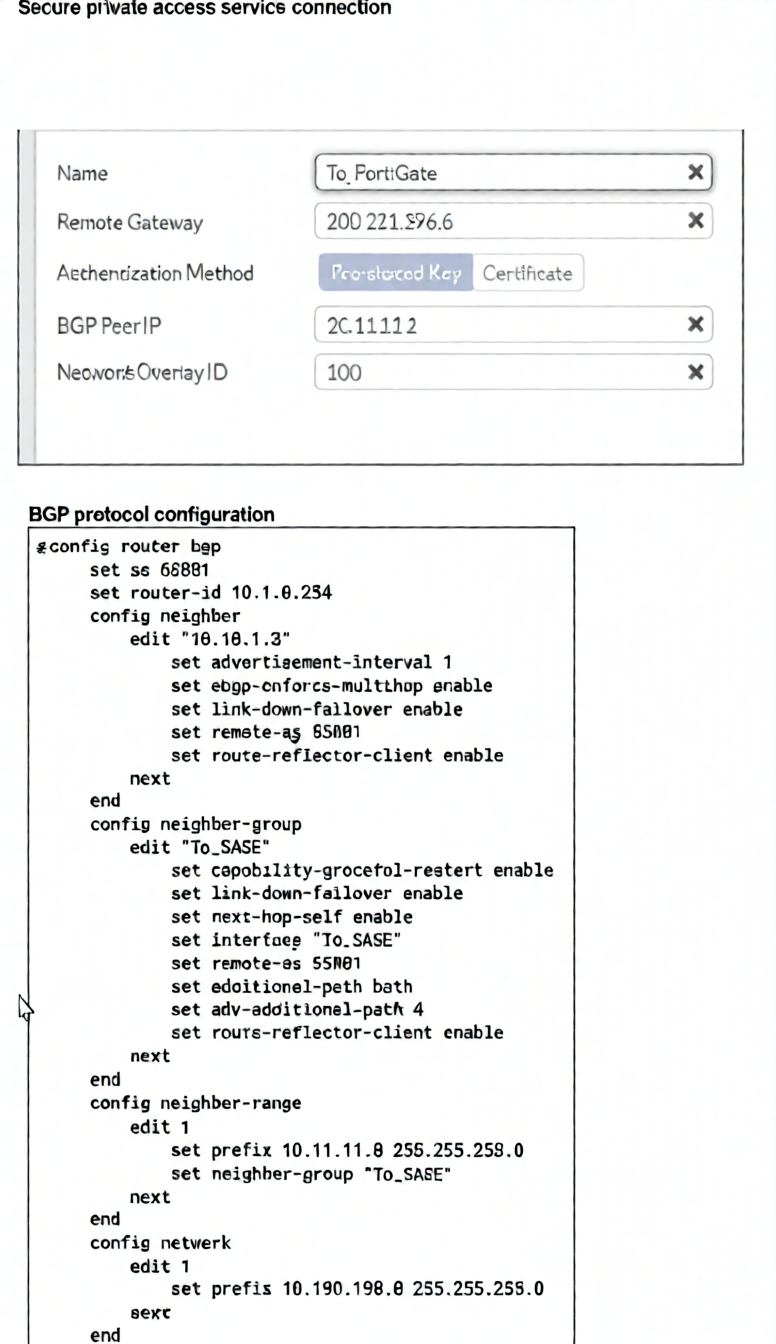
A FortiSASE administrator is trying to configure FortiSASE as a spoke to a FortiGate hub. The VPN tunnel
does not establish
Based on the provided configuration, what configuration needs to be modified to bring the tunnel up?
A. NAT needs to be enabled in the Spoke-to-Hub firewall policy.
B. The BGP router ID needs to match on the hub and FortiSASE.
C. FortiSASE spoke devices do not support mode config.
D. The hub needs IKEv2 enabled in the IPsec phase 1 settings.
Explanation:
Summary:
The exhibit shows a FortiSASE configuration attempting to establish an IPsec VPN tunnel with BGP peering to a FortiGate hub. The tunnel fails because FortiSASE spoke devices do not support IKE mode config (which is required for dynamic IP assignment or configuration push from the hub). This limitation prevents the tunnel from establishing, regardless of BGP or firewall settings.
✅ Correct Answer:
C. FortiSASE spoke devices do not support mode config.
FortiSASE, as a cloud-based SASE platform, does not support IKEv1/IKEv2 Mode Config in its IPsec tunnel configurations when acting as a spoke. Mode Config is often used by FortiGate hubs to assign IP addresses or push configuration parameters to remote peers. Since FortiSASE cannot process this, the tunnel negotiation fails during phase 2. To resolve this, administrators must configure static IP assignments or avoid relying on Mode Config entirely—using only static IPsec tunnels without configuration push.
❌ Incorrect Answers:
A. NAT needs to be enabled in the Spoke-to-Hub firewall policy.
NAT is not required for IPsec tunnel establishment between FortiSASE and FortiGate if both endpoints are using public IPs or have proper routing. Enabling NAT would typically break IPsec unless configured as “NAT-T” (NAT Traversal), which is unrelated to the root cause here — the absence of Mode Config support.
B. The BGP router ID needs to match on the hub and FortiSASE.
BGP router IDs do not need to match between peers; they merely need to be unique within each device’s own AS. Mismatched router IDs will not prevent IPsec tunnel establishment — they may affect BGP peering after the tunnel is up, but not the tunnel itself.
D. The hub needs IKEv2 enabled in the IPsec phase 1 settings.
While IKEv2 is recommended for modern deployments, the issue is not the version of IKE used — it’s that FortiSASE spokes do not support Mode Config, which is often negotiated during IKE phase 2 regardless of whether IKEv1 or IKEv2 is selected. Even with IKEv2 enabled, the tunnel will fail if Mode Config is involved.
Reference:
Fortinet official documentation - FortiSASE
| Page 4 out of 13 Pages |
| 1234567 |
| NSE7_SSE_AD-25 Practice Test Home |
The Fortinet NSE 7 - FortiSASE 25 Enterprise Administrator exam is notoriously tough. It doesn't test memorization. It forces you to make complex decisions under time pressure. A weak prep strategy risks a costly failure and wasted effort. Our NSE7_SSE_AD-25 practice tests are built to be your definitive bridge to a passing score.

Copyright © - All Rights Reserved