
Last Updated On : 12-Oct-2026
Total 106 Questions
You must configure an environment with dual-homed servers connected to a pair of
FortiSwitch units using an MCLAG.
Multicast traffic is expected in this environment, and you should ensure unnecessary traffic
is pruned from links that do not have a multicast listener.
In which two ways must you configure the igmps-f lood-traffic and igmps-flood-report
settings? (Choose two.)
A. disable on ICL trunks
B. enable on ICL trunks
C. disable on the ISL and FortiLink trunks
D. enable on the ISL and FortiLink trunks
Explanation:
In a FortiSwitch MCLAG (Multi-Chassis Link Aggregation Group) environment with multicast traffic, the goal is to efficiently forward multicast streams only to switch ports that have interested listeners (IGMP snooping), preventing unnecessary flooding. This requires precise control over the igmps-flood-traffic and igmps-flood-report settings on different trunk types.
D. enable on the ISL and FortiLink trunks
This is correct for ISL (Inter-Switch Link) and FortiLink trunks (connecting the FortiSwitch units to the FortiGate). Enabling flooding on these uplink trunks ensures that:
IGMP Reports are flooded upstream so the FortiGate/querier is aware of all listeners.
Unknown multicast traffic is flooded upstream to reach the multicast source or router.
This ensures proper multicast group membership learning and delivery across the network.
A. disable on ICL trunks
This is correct for the ICL (Inter-Chassis Link) trunk connecting the two MCLAG peers. Disabling flooding on the ICL prevents:
Duplicate multicast traffic being sent between the two switches unnecessarily.
IGMP reports being looped between the peers.
Since MCLAG peers synchronize IGMP snooping tables via the ICL, flooding is not required and would waste bandwidth.
Why Other Options Are Incorrect
B. enable on ICL trunks
Incorrect. Enabling on the ICL would cause unnecessary multicast traffic and IGMP report flooding between the two MCLAG peers, creating duplicates and wasting ICL bandwidth.
C. disable on the ISL and FortiLink trunks
Incorrect. Disabling on these uplink trunks would break multicast routing. IGMP reports would not reach the querier (FortiGate), and multicast data would not reach upstream sources/routers, causing multicast streams to fail.
Reference:
FortiSwitch OS Administration Guide, “IGMP snooping” chapter, specifically the sections on igmps-flood-traffic and igmps-flood-report in MCLAG topologies. The guide explains that these settings should be configured to optimize multicast forwarding and avoid unnecessary traffic on the ICL.
You are migrating the branches of a customer to FortiGate devices. They require
independent routing tables on the LAN side of the network.
After reviewing the design, you notice the firewall will have many BGP sessions as you
have two data centers (DC) and two ISPs per DC while each branch is using at least 10
internal segments.
Based on this scenario, what would you suggest as the more efficient solution, considering
that in the future the number of internal segments, DCs or internet links per DC will
increase?
A. No change in design is needed as even small FortiGate devices have a large memory capacity.
B. Acquire a FortiGate model with more capacity, considering the next 5 years growth.
C. Implement network-id, neighbor-group and increase the advertisement-interval
D. Redesign the SD-WAN deployment to only use a single VPN tunnel and segment traffic using VRFs on BGP
Explanation:
The current design creates unsustainable scaling pressure on branch FortiGates. With multiple data centers, multiple ISPs per DC, and numerous internal segments, each branch must maintain many BGP sessions and routing tables. Future growth in segments, DCs, or ISP links will exponentially increase session count and memory consumption.
Why Option D is Correct
Redesigning the SD-WAN to use a single VPN tunnel (or minimal tunnels) to a hub and implementing VRFs with MP-BGP is the most efficient and scalable solution.
This approach:
Simplifies the underlay: Replaces multiple physical/ISP BGP sessions with one logical VPN overlay per branch.
Preserves segmentation: Each internal segment uses a dedicated VRF, maintaining routing isolation.
Scales efficiently: MP-BGP exchanges routes for all VRFs over a single BGP session. Adding segments, DCs, or ISP links is managed centrally at the hub without increasing branch session count.
This architecture is standard for large-scale SD-WAN deployments requiring multi-tenancy.
Why Other Options Are Incorrect
A is dangerously optimistic.
Even high-memory devices have session and TCAM limits; the design will eventually exceed hardware capacity.
B is a costly temporary fix.
Larger hardware delays but doesn't solve architectural inefficiency and becomes prohibitively expensive at scale.
C offers only incremental optimization.
Features like neighbor-group and increased timers reduce overhead but don't address the fundamental problem of excessive sessions due to the design.
Reference:
Fortinet SD-WAN Design Guide (hub-and-spoke overlay section) and FortiOS BGP & VRF configuration guide both recommend using MP-BGP over a simplified VPN underlay for scalable network segmentation. This approach minimizes branch session count while maintaining routing isolation for multiple internal networks.
Refer to the exhibits.
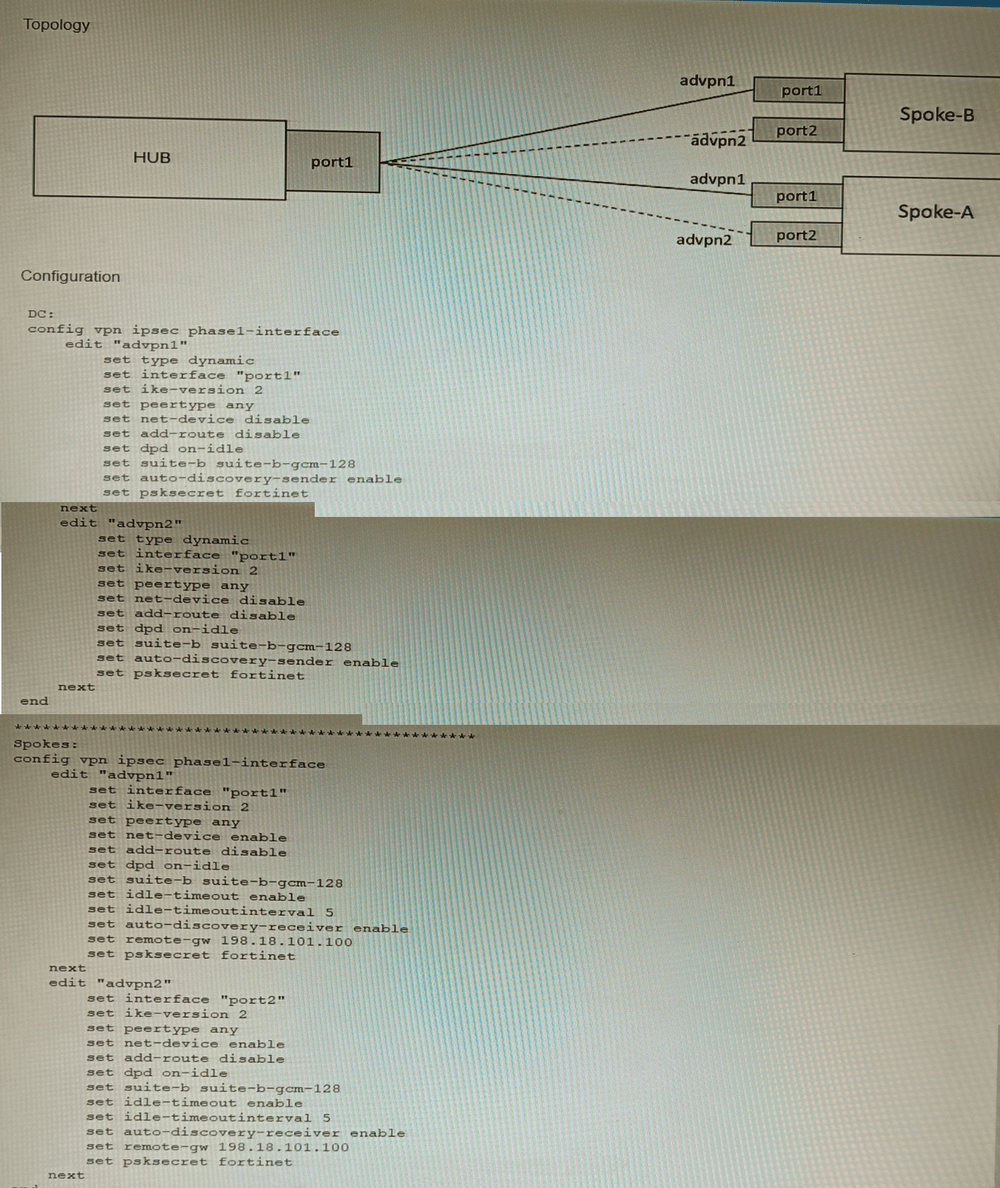
The exhibits show a diagram of a requested topology and the base IPsec configuration.
A customer asks you to configure ADVPN via two internet underlays. The requirement is
that you use one interface with a single IP address on DC FortiGate.
In this scenario, which feature should be implemented to achieve this requirement?
A. Use network-overlay id
B. Change advpn2 to IKEv1
C. Use local-id
D. Use peer-id
Explanation:
The requirement is to run two separate ADVPN (Auto-Discovery VPN) tunnels over a single physical interface with one IP address on the DC FortiGate (Hub). This creates a conflict because both Phase 1 interfaces (advpn1 and advpn2) on the Hub would otherwise use the same source IP/interface, making them indistinguishable for incoming IKE negotiations from the spokes.
Why Option A is Correct
Using network-overlay id is the specific FortiOS feature designed for this exact scenario. This feature allows multiple ADVPN tunnels (Phase 1 interfaces) to share the same physical interface and IP address by assigning a unique Overlay ID to each tunnel. The Hub can then correctly identify and separate the IKE sessions for advpn1 and advpn2 even though they arrive on the same interface/IP.
Why Other Options Are Incorrect
B (Change advpn2 to IKEv1):
ADVPN requires IKEv2. Switching one tunnel to IKEv1 would break ADVPN functionality and still not solve the interface/IP sharing conflict.
C (Use local-id):
The local-id is used in IKE authentication to identify the local peer. It does not solve the problem of differentiating multiple Phase 1 configurations bound to the same interface/IP address.
D (Use peer-id):
peer-id identifies the remote peer in IKE authentication. Like local-id, it is unrelated to allowing multiple Phase 1 interfaces on the same physical interface/IP.
Reference
FortiOS IPsec VPN guide, "ADVPN with multiple overlays on a single interface" section, explicitly states that when configuring multiple ADVPN tunnels on the same interface, you must set a unique network-overlay ID for each Phase 1 configuration to avoid conflicts.
Refer to the exhibit.
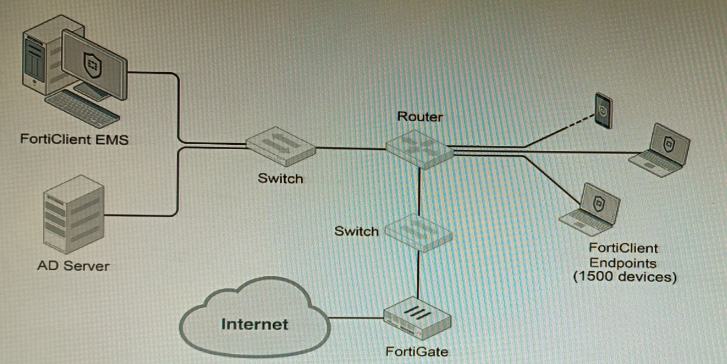
A customer wants FortiClient EMS configured to deploy to 1500 endpoints. The
deployment will be integrated with FortiOS and there is an Active Directory server.
Given the configuration shown in the exhibit, which two statements about the installation
are correct? (Choose two.)
A. If no client update time is specified on EMS, the user will be able to choose the time of installation if they wish to delay.
B. A client can be eligible for multiple enabled configurations on the EMS server, and one will be chosen based on first priority
C. You can only deploy initial installations to Windows clients.
D. You must use Standard or Enterprise SQL Server rather than the included SQL Server Express
E. The Windows clients only require "File and Printer Sharing0 allowed and the rest is handled by Active Directory group policy
Explanation:
The scenario involves deploying FortiClient EMS to 1500 endpoints integrated with FortiOS and Active Directory.
Why A is Correct
If the EMS administrator does not configure a client update time schedule in the deployment package, the FortiClient installation on the endpoint will allow the end-user to choose when to install or update, potentially delaying the process. This is a standard behavior to avoid disruption during work hours if no enforced schedule is set.
Why E is Correct
For Windows domain-joined endpoints, communication between EMS and clients for deployment and management primarily requires Windows File and Printer Sharing (SMB) to be allowed. The actual installation and configuration distribution can be efficiently handled via Active Directory Group Policy Objects (GPOs), which push the EMS installer and settings to domain computers, simplifying large-scale deployment.
Why Other Options Are Incorrect
B – Incorrect.
A client matches only one EMS configuration profile at a time based on tags, AD groups, or IP ranges, not multiple with priority selection. EMS uses a top-down matching process, not a priority scoring system.
C – Incorrect.
EMS supports initial deployments to Windows, macOS, and Linux clients. It is not limited to Windows only.
D – Incorrect.
For 1500 endpoints, the built-in SQL Server Express (free) is sufficient. Standard or Enterprise SQL is only required for very large-scale deployments (typically over 5,000 endpoints) or advanced HA requirements.
Reference
FortiClient EMS Administration Guide – Deployment section explains update scheduling and AD/GPO deployment methods. The SQL Server requirements table specifies that SQL Express supports up to several thousand endpoints.
Refer to the exhibits.
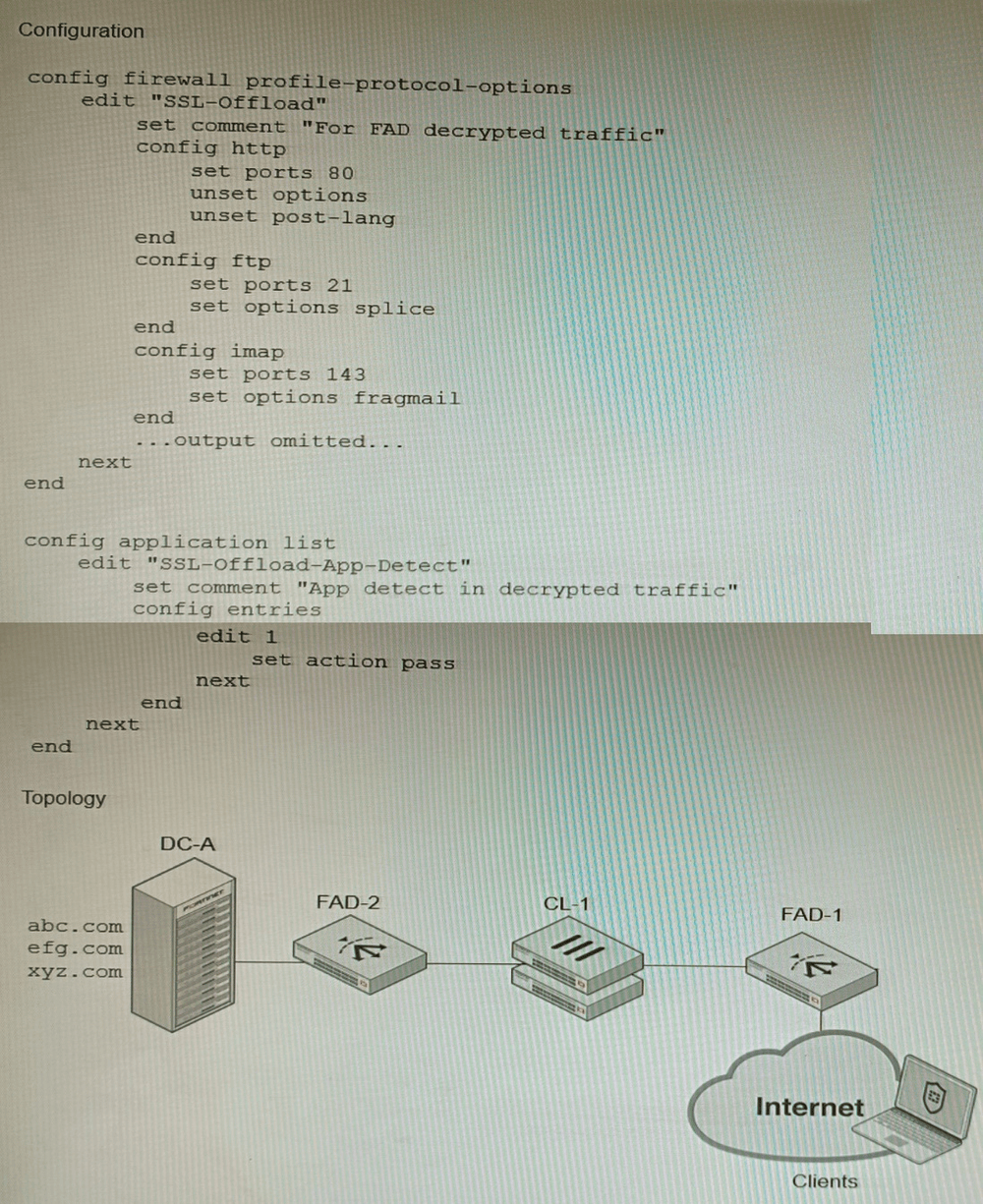
A FortiGate cluster (CL-1) protects a data center hosting multiple web applications. A pair
of FortiADC devices are already configured for SSL decryption (FAD-1), and re-encryption
(FAD-2). CL-1 must accept unencrypted traffic from FAD-1, perform application detection
on the plain-text traffic, and forward the inspected traffic to FAD-2.
The SSL-Offload-App-Detect application list and SSL-Offload protocol options profile are
applied to the firewall policy handling the web application traffic on CL-1.
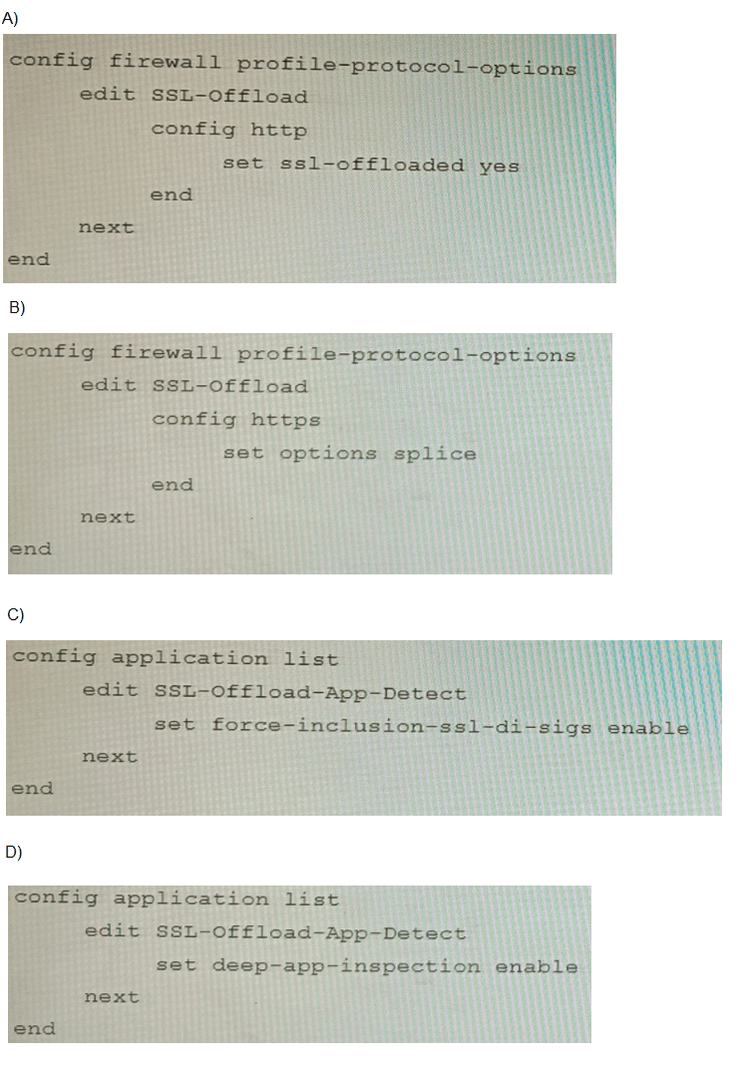
Given this scenario, which two configuration tasks must the administrator perform on CL-1?
(Choose two.)
A. Option A
B. Option B
C. Option C
D. Option D
Explanation:
The design involves FortiADC handling SSL/TLS decryption, sending plain HTTP traffic to the FortiGate cluster (CL-1) for application-layer inspection, then re-encrypting it downstream. The FortiGate must inspect already-decrypted traffic as if it were normal HTTP/HTTPS while enabling deep application detection.
Why B is Correct
The config https block with set options splice (in Option B) is essential. The splice option tells the FortiGate to inspect HTTPS traffic without performing its own SSL decryption, because the traffic is already in plain text from FortiADC. This setting ensures the firewall processes the decrypted content for application control and IPS without SSL errors.
Why C is Correct
The set force-inclusion-ssl-di-sign enable command (Option C) in the Application List forces the inclusion of SSL Deep Inspection signatures for application detection even when traffic is not SSL-encrypted at the FortiGate. This ensures that application detection engines (which often rely on SSL-specific patterns) can still identify applications correctly in the already-decrypted traffic stream from FortiADC.
Why Other Options Are Incorrect
A – set ssl-offloaded yes under config http
is used when the FortiGate itself offloads SSL to an external device (like a load balancer) but still expects SSL-terminated sessions. Here, traffic is plain HTTP after FortiADC decryption, so this option is not appropriate.
D – set deep-app-inspection enable
is a general Application Control feature flag, but does not specifically enable SSL signature inspection on non-SSL traffic. It lacks the critical force-inclusion-ssl-di-sign directive needed for this scenario.
Reference
FortiOS Application Control Guide: “Inspecting SSL/TLS traffic with an external SSL offloader” specifies using the splice option in the HTTPS protocol profile and enabling force-inclusion-ssl-di-sign in the application list to inspect decrypted traffic from an external ADC.
SD-WAN is configured on a FortiGate. You notice that when one of the internet links has
high latency the time to resolve names using DNS from FortiGate is very high.
You must ensure that the FortiGate DNS resolution times are as low as possible with the
least amount of work.
What should you configure?
A. Configure local out traffic to use the outgoing interface based on SD-WAN rules with a manual defined IP associated to a loopback interface and configure an SD-WAN rule from the loopback to the DNS server.
B. Configure an SD-WAN rule to the DNS server and use the FortiGate interface IPs in the source address.
C. Configure two DNS servers and use DNS servers recommended by the two internet providers.
D. Configure local out traffic to use the outgoing interface based on SD-WAN rules with the interface IP and configure an SD-WAN rule to the DNS server.
Explanation:
The problem is that the FortiGate’s own DNS resolution (for system services, FQDN policies, etc.) is being delayed because it uses an SD-WAN member with high latency. The simplest and most effective solution is to control which SD-WAN link the FortiGate uses for its own DNS queries.
Why D is Correct
This option directly addresses the issue with minimal configuration:
Configure local out traffic to use the outgoing interface based on SD-WAN rules with the interface IP: This ensures the FortiGate’s locally-originated traffic (including DNS queries) follows SD-WAN rules.
Configure an SD-WAN rule to the DNS server: Create an SD-WAN rule that matches traffic to the DNS server’s IP and specifies the low-latency link (or uses performance SLAs like lowest latency). This forces DNS queries to use the better-performing link, reducing resolution time.
This method requires only an SD-WAN rule and a local-out policy, which is the "least amount of work" as requested.
Why Other Options Are Incorrect
A – Using a loopback interface adds unnecessary complexity. While it can work, it requires extra configuration (loopback IP, additional SD-WAN rule, policies) and is not the simplest solution.
B – This only creates an SD-WAN rule but does not control the FortiGate’s own DNS source traffic. Without a matching local-out policy, the FortiGate may not use the SD-WAN rule for its own queries.
C – Adding more DNS servers does not solve the underlying issue: the FortiGate still uses the high-latency link for queries unless the outbound path is controlled. This may even worsen performance if the secondary DNS is also reached via the slow link.
Reference:
FortiOS SD-WAN guide, “Controlling locally originated traffic” section, explains that local service traffic (like DNS) can be steered by SD-WAN rules only if a firewall policy with set send-deny-packet disable and matching source/destination is configured for local-out traffic. Option D follows this recommended pattern.
Refer to the exhibit.
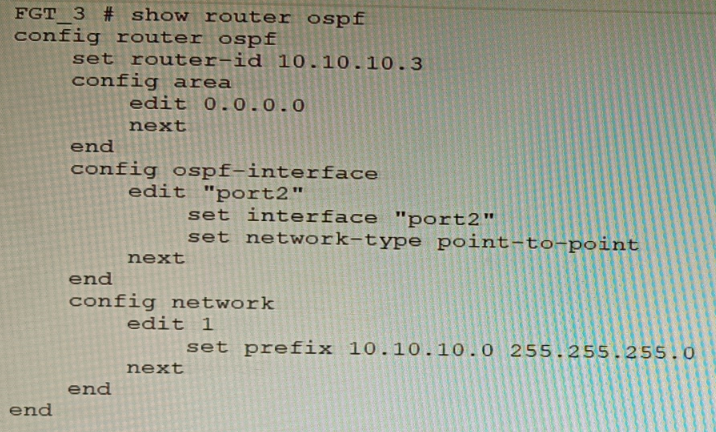
You are operating an internal network with multiple OSPF routers on the same LAN
segment. FGT_3 needs to be added to the OSPF network and has the configuration shown
in the exhibit. FGT_3 is not establishing any OSPF connection.
What needs to be changed to the configuration to make sure FGT_3 will establish OSPF
neighbors without affecting the DR/BDR election?
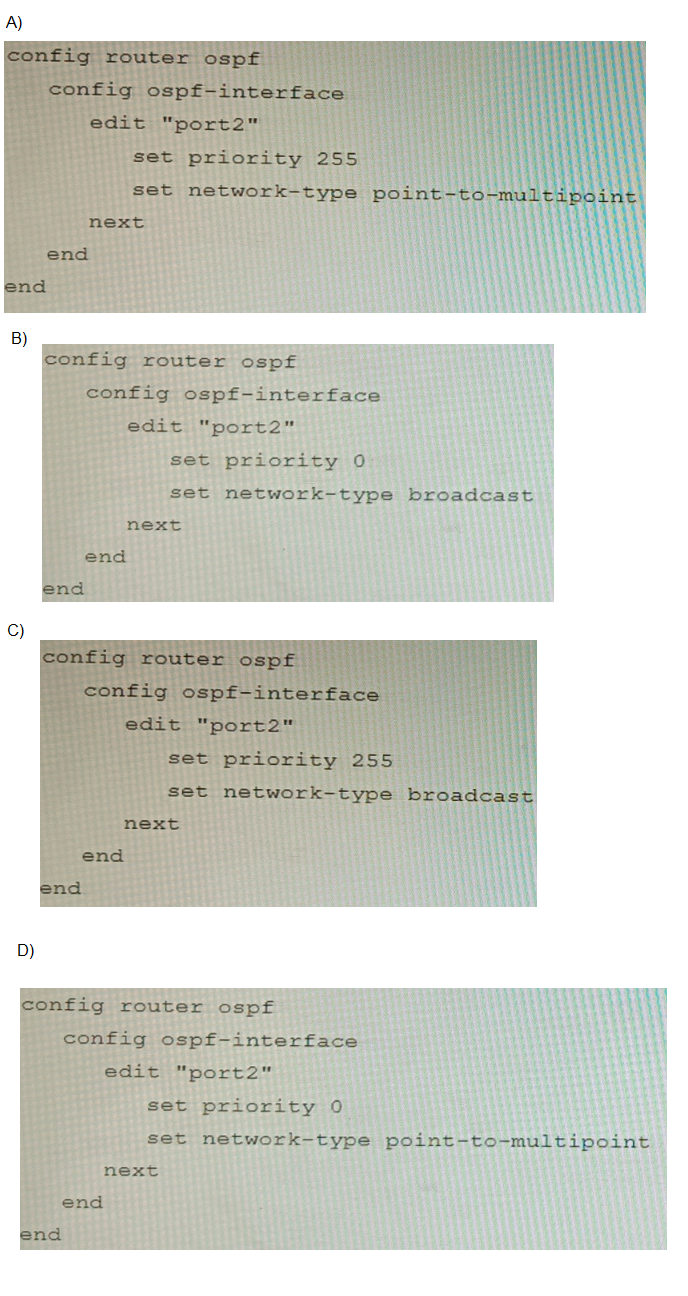
A. Option A
B. Option B
C. Option C
D. Option D
Explanation:
FGT_3 must use network-type broadcast to form OSPF adjacencies on a shared LAN segment. Setting priority to 0 ensures it does not participate in DR/BDR election, preserving the existing topology. Option B correctly applies both settings, enabling neighbor formation without disrupting DR/BDR roles.
Why Other Options Are Incorrect:
A (priority 255, point-to-multipoint):
Point-to-multipoint disables broadcast discovery, requiring manual neighbor configuration. It’s unsuitable for LAN segments with multiple routers. Priority 255 also risks FGT_3 becoming DR, which violates the requirement.
C (priority 255, broadcast):
Broadcast is correct, but priority 255 makes FGT_3 a strong DR candidate. This can override existing DR/BDR roles, causing unnecessary topology changes.
D (priority 0, point-to-multipoint):
Priority 0 avoids DR election, but point-to-multipoint prevents automatic neighbor discovery. FGT_3 won’t form adjacencies unless neighbors are manually defined, which is inefficient and error-prone on shared LANs.
Reference:
Fortinet OSPF Guide – FortiOS Routing:
“Broadcast network type is used on Ethernet LANs. DR/BDR election is influenced by interface priority. Setting priority to 0 excludes the router from DR/BDR election.”
Fortinet Documentation –
OSPF Configuration
| Page 6 out of 16 Pages |
| 23456789 |
| NSE8_812 Practice Test Home |
The Fortinet Network Security Expert 8 Written exam is notoriously tough. It doesn't test memorization. It forces you to make complex decisions under time pressure. A weak prep strategy risks a costly failure and wasted effort. Our NSE8_812 practice tests are built to be your definitive bridge to a passing score.

Copyright © - All Rights Reserved