
Last Updated On : 12-Oct-2026
Total 67 Questions
Which two statements about the Security Fabric rating are true? (Choose two.)
A. A license is required to obtain an executive summary in the Security Rating section.
B. The root FortiGate provides executive summaries of all the FortiGate devices in the Security Fabric.
C. The Security Posture category provides PCI compliance results.
D. Security Rating Insights are available only in the Security Rating page.
Explanation:
The Fortinet Security Fabric rating feature provides a scoring mechanism to evaluate the security posture of the devices within the Security Fabric. Based on FortiOS 7.6 functionality:
B. The root FortiGate provides executive summaries of all the FortiGate devices in the Security Fabric.
This is correct. In a Security Fabric deployment, the root FortiGate (the primary unit) acts as the central management and aggregation point. It collects security posture information from all downstream FortiGate devices and other Fabric members, then generates executive summaries and compliance scores for the entire Fabric. This allows administrators to view the security health of the entire network from a single pane of glass.
C. The Security Posture category provides PCI compliance results.
This is correct. The Security Fabric rating includes a "Security Posture" category that evaluates the configuration against industry best practices and compliance frameworks. Within this category, FortiGate specifically checks configurations against PCI DSS (Payment Card Industry Data Security Standard) requirements. This helps organizations identify gaps in their FortiGate configurations that could affect PCI compliance.
Why the other options are incorrect:
A. A license is required to obtain an executive summary in the Security Rating section.
This is incorrect. The Security Fabric rating feature (including executive summaries) does not require a separate license. It is available as part of the standard FortiOS firmware when devices are properly joined to a Security Fabric. However, some advanced threat intelligence features used in scoring may require FortiGuard subscriptions, but the executive summary itself is not license-restricted.
D. Security Rating Insights are available only in the Security Rating page.
This is incorrect. While the main Security Rating dashboard provides comprehensive insights, FortiOS 7.6 also integrates Security Rating Insights in other locations. For example, when configuring firewall policies or security profiles, you may see "Insights" icons or recommendations that are derived from the Security Rating analysis. This contextual help appears throughout the GUI, not just on the dedicated Security Rating page.
Fortinet Reference:
This information is documented in the FortiOS 7.6 Administration Guide under the "Security Fabric" section, specifically the "Security Rating" subsection. The guide explains that the root FortiGate aggregates data from all Fabric members and that the Security Posture assessment includes compliance checks against standards like PCI DSS.
Refer to the exhibit.
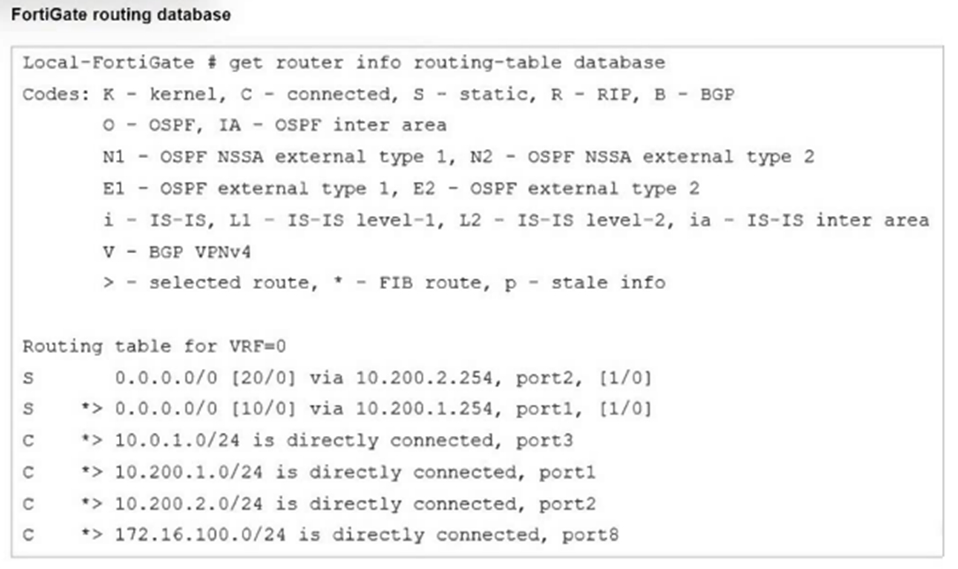
Which two statements are true about the routing entries in this database table? (Choose
two.)
A. All of the entries in the routing database table are installed in the FortiGate routing table.
B. The port2 interface is marked as inactive.
C. Both default routes have different administrative distances.
D. The default route on port2 is marked as the standby route.
Explanation:
The command get router info routing-table database displays the Routing Information Base (RIB), which includes all known routes (active and standby/inactive candidates) from all sources (static, dynamic, connected), even those not currently installed in the forwarding table.
Key indicators from the output:
> - selected route: The route chosen as the best (lowest administrative distance, then priority/metric if tied) for that prefix.
* - FIB route: The route installed in the Forwarding Information Base (FIB/kernel routing table) and used for actual packet forwarding.
Looking at the default routes (0.0.0.0/0):
S 0.0.0.0/0 [20/0] via 10.200.2.254, port2, [1/0]
→ No > symbol → not selected.
S *> 0.0.0.0/0 [10/0] via 10.200.1.254, port1, [1/0]
→ Has > symbol → selected as the best route.
→ Also has * (combined as *>) → installed in FIB.
Administrative Distance Comparison:
port1: [10/0] (distance 10)
port2: [20/0] (distance 20)
FortiOS selects the route with the lowest administrative distance (10 < 20), so the port1 route is selected (>) and active in FIB (*). The port2 route is a standby/backup route (valid but not selected due to higher distance). It becomes active only if the port1 route is withdrawn or removed.
Why not the other options?
A. All of the entries in the routing database table are installed in the FortiGate routing table.
Incorrect. The routing database (RIB) shows all candidate routes, including non-selected ones (for example, the [20/0] default route on port2). Only selected routes (>) with * are installed in the FIB (active routing table shown by get router info routing-table all).
B. The port2 interface is marked as inactive.
Incorrect. There is no indication that port2 is inactive or down (for example, no "inactive" flag or missing connected route for 10.200.2.0/24). The connected route for port2 (*C > 10.200.2.0/24) is selected and installed in the FIB. The default route via port2 is simply not selected due to higher administrative distance, not because the interface is down.
Reference (FortiOS 7.6):
Administration Guide → Routing concepts → Viewing the routing database
Explains that:
get router info routing-table database shows all routes (RIB).
> indicates the selected (best) route.
* indicates the route installed in the forwarding table (FIB).
When multiple routes to the same destination exist, the route with the lowest administrative distance is selected.
Which statement correctly describes NetAPI polling mode for the FSSO collector agent?
A. The collector agent uses a Windows API to query DCs for user logins.
B. NetAPI polling can increase bandwidth usage in large networks.
C. The NetSessionEnum function is used to track user logouts.
D. The collector agent must search Windows application event logs.
Explanation:
In NetAPI polling mode, the Fortinet Single Sign-On (FSSO) collector agent queries Windows Domain Controllers (DCs) using the Windows NetAPI (NetSessionEnum function) to detect user login sessions. This allows FortiGate to identify which users are logged in and apply identity-based policies.
Option A: Correct
NetAPI polling relies on Windows APIs to query DCs for login information.
Option B: Incorrect
NetAPI polling does not significantly increase bandwidth usage; however, it can increase CPU load on the DCs if the environment is large.
Option C: Incorrect
NetSessionEnum is used to enumerate active sessions, not specifically to track logouts.
Option D: Incorrect
Event log polling is a different mode (WMI or Event Log mode), not NetAPI polling.
Reference:
Fortinet FSSO Administration Guide → Collector Agent Modes (NetAPI vs. Event Log).
Which three pieces of information does FortiGate use to identify the hostname of the SSL server when SSL certificate inspection is enabled? (Choose three.)
A. The host field in the HTTP header.
B. The server name indication (SNI) extension in the client hello message.
C. The subject alternative name (SAN) field in the server certificate.
D. The subject field in the server certificate.
E. The serial number in the server certificate.
Explanation:
When SSL certificate inspection is enabled (not full deep inspection), FortiGate does not decrypt the encrypted payload. Instead, it relies on information available during the TLS handshake and visible metadata to determine the destination hostname.
FortiGate can identify the SSL server hostname using the following:
✅ A. The host field in the HTTP header
After TLS establishment (when visible), FortiGate can read the HTTP Host header.
This helps identify the requested website hostname for policy enforcement and logging.
✔ Used when available.
✅ B. The server name indication (SNI) extension in the client hello message
The SNI field is sent in plaintext during the TLS Client Hello.
It explicitly tells the server which hostname the client wants.
This is the primary method FortiGate uses during certificate inspection.
✔ Very important exam concept.
✅ C. The subject alternative name (SAN) field in the server certificate
Modern certificates store domain names in the SAN extension.
FortiGate reads this information from the server certificate to identify the destination.
✔ Commonly used source.
❌ Why the other options are incorrect:
D. The subject field in the server certificate
Older certificates used the Subject (CN) field.
Modern TLS identification relies mainly on SAN, and Fortinet exams emphasize SAN instead.
Not considered a primary hostname identification source here.
❌ Not selected.
E. The serial number in the server certificate
Used only for certificate identification/validation.
Contains no hostname information.
❌ Irrelevant.
🧠 Exam Tip (High-Probability Question):
For SSL Certificate Inspection, remember:
FortiGate identifies websites using:
✅ SNI
✅ Certificate SAN
✅ HTTP Host header
Think: “Handshake metadata + certificate names — without decryption.”
You are encountering connectivity problems caused by intermediate devices blocking
IPsec traffic.
In which two ways can you effectively resolve the problem? (Choose two.)
A. You should use the protocol IKEv2.
B. You can use SSL VPN tunnel mode to prevent problems with blocked ESP and UDP ports (500 or 4500).
C. You can configure a hub-and-spoke topology with SSL VPN tunnels to bypass blocked UDP ports.
D. You can turn on fragmentation to fix large certificate negotiation problems.
Explanation:
When intermediate devices (e.g., carrier-grade NAT devices, firewalls, or ISPs) block IPsec traffic, the common blockers are:
ESP (IP protocol 50) — often dropped because it's not UDP/TCP.
UDP 500 (IKE) and UDP 4500 (NAT-T) — frequently restricted or blocked in restrictive networks.
Option B is correct because:
SSL VPN tunnel mode (full tunnel) uses HTTPS/TLS over TCP 443 by default.
TCP 443 is almost universally allowed (as it's web traffic), so SSL VPN bypasses blocks on ESP, UDP 500, and UDP 4500.
This is a standard Fortinet-recommended workaround for IPsec connectivity issues in environments where UDP-based IPsec is impeded.
Option D is correct because:
In a hub-and-spoke topology using SSL VPN tunnels, remote sites (spokes) connect to a central hub FortiGate via SSL VPN (again over TCP 443).
This setup routes spoke-to-spoke traffic through the hub, avoiding direct IPsec between spokes where UDP ports might be blocked.
It effectively bypasses blocked UDP ports by using SSL VPN encapsulation instead of IPsec for the spokes.
Why not the other options?
A. You should use the protocol IKEv2
Incorrect. IKEv2 is the modern, preferred IKE version (better performance, MOBIKE support, etc.), but it still uses UDP 500/4500 for IKE and ESP for data. Switching to IKEv2 does not resolve blocks on those ports/protocol; the problem persists unless NAT-T or TCP encapsulation is forced (which is separate).
C. You can turn on fragmentation to fix large certificate negotiation problems
Incorrect. IKE fragmentation (enabled via set fragmentation enable in phase1-interface) helps with large IKE packets (e.g., during certificate exchanges in IKEv2) that might be dropped by intermediate devices that mishandle IP fragmentation. However, the question is about blocking IPsec traffic (ESP/UDP 500/4500), not specifically fragmentation issues during negotiation. Fragmentation is a partial workaround for packet size, not port/protocol blocking.
References (FortiOS 7.6):
Administration Guide → SSL VPN tunnel mode → Notes SSL VPN uses TCP 443 and is ideal where IPsec UDP/500/4500 is blocked or impeded.
SSL VPN vs. IPsec sections emphasize SSL VPN as fallback for restrictive networks blocking IPsec protocols/ports.
Fortinet migration guides highlight SSL VPN tunnel mode for environments with IPsec blocking.
Which two statements are correct when FortiGate enters conserve mode? (Choose two.)
A. FortiGate continues to run critical security actions, such as quarantine.
B. FortiGate refuses to accept configuration changes.
C. FortiGate halts complete system operation and requires a reboot to regain available resources.
D. FortiGate continues to transmit packets without IPS inspection when the fail-open global setting in IPS is enabled.
Explanation:
When FortiGate enters conserve mode, it means the system memory usage has reached a critical threshold. To preserve stability, FortiGate reduces or suspends non-essential functions but continues to operate with limited features.
Option A: Correct
Even in conserve mode, FortiGate prioritizes critical security actions such as quarantining infected hosts.
Option B: Incorrect
FortiGate still allows configuration changes; it does not refuse them.
Option C: Incorrect
Conserve mode does not halt the system or require a reboot. It is a protective state to keep the firewall operational.
Option D: Correct
If the IPS fail-open setting is enabled, FortiGate will continue forwarding traffic without IPS inspection to maintain connectivity.
This behavior ensures that the firewall remains functional under memory pressure, but with reduced inspection capabilities.
Reference:
FortiOS Administration Guide → Conserve Mode and Fail-Open Behavior.
Refer to the exhibits.
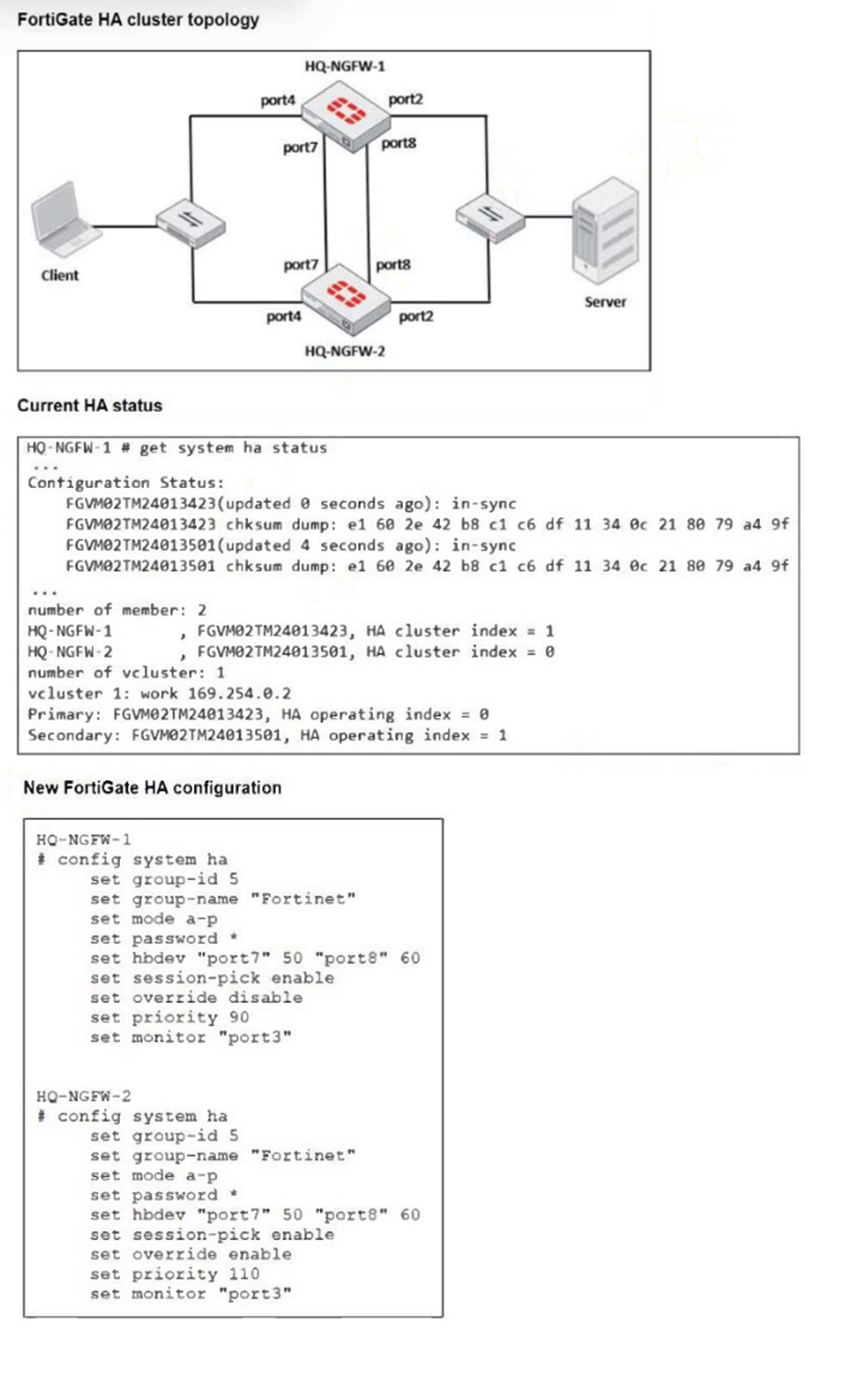 Based on the current HA status, an administrator updates the override and priority
parameters on HQ-NGFW-1 and HQ-NGFW-2 as shown in the exhibit.
Based on the current HA status, an administrator updates the override and priority
parameters on HQ-NGFW-1 and HQ-NGFW-2 as shown in the exhibit.
What would be the expected outcome in the HA cluster?
A. HQ-NGFW-1 will synchronize the override disable setting with HQ-NGFW-2.
B. HQ-NGFW-2 will take over as the primary because it has the override enable setting and higher priority than HQ-NGFW-1.
C. HQ-NGFW-1 will remain the primary because HQ-NGFW-2 has lower priority.
D. The HA cluster will become out of sync because the override setting must match on all HA members.
Explanation:
In FortiGate HA (FGCP), the primary election process follows a specific order of operations. When the override setting is disabled (default), the order is:
* Connected monitored interfaces.
* HA uptime.
* Priority.
* Serial number.
However, when override is enabled on a cluster member, the election logic changes to prioritize the Priority value over HA uptime. Looking at the "New FortiGate HA configuration" in the exhibit:
* HQ-NGFW-2 has set override enable and a set priority 110.
* HQ-NGFW-1 has set override disable and a set priority 90.
Since HQ-NGFW-2 has override enabled and a higher priority (110 vs 90), it will trigger a renegotiation and take over the primary role from HQ-NGFW-1, regardless of which device has the longer uptime.
Analysis of Incorrect Answers:
A. HQ-NGFW-1 will synchronize the override disable setting with HQ-NGFW-2
HA parameters under config system ha (such as priority, override, and group-id) are not synchronized between cluster members. Each member maintains its own unique HA identity and election settings.
C. HQ-NGFW-1 will remain the primary because HQ-NGFW-2 has lower priority
This is factually incorrect based on the exhibit. HQ-NGFW-2 has a priority of 110, which is higher than HQ-NGFW-1's priority of 90. In FortiOS HA, a higher numerical value equals higher priority.
D. The HA cluster will become out of sync because the override setting must match
The override and priority settings are specifically intended to be different between members to control election behavior. Having different values for these specific parameters does not cause a synchronization error; only global configuration and security objects must match for the "in-sync" status.
References:
Fortinet Documentation (FortiOS 7.6 Administration Guide)
Fortinet Training Institute: FCP - FortiGate Infrastructure Module: High Availability
| Page 2 out of 10 Pages |
| 12345 |
| FCP_FGT_AD-7.6 Practice Test Home |
The FortiGate 7.6 Administrator exam is notoriously tough. It doesn't test memorization. It forces you to make complex decisions under time pressure. A weak prep strategy risks a costly failure and wasted effort. Our FCP_FGT_AD-7.6 practice tests are built to be your definitive bridge to a passing score.

Copyright © - All Rights Reserved