
Last Updated On : 12-Oct-2026
Total 75 Questions
Which is recommended when you are managing a high volume of logs in your network?
A. Store logs on FortiManager and use FortiView.
B. Add and manage FortiAnalyzer from FortiManager.
C. Enable advanced ADOM mode on FortiManager.
D. Forward logs from FortiAnalyzer to FortiManager daily.
Explanation:
FortiAnalyzer is the dedicated Fortinet platform for log collection, storage, and analysis.
When managing a high volume of logs, FortiAnalyzer provides scalability, indexing, and reporting features that FortiManager alone cannot handle efficiently.
FortiManager is primarily for centralized configuration and policy management, while FortiAnalyzer is built for log-heavy environments.
Best practice is to integrate FortiAnalyzer with FortiManager so administrators can manage devices and also access detailed log analytics and reports.
Fortinet documentation confirms: “For environments with high log volume, FortiAnalyzer should be used for log storage and analysis. FortiManager integrates with FortiAnalyzer for unified management.” (FortiManager 7.6 Admin Guide, FortiAnalyzer Admin Guide).
❌ Why the other options are wrong
A. Store logs on FortiManager and use FortiView
FortiManager can store logs temporarily, but it is not designed for large-scale log retention or analysis. FortiView on FortiManager is limited compared to FortiAnalyzer.
C. Enable advanced ADOM mode on FortiManager
Advanced ADOM mode allows more granular ADOM management but has nothing to do with log handling.
D. Forward logs from FortiAnalyzer to FortiManager daily
Logs should remain on FortiAnalyzer. Forwarding them back to FortiManager is inefficient and not recommended. FortiManager should query FortiAnalyzer for log data instead.
📖 References
FortiManager 7.6 Administration Guide – section on FortiAnalyzer integration.
FortiAnalyzer Administration Guide – “FortiAnalyzer is recommended for environments with high log volume to ensure efficient log storage, indexing, and reporting.”
Refer to the exhibit.
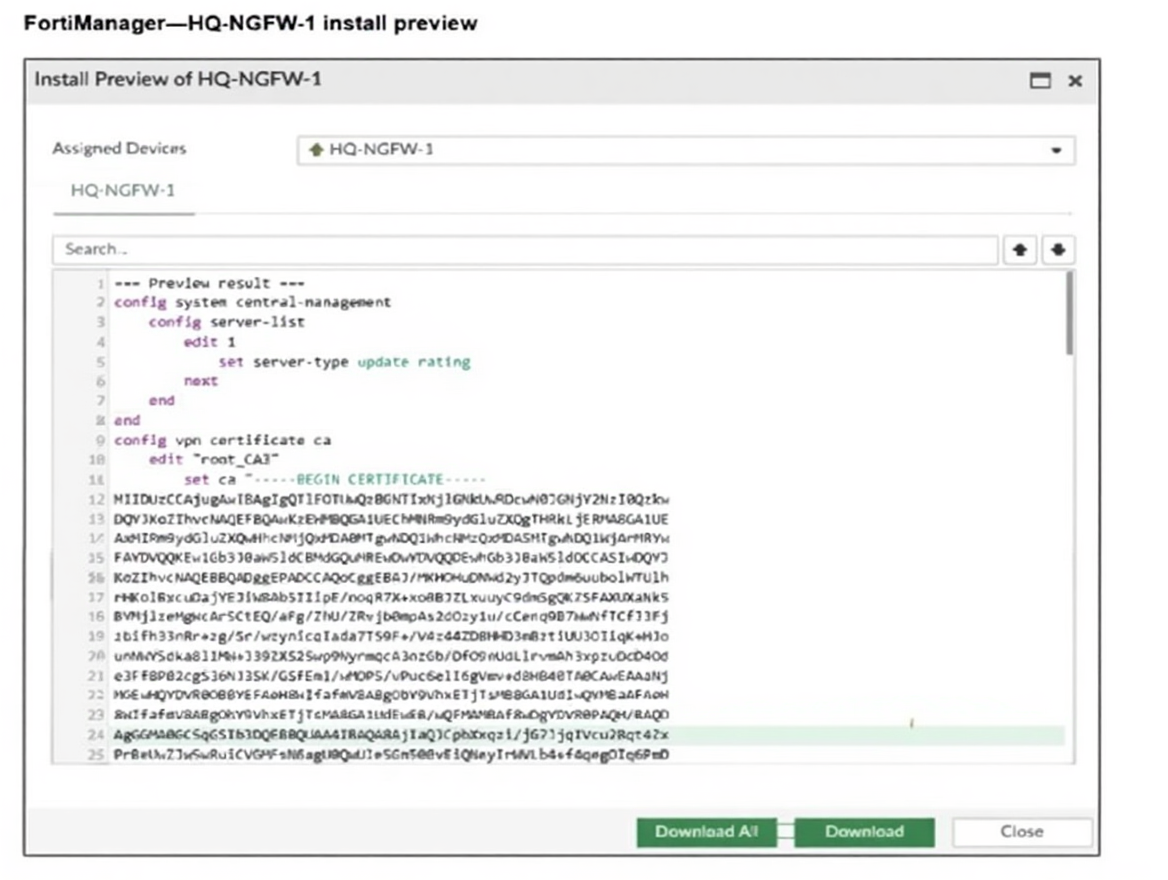
An administrator assigned a new policy package to FortiGate HQ-NGFW-1. In the installation preview, they
noticed some settings they did not modify and are unsure about the changes.
Based on the exhibit, which two things will happen if they continue with the installation? (Choose two.)
A. FortiGate HQ-NGFW-1 can use FortiManager firmware templates to upgrade firmware and ratings.
B. FortiGate HQ-NGFW-1 can contact the FortiManager acting as FortiGuard Distribution Server (FDS) to download FortiGuard updates.
C. FortiGate HQ-NGFW-1 will use the root_CA3 certificate in firewall address objects or policies.
D. FortiManager will install the CA certificate named root_CA3 to authenticate FortiGate-to-FortiManager communication protocol (FGFM) tunnel connections with FortiGate HQ- NGFW-1.
Explanation:
In the install preview, the configuration includes:
config system central-management with set server-type update rating, which enables FortiGate HQ-NGFW-1 to contact FortiManager acting as a FortiGuard Distribution Server (FDS). This allows the FortiGate to download FortiGuard updates such as AV, IPS, and rating databases from FortiManager instead of directly from FortiGuard servers.
config vpn certificate ca with a certificate named root_CA, which FortiManager installs to the FortiGate. This certificate is used to authenticate the FGFM tunnel between FortiGate and FortiManager, ensuring secure communication.
Why other options are incorrect:
A. Firmware templates are not referenced in the preview.
Firmware upgrades require explicit provisioning templates or manual upgrade actions, not policy package installs.
C. Firewall address objects or policies using certificates
would require explicit reference to the certificate in those objects, which is not shown in the preview.
References:
FortiManager 7.6 Administration Guide – “FortiManager can act as a local FDS when configured in central-management. Certificates installed via policy packages are used for FGFM authentication.”
Refer to the exhibit.
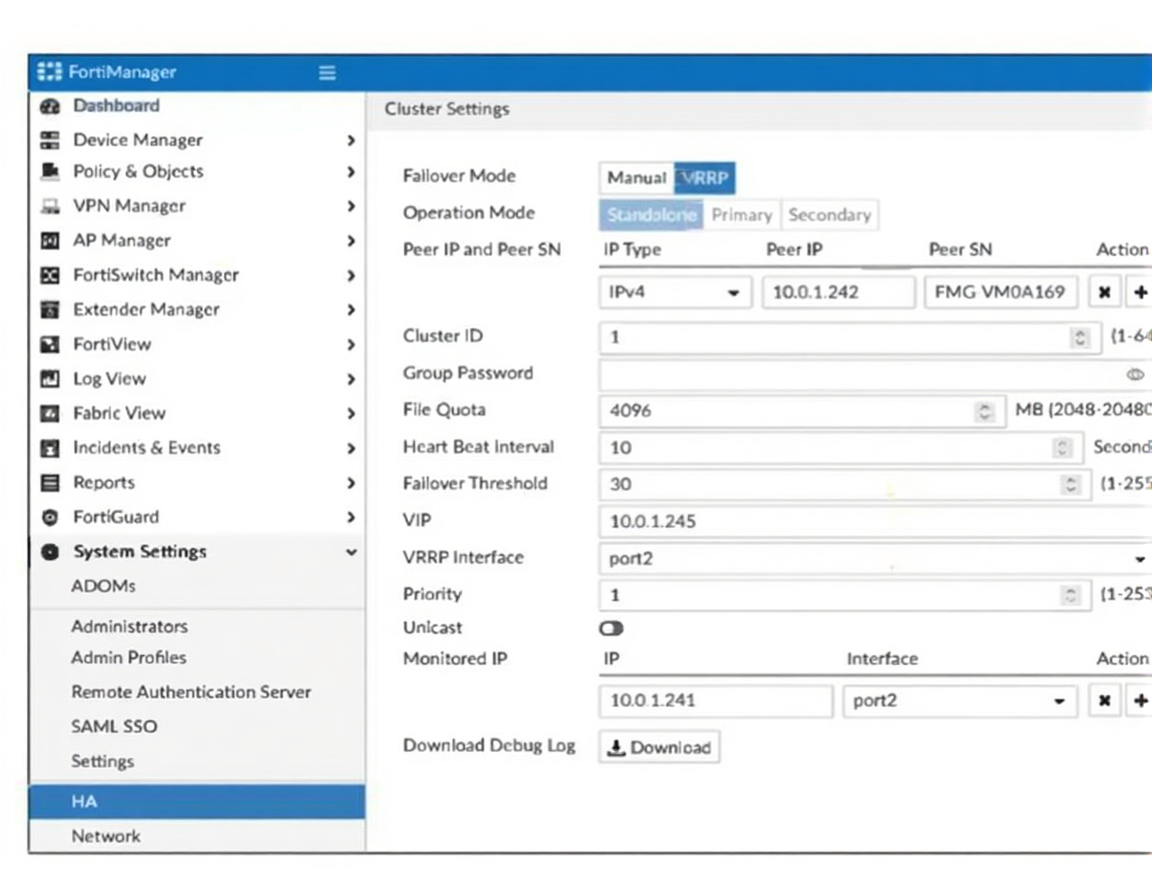
If the monitored interface for the primary FortiManager device fails, what must you do to maintain high
availability (HA)?
A. The FortiManager HAfailover is transparent to administrators and does not require any additional action.
B. Manually promote one of the working secondary devices to the primary role: and reboot the original primary device to remove the peer IP address of the failed device.
C. Reconfigure the primary device to remove the peer IP address of the failed device from its configuration.
D. Check the integrity database of the primary device to force a secondary device to become the new primary with all active interfaces.
Explanation:
The exhibit shows a VRRP-based HA configuration with monitored IP and interface settings.
If the monitored interface fails, FortiManager automatically triggers a failover to the secondary node based on the heartbeat interval and failover threshold.
This process is automatic and transparent — administrators do not need to manually promote or reconfigure devices.
Fortinet confirms: “In VRRP HA mode, failover occurs automatically when monitored interfaces or heartbeat thresholds are breached.” (FortiManager 7.6 Admin Guide).
❌ Why the other options are wrong
B. Manually promote and reboot:
Manual promotion is not required in VRRP HA. Rebooting the primary is unnecessary and disruptive.
C. Reconfigure peer IP:
Peer IPs are part of HA sync and do not need to be removed during failover.
D. Check integrity database:
Integrity checks are unrelated to HA failover logic and do not control role transitions.
📖 References
FortiManager 7.6 Administration Guide –
“VRRP failover is automatic based on monitored interface status and heartbeat thresholds.”
Fortinet KB Article –
“FortiManager HA failover does not require manual intervention when properly configured.”
Refer to the exhibit.
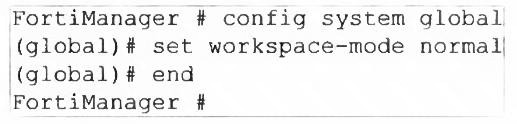
What are two results from the configuration shown in the exhibit? (Choose two.)
A. Ungraceful closed sessions will keep the ADOM in a locked state until the administrator session times out.
B. The administrator can lock policy blocks and FortiManager global ADOM.
C. The same administrator can lock more than one ADOM at the same time.
D. The administrator must have access to the ADOM to approve changes.
Explanation:
The command set workspace-mode normal enables workspace mode in FortiManager. This mode introduces session-based configuration locking and commit control, allowing administrators to make changes in isolation before committing them.
✅ A. Ungraceful closed sessions will keep the ADOM in a locked state until the administrator session times out.
In workspace mode, if an admin closes their session without committing or unlocking, the ADOM remains locked.
This lock persists until the session times out or is manually cleared, preventing others from editing the ADOM.
Fortinet confirms: “In workspace mode, uncommitted changes and abrupt session closures can leave ADOMs locked until timeout.” (FortiManager 7.6 Admin Guide).
✅ B. The administrator can lock policy blocks and FortiManager global ADOM.
Workspace mode allows granular locking of policy packages, objects, and even the global ADOM, ensuring controlled edits.
This prevents concurrent changes and supports structured configuration workflows.
❌ Why C and D are incorrect:
C. The same administrator can lock more than one ADOM at the same time:
FortiManager restricts an admin to one ADOM lock at a time to avoid conflicting changes.
D. The administrator must have access to the ADOM to approve changes:
Approval workflows are part of workflow mode, not workspace mode. Workspace mode allows commit without approval unless workflow is separately enabled.
References:
FortiManager 7.6 Administration Guide –
“Workspace mode enables locking and commit control. ADOMs remain locked if sessions close ungracefully.”
Fortinet KB Article –
“Workspace mode supports locking of policy blocks and global ADOM for isolated configuration.”
While attempting to push a NetFlow configuration script through the FortiManager policy package: an
administrator encounters an error stating that an object is unrecognized in line 4.

What must the administrator do to successfully apply the NetFlow configuration script and avoid the object
unrecognized error?
A. Make sure the user running the script has full access to the VDOM—AGEUSR.
B. Run the script on the device database.
C. Use metadata variables if they use VDOMs in the script.
D. Create a normalized interface on the policy layer before running the script.
Explanation:
The error log shows two critical pieces of information:
Running script (NetFlow Configuration) on DB failed – This indicates the script was executed on the FortiManager database (DB), not on the target device.
[line 4] > config sys interface [parameter(s) invalid. detail: object unrecognized] – The script is trying to configure a system interface (sys interface), but the object (likely an interface name) is unrecognized in the context where the script is running.
Why Option B is correct:
When a CLI script is run "on DB" (the FortiManager central database), it validates commands against FortiManager's object catalog and configuration model. FortiManager may not have the exact interface names or VDOM-specific objects from the target device loaded in its database.
Running the script "on device" (the device database) means the script will be executed directly on the target FortiGate's configuration context during installation. The FortiGate recognizes its own interface names (like port1, vlan100, etc.) and VDOM structure.
The script references edit AGEUSR (a VDOM) and then config sys interface. This is device-specific configuration that must be validated against the actual device's configuration, not FortiManager's central catalog.
Why the other options are incorrect:
A is incorrect –
While administrative access is important, the error is not about permission denial. It's an object recognition error. The issue is where the script is being validated (FortiManager DB vs. device DB), not user permissions.
C is incorrect –
Metadata variables (like {{vdom}}) are useful for making scripts reusable across different devices/VDOMs, but they don't solve the fundamental problem of where the script is validated. An object would still be "unrecognized" if validated against the wrong database.
D is incorrect –
A "normalized interface" on the policy layer refers to creating interface objects in FortiManager's policy & objects database. This is for use in firewall policies, not for CLI scripting. The script is using raw CLI commands (config sys interface), not policy objects.
Reference:
FortiManager 7.6 Administration Guide → "Scripting" chapter, specifically sections on "Device CLI Scripts" and the difference between "Execute on database" vs. "Execute on device" settings. The guide states that device-specific configuration should use "Execute on device" to avoid validation errors.
Refer to the exhibits.
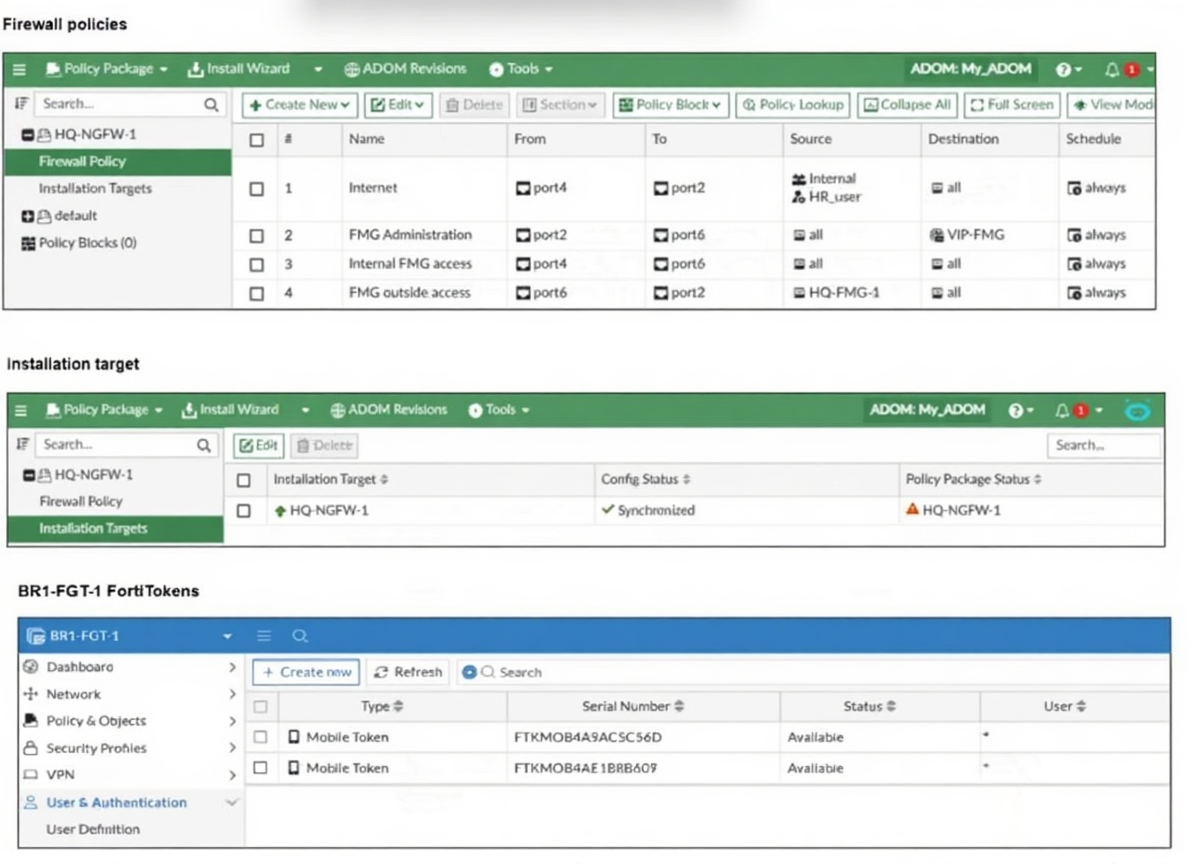
An administrator needs to push a FortiToken Mobile to assign it to HR_user in the HQ-NGFW-1.
However, when installing the policy package, they receive the following error message:
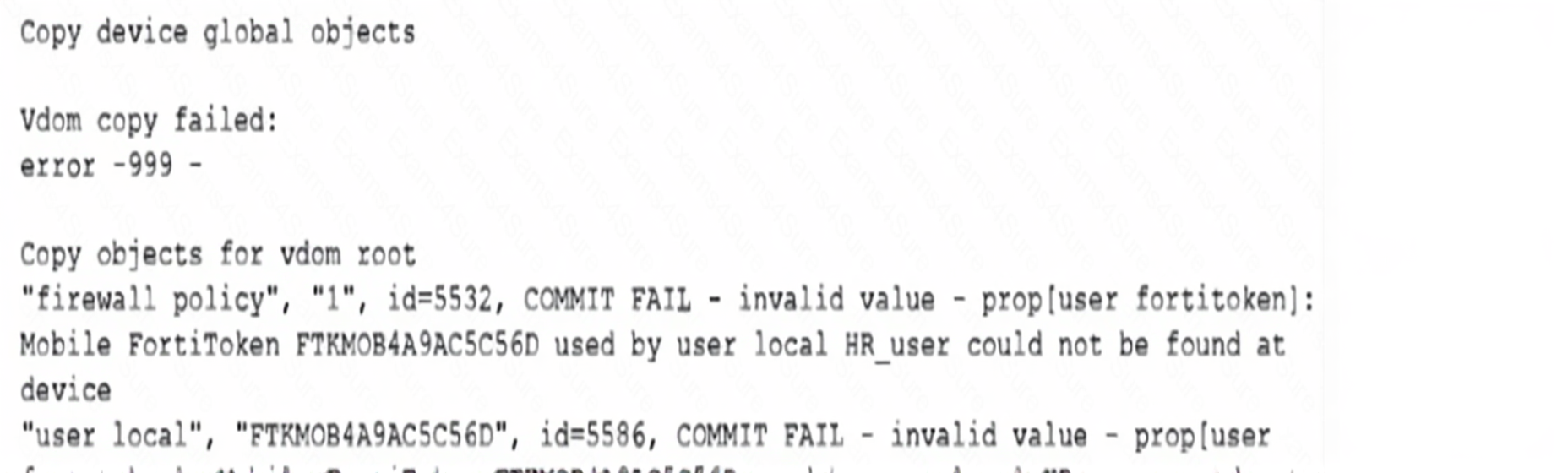
Why is the administratornotable to install the FortiToken on the HQ-NGFW-1 firewall?
A. The administrator must use a user local meta field to assign FortiToken.
B. The administrator must use a valid FortiToken that exists on HQ-NGFW-1.
C. The administrator must use a metadata variable to assign the same FortiToken to multiple users in FortiManager.
D. The administrator must use per-device mapping to assign the FortiToken to HQ-NGFW-1.
Explanation:
The error message clearly states that the FortiToken (FTKMOB4A9AC5C5D) assigned to HR_user could not be found on the device. FortiManager can only push FortiToken assignments if the token is already registered on the target FortiGate. Tokens must be physically present and recognized by the FortiGate before they can be referenced in user configurations or policy packages. Attempting to assign a token that doesn’t exist on the device results in a commit failure.
Why other options are incorrect:
A. Use a user local meta field:
Meta fields help with dynamic mapping but do not resolve missing token errors. The issue is token presence, not metadata.
C. Use a metadata variable to assign the same token to multiple users:
FortiTokens are uniquely bound to individual users. Reusing the same token across users is invalid and unsupported.
D. Use per-device mapping:
Per-device mapping allows object overrides but does not solve the core issue of the token being absent on the device.
References:
FortiManager 7.6 Administration Guide –
“FortiTokens must be registered on the FortiGate before they can be assigned through FortiManager.”
Fortinet KB Article –
“COMMIT FAIL errors occur when referenced FortiTokens are not present on the target device.”
Which output is displayed right after moving the ISFW device from one ADOM to another?
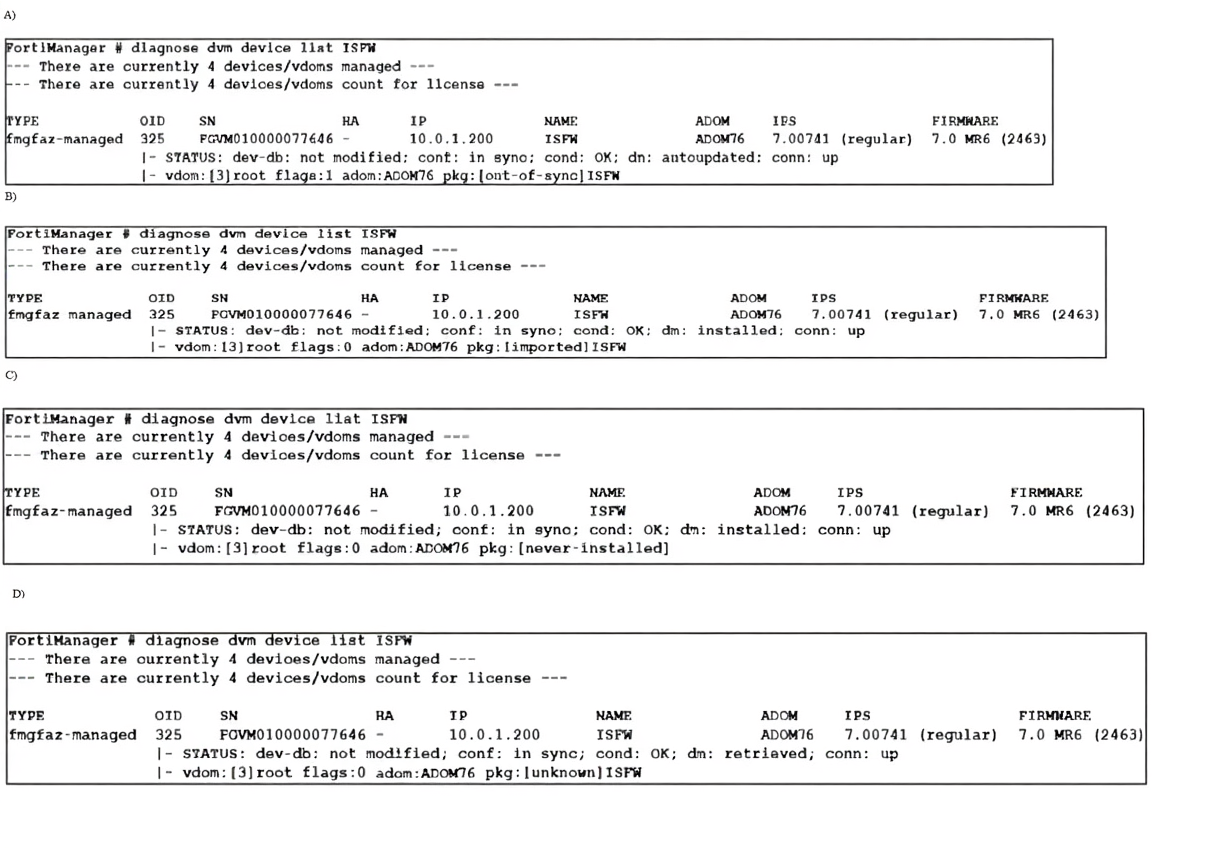
A. Option A
B. Option B
C. Option C
D. Option D
Explanation:
When a device is moved between ADOMs, FortiManager severs its link to the previous ADOM’s policy package. Although the device retains its configuration (conf: in sync), in the new ADOM it has no policy package assignment until the administrator explicitly assigns one. Once assigned, FortiManager marks the package status as never-installed because that specific package in the new ADOM context has never been pushed to the device—even if identical policies exist on the device from the old ADOM.
Why other options are incorrect:
A.(pkg:[out-of-sync])
appears when changes exist in FortiManager but are not yet installed on the device—not immediately after an ADOM move.
B. (pkg:[imported])
is seen after initial device import, not after an inter-ADOM transfer.
D. (pkg:[unknown])
typically occurs briefly during device discovery or retrieval, but is not the stable state after a completed move.
Reference:
FortiManager 7.6 Administration Guide → “Device Management” → “Moving Devices Between ADOMs.” The guide confirms policy packages are ADOM-specific and must be reassigned after a device move, resulting in a never-installed status for the newly assigned package.
| Page 4 out of 11 Pages |
| 123456 |
| FCP_FMG_AD-7.6 Practice Test Home |
The Fortinet FortiManager 7.6 Administrator exam is notoriously tough. It doesn't test memorization. It forces you to make complex decisions under time pressure. A weak prep strategy risks a costly failure and wasted effort. Our FCP_FMG_AD-7.6 practice tests are built to be your definitive bridge to a passing score.

Copyright © - All Rights Reserved