
Last Updated On : 12-Oct-2026
Total 112 Questions
Refer to the exhibits.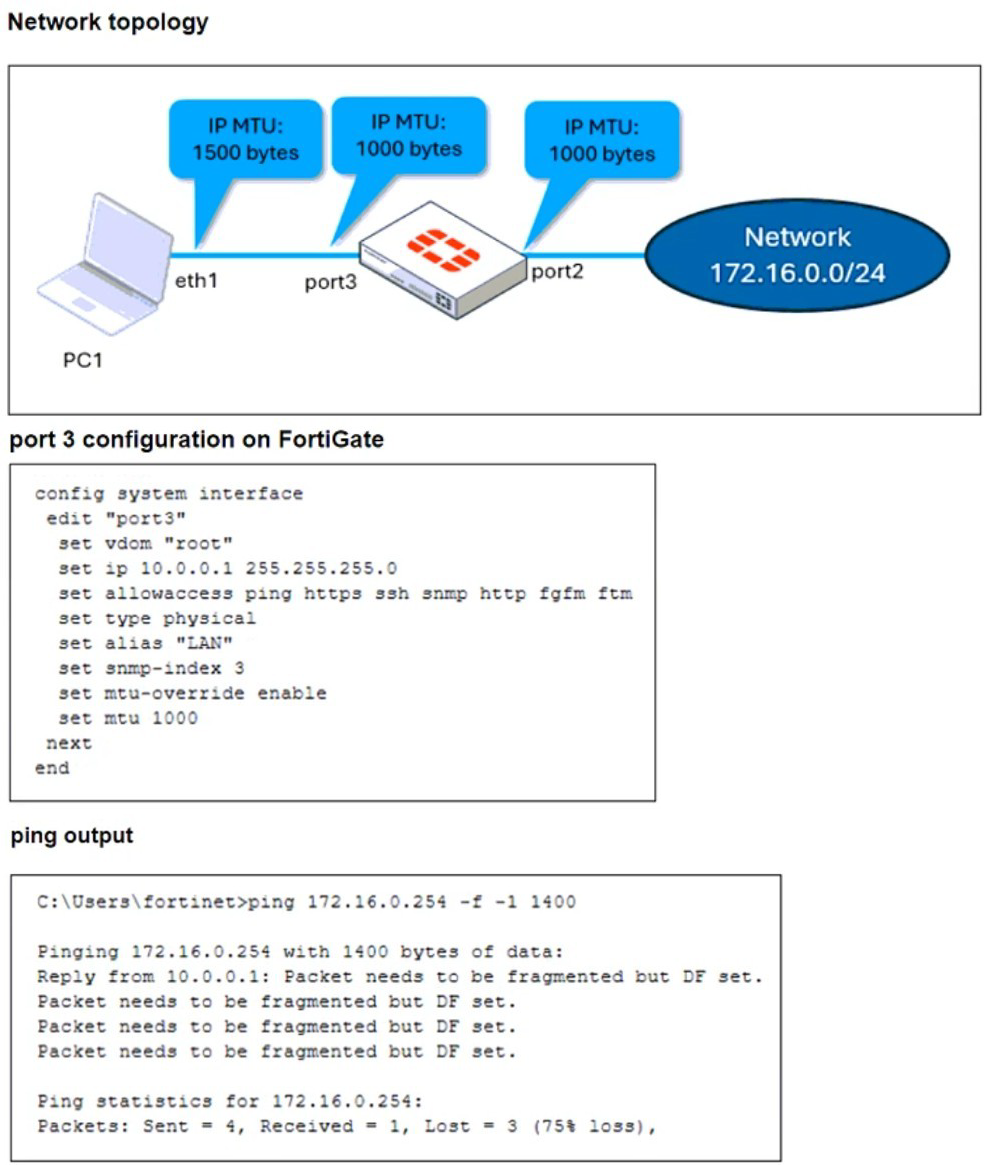
The configuration of a user's Windows PC, which has a default MTU of 1500 bytes, along
with FortiGate interfaces set to an MTU of 1000 bytes, and the results of PC1 pinging
server 172.16.0.254 are shown.
Why is the user in Windows PC1 unable to ping server 172.16.0.254 and is seeing the
message: Packet needs to be fragmented but DF set?
A. Option ip.flags.mf must be set to enable on FortiGate. The user has to adjust the ping MTU to 1000 to succeed.
B. Fragmented packets must be encrypted. To connect any application successfully, the user must install the Fortinet_CA certificate in the Microsoft Management Console.
C. FortiGate honors the do not fragment bit and the packets are dropped. The user has to adjust the ping MTU to 972 to succeed.
D. The user must trigger different traffic because path MTU discovery techniques do not recognize ICMP payloads.
Explanation:
The Windows PC is using the default MTU of 1500 bytes, while FortiGate interfaces port2 and port3 are configured with an MTU of 1000 bytes. When the user pings 172.16.0.254 with a payload of 1400 bytes and the DF (Don't Fragment) flag set, FortiGate drops the packet because it cannot fragment it to fit the lower MTU.
FortiGate strictly honors the DF bit, meaning it will not fragment oversized packets. Instead, it sends back an ICMP “Fragmentation Needed” message — which is exactly what the user sees: “Packet needs to be fragmented but DF set.”
To succeed, the user must reduce the ping payload to fit within the MTU minus overhead. For ICMP, the overhead is typically 28 bytes (20 for IP header + 8 for ICMP header). So: 1000 MTU – 28 = 972 bytes This is the maximum payload that can traverse the FortiGate path without fragmentation.
Why other options are incorrect:
A. ip.flags.mf must be set… ❌
Misleading. FortiGate does not use ip.flags.mf as a configurable option. The issue is with the DF bit, not MF.
B. Fragmented packets must be encrypted… ❌
Irrelevant. This is an ICMP ping test, not encrypted traffic. Certificates have no role here.
D. Path MTU discovery doesn’t recognize ICMP… ❌
Incorrect. ICMP is used by PMTUD to detect MTU mismatches. This is exactly what’s happening.
Reference
FortiOS 7.6 Administration Guide – MTU and Fragmentation Behavior
Fortinet KB: Understanding MTU mismatch and DF bit handling on FortiGate
What action can be taken on a FortiGate to block traffic using IPS protocol decoders, focusing on network transmission patterns and application signatures?
A. Use the DNS filter to block application signatures and protocol decoders.
B. Use application control to limit non-URL-based software handling.
C. Enable application detection-based SD-WAN rules.
D. Configure a web filter profile in flow mode.
Explanation:
The question specifically asks about blocking traffic using IPS protocol decoders and focusing on network transmission patterns and application signatures. This is the precise function of FortiGate's Application Control feature.
Application Control works by using IPS protocol decoders to deeply inspect traffic. It identifies applications based on their unique behavioral signatures, communication patterns, and protocols—even when they use non-standard ports or encryption. It can then allow, block, or restrict those applications.
The phrase "non-URL-based software handling" directly contrasts with URL filtering; Application Control is needed to block applications that don't rely on web URLs (e.g., P2P, tunneling software, custom protocols).
Why other options are incorrect:
A. DNS filter:
This only blocks or allows domains based on categorization. It does not use IPS protocol decoders to analyze traffic patterns or application signatures.
C. Enable application detection-based SD-WAN rules:
This uses App Control signatures to steer traffic (SD-WAN rule selection), not primarily to block it. The goal here is blocking, not path selection.
D. Configure a web filter profile in flow mode:
Web filtering is for HTTP/HTTPS URL and content filtering. It does not focus on the broader range of network transmission patterns and application signatures across all protocols that App Control and IPS decoders handle.
Reference:
FortiOS Security Profiles Guide - Application Control. It states that Application Control uses IPS engines and protocol decoders to detect applications by their network behavior and signature, providing control over thousands of applications regardless of port or evasion technique.
Refer to the exhibit, which shows the HA status of an active-passive cluster.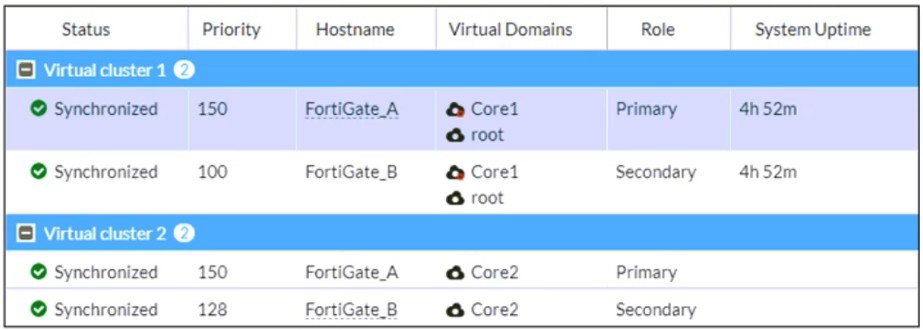
An administrator wants FortiGate_B to handle the Core2 VDOM traffic.
Which modification must the administrator apply to achieve this?
A. The administrator must disable override on FortiGate_A.
B. The administrator must change the priority from 100 to 160 for FortiGate_B.
C. The administrator must change the load balancing method on FortiGate_B.
D. The administrator must change the priority from 128 to 200 for FortiGate_B.
Explanation:
In FortiGate HA, the device with the higher priority becomes the primary (active) for a given VDOM. The exhibit shows a multi-VDOM cluster:
For VDOM Core1: FortiGate_A (Priority 150) is primary, FortiGate_B (Priority 100) is secondary.
For VDOM Core2: FortiGate_A (Priority 150) is primary, FortiGate_B (Priority 128) is secondary.
To make FortiGate_B handle traffic for VDOM Core2, it must become the primary for that VDOM. This requires its priority for Core2 to be higher than FortiGate_A's priority (150). Changing it to 200 achieves this.
Why other options are incorrect:
A. Disable override:
The override setting (if enabled) allows a device to take primary role regardless of priority if it detects the current primary is down. Disabling it on FortiGate_A would not change the priority-based election; FortiGate_A would remain primary.
B. Change priority from 100 to 160 for FortiGate_B:
This modifies the priority for VDOM Core1 (currently 100), not Core2. The target is Core2.
C. Change the load balancing method:
This refers to active-active (load balancing) clustering. The exhibit shows an active-passive cluster (primary/secondary roles), so load balancing settings do not apply.
Reference:
FortiOS HA Guide - "Configuring HA for multiple VDOMs." It explains that in multi-VDOM mode, priority is set per-VDOM, and the device with the higher priority for a specific VDOM becomes its primary.
Refer to the exhibit, which shows a command output.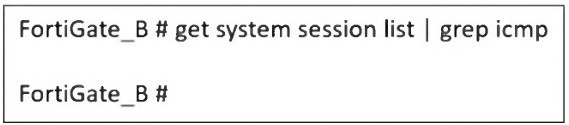
FortiGate_A and FortiGate_B are members of an FGSP cluster in an enterprise network.
While testing the cluster using the ping command, the administrator monitors packet loss
and found that the session output on FortiGate_B is as shown in the exhibit.
What could be the cause of this output on FortiGate_B?
A. The session synchronization is encrypted.
B. session-pickup-connectionless is set to disable on FortiGate_B.
C. FortiGate_B is configured in passive mode.
D. FortiGate_A and FortiGate_B have the same standalone-group-id value.
Explanation:
The exhibit shows the command get system session list | grep icmp on FortiGate_B returns no output, indicating there is no active ICMP session in its session table. This is a critical observation during FGSP cluster testing using ping (ICMP).
The root cause is the handling of connectionless protocols in FGSP. ICMP is connectionless. For a standby FGSP member to process and maintain sessions for such protocols after a failover, the specific setting session-pickup-connectionless must be enabled.
If session-pickup-connectionless is disabled on FortiGate_B, it will not pick up or create local session entries for ICMP traffic synchronized from FortiGate_A. The traffic is synchronized, but FortiGate_B cannot act upon it, leading to an empty session table for ICMP and causing packet loss during a failover test.
Why other options are incorrect:
A. The session synchronization is encrypted:
Encryption (session-sync-encryption) secures the sync channel but does not prevent session pickup or table population. It would not cause the session table to be empty.
C. FortiGate_B is configured in passive mode:
While a device in passive mode does not process new traffic, it does receive and maintain synchronized sessions from its peer in its session table for failover readiness. The exhibit shows no session at all, which is more specific to a protocol-level pickup issue.
D. FortiGate_A and FortiGate_B have the same standalone-group-id value:
A duplicate standalone-group-id is a misconfiguration that typically prevents session synchronization entirely or causes instability. The test likely would not function at all, not just show an empty ICMP session list on one member.
Reference:
FortiOS Clustering Guide - FGSP Configuration. The session-pickup-connectionless setting is explicitly documented as required for handling ICMP and other connectionless protocols to allow the backup unit to take over sessions seamlessly.
An administrator must minimize CPU and RAM use on a FortiGate firewall while also
enabling essential security features, such as web filtering and application control for
HTTPS traffic.
Which SSL inspection setting helps reduce system load while also enabling security
features, such as web filtering and application control for encrypted HTTPS traffic?
A. Use full SSL inspection to thoroughly inspect encrypted payloads.
B. Disable SSL inspection entirely to conserve resources.
C. Configure SSL inspection to handle HTTPS traffic efficiently.
D. Enable SSL certificate inspection mode to perform basic checks without decrypting traffic.
Explanation:
To minimize CPU and RAM usage while still enabling web filtering and application control for HTTPS traffic, the administrator should use SSL certificate inspection mode. This mode performs basic checks on the server certificate during the SSL handshake — such as verifying the certificate issuer, expiration, and domain — without decrypting the payload. It allows FortiGate to apply category-based filtering and application control using metadata like Server Name Indication (SNI) and certificate fields, which is sufficient for many policy enforcement scenarios.
This approach avoids the heavy resource demands of full SSL inspection, which requires decrypting and re-encrypting traffic, consuming significant CPU and memory. Certificate inspection is lightweight and scalable, making it ideal for guest networks or branch offices where performance is a priority.
Why other options are incorrect:
A. Use full SSL inspection… ❌
Full SSL inspection decrypts traffic for deep analysis but is resource-intensive. It’s not suitable when minimizing system load is a priority.
B. Disable SSL inspection entirely… ❌
Disabling SSL inspection prevents FortiGate from analyzing encrypted traffic, disabling web filtering and application control for HTTPS — defeating the security goal.
C. Configure SSL inspection to handle HTTPS traffic efficiently… ❌
Vague and non-specific. It doesn’t refer to a valid FortiGate inspection mode. Efficiency depends on choosing the right inspection type — which is certificate inspection in this case.
References
Fortinet Technical Tip:
Differences between SSL Certificate Inspection and Full SSL Inspection
Fortinet KB:
Optimizing FortiGate SSL Inspection
🔍 Summary:
Use SSL certificate inspection mode to reduce system load while still enabling HTTPS-based security features. It’s lightweight, effective, and ideal for performance-sensitive environments.
An administrator is extensively using VXLAN on FortiGate.
Which specialized acceleration hardware does FortiGate need to improve its performance?
A. NP7
B. SP5
C. 9
D. NTurbo
Explanation:
VXLAN (Virtual Extensible LAN) is a network virtualization overlay protocol that encapsulates Layer 2 Ethernet frames within Layer 4 UDP packets. For optimal performance on FortiGate, this encapsulation/decapsulation process must be hardware-accelerated.
The NP7 (Network Processor 7) is the specialized ASIC in current-generation FortiGate devices (e.g., 1000F, 2000E, 4000F series) designed to accelerate tunneled and encrypted traffic, including VXLAN, IPsec, SSL, and GTP. It offloads these intensive tasks from the general CPU, dramatically improving throughput and reducing latency.
Why other options are incorrect:
B. SP5:
The SP5 (Security Processor 5) is designed to accelerate content inspection (IPS, Anti-Virus, DPI) and specific security functions, not the tunneling/encapsulation work of VXLAN.
C. 9:
This is not a recognized FortiGate hardware acceleration component. It could refer to a CP9 (Content Processor), which handles some security offloads but not tunneled traffic.
D. NTurbo:
NTurbo is a software-based acceleration driver that improves network stack performance in certain virtual (VM) and low-end hardware models. It is not a specialized physical hardware ASIC for VXLAN and does not provide the same level of performance as an NP7.
Reference:
Fortinet Hardware Acceleration Guide / Data Sheets. The NP7 is consistently documented as the processor for "Tunneled and Encrypted Traffic Offload," which includes VXLAN, Geneve, and IPsec, ensuring line-rate performance for overlay networks.
What is the initial step performed by FortiGate when handling the first packets of a session?
A. Installation of the session key in the network processor (NP)
B. Data encryption and decryption
C. Security inspections such as ACL, HPE, and IP integrity header checking
D. Offloading the packets directly to the content processor (CP)
Explanation:
The first packets of a new session undergo the slow path processing in FortiOS. This initial step involves fundamental security and routing validations performed by the CPU before any hardware acceleration or session establishment occurs.
This includes:
ACL (Access Control List) checking: Verifying the session against firewall policies.
HPE (Header-Port-Protocol Enforcement): A basic security check that validates packet headers.
IP Integrity Header Checking: Verifying the IP packet structure for anomalies or attacks.
Only after these initial inspections pass will a session be created, a session key installed, and subsequent packets potentially offloaded to specialized processors (NP or CP) for accelerated forwarding and deep inspection.
Why other options are incorrect:
A. Installation of the session key in the network processor (NP):
This occurs after the initial packet has been validated by the CPU and the session is approved. It is a result of the first-packet processing, not the initial step.
B. Data encryption and decryption:
This occurs only if the traffic matches an IPsec VPN policy and is part of established session handling, not the initial packet inspection.
D. Offloading the packets directly to the content processor (CP):
The CP accelerates content-level security scans (like IPS, AntiVirus). Offloading to the CP happens after the session is created and a decision is made to apply UTM profiles. The first packet is always handled by the CPU.
Reference:
FortiGate System Architecture documentation, which describes the "first packet" flow through the CPU for policy lookup, header validation, and session creation before any hardware offloading takes place.
| Page 6 out of 16 Pages |
| 23456789 |
| FCSS_EFW_AD-7.6 Practice Test Home |
The FCSS - Enterprise Firewall 7.6 Administrator exam is notoriously tough. It doesn't test memorization. It forces you to make complex decisions under time pressure. A weak prep strategy risks a costly failure and wasted effort. Our FCSS_EFW_AD-7.6 practice tests are built to be your definitive bridge to a passing score.

Copyright © - All Rights Reserved