
Last Updated On : 31-Aug-2026
Total 45 Questions
The smartest way to prepare for your Fortinet FCSS_LED_AR-7.6 2026 exam isn't just reading — it's practicing. Our Fortinet NSE 6 - LAN Edge 7.6 Architect practice test bridge gap, transforming your knowledge into a passing score. Familiarize yourself with the exact style and difficulty of the real Fortinet FCSS_LED_AR-7.6 practice questions, so there are no surprises. Get detailed feedback to identify your strengths and target your weaknesses, making your study time more efficient.
High Availability and Redundancy
Refer to the exhibits.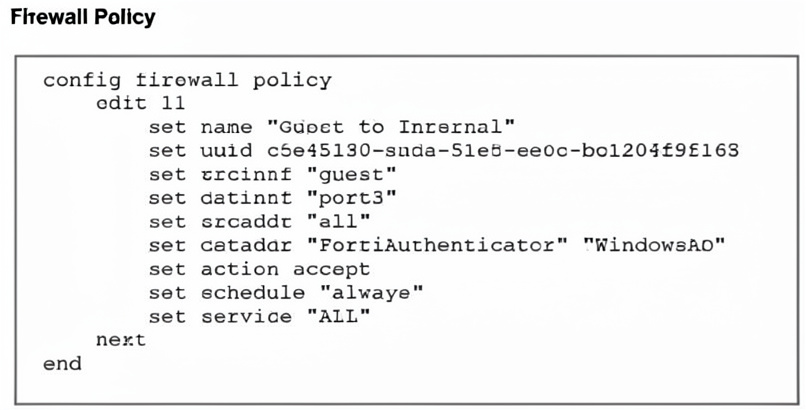
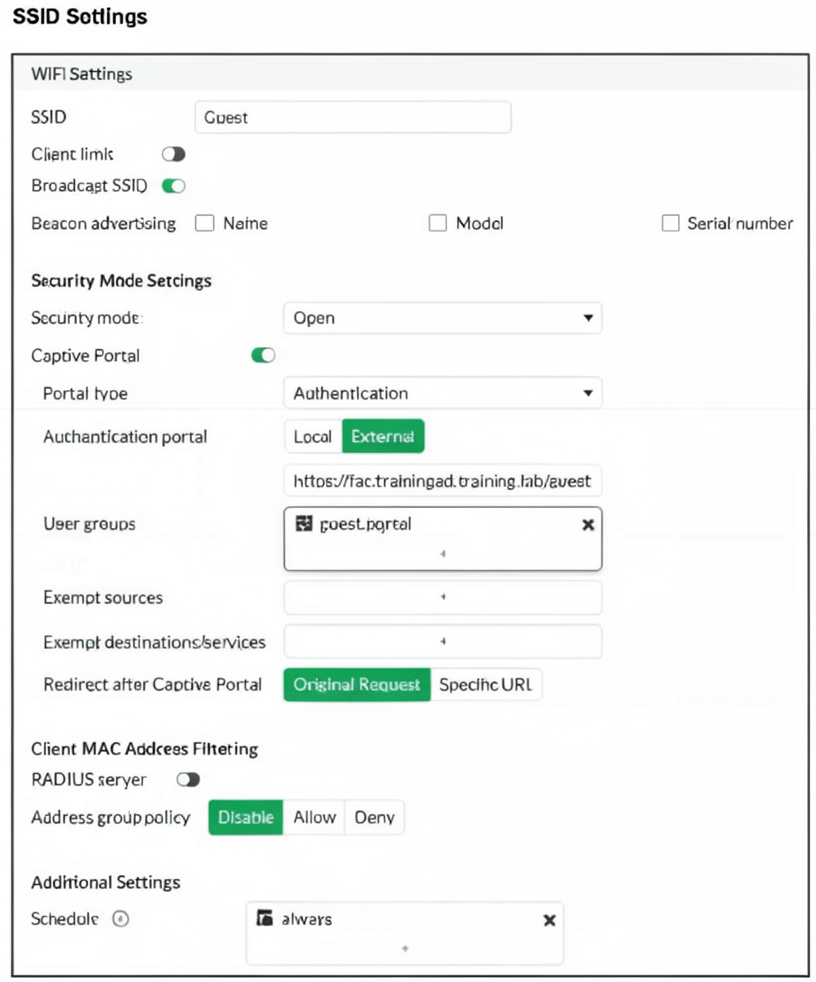
Examine the firewall policy configuration and SSID settings. Users trying to connect to the new Guest wireless network should be redirected to an external captive portal, however, these wireless users are not able to see the captive portal login page. The external captive portal URL has been verified as correct, yet the issue persists. Which configuration change should fix the problem?
A. Add FortiAuthenticator and WindowsAD as exempt sources.
B. Security mode should be set to WPA2 Enterprise to authenticate through RADIUS.
C. A firewall policy with the ID 11 is missing to enable the captive-portal-exempt option.
D. Include the user group guest.portal in the firewall policy.
Explanation:
The SSID uses an external captive portal with authentication, and the firewall policy allows traffic from guest to port3. However, users cannot see the login page. This typically occurs because the firewall policy lacks the captive-portal-exempt option. When this option is disabled (default), FortiGate blocks portal traffic until authentication completes, creating a deadlock.
Correct Option:
C. A firewall policy with the ID 11 is missing to enable the captive-portal-exempt option.
The captive-portal-exempt enable command in firewall policy allows captive portal traffic (HTTP/HTTPS to the external portal URL) to bypass authentication checks.
Without this, FortiGate drops the initial portal page request because the user is not yet authenticated.
Adding this option to policy ID 11 resolves the deadlock and displays the login page.
Incorrect Option:
A. Add FortiAuthenticator and WindowsAD as exempt sources.
Exempt sources are for bypassing captive portal entirely, not for fixing portal page delivery.
Adding them would allow users to skip authentication, defeating the portal purpose.
B. Security mode should be set to WPA2 Enterprise to authenticate through RADIUS.
WPA2 Enterprise is for Wi-Fi authentication, not for external captive portal operation.
The SSID uses Open security mode with captive portal, which is correct for guest access scenarios.
D. Include the user group guest.portal in the firewall policy.
The SSID configuration already references guest.portal as the user group for authentication.
Adding it to the firewall policy is redundant; the issue is portal traffic being blocked pre-authentication, not missing user group reference.
Reference:
Fortinet Documentation: Firewall Policy captive-portal-exempt — Required when using external captive portal on FortiGate. Without this option, HTTP/HTTPS requests to the portal URL are blocked by the same policy until authentication succeeds.
Refer to the exhibits.
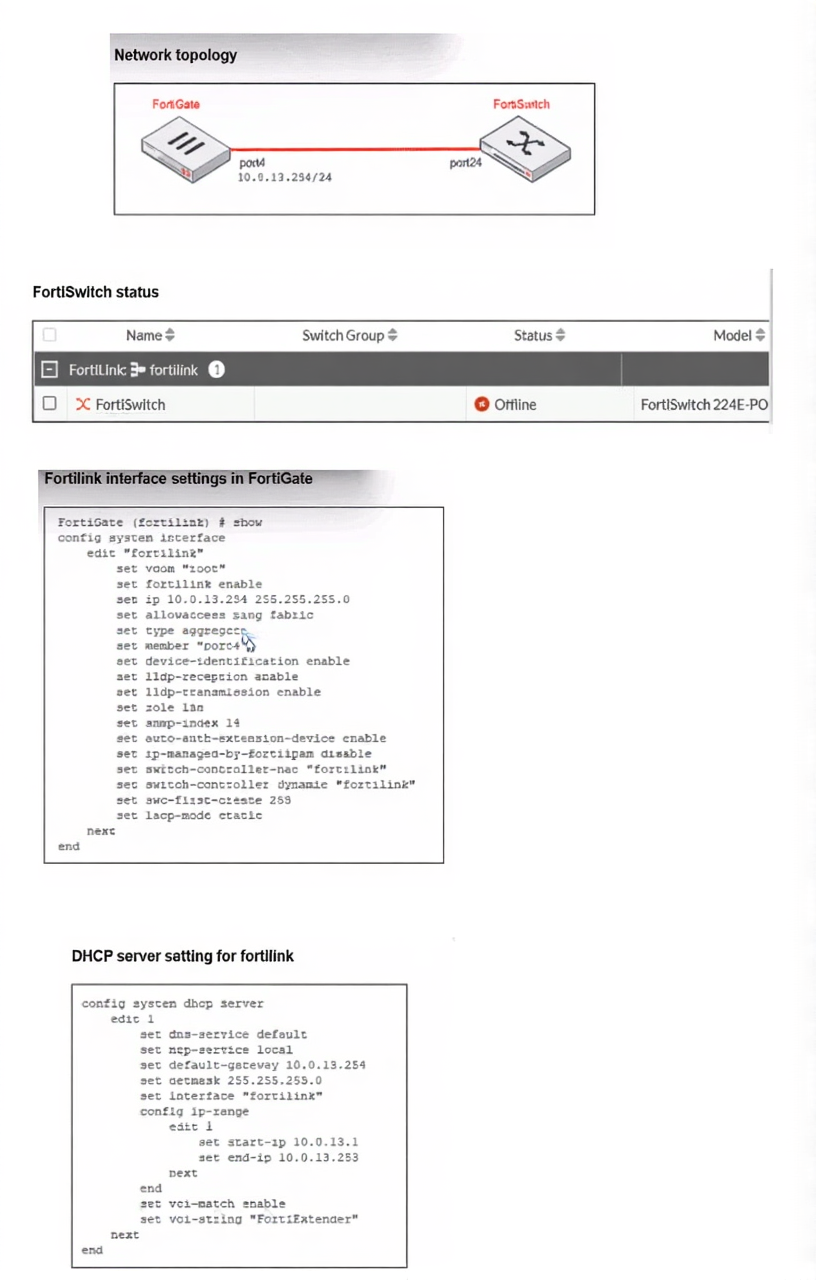
You are adding a new FortiSwitch to FortiGate for management. All necessary settings have been configured
on FortiGate, but FortiSwitch remains offline. The cabling has been verified and is correctly connected.
Which misconfiguration might be preventing FortiGate from detecting FortiSwitch?
A. The Fortilink interface setting ip-managed-by-fortiipam must be enabled.
B. The Fortilink interface has the wrong interface member.
C. The Fortilink interface setting cype must be physical.
D. The DHCP server setting vci-string is misconfigured.
Explanation:
This question tests knowledge of FortiLink auto-discovery requirements for FortiSwitches. When a FortiSwitch connects to a FortiGate, it sends a DHCP request containing a specific Vendor Class Identifier (VCI) string. The DHCP server on the FortiLink interface must match this string to assign an IP address and complete the discovery process.
✔️ Correct Option:
✔️ Option D: The DHCP server setting vci-string is misconfigured.
The exhibit shows the DHCP server configuration uses set vci-string "FortiEthernet". However, FortiSwitches send the VCI string FortiSwitch (or FortiSwitch
❌ Incorrect options:
❌ Option A: The Fortilink interface setting ip-managed-by-fortiipam must be enabled.
This setting (ip-managed-by-fortilink in the exhibit) is used when IP addresses are managed by an external IPAM solution. It is not required for basic FortiLink discovery and DHCP assignment .
❌ Option B: The Fortilink interface has the wrong interface member.
The exhibit shows set member "port4", which is a valid physical port. If the cabling is verified correct, the member configuration is appropriate for a FortiLink aggregate interface .
❌ Option C: The Fortilink interface setting cype must be physical.
The interface type shown is type aggregate, which is correct for FortiLink when using link aggregation. FortiLink supports both physical and aggregate interface types. Changing to physical would not resolve the discovery issue .
🔧 Reference:
→ Fortinet Document Library: VCI pattern matching for DHCP assignment: Official documentation explaining that vci-match enable restricts DHCP service to only clients with matching VCI strings, and vci-string defines which strings are allowed.
When the MAC address of a device is placed in quarantine on FortiSwitch, what happens to its egress traffic?
A. Traffic is sent to an access VLAN.
B. Traffic is assigned to the native VLAN.
C. Traffic is sent as untagged traffic.
D. Traffic is sent to an allowed VLAN.
Explanation:
This question tests understanding of FortiSwitch quarantine behavior in NAC deployments. When a device is quarantined based on its MAC address, FortiSwitch redirects its traffic to a specific VLAN to limit network access until the device meets security compliance requirements.
🟢 Correct Option:
A. Traffic is sent to an access VLAN
Quarantined devices are placed in a restricted access VLAN, often called a quarantine VLAN. All egress traffic from the device is redirected to this VLAN, preventing full network access while allowing remediation or onboarding procedures.
🔴 Incorrect options:
B. Traffic is assigned to the native VLAN
The native VLAN is used for untagged traffic but does not control quarantine behavior. Placing quarantined devices in the native VLAN would bypass policy enforcement.
C. Traffic is sent as untagged traffic
Traffic tagging does not determine quarantine; FortiSwitch uses VLAN assignment to isolate devices. Untagged traffic alone does not enforce restricted access.
D. Traffic is sent to an allowed VLAN
“Allowed VLAN” implies full network access. Quarantined devices are explicitly isolated, so traffic is not forwarded to standard allowed VLANs.
🔧 Reference:
→ Fortinet FortiSwitch NAC Quarantine Behavior
Confirms that quarantined MAC addresses are redirected to a designated access VLAN to restrict network access until compliance is met.
In addition to requiring a FortiAnalyzer device to configure the Security Fabric, which license must be added to FortiAnalyzer to use Indicators of Compromise (IOC) rules?
A. loT Security Add-on license
B. IOC Subscription license
C. IOC detection is included on FAZ-Basic license
D. Threat Detection Service license
Explanation:
This question tests the licensing requirements for advanced Security Fabric features on FortiAnalyzer. While a FortiAnalyzer device is required to integrate with the Security Fabric for centralized logging and analytics, using Indicators of Compromise (IOC) rules to detect compromised devices needs an additional specific license beyond the base setup.
✔️ Correct Option:
B. IOC Subscription license
This option is correct because Indicators of Compromise (IOC) functionality on FortiAnalyzer is not included in the base license. The IOC Subscription license enables FortiGuard IOC intelligence updates, allowing FortiAnalyzer to download and apply IOC rules for detecting suspicious IPs, domains, URLs, and malware indicators across the Security Fabric.
❌ Incorrect options:
A. IoT Security Add-on license
This does not satisfy the requirement because the IoT Security Add-on license is designed specifically for discovering, profiling, and securing IoT and OT devices in the network. It provides visibility into IoT asset inventory and risk assessment but has no relation to enabling IOC rules or FortiGuard threat intelligence for compromise detection.
B. IOC detection is included on FAZ-Basic license
This fails as the base FortiAnalyzer license only supports basic logging, reporting, and limited Security Fabric integration. Advanced features like real-time IOC rule processing and automatic FortiGuard IOC package downloads require a separate paid subscription and are not available with the standard FAZ-Basic license.
C. Threat Detection Service license
This is unsuitable because FortiAnalyzer does not offer a generic “Threat Detection Service” license for IOC functionality. Threat-related features on FortiAnalyzer are tied specifically to the IOC Subscription license, which handles Indicators of Compromise intelligence rather than a broad threat detection bundle.
🔧 Reference:
→ Viewing Indicators of Compromise | FortiAnalyzer 7.6
Explains that the IOC service requires a valid subscription license for full FortiGuard updates and rule functionality.
→ How IOC works | FortiAnalyzer 7.4
Describes the licensing requirement for using IOC rules with Security Fabric integration.
Refer to the exhibits.
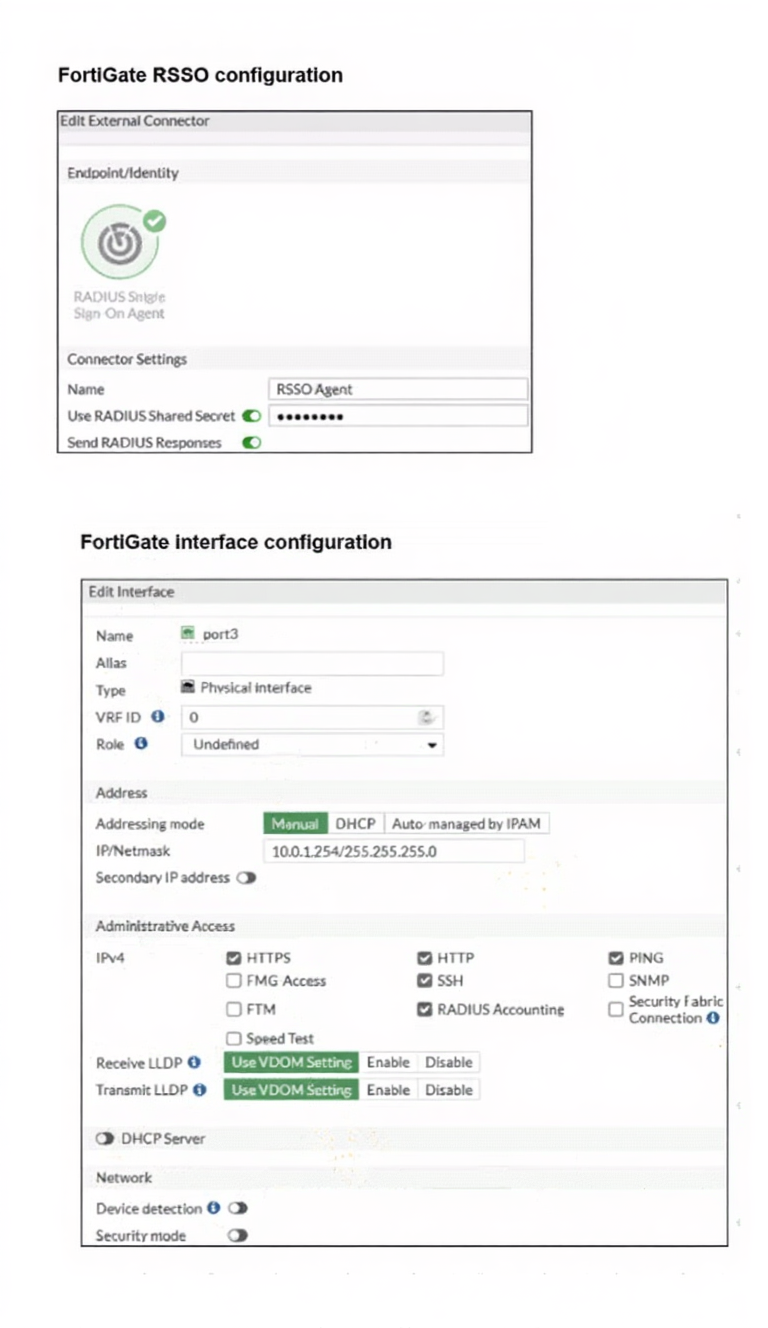
Examine the FortiGate RSSO configuration shown in the exhibit.
FortiGate is set up to use RSSO for user authentication. It is currently receiving RADIUS accounting
messages through port3. The incoming RADIUS accounting messages contain the username in the User-
Name attribute and group membership in the Class attribute. You must ensure that the users are authenticated
through these RADIUS accounting messages and accurately mapped to their respective RSSO user groups.
Which three critical configurations must you implement on the FortiGate device? (Choose three.)
A. The RADIUS Attribute Value setting configured for an RSSO user group should match the class RADIUS attribute value in the RADIUS accounting message.
B. RSSO user groups should be assigned to all firewall policies.
C. Device detection and Security Fabric Connection should be enabled on port3
D. The sso-attribute CLI setting in the RSSO agent configuration should be set to Class.
E. The rsso-endpoint-attribute CLI setting in the RSSO agent configuration should be set to User-Name.
Explanation:
This scenario involves configuring FortiGate as a RADIUS Single Sign-On (RSSO) collector. When FortiGate receives RADIUS accounting messages, it must be told exactly which attributes contain the user's identity and their group membership to create a valid login session.
✅ Correct Options:
A. The RADIUS Attribute Value setting configured for an RSSO user group should match the class RADIUS attribute value in the RADIUS accounting message.
For RSSO to function, the "User Group" defined on the FortiGate must have a specific "RADIUS Attribute Value" string. When the RADIUS packet arrives, FortiGate compares the value found in the designated group attribute against this string; if they match, the user is placed into that local RSSO group.
D. The sso-attribute CLI setting in the RSSO agent configuration should be set to Class.
By default, FortiGate may look for group information in different attributes. Since the prompt specifies that group membership is sent in the Class attribute, you must explicitly configure the sso-attribute to "Class" in the CLI so the RSSO agent knows where to extract group data.
E. The rsso-endpoint-attribute CLI setting in the RSSO agent configuration should be set to User-Name.
The rsso-endpoint-attribute defines which attribute in the RADIUS packet represents the user's unique identifier (the endpoint). Since the prompt states the username is in the User-Name attribute, this setting must be explicitly mapped to ensure the session is tied to the correct person.
❌ Incorrect options:
B. RSSO user groups should be assigned to all firewall policies.
While RSSO groups must be used in relevant policies to enforce access control, they do not need to be assigned to "all" firewall policies. This is a design choice, not a technical requirement for the authentication and mapping process to function.
C. Device detection and Security Fabric Connection should be enabled on port3.
The exhibit shows that RADIUS Accounting is already enabled on port3, which allows the interface to listen for the packets. Device detection and Security Fabric Connection are used for asset identification and fabric telemetry, respectively, and are not required for processing RSSO accounting messages.
🔧 Reference:
→ FortiGate RSSO Configuration Guide
This documentation confirms that sso-attribute and rsso-endpoint-attribute are the primary CLI settings used to map RADIUS accounting fields to FSSO/RSSO sessions.
Which FortiGuard licenses are required for FortiLink device detection to enable device identification and vulnerability detection?
A. FortiGuard Vulnerability Management and FortiGuard Endpoit Protection
B. FortiGuard Threat Intelligence and FortiGuard loT Detection
C. FortiGuard Threat Intelligence and FortiGuard Endpoint Protection
D. FortiGuard Attack Surface Security and FortiGuard loT Detection
Explanation
✅ B. FortiGuard Threat Intelligence and FortiGuard IoT Detection
This is the correct answer because FortiLink device detection relies on passive fingerprinting and threat context rather than endpoint agents or active scanning. FortiGuard IoT Detection is responsible for identifying connected devices by type, vendor, operating system, and behavior, including unmanaged and IoT devices connected through FortiSwitch. FortiGuard Threat Intelligence complements this by enriching the detected devices with known threat and vulnerability context. Without these two licenses together, FortiGate cannot fully identify devices or assess their risk level through FortiLink.
❌ A. FortiGuard Vulnerability Management and FortiGuard Endpoint Protection
This option is incorrect because Vulnerability Management focuses on infrastructure and asset scanning, not passive device detection through FortiLink. Endpoint Protection applies only to endpoints managed by FortiClient and does not identify unmanaged or IoT devices, which are the primary targets of FortiLink device detection.
❌ C. FortiGuard Threat Intelligence and FortiGuard Endpoint Protection
Although Threat Intelligence is required, Endpoint Protection does not contribute to device fingerprinting or vulnerability detection for devices connected via FortiLink. Without FortiGuard IoT Detection, FortiGate cannot identify device types or behaviors, making this license combination insufficient.
❌ D. FortiGuard Attack Surface Security and FortiGuard IoT Detection
While IoT Detection is relevant, Attack Surface Security is designed to monitor internet-facing assets and external exposure. It does not integrate with internal FortiLink device discovery or contribute to device identification within the LAN.
Official Fortinet References
FortiGuard IoT Detection Overview:
https://www.fortinet.com/products/fortiguard/fortiguard-iot-security
FortiGate 7.6 Administration Guide – Device Detection:
https://docs.fortinet.com/document/fortigate/7.6.0/administration-guide/648508/device-detection
A conference center wireless network provides guest access through a captive portal, allowing unregistered users to self-register and connect to the network. The IT team has been tasked with updating the existing configuration to enforce captive portal authentication over a secure HTTPS connection. Which two steps should the administrator take to implement this change? (Choose two.)
A. Enable HTTP redirect in the user authentication settings.
B. Create a new SSID with the HTTPS captive portal URL.
C. Disable HTTP administrative access on the guest SSID to enforce HTTPS connection.
D. Update the captive portal URL to use HTTPS on FortiGate and FortiAuthenticator.
Explanation:
This question addresses the security requirements for guest access via a captive portal. By transitioning from HTTP to HTTPS, the administrator ensures that the exchange of user credentials and self-registration data is encrypted, protecting the network from credential sniffing.
✔️ Correct Options:
✅ A. Enable HTTP redirect in the user authentication settings.
Enabling HTTP redirect is a critical step that allows the FortiGate to catch unencrypted web requests from guests and automatically redirect them to the secure portal. This ensures that users do not encounter "page not found" errors when trying to access the login page.
✅ D. Update the captive portal URL to use HTTPS on FortiGate and FortiAuthenticator.
To enforce encryption, the Captive Portal URL must be explicitly configured with the https:// prefix. This change must be consistent across the FortiGate enforcement point and the FortiAuthenticator portal host to maintain a valid and secure redirection flow.
❌ Incorrect options:
❌ B. Create a new SSID with the HTTPS captive portal URL.
Creating a new SSID is an unnecessary administrative overhead. Captive portal settings are attributes of the existing SSID’s security profile or the interface it is mapped to; therefore, the current SSID can simply be modified to support the HTTPS URL without creating a new network.
❌ C. Disable HTTP administrative access on the guest SSID to enforce HTTPS connection.
Administrative access settings (HTTP, HTTPS, SSH) control how an administrator manages the FortiGate device through that specific interface. These settings are entirely separate from the guest traffic plane and have no impact on the captive portal's authentication protocol for end-users.
🔧 Reference:
→ Captive Portal Authentication
This official Fortinet documentation confirms that securing a captive portal involves configuring the redirect logic and updating the portal URL to use the HTTPS protocol.
| Page 1 out of 7 Pages |
| 1234 |
Choosing the right preparation material is critical for passing the Fortinet NSE 6 - LAN Edge 7.6 Architect exam. Here’s how our FCSS_LED_AR-7.6 practice test is designed to bridge the gap between knowledge and a passing score.

Copyright © - All Rights Reserved