
Last Updated On : 12-Oct-2026
Total 45 Questions
High Availability and Redundancy
Refer to the exhibits.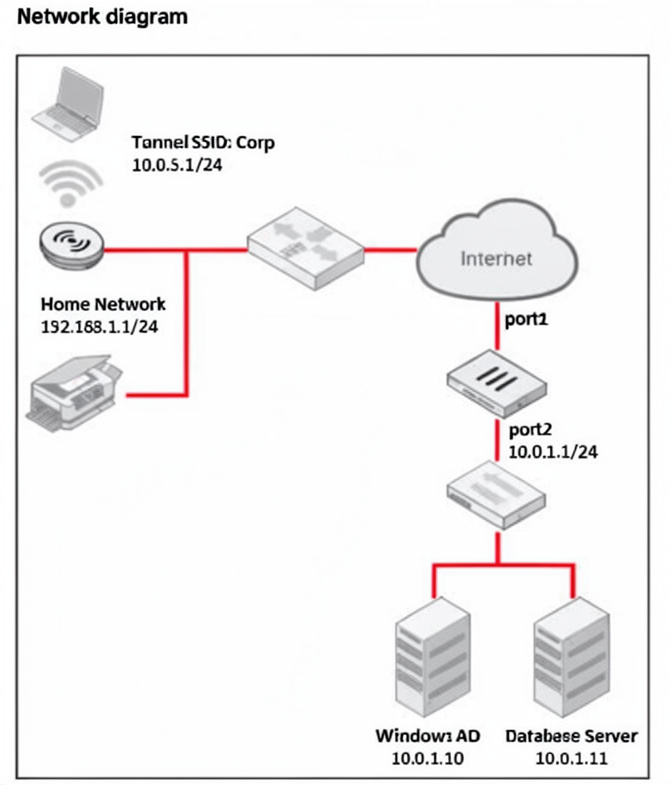
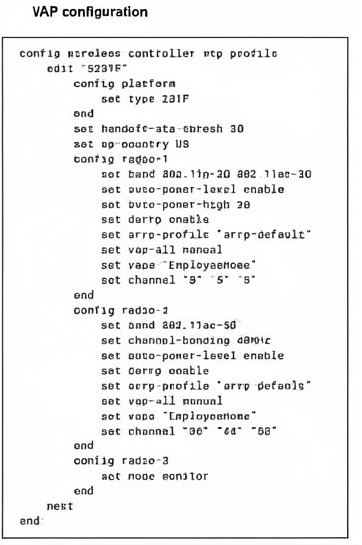
The exhibits show the WTP profile and VAP CLI configurations on FortiGate managing a remote AP. The AP is designed to grant a remote employee access to company network resources, including the database and AD servers. The employee can reach company resources but is unable to access a local printer at home. What two solutions are required to fix this issue? (Choose two answers)
A. Configure the S231F WTP profile to add a split tunneling ACL with a destination subnet of 192.168.1.1 /24, using the command set dest-ip 192.168.1.1/24.
B. Configure the EmployeeHome VAP profile for local bridging using the command set local-bridging enable.
C. Configure the EmployeeHome VAP profile to disable host isolation using the command set intra-vapprivacy disable.
D. Configure the S231F WTP profile to enable split tunneling to the AP subnet using the command set split-tunneling-acl-local-ap-subnet enable.
Explanation:
The remote AP connects an employee to corporate resources (database, AD) but blocks access to a local home printer (192.168.1.1/24). This happens because all traffic is tunneled back to FortiGate by default. To allow local printer access, split tunneling must forward local subnet traffic directly out the AP's home LAN while corporate traffic goes through the tunnel.
Correct Option:
A. Configure the S231F WTP profile to add a split tunneling ACL with a destination subnet of 192.168.1.1/24, using the command set dest-ip 192.168.1.1/24.
Split tunneling ACL defines which destination subnets bypass the tunnel and go directly out the AP's local interface.
Adding 192.168.1.1/24 allows the employee to reach the home printer without sending traffic through FortiGate.
D. Configure the S231F WTP profile to enable split tunneling to the AP subnet using the command set split-tunneling-acl-local-ap-subnet enable.
This automatically adds the AP's local subnet (where the printer resides) to the split tunneling ACL.
Combined with option A, it ensures local traffic stays local. This command simplifies configuration when the home subnet is dynamic or not predefined.
Incorrect Option:
B. Configure the EmployeeHome VAP profile for local bridging using the command set local-bridging enable.
Local bridging bridges wireless clients directly to the AP's Ethernet port, completely bypassing the tunnel to FortiGate.
This would grant local printer access but would also block access to corporate database and AD servers, breaking the primary requirement.
C. Configure the EmployeeHome VAP profile to disable host isolation using the command set intra-vap-privacy disable.
Intra-VAP privacy blocks communication between clients connected to the same VAP.
Disabling it allows client-to-client communication but does not affect access to the printer if the printer is on a different subnet or connected via AP's LAN port. This is not the correct solution.
Reference:
Fortinet Documentation: FortiGate Remote AP Split Tunneling — Use split-tunneling-acl-local-ap-subnet enable and custom ACL entries to allow local subnet traffic while maintaining corporate tunnel for other destinations.
You are setting up a captive portal to provide Wi-Fi access for visitors. To simplify the process, your team wants visitors to authenticate using their existing social media accounts instead of creating new accounts or entering credentials manually. Which two actions are required to enable this functionality? (Choose two.)
A. Set up a remote open authorization (OAuth) server for each selected social media platform.
B. Configure only the email login option because a social media login cannot be used with captive portals.
C. Enable Account Login as the authentication type and configure a remote LDAP server.
D. Set up the FortiAuthenticator internal database as the primary source for user credentials
E. Configure the social login profiles for the supported platforms.
Explanation:
This question tests Fortinet captive portal configuration for visitor Wi-Fi using social media authentication. It evaluates understanding of OAuth integration with FortiAuthenticator to enable seamless login via existing social accounts, avoiding manual credential creation.
✅ Correct Option:
Option A. Set up a remote open authorization (OAuth) server for each selected social media platform.
Setting up remote OAuth servers for platforms like LinkedIn/Facebook provides Client ID/Secret credentials. FortiAuthenticator uses these to redirect users for social authentication during captive portal login, completing the OAuth flow successfully.
Option E. Configure the social login profiles for the supported platforms.
Configuring social login profiles on FortiAuthenticator enables specific platforms, sets login button visibility on the splash page, defines user group assignment, and controls session timeouts for authenticated social media visitors.
❌ Incorrect options:
Option B. Configure only the email login option because a social media login cannot be used with captive portals.
Email login is a separate authentication method. Social media login via OAuth is fully supported on FortiAuthenticator captive portals and appears alongside other login options on the visitor splash page.
Option C. Enable Account Login as the authentication type and configure a remote LDAP server.
Remote LDAP servers handle enterprise directory authentication, not social media platforms which use OAuth 2.0 protocols. LDAP is incompatible with public social login providers like Twitter or LinkedIn.
Option D. Set up the FortiAuthenticator internal database as the primary source for user credentials.
FortiAuthenticator's internal database stores locally created users or imports social login attributes post-authentication, but OAuth providers remain the primary credential validation source during the login process.
🔧 Reference:
→ Create the Smart Connect profile
Confirms OAuth server setup and social login profile configuration steps for captive portals.
Refer to the exhibits.
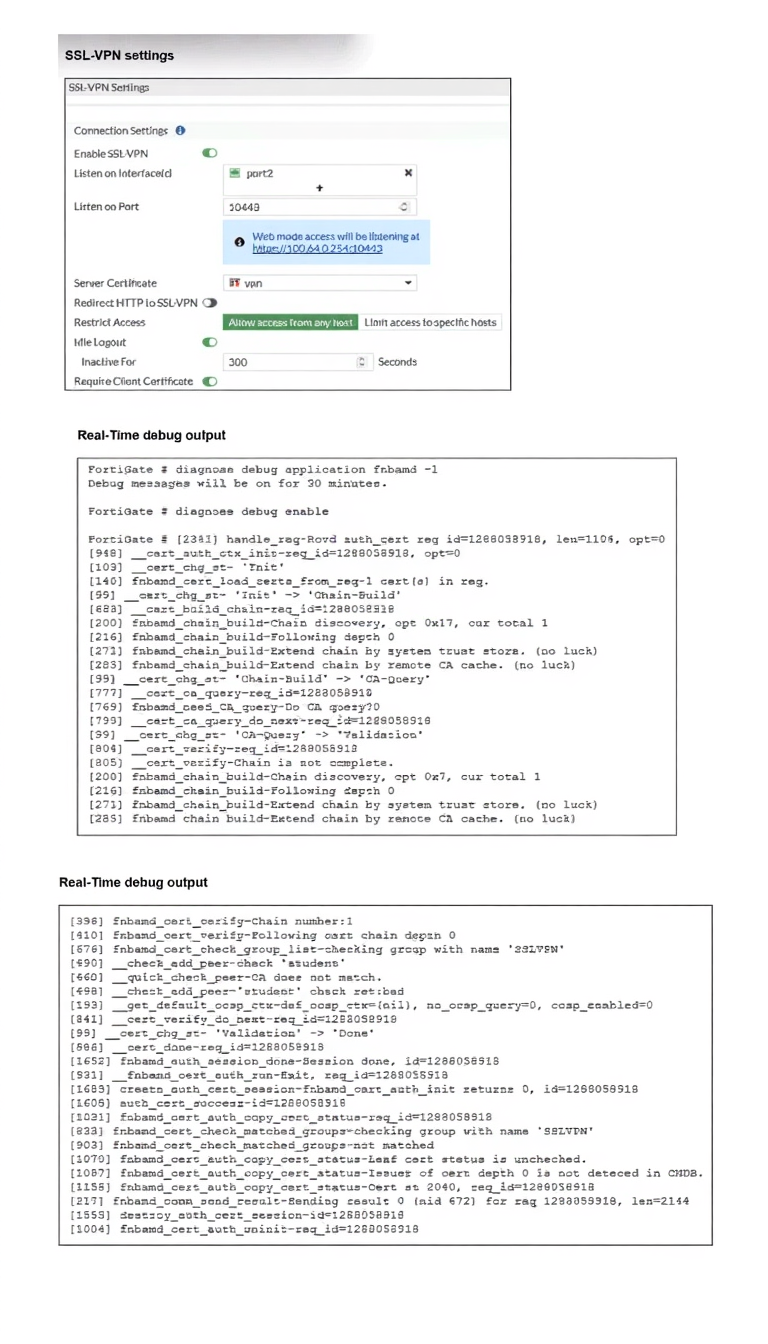
Which include debug output and SSL VPN configuration details.
An SSL VPN has been configured on FortiGate. To enhance security, the administrator enabled Required
Client Certificate in the SSL VPN settings. However, when a user attempts to connect, authentication fails.
Which configuration change is needed to fix the issue and allow the user to connect?
A. Enable Redirect HTTP to SSL-VPN on the SSL VPN configuration page.
B. Import the CA that signed the SSL VPN Server Certificate to FortiGate.
C. Set the user certificate as the Server Certificate on the SSL VPN configuration page.
D. Import the CA that signed the user certificate to FortiGate.
Explanation:
This question tests the ability to diagnose SSL-VPN client certificate authentication failures using real-time debug output. The key line in the debug log reads: "Issuer of cert depth 0 is not detected in CMDB" — meaning FortiGate cannot find the Certificate Authority (CA) that signed the user's certificate in its local certificate store, causing the authentication chain to fail and the user to be denied access.
✔️ Correct Option:
D. Import the CA that signed the user certificate to FortiGate.
The debug log explicitly states the issuer of the client certificate is not detected in CMDB (FortiGate's certificate database). FortiGate must have the signing CA imported to validate the user certificate chain. Without it, client certificate authentication cannot succeed regardless of SSL-VPN settings.
❌ Incorrect Options:
A. Enable Redirect HTTP to SSL-VPN on the SSL VPN configuration page.
This option simply redirects HTTP traffic to the SSL-VPN portal URL. It has no impact on certificate validation or authentication. The debug output shows a certificate chain verification failure — not a connectivity or redirect issue.
B. Import the CA that signed the SSL VPN Server Certificate to FortiGate.
The server certificate is already configured and functional (shown in SSL-VPN settings as "vpn"). The debug failure is specifically about the client/user certificate's issuer not being found, not the server certificate's CA chain.
C. Set the user certificate as the Server Certificate on the SSL VPN configuration page.
The Server Certificate field is for the FortiGate's own identity certificate presented to VPN clients — not for user authentication. Using a user certificate as a server certificate is architecturally incorrect and would not resolve the CA trust issue.
🔧 Reference:
⇒ Fortinet SSL VPN with Certificate Authentication – FortiGate Administration Guide
→ Confirms that FortiGate requires the CA certificate that signed the client certificate to be imported into its certificate store for successful certificate-based authentication.
⇒ Fortinet SSL VPN Troubleshooting Guide
→ Documents the fnbamd debug process and explains that "Issuer not detected in CMDB" directly indicates a missing CA certificate for client certificate validation.
Why is it critical to maintain NTP synchronization between FortiGate and FortiSwitch when FortiLink is configured?
A. To facilitate synchronization of firmware updates across devices
B. To allow FortiSwitch to communicate with other FortiSwitche devices in the network.
C. To ensure accurate time for logs, authentication, and event correlation
D. To allow FortiSwitch to function in standalone mode if FortiGate becomes unavailable
Explanation:
This question explores the foundational requirement of time synchronization in a managed network fabric. When a FortiGate manages a FortiSwitch via FortiLink, they operate as a single logical entity; therefore, any discrepancy in their internal clocks can lead to significant failures in security auditing, secure communication, and automated network response.
✅ Correct Option:
C. To ensure accurate time for logs, authentication, and event correlation
In a FortiLink environment, the FortiGate acts as the central management point. If the FortiSwitch and FortiGate are not synchronized via NTP, logs generated by the switch will have different timestamps than those on the FortiGate, making it impossible to accurately reconstruct a sequence of network events. Furthermore, security protocols like 802.1X authentication and certificate validation rely heavily on precise timing to determine if credentials or sessions are still valid for the security fabric.
❌ Incorrect options:
A. To facilitate synchronization of firmware updates across devices
Firmware synchronization is a functional process handled by the FortiLink protocol's image management system. While the FortiGate pushes the firmware to the switch, this is a version-control and file-transfer task. The success of the update depends on connectivity and compatibility rather than the real-time clock alignment between the two devices.
B. To allow FortiSwitch to communicate with other FortiSwitch devices in the network
Inter-switch communication, such as forming trunks or participating in Spanning Tree Protocol (STP), is a Layer 2 or Layer 3 networking function. These protocols rely on frame headers, MAC addresses, and priority values to establish paths. NTP is a management-plane service and does not dictate the basic data-plane connectivity between switches.
D. To allow FortiSwitch to function in standalone mode if FortiGate becomes unavailable
If a FortiSwitch loses its connection to the FortiGate, its ability to function independently is determined by its saved local configuration and boot settings. NTP synchronization with a missing FortiGate would not assist the switch in standalone operations; in fact, a standalone switch would likely need its own independent NTP source to maintain accurate logs.
🔧 Reference:
→ Configuring NTP for FortiLink
This official documentation confirms that NTP is essential for maintaining the integrity of the security fabric, ensuring that all managed switches report time-accurate data back to the FortiGate.
You are deploying a FortiSwitch device managed by FortiGate in a secure network environment. To ensure accurate communication, you must identify which protocols are required for communication and control between FortiGate and FortiSwitch. Which three protocols are used by FortiGate to manage and control FortiSwitch devices? (Choose three.)
A. SNMP can be used by FortiGate to manage FortiSwitch devices by monitoring their status.
B. UHTTPS is usea;by FortiGate to securely manage and configure FortiSwitch devices.
C. FortiGate uses the Fortilink protocol to establish communication with FortiSwitch.
D. CAPWAP is used to establish the control channel between FortiSwitch and FortiGate.
E. IGMP is required for managing communication between FortiGate and FortiSwitch devices in multicast environments.
Explanation:
This question tests understanding of the control and management protocols used in a FortiLink deployment where FortiGate manages FortiSwitch devices. FortiGate employs multiple protocols for different management functions including discovery, configuration, monitoring, and health checks . The correct options represent three distinct protocol roles in this management architecture.
✔️ Correct Answers:
A. SNMP can be used by FortiGate to manage FortiSwitch devices by monitoring their status.
SNMP (Simple Network Management Protocol) is configured globally on FortiGate for FortiSwitch management, allowing FortiGate to monitor switch status and system information such as contact info, location, and engine ID . It provides essential monitoring capabilities for managed switches.
B. HTTPS is used by FortiGate to securely manage and configure FortiSwitch devices.
Starting in FortiOS 7.4.2, FortiGate uses HTTPS to push configurations to FortiSwitch, collect diagnostics, and perform firmware upgrades via the FortiSwitch REST API . It provides secure, encrypted management communication over TCP port 443.
C. FortiGate uses the FortiLink protocol to establish communication with FortiSwitch.
FortiLink is Fortinet's proprietary protocol that serves as the foundation for communication between FortiGate and managed FortiSwitch devices . It carries both control plane traffic (CAPWAP, heartbeats) and user data plane traffic, enabling unified wired access management .
❌ Incorrect options:
D. CAPWAP is used to establish the control channel between FortiSwitch and FortiGate.
While CAPWAP (UDP port 5246) is used for FortiSwitch authentication, authorization, and health checks via DTLS tunnel, it operates within the FortiLink framework rather than being the primary establishment protocol . FortiLink is the overarching protocol; CAPWAP is a component.
E. IGMP is required for managing communication between FortiGate and FortiSwitch devices in multicast environments.
IGMP is not a management protocol for FortiSwitch control. IGMP snooping may be configured on FortiSwitch for multicast traffic optimization, but it is not used by FortiGate to manage or control FortiSwitch devices .
🔧 Reference:
→ Managed FortiSwitch Management Protocols: Provides comprehensive list of protocols including FortiLink, CAPWAP, HTTPS, SNMP, DHCP, and NTP used for FortiSwitch management.
→ Support FortiSwitch management using HTTPS: Details HTTPS as a management protocol for FortiSwitch units starting in FortiOS 7.4.2.
Refer to the exhibits.
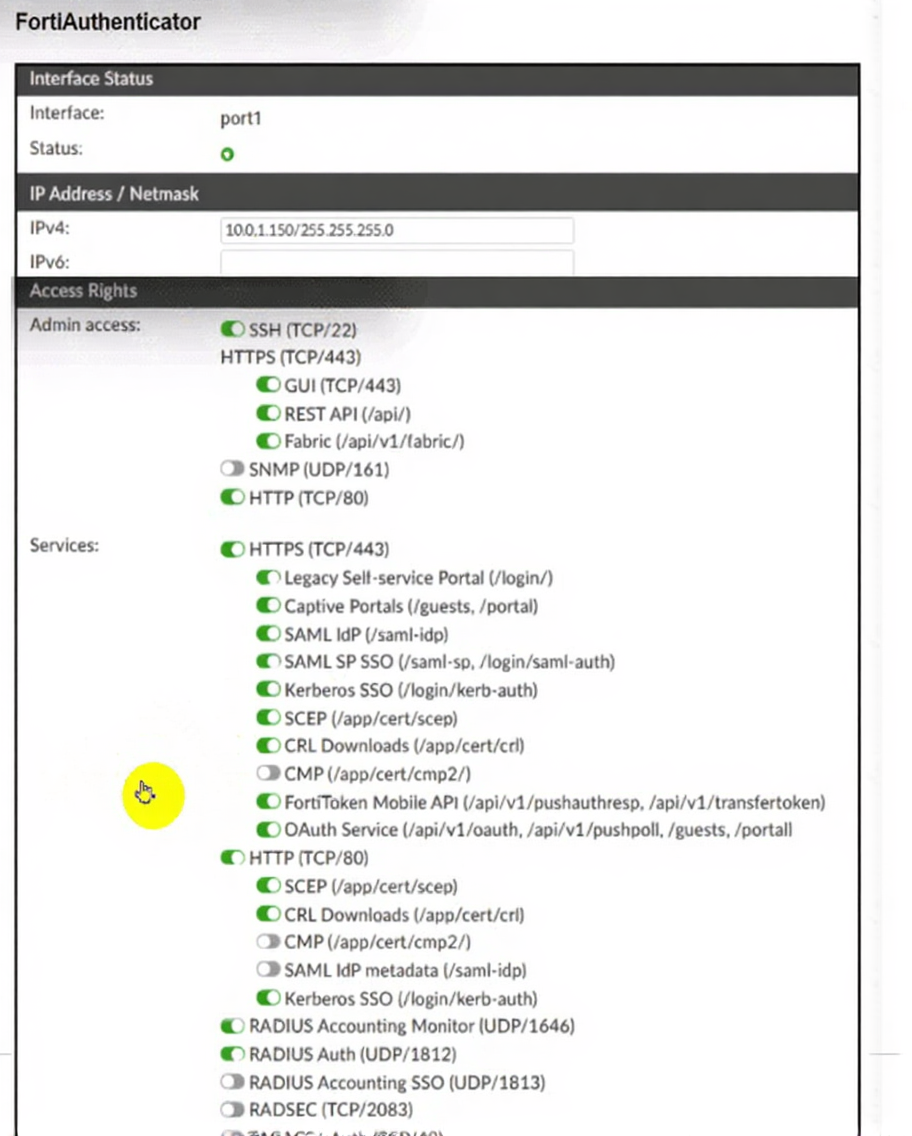
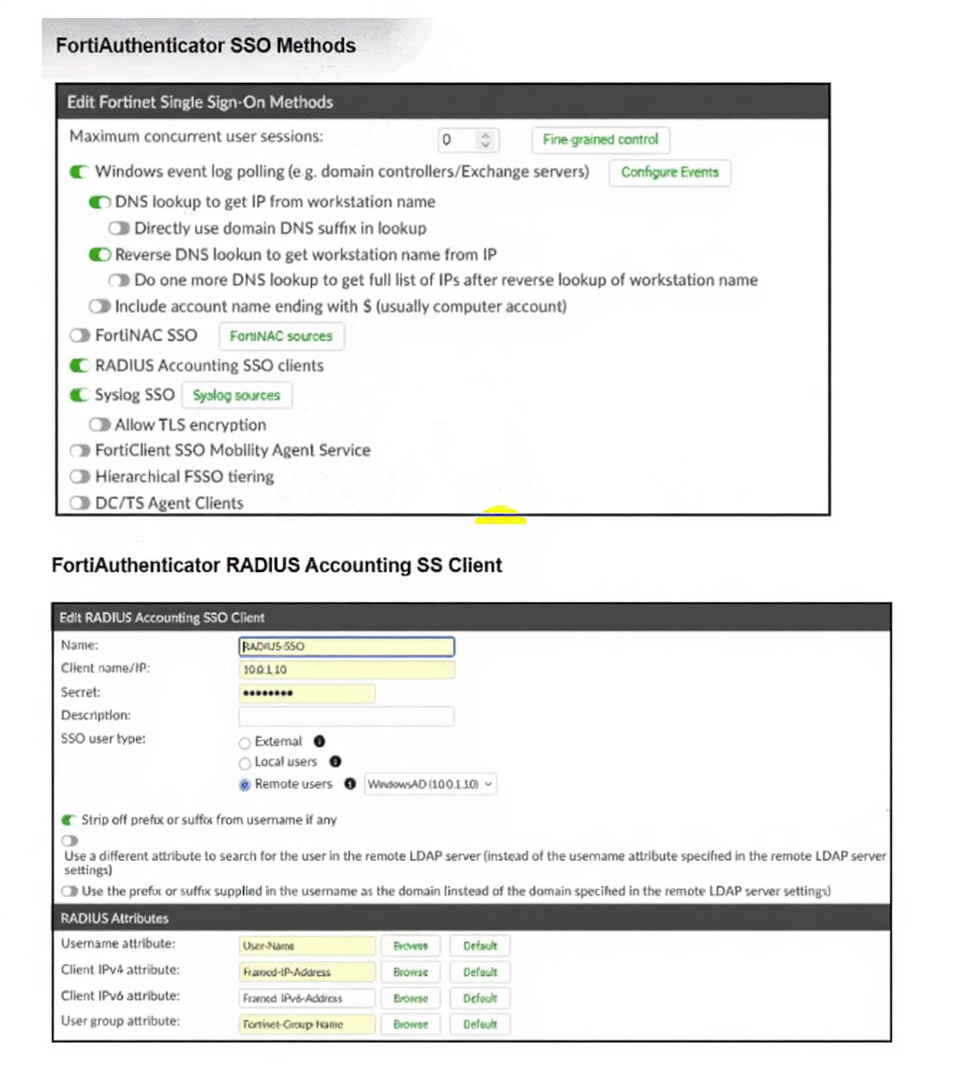
A company has multiple FortiGate devices deployed and wants to centralize user authentication and
authorization. The administrator decides to use FortiAuthenticator to convert RSSO messages to FSSO,
allowing all FortiGate devices to receive user authentication updates.
After configuring FortiAuthenticator to receive RADIUS accounting messages, users can authenticate, but
FortiGate does not enforce the correct policies based on user groups. Upon investigation, the administrator
discovers that FortiAuthenticator is receiving RADIUS accounting messages from the RADIUS server and
successfully queries LDAP for user group information. But, FSSO updates are not being sent to FortiGate
devices and FortiGate firewall policies based on FSSO user groups are not being applied.
What is the most likely reason FortiGate is not receiving FSSO updates?
A. The RADIUS Username and Client IPv4 attributes are not defined on FortiAuthenticator.
B. The LDAP server is not configured to retrieve group memberships for RSSO users.
C. FortiAuthenticator is missing the FSSO user group attribute in the configuration.
D. The FortiAuthenticator interface is not enabled to receive RADIUS accounting messages.
Explanation:
This question tests understanding of how FortiAuthenticator converts RADIUS SSO (RSSO) messages into FSSO logon events and pushes them to FortiGate. The scenario confirms RADIUS accounting is received and LDAP queries succeed — the failure point is specifically in generating and transmitting FSSO updates to FortiGate devices.
✔️ Correct Option:
C. FortiAuthenticator is missing the FSSO user group attribute in the configuration.
Even though LDAP queries return group data, FortiAuthenticator cannot properly construct FSSO logon events without the FSSO user group attribute mapped in the RADIUS SSO client config. Without this mapping, FortiAuthenticator has no mechanism to include group identity in FSSO updates sent to FortiGate, causing policies to fail.
❌ Incorrect Options:
A. The RADIUS Username and Client IPv4 attributes are not defined on FortiAuthenticator.
The exhibit clearly shows both User-Name and Framed-IP-Address are already configured under RADIUS Attributes. These fields are populated, so this cannot be the cause of missing FSSO updates.
B. The LDAP server is not configured to retrieve group memberships for RSSO users.
The question explicitly states that FortiAuthenticator successfully queries LDAP for user group information. This option directly contradicts the stated scenario, making it factually irrelevant.
D. The FortiAuthenticator interface is not enabled to receive RADIUS accounting messages.
The first exhibit shows RADIUS Accounting SSO clients is toggled ON (green), and the client is fully configured with IP 100.1.10. The question also confirms accounting messages are being received.
🔧 Reference:
→ RADIUS Accounting — FortiAuthenticator Administration Guide
Documents the RADIUS Accounting SSO client setup under Fortinet SSO > Methods > RADIUS Accounting, including the mandatory Fortinet-Group-Name attribute that must be configured for FSSO group-based updates to be sent to FortiGate.
→ FSSO — FortiGate / FortiOS 7.6.6 Administration Guide
Confirms how FortiGate receives FSSO logon events from FortiAuthenticator and applies identity-based firewall policies — which only work when user group data is correctly passed through the FSSO update.
Refer to the exhibit.
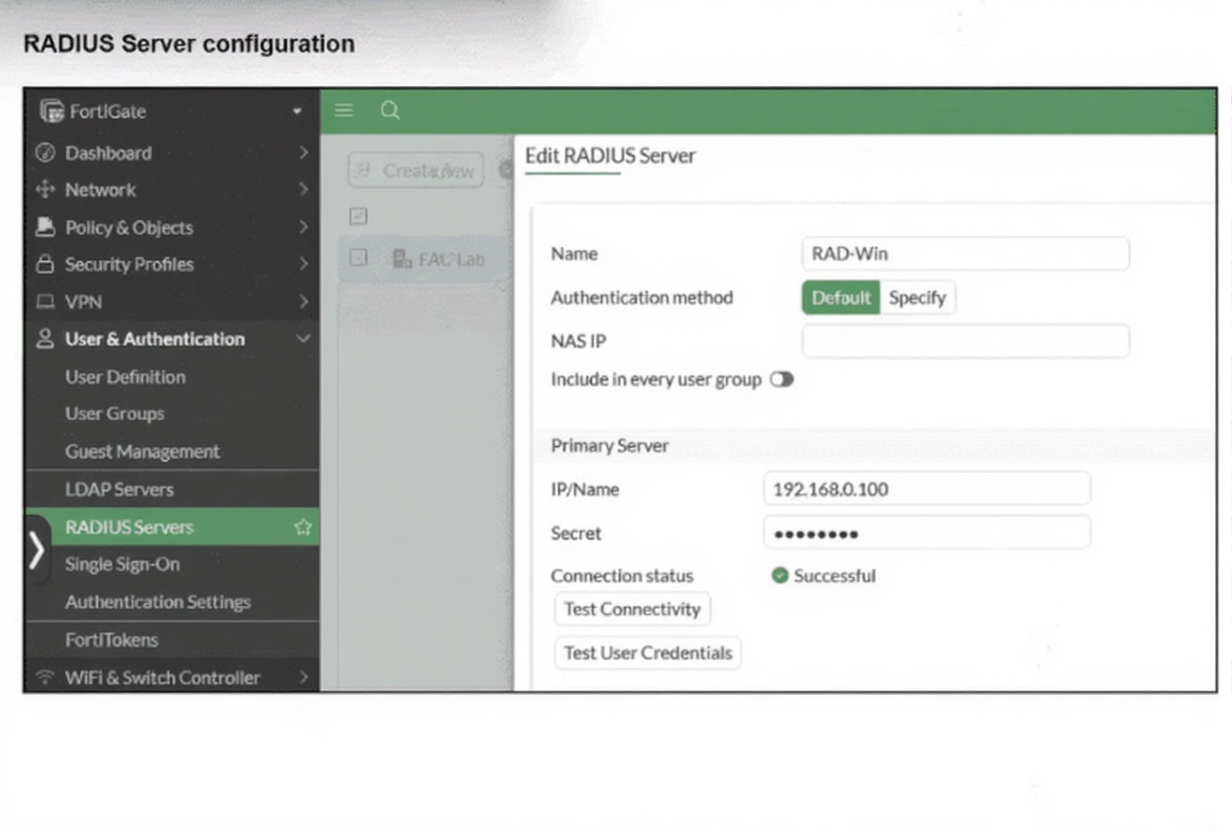
On FortiGate, a RADIUS server is configured to forward authentication requests to FortiAuthenticator, which
acts as a RADIUS proxy. FortiAuthenticator then relays these authentication requests to a remote Windows
AD server using LDAP.
While testing authentication using the CLI command diagnose test authserver. the administrator observed that
authentication succeeded with PAP but failed when using MS-CHAFV2.
Which two solutions can the administrator implement to enable MS-CHAPv2 authentication? (Choose two.)
A. Change the FortiGate authentication method to CHAP instead of MS-CHAPv2.
B. Enable Windows Active Directory domain authentication on FortiAuthenticator.
C. Enable RADIUS attribute filtering on FortiAuthenticator.
D. Configure FortiAuthenticator to use RADIUS instead of LDAP as the back-end authentication server
Explanation:
The scenario tests RADIUS proxy on FortiAuthenticator forwarding auth to Windows AD. PAP works because it sends a clear-text password that LDAP can validate. MS-CHAPv2 fails because it relies on NT hashes; LDAP bind cannot verify the MS-CHAPv2 challenge/response. To support MS-CHAPv2, FortiAuthenticator must either join the AD domain (Winbind) or use a backend that understands MS-CHAPv2 (RADIUS to NPS/AD).
✔️ Correct Options:
B. Enable Windows Active Directory domain authentication on FortiAuthenticator.
Enabling Windows AD Domain Authentication (domain join via Winbind) lets FortiAuthenticator access the NT hash material from AD. This makes MS-CHAPv2 challenge/response verifiable, so authentication succeeds when proxied from FortiGate.
D. Configure FortiAuthenticator to use RADIUS instead of LDAP as the back-end authentication server.
Pointing the backend to a Windows NPS/RADIUS server instead of LDAP allows the MS-CHAPv2 exchange to be processed by AD’s RADIUS service, which knows how to validate the NT hash. FortiAuthenticator then proxies the RADIUS request end-to-end rather than converting it to LDAP.
❌ Incorrect options:
A. Change the FortiGate authentication method to CHAP instead of MS-CHAPv2.
CHAP is a different protocol and does not satisfy the requirement to support MS-CHAPv2; the question explicitly asks how to enable MS-CHAPv2, not replace it.
C. Enable RADIUS attribute filtering on FortiAuthenticator.
Attribute filtering controls which RADIUS attributes are forwarded/rewritten. It does not provide the cryptographic capability needed to validate MS-CHAPv2 against AD, so it won’t fix the failure.
🔧 Reference:
→ Remote authentication servers – FortiAuthenticator – “If you want to authenticate users using MSCHAP2 … in an Active Directory environment, enable Windows Active Directory Domain Authentication, then enter the required Windows AD Domain Controller information.”
→ SSL VPN with RADIUS password renew on FortiAuthenticator – Shows setting auth-type ms_chap_v2 on the RADIUS server definition; RADIUS backend is required for MS-CHAPv2, not LDAP.
| Page 2 out of 7 Pages |
| 1234 |
| FCSS_LED_AR-7.6 Practice Test Home |
The Fortinet NSE 6 - LAN Edge 7.6 Architect exam is notoriously tough. It doesn't test memorization. It forces you to make complex decisions under time pressure. A weak prep strategy risks a costly failure and wasted effort. Our FCSS_LED_AR-7.6 practice tests are built to be your definitive bridge to a passing score.

Copyright © - All Rights Reserved