
Last Updated On : 12-Oct-2026
Total 92 Questions
FortiGate is integrated with FortiAnalyzer and FortiManager. When creating a firewall policy, which attribute must an administrator include to enhance functionality and enable log recording on FortiAnalyzer and FortiManager?
A. Universally Unique Identifier
B. Policy ID
C. Sequence ID
D. Log ID
Explanation:
This question tests knowledge of FortiGate's integration with FortiAnalyzer and FortiManager when managing firewall policies. When FortiGate operates within a centralized management and logging environment, certain policy attributes are critical to ensure proper log correlation and policy tracking across all platforms.
✅ Correct Option A: Universally Unique Identifier (UUID)
A UUID is a unique tag automatically assigned to each firewall policy. When FortiGate is integrated with FortiAnalyzer and FortiManager, the UUID allows both platforms to accurately identify, track, and correlate logs with specific firewall policies — even if policy names or IDs change. It ensures consistent log recording and enhanced policy management across the entire security fabric.
❌ Why the Other Options Are Wrong:
Incorrect Option B: Policy ID
Policy ID is a numerical identifier local to the FortiGate device. It is not globally unique across multiple devices or platforms and cannot reliably identify policies in FortiAnalyzer or FortiManager environments.
Incorrect Option C: Sequence ID
Sequence ID refers to the order in which policies are evaluated in the policy table. It is not an attribute used for log recording or integration with FortiAnalyzer and FortiManager.
Incorrect Option D: Log ID
Log ID is used to identify specific log message types within FortiGate logs. It is a system-generated identifier for log entries, not a policy attribute that enables log recording on FortiAnalyzer or FortiManager.
Reference:
⇒ Fortinet Documentation — Firewall Policy UUID
Confirms that UUID is required for policy identification and log correlation with FortiAnalyzer and FortiManager.
Refer to the exhibits.
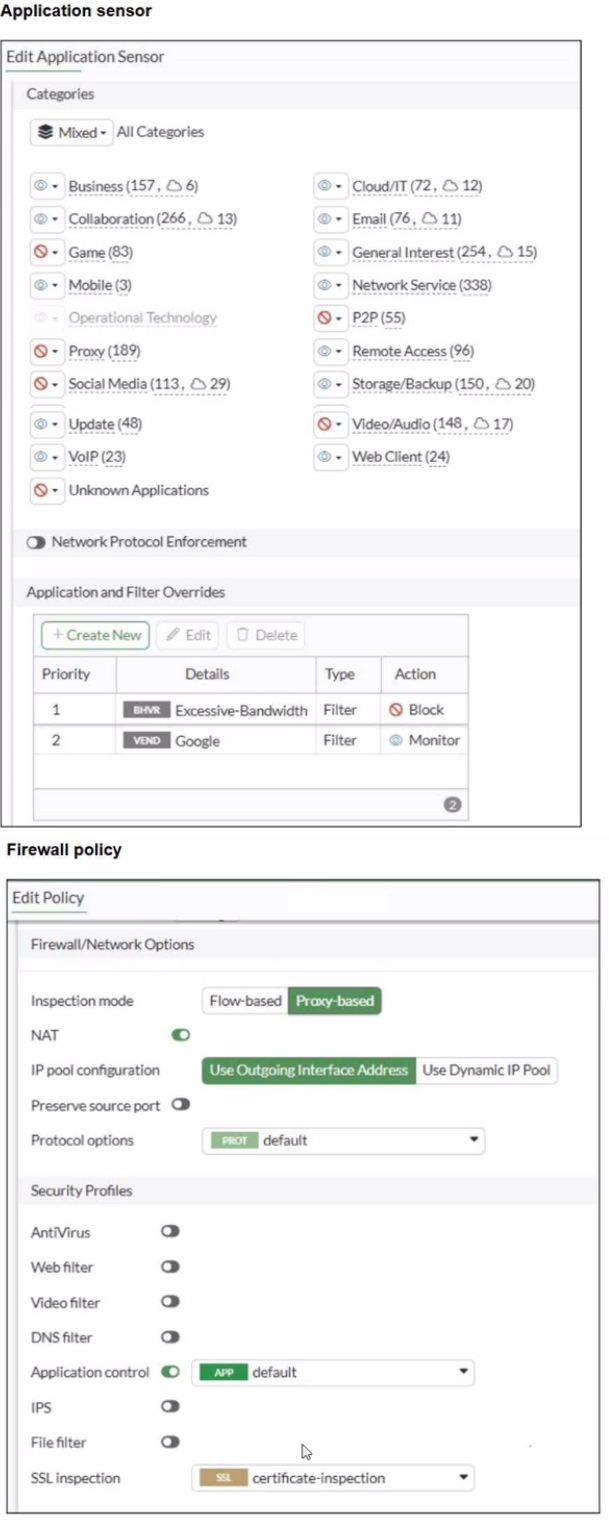
You have implemented the application sensor and the corresponding firewall policy as
shown in the exhibits.
You cannot access any of the Google applications, but you are able to access
www.fortinet.com.
Which two actions would you take to resolve the issue? (Choose two.)
A. Set SSL inspection to deep-content inspection.
B. Move up Google in the Application and Filter Overrides section to set its priority lot
C. Add "Google".com to the URL category in the security profile.
D. Change the Inspection mode to Flow-based
E. Set the action for Google in the Application and Filter Overrides section to Allow
Explanation:
This question tests understanding of Application Control policy processing and override priority in FortiGate. The exhibits show that the "Excessive-Bandwidth" filter is at Priority 1 with Block, while "Google" is at Priority 2 with Monitor. FortiGate processes overrides top-down by priority, so Google applications are being blocked by the Excessive-Bandwidth rule before the Google rule is ever evaluated.
✅ Correct Option B: Move up Google in the Application and Filter Overrides
Since FortiGate evaluates overrides by priority order, Google traffic matches Excessive-Bandwidth (Priority 1, Block) first and gets blocked before reaching the Google rule at Priority 2. Moving Google to Priority 1 ensures it is evaluated and matched before the Excessive-Bandwidth filter.
✅ Correct Option E: Set the action for Google to Allow
The current action for Google is Monitor, which logs traffic but does not guarantee an explicit allow override against higher-priority block rules. Changing the action to Allow ensures Google traffic is explicitly permitted after the priority is corrected.
❌ Incorrect Option A: Set SSL inspection to deep-content inspection
While deep inspection improves application identification, the root cause here is a priority and action conflict, not an SSL decryption issue. www.fortinet.com is accessible, confirming SSL inspection is not the problem.
❌ Incorrect Option C: Add Google.com to the URL category
URL category belongs to Web Filter, not Application Control. This would not resolve an application sensor override conflict.
❌ Incorrect Option D: Change Inspection mode to Flow-based
Switching to Flow-based mode does not resolve the priority conflict in the Application and Filter Overrides section and is unnecessary here.
Reference:
⇒ Fortinet Documentation — Application Control
Confirms that Application and Filter Overrides are processed by priority order and that the action must be explicitly set to Allow to permit traffic.
Refer to the exhibit.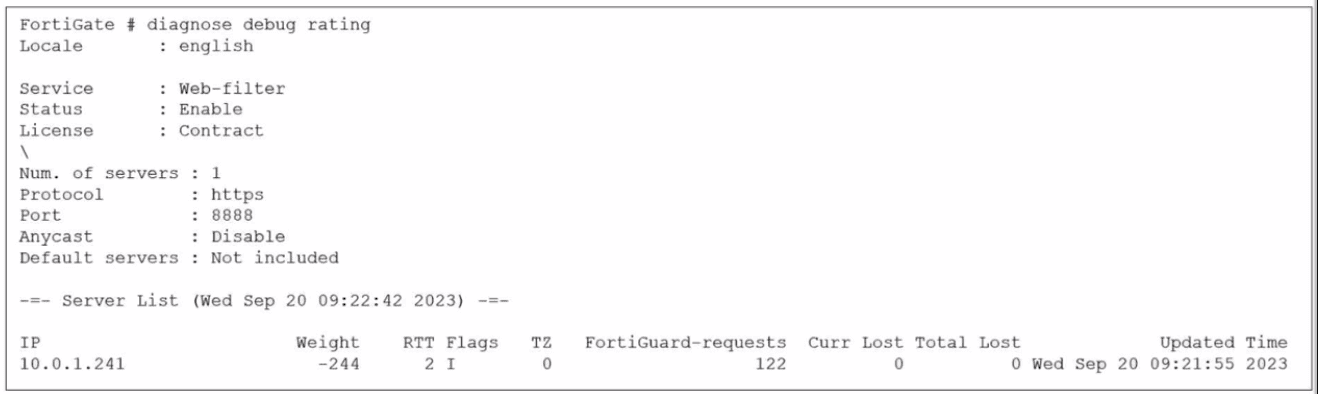
Which two statements about the FortiGuard connection are true? (Choose two.)
A. The weight increases as the number of failed packets rises
B. You can configure unreliable protocols to communicate with FortiGuard Server.
C. FortiGate identified the FortiGuard Server using DNS lookup.
D. FortiGate is using the default port for FortiGuard communication.
Explanation:
This question requires an interpretation of the FortiGate diagnose debug rating command output, specifically focusing on the connection details for FortiGuard web filtering services. It tests your understanding of how FortiGate connects to and rates FortiGuard servers.
✔️Why These Are Correct:
✅ C. FortiGate identified the FortiGuard Server using DNS lookup.
FortiGates dynamically determine the best FortiGuard servers to connect to by resolving FortiGuard service FQDNs (Fully Qualified Domain Names) through DNS. While the exhibit only displays the IP address 10.0.1.241, this IP was obtained via a prior DNS resolution process to find an available FortiGuard server.
✅ D. FortiGate is using the default port for FortiGuard communication.
The exhibit explicitly shows the line "Port : 8888". TCP port 8888 is a standard and commonly used default port for FortiGuard services, particularly for web filtering communication over HTTPS.
❌Why the Other Options Are Wrong:
❌ A. The weight increases as the number of failed packets rises.
This statement is incorrect. FortiGuard's server rating system uses "Weight" to prioritize servers. A higher number of failed packets or increased latency will cause the server's weight to decrease (become a more negative value), indicating poorer performance, making that server less preferred for future requests.
❌ B. You can configure unreliable protocols to communicate with FortiGuard Server.
This is incorrect. The exhibit shows "Protocol : https". HTTPS (Hypertext Transfer Protocol Secure) relies on TCP (Transmission Control Protocol), which is a reliable, connection-oriented protocol that ensures ordered and error-checked delivery of data. Therefore, FortiGate communicates with FortiGuard servers using reliable protocols.
Reference:
⇒ Fortinet Document Library - FortiGuard Web Filtering (Confirms how FortiGuard services are located via DNS and operate over reliable protocols like HTTPS.)
⇒ Fortinet Document Library - Ports and Protocols Used by FortiGate (Provides details on the default ports used for FortiGuard communication, including TCP 8888.)
Refer to the exhibit.
Which two ways can you view the log messages shown in the exhibit? (Choose two.)
A. By right clicking the implicit deny policy
B. Using the FortiGate CLI command diagnose log test
C. By filtering by policy universally unique identifier (UUID) and application name in the log entry
D. In the Forward Traffic section
Explanation:
This question requires an analysis of a raw log entry to determine how it can be located and viewed within the FortiGate management interfaces. The log entry provided is a UTM (Unified Threat Management) log related to application control.
✔️Why This Is Correct:
Option C:
The raw log explicitly includes the poluuid (b11ac58c...) and the app name (ABC.Com). FortiOS allows administrators to use these specific fields as filters in the Log & Report view to isolate exact traffic sessions or security events.
Option D:
Because this log represents a session that was processed by a firewall policy (indicated by policyid=1 and type="utm"), it is recorded under Log & Report > Forward Traffic. While it is a security log, forward traffic logs capture the flow details of traffic passing through the device.
❌Why the Other Options Are Wrong:
A. Implicit deny policy:
The log shows policyid=1, which is a user-defined policy. The implicit deny policy (ID 0) only logs traffic that matches no other configured policies.
B. diagnose log test:
This CLI command is used to generate "dummy" or test log messages to verify that the logging system (like a remote FortiAnalyzer connection) is working. It does not display existing traffic logs like the one shown in the exhibit.
Reference:
⇒ FortiGate Log Message Fields
Confirms that fields like poluuid and app are standard searchable attributes within the FortiOS logging architecture.
Refer to the exhibit.
A partial cloud topology is shown.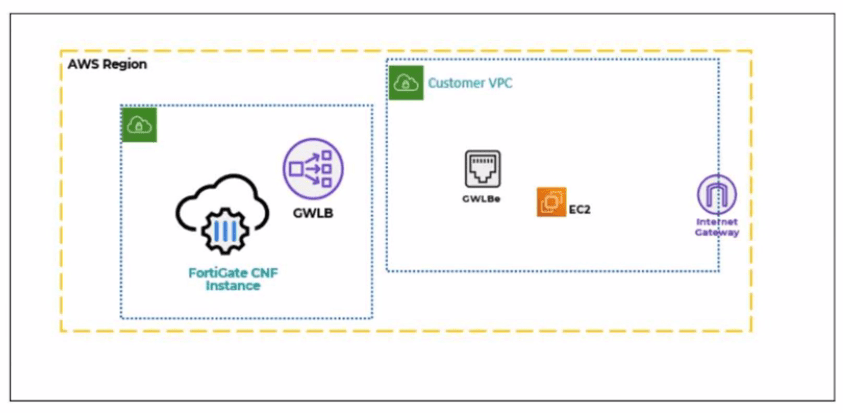
You deployed a FortiGate Cloud-Native Firewall (CNF) in AWS.
During the deployment, which components must the FortiGate CNF create to handle traffic
from the EC2 instance?
A. The customer VPC and GWLBe
B. The gateway load balancer endpoint (GWLBe) in the customer virtual private cloud (VPC)
C. The CNF VPC. customer VPC. and GWLB
D. The GWLB. GWLBe, and the internet gateway (IGW) in the customer VPC
Explanation:
This question tests your understanding of FortiGate Cloud-Native Firewall (CNF) deployment in AWS. The exhibit shows EC2 instances needing traffic inspection, and the question asks which component FortiGate CNF must create during deployment to handle that traffic.
✔️Why B Is Correct:
During FortiGate CNF deployment, the critical component created in the customer's environment is the Gateway Load Balancer endpoint (GWLBe) within the customer VPC . The onboarding process automatically creates this GWLBe, which serves as the entry point that intercepts traffic from EC2 instances and forwards it to the FortiGate CNF security stack for inspection . Without this endpoint, traffic from the customer VPC cannot be directed to the FortiGate CNF inspection infrastructure.
❌Why the Other Options Are Wrong:
A. The customer VPC and GWLBe:
The customer VPC already exists before CNF deployment and is not created by FortiGate CNF.
C. The CNF VPC, customer VPC, and GWLB:
The CNF VPC is managed by Fortinet, not created in the customer environment. The GWLB itself resides in Fortinet-managed accounts, not in the customer VPC.
D. The GWLB, GWLBe, and the internet gateway (IGW) in the customer VPC:
The IGW typically already exists in the customer VPC. The GWLB is Fortinet-managed infrastructure, not created in the customer account.
Reference:
⇒ Fortinet Document Library: Creating a new AWS FortiGate CNF instance
This guide confirms that during onboarding, FortiGate CNF "creates a gateway load balancer endpoint (GWLBe) in a protected VPC" to handle traffic inspection.
How does FortiExtender connect to FortiSASE in a site-based, remote internet access method?
A. FortiExtender uses a Virtual Extensible LAN (VXLAN)-over-IPsec connection.
B. FortiExtender establishes a secure SSL connection using FortiClient.
C. FortiExtender first connects to a FortiGate LAN extension through a secure web gateway (SWG).
D. FortiExtender uses the proxy auto-configuration
Explanation:
This question tests understanding of how FortiExtender integrates with FortiSASE in site-based remote internet access deployments. In this model, FortiExtender operates as a branch device extending network connectivity securely to the FortiSASE cloud. The connection method must support secure tunneling and network extension over the internet.
✔️ Correct option:
In a site-based deployment, FortiExtender establishes a VXLAN-over-IPsec tunnel to FortiSASE. IPsec provides encryption and secure transport, while VXLAN enables Layer 2 network extension across Layer 3 infrastructure. This allows the remote site to logically extend its network into the FortiSASE cloud while maintaining secure communication.
❌ Incorrect Options:
B. FortiExtender establishes a secure SSL connection using FortiClient
FortiClient is an endpoint agent used for user-based remote access, not for FortiExtender device connectivity. FortiExtender does not rely on FortiClient for establishing its tunnel to FortiSASE.
C. FortiExtender first connects to a FortiGate LAN extension through a secure web gateway (SWG)
SWG is a cloud security function, not a connectivity mechanism. FortiExtender connects directly using secure tunneling methods, not through an intermediate SWG connection.
D. FortiExtender uses the proxy auto-configuration
Proxy auto-configuration (PAC) files are used for client-side web traffic steering, not for device-level secure tunneling between FortiExtender and FortiSASE.
Reference:
⇒ FortiSASE Administration Guide – Site-based deployment and FortiExtender connectivity
Confirms that site-based FortiExtender deployments use secure tunneling (VXLAN over IPsec) to connect to FortiSASE.
An administrator wanted to configure an IPS sensor to block traffic that triggers the signature set number of times during a specific time period. How can the administrator achieve the objective?
A. Use IPS group signatures, set rate-mode 60.
B. Use IPS packet logging option with periodical filter option.
C. Use IPS signatures, rate-mode periodical option.
D. Use IPS filter, rate-mode periodical option.
Explanation:
This question tests IPS rate-based thresholds in FortiOS 7.6 to control signature triggering. Administrators configure signatures within an IPS sensor entry to block traffic only after it exceeds a count threshold within a time period, preventing false positives from isolated events.
✔️Why C Is Correct:
In an IPS sensor entry, set rule
❌Option A:
IPS group signatures aggregate multiple signatures but lack direct rate-mode configuration. Rate settings apply to individual signatures (set rule) within entries, not groups which organize by category.
❌Option B:
IPS packet logging with periodical filter captures packets matching signatures but doesn't control blocking thresholds. Logging is diagnostic; rate-mode governs signature action (block/reset) enforcement.
❌Option D:
IPS filters apply global overrides (e.g., severity, action) across sensor entries but exclude rate-mode options. Rate configuration requires specific signature entries, not top-level filter settings.
Reference:
⇒ https://docs.fortinet.com/document/fortigate/7.6.0/administration-guide/419589/ips-configuration-options – Details rate-mode periodical CLI syntax for signatures.
| Page 5 out of 14 Pages |
| 2345678 |
| NSE4_FGT_AD-7.6 Practice Test Home |
The Fortinet NSE 4 - FortiOS 7.6 Administrator exam is notoriously tough. It doesn't test memorization. It forces you to make complex decisions under time pressure. A weak prep strategy risks a costly failure and wasted effort. Our NSE4_FGT_AD-7.6 practice tests are built to be your definitive bridge to a passing score.

Copyright © - All Rights Reserved