
Last Updated On : 12-Oct-2026
Total 59 Questions
Network Access Control Policies
Where should you configure MAC notification traps on a supported switch?
A. Only on ports that generate linkup and linkdown traps
B. Only on ports defined as learned uplinks
C. On all ports on the switch
D. On all ports except uplink ports
Explanation:
This question tests your knowledge of Layer 2 visibility and trap configuration within FortiNAC-F. It focuses on how the system efficiently tracks MAC address movements without creating redundant or conflicting data from network infrastructure connections.
✔️Correct Option:
Configuring MAC notification traps on all ports except uplinks ensures FortiNAC receives alerts for end-user device connections while ignoring traffic from other switches or routers, which prevents "flapping" and unnecessary processing overhead.
❌Why the Other Options Are Wrong:
A. Only on ports that generate linkup/linkdown traps:
Link traps and MAC traps serve different purposes; link traps only monitor physical state, whereas MAC traps provide specific device identity data required for visibility.
B. Only on ports defined as learned uplinks:
Enabling traps on uplinks would cause FortiNAC to see every MAC address in the network through a single port, leading to database inaccuracies and performance issues.
C. On all ports on the switch:
Including uplinks in the configuration causes MAC address "slapping" between the actual edge port and the uplink port, confusing the FortiNAC location engine.
Reference:
🔧 Fortinet Documentation: FortiNAC-F SNMP Configuration
This documentation confirms that MAC notification traps must be excluded from trunk/uplink ports to maintain accurate host location mapping.
An administrator manages a corporate environment where all users log into the corporate domain each time they connect to the network. The administrator wants to leverage login scripts to use a FortiNAC-F agent to enhance endpoint visibility Which agent can be deployed as part of a login script?
A. Persistent
B. Dissolvable
C. Mobile
D. Passive
Explanation:
The question focuses on which FortiNAC-F agent type can be executed via login scripts to enhance endpoint visibility. It tests understanding of agent deployment methods and their suitability for temporary execution during user logins.
🟢 Correct Option:
B. Dissolvable
Dissolvable agents run temporarily during login, collect endpoint information, and remove themselves after execution. This makes them ideal for domain login scripts, providing visibility without permanently installing software on endpoints.
🔴 Why the Other Options Are Wrong:
A. Persistent
Remains installed on endpoints permanently, unsuitable for temporary login-script deployment. It also increases administrative overhead since updates and uninstallation must be managed manually.
C. Mobile
Designed for iOS/Android devices, cannot run via domain login scripts. It focuses on mobile device visibility rather than traditional corporate endpoints.
D. Passive
Only monitors network traffic without actively collecting endpoint information, so it does not enhance visibility during login. Passive agents cannot execute scripts or gather detailed endpoint attributes.
Reference:
⇒ FortiNAC-F 7.6 Administration Guide – Agents
– Confirms that dissolvable agents can be deployed via login scripts and provide temporary endpoint visibility.
During an evaluation of state-based enforcement, an administrator discovers that ports that should not be
under enforcement have been added to enforcement groups.
In which view would the administrator be able to identify who added the ports to the groups?
(Selected)
A. The Admin Auditing view
B. The Event Management view
C. The Port Changes view
D. The Security Events view
Explanation:
This question tests knowledge of auditing administrative actions in FortiNAC during state-based enforcement troubleshooting. When ports are manually added to enforcement groups (port groups enabling VLAN/ACL enforcement), FortiNAC logs these configuration changes for accountability. The Admin Auditing view records who performed the action, what was changed, and when.
✅ Correct Option:
A is correct because the Admin Auditing view (under Logs) tracks all administrator-initiated changes, including adding ports to groups. It shows the user ID, timestamp, and details of modifications like group membership updates, allowing identification of who added the unintended ports.
❌ Why the Other Options Are Wrong:
B. The Event Management view — Incorrect; this view manages events and alarms from system/network activity (e.g., thresholds, mappings), not administrative configuration changes like group additions.
C. The Port Changes view — Incorrect; this logs operational port events (e.g., VLAN changes, host connections), but does not record who manually added ports to enforcement groups via admin actions.
D. The Security Events view — Incorrect; this displays incoming security notifications (e.g., threats, incidents) processed by triggers, unrelated to admin configuration changes on ports/groups.
Reference:
⇒ https://docs.fortinet.com/document/fortinac-f/7.6.0/administration-guide/159530/audit-logs — Confirms the Audit Logs (Admin Auditing view) track all additions/modifications/deletions by administrators, showing who made the change.
⇒ https://docs.fortinet.com/document/fortinac-f/7.6.0/administration-guide/252301/ports-view — Notes "Show Audit Log" opens the admin auditing log for changes to selected ports/items, including group membership.
⇒ FortiNAC-F 7.6.0 Administration Guide (Audit Logs section) — Describes filtering by item/user/action to identify specific admin changes like port group additions.
An administrator wants to build a security rule that will quarantine contractors who attempt to access specific websites. In addition to a user host profile, which Iwo components must the administrator configure to create the security rule? (Choose two.)
A. Methods
B. Action
C. Endpoint compliance policy
D. Trigger
E. Security String
Explanation:
This question tests understanding of how Security Rules are constructed in FortiNAC-F. A security rule requires a condition that detects the activity and a response that enforces control. To quarantine contractors accessing restricted websites, detection and enforcement components must both be defined.
🟢 Correct Options:
B. Action
An Action defines what FortiNAC-F does when the rule conditions are met, such as quarantining a device by moving it to an isolation VLAN or enforcement group. Without an action, the rule cannot enforce remediation.
D. Trigger
A Trigger detects the defined behavior, such as access attempts to specific websites. It evaluates security events or filters and initiates the rule when conditions are satisfied.
🔴 Why the Other Options Are Wrong:
🔴 A. Methods
Methods relate to authentication or access techniques, not to defining detection conditions or enforcement responses within security rules.
🔴 C. Endpoint compliance policy
Compliance policies assess endpoint posture (e.g., antivirus status), not website access behavior.
🔴 E. Security String
Security strings are used for pattern matching in some integrations, but they are not required components when defining a standard security rule.
🔧 Reference:
⇒ Administration Guide – Security Rules
Confirms that security rules are built using triggers (conditions) and actions (responses).
⇒ Administration Guide – Triggers and Actions
Explains how triggers detect events and actions enforce quarantine or other remediation measures.
Refer to the exhibit.
A FortiNAC-F N+1 HA configuration is shown.
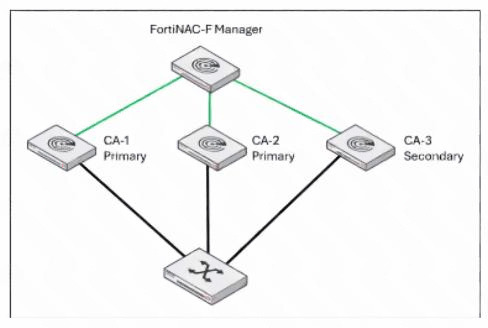
What will occur if CA-2 fails?
A. CA-1 and CA-3 will operate as a 1+1 HA cluster with CA-3 acting as a hot standby.
B. CA-3 will continue to operate as a secondary in an N+1 HA configuration.
C. CA-3 will be promoted to a primary and share management responsibilities with CA-1.
D. CA-3 will be promoted to a primary and FortiNAC-F manager will load balance between CA-1 and CA- 3.
Explanation:
This question tests understanding of FortiNAC-F N+1 HA failover behavior. In an N+1 setup, one secondary appliance monitors and supports multiple primary appliances. The key concept is that the secondary does not get permanently promoted — it steps in to cover the failed primary while retaining its secondary role.
✔️ Correct Option — B:
When CA-2 fails, CA-3 automatically assumes CA-2's responsibilities, but it remains designated as a secondary within the N+1 HA configuration. It continues monitoring and supporting the remaining primaries without changing its architectural role.
❌ Why the Other Options Are Wrong:
A. CA-1 and CA-3 will operate as a 1+1 HA cluster with CA-3 acting as a hot standby.
N+1 HA does not convert into a 1+1 cluster upon failure. CA-3 does not become a hot standby for CA-1 specifically — it retains its role as a shared secondary.
C. CA-3 will be promoted to a primary and share management responsibilities with CA-1.
CA-3 is not promoted to primary. In N+1 HA, the secondary covers the failed node's duties without being re-designated as a primary appliance.
D. CA-3 will be promoted to a primary and FortiNAC-F Manager will load balance between CA-1 and CA-3.
FortiNAC-F Manager does not perform load balancing between nodes in an N+1 failover event. This misrepresents how N+1 HA handles failover traffic.
Reference:
🔧 Fortinet Documentation — FortiNAC-F HA Configuration Guide
Confirms secondary node behavior and N+1 HA failover roles in FortiNAC-F 7.6.
When creating a device profiling rule, what are two advantages of registering the device in the host view? (Choose two.)
A. The devices can be managed as a generic SNMP device.
B. The devices will have connection logs.
C. The devices can be associated with a user.
D. The devices can be polled for connection status.
Explanation:
This question evaluates FortiNAC-F 7.6 device profiling rules and the choice between Host View vs. Inventory registration. Registering in Host View prioritizes endpoint visibility and user context for BYOD/IoT management, while Inventory suits network topology devices needing SNMP polling. It tests understanding of registration impacts on monitoring and policy application.
✔️Correct Option B:
Host View registration enables detailed connection logs, capturing session history, access events, and activity timelines for profiled devices. This supports compliance auditing and troubleshooting without requiring SNMP infrastructure.
✔️Correct Option C:
Host View allows associating devices with specific users or user groups, enabling personalized policy enforcement, access control, and ownership tracking for shared or personal endpoints like printers or laptops.
❌Why the Other Options Are Wrong:
❌ Option A:
The devices can be managed as a generic SNMP device. SNMP management and generic device handling require Inventory (Topology) View for active discovery and configuration, not Host View's passive host tracking.
❌ Option D:
The devices can be polled for connection status. Active polling for real-time link/uptime status is an Inventory feature via SNMP/Layer 2; Host View uses event-driven logs, not proactive queries.
Reference:
🔧 Fortinet docs:Register a host as a device – Explains Host View provides connection history and user association; Inventory enables SNMP polling.
Refer to the exhibit.
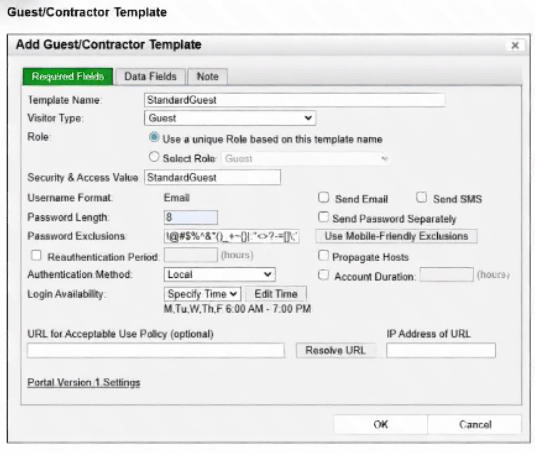
What will happen to the host of a guest user created from this template if the time of connection is 8:00 PM?
A. The host will be marked as non-authenticated.
B. The host will be marked as a rogue device.
C. The host will be marked as at-risk.
D. The host will be administratively disabled.
Explanation:
This question evaluates your understanding of how "Login Availability" settings in a FortiNAC-F guest/contractor template control access times and the immediate outcome of attempting to connect outside those defined windows.
✔️Correct Option:
The "Login Availability" for this template is set for weekdays from 6:00 AM to 7:00 PM. An attempt to connect at 8:00 PM falls outside this permitted time. In such a case, the authentication attempt will fail because the account is not considered valid for login during that period, thus the host will be marked as non-authenticated.
❌Why the Other Options Are Wrong:
B. The host will be marked as a rogue device.
A rogue device is typically an unknown or unauthorized device on the network. This host is associated with a guest template, meaning it's a known entity, even if its access is currently denied.
C. The host will be marked as at-risk.
"At-risk" usually relates to compliance failures or suspicious behavior. While connecting outside the permitted time is a policy violation, the immediate outcome for login availability is authentication failure, not a change to an "at-risk" status.
D. The host will be administratively disabled.
Administrative disablement is a more severe and persistent action typically taken for repeated violations or serious policy breaches. For a single attempt outside the login window, the immediate and direct consequence is that authentication simply fails, rendering the host non-authenticated, rather than outright disabling the host entry.
Reference:
⇒ Fortinet Document Library: FortiNAC 7.2.0 Administration Guide - Guest Access Configuration.
This documentation details how "Login Availability" restricts access, implying that attempts outside this window lead to an unsuccessful authentication.
| Page 2 out of 9 Pages |
| 12345 |
| NSE5_FNC_AD_7.6 Practice Test Home |
The Fortinet NSE 5 FortiNAC-F 7.6 Administrator exam is notoriously tough. It doesn't test memorization. It forces you to make complex decisions under time pressure. A weak prep strategy risks a costly failure and wasted effort. Our NSE5_FNC_AD_7.6 practice tests are built to be your definitive bridge to a passing score.

Copyright © - All Rights Reserved