
Last Updated On : 12-Oct-2026
Total 59 Questions
The difference between a near pass and a confident pass isn't just knowing the material, it's mastering the Fortinet NSE 5 FortiNAC-F 7.6 Administrator exam experience. Our Fortinet NSE5_FNC_AD_7.6 practice test is engineered to close the gap between your current knowledge and the 2026 exam's demands. With every question, you receive detailed, expert verified explanations that break down not just the correct answer, but also the reasoning behind every incorrect option.
Don't just study. Practice NSE5_FNC_AD_7.6 with purpose. Start your journey to a first-time pass today.
By replicating the exact style, complexity, and format of the real Fortinet NSE 5 FortiNAC-F 7.6 Administrator exam questions, we ensure you walk into the exam with complete confidence.
Device Visibility and Profiling
While discovering network infrastructure devices, a switch appears in the inventory topology with a question mark (?) on the icon. What would cause this?
A. The wrong SNMP community string was entered during discovery.
B. The SNMP ObjectlD is not recognized by FortiNAC-F.
C. A read-only SNMP community siring was used.
D. SNMP is not enabled on the switch.
Explanation:
This question addresses Device Discovery and how FortiNAC-F identifies hardware. It tests your understanding of how the system uses the SNMP ObjectID (SysObjectID) to match a physical device to a specific model or driver in its database.
✔️Correct Option:
When FortiNAC-F successfully communicates via SNMP but the ObjectID returned by the device is not in the local database, it cannot assign a specific device type, resulting in a question mark (?) icon. This occurs because the software is unable to map the unique hardware signature to a known vendor profile, even though the management communication itself is functioning correctly.
❌Why the Other Options Are Wrong:
A. The wrong SNMP community string was entered during discovery:
An incorrect string prevents all SNMP communication between the server and the switch. The device would typically fail to be added to the inventory entirely rather than appearing as an unknown type in the topology.
The system requires a valid string to even begin the interrogation process of the hardware metadata.
C. A read-only SNMP community string was used:
FortiNAC-F can successfully identify a device’s vendor and model using a read-only string. Write access is only required for active configuration changes like VLAN switching, not for the initial identification of the hardware.
The question mark icon is purely a result of a model mismatch, not a lack of write permissions on the device.
D. SNMP is not enabled on the switch:
If SNMP is disabled, FortiNAC-F cannot pull any metadata or system information from the hardware. This prevents the device from being placed in the topology at all because the management protocols are not responding.
A device must be reachable via SNMP for the software to even attempt to categorize it or display any icon.
Reference:
🔧 FortiNAC-F 7.6 Administration Guide: Device Inventory
This documentation confirms that a question mark icon signifies that the device's Vendor and Model (via ObjectID) are not recognized by the current software version.
Which two requirements must be met to set up an N+1 HA cluster? (Choose two.)
A. A FortiNAC-F manager
B. A FortiNAC-F device designated as a secondary
C. A dedicated VLAN for primary and secondary synchronization
D. At least two FortiNAC-F devices designated as primary
Explanation:
Question Summary:
This question evaluates understanding of high availability (HA) requirements specifically for N+1 clustering in FortiNAC 7.6. It tests knowledge of the mandatory components and roles needed to form a valid cluster, including the necessity of a FortiNAC-F manager node and proper designation of secondary appliances, while distinguishing these from synchronization network and primary node count constraints.
Correct Answer:
✅ A. A FortiNAC-F manager
A FortiNAC-F manager is mandatory in every N+1 HA cluster. The manager node serves as the central control point that orchestrates configuration synchronization, database replication, and failover coordination across all cluster members. Without this dedicated manager role assigned to one FortiNAC-F appliance, the cluster cannot initialize or maintain consistent state among nodes.
✅ B. A FortiNAC-F device designated as a secondary
At minimum, one FortiNAC-F appliance must be explicitly configured and designated as a secondary node to participate in the N+1 cluster. The secondary device maintains a replicated copy of the primary’s configuration and database, enabling automatic or manual failover when required. This role assignment is a core prerequisite for establishing cluster membership and HA functionality.
Incorrect Answer:
❌ C. A dedicated VLAN for primary and secondary synchronization
While a separate network segment for heartbeat and synchronization traffic is a recommended best practice for stability and security, FortiNAC documentation does not mandate a dedicated VLAN. Synchronization can occur over an existing production network interface if properly isolated and firewalled, so this is not a strict requirement to form the cluster.
❌ D. At least two FortiNAC-F devices designated as primary
FortiNAC N+1 HA architecture allows only one active primary node at any time. Designating multiple devices as primary is invalid and prevented by the configuration logic. The cluster operates with a single primary controlling all operations while secondaries remain in standby, making this option technically incorrect.
Conclusion:
The correct answers confirm that a FortiNAC-F manager and at least one FortiNAC-F device designated as secondary are the two essential requirements. These elements establish the foundational control plane and redundancy membership needed for N+1 high availability. Candidates should remember that the manager role is non-negotiable and only one primary can exist in the cluster architecture.
Reference:
FortiNAC 7.6.0 Administration Guide, High Availability chapter
A user was attempting to register their host through the registration captive portal. After successfully registering, the host remained in the registration VLAN. Which two conditions would cause this behavior? (Choose two.)
A. The wrong agent s installed.
B. There is no agent installed on the host.
C. The port default VLAN is the same as the Registration VLAN.
D. There is another unregistered host on the same port
Explanation:
This question evaluates understanding of FortiNAC registration workflows, VLAN assignment behavior, and how switch port context affects post-registration network placement. It focuses on how FortiNAC determines whether a host can transition from a registration VLAN to a production VLAN after successful captive portal registration. Candidates must understand port-level VLAN configuration, multi-host scenarios, and how FortiNAC enforces access control decisions based on switch and host state.
Correct Answer:
🟢 Option C:
When the port default VLAN is identical to the registration VLAN, FortiNAC has no alternate VLAN to transition the host into after successful registration. In this situation, even though the registration process completes correctly, the network configuration prevents VLAN reassignment. FortiNAC relies on a distinct production or access VLAN to enforce post-registration access, and identical VLAN assignments eliminate that capability.
🟢 Option D:
If another unregistered host is connected to the same switch port, FortiNAC cannot safely move the port to a different VLAN without impacting that unregistered device. To preserve security and registration integrity, FortiNAC keeps the port in the registration VLAN. This behavior is common on shared ports, hubs, or improperly configured access ports where multiple MAC addresses are detected.
Incorrect Answer:
🔴 Option A:
Installing the wrong agent does not directly cause a host to remain in the registration VLAN after successful captive portal registration. Agent mismatches typically affect posture assessment or compliance checks, not VLAN transitions tied to registration status. In captive portal-based workflows, FortiNAC primarily relies on authentication and network enforcement logic rather than agent functionality to move hosts between VLANs.
🔴 Option B:
The absence of an agent on the host does not prevent VLAN reassignment following successful captive portal registration. Agentless registration is fully supported by FortiNAC for many access scenarios. VLAN movement decisions are based on registration state, port configuration, and network context. Therefore, lacking an agent alone does not explain why a host would remain in the registration VLAN.
Conclusion:
Options C and D are correct because they describe conditions where FortiNAC is technically or architecturally unable to transition a port to a new VLAN. Matching default and registration VLANs removes the possibility of reassignment, while shared ports with unregistered devices force FortiNAC to maintain a secure baseline state. Candidates should remember that VLAN movement depends on both switch configuration and port usage context.
Reference:
Fortinet FortiNAC Administration Guide
Fortinet FortiNAC Deployment and Design Guide
Refer to the exhibit.
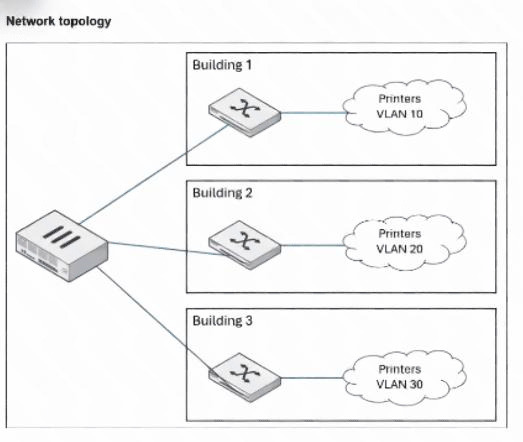
An administrator wants to use FortiNAC-F to automatically provision printers throughout their organization.
Each building uses its own local VLAN for printers.
Which FortiNAC-F feature would allow this to be accomplished with a single network access policy?
A. Dynamic host groups
B. Logical networks
C. Device profiling rules
D. Preferred VLAN designations
Explanation:
This question tests how FortiNAC enables consistent policy application across heterogeneous network segments. In environments with location-specific VLANs (e.g., different printer VLANs per building), a single network access policy can assign access based on abstract roles or device types rather than hard-coded VLAN IDs. Logical networks abstract the enforcement by mapping a common label (e.g., "Printers") to site-specific VLANs on each switch.
✅ Correct Option:
B is correct because logical networks allow a single network access policy to reference a shared logical network (e.g., "Printers") for profiled printer devices. Each switch maps this logical network to its local printer VLAN (10, 20, or 30 per building), enabling automatic provisioning with one policy without creating separate policies per location or VLAN.
❌ Why the Other Options Are Wrong:
A. Dynamic host groups — Incorrect; dynamic host groups are used to automatically group hosts based on attributes such as user role, device type, or location for purposes like alarming, reporting, or applying isolation policies. However, they do not provide the abstraction needed for VLAN assignment or allow a single network access policy to enforce different local VLANs across buildings.
C. Device profiling rules — Incorrect; device profiling rules are responsible for identifying and classifying devices (e.g., recognizing a host as a printer based on DHCP fingerprints, OUI, or behavior). While essential for triggering registration or grouping, they do not handle the actual VLAN enforcement logic or enable one policy to map to multiple site-specific VLANs.
D. Preferred VLAN designations — Incorrect; preferred VLAN designations allow administrators to set fallback or default VLANs on ports or for specific device types when no other policy applies. This is a static, per-device/port configuration and does not provide the dynamic, policy-driven abstraction required to use one network access policy across buildings with different local printer VLANs.
Reference:
⇒ https://docs.fortinet.com/document/fortinac-f/7.6.0/administration-guide/867742/logical-networks — Explains logical networks separate policies from device-specific values; each logical network has an access value mapped to different VLANs per device/location.
⇒ https://docs.fortinet.com/document/fortinac-f/7.6.0/iot-deployment-guide/609917/define-the-logical-networks
— Confirms each managed device can use different VLAN IDs for the same logical network label, ideal for consistent policies across buildings/sites.
⇒ https://docs.fortinet.com/document/fortinac-f/7.6.0/corporate-user-device/189158/mapping-logical-networks-to-vlan-s — Details mapping a logical network (e.g., for printers) to appropriate VLANs in model configuration per switch.
An administrator wants to create a conference manager administrator account but would like to limit the
number of conference accounts that can be generated to 30.
Which statement about conference accounts is true?
A. In FortiNAC-F, conference accounts can be limited by multiples of 25, so the conference administrator could create 50 accounts.
B. The administrator can set a maximum of 30 conference accounts in the administrative profile for the conference manager.
C. The conference account limit is defined in the onboarding conference portal.
D. Conference account limits are defined in the conference guest and contractor template.
Explanation:
This question tests configuration of sponsor privileges for conference account creation in FortiNAC-F. Conference accounts are bulk guest accounts for events, managed by sponsors (e.g., conference managers). Limits on how many a sponsor can create are set per administrator to control usage and prevent abuse, rather than globally or per-template.
✅ Correct Option:
B is correct because the administrator profile (under Users & Hosts > Administrators > Profiles) includes a "Manage Guests" or custom tab for sponsor settings. Here, you can enable conference account creation and specify a maximum number (e.g., 30) that this conference manager administrator can generate, enforcing the limit directly on that admin account.
❌ Why the Other Options Are Wrong:
A. In FortiNAC-F, conference accounts can be limited by multiples of 25, so the conference administrator could create 50 accounts — Incorrect; there is no restriction or requirement in FortiNAC that conference account limits must be in multiples of 25. Limits are flexible and set to any number (including 30) in the administrator profile, without forced increments or rounding to 25/50/etc.
C. The conference account limit is defined in the onboarding conference portal — Incorrect; the onboarding/portal pages handle guest/contractor self-registration and login flows, but do not control creation limits for sponsors/conference managers. Account creation limits for admins are configured in administrator profiles, not in portal settings.
D. Conference account limits are defined in the conference guest and contractor template — Incorrect; guest/contractor templates define account parameters like duration, password format, access times, and visitor types. While templates can influence how accounts are created, the maximum number a sponsor can generate is controlled per administrator in their profile, not in the template itself.
Reference:
⇒ https://docs.fortinet.com/document/fortinac-f/7.6.0/fortinac-manager/814925/add-an-administrator-profile — Confirms in the "Conference" permission: Sponsors may create any number of conference accounts, or the number may be limited by a template (but actual max count is settable per admin profile).
⇒ https://docs.fortinet.com/document/fortinac-f/7.6.0/administration-guide/580980/administrators — Explains administrator profiles limit sponsor access, including permissions to create guest/contractor/conference accounts with configurable restrictions.
⇒ FortiNAC-F 7.6.0 Administration Guide (Administrator Profiles section) — Details custom controls in profiles for guest/contractor management, including setting maximums for conference account creation by the administrator.
A network administrator is troubleshooting a network access issue for a specific host. The administrator
suspects the host is being assigned a different network access policy than expected.
Where would the administrator look to identify which network access policy, if any, is being applied to a
particular host?
A. The Policy Logs view
B. The Connections view
C. The Policy Details view for the host
D. The Port Properties view of the hosts port
Explanation:
✔️ Question Summary
This question assesses the administrator's ability to diagnose network access policy assignments within FortiNAC. Understanding where to locate applied policy information for individual hosts is critical for troubleshooting connectivity and access control issues. The scenario requires knowledge of FortiNAC's interface navigation, specifically which view displays the relationship between hosts and their assigned network access policies. Candidates must distinguish between monitoring views and configuration details.
Correct Answer
✅ C. The Policy Details view for the host
The Policy Details view for a specific host provides comprehensive information about which network access policy is currently applied to that device. This view displays the active policy assignment, enabling administrators to verify whether the expected policy is in effect or if misconfigurations exist. FortiNAC's host-centric policy detail interface consolidates policy application data, making it the primary location for identifying policy assignments during troubleshooting scenarios. This view directly answers which policy governs the host's network access.
Incorrect Answer
❌ A. The Policy Logs view
The Policy Logs view displays historical events and actions related to policy enforcement but does not provide a direct, current snapshot of which specific policy is actively assigned to an individual host. While logs offer valuable audit trails and chronological data about policy changes or enforcement actions, they require interpretation and correlation rather than presenting immediate policy assignment status. Administrators seeking real-time policy identification need a view that shows current assignments, not historical log entries.
❌ B. The Connections view
The Connections view focuses on active network sessions and connectivity status rather than policy assignments. This view displays information about current connections, protocols, and communication states but does not explicitly show which network access policy governs a particular host. While connection data can be useful for network monitoring, it lacks the policy-specific details needed to identify which access control rules are being enforced on a device during troubleshooting.
❌ D. The Port Properties view of the host's port
The Port Properties view displays physical switch port configuration and status information rather than host-specific policy assignments. This view focuses on infrastructure elements like port settings, VLAN assignments, and switch interface characteristics. While port configuration influences network access, the Port Properties view does not directly identify which FortiNAC network access policy is applied to a connected host, making it unsuitable for this troubleshooting task.
🔧 Conclusion
The correct answer demonstrates that the Policy Details view for the host is the authoritative location for identifying applied network access policies in FortiNAC. This view provides administrators with immediate visibility into current policy assignments, eliminating guesswork during troubleshooting scenarios. Candidates should remember that host-centric policy views offer the most direct path to verifying policy application, ensuring efficient diagnosis of access control issues and reducing resolution time for network connectivity problems.
Reference
Fortinet Documentation Library - FortiNAC Administration Guide
When configuring FortiNAC-F to manage FortiGate VPN users, an endpoint compliance policy must be
created for the integration.
Why is the endpoint compliance policy necessary for this type of integration?
A. To designate the required agent type
B. To validate the VPN user credentials
C. To confirm the installed endpoint certificate
D. To validate the VPN client being used
Explanation:
This question tests the role of endpoint compliance policies in FortiNAC-F's FortiGate SSL VPN integration. When FortiNAC manages VPN users (e.g., for posture checks before granting full access), it requires an endpoint compliance policy to define how the connected endpoint is assessed for compliance. This includes specifying which FortiNAC agent (Persistent, Dissolvable, or Passive) must be present or launched on the VPN client device to perform scans, gather details, and report compliance status back to FortiNAC via FortiGate.
✅ Correct Option:
A is correct because the endpoint compliance policy is necessary to designate the required agent type (typically Persistent Agent for ongoing checks or Dissolvable for one-time VPN posture assessment). Without specifying an agent, FortiNAC cannot instruct FortiGate to enforce agent deployment or collect compliance data from the VPN endpoint, preventing proper integration and posture enforcement for VPN users.
❌ Why the Other Options Are Wrong:
B. To validate the VPN user credentials — Incorrect; VPN user credentials (username/password, certificates) are validated by FortiGate during the initial SSL VPN authentication phase. FortiNAC's endpoint compliance policy operates after authentication to check device posture (e.g., AV, OS patch level), not to re-validate credentials already handled by FortiGate.
C. To confirm the installed endpoint certificate — Incorrect; while certificates can be part of VPN authentication or agent communication, the endpoint compliance policy does not focus on confirming endpoint certificates. It defines agent requirements, scan profiles, and compliance criteria (e.g., antivirus running), not certificate validation which is managed separately in FortiGate or agent settings.
D. To validate the VPN client being used — Incorrect; FortiNAC does not validate the specific VPN client software (e.g., FortiClient) via the compliance policy. FortiGate enforces client compatibility during connection; the compliance policy instead specifies the FortiNAC agent needed on the endpoint (often FortiClient with embedded agent) for posture assessment after connection.
Reference:
⇒ FortiNAC-F 7.6.0 Administration Guide (FortiGate SSL VPN Integration section) — Confirms endpoint compliance policies are required to specify the agent type and posture checks for managed VPN users.
| Page 1 out of 9 Pages |
| 12345 |
The Fortinet NSE 5 FortiNAC-F 7.6 Administrator exam is notoriously tough. It doesn't test memorization. It forces you to make complex decisions under time pressure. A weak prep strategy risks a costly failure and wasted effort. Our NSE5_FNC_AD_7.6 practice tests are built to be your definitive bridge to a passing score.

Copyright © - All Rights Reserved