
Last Updated On : 12-Oct-2026
Total 59 Questions
Network Access Control Policies
When configuring isolation networks in the configuration wizard, why does a layer 3 network typo allow for mora than ono DHCP scope for each isolation network typo?
A. The layer 3 network type allows for one scope for each possible host status.
B. Configuring more than one DHCP scope allows for DHCP server redundancy
C. There can be more than one isolation network of each type
D. Any scopes beyond the first scope are used if the initial scope runs out of IP addresses.
Explanation:
Question Summary
This question evaluates knowledge of Layer 3 isolation network configuration in FortiNAC-F 7.6's configuration wizard, focusing on DHCP scope support. It tests FortiNAC-F's network access control mechanisms, including isolation states like Registration, Remediation, and Isolation. Essential areas cover DHCP allocation logic, scope multiplicity per state, and wizard-driven setup for enterprise-scale segmentation without IP conflicts.
Correct Answer
C. There can be more than one isolation network of each type.
FortiNAC-F 7.6 Layer 3 configuration explicitly permits multiple DHCP scopes within each isolation network type to accommodate diverse environments, such as separate registration networks across buildings. Official documentation confirms this flexibility in the wizard, enabling administrators to define scopes for varied captive portals or locations while maintaining state-specific routing. This design principle supports scalable deployments with distinct lease pools per network instance.
Incorrect Answer
A. The layer 3 network type allows for one scope for each possible host status.
While Layer 3 supports scopes tied to states like Registration or Isolation, the primary reason for multiple scopes per network type is accommodating multiple networks, not limiting to one per status; documentation emphasizes environmental multiplicity over status restriction, making this explanation incomplete and misaligned with wizard capabilities.
B. Configuring more than one DHCP scope allows for DHCP server redundancy.
DHCP redundancy in FortiNAC-F relies on High Availability clustering or relay configurations, not additional scopes within Layer 3 networks; official guides separate scope multiplicity for network diversity from failover mechanisms, rendering this option technically inaccurate per product architecture.
D. Any scopes beyond the first scope are used if the initial scope runs out of IP addresses.
FortiNAC-F assigns scopes based on network type and isolation state precedence, not sequential exhaustion; lease pool overflow requires manual range expansion or external relays, conflicting with documented deterministic allocation and wizard scope labeling rules.
Conclusion
The correct answers demonstrate that Layer 3 isolation networks in FortiNAC-F 7.6 support multiple DHCP scopes per type to handle diverse network instances like building-specific captive portals. This aligns with Fortinet's scalable NAC architecture, enabling precise lease assignment without overlap. Candidates should recall this wizard feature for configuring enterprise isolation effectively.
Reference
Fortinet Documentation: Layer 3 Network
Fortinet Documentation: Configure Scopes
Fortinet Administration Guide: FortiNAC-F 7.6.0
An administrator wants FortiNAC-F to return a group of user-defined RADIUS attributes in RADIUS
responses.
Which condition must be true to achieve this?
A. The requesting device must support RFC 5176.
B. Inbound RADIUS requests must contain the Calling-Station-ID attribute.
C. The device models in the inventory view must be configured for proxy-based authentication.
D. RADIUS accounting must be enabled on the FortiNAC-F RADIUS server configuration.
Explanation:
This question tests your understanding of how FortiNAC delivers dynamic, user-defined RADIUS attributes (like VLAN assignments or ACL names) to network devices. The key requirement involves how FortiNAC links the incoming request to a specific host record to retrieve the correct attributes.
✔️Correct Option:
The inbound RADIUS request must contain the Calling-Station-ID attribute, which carries the client's MAC address. This unique identifier allows FortiNAC to locate the correct host record and return the specific user-defined attributes assigned to that endpoint.
❌Why the Other Options Are Wrong:
❌ A. The requesting device must support RFC 5176:
RFC 5176 defines Change of Authorization (CoA) and Disconnect messages, which are used for mid-session changes like re-authentication or session termination. This is unrelated to including custom attributes in the initial Access-Accept response, which is handled by standard RADIUS attributes.
❌ C. The device models in the inventory view must be configured for proxy-based authentication:
Devices that return user-defined attributes must be configured for Local RADIUS Authentication. Proxy mode forwards requests to an external server, preventing FortiNAC from injecting its own attributes into the response. Local mode allows FortiNAC to control the entire RADIUS transaction.
❌ D. RADIUS accounting must be enabled on the FortiNAC-F RADIUS server configuration:
RADIUS accounting tracks session statistics like start/stop times and data usage. While useful for auditing, it is not required for FortiNAC to return user-defined attributes in an Access-Accept message. The prerequisites are strictly Local Authentication mode and the presence of the Calling-Station-ID.
Reference:
⇒ The Fortinet FortiNAC Administration Guide confirms: "For RADIUS Attribute Groups to work, the device must be configured for Local Authentication and the inbound RADIUS request must contain the Calling-Station-ID." This is also detailed in the RADIUS cookbook section of the documentation.
An administrator has configured the DHCP scope for a registration isolation network, but the isolation process
isn't working.
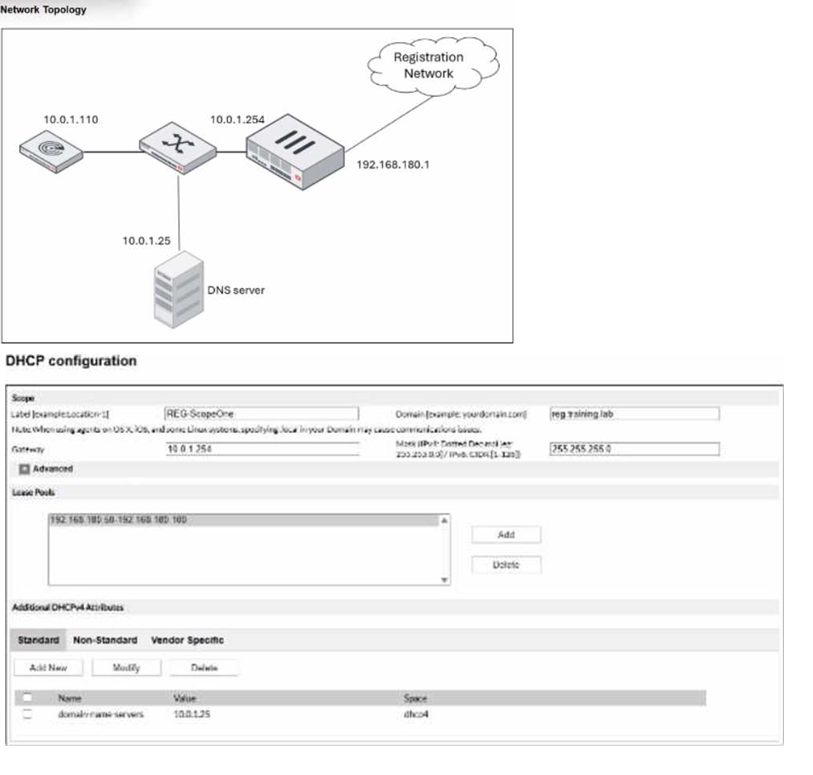
An administrator has configured the DHCP scope for a registration isolation network, but the isolation process
isn't working.
What is the problem with the configuration?
A. The domain name server designation is incorrect.
B. The label uses a system-reserved value.
C. The lease pool does not contain a complete subnet.
D. The gateway defined for the scope is incorrect.
Explanation:
Question Summary:
This question evaluates the candidate's ability to diagnose a misconfigured DHCP scope within a FortiNAC registration isolation network scenario. It tests understanding of the critical relationship between the defined gateway IP address, the lease pool's subnet, and the network topology for proper client isolation and subsequent network access.
✅ Correct Answer:
Option D: The gateway defined for the scope is incorrect. This option is valid because the topology shows the registration network gateway as 192.168.180.1, but the configured DHCP scope gateway is set to 10.0.1.254. This mismatch prevents isolated hosts from receiving correct routing instructions, breaking the isolation process as clients cannot communicate with the necessary FortiNAC enforcement points on their assigned subnet.
❌ Incorrect Answer:
Option A: The domain name server designation is incorrect. While an incorrect DNS server can cause name resolution failures, it does not directly prevent the core registration and isolation process from functioning. Clients can still initiate contact with FortiNAC for authentication and remediation even with flawed DNS configuration.
Option B: The label uses a system-reserved value. The label "REG-ScopeOne" is an administrator-defined string for scope identification. FortiNAC does not reserve common terms like "REG" for labels; these are user-configurable and do not impact the technical operation of DHCP lease assignment or network isolation.
Option C: The lease pool does not contain a complete subnet. The lease pool 192.168.180.50-192.168.180.100 is a valid range within the 192.168.180.0/24 subnet. DHCP scopes typically define a usable pool, not every address in the subnet, excluding the gateway and other reserved IPs. This configuration is standard and functional.
🔧 Conclusion:
The correct answers demonstrate that a DHCP scope in a registration network must provide clients with a gateway address that matches the subnet of the assigned lease pool and aligns with the network's physical topology. The primary failure point for isolation is an incorrect default gateway, which disrupts all layer-3 communication for the isolated host.
Reference:
Fortinet Documentation Library. FortiNAC Administration Guide, Version 7.6. "Configuring Registration."
In which three ways would deploying a FortiNAC-F Manager into a large environment consisting of several FortiNAC-F CAs simplify management? (Choose three.)
A. Global infrastructure device inventory
B. Global version control
C. Global authentication security policies
D. Pooled licenses
E. Global visibility
Explanation:
This question assesses your understanding of the centralized management benefits provided by a FortiNAC-F Manager when deployed in a large environment with multiple FortiNAC-F CAs (Control Appliances). The Manager acts as a single pane of glass, simplifying administration across distributed sites by consolidating key operational tasks.
✔️Correct Options:
✅ B. Global version control:
The FortiNAC Manager enables administrators to manage version control on all FortiNAC appliances within the network from a single management device, allowing centralized firmware upgrades and ensuring all CAs run the same version .
✅ D. Pooled licenses:
License counts are shared across all managed FortiNAC appliances as a central pool controlled by the Manager. Any CA can use licenses from this pool until the total count is consumed, simplifying license administration .
✅ E. Global visibility:
The Global Find feature allows administrators to quickly locate devices and users anywhere in the network, including MAC addresses, locations, and connection ports, providing unified visibility across all managed locations .
❌Why the Other Options Are Wrong:
❌ A. Global infrastructure device inventory:
The FortiNAC Manager does not maintain a global network inventory view because its database lacks port objects specific to individual network devices. Infrastructure device management remains at the individual CA level, not globally from the Manager .
❌ C. Global authentication security policies:
While global objects like groups and templates are shared, NAC policies themselves can only be fully configured and ranked on each individual FortiNAC CA server. The Manager does not provide global policy configuration or ranking capabilities .
Reference:
⇒ Fortinet Documentation: "Key features | FortiNAC Manager" and "Licensing in a FortiNAC Manager environment" . These sources confirm Global Version Control, Global License Management, and Global Find (visibility) as key Manager features.
When creating a user or host profile, which three criteria can you apply? (Choose three.)
A. Host or user group memberships
B. Host or user attributes
C. Adapter current VLAN
D. An applied access policy
E. Location
Explanation:
This question tests your understanding of Profile configuration within FortiNAC-F. Profiles are the primary building blocks used to categorize entities based on specific identifying data points before they are evaluated by the policy engine for network access.
✔️Correct Options:
Host or user group memberships:
This criterion allows the system to identify devices based on their presence in local or directory-based groups.
It simplifies policy application by grouping multiple entities that share the same organizational role or technical classification.
Host or user attributes:
Attributes allow for granular identification by looking at specific data points like OS version, serial numbers, or LDAP fields.
This ensures that security policies are tailored to the exact technical specifications and ownership details of the connecting device.
Location:
Location-based criteria utilize the physical connection point, such as the specific switch, port, or SSID, to define a profile.
This is essential for enforcing localized access rules where a user’s permissions may change based on their physical office.
❌Why the Other Options Are Wrong:
C. Adapter current VLAN:
The current VLAN is an operational state resulting from an applied policy rather than a classification criterion used to define a profile.
Using the current VLAN as a criterion would create a circular logic loop where the current state determines the profile that is supposed to assign that state.
The system needs to identify what the device is before it decides which VLAN it should be placed in.
D. An applied access policy:
Access policies are the final results of a match between a profile and a logical network, not a criterion used within the profile itself.
A profile must be defined and matched first before an access policy can even be considered for application to a specific host or user session.
Including a policy as a profile criterion would reverse the logical flow of the FortiNAC policy evaluation engine.
Reference:
🔧 FortiNAC-F 7.6 Administration Guide: User and Host Profiles
The documentation confirms that profiles are constructed using location data, group memberships, and specific user or host attributes to facilitate precise network segmentation and identification.
Refer to the exhibit.
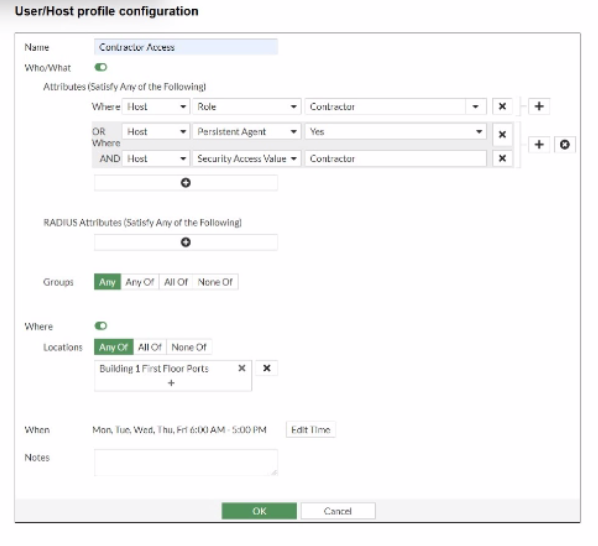
If a host is connected to a port in the Building 1 First Floor Ports group, what must also be true to match this
user/host profile?
A. The host must have a role value of contractor, an installed persistent agent or a security access value of contractor, and be connected between 6 AM and 5 PM.
B. The host must have a role value of contractor or an installed persistent agent, a security access value of contractor, and be connected between 9 AM and 5 PM.
C. The host must have a role value of contractor or an installed persistent agent or a security access value of contractor, and be connected between 6 AM and 5 PM.
D. The host must have a role value of contractor or an installed persistent agent and a security access value of contractor, and be connected between 6 AM and 5 PM.
Explanation:
This question assesses your ability to interpret a FortiNAC-F User/Host profile configuration, specifically how the logical "AND" and "OR" conditions combine with "Where" (location) and "When" (time) rules to match a host.
✔️Correct Option:
To match this profile, the host must satisfy all "Who/What," "Where," and "When" conditions.
Who/What (Attributes): The conditions are:
(Host Role is Contractor) OR (Host Persistent Agent is Yes)
AND (Host Security Access Value is Contractor) This means the host needs either the Contractor role or a Persistent Agent, AND it must have a Security Access Value of Contractor.
Where (Locations): The host must be connected to a port in the "Building 1 First Floor Ports" group.
When (Time): The connection must occur between "Mon, Tue, Wed, Thu, Fri 6:00 AM - 5:00 PM."
Option D accurately reflects this combination of conditions.
❌Why the Other Options Are Wrong:
A. The host must have a role value of contractor, an installed persistent agent or a security access value of contractor, and be connected between 6 AM and 5 PM.
This option incorrectly groups the "security access value" with an "OR" condition for the "Who/What" attributes. The exhibit clearly shows "Host Security Access Value = Contractor" linked with an "AND."
B. The host must have a role value of contractor or an installed persistent agent, a security access value of contractor, and be connected between 9 AM and 5 PM.
This option correctly interprets the "Who/What" and "Security Access Value" conditions but incorrectly states the connection time as "9 AM and 5 PM" instead of "6 AM and 5 PM" from the exhibit.
C. The host must have a role value of contractor or an installed persistent agent or a security access value of contractor, and be connected between 6 AM and 5 PM.
This option incorrectly uses "OR" for the "security access value." The exhibit clearly states "AND Host Security Access Value = Contractor" as a separate, mandatory condition that must be met in addition to one of the prior conditions.
Reference:
⇒ Fortinet Document Library: FortiNAC 7.2.0 Administration Guide - Creating User and Host Profiles.This official documentation explains the logical operations (AND/OR) used when defining conditions within FortiNAC user/host profiles for matching purposes.
A healthcare organization is integrating FortiNAC-F with its existing MDM. Communication is failing
between the systems.
What could be a probable cause?
A. Security Fabric traffic is failing
B. SSH communication is failing
C. REST API communication is failing
D. SOAP API communication is failing
Explanation:
This assessment focuses on the integration troubleshooting between FortiNAC-F and third-party Mobile Device Management (MDM) platforms. It evaluates a candidate's understanding of the specific communication protocols utilized during external connector synchronization. To resolve such failures, professionals must recognize how FortiNAC-F pulls device metadata and posture information from external databases. The core knowledge area involves identifying that modern Fortinet fabric integrations and external MDM queries rely primarily on web-based service architectures rather than legacy management protocols.
🟢 Correct Answer
Option C is valid because FortiNAC-F utilizes the Representational State Transfer (REST) architecture to communicate with modern MDM solutions like Workspace ONE, Microsoft Intune, or Jamf. When this communication fails, it is typically due to incorrect API credentials, blocked HTTPS traffic on port 443, or expired certificates. Fortinet design principles dictate that MDM polling and notification listeners operate through REST API calls to ensure secure, scalable, and efficient data exchange between the network access controller and the endpoint management system.
🔴 Incorrect Answer
Option A is incorrect because the Fortinet Security Fabric is a proprietary framework for inter-Fortinet communication, whereas MDM integration involves external third-party systems.
Option B is invalid as Secure Shell (SSH) is utilized for command-line management or communicating with certain network infrastructure devices, not for retrieving database objects from an MDM.
Option D is incorrect because Simple Object Access Protocol (SOAP) is an older, XML-based protocol that has been largely superseded by REST in contemporary FortiNAC-F integration workflows and official documentation.
Conclusion
The correct answers demonstrate that REST API communication is the fundamental mechanism for synchronizing endpoint data between FortiNAC-F and external MDM platforms. Candidates should remember that successful integration requires verified API permissions and unobstructed HTTPS pathways. This alignment with modern web service standards ensures that FortiNAC-F can effectively retrieve critical device attributes to enforce dynamic network access policies. Understanding this protocol-specific requirement is essential for diagnosing connectivity issues within a complex healthcare security architecture or similar enterprise environments.
Reference
FortiNAC-F 7.6 Administration Guide
Fortinet Docs Library: MDM Integration Overview
Fortinet Knowledge Base: Troubleshooting MDM Connectors
| Page 3 out of 9 Pages |
| 12345 |
| NSE5_FNC_AD_7.6 Practice Test Home |
The Fortinet NSE 5 FortiNAC-F 7.6 Administrator exam is notoriously tough. It doesn't test memorization. It forces you to make complex decisions under time pressure. A weak prep strategy risks a costly failure and wasted effort. Our NSE5_FNC_AD_7.6 practice tests are built to be your definitive bridge to a passing score.

Copyright © - All Rights Reserved