
Last Updated On : 12-Oct-2026
Total 44 Questions
The difference between a near pass and a confident pass isn't just knowing the material, it's mastering the Fortinet NSE 5 - FortiSASE and SD-WAN 7.6 Core Administrator exam experience. Our Fortinet NSE5_SSE_AD-7.6 practice test is engineered to close the gap between your current knowledge and the 2026 exam's demands. With every question, you receive detailed, expert verified explanations that break down not just the correct answer, but also the reasoning behind every incorrect option.
Don't just study. Practice NSE5_SSE_AD-7.6 with purpose. Start your journey to a first-time pass today.
By replicating the exact style, complexity, and format of the real Fortinet NSE 5 - FortiSASE and SD-WAN 7.6 Core Administrator exam questions, we ensure you walk into the exam with complete confidence.
Refer to the exhibit.
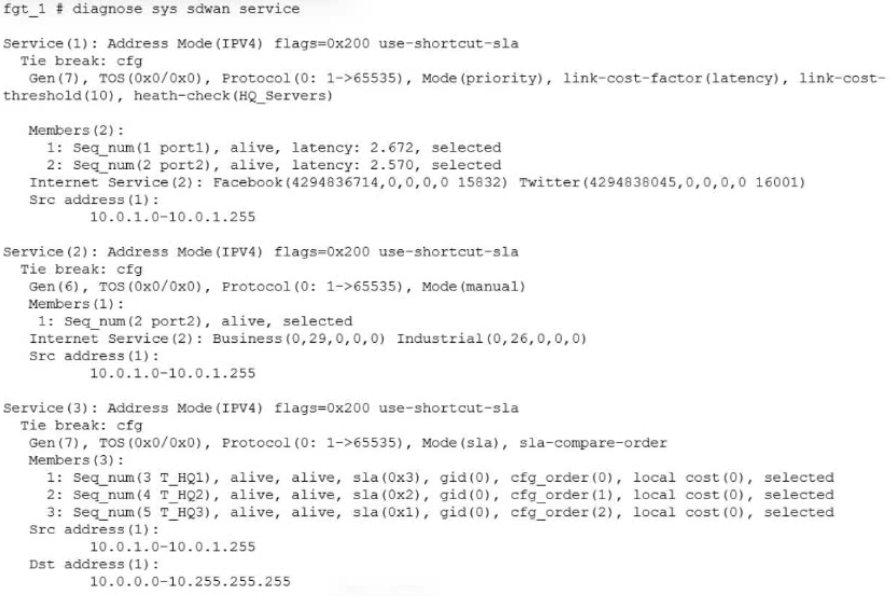
The exhibit shows output of the command diagnose sys sdwan service collected on a FortiGate device.
The administrator wants to know through which interface FortiGate will steer traffic from local users on
subnet 10.0.1.0/255.255.255.192 and with a destination of the social media application Facebook.
Based on the exhibits, which two statements are correct? (Choose two.)
A. FortiGate steers traffic for social media applications according to the service rule 2 and steers traffic through port2.
B. There is no service defined for the Facebook application, so FortiGate applies service rule 3 and directs the traffic to headquarters.
C. When FortiGate cannot recognize the application of the flow, it load balances the traffic through the tunnels HQ_T1, HQ_T2, HQ_T3.
D. When FortiGate cannot recognize the application of the flow, it steers the traffic through the preferred member of rule 3, HQ_T1.
Explanation:
🚀 Question Summary
This question evaluates understanding of FortiGate SD-WAN service rule evaluation and traffic steering mechanisms in FortiOS. It assesses knowledge of sequential rule matching, application-based selection for social media like Facebook, interface prioritization in auto mode with latency factors, and implicit rule load balancing across tunnels for unrecognized flows from specific subnets.
✅ Correct Answer
A. FortiGate steers traffic for social media applications according to the service rule 2 and steers traffic through port2.
Rule 2 targets Internet Service Business traffic, incorporating social media applications including Facebook. In auto mode using link-cost-factor latency, port2 emerges as selected due to optimal metrics among members like seq num 1. This directs local subnet 10.0.1.0/26 flows precisely through port2, aligning with FortiGate's hierarchical SD-WAN decision process.
C. When FortiGate cannot recognize the application of the flow, it load balances the traffic through the tunnels HQ_T1, HQ_T2, HQ_T3.
Unmatched flows drop to the implicit SD-WAN rule after explicit services. Rule 3 lists HQ_T1, HQ_T2, HQ_T3 in manual mode without designated preference. FortiOS then employs ECMP load balancing across available tunnels, distributing unidentified application traffic equitably to ensure resilient connectivity to headquarters.
❌ Incorrect Answer
B. There is no service defined for the Facebook application, so FortiGate applies service rule 3 and directs the traffic to headquarters.
Facebook qualifies under social media in rule 2's Internet Service, triggering an earlier match before rule 3. Explicit service definitions encompass broad categories like social platforms, preventing fallback. This misinterprets rule precedence and application grouping in FortiGate SD-WAN configuration.
D. When FortiGate cannot recognize the application of the flow, it steers the traffic through the preferred member of rule 3, HQ_T1.
Implicit rule governs post-explicit matches, not rule 3's manual members directly. No "preferred" designation appears for HQ_T1 in output; multiple tunnels exist without selection. FortiOS defaults to load balancing rather than singular steering, contradicting the assumption of fixed preference.
📌 Conclusion
Options A and C are correct because they accurately reflect FortiGate's SD-WAN rule traversal from explicit services to implicit fallback. Rule 2's auto-mode selection via latency-optimized port2 handles social media precisely, while ECMP across HQ tunnels ensures equitable distribution for unknown apps. Candidates must memorize sequential evaluation and mode-specific behaviors for exam success.
🔗 Reference
SD-WAN related diagnose commands
Fortinet: Implicit rule
For a small site, an administrator plans to implement SD-WAN and ensure high network availability for
business-critical applications while limiting the overall cost and the cost of pay-per-use backup connections.
Which action must the administrator take to accomplish this plan?
A. Use a mid-range FortiGate device to implement standalone SD-WAN.
B. Implement dynamic routing.
C. Set up a high availability (HA) cluster to implement standalone SD-WAN.
D. Configure at least two WAN links.
Explanation:
This question tests SD-WAN deployment strategies for small sites balancing high availability, business-critical app performance, and cost control. SD-WAN requires multiple WAN interfaces to enable link redundancy, failover, and load balancing. Using a primary link with pay-per-use backups (like 4G/5G) meets availability needs without constant dual-link costs.
✅Correct Option:
Configuring at least two WAN links enables SD-WAN to monitor health, steer critical traffic via SLAs, and fail over to cost-effective backups only when needed. This provides redundancy essential for business apps while minimizing pay-per-use expenses through primary link preference. (34 words)
❌Why the Other Options Are Wrong:
Option A:
❌ A mid-range FortiGate with standalone SD-WAN lacks device-level redundancy, risking total outage if the single unit fails.
This fails high availability requirements despite lower initial cost, as no failover exists for hardware issues.
Option B:
❌ Dynamic routing (like BGP/OSPF) optimizes path selection but doesn't inherently provide link redundancy or availability.
Without multiple WAN links, there's no failover capability, making it insufficient for the stated goals.
Option C:
❌ HA clusters require two identical FortiGates, doubling hardware/license costs beyond small site budgets.
This violates the cost limitation while adding unnecessary complexity for basic link-level availability.
Reference:
🔧 https://docs.fortinet.com/document/fortigate/7.6.5/administration-guide/23145/sd-wan-with-fgcp-ha
Confirms SD-WAN needs multiple WAN links for redundancy and load balancing before HA considerations.
Details standalone SD-WAN requires multiple ISP links for availability, HA adds further redundancy.
The IT team is wondering whether they will need to continue using MDM tools for future FortiClient upgrades. What options are available for handling future FortiClient upgrades?
A. Enable the Endpoint Upgrade feature on the FortiSASE portal.
B. FortiClient will need to be manually upgraded.
C. Perform onboarding for managed endpoint users with a newer FortiClient version.
D. A newer FortiClient version will be auto-upgraded on demand.
Explanation:
This question evaluates understanding of FortiSASE endpoint lifecycle management, specifically how FortiClient upgrades are handled after initial deployment. It focuses on the relationship between FortiClient, FortiSASE cloud management, and traditional MDM tools. Candidates must understand centralized upgrade capabilities, supported upgrade workflows, and how FortiSASE reduces dependency on external endpoint management systems for maintaining FortiClient versions.
✅ Correct Answer
A. Enable the Endpoint Upgrade feature on the FortiSASE portal.
This option is correct because FortiSASE includes a built-in Endpoint Upgrade feature that centrally manages FortiClient version updates. When enabled, administrators can control upgrade timing and target versions directly from the FortiSASE portal. This design aligns with Fortinet’s cloud-managed architecture, allowing automated upgrades without relying on third-party MDM tools or manual intervention on endpoints.
❌ Incorrect Answer
B. FortiClient will need to be manually upgraded.
This option is incorrect because FortiSASE provides native mechanisms for managing FortiClient upgrades. Manual upgrades are not a required or recommended practice once Endpoint Upgrade is enabled, as they increase operational overhead and reduce consistency across managed endpoints.
C. Perform onboarding for managed endpoint users with a newer FortiClient version.
This option is invalid because onboarding is intended for initial enrollment, not version upgrades. Re-onboarding users to deploy a newer FortiClient release is inefficient and contradicts FortiSASE’s centralized upgrade model.
D. A newer FortiClient version will be auto-upgraded on demand.
This option is incorrect because FortiClient does not automatically upgrade itself unless explicitly controlled through the Endpoint Upgrade feature. Upgrades require administrative configuration and approval within the FortiSASE portal.
✔️ Conclusion
The correct answers confirm that… FortiSASE is designed to centrally manage FortiClient upgrades through the Endpoint Upgrade feature, eliminating the need for MDM-based or manual upgrade processes. This approach ensures consistent client versions, reduces administrative complexity, and aligns with Fortinet’s cloud-managed security architecture. For the exam, candidates should remember that upgrade behavior is policy-driven and controlled directly from FortiSASE.
Reference
🔹 Fortinet Documentation – FortiSASE Administration Guide
🔹 Fortinet Documentation – FortiClient and FortiSASE Integration Guide
Refer to the exhibit, which shows the SD-WAN rule status and configuration.
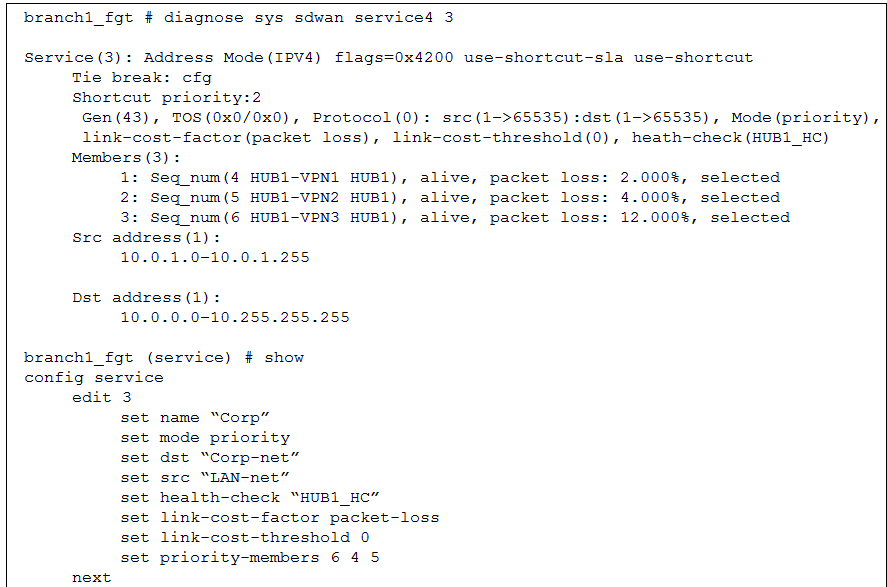
Based on the exhibit, which change in the measured packet loss will make HUB1-VPN3 the new preferred
member? (Choose one answer)
A. When all three members have the same packet loss
B. When HUB1-VPN1 has 4% packet loss
C. When HUB1-VPN1 has 12% packet loss
D. When HUB1-VPN3 has 4% packet loss
Explanation:
📊 Question Summary:
This question assesses comprehension of FortiGate SD-WAN link selection behavior when the link-cost-factor and mode priority settings interact. It tests the candidate's ability to predict how measured performance metrics, specifically packet loss, override a static priority list, and under which conditions the configured priority order will be applied according to the defined threshold.
✅ Correct Answer:
A is correct. With link-cost-factor set to packet-loss and a threshold of 0, the performance-based algorithm activates when any member's packet loss exceeds 0%. If all members report identical packet loss, the cost factor cannot differentiate between them. The system then reverts to the administrator-defined priority-members order (6, 4, 5), making member 6 (HUB1-VPN3) the preferred path.
❌ Incorrect Answer:
🔹 B is incorrect because if HUB1-VPN1 has 4% loss, HUB1-VPN2 has 4%, and HUB1-VPN3 has 12%, the lowest loss paths (4%) are VPN1 and VPN2. Between these, priority order selects VPN1 (member 4) over VPN2, leaving VPN3 as the worst-performing and not preferred.
🔹 C is invalid as it results in VPN2 having the sole lowest loss (4%), making it the winner.
🔹 D is faulty because with VPN3 at 4% loss and VPN1 at 2%, VPN1 retains the best performance metric and is selected.
📝 Conclusion:
The correct answer demonstrates that in FortiGate SD-WAN, when the link-cost-factor is enabled with a threshold of 0, identical performance measurements across all members nullify the cost-based tie-breaking. This forces the rule to utilize the statically configured priority-members sequence, thereby selecting the member with the highest administrative priority as the optimal path.
🔗 Reference:
Fortinet Documentation. FortiOS 7.6 Administration Guide, SD-WAN chapter, "SD-WAN rule" and "Link health monitoring and failover."
You are configuring SD-WAN to load balance network traffic. Which two facts should you consider when setting up SD-WAN? (Choose two.)
A. When applicable, FortiGate load balances traffic through all members that meet the SLA target.
B. SD-WAN load balancing is possible only when using the manual and the best quality strategies.
C. Only the manual and lowest cost (SLA) strategies allow SD-WAN load balancing.
D. You can select the outsessions hash mode with all strategies that allow load balancing.
Explanation:
This question tests your understanding of SD-WAN load balancing capabilities and configuration options in FortiGate. Not all SD-WAN strategies support load balancing, and those that do have specific behaviors regarding SLA compliance and hash mode selection.
✅Correct Option:
✅ A. When applicable, FortiGate load balances traffic through all members that meet the SLA target.
This is correct because when using the Maximize Bandwidth (SLA) strategy (load-balance mode), FortiGate distributes traffic across all available members that satisfy the SLA requirements. If some members do not meet the SLA target, they are excluded from load balancing until they recover .
✅ D. You can select the outbound hash mode with all strategies that allow load balancing.
This is correct because for SD-WAN rules configured with load balancing strategies, FortiGate supports multiple hash modes including outbound hash mode. These hash modes determine how traffic is distributed across selected interfaces .
❌Why the Other Options Are Wrong:
❌ B. SD-WAN load balancing is possible only when using the manual and the best quality strategies.
This is incorrect because manual and best quality strategies are not primarily designed for load balancing. Manual strategy uses fixed interface priorities, while best quality selects the single best link based on link-cost-factor. Load balancing is specifically available with the Maximize Bandwidth (SLA) strategy .
❌ C. Only the manual and lowest cost (SLA) strategies allow SD-WAN load balancing.
This is incorrect because lowest cost (SLA) strategy selects a single link (the lowest cost member that meets SLA), not multiple links for load balancing. Manual strategy similarly selects based on priority order, not distribution across multiple members .
Reference:
Fortinet Community: Understanding SD-WAN Load Balance Hash Modes
What is the purpose of the on/off-net rule setting in FortiSASE?
A. To enable or disable user authentication for external network access.
B. To define different traffic routing rules for on-premises and cloud-based resources.
C. To determine if an endpoint is connecting from a trusted network or untrusted location.
D. To configure different access policies for users based on their geographical location.
Explanation:
This question assesses a candidate's understanding of FortiSASE's on/off-net rule functionality and its role in endpoint network classification. The question evaluates knowledge of how FortiSASE distinguishes trusted corporate environments from untrusted external locations to enforce adaptive security policies. Candidates must understand the technical purpose of on/off-net detection within Secure Access Service Edge architectures and how this mechanism influences policy enforcement based on network trust boundaries rather than authentication methods, routing preferences, or geographic parameters.
Correct Answer
✅ Option C: To determine if an endpoint is connecting from a trusted network or untrusted location.
FortiSASE employs on/off-net rules to identify whether endpoints operate within corporate network perimeters or external environments. This classification mechanism enables the platform to enforce differential security controls based on network trust status. When devices connect from recognized enterprise networks, policies may permit reduced inspection overhead or streamlined access protocols. Conversely, endpoints operating from untrusted locations trigger enhanced security measures including stricter authentication requirements, comprehensive traffic inspection, and restricted resource access to maintain organizational security posture.
Incorrect Answer
❌ Option A: To enable or disable user authentication for external network access.
This option incorrectly suggests that on/off-net rules function as authentication toggles for external connectivity. Authentication enforcement represents a separate security layer managed through identity verification policies rather than network location detection mechanisms. While on/off-net status may influence which authentication methods apply, the primary purpose remains network trust classification rather than controlling whether authentication occurs. FortiSASE manages user verification independently from network location determination, making this explanation technically inaccurate regarding the fundamental purpose of on/off-net configuration.
❌ Option B: To define different traffic routing rules for on-premises and cloud-based resources.
This explanation incorrectly frames on/off-net rules as traffic routing directives distinguishing on-premises infrastructure from cloud services. The actual function involves classifying endpoint network environments rather than determining resource destination types. While network classification may subsequently influence routing decisions through policy enforcement, the core mechanism identifies endpoint location trust status. Routing configurations for hybrid environments utilize separate architectural components within FortiSASE, making this characterization fundamentally misaligned with on/off-net rule objectives and implementation.
❌ Option D: To configure different access policies for users based on their geographical location.
This option erroneously characterizes on/off-net rules as geolocation-based policy engines. Network trust determination operates independently from physical geographic positioning, focusing instead on whether endpoints connect through recognized corporate network infrastructure versus external networks. Geographic location services represent distinct capabilities within security platforms that leverage IP geolocation databases or GPS coordinates. On/off-net classification evaluates network environment trust boundaries through mechanisms like DNS resolution, IP range matching, or network identifiers rather than physical user positioning.
🔧 Conclusion
The correct answer confirms that on/off-net rules serve as network trust classification mechanisms within FortiSASE architecture. This functionality enables security platforms to distinguish corporate network connections from external environment access, facilitating adaptive policy enforcement based on endpoint location context. Candidates should recognize that this classification represents a foundational component of zero-trust security models where access privileges dynamically adjust according to network trust boundaries rather than static configurations, ensuring appropriate protection levels across diverse connectivity scenarios.
Reference
Fortinet Documentation Library - FortiSASE Administration Guide
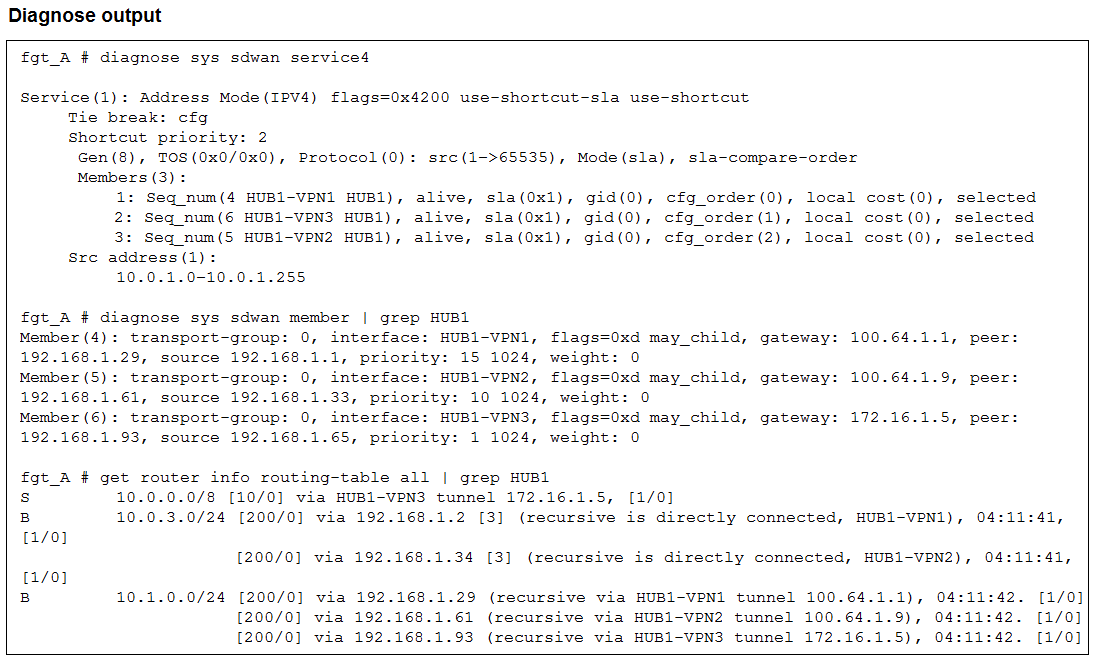
An administrator is troubleshooting SD-WAN on FortiGate. A device behind branch1_fgt generates traffic to
the 10.0.0.0/8 network. The administrator expects the traffic to match SD-WAN rule ID 1 and be routed over
HUB1-VPN1. However, the traffic is routed over HUB1-VPN3.
Based on the output shown in the exhibit, which two reasons, individually or together, could explain the
observed behavior? (Choose two.)
A. HUB1-VPN1 does not have a valid route to the destination.
B. HUB1-VPN3 has a higher member configuration priority than HUB1-VPN1.
C. HUB1-VPN3 has a lower route priority value (higher priority) than HUB1-VPN1.
D. The traffic matches a regular policy route configured with HUB1-VPN3 as the outgoing device.
Explanation:
This question tests your ability to interpret diagnose and get command outputs to troubleshoot SD-WAN path selection. It specifically evaluates how SD-WAN rules interact with the Routing Information Base (RIB) and interface priorities when selecting a member.
✅ Correct Option A:
The SD-WAN engine only considers members that have a valid route to the destination in the routing table. If HUB1-VPN1 lacks a specific or valid route for the 10.0.0.0/8 subnet, the engine will bypass it entirely, regardless of the rule's preference order.
✅ Correct Option C:
FortiGate's routing engine prioritizes interfaces with lower priority values (lower cost/higher priority). If HUB1-VPN3 is configured with a lower route priority than HUB1-VPN1 in the routing table, it will be selected first even if the SD-WAN rule lists HUB1-VPN1 as the primary member.
❌ Why the Other Options Are Wrong:
B. HUB1-VPN3 has a higher member configuration priority:
The output shows "Tie break: cfg" (config order), where HUB1-VPN1 is listed first (seq_num 4). In this mode, the configuration sequence normally favors the first listed member unless routing table constraints override it.
D. Regular policy route matching:
If a standard policy route matched the traffic, the FortiGate would bypass the SD-WAN engine entirely. The exhibit focuses on SD-WAN diagnostics, implying the traffic is being handled by the SD-WAN service but failing to hit the expected member.
Reference:
🔧 Fortinet:SD-WAN routing logic
⇒ This documentation confirms that a valid RIB route is a prerequisite for SD-WAN member selection and explains how route priority impacts traffic steering.
| Page 1 out of 7 Pages |
| 1234 |
The Fortinet NSE 5 - FortiSASE and SD-WAN 7.6 Core Administrator exam is notoriously tough. It doesn't test memorization. It forces you to make complex decisions under time pressure. A weak prep strategy risks a costly failure and wasted effort. Our NSE5_SSE_AD-7.6 practice tests are built to be your definitive bridge to a passing score.

Copyright © - All Rights Reserved