
Last Updated On : 12-Oct-2026
Total 65 Questions
Policy and objects
Refer to Exhibit:
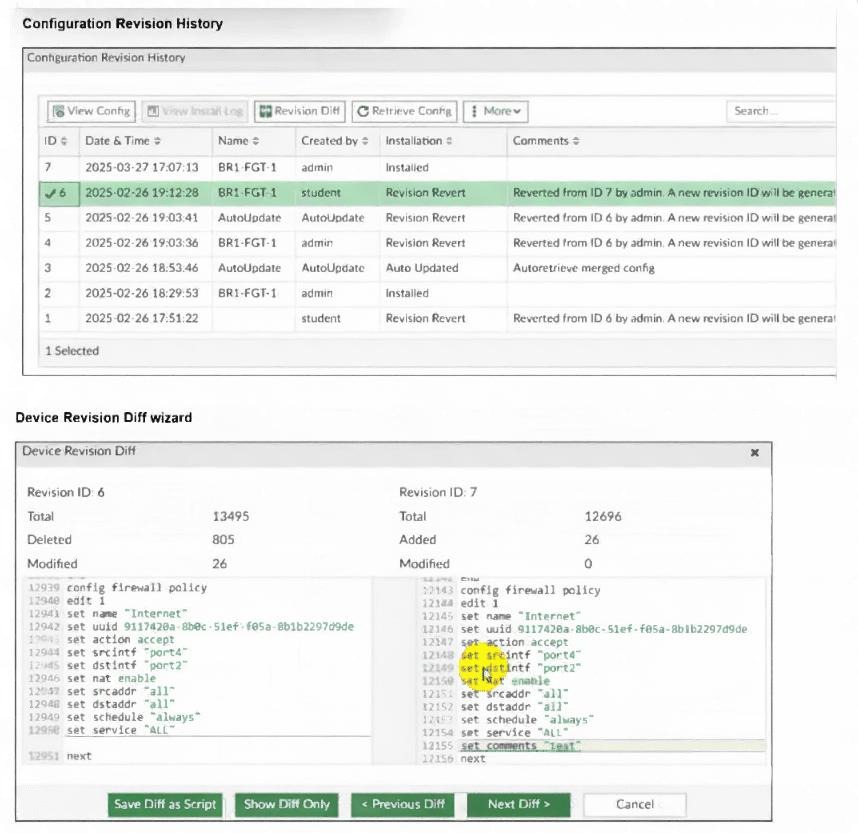
An administrator admin used the Configuration Revision History window to revert the FortiGate device
configuration to revision ID 6. After running the reinstall policy package, the administrator noticed problems
with the firewall policy- they could not see the unset comment on policy ID 1.
Why did FortiManager not remove the comment from policy ID 1 when the administrator ran reinstall policy
package?
A. Because the administrator student must install the configuration changes to correctly see the expected results.
B. Because the administrator must import the firewall policies to update the firewall policy package.
C. Because every time the administrator uses the revert config file, they must use the Install Wizard instead of running the reinstall policy package.
D. Because the administrator used the Revision Diff view, which shows what changed, not what will be installed.
✅ Explanation:
The exhibit shows that the administrator reverted the device configuration to revision ID 6 using the Configuration Revision History window. However, after running the reinstall policy package, the comment on policy ID 1 (which was removed in revision 6) was not removed from the device.
❌ Why Other Options Are Incorrect
A. Because the administrator student must install the configuration changes to correctly see the expected results.
This is incorrect. The administrator admin performed the revert and reinstall. The identity of the user (student) is irrelevant to why the comment was not removed. The issue is with the method used, not the user.
B. Because the administrator must import the firewall policies to update the firewall policy package.
This is incorrect. Importing policies pulls configuration from the FortiGate into FortiManager, which is the opposite direction. The administrator needs to update the policy package in FortiManager and push it to the device, not import from the device.
C. Because every time the administrator uses the revert config file, they must use the Install Wizard instead of running the reinstall policy package.
This is incorrect. The Install Wizard is a tool for installing policy packages to devices, but it is not a mandatory requirement after a revert. The key issue is that the policy package itself still contains the comment, not the installation method.
📚 References
FortiManager 7.6 Administration Guide, Chapter "Device Manager" → Section "Configuration Revisions" – Explains that reverting to a previous revision restores the device's configuration in the FortiManager database but does not automatically update the policy package or remove policy-level changes.
FortiGate is integrated with FortiAnalyzer and FortiManager. When creating a firewall policy, which attribute must an administrator include to enhance functionality and enable log recording on FortiAnalyzer and FortiManager?
A. Policy ID
B. Log ID
C. Universally Unique Identifier
D. Sequence ID
✅ Explanation:
In a Fortinet security fabric environment where FortiGate is integrated with FortiAnalyzer and FortiManager, each firewall policy must have a Log ID to enable proper log recording and correlation across these platforms.
❌ Why Other Options Are Incorrect
A. Policy ID
– This is the system-generated sequential number (e.g., 1, 2, 3) assigned by FortiGate when a policy is created. While it identifies the policy, it is not used by FortiAnalyzer or FortiManager for enhanced log recording in the same way Log ID is. Policy IDs can change (e.g., after reordering), making them unreliable for log correlation.
C. Universally Unique Identifier
– The UUID is a unique identifier automatically generated for each policy by FortiManager during import or installation. While it helps FortiManager track policies across different devices and ADOMs, it is not an attribute that the administrator includes in the policy itself for log recording functionality. UUIDs are for internal object tracking, not for log indexing on FortiAnalyzer.
D. Sequence ID
– This term generally refers to the order of policies (position in the policy list) and is not a configurable attribute in the policy settings. It does not impact log recording or integration with FortiAnalyzer or FortiManager.
📚 References
FortiGate Security Fabric Integration Guide – Explains that firewall policies should include a Log ID to enable logs to be properly categorized and displayed by Log View on FortiAnalyzer, and to allow FortiManager to synchronize logging.
Refer to the exhibit.
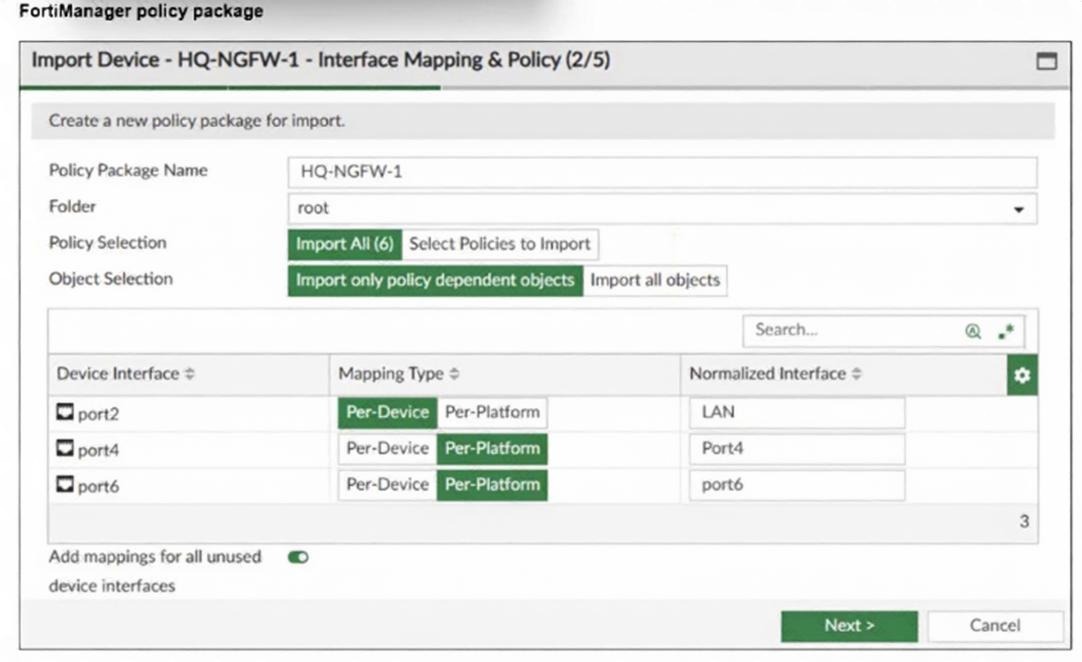
An administrator added a FortiGate device to FortiManager with the default object settings at the ADOM
layer.
What can you conclude from the import policy package process of the HQ-NGFW- 1 device?
A. The administrator must select Per Platform for all interfaces to correctly detect all interfaces from HQNGFW- 1.
B. The administrator must manually create the port4 interface on the ADOM layer to avoid import policy errors.
C. FortiManager will create LAN, port4, and port6 as normalized interfaces at the ADOM layer.
D. FortiGate may not work as expected when the administrator does not import all objects.
✅ Explanation
The exhibit shows the Interface Mapping step during the import of device HQ-NGFW-1. The administrator is mapping device interfaces (port2, port4, port6) to normalized interfaces at the ADOM layer. The Mapping Type column shows "Per-Device" for all three interfaces.
❌ Why Other Options Are Incorrect
A. The administrator must select Per Platform for all interfaces to correctly detect all interfaces from HQ-NGFW-1.
This is incorrect. Per-Device is the correct mapping type when importing a specific device's interfaces. Per-Platform is used when mapping interfaces based on FortiGate platform model (e.g., all 100F models share the same interface names). Per-Device is appropriate here because the administrator is mapping this specific device's interfaces.
B. The administrator must manually create the port4 interface on the ADOM layer to avoid import policy errors.
This is incorrect. FortiManager automatically creates the normalized interfaces during the import process if they do not already exist in the ADOM. Manual creation is not required—the system handles this as part of the import.
D. FortiGate may not work as expected when the administrator does not import all objects.
This is incorrect. The exhibit shows the Interface Mapping step, not the Object Selection step (which appears in the background as "Object Selection" with options to import only policy-dependent objects or all objects). At this stage, the administrator is configuring interface mappings, not choosing object import settings. The question specifically asks about the import process, and the interface mapping step proceeds normally regardless of the object import option chosen later.
📚 References
FortiManager 7.6 Administration Guide, Chapter "Policy and Objects" → Section "Importing Policies from Managed Devices" – Explains that during the import wizard, the Interface Mapping step automatically creates normalized interfaces in the ADOM for the device's physical interfaces based on the mapping configuration.
While attempting to push a NetFlow configuration script through the FortiManager policy package: an
administrator encounters an error stating that an object is unrecognized in line 4.

What must the administrator do to successfully apply the NetFlow configuration script and avoid the object
unrecognized error?
A. Make sure the user running the script has full access to the VDOM—AGEUSR.
B. Run the script on the device database.
C. Use metadata variables if they use VDOMs in the script.
D. Create a normalized interface on the policy layer before running the script.
Explanation:
The error message shows [line 4] > config sys interface [parameter(s) invalid. detail: object unrecognized]. This indicates that the script is trying to configure a system interface within the VDOM AGEUSR, but FortiManager does not recognize the interface object being referenced.
❌ Why Other Options Are Incorrect:
A. Make sure the user running the script has full access to the VDOM—AGEUSR.
This is incorrect. The error is object unrecognized, not a permission error. The user already has access to the VDOM (as shown by edit AGEUSR being accepted). Full access would not resolve an unrecognized object issue.
B. Run the script on the device database.
This is incorrect. While running the script directly on the device database might bypass the normalization requirement, the question specifically asks how to apply the script through the FortiManager policy package. Running on the device database would not address the root cause—it would simply avoid the normalized interface requirement, which is not the intended solution for policy-package-based script execution.
C. Use metadata variables if they use VDOMs in the script.
This is incorrect. Metadata variables are used for categorizing devices and policies, not for resolving interface objects in scripts. Using metadata variables would not fix an unrecognized interface object error.
📚 References:
FortiManager 7.6 Administration Guide, Chapter "Policy and Objects" → Section "Interface Normalization" – Explains that normalized interfaces are required when running scripts or configuring policies at the ADOM/policy layer, as FortiManager must map device-specific physical interfaces to ADOM-level objects.
Refer to the exhibit.
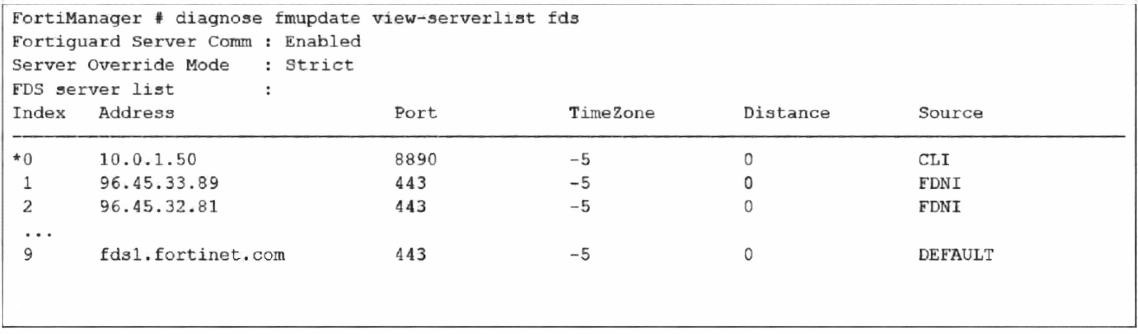
How does FortiManager get antivirus and IPS updates? Choose one answer
A. It uses all URLs in the list that contain the fds host name.
B. It gets updates from the server with IP address 10.0.1.50.
C. It connects to all servers marked as FortiGuard Distribution Network through Internet FDNI sources.
D. It connects to the public FortiGuard servers listed in the configuration
✅ Explanation
The exhibit shows the output of the diagnose fmpupdate view-serverlist fds command, which displays the FortiGuard Distribution Server (FDS) list that FortiManager uses to download antivirus and IPS updates.
❌ Why Other Options Are Incorrect
A. It uses all URLs in the list that contain the fds host name.
This is incorrect. The list contains IP addresses and hostnames, but in Strict mode, FortiManager does not use all URLs. It prioritizes the configured list and only uses the active/selected server (Index 0).
C. It connects to all servers marked as FortiGuard Distribution Network through Internet FDNI sources.
This is incorrect. The FDNI source entries (Indices 1 and 2) are public FortiGuard servers, but with Strict mode enabled, FortiManager will not connect to these unless the primary server fails. It does not connect to all servers simultaneously.
D. It connects to the public FortiGuard servers listed in the configuration.
This is incorrect. The DEFAULT entries (e.g., fds1.fortinet.com) are the public FortiGuard servers. However, because the administrator has overridden the server list with a private FDS (10.0.1.50) and enabled Strict mode, FortiManager will not use the public servers unless the private one becomes unreachable.
📚 References
FortiManager 7.6 Administration Guide, Chapter "System Settings" → Section "FortiGuard Distribution Server (FDS)" – Explains that FortiManager can be configured to use a private FDS for updates, and the diagnose fmpupdate view-serverlist fds command displays the configured servers and the active selection.
Which is recommended when you are managing a high volume of logs in your network?
A. Store logs on FortiManager and use FortiView.
B. Add and manage FortiAnalyzer from FortiManager.
C. Enable advanced ADOM mode on FortiManager.
D. Forward logs from FortiAnalyzer to FortiManager daily.
✅ Explanation
When managing a high volume of logs in a network, the recommended best practice is to use a dedicated FortiAnalyzer for log collection, storage, and analytics, while integrating it with FortiManager for centralized management.
❌ Why Other Options Are Incorrect
A. Store logs on FortiManager and use FortiView.
This is incorrect. FortiManager is not designed for high-volume log storage. Its disk space and database are optimized for configuration management, not log retention. Storing large volumes of logs on FortiManager can degrade performance and fill up storage quickly.
C. Enable advanced ADOM mode on FortiManager.
This is incorrect. Advanced ADOM mode allows for more granular ADOM-level firmware management and object sharing, but it does not enhance log storage or processing capabilities. It is unrelated to log volume management.
D. Forward logs from FortiAnalyzer to FortiManager daily.
This is incorrect. Forwarding logs from FortiAnalyzer to FortiManager would defeat the purpose of using FortiAnalyzer for dedicated storage. It would also consume FortiManager's limited storage and processing capacity, recreating the very problem it aims to solve. The recommended flow is for FortiGate to send logs directly to FortiAnalyzer, while FortiManager handles management functions.
📚 References:
FortiManager 7.6 Administration Guide, Chapter "FortiAnalyzer Integration" – Explains that FortiAnalyzer can be added as a managed device within FortiManager, allowing administrators to centrally manage both platforms and offload log storage to FortiAnalyzer.
An administrator must create a policy and install it on a FortiGate device within an ADOM in backup mode. How can the administrator perform this task?
A. Use the Install Wizard located on the device manager.
B. Enable workflow mode to allow policy creation and approval.
C. Make sure the ADOM and FortiGate firmware versions match and use the ADOM policy package.
D. Use a FortiManager script to apply the configuration changes.
✅ Explanation:
When a FortiGate device is in an ADOM in backup mode (also known as normal mode or policy package mode), the administrator can create and install policies using the Install Wizard from the Device Manager.
In backup mode:
The administrator has full control over policy creation and installation.
The Install Wizard is the recommended tool for installing policies to managed devices because it provides a step-by-step interface to select the target device, review policy changes, and push the installation.
It ensures that the correct policy package is assigned to the device and that any necessary installation targets (e.g., VDOMs) are properly selected.
The Install Wizard also allows the administrator to:
Review installation previews.
Select specific policy packages to install.
Handle installation targets such as multiple devices or VDOMs.
❌ Why Other Options Are Incorrect
B. Enable workflow mode to allow policy creation and approval.
This is incorrect. Workflow mode is a change management feature that requires approvals before installation. It is not required to create or install policies in backup mode. In fact, enabling workflow mode would add extra steps (approval) rather than simplify the task.
C. Make sure the ADOM and FortiGate firmware versions match and use the ADOM policy package.
This is incorrect. While matching firmware versions is a general best practice to avoid compatibility issues, it is not a prerequisite for creating or installing a policy in backup mode. The ADOM policy package is used by default, but the installation method still requires the Install Wizard, not just version matching.
D. Use a FortiManager script to apply the configuration changes.
This is incorrect. While scripts can be used to apply configuration changes, they are not the standard or recommended method for installing a single policy to a FortiGate device. Scripts are better suited for bulk changes or CLI-level configurations, not for policy package installations.
📚 References:
FortiManager 7.6 Administration Guide, Chapter "Device Manager" → Section "Install Wizard" – Explains that the Install Wizard is the primary tool for installing policy packages to managed devices and provides a guided workflow.
| Page 3 out of 10 Pages |
| 12345 |
| NSE6_FMG_AD-7.6 Practice Test Home |
The Fortinet NSE 6 FortiManager 7.6 Administrator exam is notoriously tough. It doesn't test memorization. It forces you to make complex decisions under time pressure. A weak prep strategy risks a costly failure and wasted effort. Our NSE6_FMG_AD-7.6 practice tests are built to be your definitive bridge to a passing score.

Copyright © - All Rights Reserved