
Last Updated On : 12-Oct-2026
Total 65 Questions
The difference between a near pass and a confident pass isn't just knowing the material, it's mastering the Fortinet NSE 6 FortiManager 7.6 Administrator exam experience. Our Fortinet NSE6_FMG_AD-7.6 practice test is engineered to close the gap between your current knowledge and the 2026 exam's demands. With every question, you receive detailed, expert verified explanations that break down not just the correct answer, but also the reasoning behind every incorrect option.
Don't just study. Practice NSE6_FMG_AD-7.6 with purpose. Start your journey to a first-time pass today.
By replicating the exact style, complexity, and format of the real Fortinet NSE 6 FortiManager 7.6 Administrator exam questions, we ensure you walk into the exam with complete confidence.
Policy and objects
Refer to the exhibit.
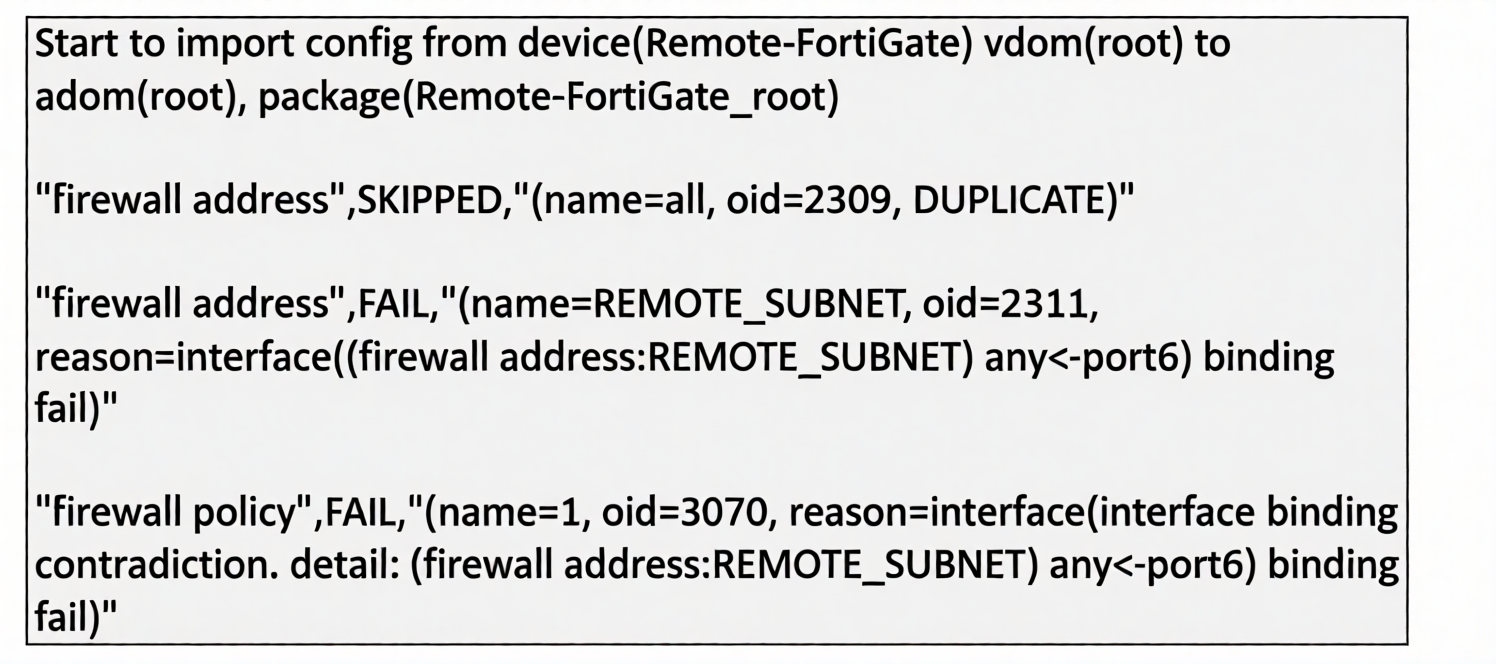
What can you conclude from the downloaded import report?
A. FortiManager does not support per-device mapping for firewall addresses.
B. The administrator will see a new policy package named Remote-FortiGate_root in the FortiManager ADOM database
C. FortiManager will change the configuration of REMOTE_SUBNET to match the interface mapping coming in from Remote-FortiGate.
D. As a result of this policy import process, FortiManager will create a new firewall address called REMOTE_SUBNET in the ADOM database.
✅ Explanation:
The import report shows that REMOTE_SUBNET failed with a FAIL status due to an interface binding contradiction (any on FortiManager vs. port6 on the device). In FortiManager, a FAIL status during import does not mean the object is discarded. Instead, the object is created in the ADOM database but placed in a conflict/unresolved state. The administrator must manually resolve the interface mismatch later using the Resolve Conflicts tool. Therefore, the address object does exist in the database—just not in a fully installed or usable form.
The system-reserved object all was SKIPPED due to duplication, which is expected behavior. Policy 1 failed as a secondary effect because it references the conflicted REMOTE_SUBNET object.
❌ Why Other Options Are Incorrect:
A. FortiManager does not support per-device mapping for firewall addresses.
This is incorrect. FortiManager fully supports per-device address mapping via the Device Database or per-device ADOM objects. The failure here is a binding mismatch, not a lack of feature support.
B. The administrator will see a new policy package named Remote-FortiGate_root in the FortiManager ADOM database.
This is incorrect. The package Remote-FortiGate_root already existed before the import (it is shown as the target package). The import does not create a new package; it attempts to update the existing one.
C. FortiManager will change the configuration of REMOTE_SUBNET to match the interface mapping coming in from Remote-FortiGate.
This is incorrect. FortiManager does not automatically change ADOM objects to match the device. If it did, the status would be SUCCESS or UPDATED. The FAIL status explicitly requires manual intervention.
📚 References:
FortiManager 7.6 Administration Guide, Chapter "Policy and Object Management" → Section "Importing Policies from Managed Devices" – explains that object conflicts result in a FAIL status and require manual resolution via the Resolve Conflicts interface.
FortiManager 7.6 Administration Guide, Chapter "Device Manager" → Section "Per-Device Mapping" – confirms support for device-specific address bindings.
Refer to the exhibit.
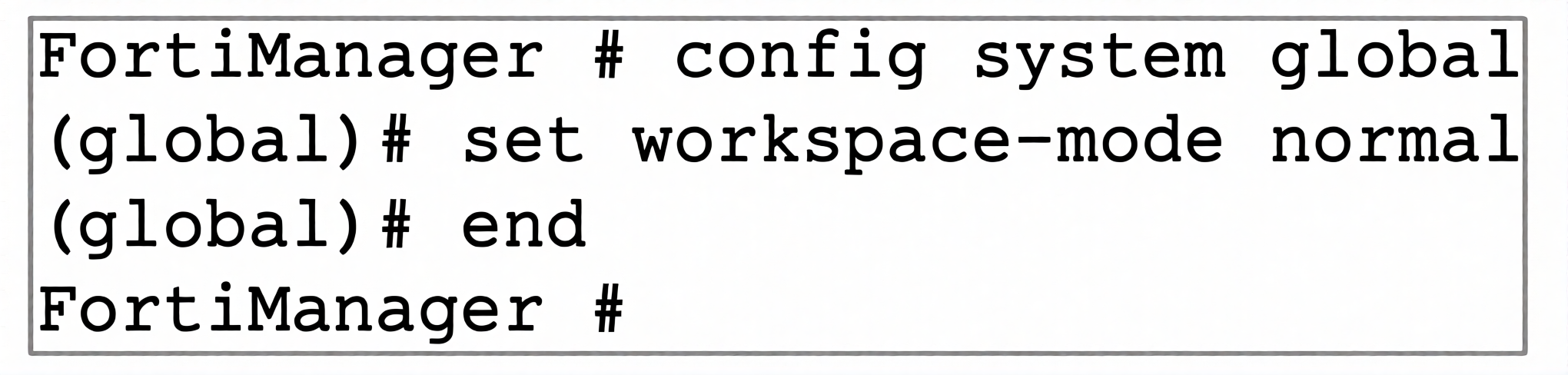
What are two results from the configuration shown in the exhibit? (Choose two.)
A. Ungraceful closed sessions will keep the ADOM in a locked state until the administrator session times out.
B. The administrator can lock policy blocks and FortiManager global ADOM.
C. The same administrator can lock more than one ADOM at the same time.
D. The administrator must have access to the ADOM to approve changes.
Explanation:
When workspace-mode is set to normal, ADOM locking is enforced to prevent multiple administrators from concurrently modifying the same Administrative Domain (ADOM).
Option A is correct:
Closing a browser window or losing a network connection without logging out ends the session ungracefully. In normal workspace mode, the lock remains active until the administrator's session officially times out or is terminated by a Super_User.
Option C is correct:
A single administrator session can lock and manage multiple ADOMs simultaneously, provided they have sufficient administrative permissions.
Why Other Options Are Incorrect:
Option B is incorrect:
Locking individual policy blocks or granular workspace components independently is restricted to per-ADOM or restricted locking configurations. Setting workspace-mode normal globally applies lock control at the overall ADOM level.
Option D is incorrect:
ADOM change approval processes require workflow mode (set workspace-mode workflow). Normal workspace mode only controls write access via locking and does not enforce approval workflows.
References
FortiManager 7.6 Administration Guide: System Settings > Workspace Modes > Normal Mode
Refer to the exhibits.
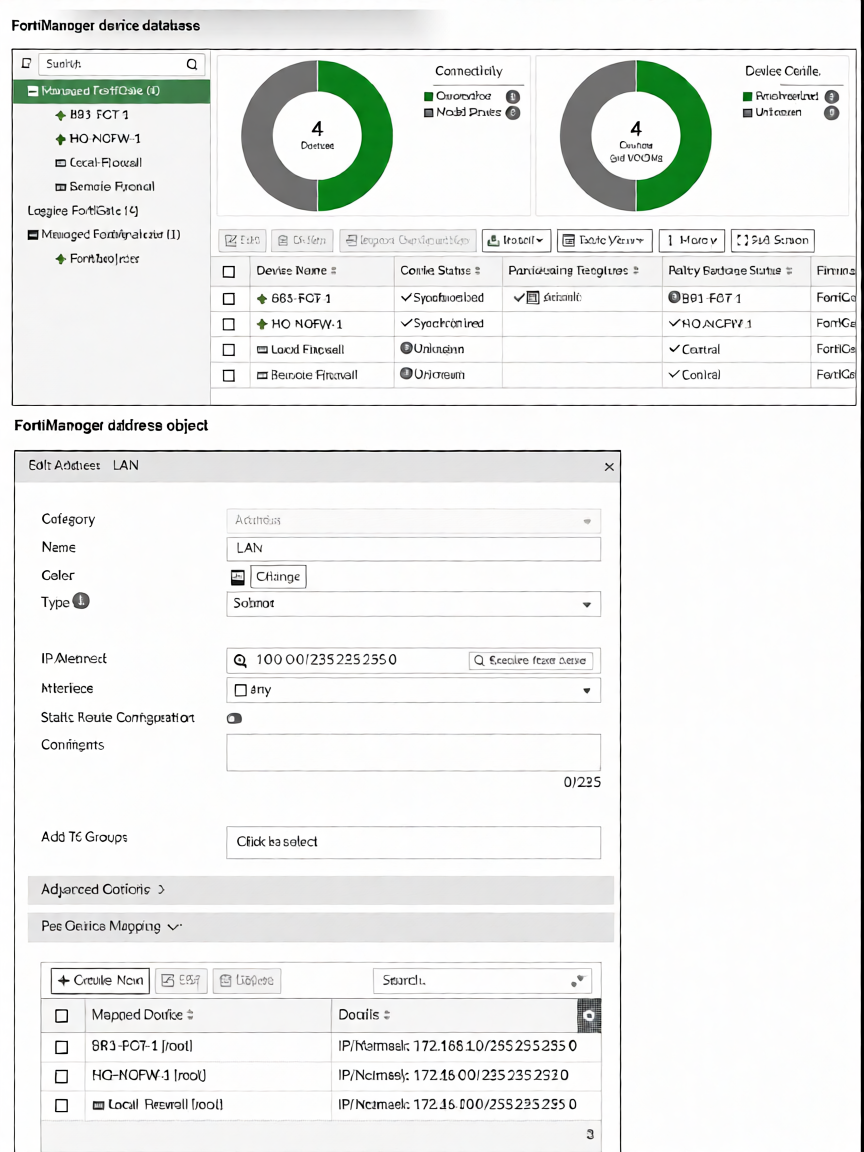
Which IP/netmask will be present in the LAN firewall address object on the Remote-Firewall?
A. 172.16.0.0/255.255.255.0
B. 10.0.0.0/255.255.255.0
C. 192.168.1.0/255.255.255.0
D. 172.16.10.0/255.255.255.0
Explanation:
Default Value: In the Edit Address LAN dialog box, the default global IP/Netmask value configured in the object settings is 10.0.0.0/255.255.255.0.
Per-Device Mapping Check: FortiManager checks the Per-Device Mapping table for explicit overrides for specific devices.
893-FGT-1 [root] is mapped to 172.168.1.0/255.255.255.0.
HO-NCFW-1 [root] is mapped to 172.16.0.0/255.255.255.0.
Local-Firewall [root] is mapped to 172.16.10.0/255.255.255.0.
Fallback Behavior: Remote-Firewall has no entry under the Per-Device Mapping table. When no device-specific mapping exists for a managed device, FortiManager inherits and installs the global default value (10.0.0.0/255.255.255.0).
Why Other Options Are Incorrect:
Option A (172.16.0.0/255.255.255.0): Incorrect. This specific IP/netmask mapping belongs exclusively to HO-NCFW-1 [root].
Option C (192.168.1.0/255.255.255.0): Incorrect. This subnet is not the default value defined in this object database setup.
Option D (172.16.10.0/255.255.255.0): Incorrect. This specific mapping applies only to Local-Firewall [root].
Reference:
FortiManager 7.6 Administration Guide: Policy & Objects > Dynamic Objects > Per-Device Mapping Overrides
Refer to the exhibit.
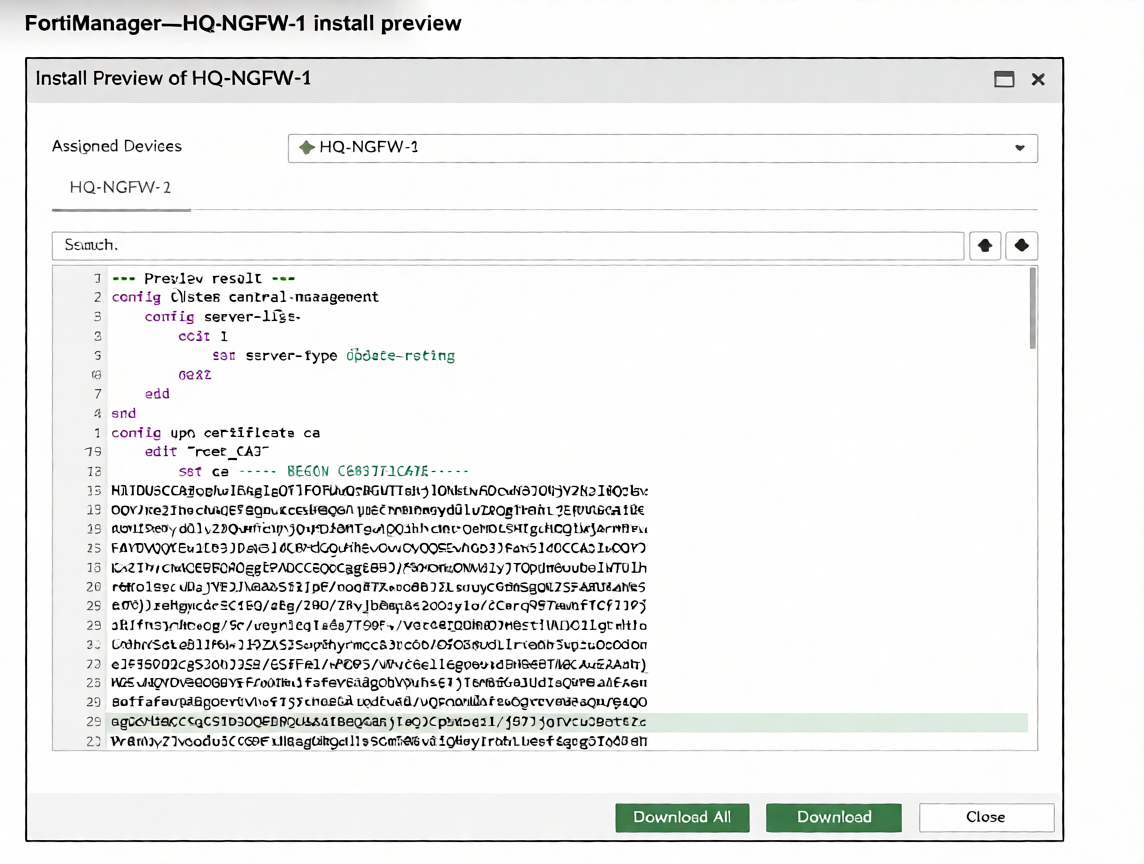
An administrator assigned a new policy package to FortiGate HQ-NGFW-1. In the installation preview, they
noticed some settings they did not modify and are unsure about the changes.
Based on the exhibit, which two things will happen if they continue with the installation? (Choose two.)
A. FortiGate HQ-NGFW-1 can use FortiManager firmware templates to upgrade firmware and ratings.
B. FortiGate HQ-NGFW-1 can contact the FortiManager acting as FortiGuard Distribution Server (FDS) to download FortiGuard updates.
C. FortiGate HQ-NGFW-1 will use the root_CA3 certificate in firewall address objects or policies.
D. FortiManager will install the CA certificate named root_CA3 to authenticate FortiGate-to-FortiManager communication protocol (FGFM) tunnel connections with FortiGate HQ- NGFW-1.
✅ Explanation:
The installation preview shows two unmodified configuration sections that the administrator did not explicitly change:
1. Central management server list configuration (config system central-management):
This section configures how the FortiGate connects to FortiManager for management and FortiGuard updates. When FortiManager is configured as a FortiGuard Distribution Server (FDS), it can act as a proxy for FortiGuard updates, allowing managed FortiGates to download updates directly from the FortiManager instead of reaching out to the public FortiGuard network. This is why option B is correct—the FortiGate can contact FortiManager acting as an FDS.
2. VPN certificate CA configuration (config vpn certificate ca):
The preview shows a CA certificate named root_CA3 being installed. In FortiManager, when a CA certificate is pushed to a managed FortiGate, it is typically used to authenticate the FGFM (FortiGate-to-FortiManager) tunnel connection. FGFM is the secure communication protocol between FortiGate and FortiManager, and certificates are used to validate the identity of both peers during tunnel establishment. This is why option D is correct—the CA certificate will be used to authenticate the FGFM tunnel.
These unmodified settings are part of the device-level configuration that comes from the FortiManager system templates or device settings, not from the policy package the administrator edited. They will be installed alongside the policy changes.
❌ Why Other Options Are Incorrect:
A. FortiGate HQ-NGFW-1 can use FortiManager firmware templates to upgrade firmware and ratings.
This is incorrect. The preview shows central management settings for FortiGuard update servers, not firmware upgrade templates. Firmware templates are separate configuration objects used for pushing firmware images to devices, and there is no evidence of firmware templates in the displayed configuration.
C. FortiGate HQ-NGFW-1 will use the root_CA3 certificate in firewall address objects or policies
.
This is incorrect. The certificate shown is a CA certificate (config vpn certificate ca), which is used for authentication purposes (like VPN or FGFM authentication), not for firewall address objects or policies. Firewall policies use certificates for SSL inspection or SSL VPN, but CA certificates are not directly referenced in address objects.
📚 References:
FortiManager 7.6 Administration Guide, Chapter "System Settings" → Section "FortiGuard Distribution Server (FDS)" – explains that FortiManager can act as an FDS to provide FortiGuard updates to managed devices, reducing external internet dependency.
Refer to the exhibits.
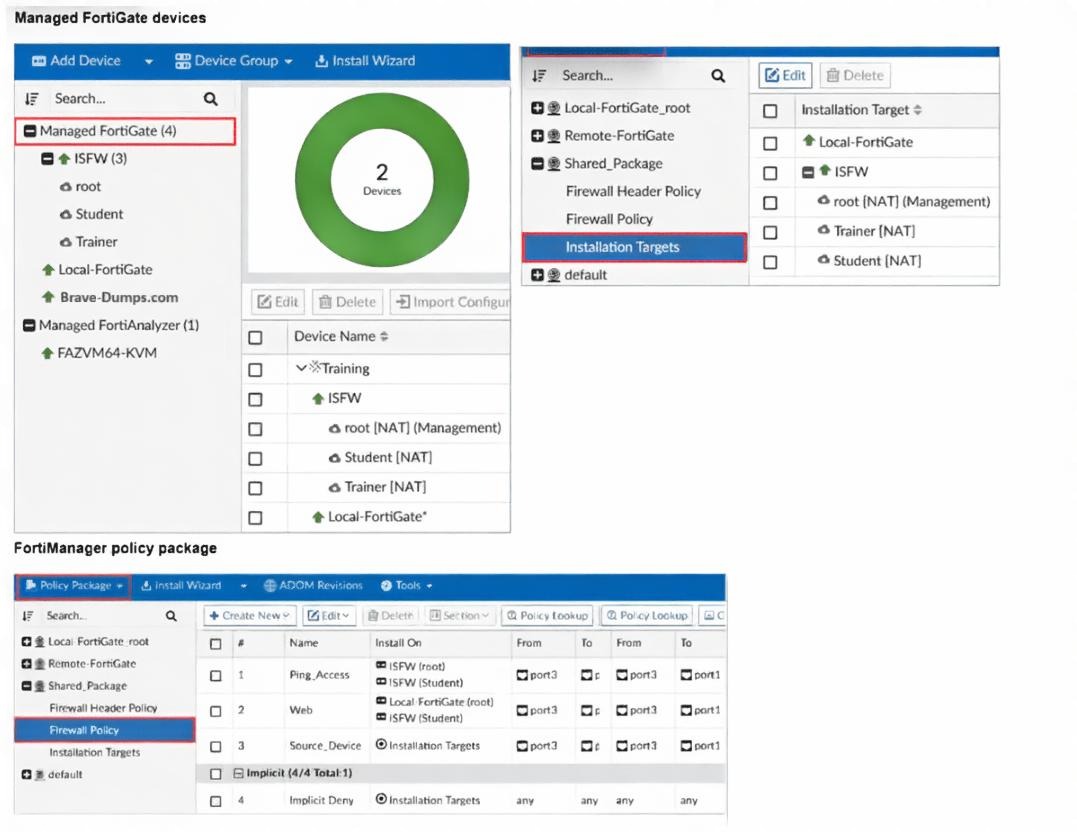
What can you conclude, based on the configuration shown in the exhibit? Choose one answer
A. The administrator needs to retrieve the Local-FortiGate configuration to sync with the Security Fabric group, Training.
B. Policy sequence #1 will be installed on the internal segmentation firewall ISFW device root NAT and Trainer NAT VDOMs.
C. Policy sequence #3 must have devices or VDOMs listed in the Install On column; otherwise, it will cause errors
D. The global policy package will be added to the top of the ISFW policy package.
✅ Explanation:
In the exhibit, the Install On column for policy sequence #1 shows "ISFW (root)". The device group "ISFW" contains three VDOMs: root, Student, and Trainer (as shown in the Managed FortiGate devices pane). When a policy package is installed on a device group, the policies are installed on all members of that group by default, unless specific VDOM exceptions are configured. Therefore, policy #1 (Ping_Access) will be installed on the ISFW device's root VDOM, Student VDOM, and Trainer VDOM—making option B correct.
The policy package being used is "Shared_Package", which is a shared policy package assigned to multiple installation targets (Local-FortiGate_root, Remote-FortiGate, and Installation Targets). Shared packages allow the same policy set to be pushed to multiple devices or VDOMs.
❌ Why Other Options Are Incorrect:
A. The administrator needs to retrieve the Local-FortiGate configuration to sync with the Security Fabric group, Training.
This is incorrect. The exhibit shows no indication of a Security Fabric group named "Training" or any sync requirement. The "Training" shown is a VDOM under ISFW, not a Security Fabric group. Retrieving configuration is unrelated to syncing Security Fabric groups.
C. Policy sequence #3 must have devices or VDOMs listed in the Install On column; otherwise, it will cause errors.
This is incorrect. Policy sequence #3 shows "Installation Targets" in the Install On column, which is a valid installation target (as seen in the Installation Targets pane). The policy will be installed on all devices/VDOMs mapped to that installation target. There is no error; it correctly references a valid target.
D. The global policy package will be added to the top of the ISFW policy package.
This is incorrect. The exhibit does not show any global policy package being added or referenced. Global policies are typically sectioned separately (above or below device-specific policies) and are not automatically added to the top of a device policy package unless explicitly configured.
📚 References:
FortiManager 7.6 Administration Guide, Chapter "Policy and Objects" → Section "Shared Policy Packages" – explains that shared packages can be installed on multiple devices/VDOMs, and policies are applied to all members of the selected installation target.
Refer to the exhibit.
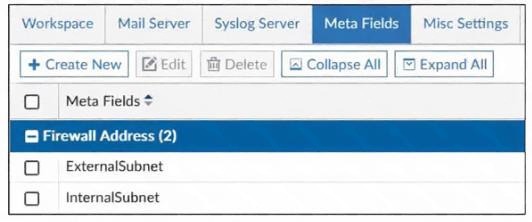
An administrator created two new meta fields in FortiManager.
Which operation can you perform with these parameters?
A. You can add them to objects as custom attributes.
B. You can export them to be used in other ADOMs.
C. You can use them as variables in scripts.
D. You can invoke them using the $ character.
✅ Explanation:
In FortiManager, meta fields are custom user-defined fields that administrators create to attach additional metadata to objects such as firewall policies, addresses, services, or device entries. These fields allow for better categorization, searching, filtering, and reporting—for example, tagging policies by project name, cost center, or business unit. Once a meta field is created, the primary operation is to assign values to these fields on individual objects, making them custom attributes for those objects.
❌ Why Other Options Are Incorrect:
B. You can export them to be used in other ADOMs.
This is incorrect. Meta fields are ADOM-specific and cannot be exported or imported across different ADOMs. Each ADOM maintains its own independent set of meta fields.
C. You can use them as variables in scripts.
This is incorrect. Scripts (CLI or TCL) in FortiManager do not support using meta fields as variables. Scripts use device variables (defined separately in Device Manager), not meta fields, for substitution.
**D. You can invoke them using the c h a r a c t e r .
∗ ∗ T h i s i s i n c o r r e c t . T h e ‘ character.∗∗Thisisincorrect.The‘character is used for **device variables** in policy packages or scripts. Meta fields are accessed through the GUI as custom attributes or columns, not invoked with a$` prefix.
References:
FortiManager 7.6 Administration Guide, Chapter "System Settings" → Section "Meta Fields" – explains that meta fields add custom attributes to objects, policies, and devices for categorization and filtering.
An administrator receives the import report after importing policies into the policy package layer.
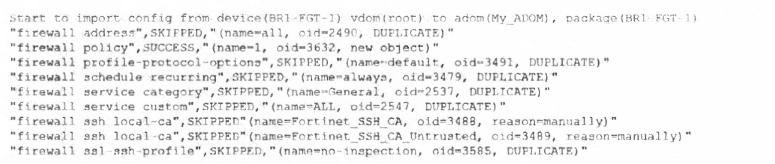
Based on the import report, how did FortiManager handle the profile-protocol-options object named default?
A. FortiManager deleted the duplicate value from its database.
B. FortiManager created a new service category in its database.
C. FortiManager did not update its database with the value.
D. FortiManager updated the duplicate value in the FortiGate database.
✅ Explanation:
The import report shows "firewall profile-protocol-options",SKIPPED,"(name=default, oid=3491, DUPLICATE)". The status SKIPPED with the reason DUPLICATE indicates that an object with the same name (default) already exists in the FortiManager ADOM database. When FortiManager encounters a duplicate object during import, it does not overwrite or update the existing object in its database. Instead, it skips the import of that object and retains the existing version already present in the ADOM. This prevents unintended overwrites of shared or system-default objects that may already be referenced by other policies.
❌ Why Other Options Are Incorrect:
A. FortiManager deleted the duplicate value from its database.
This is incorrect. FortiManager does not delete objects when duplicates are found. It simply skips the import and leaves the existing object unchanged.
B. FortiManager created a new service category in its database.
This is incorrect. The import report refers to a profile-protocol-options object, not a service category. Service categories are separate object types (as seen with "firewall service category" in the report, which was also skipped). No new service category was created.
D. FortiManager updated the duplicate value in the FortiGate database.
This is incorrect. The import process is from the FortiGate to FortiManager, not the other way around. FortiManager does not push updates back to the FortiGate during import. The import updates FortiManager's database, not the FortiGate's.
📚 References
FortiManager 7.6 Administration Guide, Chapter "Policy and Objects"→ Section "Importing Policies from Managed Devices" – explains that when duplicate objects are encountered, they are SKIPPED and the existing object in the ADOM database remains unchanged.
| Page 1 out of 10 Pages |
| 12345 |
The Fortinet NSE 6 FortiManager 7.6 Administrator exam is notoriously tough. It doesn't test memorization. It forces you to make complex decisions under time pressure. A weak prep strategy risks a costly failure and wasted effort. Our NSE6_FMG_AD-7.6 practice tests are built to be your definitive bridge to a passing score.

Copyright © - All Rights Reserved