
Last Updated On : 18-Oct-2026
Total 49 Questions
ML, UEBA, and ZTNA
Refer to the exhibit.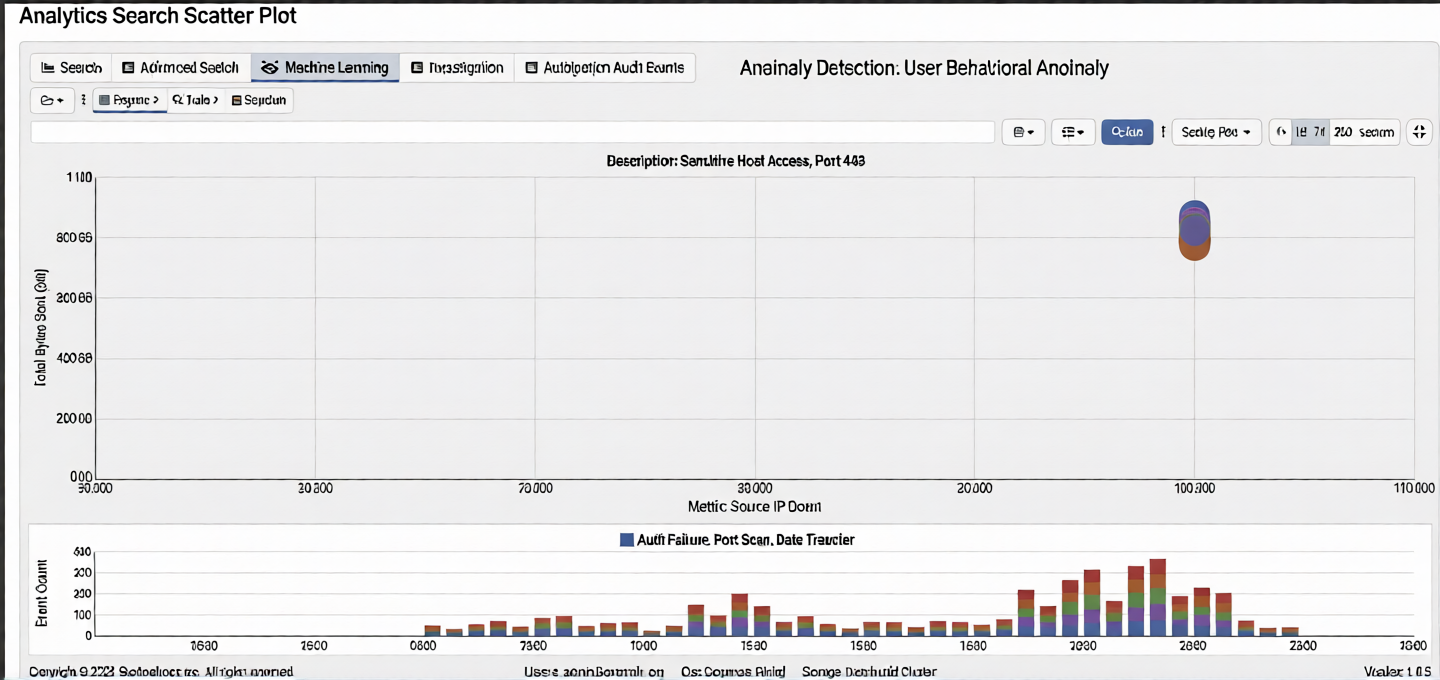
An analyst wants to perform a KMeans machine learning (ML) job on this data. How many N clusters would be a good fit for the data? (Choose one answer)
A. Two
B. 50
C. 100
D. One
Explanation:
This question tests your understanding of KMeans clustering and how to visually determine the optimal number of clusters from a scatter plot. The goal of KMeans is to group data points into distinct, meaningful clusters based on similarity. The ideal number of clusters should naturally separate the visible patterns in the dataset without overfitting.
Correct Option:
A. Two
Based on the scatter plot shown, the data points clearly form two distinct vertical bands or clusters. One cluster appears around the lower range (approximately 0–50 on the x-axis) and another around the higher range (approximately 60–120+). This natural separation makes k=2 the most logical and parsimonious choice. Using the "elbow method" visually, adding more clusters would over-segment these two obvious groupings.
Incorrect Option:
B. 50
Choosing 50 clusters would massively overfit the data. KMeans with 50 clusters would force every small grouping of points into its own cluster, creating meaningless micro-segments. This defeats the purpose of clustering for pattern discovery and would produce fragmented, hard-to-interpret results with high variance.
C. 100
This is even worse than 50 clusters. With 100 clusters, nearly every data point or tiny group would become its own cluster. This provides zero analytical value, offers no generalization, and violates the fundamental principle of clustering—which is to find meaningful, broad groupings. It would simply memorize the data rather than reveal patterns.
D. One
A single cluster would treat all data points as belonging to one group, ignoring the clear visual separation between the lower and upper bands. This would obscure the distinct behavioral patterns visible in the data (e.g., normal vs. anomalous traffic). KMeans with k=1 is rarely useful unless data is truly homogeneous.
Reference:
FortiSIEM 7.4.0 Analytics Guide, Chapter 5: Machine Learning → KMeans Clustering – "The optimal number of clusters can often be estimated visually from scatter plots. Look for natural groupings or density separations. Use the elbow method or silhouette scores to validate. Over-clustering (too many clusters) leads to overfitting and reduces interpretability."
Refer to the exhibit.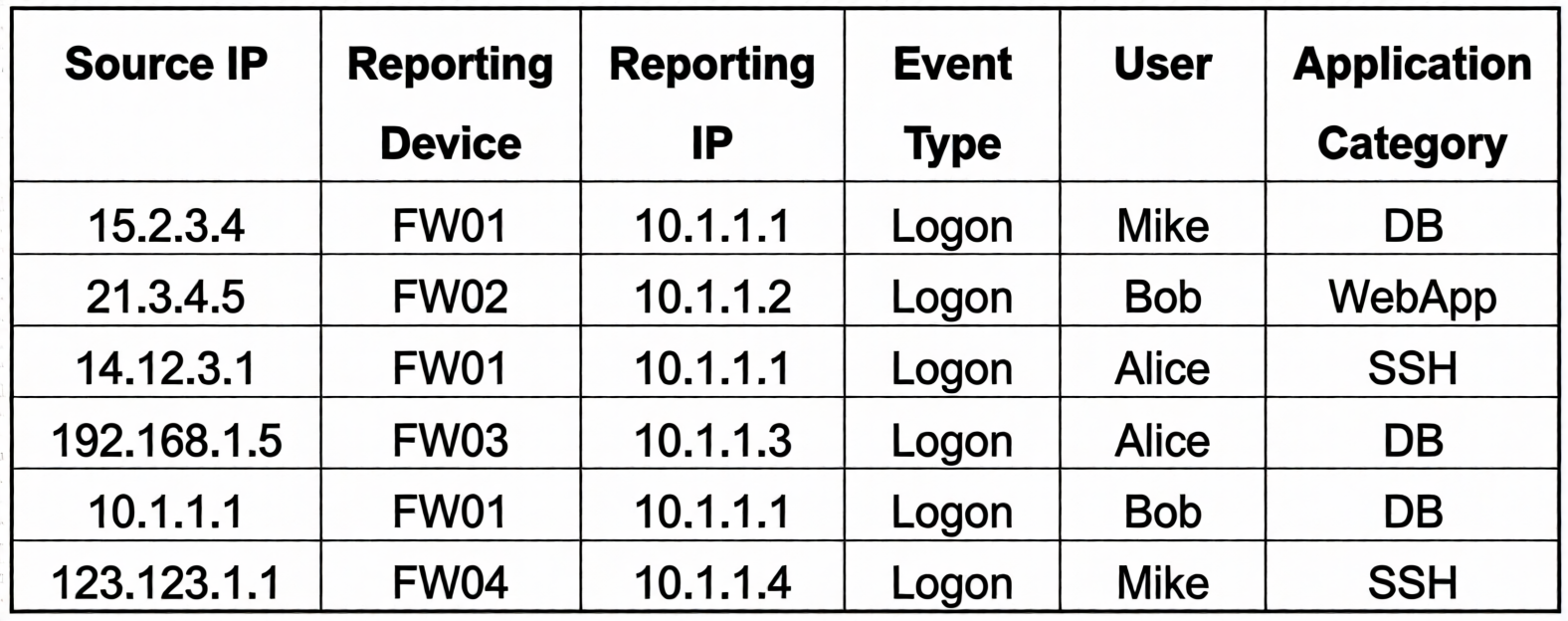
If you group the events by Reporting Device , Reporting IP , and Application Category , how many results will FortiSIEM display?
A. Four
B. Five
C. One
D. Six
E. Two
Explanation:
This question tests your understanding of how FortiSIEM's grouping (GROUP BY) functionality works. When you group by multiple attributes, FortiSIEM creates unique combinations of values from those specified columns. Each distinct combination counts as one result row, aggregating all events that share that exact combination of attribute values.
Correct Option:
B. Five
Grouping by Reporting Device, Reporting IP, and Application Category produces unique combinations:
Incorrect Option:
A. Four
This would undercount. It likely misses that FW01 with IP 10.1.1.1 has two different Application Categories (DB and SSH), which must be separate groups since Application Category is part of the GROUP BY.
C. One
This would only be true if you grouped by a single constant value or used no grouping at all. With three distinct attributes having multiple values, one group is impossible given the data variation.
D. Six
This is the total number of raw events before grouping. Grouping collapses events with identical combinations, so duplicate combinations (FW01, 10.1.1.1, DB) are merged into a single result row.
E. Two
This would undercount significantly. It might occur if you only grouped by Reporting Device or ignored Application Category entirely, but since all three are specified, there are clearly more than two distinct combinations.
Reference:
FortiSIEM 7.4.0 User Guide, Chapter 6: Event Search → Group By – "The Group By function aggregates events based on unique combinations of selected attributes. Each unique combination appears as one row in the results, with counts reflecting the number of events in that group."
Refer to the exhibit.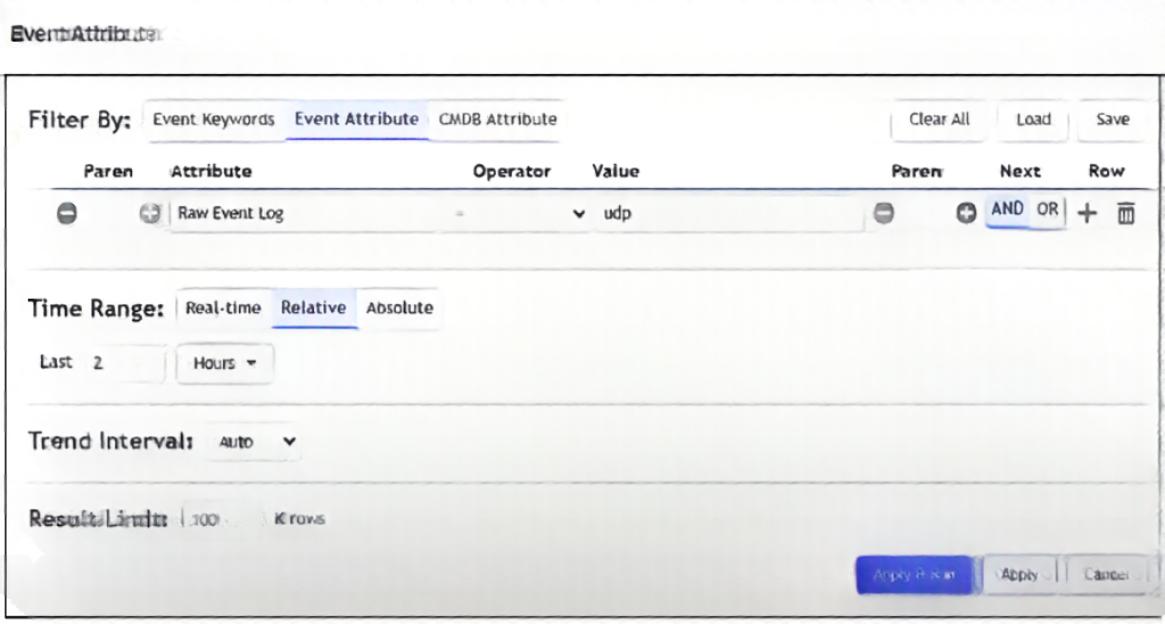
A FortiSIEM device is receiving syslog events from a FortiGate firewall. The FortiSIEM analyst is trying to search the raw event logs for the last two hours that contain the keyword " udp " . However, they are getting no results from the search, which they know should be available. Based on the filter shown in the exhibit, why are there no search results?
A. The analyst selected AND in the Next column. This is the wrong Boolean operator.
B. The Time Range value should be set to Real-Time.
C. The keyword is case sensitive. Instead of typing udp in the Value field, the analyst should type UDP.
D. The analyst selected = in the Operator column. That is the wrong operator.
Explanation:
This question tests your understanding of how the Operator column works in FortiSIEM's event search filters. The = operator performs an exact match on the entire field value, not a substring search. When searching for a keyword like "udp" within raw event logs, you need an operator that looks for the term anywhere inside the event message, not just as the complete field value.
Correct Option:
D. The analyst selected = in the Operator column. That is the wrong operator.
The = operator requires an exact, full-field match against the Event Message or Raw Log attribute. Since raw event logs contain much more than just the word "udp" (e.g., "src=10.0.0.1 sport=443 dst=192.168.1.1 dport=53 proto=udp"), an exact match fails. The correct operator should be CONTAINS or LIKE to search for "udp" as a substring anywhere within the raw log content.
Incorrect Option:
A. The analyst selected AND in the Next column. This is the wrong Boolean operator.
If only one filter row exists (keyword "udp"), the Next column is irrelevant because there are no additional conditions to combine. Even with multiple rows, AND would narrow results but wouldn't cause zero results if matches existed—it would just filter them further.
B. The Time Range value should be set to Real-Time.
The exhibit shows "Last 2 Hours" selected, which is a valid Relative time range. Real-Time is for live streaming events and would not affect historical search results. The time range is working correctly; the issue is with the filter logic, not the time window.
C. The keyword is case sensitive. Instead of typing udp in the Value field, the analyst should type UDP.
FortiSIEM event searches are generally case-insensitive by default for text-based searches, especially when using CONTAINS. The issue is not case but the operator itself. Even if case sensitivity were a factor, "udp" would still match "UDP" in a case-insensitive system.
Reference:
FortiSIEM 7.4.0 User Guide, Chapter 6: Event Search → Filter Operators – "Use the '=' operator for exact matches on the entire field value. Use 'CONTAINS' or 'LIKE' for substring searches within text fields such as Event Message or Raw Log. For keyword searches inside raw event payloads, CONTAINS is typically required."
Refer to the exhibit.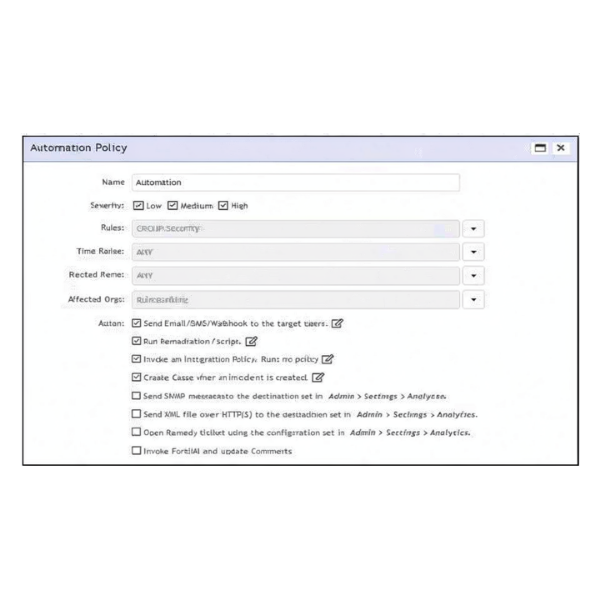
According to the automation policy configuration shown in the exhibit, what happens if an associated rule triggers?
A. FortiSIEM runs the remediation script, because that takes precedence over all other options.
B. FortiSIEM performs all selected actions.
C. FortiSIEM fails to the integration policy, because no policy is defined.
D. FortiSIEM sends an email, because that is first on the list.
Explanation:
This question tests your understanding of how FortiSIEM automation policies execute actions when an associated rule triggers. The automation policy configuration allows multiple actions to be selected simultaneously. When a rule triggers, FortiSIEM processes all configured actions in parallel or sequentially, not just the first one or a single prioritized action.
Correct Option:
B. FortiSIEM performs all selected actions.
In the exhibit, multiple action checkboxes are visibly selected, including "Send Email/SMS/Webhook," "Run Remediation/Script," "Create Case," "Send SNMP message," and "Invoke FortiAI and update Comments." When an associated rule triggers, FortiSIEM executes all enabled actions as configured. There is no single-action precedence unless specifically designed; the policy executes every checked action.
Incorrect Option:
A. FortiSIEM runs the remediation script, because that takes precedence over all other options.
There is no inherent precedence or hierarchy among automation actions. Remediation scripts do not automatically override other actions. All selected actions are executed; none takes priority over others unless explicitly coded in the script or policy logic.
C. FortiSIEM fails to the integration policy, because no policy is defined.
The exhibit shows "Invoke an Integration Policy. Run: no policy" as an available action, but it is not selected (the checkbox is unchecked). Since it is not enabled, the automation policy ignores it entirely and proceeds with the other selected actions. No failure occurs.
D. FortiSIEM sends an email, because that is first on the list.
The order of actions in the list does not determine execution priority. FortiSIEM executes all selected actions regardless of their position in the UI. Being first does not make email the sole or primary action; all checked actions are performed.
Reference:
FortiSIEM 7.4.0 Administration Guide, Chapter 14: Automation → Automation Policies – "When an automation policy is triggered, FortiSIEM executes all actions that are enabled (selected) in the policy configuration. Actions are not prioritized; each configured action runs according to its own settings and schedule."
Which analytics search can be used to apply a user and entity behavior analytics (UEBA) tag to an event for a failed login by the user JSmith?
A. User = smith
B. Username NOT END WITH jsmith
C. User IS jsmith
D. Username CONTAIN smit
Explanation:
This question tests your understanding of how UEBA tags are applied to events in FortiSIEM. UEBA tags are typically assigned based on specific user identification attributes. To tag an event for a failed login by the user JSmith, you need a filter that correctly identifies that exact username while maintaining flexibility for case variations or partial matches commonly found in authentication logs.
Correct Option:
D. Username CONTAIN smit
The CONTAIN operator (or CONTAINS) performs a substring match, which is ideal for UEBA tagging because usernames may appear with different case formats (e.g., "jsmith", "JSMITH", "jSmith") or include domain prefixes (e.g., "DOMAIN\jsmith"). Searching for "smit" as a substring captures all variants of "JSmith" while avoiding exact-case restrictions, ensuring the UEBA tag applies consistently to this user.
Incorrect Option:
A. User = smith
This is an exact match for "smith" (lowercase), which would miss "JSmith" with a capital 'J' and 'S'. UEBA tagging requires more flexible matching to accommodate case variations and formatting differences in log sources, so this filter is too restrictive.
B. Username NOT END WITH jsmith
This is a negative condition that explicitly excludes events ending with "jsmith". Since you want to tag JSmith's failed logins, this filter would do the opposite—it would tag everyone except JSmith. This is logically incorrect for the stated goal.
C. User IS jsmith
Similar to option A, IS performs an exact case-sensitive match (depending on configuration) for "jsmith" (all lowercase). It would miss "JSmith", "JSMITH", "jSmith", or domain-qualified variants like "DOMAIN\jsmith". UEBA tagging needs broader matching to be effective.
Reference:
FortiSIEM 7.4.0 User Guide, Chapter 15: User and Entity Behavior Analytics → Tagging Events – "Use the CONTAINS operator for username-based UEBA tagging to accommodate case variations and domain prefixes commonly found in authentication logs. Exact-match operators like = or IS may miss legitimate events due to formatting differences across log sources."
Refer to the exhibits.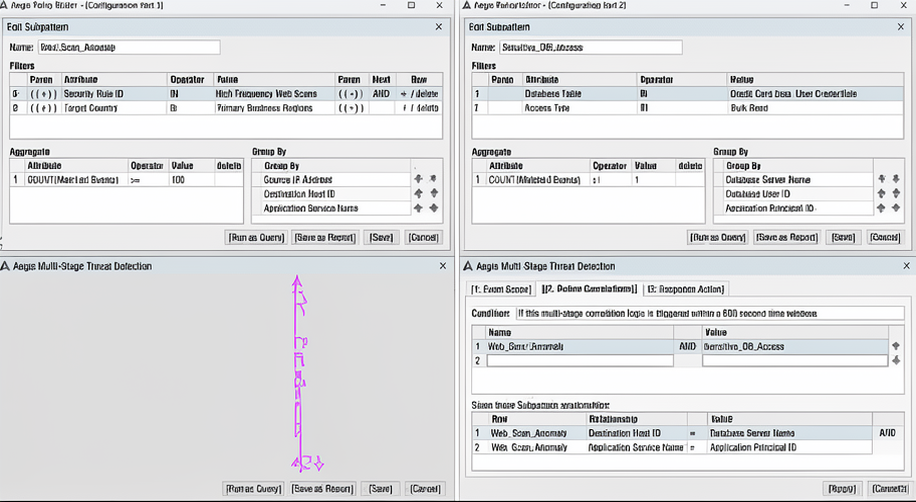
You are troubleshooting why the rule shown in the exhibit is generating incidents for successful Remote Desktop Protocol (RDP) connections with correct logins. It should only be triggering when a person fails to log in three or more times to the target device when connecting with RDP.
What is causing the rule to be triggered by correct login events? (Choose one answer)
A. The subpattern relationship RDP_Connection:User = Failed_Logon:User never matches.
B. The Boolean between the subpatterns is incorrect.
C. The attribute types in the subpatterns do not match.
D. The RDP login is different from the login used to access the target device.
Explanation:
This question tests your understanding of multi-stage correlation logic in FortiSIEM, specifically how subpattern relationships determine when a rule triggers. The rule is designed to detect a specific sequence: multiple failed logins followed by a successful RDP connection. When incidents are incorrectly generated by successful logins alone, the issue typically lies in how the subpatterns are correlated—specifically, the Boolean operator defining their relationship.
Correct Option:
B. The Boolean between the subpatterns is incorrect.
Based on the exhibit, the multi-stage correlation logic shows the relationship between Web_Scan_Anomaly and Sensitive_DB_Access with an AND operator. However, the described scenario requires failed logins (three or more) followed by a successful RDP connection. This is a sequential relationship, not a simultaneous AND condition. If the correlation logic uses AND instead of a sequence or FOLLOWED_BY operator, the rule may incorrectly trigger on any combination of events, including successful logins alone, because it doesn't enforce the temporal order or requirement of prior failures.
Incorrect Option:
A. The subpattern relationship RDP_Connection:User = Failed_Logon:User never matches.
If this relationship never matched, the rule would not trigger at all—contradicting the scenario where incidents are being generated. The existence of false positives indicates the relationships are matching, but incorrectly.
C. The attribute types in the subpatterns do not match.
Attribute type mismatches would also cause the correlation to fail (no matches), not generate false positives. FortiSIEM enforces type consistency for correlation; mismatches would result in zero incidents, not incorrect ones.
D. The RDP login is different from the login used to access the target device.
This is irrelevant to why correct logins trigger the rule. The rule should require failed attempts first; the specific username or device identity is not the root cause. The issue is the logical relationship, not the user identity.
Reference:
FortiSIEM 7.4.0 Administration Guide, Chapter 8: Rules → Multi-Stage Correlations – "When correlating multiple subpatterns, use SEQUENCE or FOLLOWED_BY to enforce temporal ordering. Using AND requires all subpatterns to match simultaneously, which can produce false positives when sequencing is required." The exhibit's "Condition" section shows Web_Scan_Anomaly AND Sensitive_DB_Access with a 600-second window, confirming the AND logic.
When selecting multiple rules at once on FortiSIEM, what actions can you perform?
A. You can change the severity of multiple rules, and activate or deactivate them.
B. You can only view, edit, and activate a single rule at one time.
C. You can only change the severity of multiple rules.
D. You can only activate or deactivate multiple rules.
Explanation:
This question tests your knowledge of FortiSIEM's bulk rule management capabilities. The FortiSIEM interface allows analysts to select multiple rules simultaneously to perform administrative actions efficiently, saving time when managing large rule sets. Understanding which bulk actions are supported is essential for effective rule lifecycle management.
Correct Option:
A. You can change the severity of multiple rules, and activate or deactivate them.
In FortiSIEM, when you select multiple rules from the rule list, you can perform several bulk actions. The interface provides options to:
Change severity (e.g., from Low to High) across all selected rules.
Activate or deactivate (enable/disable) multiple rules at once.
This allows administrators to quickly apply global changes without editing each rule individually, streamlining policy management.
Incorrect Option:
B. You can only view, edit, and activate a single rule at one time.
This is incorrect because FortiSIEM explicitly supports multi-select functionality for certain bulk operations. While viewing or editing the detailed configuration of a rule is done individually, activation/deactivation and severity changes can be applied to multiple rules simultaneously.
C. You can only change the severity of multiple rules.
This is partially correct but incomplete. While you can change severity in bulk, you can also activate or deactivate rules in bulk. The question asks for all actions you can perform, so this option omits the activation/deactivation capability.
D. You can only activate or deactivate multiple rules.
This is also partially correct but incomplete. It omits the ability to change severity in bulk. Both operations (severity change and activation/deactivation) are supported when multiple rules are selected.
Reference:
FortiSIEM 7.4.0 Administration Guide, Chapter 8: Rules → Managing Rules – "You can select multiple rules and perform bulk actions such as Activate, Deactivate, and Change Severity. This simplifies administration when applying common settings to a group of rules."
| Page 2 out of 7 Pages |
| 1234 |
| NSE6_FSM_AN-7.4 Practice Test Home |
The Fortinet NSE 6 - FortiSIEM 7.4 Analyst exam is notoriously tough. It doesn't test memorization. It forces you to make complex decisions under time pressure. A weak prep strategy risks a costly failure and wasted effort. Our NSE6_FSM_AN-7.4 practice tests are built to be your definitive bridge to a passing score.

Copyright © - All Rights Reserved