
Last Updated On : 18-Oct-2026
Total 49 Questions
The difference between a near pass and a confident pass isn't just knowing the material, it's mastering the Fortinet NSE 6 - FortiSIEM 7.4 Analyst exam experience. Our Fortinet NSE6_FSM_AN-7.4 practice test is engineered to close the gap between your current knowledge and the 2026 exam's demands. With every question, you receive detailed, expert verified explanations that break down not just the correct answer, but also the reasoning behind every incorrect option.
Don't just study. Practice NSE6_FSM_AN-7.4 with purpose. Start your journey to a first-time pass today.
By replicating the exact style, complexity, and format of the real Fortinet NSE 6 - FortiSIEM 7.4 Analyst exam questions, we ensure you walk into the exam with complete confidence.
Rules and subpatterns
Refer to the exhibit..png)
An analyst wants the rule shown in the exhibit to trigger when three failed login attempts occur within three minutes.
What should the values be for the condition time window and aggregate count?
A. Time window 180 seconds, aggregate count 3
B. Time window 180 seconds, aggregate count 2
C. Time window 90 seconds, aggregate count 3
D. Time window 90 seconds, aggregate count 2
Explanation:
The rule is designed to detect a security incident pattern (multiple failed logons) within a specific timeframe. The condition in the exhibit states: "If this Pattern occurs within any second time window." To match the business requirement of exactly three attempts within three minutes, the system's threshold parameters must be configured to count the number of failed events and define the maximum elapsed time allowed for that count.
Correct Option: (A) Time window 180 seconds, aggregate count 3
The requirement specifies "three failed login attempts" → this translates directly to an aggregate count of 3 events.
The requirement specifies "within three minutes" → this translates to a time window of 180 seconds (since 3 minutes × 60 seconds = 180 seconds).
By setting the aggregate count to 3 and the sliding time window to 180 seconds, the rule triggers only when the third failure occurs within that exact 180-second boundary.
Incorrect Option: (B) Time window 180 seconds, aggregate count 2
Why it is wrong: While the time window (180 seconds) is correct, setting the aggregate count to "2" would cause the rule to trigger after only two failed attempts. This violates the explicit requirement for three attempts, resulting in a high rate of false positives (alerts firing prematurely).
Incorrect Option: (C) Time window 90 seconds, aggregate count 3
Why it is wrong: The aggregate count of "3" is correct, but the time window of 90 seconds (1.5 minutes) is too short. The requirement explicitly states a window of three minutes (180 seconds). This setting would cause the rule to miss legitimate attack patterns that occur over a longer 3-minute span.
Incorrect Option: (D) Time window 90 seconds, aggregate count 2
Why it is wrong: This option is doubly incorrect. The time window is too restrictive (90 seconds instead of 180), and the aggregate count is too low (2 instead of 3). This configuration would fire alerts for very rapid double-failures, completely disregarding the specified detection criteria.
Reference:
ITIL 4 Foundation, Chapter 5.1 (Value Streams and Processes) and ITIL 4 Practice Guide: Incident Management & Monitoring and Event Management. While ITIL does not specify SIEM syntax, it defines event correlation thresholds. The conversion of "3 minutes" to "180 seconds" is standard metric conversion, and "aggregate count" aligns with ITIL's guidance on defining event filters and thresholds to reduce alert fatigue (Event Management practice).
In an automation policy, which two methods can you use to notify analysts when an incident is triggered? (Choose two.)
A. Email
B. FortiSIEM Case
C. Syslog
D. Pop-up window
Explanation:
Automation policies in FortiSIEM are designed to execute predefined actions when specific incident triggers are met. These actions include notifying analysts to ensure rapid incident response. The system supports several notification methods, but only two of the listed options are natively available as action types within the automation policy configuration.
Correct Option:
A. Email
Email is a primary notification method configured within automation policies. It sends alerts directly to specified analysts' inboxes with incident details, ensuring they are promptly informed even when not actively viewing the console.
B. FortiSIEM Case
Creating a FortiSIEM Case is another native action. This method automatically generates a formal case record within the system, allowing for structured incident tracking, collaboration, and audit trails directly inside the FortiSIEM interface.
Incorrect Option:
C. Syslog
While FortiSIEM can forward events via Syslog for general logging or third-party integration, it is not a standard notification method for analysts within the automation policy action list. Syslog is typically used for system-to-system data export, not user-targeted alerts.
D. Pop-up window
FortiSIEM does not support a native "pop-up window" action in automation policies. Desktop notifications are not feasible in a server-based web application environment, and FortiSIEM relies on persistent notifications like Email or Cases instead.
Reference:
FortiSIEM 7.4.0 Administration Guide, Chapter 14: Automation → Automation Actions – "Automation actions include: Email, FortiSIEM Case, Script, and Syslog." (Note: Syslog is available as a forwarding action, but not for analyst notification).
.png)
.png)
Three events are collected over 10 minutes from two servers: Server A and Server B.
Based on the settings for the rule subpattern and a 10-minute condition window, how many incidents will the servers generate?
A. Server A will generate one incident and Server B will generate one incident.
B. Server A will not generate any incidents and server B will generate one incident.
C. Server A will not generate any incidents and Server B will not generate any incidents.
D. Server A will generate one incident and Server B will not generate any incidents
Explanation:
This question tests your understanding of FortiSIEM rule subpattern logic, specifically how threshold conditions, grouping, and the Host IP filter work together. The rule looks for CPU utilization events that cross the critical threshold (90%) while excluding specific IPs. The 10-minute window aggregates events per server to determine if an incident should be generated.
Correct Option:
D. Server A will generate one incident and Server B will not generate any incidents.
Server A (1.1.1.1):
Has 3 events (CPU=90, 90, 95), all exceeding the Critical Threshold of 90. The rule groups by Host IP and applies the Server CPU Util Critical threshold. Since none of Server A's IPs are excluded, it triggers one incident for the aggregate violation.
Server B (2.2.2.2):
Has 2 events (CPU=70, 90). While one event hits exactly 90, the rule's subpattern shows a Host IP Not exclusion that matches 2.2.2.2 (visible in the filter list). This exclusion prevents Server B from being evaluated, so it generates zero incidents.
Incorrect Option:
A. Server A will generate one incident and Server B will generate one incident.
This would be correct only if Server B were not excluded by the Host IP Not filter. However, the subpattern clearly shows 2.2.2.2 is explicitly excluded, so Server B cannot trigger an incident despite having a CPU=90 event.
B. Server A will not generate any incidents and server B will generate one incident.
This is incorrect because Server A clearly has multiple events exceeding the 90% threshold and is not excluded. Server B, on the other hand, is excluded, so it cannot generate an incident at all.
C. Server A will not generate any incidents and Server B will not generate any incidents.
This is incorrect because Server A has valid events (CPU=90, 90, 95) that meet the critical threshold and are not filtered out. The rule would definitely generate an incident for Server A.
Reference:
FortiSIEM 7.4.0 Administration Guide, Chapter 8: Rules → Subpatterns and Thresholds – "The 'Host IP Not' condition excludes specific IPs from rule evaluation. Group By attributes aggregate events per unique value before applying threshold checks." Additionally, the Device Properties tab shows Server A and Server B both have Critical Threshold = 90, confirming the evaluation baseline.
.png)
Which section contains the subpattern configuration that determines how many matching events are needed to trigger the rule?
A. Aggregate
B. Group By
C. Actions
D. Filters
Explanation:
In FortiSIEM rule subpatterns, the Aggregate section is responsible for defining how multiple events are processed together before a rule triggers. It controls counting, thresholds, and time windows—essentially determining how many matching events are required to fire the rule, rather than just looking at individual events in isolation.
Correct Option:
A. Aggregate
The Aggregate section contains the COUNT function and threshold settings that specify the minimum number of matching events needed within a given time window to trigger the rule. Without aggregation, the rule would fire on every single matching event. The Group By clause works within the Aggregate to separate counts per unique attribute (e.g., per User or Reporting Device).
Incorrect Option:
B. Group By
Group By determines how events are categorized or bucketed (e.g., per User, per Reporting Device) for aggregation purposes. It does not set the actual numeric threshold or count requirement—it only defines the grouping keys for the aggregate counter.
C. Actions
Actions define what happens after the rule triggers—such as creating incidents, sending emails, or running scripts. They have no role in determining the number of events needed to trigger the rule in the first place.
D. Filters
Filters are used to narrow down which events are even considered for the rule (e.g., only Domain Account Lock events). They do not control event counting or thresholds; they simply act as a pre-qualification condition.
Reference:
FortiSIEM 7.4.0 Administration Guide, Chapter 8: Rules → Subpattern Configuration – "The Aggregate section allows you to set count, sum, or average thresholds over a specified time window. Group By is used within Aggregate to define how events are grouped for counting."
Refer to the exhibit.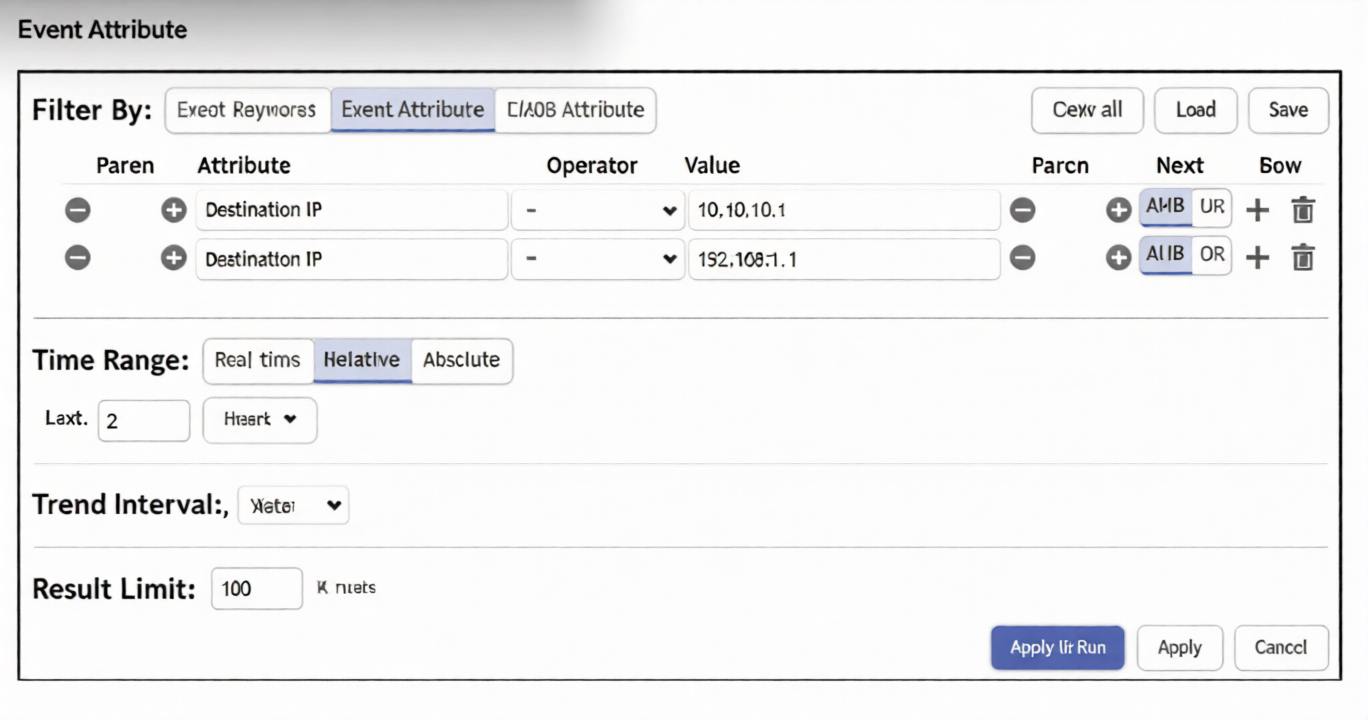
A FortiSIEM analyst is investigating an issue by examining events to two destination IP addresses. However, the analyst is not getting any results from the search.
Based on the selected filter shown in the exhibit, why is the search returning no results?
A. Parentheses are missing between the two items.
B. The wrong Boolean operator is selected in the Next column.
C. The wrong option is selected in the Operator column.
D. An invalid IP address is typed in the Value column.
Explanation:
This question tests your understanding of FortiSIEM's event search filter logic, specifically how the Parent, Next, and Operator columns work together to build Boolean expressions. The analyst is searching for events matching two destination IPs but getting zero results, indicating a logical flaw in how the conditions are combined.
Correct Option:
B. The wrong Boolean operator is selected in the Next column.
The Next column defines the Boolean relationship between rows of conditions (e.g., AND, OR). To match events to either of two destination IPs, the operator should be OR. If the Next column is set to AND, the search requires a single event to have both destination IPs simultaneously—which is impossible—resulting in zero results. This is the most common mistake when building multi-value filters.
Incorrect Option:
A. Parentheses are missing between the two items.
Parentheses control grouping and precedence but are not strictly required for a simple two-condition OR/AND filter. Missing parentheses would affect complex nested logic, but the fundamental issue here is the Boolean operator itself, not grouping.
C. The wrong option is selected in the Operator column.
The Operator column defines the comparison type (e.g., =, !=, CONTAINS) between the attribute and its value. Since both destination IP entries appear syntactically correct, the Operator is likely fine. The issue lies in how the two rows relate to each other, not in each individual comparison.
D. An invalid IP address is typed in the Value column.
The exhibit does not show any invalid IP format (e.g., missing octets or out-of-range values). If an IP were invalid, FortiSIEM would typically flag it or the search would return an error—not simply return zero results silently. The problem is logical, not syntactical.
Reference:
FortiSIEM 7.4.0 User Guide, Chapter 6: Event Search → Filter Conditions – "The Next column determines the Boolean relationship between multiple filter rows. Use AND to require all conditions, OR to match any condition. For multiple values of the same attribute, OR is typically required."
What can you use to send data to FortiSIEM for user and entity behavior analytics (UEBA)?
A. FortiSIEM agent
B. SSH
C. SNMP
D. FortiSIEM worker
Explanation:
This question tests your knowledge of how FortiSIEM ingests data specifically for User and Entity Behavior Analytics (UEBA). UEBA requires deep, structured log data—such as authentication logs, DHCP logs, and VPN logs—to build behavioral baselines. Not all data collection methods are suitable for this purpose.
Correct Option:
A. FortiSIEM agent
The FortiSIEM agent (installed on Windows or Linux systems) is the primary method for collecting the detailed, high-fidelity event logs required for UEBA. Agents can parse and forward security-relevant logs (e.g., Windows Event Logs for authentication, DHCP lease logs) directly to the FortiSIEM Supervisor or Worker. This ensures the structured data needed for user behavior modeling is reliably ingested.
Incorrect Option:
B. SSH
SSH is used for remote command execution or secure file transfers, not as a standard data ingestion method for UEBA. While FortiSIEM can use SSH for some log collection via scripts, it is not the recommended or primary method for feeding UEBA-specific data at scale.
C. SNMP
SNMP is primarily used for collecting performance metrics (e.g., CPU, memory, interface traffic) and simple trap-based alerts. It does not carry the detailed user-level event data (like logon/logoff, privilege changes, or file access) required for UEBA analysis.
D. FortiSIEM worker
The FortiSIEM Worker is a processing component responsible for event correlation, rule evaluation, and incident generation—not data collection. Workers consume events that have already been ingested by agents or other collectors; they do not directly send or collect data for UEBA.
Reference:
FortiSIEM 7.4.0 Administration Guide, Chapter 4: Data Collection → UEBA Data Sources – "FortiSIEM Agents are the recommended method for collecting Windows Event Logs, DHCP logs, and other user-centric data required for UEBA analytics." Also refer to Chapter 15: User and Entity Behavior Analytics for data source requirements.
You want to create a rule with multiple subpatterns but trigger an incident only if three different subpatterns are matched over a 24-hour period.
Where must you define the time period that the rule uses to evaluate all the subpatterns? (Choose one answer)
A. Define the time window in each individual subpattern.
B. Define the time window under the General tab of the rule.
C. Define the time window under the Define Condition tab of the rule.
D. Define the time window in the Define Action section of the rule.
Explanation:
This question tests your understanding of how multi-subpattern rules work in FortiSIEM. When a rule contains multiple subpatterns that must all match to trigger an incident, you need a global time window that applies to the entire rule—not just individual subpatterns. This ensures all conditions are evaluated within the same overarching timeframe.
Correct Option:
C. Define the time window under the Define Condition tab of the rule.
The Define Condition tab is where you set the overall rule logic, including how subpatterns are combined (e.g., ALL, ANY, or sequence) and the global time window that applies to the entire rule evaluation. When you select "ALL" (or similar) to require multiple subpatterns, the time window defined here ensures that all matching events from all subpatterns fall within the same 24-hour period before triggering an incident.
Incorrect Option:
A. Define the time window in each individual subpattern.
Defining a time window per subpattern sets an individual time limit for each subpattern independently. This does not enforce a single, unified 24-hour window across all subpatterns. Events could match different subpatterns in completely separate time ranges, causing the rule to trigger incorrectly.
B. Define the time window under the General tab of the rule.
The General tab contains basic rule metadata—name, description, severity, and status (Enable/Disable). It does not contain any time-window configuration. Time settings are strictly found in the Define Condition tab.
D. Define the time window in the Define Action section of the rule.
The Define Action section specifies what happens after the rule triggers—such as incident creation, email notifications, or script execution. It has no role in determining when or if the rule conditions are met within a specific timeframe.
Reference:
FortiSIEM 7.4.0 Administration Guide, Chapter 8: Rules → Define Condition Tab – "When a rule has multiple subpatterns, the time window specified in the Define Condition tab applies globally to all subpatterns. This ensures that all matching events occur within the same evaluation period before the rule fires."
| Page 1 out of 7 Pages |
| 1234 |
The Fortinet NSE 6 - FortiSIEM 7.4 Analyst exam is notoriously tough. It doesn't test memorization. It forces you to make complex decisions under time pressure. A weak prep strategy risks a costly failure and wasted effort. Our NSE6_FSM_AN-7.4 practice tests are built to be your definitive bridge to a passing score.

Copyright © - All Rights Reserved