
Last Updated On : 12-Oct-2026
Total 43 Questions
The difference between a near pass and a confident pass isn't just knowing the material, it's mastering the Fortinet NSE 6 - FortiSOAR 7.3 Administrator exam experience. Our Fortinet NSE6_FSR-7.3 practice test is engineered to close the gap between your current knowledge and the 2026 exam's demands. With every question, you receive detailed, expert verified explanations that break down not just the correct answer, but also the reasoning behind every incorrect option.
Don't just study. Practice NSE6_FSR-7.3 with purpose. Start your journey to a first-time pass today.
By replicating the exact style, complexity, and format of the real Fortinet NSE 6 - FortiSOAR 7.3 Administrator exam questions, we ensure you walk into the exam with complete confidence.
Which two ports must be open between FortiSOAR HA nodes'* (Choose two.)
A. Port 5432
B. Port 25
C. Port 6380
D. Port 9200
Explanation
FortiSOAR High Availability relies on constant communication between cluster nodes for database replication and search functionality. Only specific ports carry the critical traffic required for synchronization, heartbeat, and failover operations. Opening the correct ports ensures the cluster forms properly and remains stable even during node failures.
✅ Correct Option: A. Port 5432
This is the default PostgreSQL port. In an HA cluster, the primary node continuously replicates its database to the secondary node through port 5432. Without bidirectional access, replication stops, preventing the secondary from staying in sync and making failover impossible.
✅ Correct Option: D. Port 9200
Port 9200 is used by Elasticsearch (or OpenSearch in newer versions) for HTTP communication. All FortiSOAR nodes need to reach the search cluster on this port to index and query data. In HA deployments, blocking 9200 causes search failures and indicator enrichment issues after failover.
❌ Incorrect Option: B. Port 25
Port 25 is for SMTP/email relay. While FortiSOAR can send alerts via email, this traffic is unrelated to HA node-to-node communication. It can remain closed between cluster nodes without affecting availability or synchronization.
❌ Incorrect Option: C. Port 6380
Port 6380 is typically associated with Redis Sentinel or cluster bus in some environments, but FortiSOAR does not use it for HA communication. Opening it has no impact on cluster health or replication.
Summary
For FortiSOAR HA to function correctly, ports 5432 (PostgreSQL replication) and 9200 (Elasticsearch/OpenSearch) must be open bidirectionally between all nodes.Ports 25 and 6380 are not required for clustering and can remain blocked in the internal firewall rules.
Reference
Fortinet Docs – High Availability support in FortiSOAR
Refer to the exhibit.
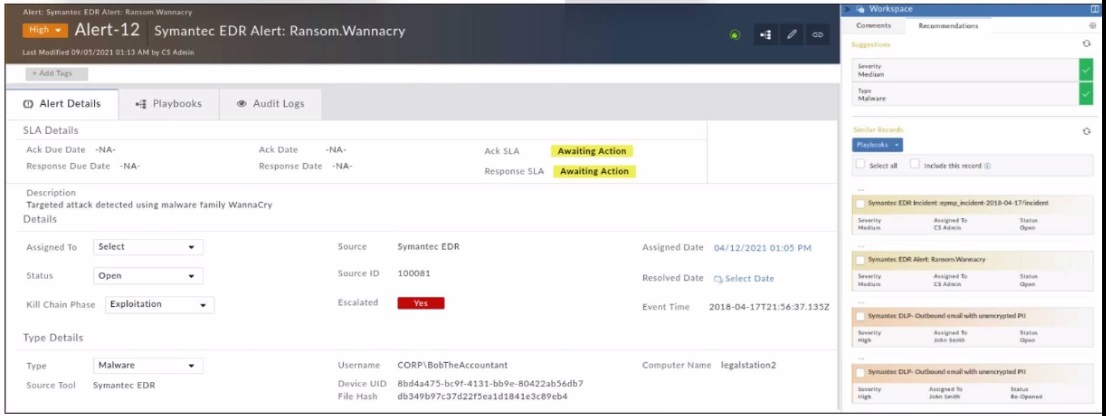
Which two statements about the recommendation engine are true? (Choose two.)
A. There are no playbooks that can be run on the recommended alerts using the recommendation panel
B. The dataset is trained to predict the Severity and Type fields.
C. The recommendation engine is set to automatically accept suggestions.
D. The alert severity is High, but the recommendation is for it to be set to Medium
Explanation:
This question tests understanding of FortiSOAR's recommendation engine functionality based on the exhibit. The recommendation panel shows suggestions for Severity and Type fields, indicating the ML model training focus and a severity downgrade recommendation from current High status.
Correct:
B. The dataset is trained to predict the Severity and Type fields.
✔️ Correct because the recommendation panel displays suggested values specifically for Severity (Medium) and Type fields. This confirms the ML dataset was trained on historical data to predict these exact fields for new alerts.
D. The alert severity is High, but the recommendation is for it to be set to Medium
✔️ Correct because the exhibit shows current alert severity as High, while the recommendation panel suggests changing it to Medium. This demonstrates the engine's predictive capability to adjust severity based on pattern analysis.
Incorrect:
A. There are no playbooks that can be run on the recommended alerts using the recommendation panel
❌ Incorrect because the exhibit shows a Playbooks tab with checkboxes next to available playbooks. The recommendation panel supports playbook execution alongside field suggestions.
C. The recommendation engine is set to automatically accept suggestions.
❌ Incorrect because the suggestions appear in the recommendation panel requiring manual review. No indication exists of auto-accept configuration; manual checkboxes show user control is active.
🔧 Reference:
⇒ FortiSOAR Recommendation Engine — confirms recommendation engine predicts Severity/Type fields and requires manual acceptance.
Which two relationship types are configurable on FortiSOAR? (Choose two.)
A. Siblings
B. Grandparents
C. Parents
D. Relatives
Explanation
FortiSOAR provides configurable relationship types that help analysts understand how records connect during investigations. These relationships create structured links between incidents, indicators, alerts, and artifacts, enabling better case correlation. Only specific, logically defined types—such as parent-child or sibling—are supported. Broader or multi-layered familial terms are not part of the platform’s relationship model.
🟩 Correct Option: A. Siblings
🟢 Sibling relationships are configurable in FortiSOAR and represent records that share a common relationship without depending on one another. This linkage is especially useful for grouping similar alerts, correlating related artifacts, or reviewing parallel findings in an investigation. It helps analysts view lateral connections and improves data clarity.
🟩 Correct Option: C. Parents
🟢 Parent relationships are supported and commonly used to show hierarchical structure. They allow an incident to act as the parent record for multiple alerts, artifacts, or indicators. This makes investigations more organized and helps teams understand how supporting data contributes to the main incident being handled.
🟥 Incorrect Option: B. Grandparents
🔴 FortiSOAR does not offer “grandparent” relationships. The system avoids multi-tiered generational structures to keep investigations simple and navigable. Its design relies on parent-child and sibling models, which provide clarity without unnecessary complexity.
🟥 Incorrect Option: D. Relatives
🔴 “Relatives” is not a configurable relationship category. FortiSOAR keeps relationship types precise and functional. Broad family-style terminology does not fit into the structured relationship taxonomy required for SOC workflows, so it is not included.
Summary
FortiSOAR supports structured relationships such as parents and siblings to help analysts categorize and correlate records. Broader or generational types like grandparents or relatives are not supported. The correct answers reflect FortiSOAR’s practical and investigative-focused design.
📚 Reference
Fortinet Official Documentation – FortiSOAR Admin & User Guide: Record Relationship Types & Configuration
When configuring an HA cluster with an externalized PostgreSQL database, which two tiles on the database server need to be configured to trust all FortiSOAR nodes' incoming connections? (Choose two.)
A. pg_hba.conf
B. db_external_config.yml.
C. postgreaq1.conf
D. db_config.yml
Explanation:
This question tests which PostgreSQL server files must be configured so FortiSOAR nodes can connect to an external database in an HA setup. Fortinet’s documentation says pg_hba.conf must trust the FortiSOAR server for incoming connections, and postgresql.conf must also be adjusted for the server-side connection settings.
Correct:
A. pg_hba.conf
✔️ Correct because this file controls host-based authentication and must include entries that allow the FortiSOAR nodes’ IP addresses or subnet to connect to PostgreSQL. Fortinet’s guide explicitly instructs adding trust rules for incoming connections in pg_hba.conf.
C. postgresql.conf
✔️ Correct because Fortinet’s external database setup guide also requires changes to postgresql.conf on the database server to permit and support the incoming FortiSOAR connections. This file handles PostgreSQL server behavior, so it is part of the trust and connectivity configuration.
Incorrect:
B. db_external_config.yml
❌ Incorrect because this is a FortiSOAR-side configuration file, not a PostgreSQL server file. It is used to define external database parameters such as host, port, and whether PostgreSQL is externalized, but it does not control trust rules on the database server.
D. db_config.yml
❌ Incorrect because this file is not the PostgreSQL server-side file used to trust incoming FortiSOAR connections. The official externalization steps reference db_external_config.yml for FortiSOAR configuration, while pg_hba.conf and postgresql.conf are the relevant database server files.
🔧 Reference:
⇒ Externalization of your FortiSOAR PostgreSQL database — confirms pg_hba.conf and postgresql.conf are configured on the database server.
Which product is essential to level 3 of the SOC automation model?
A. FortiAnalyzer
B. FortiAuthenticator
C. FortiManager
D. FortiSOAR
Explanation
The SOC automation maturity model defines five levels of increasing automation. Level 3 ("Orchestration and Automation") requires a dedicated Security Orchestration, Automation, and Response (SOAR) platform that can execute multi-step playbooks across multiple security tools, automate repetitive analyst tasks, and orchestrate incident response workflows. Only a true SOAR solution meets these requirements.
✅ Correct Option: D. FortiSOAR
FortiSOAR is Fortinet’s SOAR platform specifically designed for level 3 and above. It provides playbook automation, case management, bi-directional integration with hundreds of security products, and response orchestration—exactly what distinguishes level 3 from lower levels that rely only on alerting or basic ticketing.
❌ Incorrect Option: A. FortiAnalyzer
FortiAnalyzer is a powerful SIEM and log management platform that provides advanced analytics, incident detection, long-term storage, and customizable reports. While it forms a critical data foundation for any SOC (especially Levels 1–2), it lacks native orchestration engines, automated playbook execution, cross-tool response actions, and case management workflows, so it cannot elevate an organization to Level 3 on its own.
❌ Incorrect Option: B. FortiAuthenticator
FortiAuthenticator focuses exclusively on identity and access management—handling strong authentication, single sign-on, certificate management, and guest portals. It has no capabilities for incident orchestration, playbook automation, or security tool integration outside of authentication contexts, making it completely unrelated to SOC automation maturity progression.
❌ Incorrect Option: C. FortiManager
FortiManager centrally manages FortiGate and other Fortinet device policies. While useful for configuration consistency, it does not automate incident response workflows or orchestrate actions across disparate security tools.
Summary
Level 3 of the SOC automation model is achieved only when a true SOAR platform is implemented.
FortiSOAR is the Fortinet product that delivers the required orchestration, automation, and case management capabilities.
The other products support security operations but do not provide SOAR functionality.
Reference
Fortinet Docs – Security Orchestration, Automation and Response (SOAR)
A security analyst has reported unauthorized access to System Configuration. You must review the user's current level of access, and then restrict their access according to your organization's requirements. As part of your auditing process, which two actions should you perform? (Choose two.)
A. Remove the create, read, update, and delete (CRUD) permissions or roles that the user does not require.
B. View the user's effective role permissions, and then investigate which role is providing that access.
C. Remove all record ownership that is assigned to the user.
D. Review the user's learn hierarchy to ensure that the appropriate relationships are configured.
Explanation:
This scenario tests your understanding of the FortiSOAR access control model and the steps to audit and remediate unauthorized permissions. Unauthorized access typically stems from explicit permissions assigned to a user, not from data ownership. The correct procedure involves first investigating the source of the access and then explicitly removing the unnecessary permissions.
✅ Correct Options:
A. Remove the create, read, update, and delete (CRUD) permissions or roles that the user does not require.
This is the definitive remediation action. Once you identify which specific permissions are excessive, you must edit the user's assigned roles or the role's permission definitions to revoke the unnecessary CRUD access to the System Configuration module or other areas.
B. View the user's effective role permissions, and then investigate which role is providing that access.
This is the critical first step in the auditing process. A user's "Effective Permissions" view aggregates all permissions granted by their assigned roles. Reviewing this will show exactly what access the user has and, more importantly, trace that access back to the specific role that grants it.
❌ Incorrect Options:
C. Remove all record ownership that is assigned to the user.
Record ownership relates to data-level control over specific incidents, alerts, or assets, not system-level configuration access. Removing ownership would affect their ability to manage certain records but would not directly revoke their permissions to access the System Configuration menu or its functions.
D. Review the user's learn hierarchy to ensure that the appropriate relationships are configured.
This is a distractor. "Learn hierarchy" is not a standard FortiSOAR term. The relevant concept is the team hierarchy, which can affect data visibility through record sharing rules. However, access to the System Configuration module is governed strictly by global role-based permissions, not by team relationships.
Summary:
To audit and fix unauthorized system access, first use the Effective Permissions view to identify the source role (B), then edit that role or the user's assignments to remove the excessive permissions (A). Data ownership and team structures do not control access to system administration areas.
Reference:
Fortinet Documentation - FortiSOAR Administration Guide, "Managing Users and Role-Based Access Control (RBAC)."
When troubleshooting an IKEv2 VPN that fails during phase 2 negotiation, what is the most likely cause?
A. Incorrect PSK on phase 1
B. Mismatched ESP proposals
C. Unsupported DH group
D. IKEv2 is not enabled on the remote peer
Explanation:
This question tests the candidate's ability to identify the root cause of an IKEv2 VPN failure occurring specifically during Phase 2 negotiation. In IKEv2, Phase 1 establishes the secure IKE SA, while Phase 2 negotiates IPsec SA parameters using ESP. Understanding which parameters belong to which phase is critical for accurate and efficient VPN troubleshooting.
✅ Correct Answer:
B. Mismatched ESP proposals
Phase 2 negotiation is responsible for establishing the IPsec SA using ESP (Encapsulating Security Payload). If the encryption algorithm, integrity algorithm, or PFS (Perfect Forward Secrecy) settings do not match between peers, Phase 2 will fail. Mismatched ESP proposals are the most direct and common cause of Phase 2 failure, as both peers must agree on identical IPsec transform sets to proceed.
❌ Incorrect Answers:
A. Incorrect PSK on phase 1
An incorrect Pre-Shared Key (PSK) causes failure during Phase 1, not Phase 2. PSK is used to authenticate peers while establishing the IKE SA. If the PSK is wrong, the tunnel would never progress past Phase 1, so it cannot be the cause of a Phase 2-specific failure.
C. Unsupported DH group
DH (Diffie-Hellman) group mismatches primarily affect Phase 1 key exchange. While DH can also be used in Phase 2 for PFS, an unsupported DH group alone is less commonly the root cause compared to fully mismatched ESP proposals. It is a secondary concern in Phase 2 troubleshooting.
D. IKEv2 is not enabled on the remote peer
If IKEv2 is not enabled on the remote peer, the VPN would fail at the very beginning — before Phase 1 even completes. This would prevent any IKE negotiation from starting at all, making it irrelevant to a failure that occurs specifically during Phase 2 negotiation.
🔧 Reference:
⇒ Fortinet FortiGate – IPsec VPN Administration Guide
→ Confirms that Phase 2 negotiates ESP proposals (encryption + integrity), and a mismatch in these parameters is the primary cause of Phase 2 negotiation failure.
| Page 1 out of 7 Pages |
| 1234 |
The Fortinet NSE 6 - FortiSOAR 7.3 Administrator exam is notoriously tough. It doesn't test memorization. It forces you to make complex decisions under time pressure. A weak prep strategy risks a costly failure and wasted effort. Our NSE6_FSR-7.3 practice tests are built to be your definitive bridge to a passing score.

Copyright © - All Rights Reserved